lights RENAULT FLUENCE 2012 1.G Owner's Manual
[x] Cancel search | Manufacturer: RENAULT, Model Year: 2012, Model line: FLUENCE, Model: RENAULT FLUENCE 2012 1.GPages: 241, PDF Size: 6.5 MB
Page 73 of 241

menu for customising the vehicle settings
(up to the end of the DU)
customising the vehicle settings ........... (up to the end of the DU)
customised vehicle settings .................. (up to the end of the DU)
1.69
ENG_UD24231_2
Menu de personnalisation des réglages du véhicule (L38 - X38 - Re\
nault)
ENG_NU_891_892-7_L38-B32_Renault_1
vehicle settings customisation menu
VEhICLE sETTINgs CUsTOMIsATION MENU
Adjusting the settingsPress one of buttons 2 or 3 to select a
function to change:
a) Auto door locking while driving ;
b) Auto rear wipe with reverse gear ;
c) Auto dipped-beam headlights ;
d) Rear parking sensor ;
e) Parking sensor volume ;
f) LANGUAGE.
= function activated
< function deactivated
On equipped vehicles, this function,
which is integrated in the trip compu
-
ter and warning system 1 , allows you
to activate/deactivate some of the vehi-
cle’s functions.
Accessing the settings
customisation menu
With the vehicle stationary, press
either button 2 or 3 until the mes -
sage “ Settings menu: press and hold ”
appears on display 1 . Press either
button 2 or 3 for longer than 2 seconds
to enter the menu.
Once a line has been selected, keep
pressing either button 2 or 3 to change
the function: If you select either “Parking
sensor volume ” or “LANGUAGE ”, you
will be given a new choice of options
(parking distance control volume or in-
strument panel language). In this case,
make your selection and confirm it by
holding either button 2 or 3 , the value
selected is shown by a
~ in front
of the line.
To exit the menu, select “ EXIT” or
“ BACK ” then confirm by holding either
button 2 or 3 . It may be necessary to
carry out this operation several times.
2
3
1
The vehicle settings customisation
menu cannot be used when driv -
ing. At speeds of above 12 mph (20
km/h) for vehicles with a manual
gearbox (0 mph for vehicles with an
automatic gearbox), the on-board
display returns automatically to the
trip computer and warning system
mode.
Page 77 of 241
JauneNoirNoir texte
1.73
ENG_UD21622_2
Rétroviseurs (L38 - X38 - Renault)
ENG_NU_891_892-7_L38-B32_Renault_1
REAR VIEW MIRRORs (2/2)
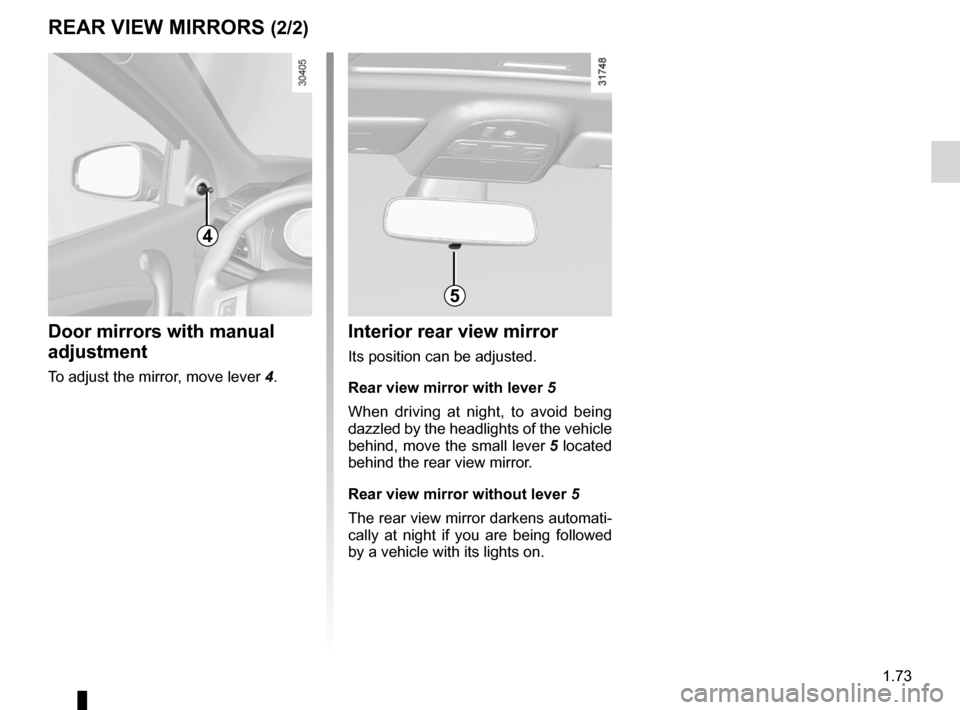
Interior rear view mirror
Its position can be adjusted.
Rear view mirror with lever 5
When driving at night, to avoid being
dazzled by the headlights of the vehicle
behind, move the small lever 5 located
behind the rear view mirror.
Rear view mirror without lever 5
The rear view mirror darkens automati-
cally at night if you are being followed
by a vehicle with its lights on.
5
4
Door mirrors with manual
adjustment
To adjust the mirror, move lever 4.
Page 78 of 241

warning buzzer ..................................... (up to the end of the DU)
headlight flashers ................................. (up to the end of the DU)
indicators .............................................. (up to the end of the DU)
lights: hazard warning ............................... (up to the end of the DU)
lights: direction indicators .......................... (up to the end of the DU)
indicators: direction indicators .......................... (up to the end of the DU)
hazard warning lights signal ................. (up to the end of the DU)
hazard warning lights signal ................. (up to the end of the DU)
horn ...................................................... (up to the end of the DU)
horn: flash ................................................................. (current page)
horn: sounding the horn ............................................ (current page)
horn ....................................................................... (current page)
audible and visual signals .....................(up to the end of the DU)
1.74
ENG_UD21429_2
Avertisseurs sonore et lumineux (L38 - X38 - Renault)
ENG_NU_891_892-7_L38-B32_Renault_1
Audible and visual signals
AUDIBLE AND VIsUAL sIgNALs
horn
Press on the sides of the steering wheel
boss A.
headlight flasher
Pull stalk 1 towards you to flash the
headlights.
éhazard warning lights
Press switch 2. This switch ac-
tivates all four direction indicators and
the side indicator lights simultaneously.
It must only be used in an emergency to
warn drivers of other vehicles that you
have had to stop in an area where stop-
ping is prohibited or unexpected or that
you are obliged to drive under special
conditions.
Depending on the vehicle, the hazard
warning lights may come on automati -
cally under heavy deceleration. You can
switch them off by pressing switch 2.
Direction indicators
Move stalk 1 parallel to the steering
wheel and in the direction you are going
to turn it.
When driving on the motorway, the
steering wheel is not often turned
enough to return the stalk automatically
to 0 . There is an intermediate position
in which the stalk may be held when
changing lanes.
When the stalk is released, it automati-
cally returns to 0.
A
2
1
0
Page 79 of 241
lighting:exterior ............................................ (up to the end of the DU)
instrument panel .................................................... (current page)
lights: side lights ......................................................... (current page)
lights: dipped beam headlights ................................... (current page)
hazard warning lights signal .................................. (current page)
signals and lights .................................. (up to the end of the DU)
lighting: instrument panel .............................................. (current page)
daytime running lights ............................................ (current page)
1.75
ENG_UD27178_2
Éclairages et signalisations extérieurs (L38 - X38 - Renault)
ENG_NU_891_892-7_L38-B32_Renault_1
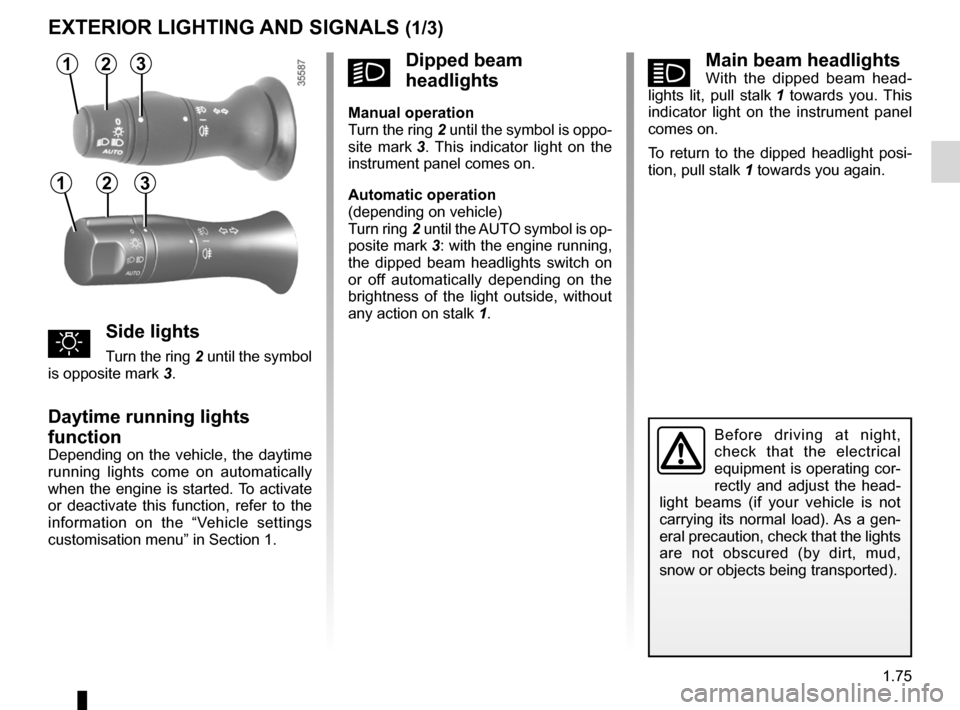
áMain beam headlightsWith the dipped beam head -
lights lit, pull stalk 1 towards you. This
indicator light on the instrument panel
comes on.
To return to the dipped headlight posi-
tion, pull stalk 1 towards you again.
Exterior lighting and signals
Before driving at night,
check that the electrical
equipment is operating cor-
rectly and adjust the head -
light beams (if your vehicle is not
carrying its normal load). As a gen-
eral precaution, check that the lights
are not obscured (by dirt, mud,
snow or objects being transported).
EXTERIOR LIghTINg AND sIgNALs (1/3)
31
uside lights
Turn the ring 2 until the symbol
is opposite mark 3.
Daytime running lights
function
Depending on the vehicle, the daytime
running lights come on automatically
when the engine is started. To activate
or deactivate this function, refer to the
information on the “Vehicle settings
customisation menu” in Section 1.
kDipped beam
headlights
Manual operation
Turn the ring 2 until the symbol is oppo -
site mark 3 . This indicator light on the
instrument panel comes on.
Automatic operation
(depending on vehicle)
Turn ring 2 until the AUTO symbol is op-
posite mark 3: with the engine running,
the dipped beam headlights switch on
or off automatically depending on the
brightness of the light outside, without
any action on stalk 1.
2
312
Page 80 of 241
lights:main beam headlights ...................................... (current page)
warning buzzer ...................................................... (current page)
see-me-home lighting ............................................ (current page)
lights mobile directional ............................................. (current page)
1.76
ENG_UD27178_2
Éclairages et signalisations extérieurs (L38 - X38 - Renault)
ENG_NU_891_892-7_L38-B32_Renault_1
Jaune NoirNoir texte
EXTERIOR LIghTINg AND sIgNALs (2/3)
special note:
– If the dipped beam headlights are
manually switched on and if the light
is sufficient, the directional head -
lights will remain fixed;
– If the lights come on automatically
when cornering, the directional
headlights will start working from the
next time the vehicle corners;
– When the dipped beam headlights
are switched on with the engine
running and the vehicle stationary,
the lights move to reinitialise them -
selves. If not, there is a system fault.
switching off the lights
There are two possibilities:
– Manually, move ring 2 to position 0;
– automatically, the lights will go out
when the engine is switched off, the
driver’s door is opened or the vehicle
is locked. In this case, the next time
the engine is started the lights will be
switched back on according to the
position of the ring 2.
Note: if the fog lights are lit, the lights
are not switched off automatically.
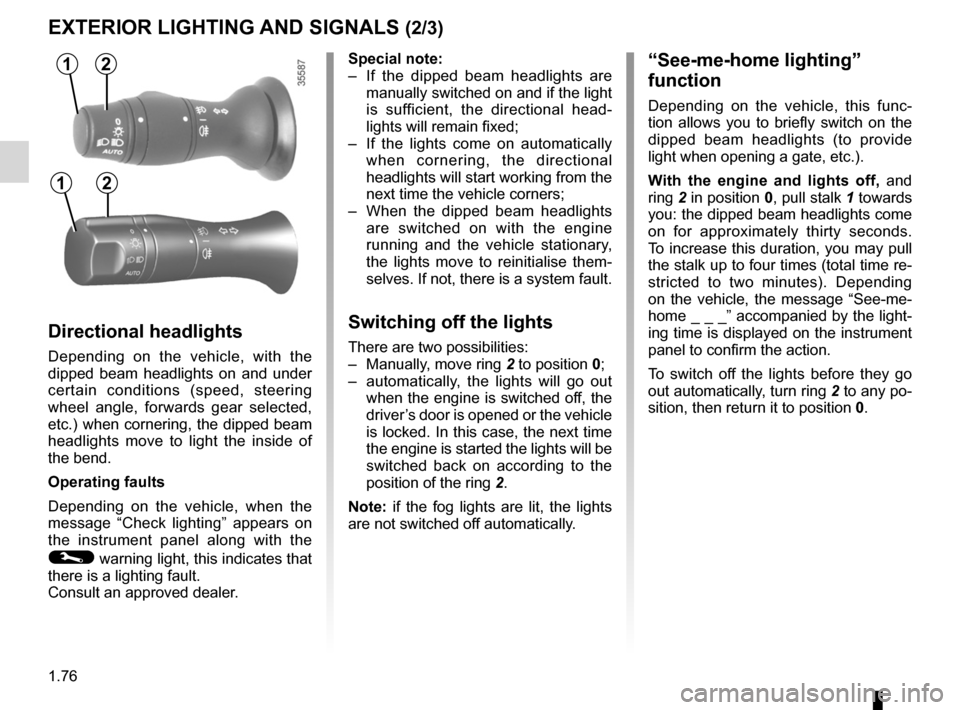
“see-me-home lighting”
function
Depending on the vehicle, this func -
tion allows you to briefly switch on the
dipped beam headlights (to provide
light when opening a gate, etc.).
With the engine and lights off, and
ring 2 in position 0, pull stalk 1 towards
you: the dipped beam headlights come
on for approximately thirty seconds.
To increase this duration, you may pull
the stalk up to four times (total time re-
stricted to two minutes). Depending
on the vehicle, the message “See-me-
home _ _ _” accompanied by the light-
ing time is displayed on the instrument
panel to confirm the action.
To switch off the lights before they go
out automatically, turn ring 2 to any po-
sition, then return it to position 0.
Directional headlights
Depending on the vehicle, with the
dipped beam headlights on and under
certain conditions (speed, steering
wheel angle, forwards gear selected,
etc.) when cornering, the dipped beam
headlights move to light the inside of
the bend.
Operating faults
Depending on the vehicle, when the
message “Check lighting ” appears on
the instrument panel along with the
© warning light, this indicates that
there is a lighting fault.
Consult an approved dealer.
12
12
Page 81 of 241
lights:fog lights .......................................................... (current page)
JauneNoirNoir texte
1.77
ENG_UD27178_2
Éclairages et signalisations extérieurs (L38 - X38 - Renault)
ENG_NU_891_892-7_L38-B32_Renault_1
EXTERIOR LIghTINg AND sIgNALs (3/3)
When driving in fog or snow, or
when transporting objects which are
higher than the roof, the headlights
do not come on automatically.
Switching on the fog lights remains
the responsibility of the driver: the
indicator lights on the instrument
panel inform you whether the fog
lights are lit (indicator light on) or not
(indicator light not on).
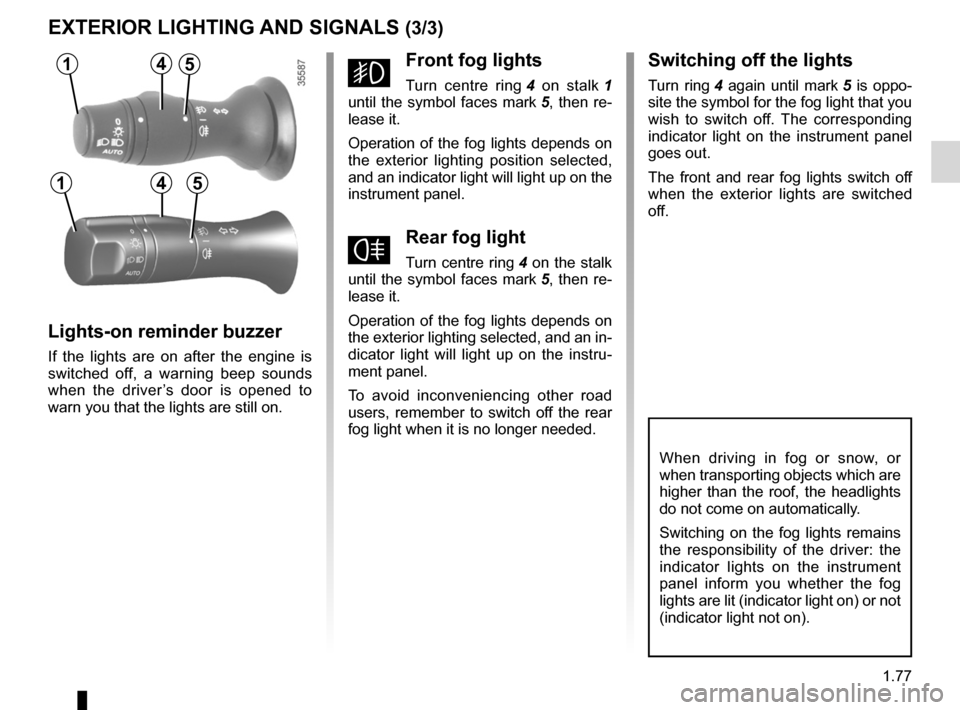
gFront fog lights
Turn centre ring 4 on stalk 1
until the symbol faces mark 5, then re-
lease it.
Operation of the fog lights depends on
the exterior lighting position selected,
and an indicator light will light up on the
instrument panel.
fRear fog light
Turn centre ring 4 on the stalk
until the symbol faces mark 5, then re-
lease it.
Operation of the fog lights depends on
the exterior lighting selected, and an in-
dicator light will light up on the instru -
ment panel.
To avoid inconveniencing other road
users, remember to switch off the rear
fog light when it is no longer needed.
Lights-on reminder buzzer
If the lights are on after the engine is
switched off, a warning beep sounds
when the driver ’s door is opened to
warn you that the lights are still on.
switching off the lights
Turn ring 4 again until mark 5 is oppo -
site the symbol for the fog light that you
wish to switch off. The corresponding
indicator light on the instrument panel
goes out.
The front and rear fog lights switch off
when the exterior lights are switched
off.
14
145
5
Page 82 of 241

electric beam height adjustment ........... (up to the end of the DU)
see-me-home lighting ........................... (up to the end of the DU)
lights: adjusting ......................................... (up to the end of the DU)
lights adjustment ...................................... (up to the end of the DU)
signals and lights .................................. (up to the end of the DU)
headlight beam adjustment .................. (up to the end of the DU)
1.78
ENG_UD13644_1
Réglage électrique de la hauteur des faisceaux (L38 - X38 - Renau\
lt)ENG_NU_891_892-7_L38-B32_Renault_1
Headlight beam adjustment
On vehicles fitted with this function,
control A allows you to adjust the height
of the beams according to the load.
Turn control A downwards to lower the
headlights and upwards to raise them.
For vehicles not fitted with control A ,
adjustment is automatic.
ELECTRICAL ADJUsTMENT OF ThE DIppED BEAM hEADLIghTs
A
For manual setting
Examples of positions for adjusting control A according to the load
Driver alone or with front
passenger 0
Driver with one front passenger
and one rear passenger 0
Driver with one front passenger
and two or three rear
passengers 1
Driver with one front passenger,
three rear passengers and
luggage 3
Page 84 of 241

headlight washer ................................................... (current page)
1.80
ENG_UD27179_3
Essuie-vitre / lave-vitre avant (L38 - X38 - Renault)
ENG_NU_891_892-7_L38-B32_Renault_1
headlight washers
headlights on
On equipped vehicles, hold stalk 1
pulled towards you for about 1 second,
and the headlight washers and wind -
screen washers will be activated at the
same time.
Note: when the minimum windscreen
washer fluid level is reached, the head -
light washer system may be deprimed.
Fill the windscreen washer fluid and
then activate the windscreen washer,
with the engine running , to reprime
the system.
Windscreen washer
With the ignition on, pull stalk 1 then
release.
A brief pull will trigger a single sweep
of the wipers, in addition to the wind -
screen washer.
A longer pull will trigger three sweeps
of the wipers followed, a few seconds
later, by a fourth, in addition to the wind -
screen washer.
WINDsCREEN WAsh/WIpE (2/2)
In freezing or snowy weather, ensure
they are not stuck to the windscreen
(including the central area located
behind the interior rear-view mirror)
and the rear screen before starting
the wipers (risk of motor overheat -
ing).
1
A
When working in the engine
compartment, ensure that
the windscreen wiper stalk
is in position A (park).
Risk of injury.
Before any action on the
windscreen (washing the
vehicle, de-icing, cleaning
the windscreen, etc.) return
stalk 1 to position A (park).
Risk of injury and/or damage.
1
1
Page 87 of 241
JauneNoirNoir texte
1.83
ENG_UD23758_4
Réservoir à carburant (L38 - X38 - Renault)
ENG_NU_891_892-7_L38-B32_Renault_1
Filling with fuel
Insert the nozzle to open valve D (de -
pending on the vehicle) and insert it
fully before activating it to fill the fuel
tank (risk of splashing).
Keep the nozzle in this position through -
out the entire filling operation.
When the pump cuts out automatically
at the end of the filling procedure, a
maximum of two further filling attempts
may be made, as there must be suffi -
cient space in the fuel tank to allow for
expansion.
Make sure that no water enters the fuel
tank during filling. Valve D (depending
on the vehicle) and its surrounding area
must be kept clean.
FUEL TANK (2/3)
persistent smell of
fuel
If you notice a persistent
smell of fuel you should:
– stop the vehicle as soon as traf-
fic conditions allow and switch off
the ignition;
– switch on the hazard warning
lights and ask your passengers
to leave the vehicle and to keep
away from traffic;
– contact an approved Dealer.
Vehicles running on ethanol -based
fuel
It is essential to use unleaded petrol or
fuel containing a maximum of 85% eth-
anol (E85).
In very cold conditions, it may be very
difficult or even impossible to start the
engine. To avoid this problem, use un-
leaded petrol or, on equipped vehicles,
use the heater integrated in the engine:
connect the special end of the exten -
sion piece supplied into the socket in -
tegrated into the radiator grille and the
other end into a 220V socket for at least
6 hours before starting.
NB: You may notice an increase in fuel
consumption with this type of fuel. petrol versions
Using leaded petrol will damage the
antipollution system and may lead to a
loss of warranty.
To ensure that the fuel tank is not filled
with leaded petrol, the fuel tank filler
neck contains a restrictor fitted with a
foolproof system which
only allows
the nozzle for unleaded petrol to be
used (at the pump).
Do not mix even small
amounts of petrol (un -
leaded or E85) with diesel.
Do not use ethanol-based
fuel if your vehicle is not compatible
with this fuel.
Do not add any additives to the fuel,
you risk damaging the engine.
Page 98 of 241
gear lever............................................................... (current page)
changing gear ....................................... (up to the end of the DU)
reverse gear selecting .......................................... (up to the end of the DU)
driving ................................................... (up to the end of the DU)
handbrake ............................................. (up to the end of the DU)
2.10
ENG_UD18561_2
Levier de vitesses (L38 - X38 - Renault)
ENG_NU_891_892-7_L38-B32_Renault_2
Gear lever
Handbrake
GeAR LeVeR/hANDBRAke
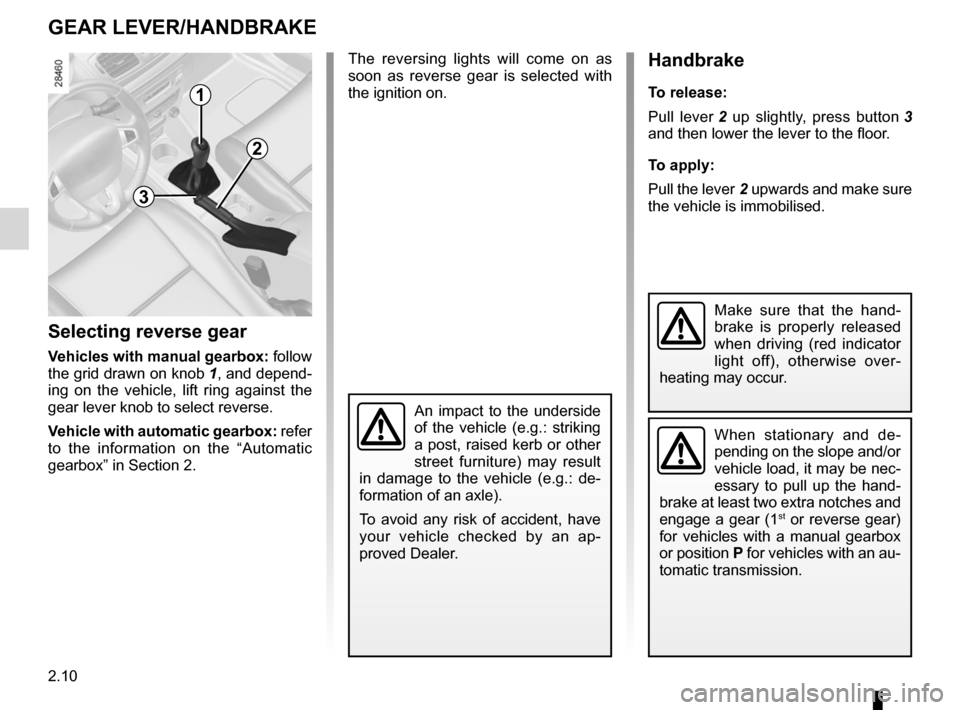
Selecting reverse gear
Vehicles with manual gearbox: follow
the grid drawn on knob 1, and depend -
ing on the vehicle, lift ring against the
gear lever knob to select reverse.
Vehicle with automatic gearbox: refer
to the information on the “Automatic
gearbox” in Section 2. The reversing lights will come on as
soon as reverse gear is selected with
the ignition on.
1
handbrake
t
o release:
Pull lever 2 up slightly, press button 3
and then lower the lever to the floor.
t o apply:
Pull the lever 2 upwards and make sure
the vehicle is immobilised.
When stationary and de -
pending on the slope and/or
vehicle load, it may be nec-
essary to pull up the hand -
brake at least two extra notches and
engage a gear (1
st or reverse gear)
for vehicles with a manual gearbox
or position P for vehicles with an au-
tomatic transmission.
Make sure that the hand -
brake is properly released
when driving (red indicator
light off), otherwise over -
heating may occur.
3
2
An impact to the underside
of the vehicle (e.g.: striking
a post, raised kerb or other
street furniture) may result
in damage to the vehicle (e.g.: de -
formation of an axle).
To avoid any risk of accident, have
your vehicle checked by an ap -
proved Dealer.