lights RENAULT FLUENCE Z.E. 2012 User Guide
[x] Cancel search | Manufacturer: RENAULT, Model Year: 2012, Model line: FLUENCE Z.E., Model: RENAULT FLUENCE Z.E. 2012Pages: 195, PDF Size: 5.23 MB
Page 56 of 195
JauneNoirNoir texte
1.51
ENG_UD23033_2
Poste de conduite à gauche (L38 électrique - Renault)
ENG_NU_914-4_L38e_Renault_1
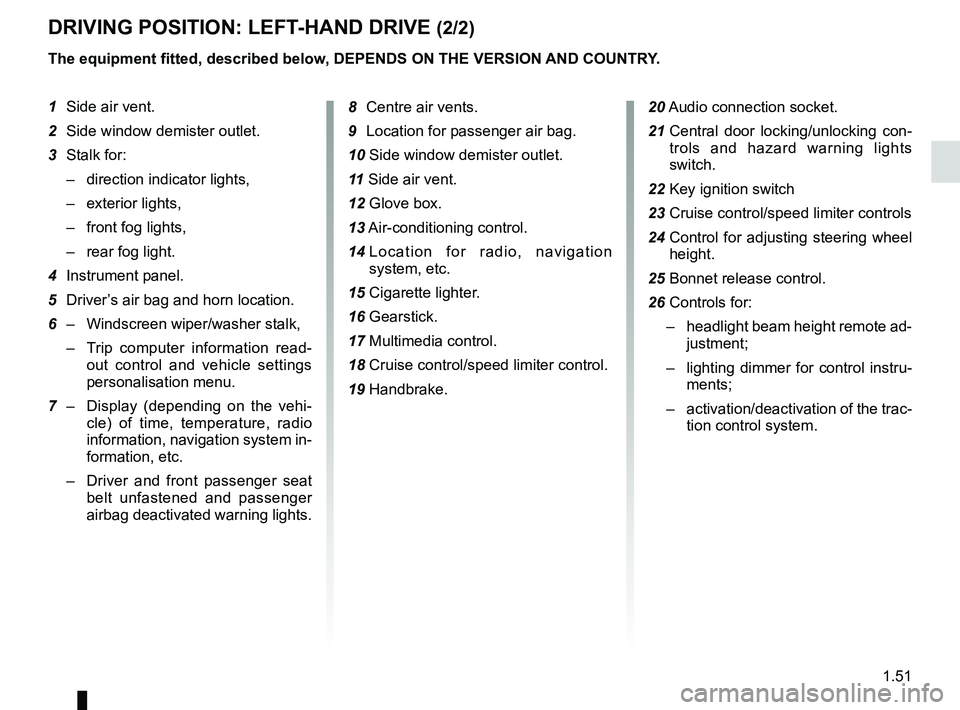
DriviNg POSitiON: leFt-hAND Drive (2/2)
the equipment fitted, described below, DePeNDS ON the verSiON AND cOUNtr Y.
1 Side air vent.
2 Side window demister outlet.
3 Stalk for:
– direction indicator lights,
– exterior lights,
– front fog lights,
– rear fog light.
4 Instrument panel.
5 Driver’s air bag and horn location.
6 – Windscreen wiper/washer stalk,
– Trip computer information read -
out control and vehicle settings
personalisation menu.
7 – Display (depending on the vehi -
cle) of time, temperature, radio
information, navigation system in-
formation, etc.
– Driver and front passenger seat
belt unfastened and passenger
airbag deactivated warning lights. 8
Centre air vents.
9 Location for passenger air bag.
10 Side window demister outlet.
11 Side air vent.
12 Glove box.
13 Air-conditioning control.
14 Location for radio, navigation
system, etc.
15 Cigarette lighter.
16 Gearstick.
17 Multimedia control.
18 Cruise control/speed limiter control.
19 Handbrake. 20
Audio connection socket.
21 Central door locking/unlocking con -
trols and hazard warning lights
switch.
22 Key ignition switch
23 Cruise control/speed limiter controls
24 Control for adjusting steering wheel
height.
25 Bonnet release control.
26 Controls for:
– headlight beam height remote ad-
justment;
– lighting dimmer for control instru-
ments;
– activation/deactivation of the trac-
tion control system.
Page 58 of 195
JauneNoirNoir texte
1.53
ENG_UD23034_2
Poste de conduite à droite (L38 électrique - Renault)
ENG_NU_914-4_L38e_Renault_1
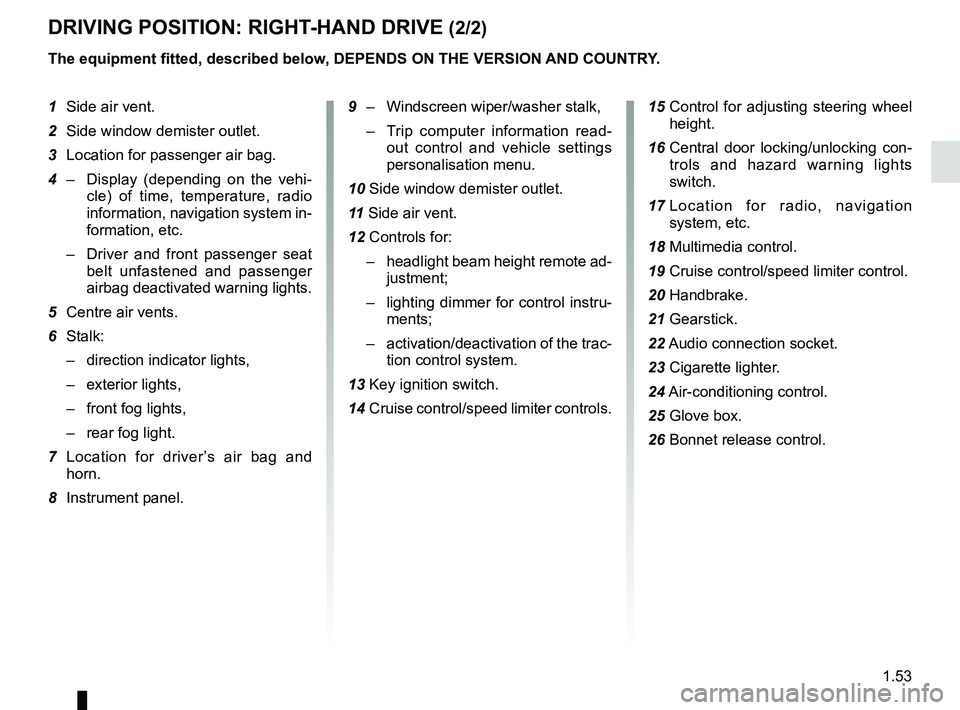
DriviNg POSitiON: right-hAND Drive (2/2)
the equipment fitted, described below, DePeNDS ON the verSiON AND cOUNtr Y.
1 Side air vent.
2 Side window demister outlet.
3 Location for passenger air bag.
4 – Display (depending on the vehi -
cle) of time, temperature, radio
information, navigation system in-
formation, etc.
– Driver and front passenger seat
belt unfastened and passenger
airbag deactivated warning lights.
5 Centre air vents.
6 Stalk:
– direction indicator lights,
– exterior lights,
– front fog lights,
– rear fog light.
7 Location for driver ’s air bag and
horn.
8 Instrument panel.
9 – Windscreen wiper/washer stalk,
– Trip computer information read -
out control and vehicle settings
personalisation menu.
10 Side window demister outlet.
11 Side air vent.
12 Controls for:
– headlight beam height remote ad-
justment;
– lighting dimmer for control instru-
ments;
– activation/deactivation of the trac-
tion control system.
13 Key ignition switch.
14 Cruise control/speed limiter controls. 15
Control for adjusting steering wheel
height.
16 Central door locking/unlocking con -
trols and hazard warning lights
switch.
17 Location for radio, navigation
system, etc.
18 Multimedia control.
19 Cruise control/speed limiter control.
20 Handbrake.
21 Gearstick.
22 Audio connection socket.
23 Cigarette lighter.
24
Air-conditioning control.
25 Glove box.
26 Bonnet release control.
Page 59 of 195
display .................................................. (up to the end of the DU)
warning lights ........................................ (up to the end of the DU)
driver’s position .................................... (up to the end of the DU)
instrument panel ................................... (up to the end of the DU)
control instruments ............................... (up to the end of the DU)
indicators: instrument panel ............................. (up to the end of the DU)
lights: fog lights .......................................................... (current page)
lights: dipped beam headlights ................................... (current page)
lights: direction indicators ........................................... (current page)
lights: main beam headlights ...................................... (current page)
1.54
ENG_UD26161_4
Témoins lumineux (L38 électrique - Renault)
ENG_NU_914-4_L38e_Renault_1
Jaune NoirNoir texte
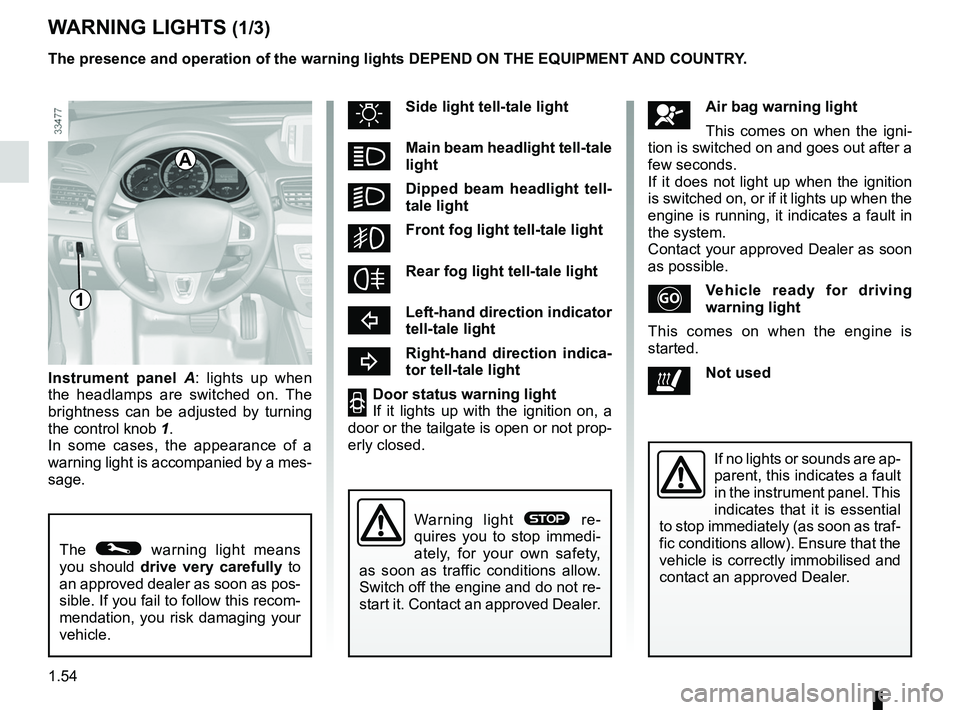
Warning lights
instrument panel A : lights up when
the headlamps are switched on. The
brightness can be adjusted by turning
the control knob 1.
In some cases, the appearance of a
warning light is accompanied by a mes-
sage.
W ArNiNg lightS (1/3)
The © warning light means
you should drive very carefully to
an approved dealer as soon as pos-
sible. If you fail to follow this recom-
mendation, you risk damaging your
vehicle.
A
åAir bag warning light
This comes on when the igni -
tion is switched on and goes out after a
few seconds.
If it does not light up when the ignition
is switched on, or if it lights up when the
engine is running, it indicates a fault in
the system.
Contact your approved Dealer as soon
as possible.
v ehicle ready for driving
warning light
This comes on when the engine is
started.
ðNot used
uSide light tell-tale light
ámain beam headlight tell-tale
light
kDipped beam headlight tell -
tale light
gFront fog light tell-tale light
frear fog light tell-tale light
cleft-hand direction indicator
tell-tale light
br ight-hand direction indica -
tor tell-tale light
2Door status warning light
If it lights up with the ignition on, a
door or the tailgate is open or not prop-
erly closed.
If no lights or sounds are ap-
parent, this indicates a fault
in the instrument panel. This
indicates that it is essential
to stop immediately (as soon as traf-
fic conditions allow). Ensure that the
vehicle is correctly immobilised and
contact an approved Dealer.
Warning light ® re -
quires you to stop immedi -
ately, for your own safety,
as soon as traffic conditions allow.
Switch off the engine and do not re-
start it. Contact an approved Dealer.
1
the presence and operation of the warning lights DePeND ON the eqUiPmeNt AND cOUNtr Y.
Page 60 of 195

seat belts ............................................................... (current page)
speed limiter .......................................................... (current page)
cruise control ......................................................... (current page)
battery .................................................................... (current page)
JauneNoirNoir texte
1.55
ENG_UD26161_4
Témoins lumineux (L38 électrique - Renault)
ENG_NU_914-4_L38e_Renault_1
W ArNiNg lightS (2/3)
®St OP light
This lights up when the ignition
is switched on and goes out as soon as
the engine is started. It comes on with
other warning lights and/or messages,
and is accompanied by a beep.
It requires you to stop immediately, for
your own safety, as soon as traffic con-
ditions allow. Switch off the engine and
do not restart it.
Contact an approved Dealer.
DBrake circuit fault warning
light
If it comes on during braking and is ac-
companied by the
® warning light
and a beep, it indicates that the fluid
level in the circuit is low or that there is
a braking system fault. Stop as soon as
traffic conditions allow and contact an
approved Dealer.
Ú12 v battery charge warning
light
If it comes on together with the
®
warning light and a beep, it indicates
that the electrical circuit is overcharged
or undercharged.
©Warning light
This lights up when the ignition
is switched on and goes out as soon as
the engine is started. It can light up in
conjunction with other warning lights
and/or messages on the instrument
panel.
It means you should drive very care-
fully to an approved dealer as soon as
possible. If you fail to follow this recom-
mendation, you risk damaging your ve-
hicle.
the presence and operation of the warning lights DePeND ON the eqUiPmeNt AND cOUNtr
Y.
ßFront seat belt reminder
warning light
It lights up on the central display when
the engine is started and, if the driv -
er’s seat belt is not fastened, the light
flashes and a beep sounds for about
two minutes when the vehicle reaches
a speed of approximately 12 mph
(20 km/h).
Î Ïcruise control and
speed limiter indica -
tor lights
Refer to the information on “Cruise con-
trol/speed limiter” in Section 2.
c harging cord plugged in
warning light
This comes on when the charging cord
is plugged into the vehicle.
A
Page 61 of 195
1.56
ENG_UD26161_4
Témoins lumineux (L38 électrique - Renault)
ENG_NU_914-4_L38e_Renault_1
e l e c t r o t e c h n i c a l s y s t e m
warning light
When the blue warning light comes on,
this means that the traction battery tem-
perature is too low.
When the orange warning light comes
on, this means the traction battery or
the motor temperature is too high. Opt
for a calmer driving style.
if either of these warning lights come
on, this may lead to reduced vehicle
performance.
l ow traction battery level
warning light
This comes on when the traction bat -
tery charge level has reached the re -
serve threshold. Please see the infor -
mation on “Displays and indicators” in
Section 1.
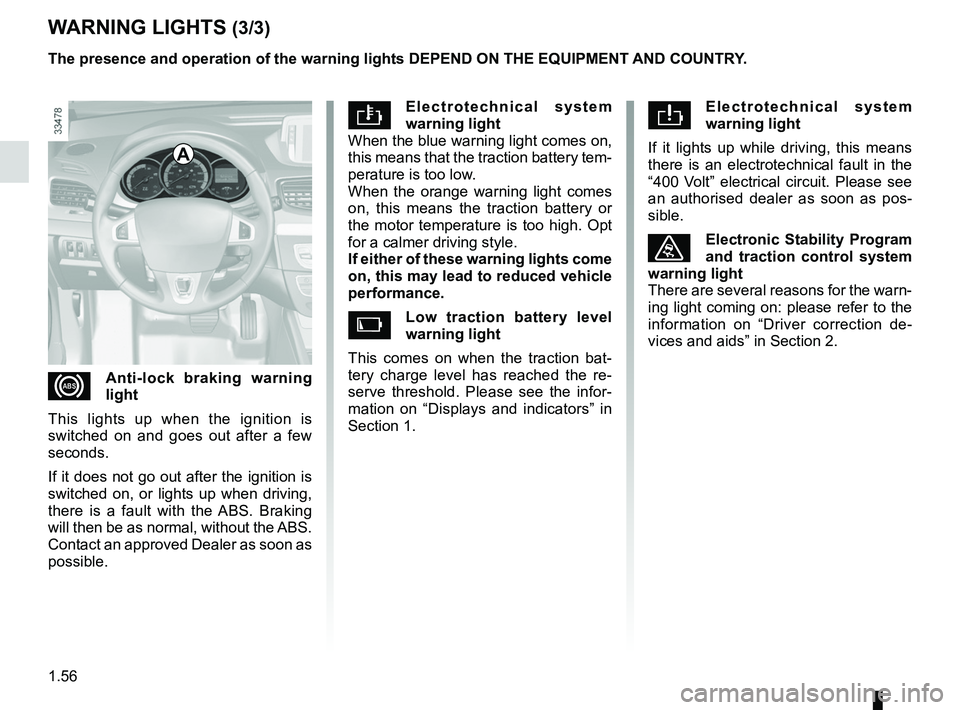
W ArNiNg lightS (3/3)
el e c t r o t e c h n i c a l s y s t e m
warning light
If it lights up while driving, this means
there is an electrotechnical fault in the
“400 Volt” electrical circuit. Please see
an authorised dealer as soon as pos -
sible.
ùelectronic Stability Program
and traction control system
warning light
There are several reasons for the warn-
ing light coming on: please refer to the
information on “Driver correction de -
vices and aids” in Section 2.
xAnti-lock braking warning
light
This lights up when the ignition is
switched on and goes out after a few
seconds.
If it does not go out after the ignition is
switched on, or lights up when driving,
there is a fault with the ABS. Braking
will then be as normal, without the ABS.
Contact an approved Dealer as soon as
possible. the presence and operation of the warning lights DePeND ON the eqUiPmeNt AND cOUNtr Y.
A
Page 64 of 195
trip computer and warning system........(up to the end of the DU)
control instruments ............................... (up to the end of the DU)
indicators: instrument panel ............................. (up to the end of the DU)
instrument panel ................................... (up to the end of the DU)
warning lights ........................................ (up to the end of the DU)
instrument panel messages ..................(up to the end of the DU)
1.59
ENG_UD23015_2
Ordinateur de bord : généralités (L38 électrique - Renault)\
ENG_NU_914-4_L38e_Renault_1
Trip computer
triP cOmPUter: general information (1/2)
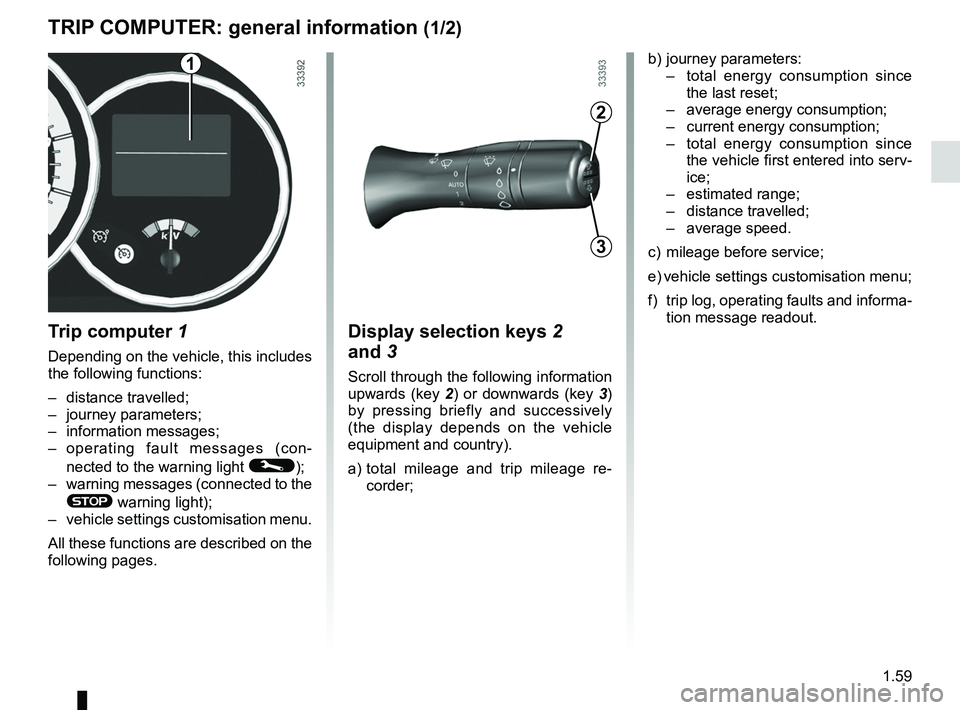
t rip computer 1
Depending on the vehicle, this includes
the following functions:
– distance travelled;
– journey parameters;
– information messages;
– operating fault messages (con -
nected to the warning light
©);
– warning messages (connected to the
® warning light);
– vehicle settings customisation menu.
All these functions are described on the
following pages.
Display selection keys 2
and 3
Scroll through the following information
upwards (key 2) or downwards (key 3)
by pressing briefly and successively
(the display depends on the vehicle
equipment and country).
a) total mileage and trip mileage re -
corder;
b) journey parameters:
– total energy consumption since
the last reset;
– average energy consumption;
– current energy consumption;
– total energy consumption since
the vehicle first entered into serv-
ice;
– estimated range;
– distance travelled;
– average speed.
c) mileage before service;
e) vehicle settings customisation menu;
f) trip log, operating faults and informa-
tion message readout.
3
2
1
Page 73 of 195
menu for customising the vehicle settings
(up to the end of the DU)
customising the vehicle settings ........... (up to the end of the DU)
customised vehicle settings .................. (up to the end of the DU)
1.68
ENG_UD21535_3
Menu de personnalisation des réglages du véhicule (L38 - X38 - Re\
nault)
ENG_NU_914-4_L38e_Renault_1
Vehicle settings customisation menu.
vehicle SettiNgS cUSt OmiSAtiON meNU
Adjusting the settingsPress button 2 or 3 to select a function
to change:
a) Auto door locking while driving ;
b) Auto dipped-beam headlights ;
c) Rear parking sensor ;
d) Parking sensor volume ;
e) LANGUAGE.
= function activated
< function deactivated
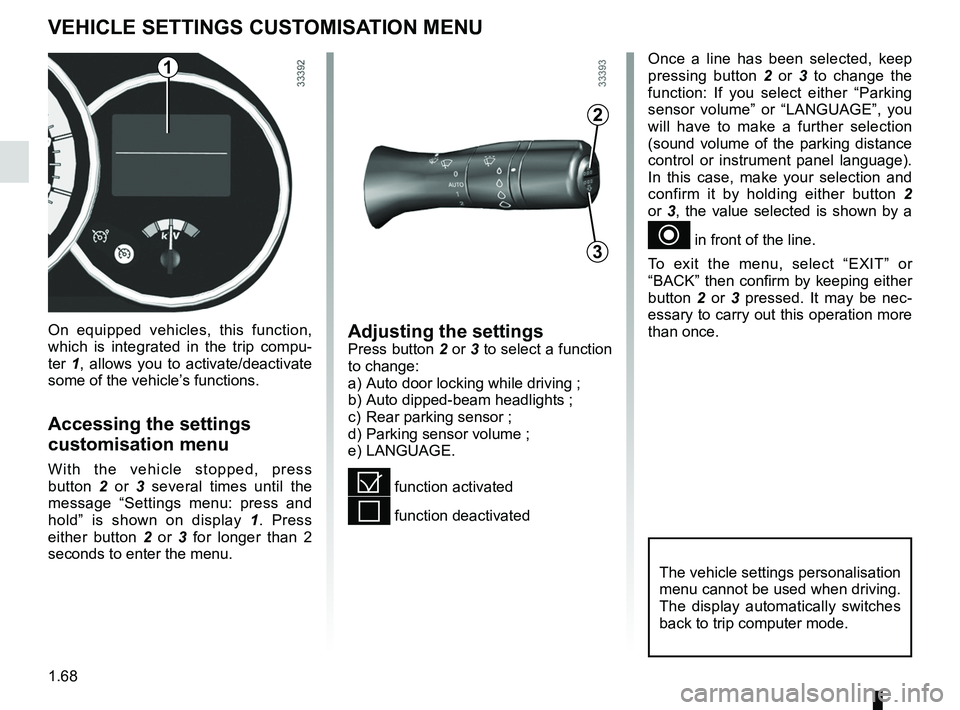
On equipped vehicles, this function,
which is integrated in the trip compu
-
ter 1, allows you to activate/deactivate
some of the vehicle’s functions.
Accessing the settings
customisation menu
With the vehicle stopped, press
button 2 or 3 several times until the
message “ Settings menu: press and
hold ” is shown on display 1 . Press
either button 2 or 3 for longer than 2
seconds to enter the menu.
Once a line has been selected, keep
pressing button 2 or 3 to change the
function: If you select either “ Parking
sensor volume ” or “LANGUAGE ”, you
will have to make a further selection
(sound volume of the parking distance
control or instrument panel language).
In this case, make your selection and
confirm it by holding either button 2
or 3, the value selected is shown by a
~ in front of the line.
To exit the menu, select “ EXIT” or
“BACK” then confirm by keeping either
button 2 or 3 pressed. It may be nec -
essary to carry out this operation more
than once.
2
3
1
The vehicle settings personalisation
menu cannot be used when driving.
The display automatically switches
back to trip computer mode.
Page 74 of 195
rear view mirrors ................................... (up to the end of the DU)
1.69
ENG_UD20062_2
Rétroviseurs (L38 - X38 - Renault)
ENG_NU_914-4_L38e_Renault_1
Rear-view mirrors
reAr-vieW mirrOrS
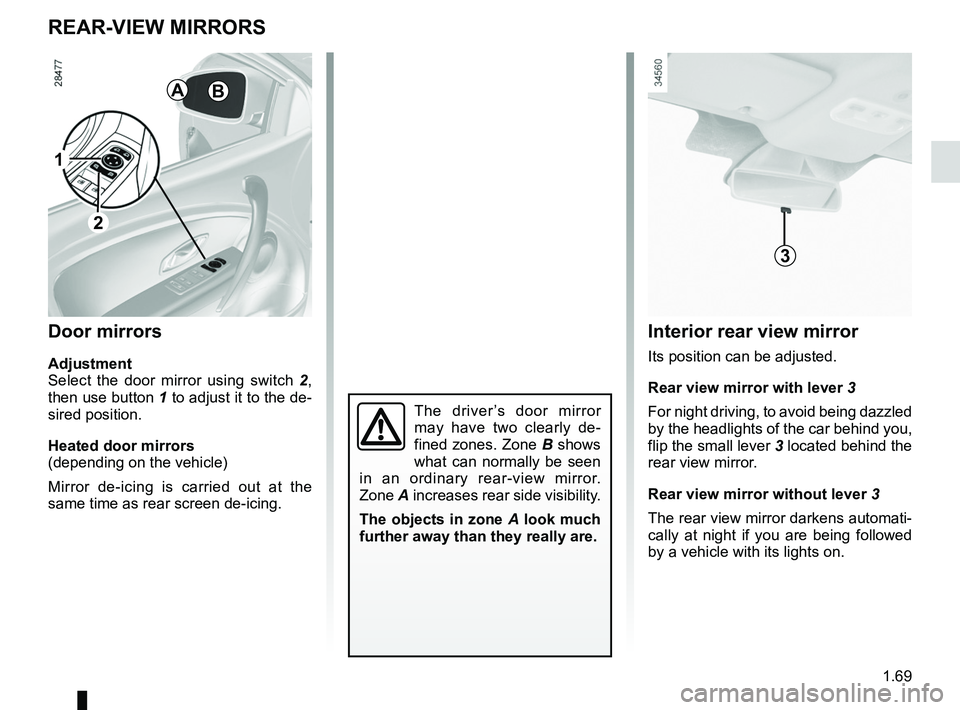
Door mirrors
Adjustment
Select the door mirror using switch 2 ,
then use button 1 to adjust it to the de-
sired position.
heated door mirrors
(depending on the vehicle)
Mirror de-icing is carried out at the
same time as rear screen de-icing.
The driver ’s door mirror
may have two clearly de -
fined zones. Zone B shows
what can normally be seen
in an ordinary rear-view mirror.
Zone A increases rear side visibility.
the objects in zone A look much
further away than they really are.
1
AB
2
3
interior rear view mirror
Its position can be adjusted.
rear view mirror with lever 3
For night driving, to avoid being dazzled
by the headlights of the car behind you,
flip the small lever 3 located behind the
rear view mirror.
rear view mirror without lever 3
The rear view mirror darkens automati-
cally at night if you are being followed
by a vehicle with its lights on.
Page 75 of 195
warning buzzer ..................................... (up to the end of the DU)
headlight flashers ................................. (up to the end of the DU)
indicators .............................................. (up to the end of the DU)
lights: hazard warning ............................... (up to the end of the DU)
lights: direction indicators .......................... (up to the end of the DU)
indicators: direction indicators .......................... (up to the end of the DU)
hazard warning lights signal ................. (up to the end of the DU)
hazard warning lights signal ................. (up to the end of the DU)
horn ...................................................... (up to the end of the DU)
horn: flash ................................................................. (current page)
horn: sounding the horn ............................................ (current page)
horn ....................................................................... (current page)
audible and visual signals .....................(up to the end of the DU)
1.70
ENG_UD19234_1
Avertisseurs sonore et lumineux (L38 - X38 - Renault)
ENG_NU_914-4_L38e_Renault_1
Audible and visual signals
AUDiBle AND viSUAl SigNAlS
horn
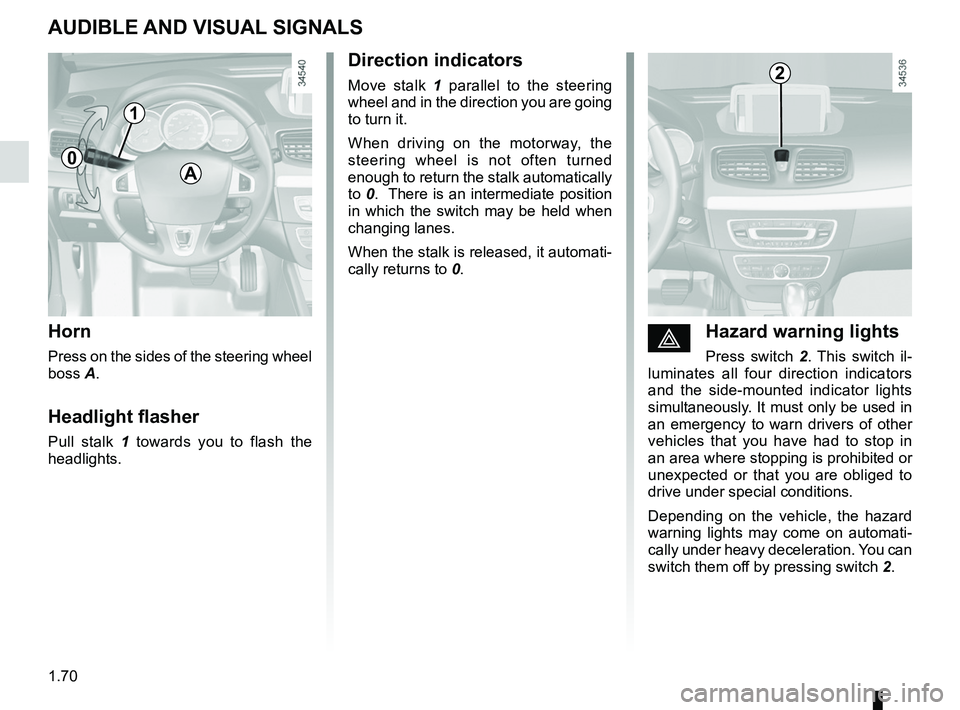
Press on the sides of the steering wheel
boss A.
headlight flasher
Pull stalk 1 towards you to flash the
headlights.
éhazard warning lights
Press switch 2 . This switch il -
luminates all four direction indicators
and the side-mounted indicator lights
simultaneously. It must only be used in
an emergency to warn drivers of other
vehicles that you have had to stop in
an area where stopping is prohibited or
unexpected or that you are obliged to
drive under special conditions.
Depending on the vehicle, the hazard
warning lights may come on automati -
cally under heavy deceleration. You can
switch them off by pressing switch 2.
Direction indicators
Move stalk 1 parallel to the steering
wheel and in the direction you are going
to turn it.
When driving on the motorway, the
steering wheel is not often turned
enough to return the stalk automatically
to 0. There is an intermediate position
in which the switch may be held when
changing lanes.
When the stalk is released, it automati-
cally returns to 0.
A
2
1
0
Page 76 of 195
lighting:exterior ............................................ (up to the end of the DU)
instrument panel .................................................... (current page)
lights: side lights ......................................................... (current page)
lights: dipped beam headlights ................................... (current page)
hazard warning lights signal .................................. (current page)
signals and lights .................................. (up to the end of the DU)
lighting: instrument panel .............................................. (current page)
daytime running lights ............................................ (current page)
1.71
ENG_UD20073_2
Éclairages et signalisations extérieurs (L38 - X38 - Renault)
ENG_NU_914-4_L38e_Renault_1
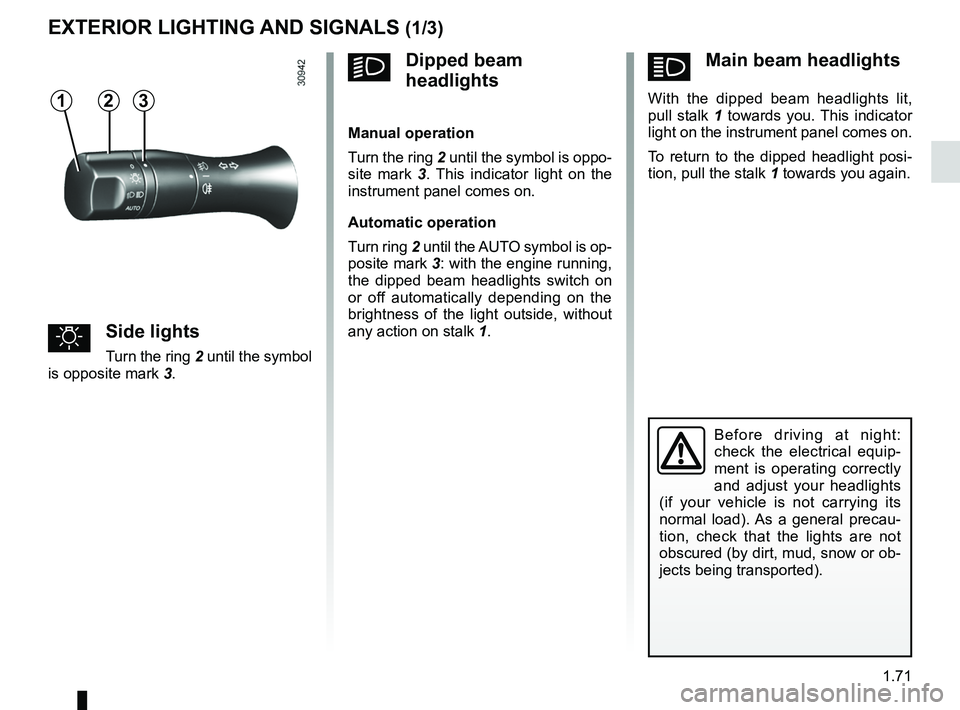
ámain beam headlights
With the dipped beam headlights lit,
pull stalk 1 towards you. This indicator
light on the instrument panel comes on.
To return to the dipped headlight posi-
tion, pull the stalk 1 towards you again.
Exterior lighting and signals
Before driving at night:
check the electrical equip -
ment is operating correctly
and adjust your headlights
(if your vehicle is not carrying its
normal load). As a general precau -
tion, check that the lights are not
obscured (by dirt, mud, snow or ob-
jects being transported).
eXteriOr lightiNg AND SigNAlS (1/3)
31
uSide lights
Turn the ring 2 until the symbol
is opposite mark 3.
kDipped beam
headlights
manual operation
Turn the ring 2 until the symbol is oppo -
site mark 3 . This indicator light on the
instrument panel comes on.
Automatic operation
Turn ring 2 until the AUTO symbol is op-
posite mark 3: with the engine running,
the dipped beam headlights switch on
or off automatically depending on the
brightness of the light outside, without
any action on stalk 1.
2