light RENAULT KADJAR 2018 Owners Manual
[x] Cancel search | Manufacturer: RENAULT, Model Year: 2018, Model line: KADJAR, Model: RENAULT KADJAR 2018Pages: 310, PDF Size: 8.35 MB
Page 189 of 310
3.7
AUTOMATIC CLIMATE CONTROL (1/6)Automatic mode
The automatic climate control system
guarantees comfort in the passen-
ger compartment and good visibility
(except in the event of extreme condi-
tions), while optimising consumption.
The system controls the ventilation
speed, air distribution, air recirculation,
and starting and stopping the air condi-
tioning and air temperature.
AUTO: allows the selected com-
fort level to be best attained, depend-
ing on the exterior conditions. Press
button 7. The integrated indicator light
on button 7 comes on.
Varying the ventilation speedIn automatic mode, the system uses
the most suitable amount of air to reach
and maintain the desired comfort level.
You can still adjust the fan speed by
pressing the buttons 6 to increase or
reduce the fan speed.
In this case, the integrated indicator
light on button 7 goes out and the ven-
tilation speed selected is displayed on
the indicator C.
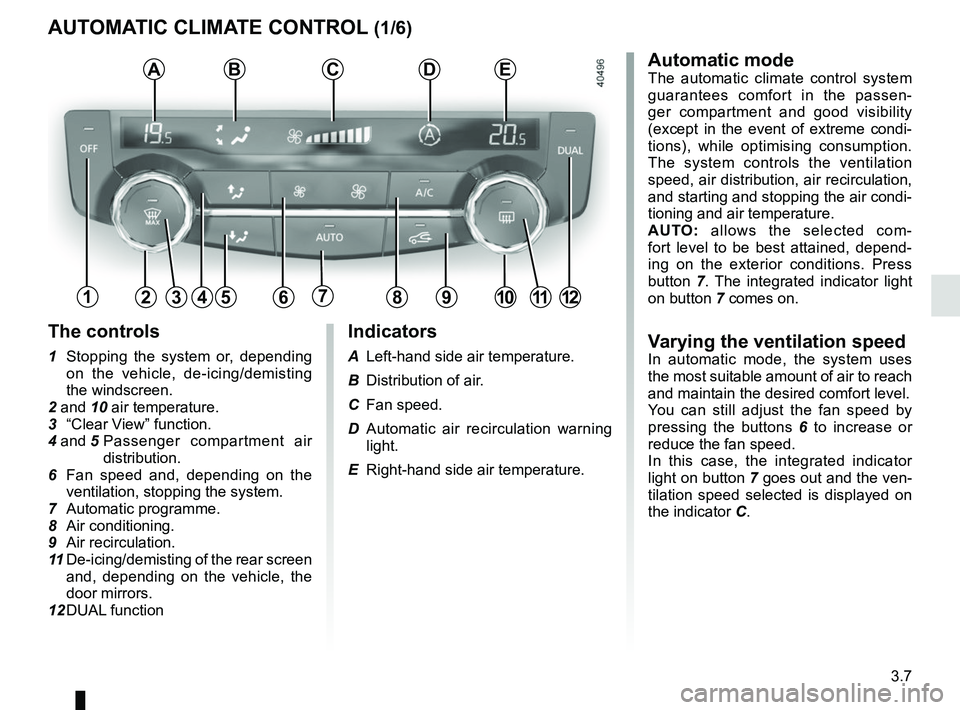
Indicators
A Left-hand side air temperature.
B Distribution of air.
C Fan speed.
D Automatic air recirculation warning
light.
E Right-hand side air temperature.
The controls
1 Stopping the system or, depending on the vehicle, de-icing/demisting
the windscreen.
2 and 10 air temperature.
3 “Clear View” function.
4 and 5 Passenger compartment air
distribution.
6 Fan speed and, depending on the ventilation, stopping the system.
7 Automatic programme.
8 Air conditioning.
9 Air recirculation.
11 De-icing/demisting of the rear screen
and, depending on the vehicle, the
door mirrors.
12 DUAL function
124567891012
ABCDE
311
Page 191 of 310
3.9
Preferably, use automatic mode.
In automatic mode (warning light 7
is on), all climate control functions
are controlled by the system.
You can always modify the choice
of system; in this case, the warning
light in the button 7 goes out.
To return to automatic mode, press
programme AUTO.
AUTOMATIC CLIMATE CONTROL (3/6)
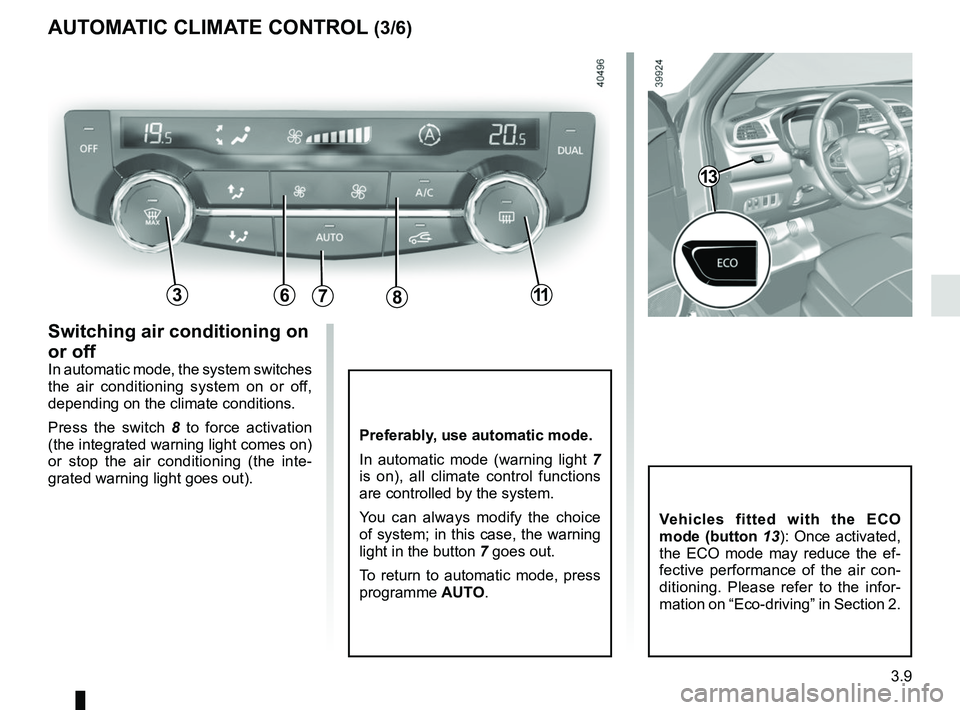
Switching air conditioning on
or off
In automatic mode, the system switches
the air conditioning system on or off,
depending on the climate conditions.
Press the switch 8 to force activation
(the integrated warning light comes on)
or stop the air conditioning (the inte-
grated warning light goes out).
786311
Vehicles fitted with the ECO
mode (button 13): Once activated,
the ECO mode may reduce the ef-
fective performance of the air con-
ditioning. Please refer to the infor-
mation on “Eco-driving” in Section 2.
13
Page 192 of 310
3.10
45
B
AUTOMATIC CLIMATE CONTROL (4/6)
6311
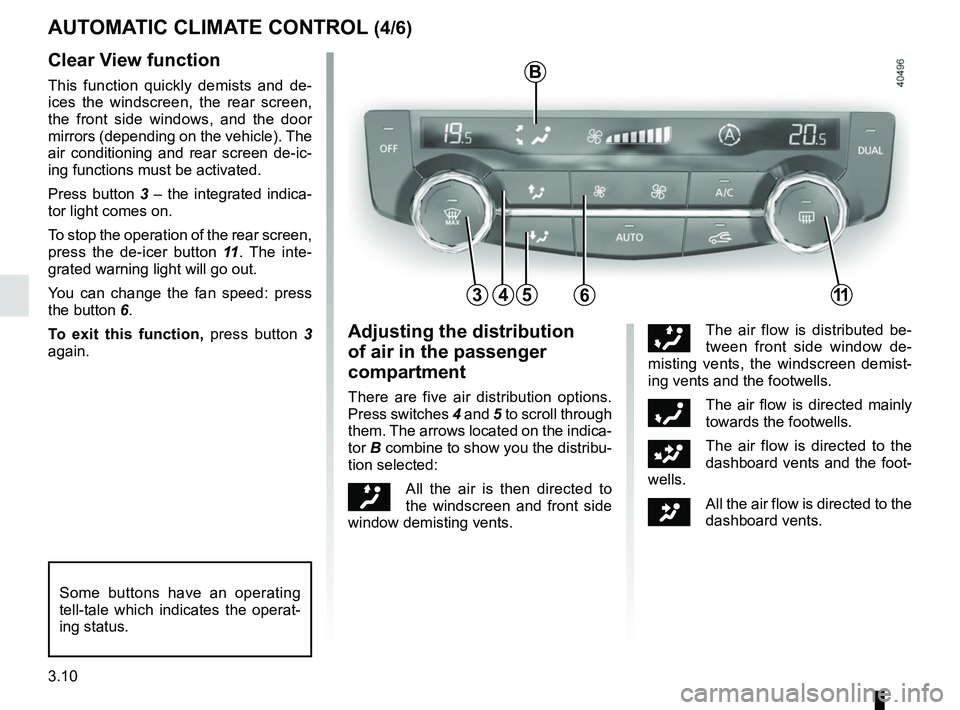
Clear View function
This function quickly demists and de-
ices the windscreen, the rear screen,
the front side windows, and the door
mirrors (depending on the vehicle). The
air conditioning and rear screen de-ic-
ing functions must be activated.
Press button 3 – the integrated indica-
tor light comes on.
To stop the operation of the rear screen,
press the de-icer button 11. The inte-
grated warning light will go out.
You can change the fan speed: press
the button 6.
To exit this function, press button 3
again.
Some buttons have an operating
tell-tale which indicates the operat-
ing status.
Adjusting the distribution
of air in the passenger
compartment
There are five air distribution options.
Press switches 4 and 5 to scroll through
them. The arrows located on the indica-
tor B combine to show you the distribu-
tion selected:
õAll the air is then directed to
the windscreen and front side
window demisting vents.
÷The air flow is distributed be-
tween front side window de-
misting vents, the windscreen demist-
ing vents and the footwells.
óThe air flow is directed mainly
towards the footwells.
GThe air flow is directed to the
dashboard vents and the foot-
wells.
JAll the air flow is directed to the
dashboard vents.
Page 193 of 310
3.11
AUTOMATIC CLIMATE CONTROL (5/6)
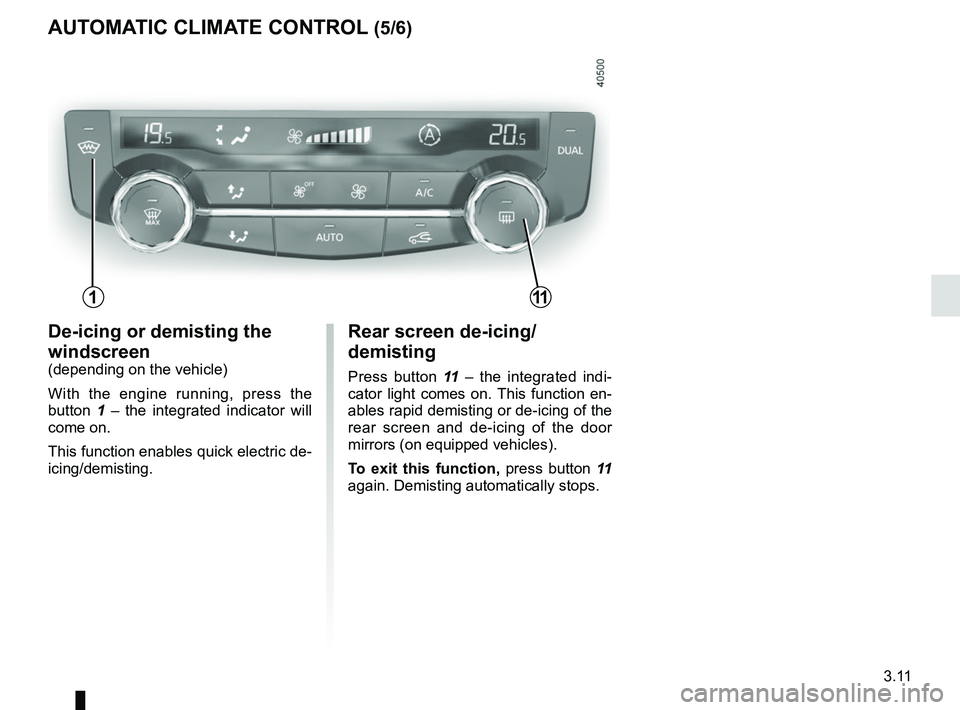
Rear screen de-icing/
demisting
Press button 11 – the integrated indi-
cator light comes on. This function en-
ables rapid demisting or de-icing of the
rear screen and de-icing of the door
mirrors (on equipped vehicles).
To exit this function, press button 11
again. Demisting automatically stops.
De-icing or demisting the
windscreen
(depending on the vehicle)
With the engine running, press the
button 1 – the integrated indicator will
come on.
This function enables quick electric de-
icing/demisting.
111
Page 194 of 310
3.12
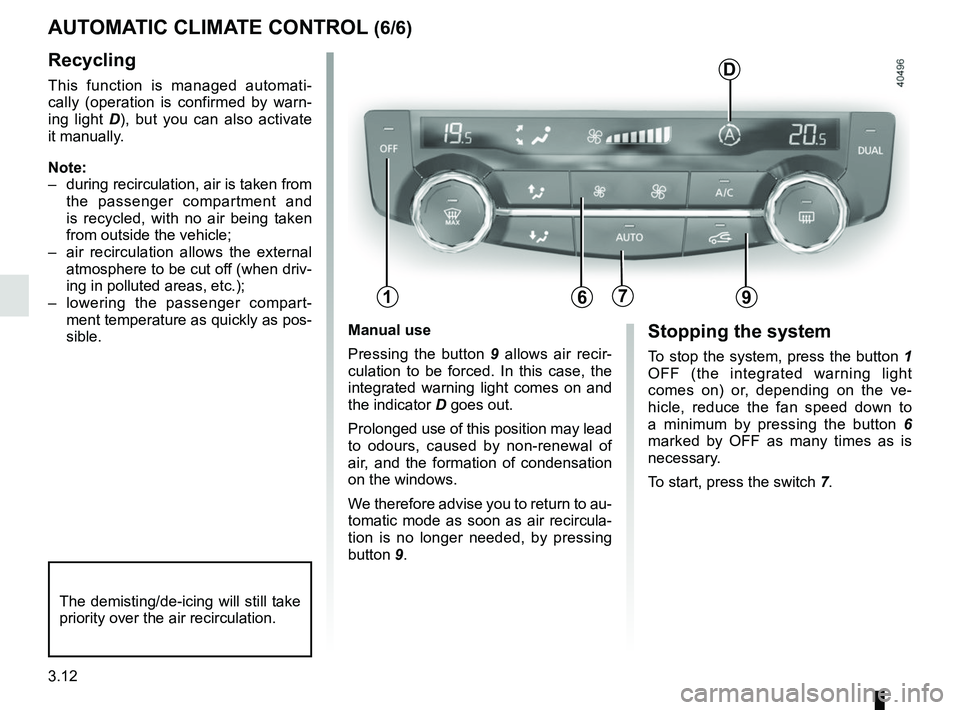
Manual use
Pressing the button 9 allows air recir-
culation to be forced. In this case, the
integrated warning light comes on and
the indicator D goes out.
Prolonged use of this position may lead
to odours, caused by non-renewal of
air, and the formation of condensation
on the windows.
We therefore advise you to return to au-
tomatic mode as soon as air recircula-
tion is no longer needed, by pressing
button 9.Stopping the system
To stop the system, press the button 1
OFF (the integrated warning light
comes on) or, depending on the ve-
hicle, reduce the fan speed down to
a minimum by pressing the button 6
marked by OFF as many times as is
necessary.
To start, press the switch 7.
Recycling
This function is managed automati-
cally (operation is confirmed by warn-
ing light D), but you can also activate
it manually.
Note:
– during recirculation, air is taken from the passenger compartment and
is recycled, with no air being taken
from outside the vehicle;
– air recirculation allows the external atmosphere to be cut off (when driv-
ing in polluted areas, etc.);
– lowering the passenger compart- ment temperature as quickly as pos-
sible.
AUTOMATIC CLIMATE CONTROL (6/6)
The demisting/de-icing will still take
priority over the air recirculation.
179
D
6
Page 197 of 310
3.15
OUTSIDE AIR QUALITY AND DEODORISATION FUNCTION
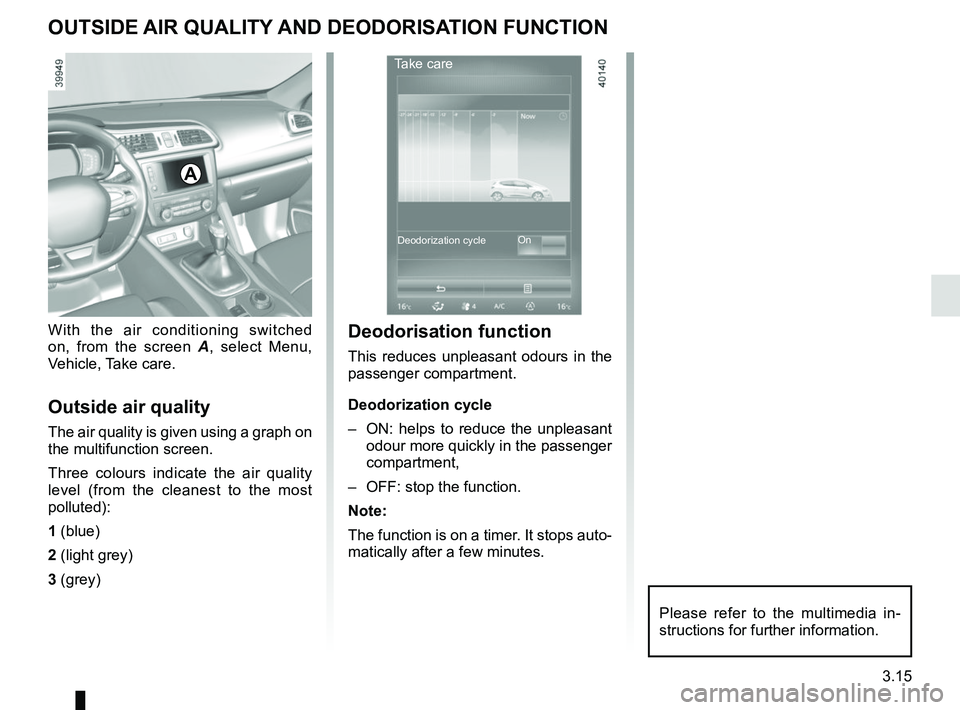
With the air conditioning switched
on, from the screen A, select Menu,
Vehicle, Take care.
Outside air quality
The air quality is given using a graph on
the multifunction screen.
Three colours indicate the air quality
level (from the cleanest to the most
polluted):
1 (blue)
2 (light grey)
3 (grey)
A
Deodorisation function
This reduces unpleasant odours in the
passenger compartment.
Deodorization cycle
– ON: helps to reduce the unpleasant odour more quickly in the passenger
compartment,
– OFF: stop the function.
Note:
The function is on a timer. It stops auto-
matically after a few minutes.
Take care
On
Deodorization cycle
Please refer to the multimedia in-
structions for further information.
Page 200 of 310
3.18
Note: for vehicles fitted with a naviga-
tion system, you can use the multifunc-
tion screen to deactivate/activate the
courtesy lights which come on when
the doors or boot are opened. To do
this, please refer to “Vehicle settings
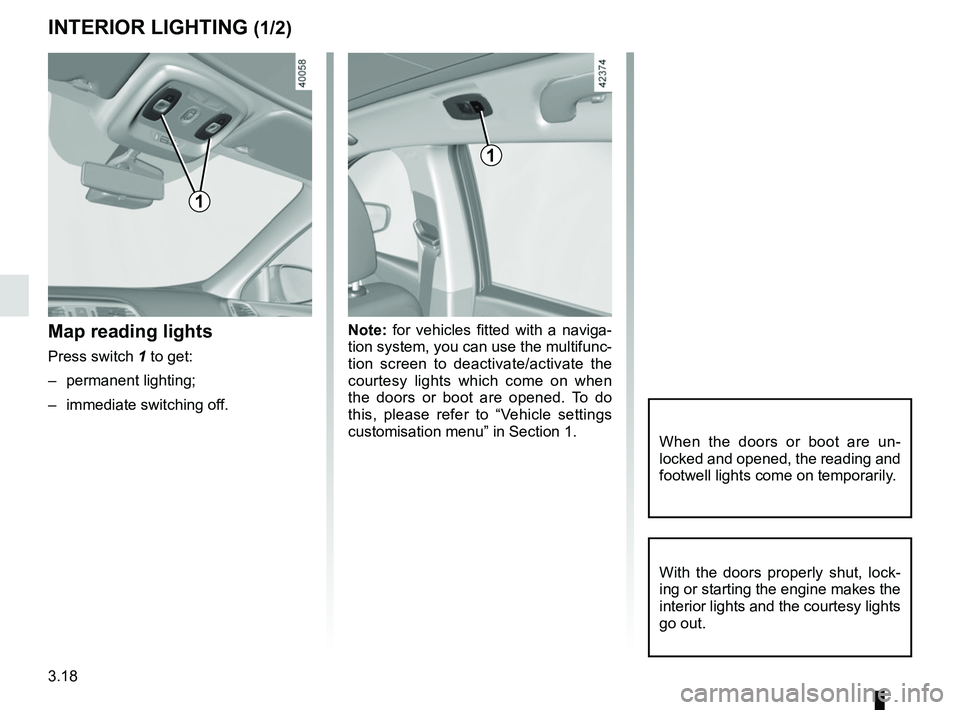
customisation menu” in Section 1.Map reading lights
Press switch 1 to get:
– permanent lighting;
– immediate switching off.
When the doors or boot are un-
locked and opened, the reading and
footwell lights come on temporarily.
INTERIOR LIGHTING (1/2)
With the doors properly shut, lock-
ing or starting the engine makes the
interior lights and the courtesy lights
go out.
1
1
Page 201 of 310
3.19
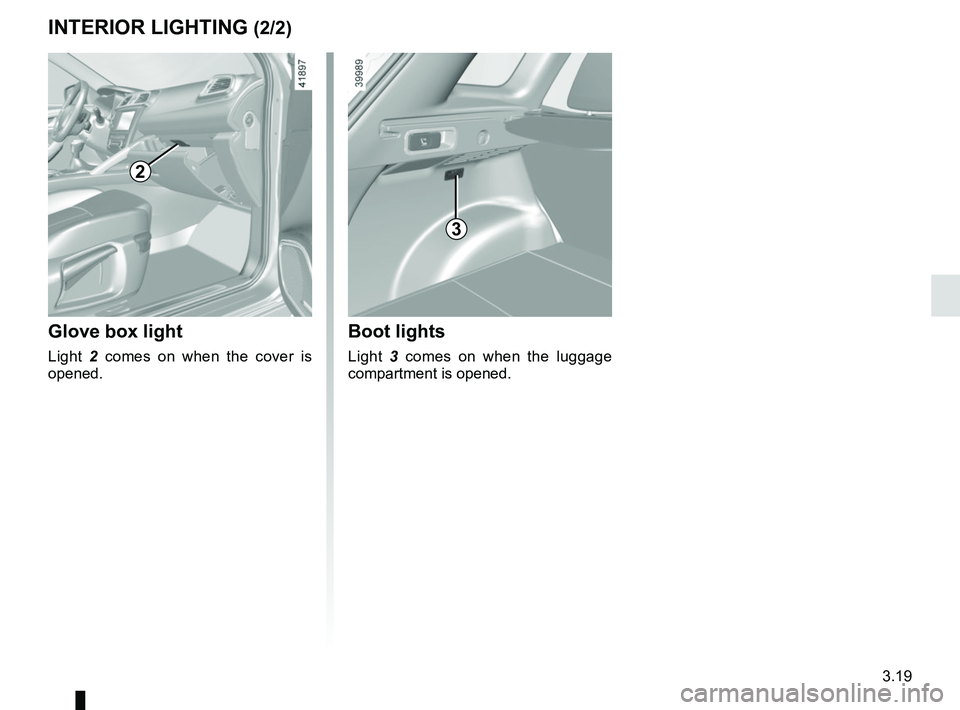
Glove box light
Light 2 comes on when the cover is
opened.
2
3
Boot lights
Light 3 comes on when the luggage
compartment is opened.
INTERIOR LIGHTING (2/2)
Page 207 of 310
3.25
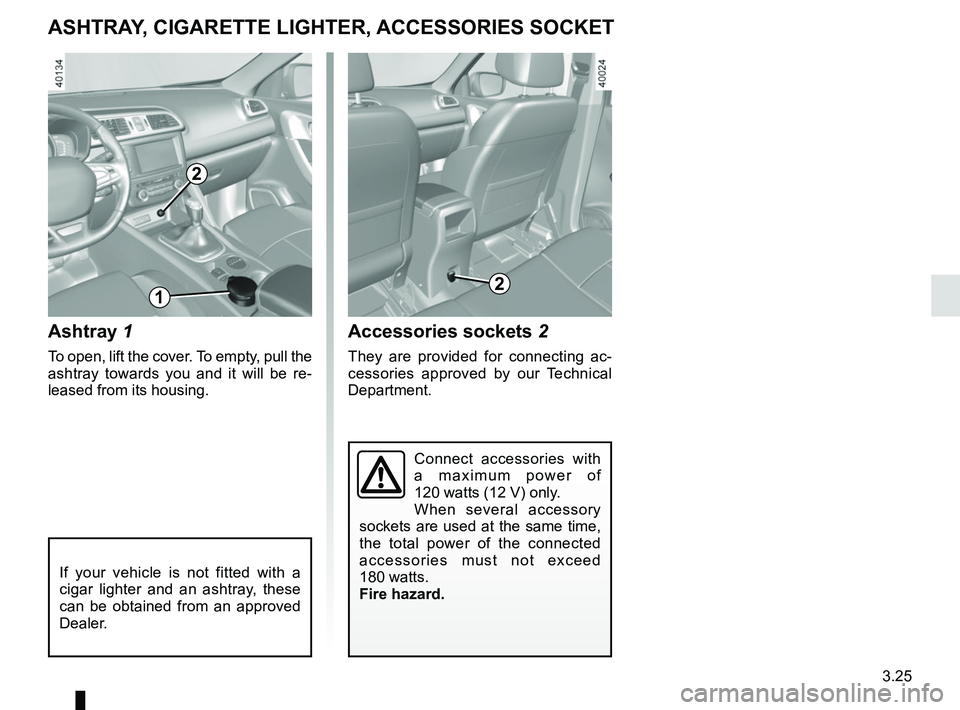
Ashtray 1
To open, lift the cover. To empty, pull the
ashtray towards you and it will be re-
leased from its housing.
Accessories sockets 2
They are provided for connecting ac-
cessories approved by our Technical
Department.
ASHTRAY, CIGARETTE LIGHTER, ACCESSORIES SOCKET
If your vehicle is not fitted with a
cigar lighter and an ashtray, these
can be obtained from an approved
Dealer.
2
12
Connect accessories with
a maximum power of
120 watts (12 V) only.
When several accessory
sockets are used at the same time,
the total power of the connected
accessories must not exceed
180 watts.
Fire hazard.
Page 216 of 310
3.34
Permissible nose weight, maxi-
mum permissible towing weight,
braked and unbraked: refer to
the information on “Weights” in
Section 6.
Choice and fitting of towing
equipment
Maximum weight of towing equip-
ment: 32 kg
For fitting and conditions of use,
refer to the equipment’s fitting in-
structions.
Please keep these instructions with
the rest of the vehicle documenta-
tion.
TRANSPORTING OBJECTS towbar
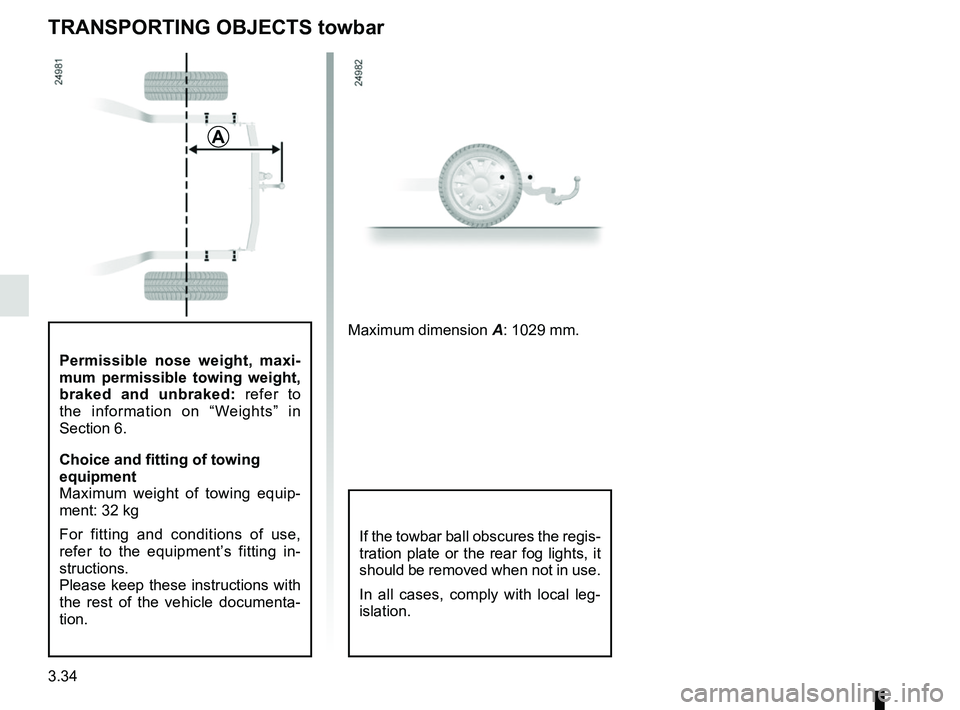
A
Maximum dimension A: 1029 mm.
If the towbar ball obscures the regis-
tration plate or the rear fog lights, it
should be removed when not in use.
In all cases, comply with local leg-
islation.