light RENAULT KADJAR 2018 Owners Manual
[x] Cancel search | Manufacturer: RENAULT, Model Year: 2018, Model line: KADJAR, Model: RENAULT KADJAR 2018Pages: 310, PDF Size: 8.35 MB
Page 262 of 310
5.20
INTERIOR LIGHTING: changing bulbs (1/2)
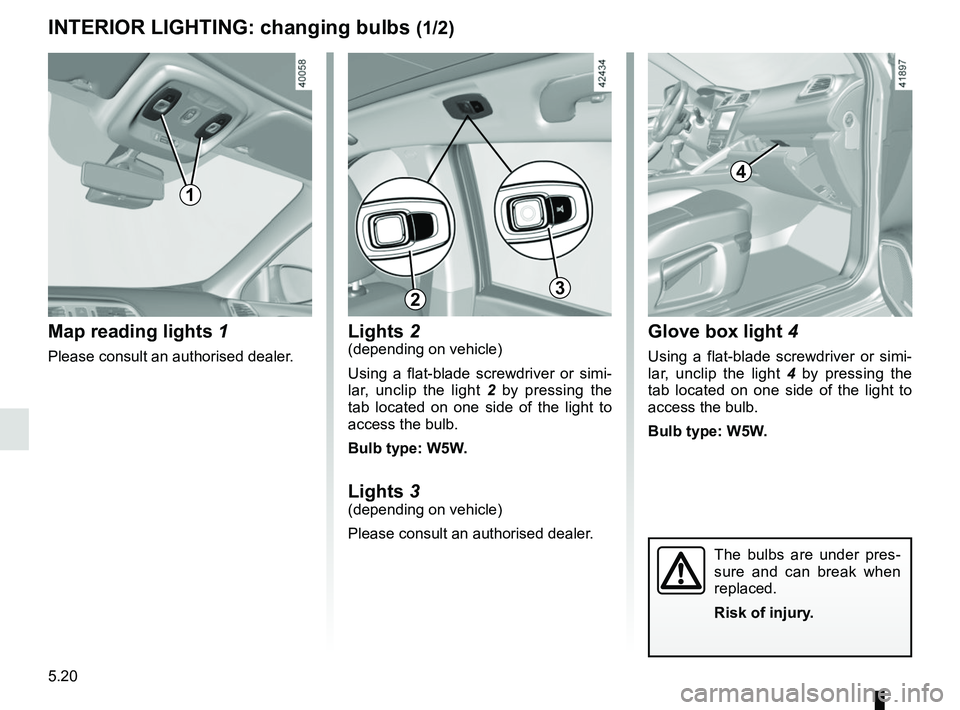
Map reading lights 1
Please consult an authorised dealer.
1
4
Glove box light 4
Using a flat-blade screwdriver or simi-
lar, unclip the light 4 by pressing the
tab located on one side of the light to
access the bulb.
Bulb type: W5W.
The bulbs are under pres-
sure and can break when
replaced.
Risk of injury.
Lights 2(depending on vehicle)
Using a flat-blade screwdriver or simi-
lar, unclip the light 2 by pressing the
tab located on one side of the light to
access the bulb.
Bulb type: W5W.
Lights 3
(depending on vehicle)
Please consult an authorised dealer.
23
Page 263 of 310
5.21
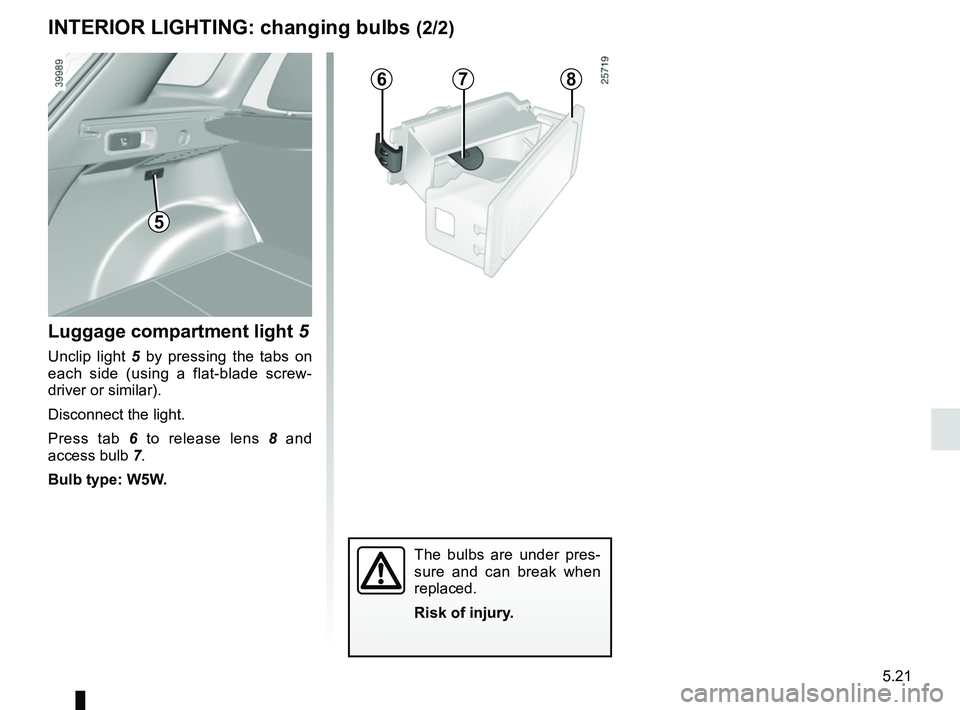
678
The bulbs are under pres-
sure and can break when
replaced.
Risk of injury.
5
Luggage compartment light 5
Unclip light 5 by pressing the tabs on
each side (using a flat-blade screw-
driver or similar).
Disconnect the light.
Press tab 6 to release lens 8 and
access bulb 7.
Bulb type: W5W.
INTERIOR LIGHTING: changing bulbs (2/2)
Page 268 of 310

Allocation of fuses
(the presence of certain fuses depends on the vehicle equipment level)\
Symbol Allocation SymbolAllocation
DIndicatorsSteering column controls
ßBrake lightñ")
5.26
FUSES (3/3)
Allocation of fuses
(the presence of certain fuses depends on the vehicle equipment level)\
Symbol Allocation SymbolAllocation
DIndicatorsSteering column controls
ßBrake lightñHeated seats
Audio amplifierCHeated rear screen
NDoor locking/unlockingElectric door mirror
fWipersëAccessories sockets
Z
Interior lighting, courtesy mirror, rain and
light sensor, electric rear view mirrors, air
conditioning, ECO mode
Passenger compartment central unit, speed
limiter/cruise control, diagnostics socket, electric
windows, 4-wheel drive transmission (4WD)
îRadio, multifunction screen, multimedia sockets
Page 269 of 310
5.27
BATTERY: troubleshooting (1/2)
To avoid all risk of sparks:
– Ensure that any consumers (cour-tesy lights, etc.) are switched off
before disconnecting or reconnect-
ing the battery;
– when charging, stop the charger before connecting or disconnecting
the battery;
– to avoid creating a short circuit be- tween the terminals, do not place
metal objects on the battery;
– always wait at least one minute after the engine has been switched off
before disconnecting a battery;
– make sure that you reconnect the battery terminals after refitting.
Connecting a battery charger
The battery charger must be com-
patible with a battery with nominal
voltage of 12 volts.
Do not disconnect the battery when the
engine is running. Follow the instruc-
tions given by the manufacturer of
the battery charger you are using.
Special procedures may be
required to charge some
batteries. Contact your ap-
proved dealer.
Avoid all risk of sparks which may
cause an immediate explosion, and
charge the battery in a well venti-
lated area. Risk of serious injury.
Before performing any
action in the engine com-
partment, the ignition must
be switched off (please see
the information on “Starting, stop-
ping the engine” in Section 2).
Please note when work-
ing close to the engine that
it may be hot. The engine
cooling fan may also start
at any moment. The
warning
light in the engine compartment re-
minds you of this.
Risk of injury.
Handle the battery with care
as it contains sulphuric acid,
which must not come into
contact with eyes or skin. If
it does, wash the affected area with
plenty of cold water. If necessary,
consult a doctor.
Keep naked flames, red hot objects
and sparks away from the battery
components as there is a risk of
explosion.
Page 272 of 310
5.30
WINDSCREEN WIPER BLADES: replacement (1/2)
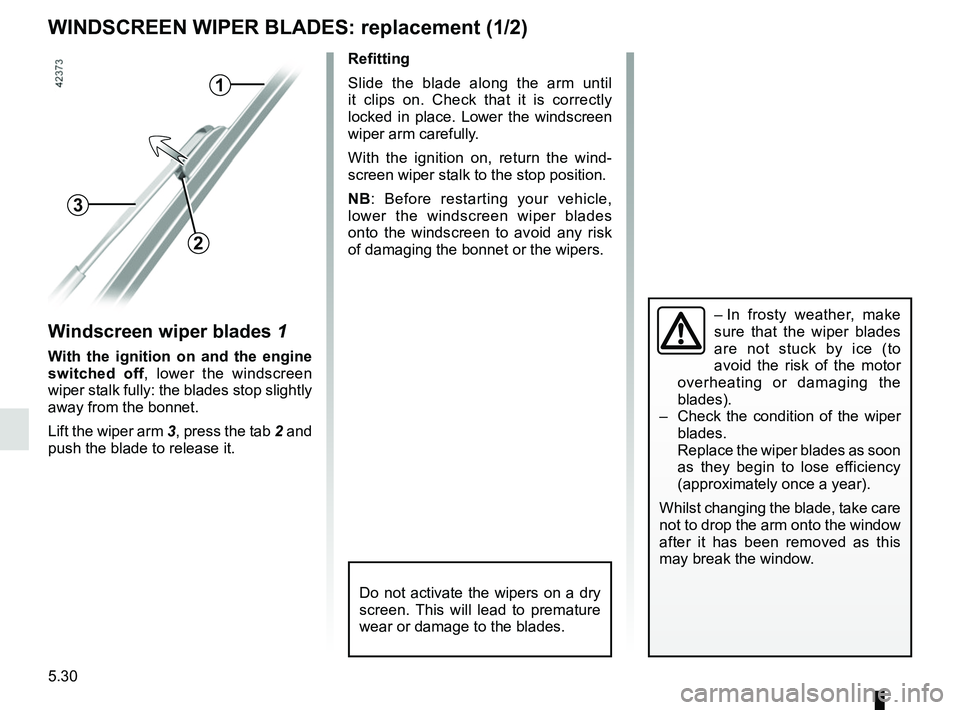
Windscreen wiper blades 1
With the ignition on and the engine
switched off, lower the windscreen
wiper stalk fully: the blades stop slightly
away from the bonnet.
Lift the wiper arm 3, press the tab 2 and
push the blade to release it.
1
2
3
Refitting
Slide the blade along the arm until
it clips on. Check that it is correctly
locked in place. Lower the windscreen
wiper arm carefully.
With the ignition on, return the wind-
screen wiper stalk to the stop position.
NB: Before restarting your vehicle,
lower the windscreen wiper blades
onto the windscreen to avoid any risk
of damaging the bonnet or the wipers.
– In frosty weather, make
sure that the wiper blades
are not stuck by ice (to
avoid the risk of the motor
overheating or damaging the
blades).
– Check the condition of the wiper
blades.
Replace the wiper blades as soon
as they begin to lose efficiency
(approximately once a year).
Whilst changing the blade, take care
not to drop the arm onto the window
after it has been removed as this
may break the window.
Do not activate the wipers on a dry
screen. This will lead to premature
wear or damage to the blades.
Page 274 of 310
5.32
TOWING: breakdown recovery (1/2)
Before towing, put the gearbox in neu-
tral, unlock the steering column and re-
lease the parking brake.
For vehicles fitted with an automa-
tic gearbox, if it is not possible to put
the gear lever into position N, please
consult an authorised dealer.
Steering column unlocking
Insert the key into the ignition or, de-
pending on the vehicle, having the
RENAULT card on you, press the
engine start button for approximately
2 seconds.
Reposition the lever to neutral (posi-
tion N for vehicles fitted with an auto-
matic gearbox).
The steering column unlocks, the ac-
cessory functions are powered: you
can use the vehicle’s lights (direction
indicators, brake lights, etc.). At night
the vehicle must have its lights on.
Depending on the vehicle, once you
have finished towing, press the engine
start button twice (risk of running down
the battery). The speed specified by current legis-
lation for towing must always be ob-
served. If your vehicle is the towing
vehicle, do not exceed the maximum
towing weight for your vehicle (refer to
the information on “Weights” in Section
6).
Towing a vehicle with an
automatic gearbox
Transport the vehicle on a trailer or tow
it with the front wheels off the ground.
In exceptional circumstances
, you
may tow it with all four wheels on the
ground, only in a forward gear, with
the gear in neutral position N over a
maximum distance of 50 miles (80 km)
and not exceeding a speed of 16 mph
(25 km/h).
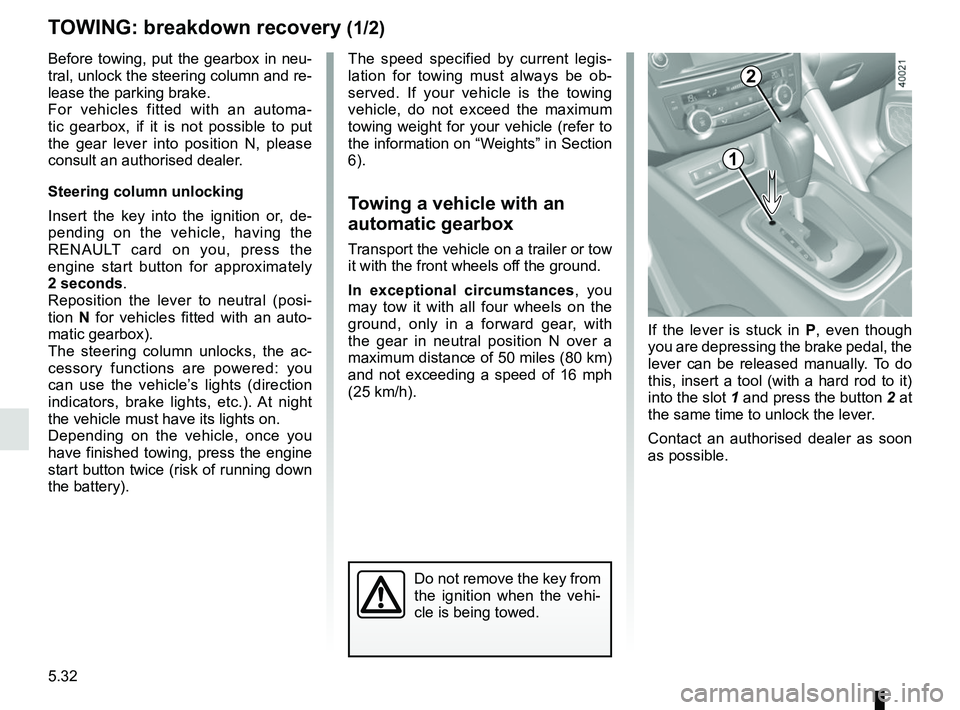
1
2
Do not remove the key from
the ignition when the vehi-
cle is being towed.
If the lever is stuck in P , even though
you are depressing the brake pedal, the
lever can be released manually. To do
this, insert a tool (with a hard rod to it)
into the slot 1 and press the button 2 at
the same time to unlock the lever.
Contact an authorised dealer as soon
as possible.
Page 278 of 310
5.36
OPERATING FAULTS (3/7)
The starter is activatedPOSSIBLE CAUSES WHAT TO DO
The instrument panel indicator lights are
weak or fail to light up and the starter
does not turn. Battery terminals not tight,
battery terminals discon-
nected or oxidised.Retighten or reconnect the terminals, or clean them if
they are oxidised.
Discharged battery or not
operational. Connect another battery to the faulty battery. Refer to
information on “Battery: troubleshooting” in Section 5
or replace the battery if necessary.
Do not push the vehicle if the steering column is
locked.
Faulty circuit. Consult an approved dealer.
The engine will not start. Starting conditions are not
fulfilled.Please refer to the information on “Starting, stopping
the engine” in Section 2.
The RENAULT card does
not work. Please refer to the information on “Starting, stopping
the engine” in Section 2.
The engine cannot be switched off. Card not detected. Please refer to the information on “Starting, stopping
the engine” in Section 2.
Electronic fault. Press the starter button quickly five times.
The steering column remains locked. Steering wheel locked. Move the steering wheel while pressing the engine
start button or, depending on the vehicle, while turning
the key (refer to the information on “Starting, stopping
the engine” in Section 2).
Faulty circuit. Consult an approved dealer.
Page 279 of 310
5.37
OPERATING FAULTS (4/7)
On the roadPOSSIBLE CAUSESWHAT TO DO
Vibrations. Tyres not inflated to correct pres-
sures, incorrectly balanced or dam-
aged. Check the tyre pressures: if this is not the
problem, have them checked by an ap-
proved Dealer.
White smoke from the exhaust. In the diesel version, this is necessar-
ily a fault. Smoke may be caused by
particle filter regeneration. Refer to the information on “Special fea-
tures of diesel versions” in Section 2.
Smoke under the bonnet. Short-circuit or cooling system leak. Stop, switch off the ignition, stand away
from the vehicle and contact an approved
dealer.
The oil pressure warning light comes
on: while cornering or braking The level is too low. Top up the engine oil level (refer to the in-
formation on “Engine oil level: topping up,
filling” in Section 4).
is slow to go out or remains lit
under acceleration Loss of oil pressure.
Stop the vehicle and contact an approved
Dealer.
Page 280 of 310
5.38
OPERATING FAULTS (5/7)
On the roadPOSSIBLE CAUSESWHAT TO DO
Steering becomes heavy. Assistance overheating.
Fault with the electric assistance
motor.
Fault in the assistance system. Drive carefully at reduced speed, be aware
of the level of force on the steering wheel
needed to turn the wheels. Consult an ap-
proved dealer.
The engine is overheating. The cool-
ant temperature indicator is in the
warning zone and warning light
® comes on. Engine cooling fan not working. Stop the vehicle, switch off the engine and
contact an approved dealer.
Coolant leaks. Check the coolant reservoir: it should con- tain fluid. If there is no coolant, consult an
approved dealer as soon as possible.
Coolant boiling in the coolant reser-
voir. Mechanical fault: damaged cylinder
head gasket. Stop the engine.
Contact an approved dealer.
Radiator:
If there is a significant lack of coolant, remember that it must never b\
e topped up using cold coolant while
the engine is very warm. After any procedure on the vehicle which has involved even partial drain\
ing of the cooling
system, it must be refilled with a new mixture prepared in the correct p\
roportions. Reminder: only products approved
by our Technical Department may be used for this purpose.
Page 281 of 310
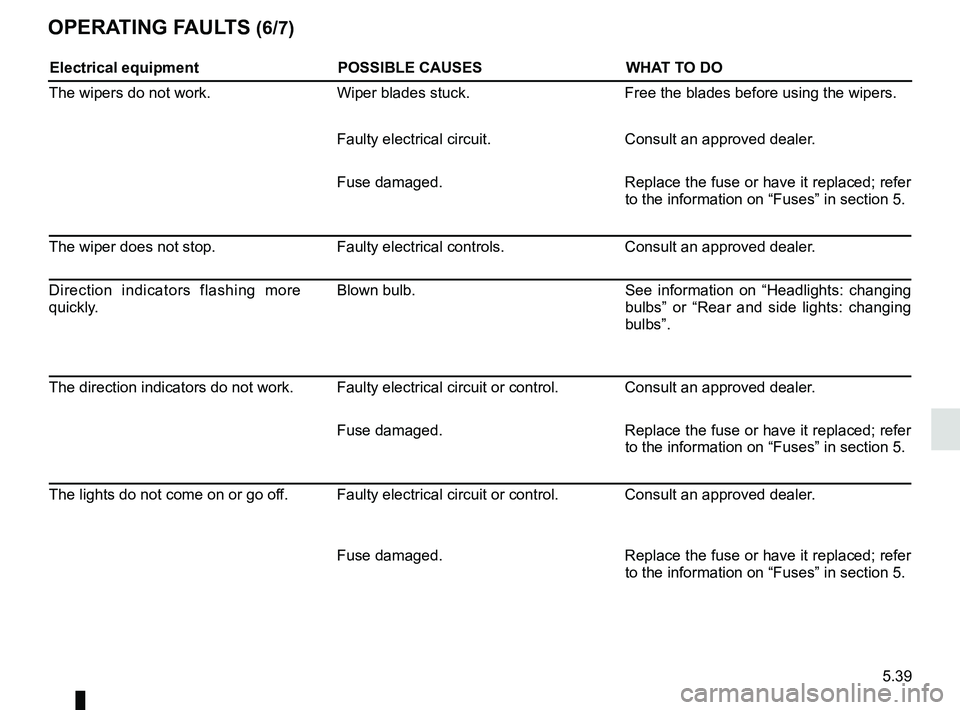
5.39
OPERATING FAULTS (6/7)
Electrical equipmentPOSSIBLE CAUSESWHAT TO DO
The wipers do not work. Wiper blades stuck. Free the blades before using the wipers.
Faulty electrical circuit. Consult an approved dealer.
Fuse damaged. Replace the fuse or have it replaced; refer
to the information on “Fuses” in section 5.
The wiper does not stop. Faulty electrical controls.Consult an approved dealer.
Direction indicators flashing more
quickly. Blown bulb.
See information on “Headlights: changing
bulbs” or “Rear and side lights: changing
bulbs”.
The direction indicators do not work. Faulty electrical circuit or control. Consult an approved dealer. Fuse damaged.Replace the fuse or have it replaced; refer
to the information on “Fuses” in section 5.
The lights do not come on or go off. Faulty electrical circuit or control. Consult an approved dealer.
Fuse damaged.Replace the fuse or have it replaced; refer
to the information on “Fuses” in section 5.