door lock RENAULT KADJAR 2018 User Guide
[x] Cancel search | Manufacturer: RENAULT, Model Year: 2018, Model line: KADJAR, Model: RENAULT KADJAR 2018Pages: 310, PDF Size: 8.35 MB
Page 17 of 310
1.11
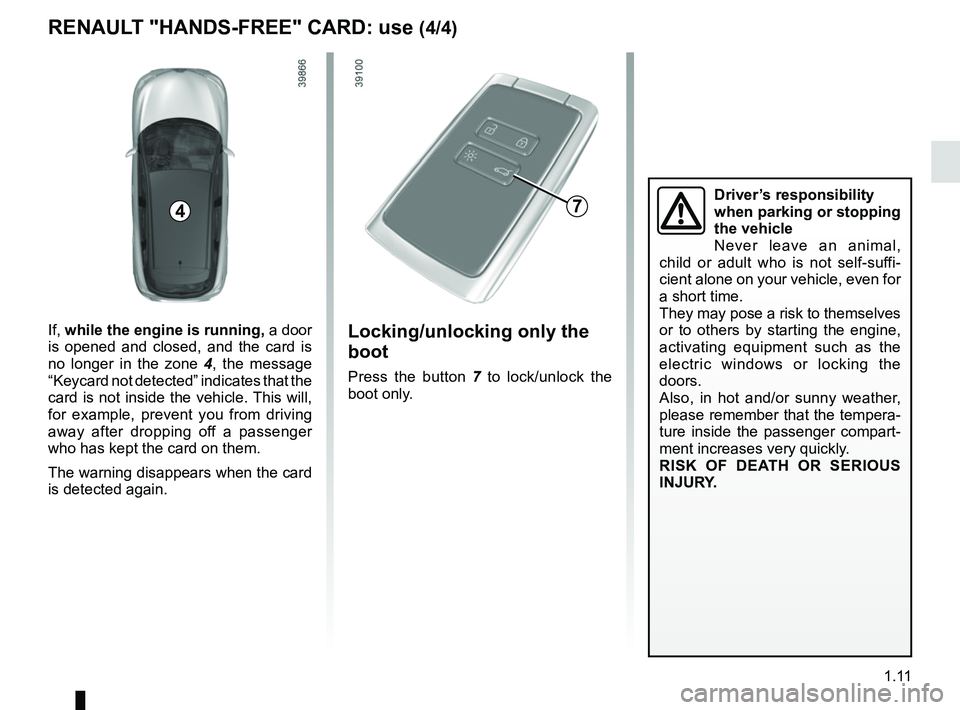
Locking/unlocking only the
boot
Press the button 7 to lock/unlock the
boot only.
7
RENAULT "HANDS-FREE" CARD: use (4/4)
Driver’s responsibility
when parking or stopping
the vehicle
Never leave an animal,
child or adult who is not self-suffi-
cient alone on your vehicle, even for
a short time.
They may pose a risk to themselves
or to others by starting the engine,
activating equipment such as the
electric windows or locking the
doors.
Also, in hot and/or sunny weather,
please remember that the tempera-
ture inside the passenger compart-
ment increases very quickly.
RISK OF DEATH OR SERIOUS
INJURY.
4
If, while the engine is running, a door
is opened and closed, and the card is
no longer in the zone 4, the message
“Keycard not detected” indicates that the
card is not inside the vehicle. This will,
for example, prevent you from driving
away after dropping off a passenger
who has kept the card on them.
The warning disappears when the card
is detected again.
Page 18 of 310
1.12
Never use deadlocking if
someone is still inside the
vehicle.
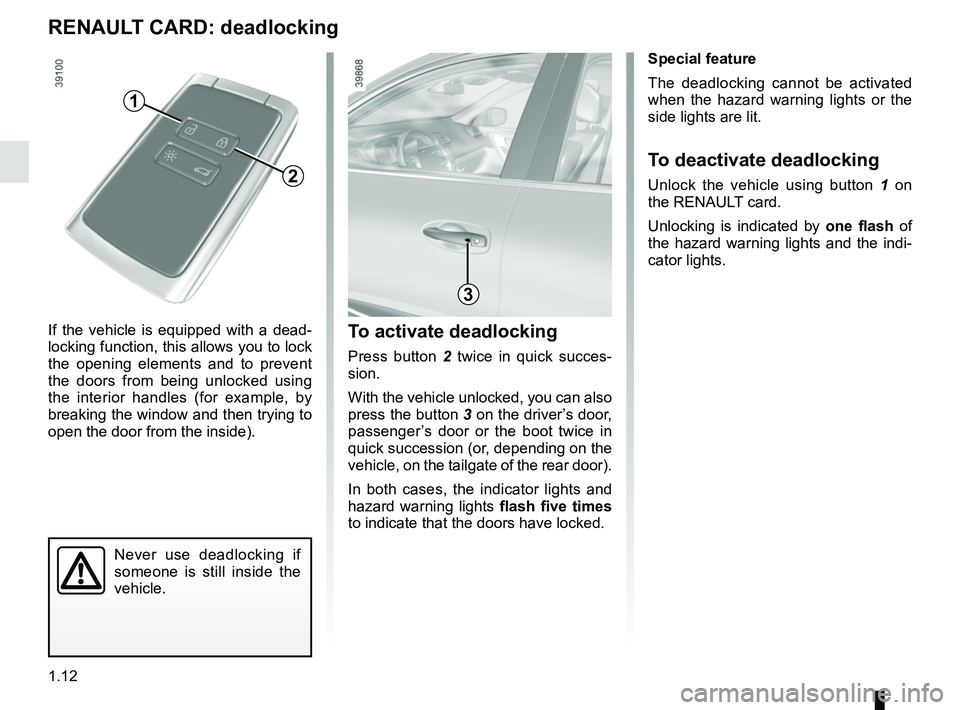
To activate deadlocking
Press button 2 twice in quick succes-
sion.
With the vehicle unlocked, you can also
press the button 3 on the driver’s door,
passenger’s door or the boot twice in
quick succession (or, depending on the
vehicle, on the tailgate of the rear door).
In both cases, the indicator lights and
hazard warning lights flash five times
to indicate that the doors have locked.
If the vehicle is equipped with a dead-
locking function, this allows you to lock
the opening elements and to prevent
the doors from being unlocked using
the interior handles (for example, by
breaking the window and then trying to
open the door from the inside).
RENAULT CARD: deadlocking
Special feature
The deadlocking cannot be activated
when the hazard warning lights or the
side lights are lit.
To deactivate deadlocking
Unlock the vehicle using button
1 on
the RENAULT card.
Unlocking is indicated by one flash of
the hazard warning lights and the indi-
cator lights.
1
2
3
Page 19 of 310
1.13
LOCKING, UNLOCKING THE DOORS (1/3)
If the remote control or,
depending on the vehicle, the
RENAULT card does not work
In some cases, the radio frequency
remote control or the RENAULT card
may not work:
– RENAULT card/radio frequency remote control battery worn or run
flat, vehicle battery flat, etc.
– use of appliances operating on the same frequency as the card (mobile
phone, etc.);
– vehicle located in a high electromag- netic radiation zone.
Never leave your vehicle
with the key or RENAULT
card inside.
It is then possible:
– depending on the vehicle, use the radio frequency remote control or
the emergency key integrated in the
card to unlock the front left-hand
door;
– to lock each of the doors manually;
– to use the interior door locking/un- locking control (refer to the following
pages).
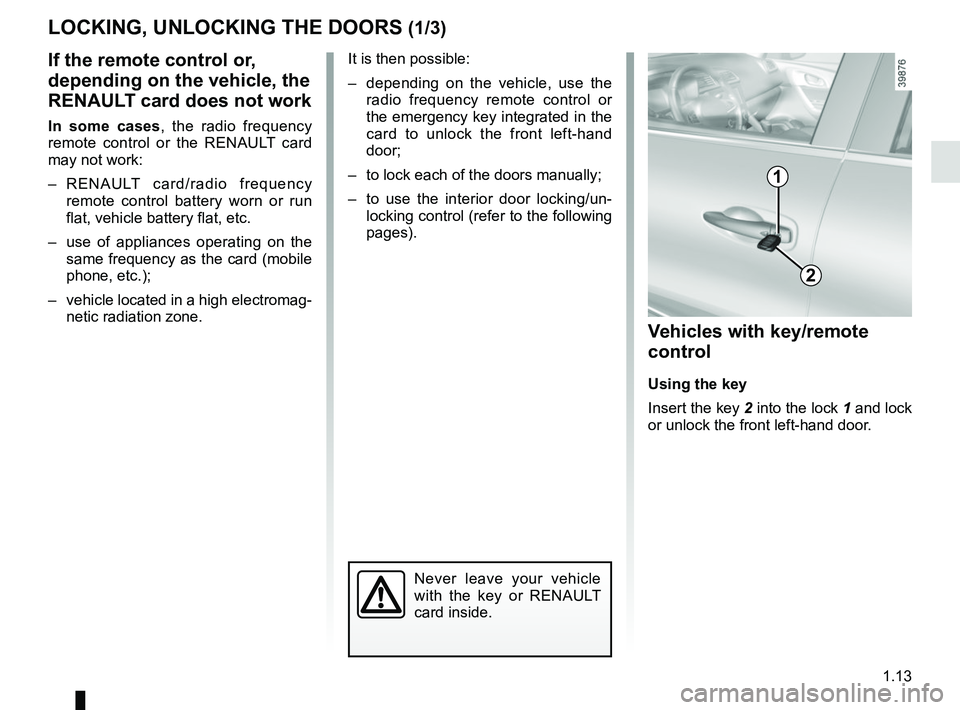
2
1
Vehicles with key/remote
control
Using the key
Insert the key 2 into the lock 1 and lock
or unlock the front left-hand door.
Page 20 of 310
1.14
LOCKING, UNLOCKING THE DOORS (2/3)
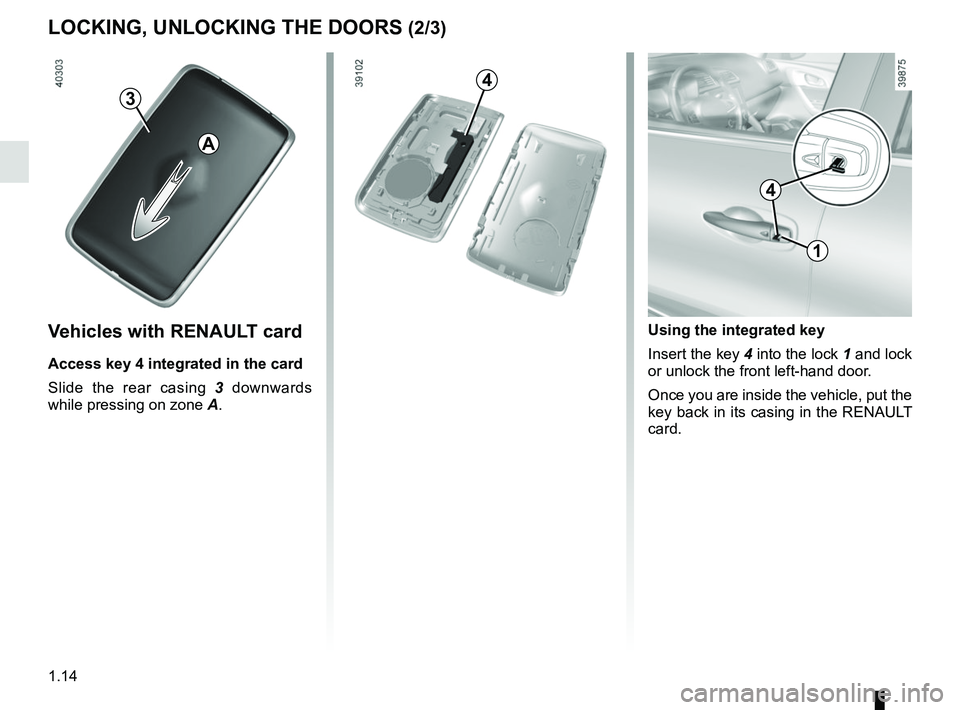
1
Using the integrated key
Insert the key 4 into the lock 1 and lock
or unlock the front left-hand door.
Once you are inside the vehicle, put the
key back in its casing in the RENAULT
card.
4
Vehicles with RENAULT card
Access key 4 integrated in the card
Slide the rear casing 3 downwards
while pressing on zone A.
4
A
3
Page 21 of 310
1.15
LOCKING, UNLOCKING THE DOORS (3/3)
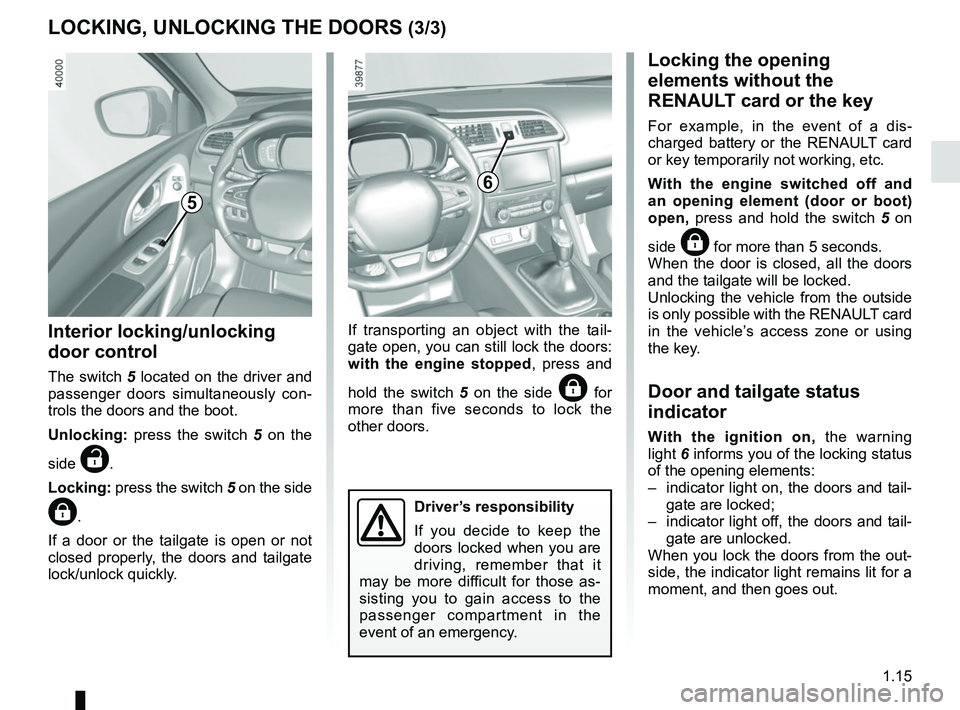
Interior locking/unlocking
door control
The switch 5 located on the driver and passenger doors simultaneously con-
trols the doors and the boot.
Unlocking: press the switch 5 on the
side
‡.
Locking: press the switch 5 on the side
….
If a door or the tailgate is open or not
closed properly, the doors and tailgate
lock/unlock quickly. If transporting an object with the tail-
gate open, you can still lock the doors:
with the engine stopped
, press and
hold the switch 5 on the side
… for
more than five seconds to lock the
other doors.
Locking the opening
elements without the
RENAULT card or the key
For example, in the event of a dis-
charged battery or the RENAULT card
or key temporarily not working, etc.
With the engine switched off and
an opening element (door or boot)
open, press and hold the switch 5 on
side
… for more than 5 seconds.
When the door is closed, all the doors
and the tailgate will be locked.
Unlocking the vehicle from the outside
is only possible with the RENAULT card
in the vehicle’s access zone or using
the key.
Door and tailgate status
indicator
With the ignition on, the warning
light 6 informs you of the locking status
of the opening elements:
– indicator light on, the doors and tail- gate are locked;
– indicator light off, the doors and tail- gate are unlocked.
When you lock the doors from the out-
side, the indicator light remains lit for a
moment, and then goes out.
6
Driver’s responsibility
If you decide to keep the
doors locked when you are
driving, remember that it
may be more difficult for those as-
sisting you to gain access to the
passenger compartment in the
event of an emergency.
5
Page 22 of 310
1.16
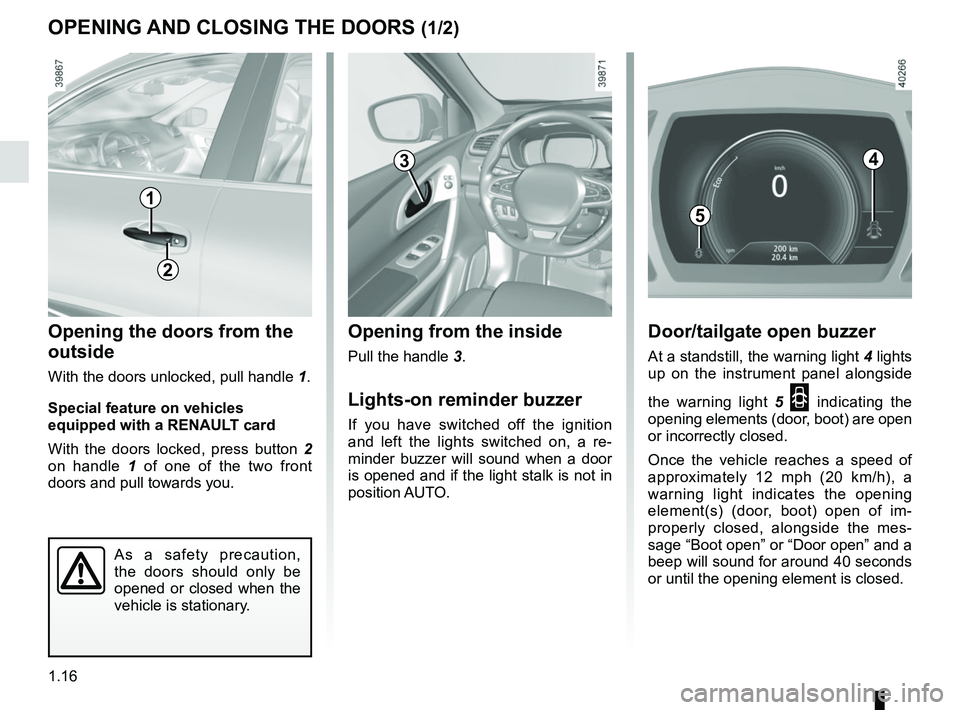
Opening from the inside
Pull the handle 3.
Lights-on reminder buzzer
If you have switched off the ignition
and left the lights switched on, a re-
minder buzzer will sound when a door
is opened and if the light stalk is not in
position AUTO.
Opening the doors from the
outside
With the doors unlocked, pull handle 1.
Special feature on vehicles
equipped with a RENAULT card
With the doors locked, press button 2
on handle 1 of one of the two front
doors and pull towards you.
OPENING AND CLOSING THE DOORS (1/2)
1
3
As a safety precaution,
the doors should only be
opened or closed when the
vehicle is stationary.
2
Door/tailgate open buzzer
At a standstill, the warning light 4 lights
up on the instrument panel alongside
the warning light 5
2 indicating the
opening elements (door, boot) are open
or incorrectly closed.
Once the vehicle reaches a speed of
approximately 12 mph (20 km/h), a
warning light indicates the opening
element(s) (door, boot) open of im-
properly closed, alongside the mes-
sage “Boot open” or “Door open” and a
beep will sound for around 40 seconds
or until the opening element is closed.
4
5
Page 23 of 310
1.17
6
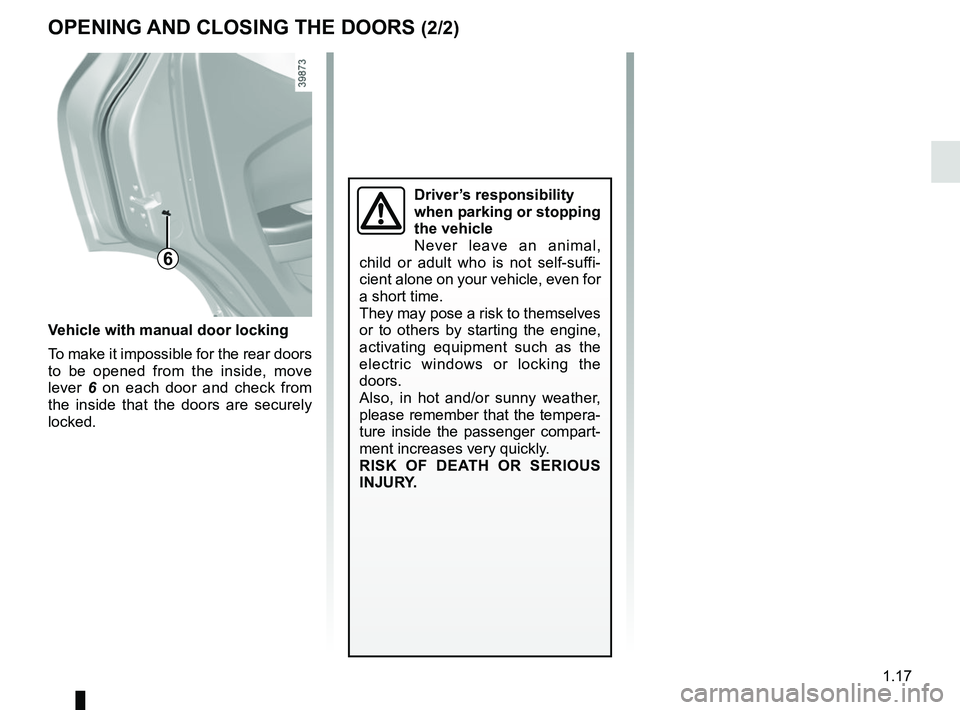
Vehicle with manual door locking
To make it impossible for the rear doors
to be opened from the inside, move
lever 6 on each door and check from
the inside that the doors are securely
locked.
OPENING AND CLOSING THE DOORS (2/2)
Driver’s responsibility
when parking or stopping
the vehicle
Never leave an animal,
child or adult who is not self-suffi-
cient alone on your vehicle, even for
a short time.
They may pose a risk to themselves
or to others by starting the engine,
activating equipment such as the
electric windows or locking the
doors.
Also, in hot and/or sunny weather,
please remember that the tempera-
ture inside the passenger compart-
ment increases very quickly.
RISK OF DEATH OR SERIOUS
INJURY.
Page 24 of 310
1.18
Operating principleAfter the vehicle is started, the system
automatically locks the doors when you
are driving at approximately 6 mph
(10 km/h) and over.
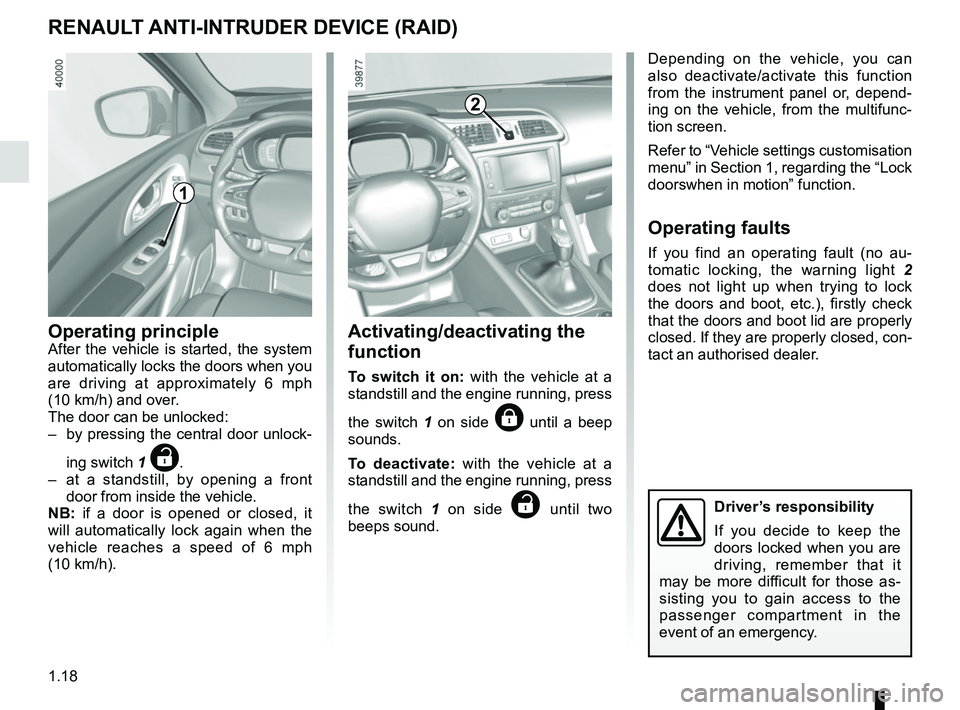
The door can be unlocked:
– by pressing the central door unlock-
ing switch 1
‡.
– at a standstill, by opening a front door from inside the vehicle.
NB: if a door is opened or closed, it
will automatically lock again when the
vehicle reaches a speed of 6 mph
(10 km/h).
RENAULT ANTI-INTRUDER DEVICE (RAID)
Driver’s responsibility
If you decide to keep the
doors locked when you are
driving, remember that it
may be more difficult for those as-
sisting you to gain access to the
passenger compartment in the
event of an emergency.
1
2
Depending on the vehicle, you can
also deactivate/activate this function
from the instrument panel or, depend-
ing on the vehicle, from the multifunc-
tion screen.
Refer to “Vehicle settings customisation
menu” in Section 1, regarding the “Lock
doorswhen in motion” function.
Operating faults
If you find an operating fault (no au-
tomatic locking, the warning light 2
does not light up when trying to lock
the doors and boot, etc.), firstly check
that the doors and boot lid are properly
closed. If they are properly closed, con-
tact an authorised dealer.
Activating/deactivating the
function
To switch it on: with the vehicle at a
standstill and the engine running, press
the switch 1 on side
… until a beep
sounds.
To deactivate: with the vehicle at a
standstill and the engine running, press
the switch 1 on side
‡ until two
beeps sound.
Page 30 of 310
1.24
SEAT BELTS (2/4)
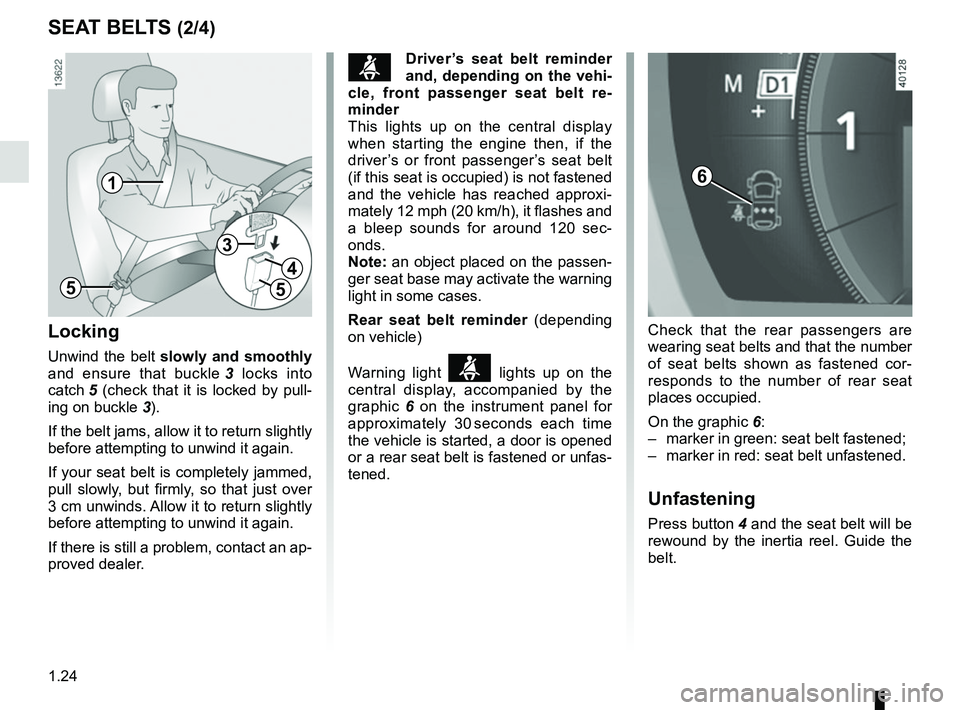
Locking
Unwind the belt slowly and smoothly
and ensure that buckle 3 locks into
catch 5 (check that it is locked by pull- ing on buckle 3).
If the belt jams, allow it to return slightly
before attempting to unwind it again.
If your seat belt is completely jammed,
pull slowly, but firmly, so that just over
3 cm unwinds. Allow it to return slightly
before attempting to unwind it again.
If there is still a problem, contact an ap-
proved dealer.
1
5
3
4
5
ßDriver’s seat belt reminder
and, depending on the vehi-
cle, front passenger seat belt re-
minder
This lights up on the central display
when starting the engine then, if the
driver’s or front passenger’s seat belt
(if this seat is occupied) is not fastened
and the vehicle has reached approxi-
mately 12 mph (20 km/h), it flashes and
a bleep sounds for around 120 sec-
onds.
Note: an object placed on the passen-
ger seat base may activate the warning
light in some cases.
Rear seat belt reminder (depending
on vehicle)
Warning light
ß lights up on the
central display, accompanied by the
graphic 6 on the instrument panel for
approximately 30 seconds each time
the vehicle is started, a door is opened
or a rear seat belt is fastened or unfas-
tened. Check that the rear passengers are
wearing seat belts and that the number
of seat belts shown as fastened cor-
responds to the number of rear seat
places occupied.
On the graphic 6:
– marker in green: seat belt fastened;
– marker in red: seat belt unfastened.
Unfastening
Press button 4 and the seat belt will be
rewound by the inertia reel. Guide the
belt.
6
Page 40 of 310
1.34
CHILD SAFETY: General information (1/2)
Carrying children
Please ensure that you comply with the
legislation of your country.
Children, and adults, must be correctly
seated and strapped in for all journeys.
The children being carried in your vehi-
cle are your responsibility.
A child is not a miniature adult. Children
are at risk of specific injuries as their
muscles and bones have not yet fin-
ished growing. The seat belt alone
would not provide suitable protection.
Use an approved child seat and ensure
you use it correctly.
A collision at 30 mph
(50 km/h) is the same as fall-
ing a distance of 10 metres.
Transporting a child without
a restraint is the equivalent of allow-
ing him or her to play on a fourth-
floor balcony without railings.
Never travel with a child held in your
arms. In the event of an accident,
you will not be able to keep hold of
the child, even if you yourself are
wearing a seat belt.
If your vehicle has been involved in
a road accident, replace the child
seat and have the seat belts and
ISOFIX anchorage points checked.
To prevent the doors being
opened, use the “Child
safety” device (refer to the
information on “Opening
and closing the doors” in Section 1).
Driver’s responsibility
when parking or stopping
the vehicle
Never leave an animal,
child or adult who is not self-suffi-
cient alone on your vehicle, even for
a short time.
They may pose a risk to themselves
or to others by starting the engine,
activating equipment such as the
electric windows or by locking the
doors.
Also, in hot and/or sunny weather,
please remember that the tempera-
ture inside the passenger compart-
ment increases very quickly.
RISK OF DEATH OR SERIOUS
INJURY.