lock RENAULT KANGOO 2012 X61 / 2.G User Guide
[x] Cancel search | Manufacturer: RENAULT, Model Year: 2012, Model line: KANGOO, Model: RENAULT KANGOO 2012 X61 / 2.GPages: 237, PDF Size: 8.62 MB
Page 17 of 237
doors..................................................... (up to the end of the DU)
locking the doors .................................. (up to the end of the DU)
unlocking the doors .............................. (up to the end of the DU)
1.11
ENG_UD21405_4
Verrouillage des portes (X61 - F61 - K61 - Renault)
ENG_NU_813-11_FK61_Renault_1
Locking the opening
elements without the remote
control
With the engine and ignition off, the
sliding side doors closed and a front
door open, press switch 1 for more than
five seconds.
Make sure you have your key with you
before you leave your vehicle.
When the door is closed, all the doors
and tailgate will be locked.
Unlocking from outside the vehicle will
only be possible with the key for the
driver’s door.
Doors and tailgate status
indicator light
When the ignition is on, the indicator
light integrated in switch 1 informs you
of the status of the doors and tailgate:
– indicator light on, the doors and tail-
gate are locked;
– indicator light off, at least one door is
unlocked.
When you lock the doors, the indicator
light remains lit and then goes out.
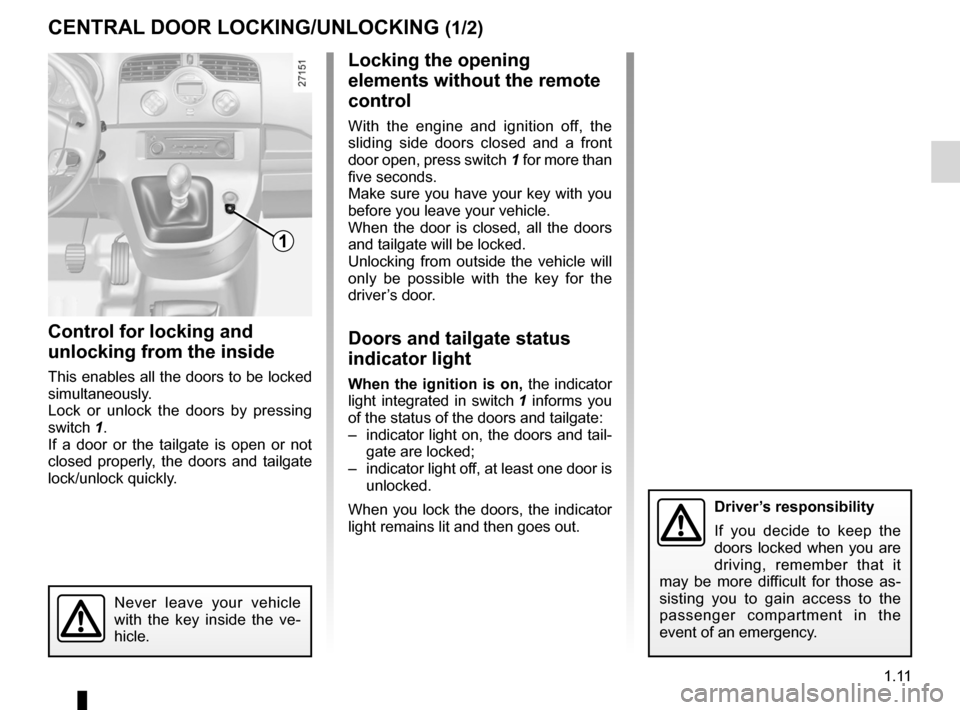
Control for locking and
unlocking from the inside
This enables all the doors to be locked
simultaneously.
Lock or unlock the doors by pressing
switch 1.
If a door or the tailgate is open or not
closed properly, the doors and tailgate
lock/unlock quickly.
Locking/unlocking the doors
CeNTRAL DOOR LOCKING/UNLOCKING (1/2)
1
Never leave your vehicle
with the key inside the ve -
hicle.
Driver’s responsibility
If you decide to keep the
doors locked when you are
driving, remember that it
may be more difficult for those as -
sisting you to gain access to the
passenger compartment in the
event of an emergency.
Page 18 of 237
1.12
ENG_UD21405_4
Verrouillage des portes (X61 - F61 - K61 - Renault)
ENG_NU_813-11_FK61_Renault_1
CeNTRAL DOOR LOCKING/UNLOCKING (2/2)
2
Manual control
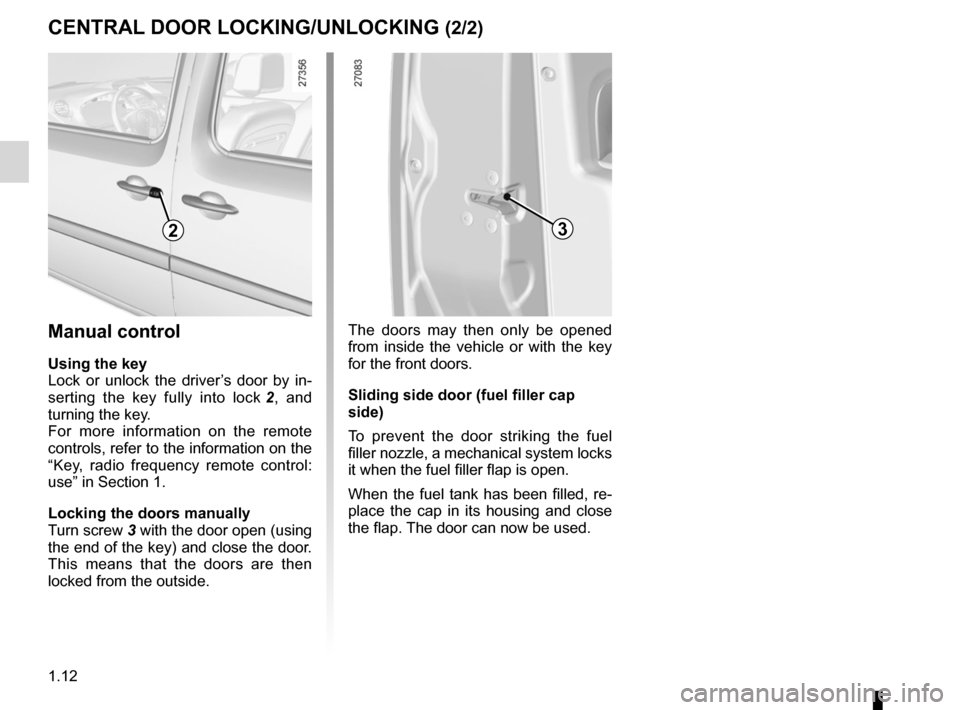
Using the key
Lock or unlock the driver’s door by in -
serting the key fully into lock 2 , and
turning the key.
For more information on the remote
controls, refer to the information on the
“Key, radio frequency remote control:
use” in Section 1.
Locking the doors manually
Turn screw 3 with the door open (using
the end of the key) and close the door.
This means that the doors are then
locked from the outside.
The doors may then only be opened
from inside the vehicle or with the key
for the front doors.
Sliding side door (fuel filler cap
side)
To prevent the door striking the fuel
filler nozzle, a mechanical system locks
it when the fuel filler flap is open.
When the fuel tank has been filled, re-
place the cap in its housing and close
the flap. The door can now be used.
3
Page 19 of 237
RENAULT ANTI-INTRUDER DEVICE (RAID) .......(current page)
doors ...................................................................... (current page)
1.13
ENG_UD21406_3
Condamnation automatique des ouvrants en roulage (X61 - F61 - K61 - Renault)
ENG_NU_813-11_FK61_Renault_1
y ou must first decide if you want to
activate this function.
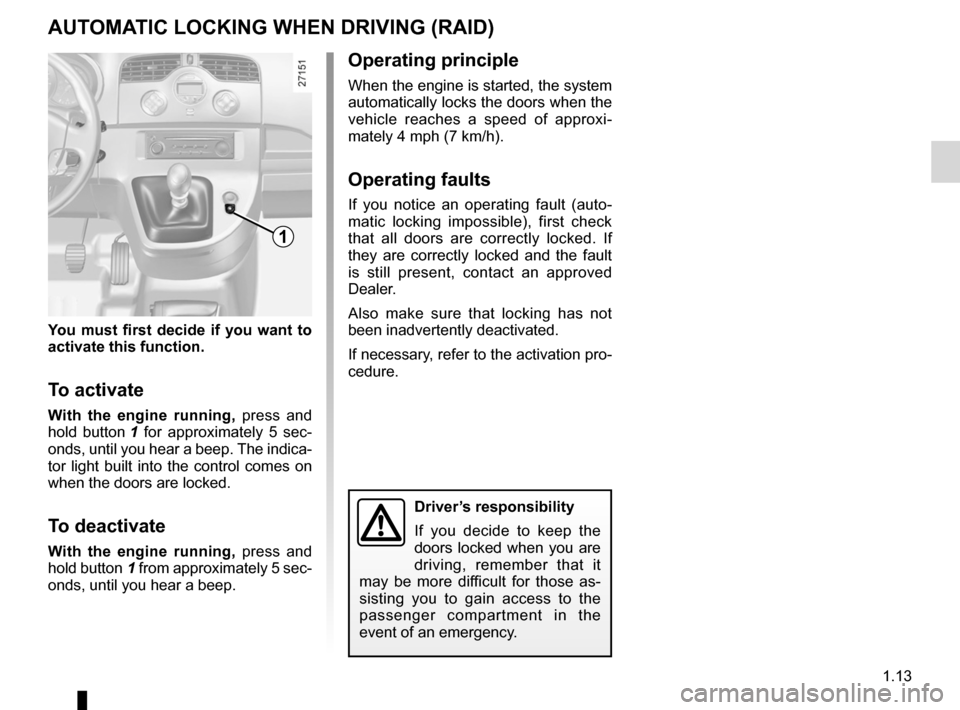
To activate
With the engine running, press and
hold button 1 for approximately 5 sec -
onds, until you hear a beep. The indica -
tor light built into the control comes on
when the doors are locked.
To deactivate
With the engine running, press and
hold button 1 from approximately 5 sec-
onds, until you hear a beep.
Automatic locking of opening elements when driving
AUTOMATIC LOCKING WHeN DRIvING (RAID)
Operating principle
When the engine is started, the system
automatically locks the doors when the
vehicle reaches a speed of approxi -
mately 4 mph (7 km/h).
Operating faults
If you notice an operating fault (auto -
matic locking impossible), first check
that all doors are correctly locked. If
they are correctly locked and the fault
is still present, contact an approved
Dealer.
Also make sure that locking has not
been inadvertently deactivated.
If necessary, refer to the activation pro-
cedure.
1
Driver’s responsibility
If you decide to keep the
doors locked when you are
driving, remember that it
may be more difficult for those as -
sisting you to gain access to the
passenger compartment in the
event of an emergency.
Page 20 of 237
headrest................................................ (up to the end of the DU)
1.14
ENG_UD29319_4
Appuis-tête avant (X61 - F61 - K61 - Renault)
ENG_NU_813-11_FK61_Renault_1
Jaune NoirNoir texte
Headrests/Front seats
FRONT HeADReSTS (1/3)
To refit the headrest
First, check that the headrest rods are
clean and correctly aligned.
Pull the tab 2 forwards.
Insert the headrest rods in the holes,
with the notches facing forwards (tilt the
seat backwards if necessary).
Guide the headrest down to the desired
height.
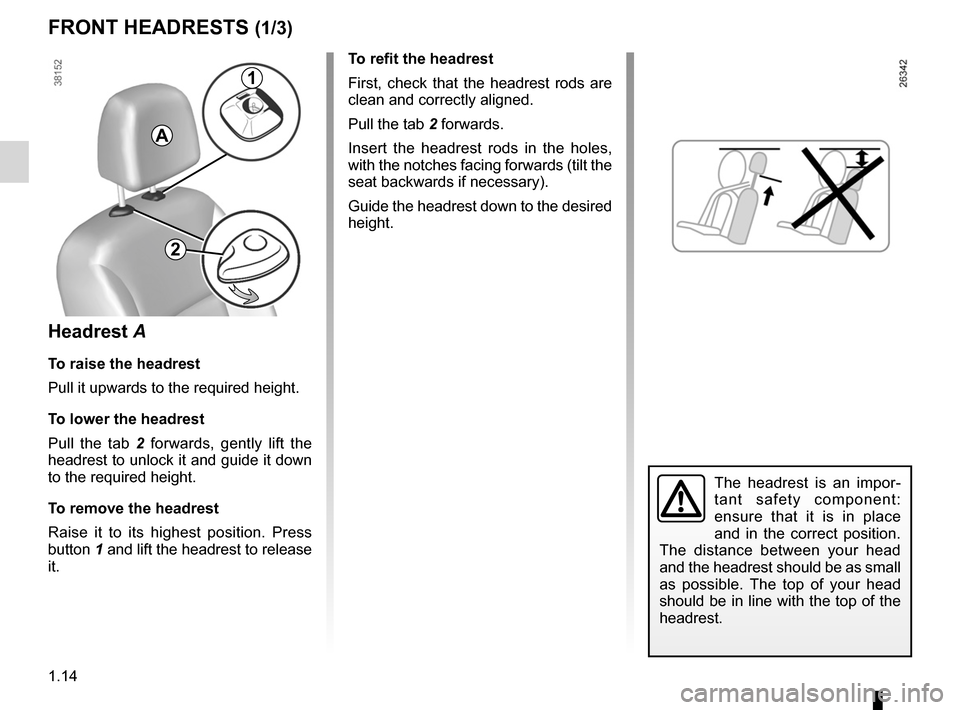
Headrest A
To raise the headrest
Pull it upwards to the required height.
To lower the headrest
Pull the tab 2 forwards, gently lift the
headrest to unlock it and guide it down
to the required height.
To remove the headrest
Raise it to its highest position. Press
button 1 and lift the headrest to release
it.
A
The headrest is an impor -
tant safety component:
ensure that it is in place
and in the correct position.
The distance between your head
and the headrest should be as small
as possible. The top of your head
should be in line with the top of the
headrest.
1
2
Page 21 of 237

JauneNoirNoir texte
1.15
ENG_UD29319_4
Appuis-tête avant (X61 - F61 - K61 - Renault)
ENG_NU_813-11_FK61_Renault_1
To remove the headrest
Raise it to its highest position. Press
button 4 and lift the headrest to release
it.
Note: when the headrest is removed,
take care not to change the positions
of the rods.
To refit the headrest
If the setting of the rods has been al -
tered, pull them fully upwards. Take
care to ensure they are clean and cor-
rectly aligned and, if there are any prob-
lems, check that the notches are facing
forwards.
Insert the headrest rods into the holes
(tilt the seatback backwards if neces -
sary).
Lower the headrest until it locks, press
button 3 and lower the headrest as far
as possible.
FRONT HeADReSTS (2/3)
Headrest B
To raise the headrest
Pull it upwards to the required height.
To lower the headrest
Press button 3 and guide the headrest
down to the desired height.
The headrest is an impor -
tant safety component:
ensure that it is in place
and in the correct position.
The distance between your head
and the headrest should be as small
as possible. The top of your head
should be in line with the top of the
headrest.
3
B
4
Page 24 of 237
front seatsadjustment ...................................... (up to the end of the DU)
heated seats ......................................... (up to the end of the DU)
front seat adjustment ............................(up to the end of the DU)
1.18
ENG_UD21409_6
Sièges avant (X61 - F61 - K61 - Renault)
ENG_NU_813-11_FK61_Renault_1
Jaune NoirNoir texte
Front seats
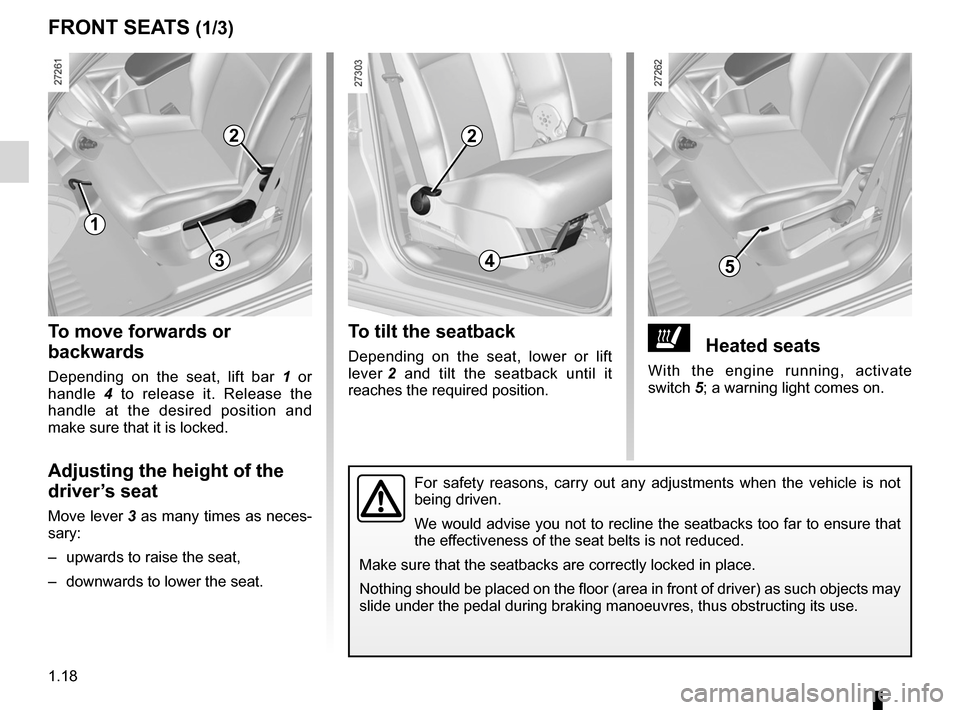
ðHeated seats
With the engine running, activate
switch 5; a warning light comes on.
To tilt the seatback
Depending on the seat, lower or lift
lever 2 and tilt the seatback until it
reaches the required position.
To move forwards or
backwards
Depending on the seat, lift bar 1 or
handle 4 to release it. Release the
handle at the desired position and
make sure that it is locked.
Adjusting the height of the
driver’s seat
Move lever 3 as many times as neces-
sary:
– upwards to raise the seat,
– downwards to lower the seat.
FRONT SeATS (1/3)
1
2
534
2
For safety reasons, carry out any adjustments when the vehicle is not
being driven.
We would advise you not to recline the seatbacks too far to ensure that
the effectiveness of the seat belts is not reduced.
Make sure that the seatbacks are correctly locked in place.
Nothing should be placed on the floor (area in front of driver) as such objects may
slide under the pedal during braking manoeuvres, thus obstructing its use.
Page 25 of 237
JauneNoirNoir texte
1.19
ENG_UD21409_6
Sièges avant (X61 - F61 - K61 - Renault)
ENG_NU_813-11_FK61_Renault_1
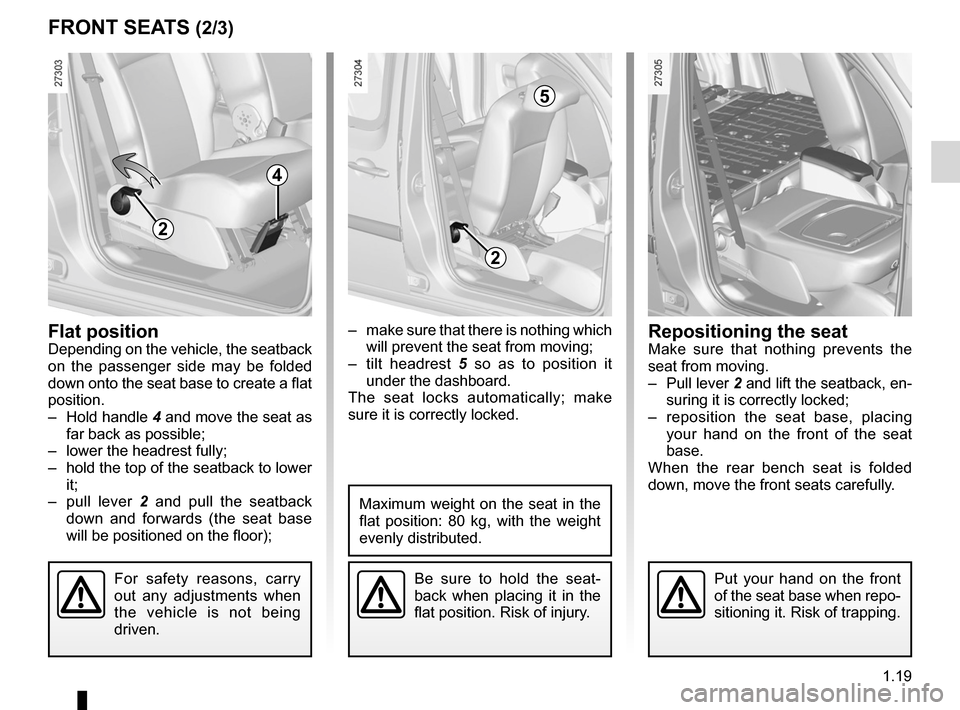
– make sure that there is nothing which
will prevent the seat from moving;
– tilt headrest 5 so as to position it
under the dashboard.
The seat locks automatically; make
sure it is correctly locked.Flat positionDepending on the vehicle, the seatback
on the passenger side may be folded
down onto the seat base to create a flat
position.
– Hold handle 4 and move the seat as
far back as possible;
– lower the headrest fully;
– hold the top of the seatback to lower
it;
– pull lever 2 and pull the seatback
down and forwards (the seat base
will be positioned on the floor);
Be sure to hold the seat -
back when placing it in the
flat position. Risk of injury.
Maximum weight on the seat in the
flat position: 80 kg, with the weight
evenly distributed.
FRONT SeATS (2/3)
4
2
2
5
For safety reasons, carry
out any adjustments when
the vehicle is not being
driven.Put your hand on the front
of the seat base when repo-
sitioning it. Risk of trapping.
Repositioning the seatMake sure that nothing prevents the
seat from moving.
– Pull lever 2 and lift the seatback, en-
suring it is correctly locked;
– reposition the seat base, placing
your hand on the front of the seat
base.
When the rear bench seat is folded
down, move the front seats carefully.
Page 26 of 237
1.20
ENG_UD21409_6
Sièges avant (X61 - F61 - K61 - Renault)
ENG_NU_813-11_FK61_Renault_1
FRONT SeATS (3/3)
Front seats
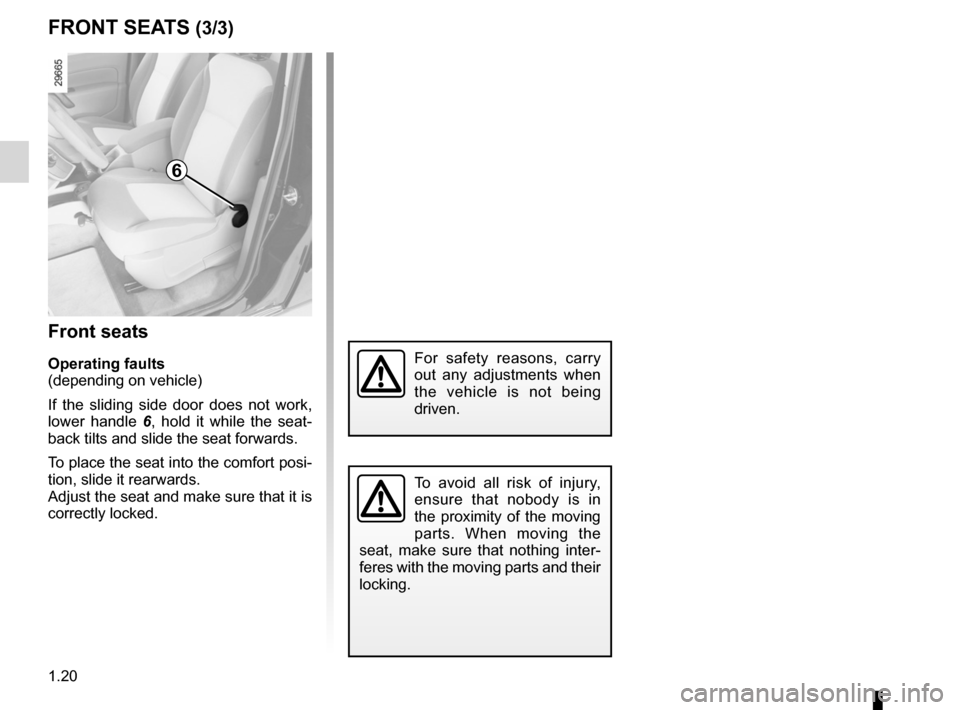
Operating faults
(depending on vehicle)
If the sliding side door does not work,
lower handle 6 , hold it while the seat -
back tilts and slide the seat forwards.
To place the seat into the comfort posi-
tion, slide it rearwards.
Adjust the seat and make sure that it is
correctly locked.
To avoid all risk of injury,
ensure that nobody is in
the proximity of the moving
parts. When moving the
seat, make sure that nothing inter -
feres with the moving parts and their
locking.
For safety reasons, carry
out any adjustments when
the vehicle is not being
driven.
6
Page 27 of 237
1.21
ENG_UD21407_3
Trappe de pavillon (X61 - F61 - K61 - Renault)
ENG_NU_813-11_FK61_Renault_1
Roof flap
ROOF FLAp (1/2)
Driving with the roof flap
open may be unpleasant
for passengers because
exhaust gas may enter the
passenger compartment. This use
is solely for short distances, whilst
transporting bulky objects with-
out having to open the rear doors.
In this case, close the other win -
dows and operate the ventilation
system at the half or fully open
setting, as this will help to prevent
exhaust gas from entering the pas-
senger compartment.
123
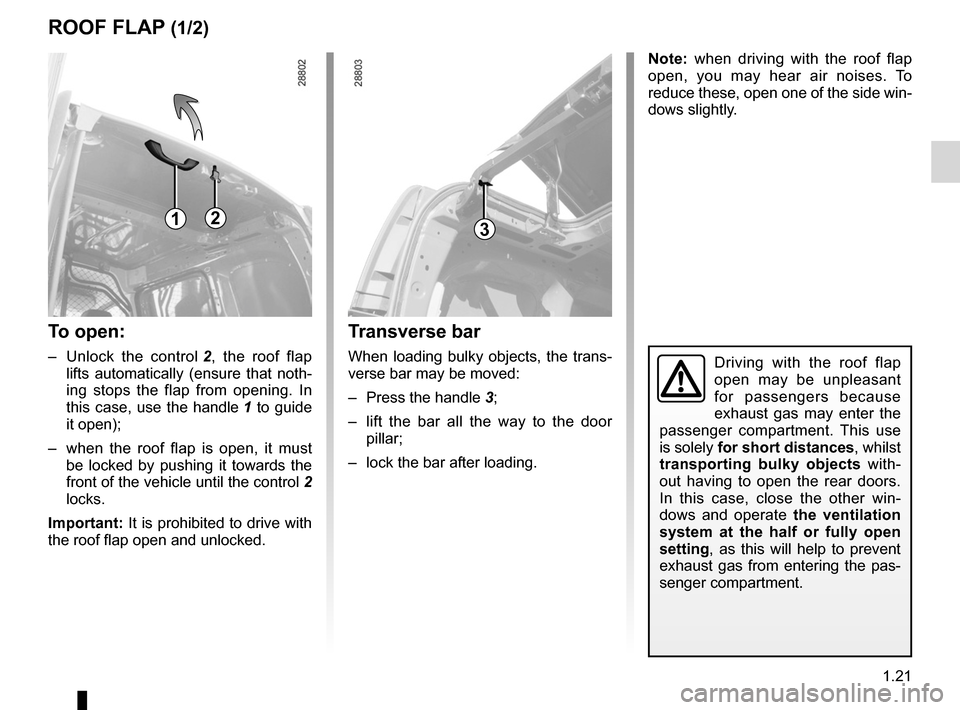
Transverse bar
When loading bulky objects, the trans-
verse bar may be moved:
– Press the handle 3;
– lift the bar all the way to the door
pillar;
– lock the bar after loading.
To open:
– Unlock the control 2 , the roof flap
lifts automatically (ensure that noth-
ing stops the flap from opening. In
this case, use the handle 1 to guide
it open);
– when the roof flap is open, it must
be locked by pushing it towards the
front of the vehicle until the control 2
locks.
Important: It is prohibited to drive with
the roof flap open and unlocked. Note:
when driving with the roof flap
open, you may hear air noises. To
reduce these, open one of the side win-
dows slightly.
Page 28 of 237
1.22
ENG_UD21407_3
Trappe de pavillon (X61 - F61 - K61 - Renault)
ENG_NU_813-11_FK61_Renault_1
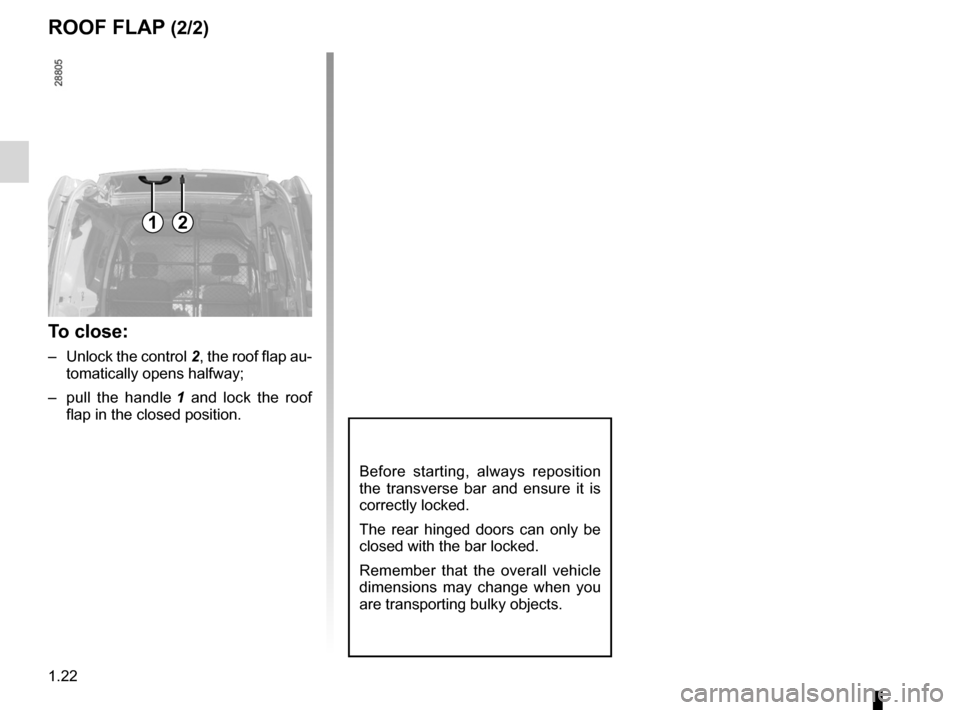
ROOF FLAp (2/2)
Before starting, always reposition
the transverse bar and ensure it is
correctly locked.
The rear hinged doors can only be
closed with the bar locked.
Remember that the overall vehicle
dimensions may change when you
are transporting bulky objects.
12
To close:
– Unlock the control 2, the roof flap au-
tomatically opens halfway;
– pull the handle 1 and lock the roof
flap in the closed position.