steering RENAULT KANGOO 2018 User Guide
[x] Cancel search | Manufacturer: RENAULT, Model Year: 2018, Model line: KANGOO, Model: RENAULT KANGOO 2018Pages: 264, PDF Size: 7.09 MB
Page 93 of 264

Running in . . . . . . . . . . . . . . . . . . . . . . . . . . . . . . . . . . . . \
. . . . . . . . . . . . . . . .")
2.1
Section 2: Driving
(Advice on use relating to fuel economy and the environment)
Running in . . . . . . . . . . . . . . . . . . . . . . . . . . . . . . . . . . . . \
. . . . . . . . . . . . . . . . . . . . . . . . . . . . . . . . . 2.2
Ignition switch . . . . . . . . . . . . . . . . . . . . . . . . . . . . . . . . . . . .\
. . . . . . . . . . . . . . . . . . . . . . . . . . . . . . 2.2
Starting, stopping the engine . . . . . . . . . . . . . . . . . . . . . . . . . . . . . . . . . . . . \
. . . . . . . . . . . . . . . . . . . 2.3
Stop and Start function . . . . . . . . . . . . . . . . . . . . . . . . . . . . . . . . . . . .\
. . . . . . . . . . . . . . . . . . . . . . . 2.4
Gear lever . . . . . . . . . . . . . . . . . . . . . . . . . . . . . . . . . . . .\
. . . . . . . . . . . . . . . . . . . . . . . . . . . . . . . . . 2.7
Handbrake/Power-assisted steering . . . . . . . . . . . . . . . . . . . . . . . . . . . . . . . . . . . .\
. . . . . . . . . . . . . 2.8
Special features of petrol versions . . . . . . . . . . . . . . . . . . . . . . . . . . . . . . . . . . . .\
. . . . . . . . . . . . . . 2.9
Special features of diesel versions . . . . . . . . . . . . . . . . . . . . . . . . . . . . . . . . . . . .\
. . . . . . . . . . . . . . 2.10
Driving advice, Eco-driving . . . . . . . . . . . . . . . . . . . . . . . . . . . . . . . . . . . .\
. . . . . . . . . . . . . . . . . . . . 2.11
Maintenance and antipollution advice . . . . . . . . . . . . . . . . . . . . . . . . . . . . . . . . . . . . \
. . . . . . . . . . . . 2.15
Environment . . . . . . . . . . . . . . . . . . . . . . . . . . . . . . . . . . . .\
. . . . . . . . . . . . . . . . . . . . . . . . . . . . . . . 2.16
Tyre pressure loss warning . . . . . . . . . . . . . . . . . . . . . . . . . . . . . . . . . . . .\
. . . . . . . . . . . . . . . . . . . . 2.17
Tyre pressure loss warning . . . . . . . . . . . . . . . . . . . . . . . . . . . . . . . . . . . .\
. . . . . . . . . . . . . . . . . . . . 2.22
Driver correction devices/aids . . . . . . . . . . . . . . . . . . . . . . . . . . . . . . . . . . . . \
. . . . . . . . . . . . . . . . . . 2.26
Speed limiter . . . . . . . . . . . . . . . . . . . . . . . . . . . . . . . . . . . .\
. . . . . . . . . . . . . . . . . . . . . . . . . . . . . . . 2.31
Cruise control . . . . . . . . . . . . . . . . . . . . . . . . . . . . . . . . . . . .\
. . . . . . . . . . . . . . . . . . . . . . . . . . . . . . 2.34
Parking distance control . . . . . . . . . . . . . . . . . . . . . . . . . . . . . . . . . . . .\
. . . . . . . . . . . . . . . . . . . . . . 2.38
Reversing camera . . . . . . . . . . . . . . . . . . . . . . . . . . . . . . . . . . . . \
. . . . . . . . . . . . . . . . . . . . . . . . . . . 2.40
Automatic gearbox. . . . . . . . . . . . . . . . . . . . . . . . . . . . . . . . . . . . \
. . . . . . . . . . . . . . . . . . . . . . . . . . . 2.42
Page 94 of 264
2.2
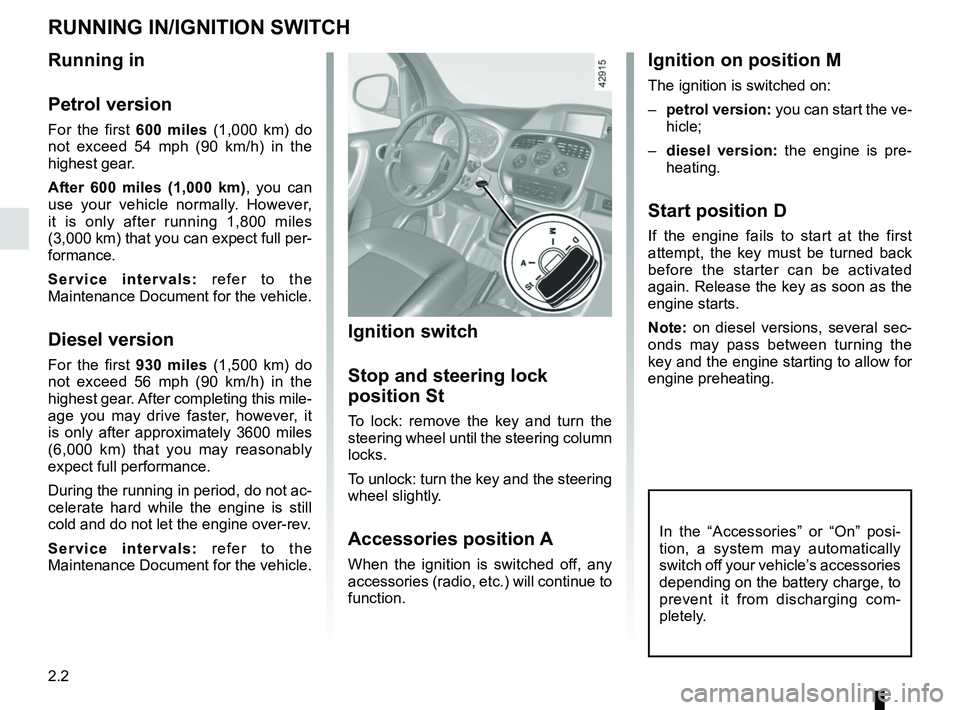
Ignition on position M
The ignition is switched on:
– petrol version: you can start the ve-
hicle;
– diesel version: the engine is pre-
heating.
Start position D
If the engine fails to start at the first
attempt, the key must be turned back
before the starter can be activated
again. Release the key as soon as the
engine starts.
Note: on diesel versions, several sec-
onds may pass between turning the
key and the engine starting to allow for
engine preheating.
Ignition switch
Stop and steering lock
position St
To lock: remove the key and turn the
steering wheel until the steering column
locks.
To unlock: turn the key and the steering
wheel slightly.
Accessories position A
When the ignition is switched off, any
accessories (radio, etc.) will continue to
function.
Running in
Petrol version
For the first 600 miles (1,000 km) do
not exceed 54 mph (90 km/h) in the
highest gear.
After 600 miles (1,000 km) , you can
use your vehicle normally. However,
it is only after running 1,800 miles
(3,000 km) that you can expect full per-
formance.
Service intervals: refer to the
Maintenance Document for the vehicle.
Diesel version
For the first 930 miles (1,500 km) do
not exceed 56 mph (90 km/h) in the
highest gear. After completing this mile-
age you may drive faster, however, it
is only after approximately 3600 miles
(6,000 km) that you may reasonably
expect full performance.
During the running in period, do not ac-
celerate hard while the engine is still
cold and do not let the engine over-rev.
Service intervals: refer to the
Maintenance Document for the vehicle.
RUNNING IN/IGNITION SWITCH
In the “Accessories” or “On” posi-
tion, a system may automatically
switch off your vehicle’s accessories
depending on the battery charge, to
prevent it from discharging com-
pletely.
Page 100 of 264

2.8
To apply:
Pull upwards, check that the vehicle is
properly immobilised.
Variable power-assisted
steering
The variable power-assisted steering
system is equipped with an electronic
control system which alters the level of
assistance to suit the vehicle speed.
Steering is made easier during parking
manoeuvres (for added comfort) while
the force needed to steer increases
progressively as the speed rises (for
enhanced safety at high speeds).
Handbrake
To release:
Pull lever 2 up slightly, press button 1
and then lower the lever to the floor.
Never switch off the igni-
tion when travelling down-
hill, and avoid doing so in
normal driving (assistance
is not provided).
HANDBRAKE/POWER-ASSISTED STEERING
21
Make sure that the hand-
brake is properly released
when driving (red indicator
light off), otherwise over-
heating, or even damage, may
occur.
2
1
When stationary and de-
pending on the slope and/or
vehicle load, it may be nec-
essary to pull up the hand-
brake at least two extra notches and
engage a gear (1
st or reverse gear)
for vehicles with a manual gearbox
or position P for vehicles with an au-
tomatic transmission.
Page 104 of 264

2.12
DRIVING ADVICE, ECO-DRIVING (2/4)
ECO mode
ECO mode is a function which opti-
mises fuel consumption. It acts upon
certain power consuming systems in
the vehicle (heating, air conditioning,
power-assisted steering, etc.) and on
certain driving actions (acceleration,
gear changing, cruise control, deceler-
ation, etc.).
Activating the function
Press switch 4.
The warning light in the 4 switch lights
up.
4
While driving, it is possible to leave the
ECO mode temporarily in order to im-
prove engine performance.
To do this, press the accelerator pedal
firmly and fully.
ECO mode is reactivated when you
take pressure off the accelerator pedal.
Disabling the function
Press switch 4.
The indicator light in the switch 4 goes
out.
Journey record
Once the engine is switched off, you
will see “Journey record” displayed on
the screen 3, enabling you to view in-
formation relating to your last journey.
This indicates:
– average fuel consumption;
– number of miles/kilometres travelled;
– number of miles/kilometres saved.
3
Depending on the vehicle, the func-
tion is active every time the engine
is started. A label is attached to the
dashboard to notify you.
Page 119 of 264

2.27
DRIVING CORRECTION DEVICES AND AIDS (2/5)
Electronic stability program
ESC with understeer control
and traction control
Electronic stability control ESC
This system helps you to keep control
of the vehicle in critical driving condi-
tions (avoiding an obstacle, loss of grip
on a bend, etc.).
Operating principle
A sensor in the steering wheel detects
the direction selected by the driver.
Other sensors throughout the vehicle
measure the actual direction.
The system compares driver input to
the actual trajectory of the vehicle and
corrects the trajectory if necessary by
controlling the braking of certain wheels
and/or engine power. In the event that
the system is engaged, indicator light
flashes on the instrument panel. Understeer control
This system optimises the action of the
ESC in the case of pronounced under-
steer (loss of front axle road holding).
Traction control
This system helps to limit wheelspin of
the drive wheels and to control the ve-
hicle when pulling away accelerating or
decelerating.
Operating principle
Using the wheel sensors, the system
measures and compares the speed of
the drive wheels at all times and slows
down their over-rotation. If a wheel is
starting to slip, the system brakes au-
tomatically until the drive supplied be-
comes compatible with the level of grip
under the wheel again.
The system also adjusts the engine
speed to the grip available under the
wheels, independently of the pressure
exerted on the accelerator pedal. Operating faults
When the system detects an operating
fault the message “CHECK ESC” and
warning light
© appear on the in-
strument panel. In this case, the ESC
and traction control system are deacti-
vated.
Consult an approved dealer.
Page 133 of 264
2.41
REVERSING CAMERA (2/2)
The screen shows a reverse image.
The frames are a representation
projected onto flat ground; this in-
formation must not be taken into
account when superimposed on a
vertical object or an object on the
ground.
Objects which appear on the edge
of the screen may be deformed.
In very bright light (snow, vehicle in
sunshine etc.), the camera vision
may be adversely affected.
If the rear doors are open or poorly
closed, the camera display disap-
pears and, depending on the ve-
hicle, the message “BOOT OPEN”
appears.
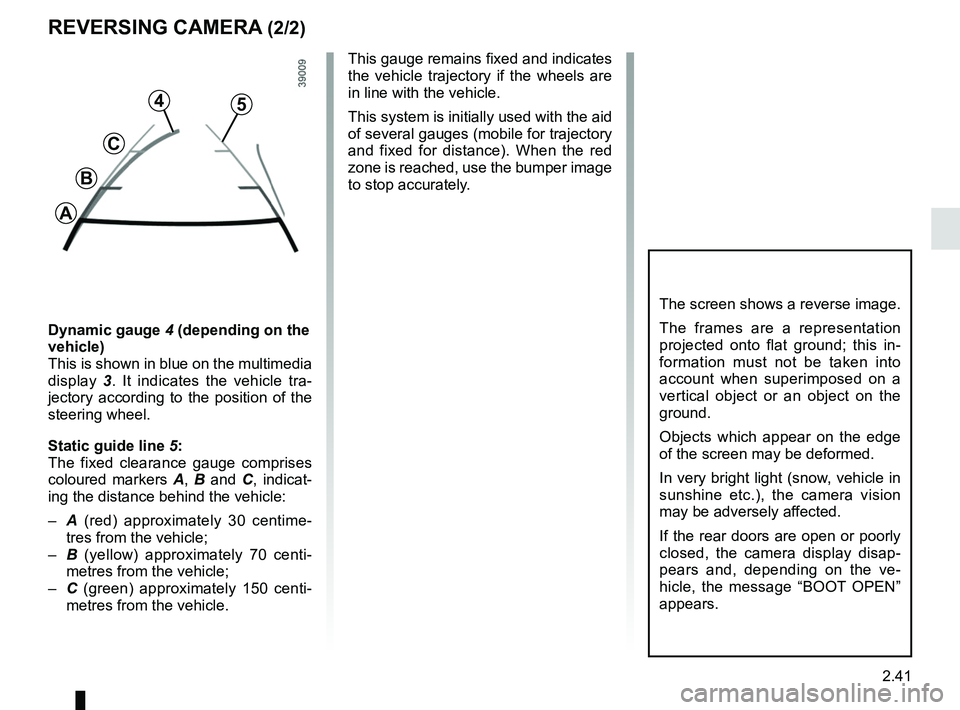
Dynamic gauge 4 (depending on the
vehicle)
This is shown in blue on the multimedia
display 3. It indicates the vehicle tra-
jectory according to the position of the
steering wheel.
Static guide line 5:
The fixed clearance gauge comprises
coloured markers A, B and C , indicat-
ing the distance behind the vehicle:
– A (red) approximately 30 centime-
tres from the vehicle;
– B (yellow) approximately 70 centi-
metres from the vehicle;
– C (green) approximately 150 centi-
metres from the vehicle. This gauge remains fixed and indicates
the vehicle trajectory if the wheels are
in line with the vehicle.
This system is initially used with the aid
of several gauges (mobile for trajectory
and fixed for distance). When the red
zone is reached, use the bumper image
to stop accurately.
4
C
B
A
5
Page 173 of 264
3.37
MULTIMEDIA EQUIPMENT
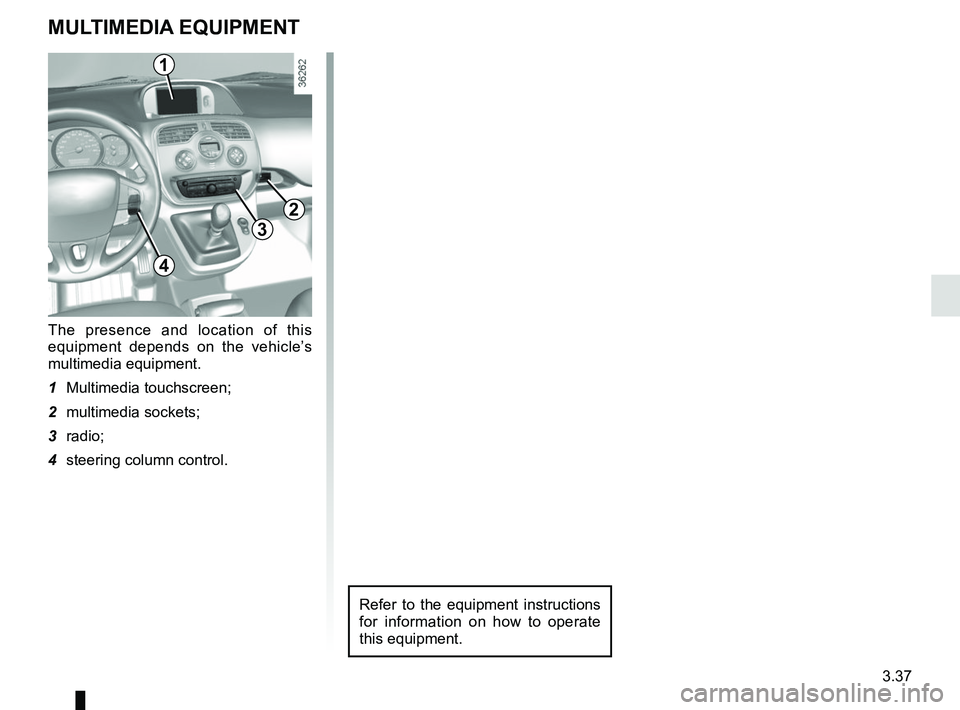
The presence and location of this
equipment depends on the vehicle’s
multimedia equipment.
1 Multimedia touchscreen;
2 multimedia sockets;
3 radio;
4 steering column control.
1
3
2
4
Refer to the equipment instructions
for information on how to operate
this equipment.
Page 225 of 264
5.31
Before towing, unlock the steering
column: with the clutch dipped, engage
first gear (lever in N or R positions for
vehicles with an automatic gearbox),
insert the key in the ignition-starter
switch.
Reposition the lever to neutral (position
N for vehicles fitted with an automatic
gearbox).
The column is unlocked, the acces-
sory functions are supplied: the vehi-
cle lights can be used (indicators, brake
lights etc.). At night the vehicle must
have its lights on. The speed specified by current legis-
lation for towing must always be ob-
served. If your vehicle is the towing
vehicle, do not exceed the maximum
towing weight for your vehicle (refer to
the information on “Weights” in Section
6).
Towing a vehicle with an
automatic gearbox
With the engine switched off:
the
gearbox is no longer lubricated. It is
preferable to tow this type of vehicle on
a trailer or tow it with the front wheels
off the ground.
Under exceptional circumstances ,
you may tow the vehicle with all four
wheels on the ground, only going
forward, with the gear lever in the
Neutral position, and for a distance
not exceeding 30 miles (50 km).
TOWING: breakdown (1/2)
When the engine is
stopped, steering and brak-
ing assistance are not op-
erational.
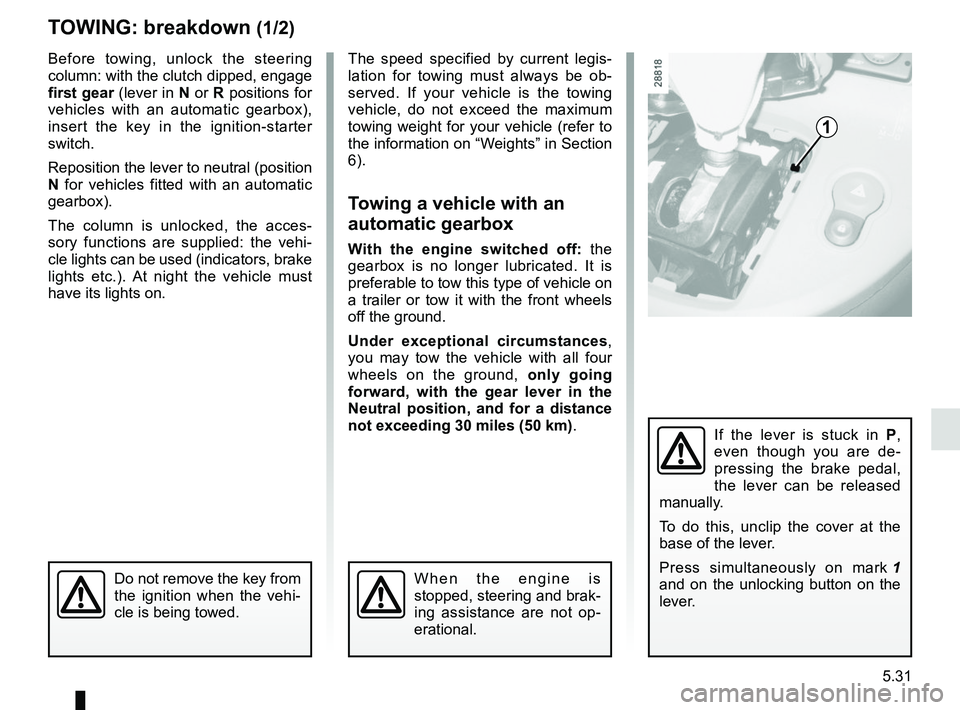
1
If the lever is stuck in P ,
even though you are de-
pressing the brake pedal,
the lever can be released
manually.
To do this, unclip the cover at the
base of the lever.
Press simultaneously on mark 1
and on the unlocking button on the
lever.
Do not remove the key from
the ignition when the vehi-
cle is being towed.
Page 227 of 264
5.33
To use this equipment, consult the
instructions for the equipment which
should be kept with the other vehi-
cle documentation.
FITTING A RADIO (1/2)
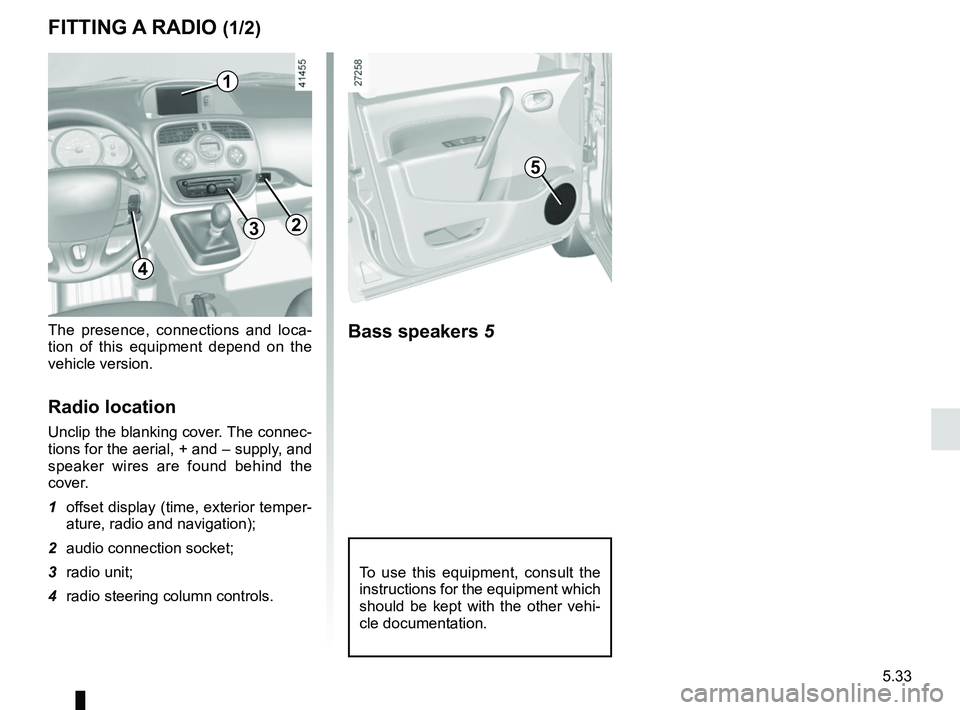
The presence, connections and loca-
tion of this equipment depend on the
vehicle version.
Radio location
Unclip the blanking cover. The connec-
tions for the aerial, + and – supply, and
speaker wires are found behind the
cover.
1 offset display (time, exterior temper-ature, radio and navigation);
2 audio connection socket;
3 radio unit;
4 radio steering column controls.
Bass speakers 5
5
1
32
4
Page 232 of 264
5.38
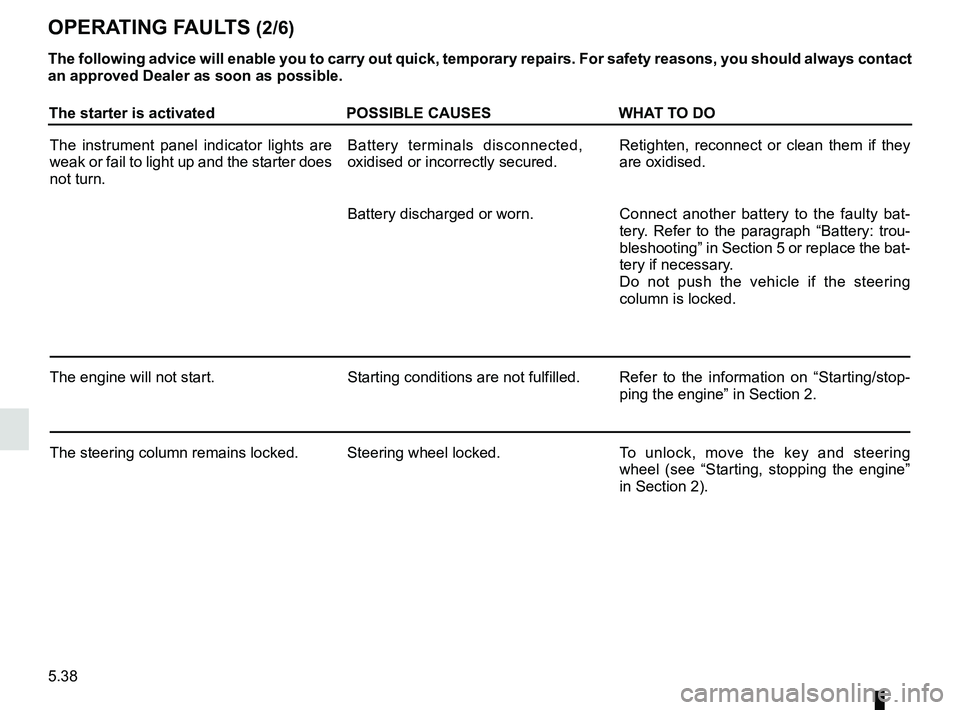
The starter is activatedPOSSIBLE CAUSESWHAT TO DO
The instrument panel indicator lights are
weak or fail to light up and the starter does
not turn. Battery terminals disconnected,
oxidised or incorrectly secured.
Retighten, reconnect or clean them if they
are oxidised.
Battery discharged or worn. Connect another battery to the faulty bat-
tery. Refer to the paragraph “Battery: trou-
bleshooting” in Section 5 or replace the bat-
tery if necessary.
Do not push the vehicle if the steering
column is locked.
The engine will not start. Starting conditions are not fulfilled.Refer to the information on “Starting/stop-
ping the engine” in Section 2.
The steering column remains locked. Steering wheel locked. To unlock, move the key and steering
wheel (see “Starting, stopping the engine”
in Section 2).
OPERATING FAULTS (2/6)
The following advice will enable you to carry out quick, temporary repai\
rs. For safety reasons, you should always contact
an approved Dealer as soon as possible.