check RENAULT KANGOO 2018 Owner's Manual
[x] Cancel search | Manufacturer: RENAULT, Model Year: 2018, Model line: KANGOO, Model: RENAULT KANGOO 2018Pages: 264, PDF Size: 7.09 MB
Page 49 of 264
1.43
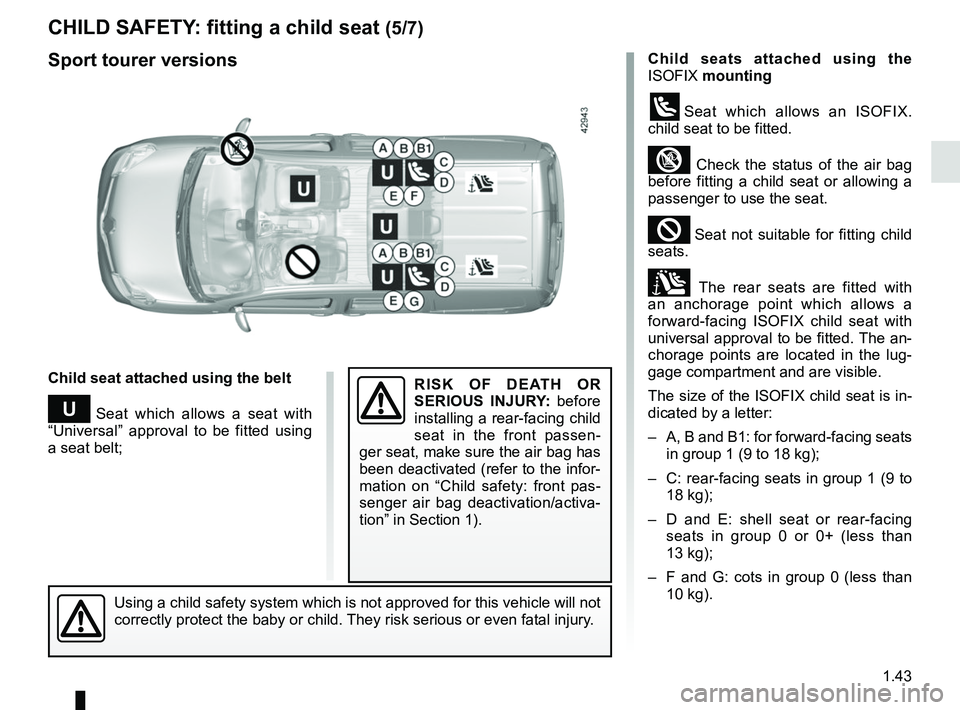
CHILD SAFETY: fitting a child seat (5/7)
Child seats attached using the
ISOFIX mounting
üSeat which allows an ISOFIX.
child seat to be fitted.
³ Check the status of the air bag
before fitting a child seat or allowing a
passenger to use the seat.
² Seat not suitable for fitting child
seats.
± The rear seats are fitted with
an anchorage point which allows a
forward-facing ISOFIX child seat with
universal approval to be fitted. The an-
chorage points are located in the lug-
gage compartment and are visible.
The size of the ISOFIX child seat is in-
dicated by a letter:
– A, B and B1: for forward-facing seats in group 1 (9 to 18 kg);
– C: rear-facing seats in group 1 (9 to 18 kg);
– D and E: shell seat or rear-facing seats in group 0 or 0+ (less than
13 kg);
– F and G: cots in group 0 (less than 10 kg).
Child seat attached using the belt
¬ Seat which allows a seat with
“Universal” approval to be fitted using
a seat belt;
Using a child safety system which is not approved for this vehicle will \
not
correctly protect the baby or child. They risk serious or even fatal injury.
RISK OF DEATH OR
SERIOUS INJURY: before
installing a rear-facing child
seat in the front passen-
ger seat, make sure the air bag has
been deactivated (refer to the infor-
mation on “Child safety: front pas-
senger air bag deactivation/activa-
tion” in Section 1).
Sport tourer versions
Page 51 of 264

1.45
X = Seat not suitable for fitting child seats.
U = Seat which allows a child seat with “Universal” approval to be ins\
talled using a seat belt; check that it can be fitted.
IUF/IL = On equipped vehicles, seat which allows an approved “Universal/semi-u\
niversal” or “vehicle specific” child seat to be at-
tached using the ISOFIX system; check that it can be fitted.
(2) Only a rear-facing child seat can be fitted in this seat: raise the seat\
to the maximum and position it as far back as possible ,
tilting the seatback slightly (approximately 25°).
(3) A carrycot is fitted crosswise and occupies at least two seats (the chil\
d’s feet are placed nearest the door).
(4) Move the front seat as far forward as possible to install a rear-facing \
child seat, then move back the seat in front as far as it will
go, although without allowing it to come into contact with the child sea\
t.
(5) Forward-facing child seat; position the seatback of the child seat in co\
ntact with the seatback of the vehicle seat. Adjust the
headrest, or remove it if necessary. In addition, do not push the seat in front of the child further than h\
alfway along its runners,
or incline the seatback more than 25°.
CHILD SAFETY: fitting a child seat (7/7)
Page 52 of 264
1.46
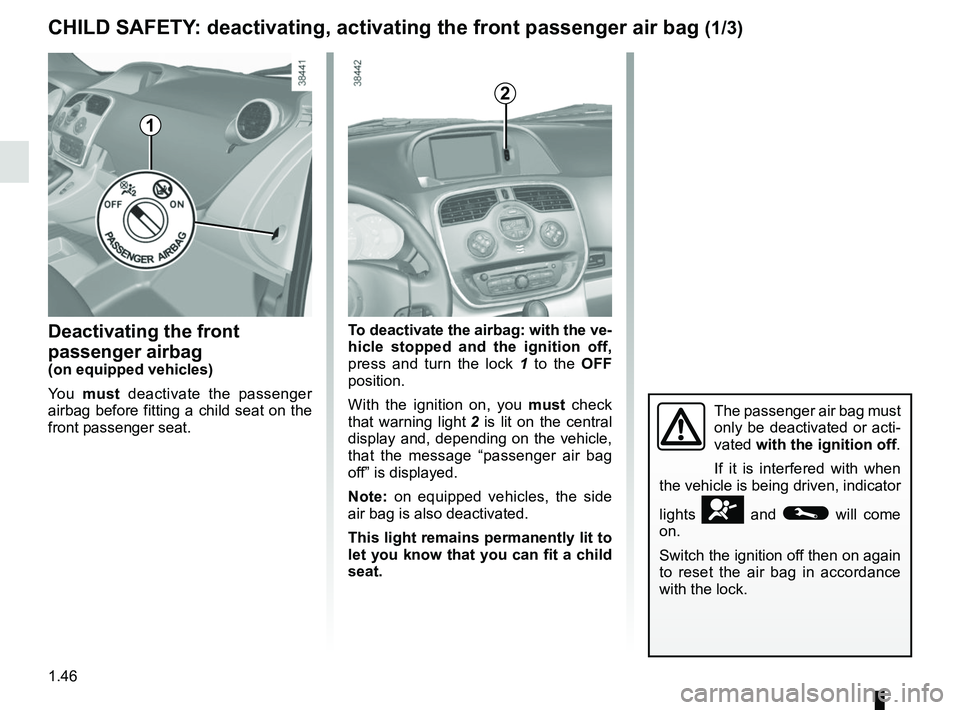
Deactivating the front
passenger airbag
(on equipped vehicles)
Yo u must deactivate the passenger
airbag before fitting a child seat on the
front passenger seat. To deactivate the airbag: with the ve-
hicle stopped and the ignition off,
press and turn the lock 1 to the OFF
position.
With the ignition on, you must check
that warning light 2 is lit on the central
display and, depending on the vehicle,
that the message “passenger air bag
off” is displayed.
Note: on equipped vehicles, the side
air bag is also deactivated.
This light remains permanently lit to
let you know that you can fit a child
seat.
CHILD SAFETY: deactivating, activating the front passenger air bag (1/3)
The passenger air bag must
only be deactivated or acti-
vated with the ignition off.
If it is interfered with when
the vehicle is being driven, indicator
lights
å and © will come
on.
Switch the ignition off then on again
to reset the air bag in accordance
with the lock.
1
2
Page 61 of 264

A
The presence and operation of the warning lights DEPEND ON THE EQUIPMENT\
AND COUNTRY.
© Warning light
It comes on when the ignition is
switched on, sometimes at the sam")
1.55
WARNING LIGHTS (2/4)
A
The presence and operation of the warning lights DEPEND ON THE EQUIPMENT\
AND COUNTRY.
© Warning light
It comes on when the ignition is
switched on, sometimes at the same
time as other warning lights and then
goes out after several seconds.
If the light comes on, you should visit an
approved Dealer immediately.
Depending on the vehicle, this warning
light is accompanied by a message on
the instrument panel.
ÄWarning light for monitoring
exhaust gas
On equipped vehicles, the light comes
on when the ignition is switched on then
goes out.
– If it lights up continuously accom-
panied by the
© indicator light,
consult an approved Dealer as soon
as possible;
– If it flashes, reduce the engine speed until the light stops flashing. Contact
your approved Dealer as soon as
possible.
Refer to “Emission control, fuel econ-
omy and driving advice” in section 2.
ÔCoolant temperature warn-
ing light
If this remains lit while driving accom-
panied by the
® indicator light, it
indicates engine overheating. Stop and
allow the engine to run at idle speed
for a minute or two. The temperature
should drop. If not, stop the engine.
Let the engine cool down, then check
the coolant level. Contact an approved
Dealer if necessary.
DHandbrake “on” warning
light and brake circuit inci-
dent warning light
This comes on when the ignition is
switched on. If it comes on during brak-
ing or when the vehicle is being driven,
accompanied by the
® indicator
light, it means that one of the circuit
levels is too low; it may be dangerous to
continue driving. Consult an approved
Dealer.
® STOP light
It comes on when the ignition is
switched on, sometimes at the same
time as other warning lights and then
goes out after several seconds.
It indicates that it is essential to stop as
soon as traffic conditions allow. Contact
an approved Dealer as soon as possi-
ble.
Depending on the vehicle, this warning
light is accompanied by a message on
the instrument panel.
Page 62 of 264

A
The presence and operation of the warning lights DEPEND ON THE EQUIPMENT\
AND COUNTRY.
xAnti-lock braking warning
light
This lights up when the ignition is
switched on a")
1.56
WARNING LIGHTS (3/4)
A
The presence and operation of the warning lights DEPEND ON THE EQUIPMENT\
AND COUNTRY.
xAnti-lock braking warning
light
This lights up when the ignition is
switched on and goes out after a few
seconds.
If it does not go out after the ignition is
switched on, or lights up when driving,
there is a fault with the ABS. Braking
will then be as normal, without the ABS
system.
Contact an approved Dealer as soon as
possible.
LLow fuel level warning light This comes on when the igni-
tion is switched on and goes out after a
few seconds. If it comes on when driv-
ing and is accompanied by a beep, fill
up with fuel as soon as possible. There
is only approximately 30 miles (50 km)
worth of fuel left after the warning light
first comes on.
ÉPreheating warning light (on
diesel version)
This should come on when the igni-
tion is switched on. It indicates that the
heater plugs are in operation. It goes
out after preheating is sufficient and the
engine can be started.
ÒElectronic fault warning light
If it comes on when driving, it
indicates an electronic or electrical fault
or, for diesel versions, the presence of
water in the diesel fuel.
Contact your approved Dealer as soon
as possible.
åAir bag warning light
This comes on when the igni-
tion is switched on and goes out after
a few seconds. If it does not come on
when the ignition is switched on or if it
flashes, there is a fault in the system.
Contact an approved Dealer as soon as
possible.
ÀOil pressure warning light
If it comes on while you are
driving, stop at once and switch off the
ignition.
Check the oil level (refer to section 4
“Engine oil level”). If the level is normal,
the light has come on for another
reason: contact an approved Dealer as
soon as possible.
Page 73 of 264

1.67
Information messagesThese can help in the vehicle starting phase, or give information about \
a selection or a driving status.
Examples of information messages are given in the following pages.Examples of messages Interpretation of messages
« NO MESSAGE AVAILABLE » f) Trip log
Successive display:
– information messages (automatic lighting, etc.),
– operating fault messages (check injection system, etc).
« BOOT OPEN » Indicates that the tailgate has been left open.
« BATTERY MODE : ECONOMY » Indicates that vehicle accessories have been switched off to preserve the battery. « OIL LEVEL CORRECT » Indicates that the oil level is correct when the ignition is switched on\
.
« AUTO LIGHTS DEACTIVATED » Indicates that the automatic lights function is deactivated.
TRIP COMPUTER AND WARNING SYSTEM: information messages
Page 74 of 264

1.68
These appear with the © warning light and mean that you should drive very carefully to an approv\
ed Dealer as
soon as possible. If you fail to follow this recommendation, you risk da\
maging your vehicle.
They disappear when the display selection key is pressed or after severa\
l seconds and are stored in the computer log. The
© warning light stays on. Examples of operating fault messages are given \
on the following pages .
Examples of messages Interpretation of messages « CHECK ESC » Indicates a fault in the Electronic Stability Program and the traction c\
ontrol system
(see “Driver correction devices and aids” in Section 2).
« CHECK FUEL FILTER » Indicates that there is water present in the diesel fuel.
Contact an approved Dealer as soon as possible.
« CHECK GEARBOX » Indicates that a fault has occurred in the gearbox; contact an approved \
Dealer as
soon as possible.
« CHECK AUTO LIGHTS » Indicates an automatic lighting operating fault; contact an approved Dea\
ler.
« CHECK STEERING » Indicates a power-assisted steering system operating fault.
TRIP COMPUTER AND WARNING SYSTEM: operating fault messages
Page 81 of 264
1.75
áMain beam headlights
With stalk 1 in dipped beam headlights
position, move the stalk towards you.
The indicator light on the instrument
panel then lights up.
To return to the dipped beam head-
light position, pull the stalk towards you
again.
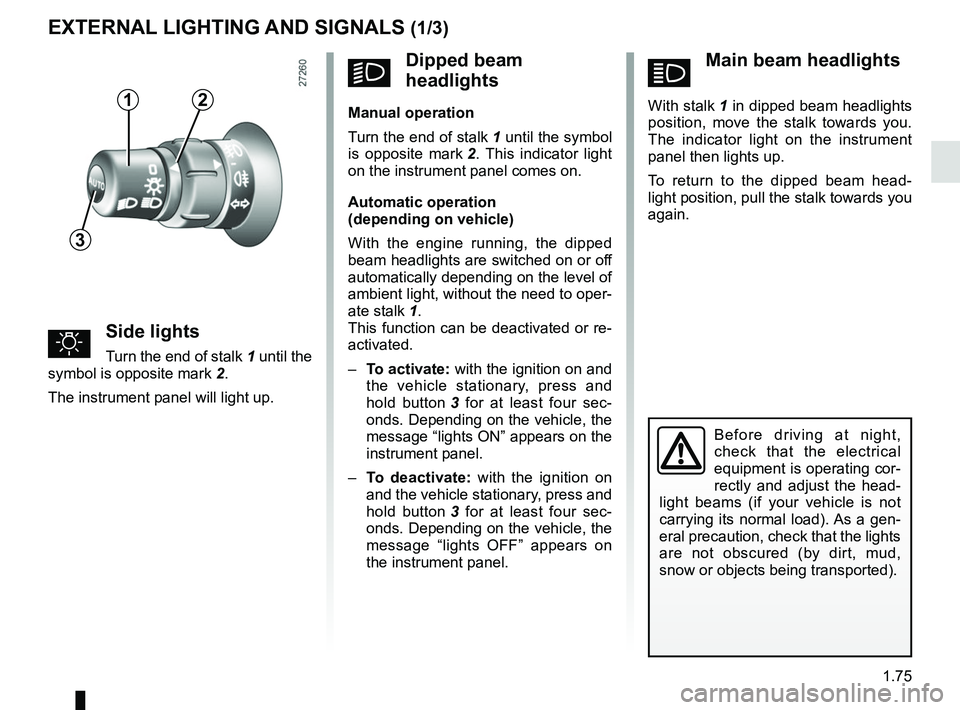
uSide lights
Turn the end of stalk 1 until the
symbol is opposite mark 2.
The instrument panel will light up.
EXTERNAL LIGHTING AND SIGNALS (1/3)
Before driving at night,
check that the electrical
equipment is operating cor-
rectly and adjust the head-
light beams (if your vehicle is not
carrying its normal load). As a gen-
eral precaution, check that the lights
are not obscured (by dirt, mud,
snow or objects being transported).
kDipped beam
headlights
Manual operation
Turn the end of stalk 1 until the symbol
is opposite mark 2. This indicator light
on the instrument panel comes on.
Automatic operation
(depending on vehicle)
With the engine running, the dipped
beam headlights are switched on or off
automatically depending on the level of
ambient light, without the need to oper-
ate stalk 1.
This function can be deactivated or re-
activated.
– To activate: with the ignition on and
the vehicle stationary, press and
hold button 3 for at least four sec-
onds. Depending on the vehicle, the
message “lights ON” appears on the
instrument panel.
– To deactivate: with the ignition on
and the vehicle stationary, press and
hold button 3 for at least four sec-
onds. Depending on the vehicle, the
message “lights OFF” appears on
the instrument panel.12
3
Page 87 of 264
1.81
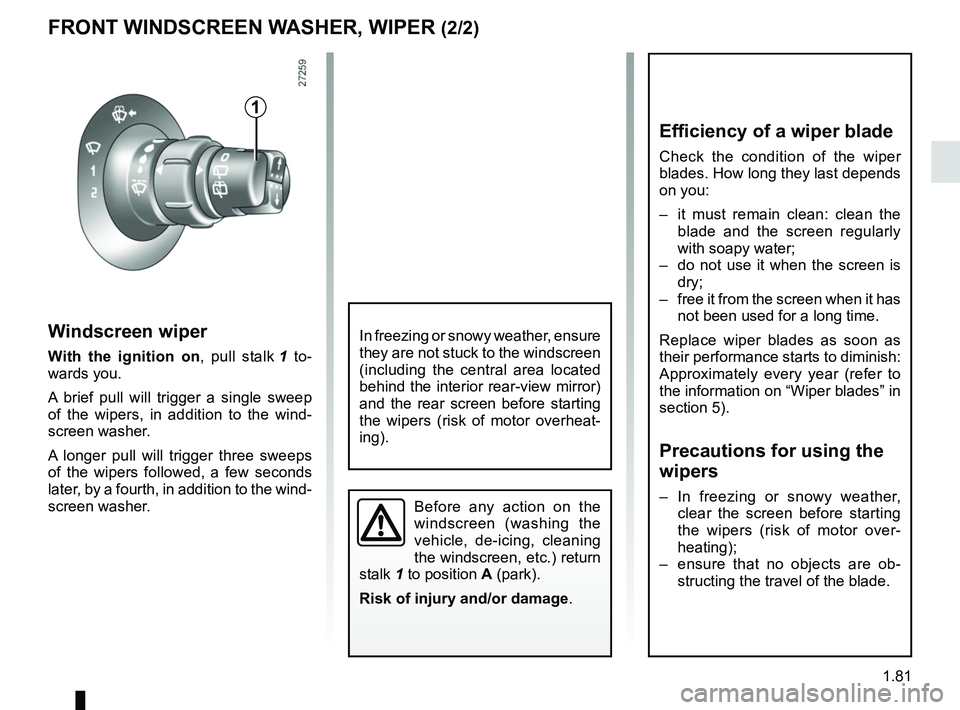
Windscreen wiper
With the ignition on, pull stalk 1 to-
wards you.
A brief pull will trigger a single sweep
of the wipers, in addition to the wind-
screen washer.
A longer pull will trigger three sweeps
of the wipers followed, a few seconds
later, by a fourth, in addition to the wind-
screen washer.
FRONT WINDSCREEN WASHER, WIPER (2/2)
1
Before any action on the
windscreen (washing the
vehicle, de-icing, cleaning
the windscreen, etc.) return
stalk 1 to position A (park).
Risk of injury and/or damage .
In freezing or snowy weather, ensure
they are not stuck to the windscreen
(including the central area located
behind the interior rear-view mirror)
and the rear screen before starting
the wipers (risk of motor overheat-
ing).
Efficiency of a wiper blade
Check the condition of the wiper
blades. How long they last depends
on you:
– it must remain clean: clean the
blade and the screen regularly
with soapy water;
– do not use it when the screen is dry;
– free it from the screen when it has not been used for a long time.
Replace wiper blades as soon as
their performance starts to diminish:
Approximately every year (refer to
the information on “Wiper blades” in
section 5).
Precautions for using the
wipers
– In freezing or snowy weather, clear the screen before starting
the wipers (risk of motor over-
heating);
– ensure that no objects are ob- structing the travel of the blade.
Page 88 of 264
1.82
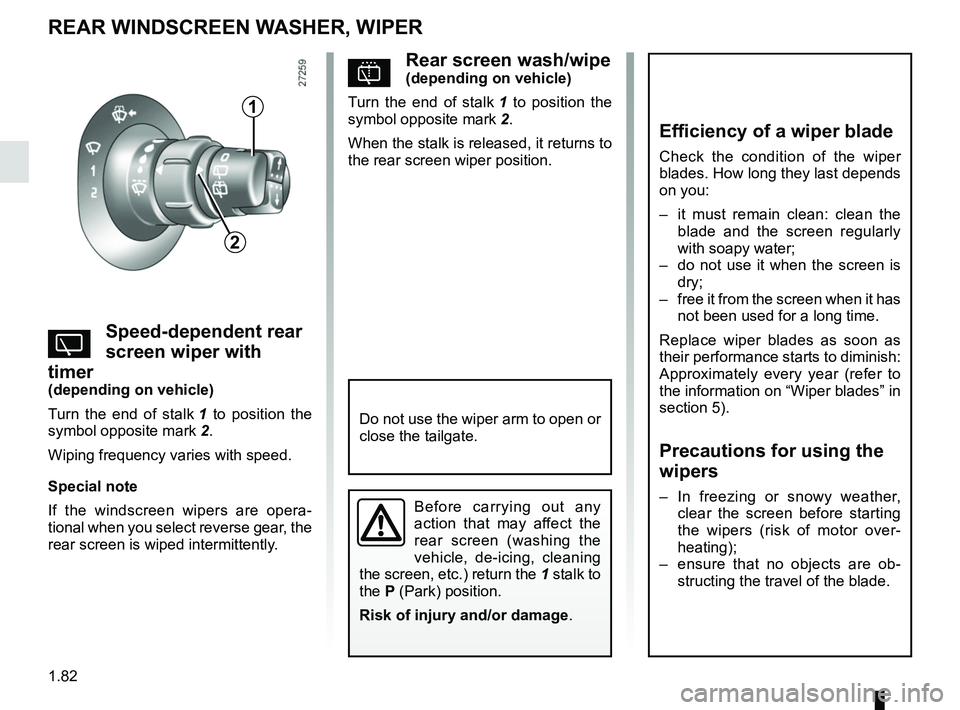
pRear screen wash/wipe(depending on vehicle)
Turn the end of stalk 1 to position the
symbol opposite mark 2.
When the stalk is released, it returns to
the rear screen wiper position.
YSpeed-dependent rear
screen wiper with
timer
(depending on vehicle)
Turn the end of stalk 1 to position the
symbol opposite mark 2.
Wiping frequency varies with speed.
Special note
If the windscreen wipers are opera-
tional when you select reverse gear, the
rear screen is wiped intermittently.
REAR WINDSCREEN WASHER, WIPER
1
2
Efficiency of a wiper blade
Check the condition of the wiper
blades. How long they last depends
on you:
– it must remain clean: clean the blade and the screen regularly
with soapy water;
– do not use it when the screen is dry;
– free it from the screen when it has not been used for a long time.
Replace wiper blades as soon as
their performance starts to diminish:
Approximately every year (refer to
the information on “Wiper blades” in
section 5).
Precautions for using the
wipers
– In freezing or snowy weather, clear the screen before starting
the wipers (risk of motor over-
heating);
– ensure that no objects are ob- structing the travel of the blade.Before carrying out any
action that may affect the
rear screen (washing the
vehicle, de-icing, cleaning
the screen, etc.) return the 1 stalk to
the P (Park) position.
Risk of injury and/or damage .
Do not use the wiper arm to open or
close the tailgate.