battery RENAULT KANGOO Z.E. 2018 User Guide
[x] Cancel search | Manufacturer: RENAULT, Model Year: 2018, Model line: KANGOO Z.E., Model: RENAULT KANGOO Z.E. 2018Pages: 230, PDF Size: 5.03 MB
Page 25 of 230

1.19
KEY, RADIO FREQUENCY REMOTE CONTROL: Use (1/2)
The doors are locked and unlocked
using the remote control unit.
It is powered by a battery which must
be replaced (refer to the information on
the “Key, radio frequency remote con-
trol: batteries” in Section 5).Locking the doors
Remote control A or B
Press locking button 1.
The hazard warning lights and side in-
dicator lights flash twice to indicate
that the doors have locked.
If a door or the tailgate is open or not
properly shut, the doors and tailgate
lock then quickly unlock and the hazard
warning lights and side indicator lights
do not flash.
1
AB
1
Driver’s responsibility
when parking or stopping
the vehicle
Never leave an animal,
child or adult who is not self-suffi-
cient alone in your vehicle, even for
a short time.
They may pose a risk to themselves
or to others by starting the engine,
activating equipment such as the
electric windows or locking the
doors, for example.
Also, in hot and/or sunny weather,
please remember that the tempera-
ture inside the passenger compart-
ment increases very quickly.
RISK OF DEATH OR SERIOUS
INJURY.
Page 28 of 230
1.22
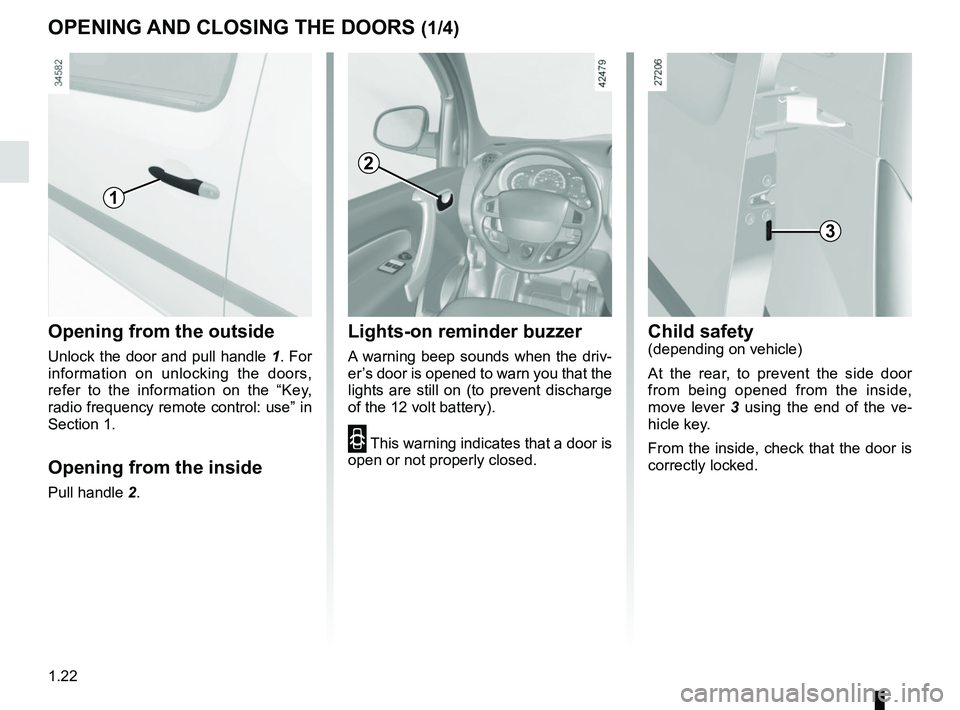
Opening from the outside
Unlock the door and pull handle 1. For
information on unlocking the doors,
refer to the information on the “Key,
radio frequency remote control: use” in
Section 1.
Opening from the inside
Pull handle 2.
OPENING AND CLOSING THE DOORS (1/4)
1
2
Child safety(depending on vehicle)
At the rear, to prevent the side door
from being opened from the inside,
move lever 3 using the end of the ve-
hicle key.
From the inside, check that the door is
correctly locked.
3
Lights-on reminder buzzer
A warning beep sounds when the driv-
er’s door is opened to warn you that the
lights are still on (to prevent discharge
of the 12 volt battery).
2 This warning indicates that a door is
open or not properly closed.
Page 72 of 230
1.66
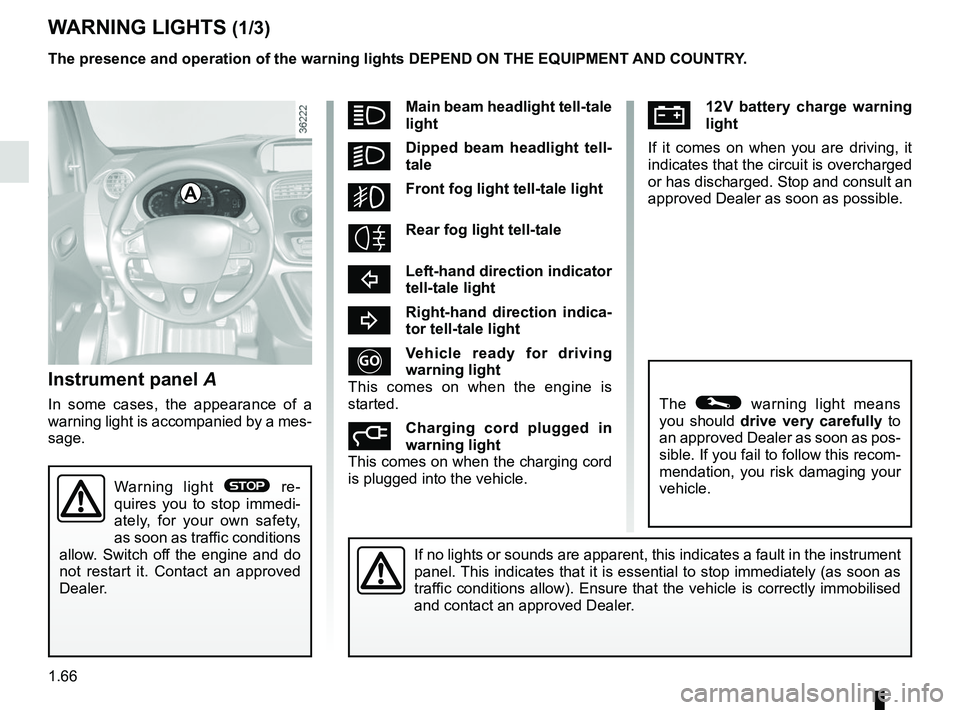
Ú12V battery charge warning
light
If it comes on when you are driving, it
indicates that the circuit is overcharged
or has discharged. Stop and consult an
approved Dealer as soon as possible.
Instrument panel A
In some cases, the appearance of a
warning light is accompanied by a mes-
sage.
WARNING LIGHTS (1/3)
If no lights or sounds are apparent, this indicates a fault in the instr\
ument
panel. This indicates that it is essential to stop immediately (as soon as
traffic conditions allow). Ensure that the vehicle is correctly immobilised\
and contact an approved Dealer.
A
Warning light ® re-
quires you to stop immedi-
ately, for your own safety,
as soon as traffic conditions
allow. Switch off the engine and do
not restart it. Contact an approved
Dealer.
The presence and operation of the warning lights DEPEND ON THE EQUIPMENT\
AND COUNTRY.
The © warning light means
you should drive very carefully to
an approved Dealer as soon as pos-
sible. If you fail to follow this recom-
mendation, you risk damaging your
vehicle.
áMain beam headlight tell-tale
light
kDipped beam headlight tell-
tale
gFront fog light tell-tale light
Rear fog light tell-tale
cLeft-hand direction indicator
tell-tale light
bRight-hand direction indica-
tor tell-tale light
Vehicle ready for driving
warning light
This comes on when the engine is
started.
Charging cord plugged in
warning light
This comes on when the charging cord
is plugged into the vehicle.
Page 74 of 230

The presence and operation of the warning lights DEPEND ON THE EQUIPMENT\
AND COUNTRY.
Electrotechnical system
warning light
When the blue warning light comes on,
this")
1.68
WARNING LIGHTS (3/3)
The presence and operation of the warning lights DEPEND ON THE EQUIPMENT\
AND COUNTRY.
Electrotechnical system
warning light
When the blue warning light comes on,
this indicates that the traction battery
temperature is too low.
When the orange warning light comes
on, this means the traction battery or
the motor temperature is too high.
If either of these warning lights come
on, this may lead to reduced vehicle
performance.
Opt for a calmer driving style.
xAnti-lock braking warning
light
This lights up when the ignition is
switched on and goes out after a few
seconds.
If it does not go out after the ignition is
switched on, or lights up when driving,
there is a fault with the ABS. Braking
will then be as normal, without the ABS
system.
Contact an approved Dealer as soon as
possible.
\bLow traction battery level
warning light
This comes on when the traction bat-
tery charge level has reached the re-
serve threshold. Please see the infor-
mation on “Displays and indicators” in
Section 1.
Electrotechnical system
warning light
If this comes on while driving, it indi-
cates an electrotechnical fault relating
to the “400V” electrical circuit. Please
contact an authorised dealer as soon
as possible.
A
LLow fuel level or additional
heating warning light
This comes on when the ignition is
switched on and goes out after a few
seconds. When driving, if it comes on
together with a beep, the minimum fuel
level has been reached.
Driving correction device
warning light
Please refer to the information on
“Driver correction devices and aids” in
Section 2.
Tyre pressure loss warning
Please refer to the information
on the “Tyre pressure loss warning” in
Section 2.
Page 75 of 230

1.69
DISPLAYS AND INDICATORS (1/3)
Overspeed buzzer
Depending on the vehicle, a beep
sounds for 10 seconds approximately
every 40 seconds as long as the ve-
hicle is travelling at over 72 miles per
hour (120 km/h).
Note: the desired speed may be pro-
grammed; consult an approved Dealer.
Multifunction display 2Please refer to the information on the
“Trip computer: general information” in
Section 1.
Speedometer 1
Vehicle speed is limited to approxi-
mately 80 mph (130 km/h).
Depending on your vehicle, this speed
can be permanently limited to a set
value.
1
The presence and operation of the display and indicators DEPENDS ON THE \
LEVEL OF EQUIPMENT AND THE COUNTRY.
3
Charge level 3
The gauge indicates the level of energy
remaining.
Reserve threshold 5
This indicates that the battery is at ap-
proximately 12% charge. The warn-
ing light
Ṏ comes on and a beep
sounds.
To optimise your range, please see the
information on “Recommendations:
saving energy” in Section 2.
Immobilisation threshold
imminent 4
This indicates that the battery is at ap-
proximately 6% charge. A beep is re-
peated every 10 seconds and warning
light
Ṏ flashes.
The message “Limited performance”
may also be displayed on the instru-
ment panel.
Motor performance gradually de-
creases until the vehicle comes to a
stop.
Please see the information on “Towing:
breakdown recovery” in Section 5.
54
2
Page 79 of 230

1.73
Trip mileage resetting
With “trip mileage recorder” selected on
the display, press button 1 or 2 until the
mileage recorder resets to zero.
Resetting the journey
parameters (reset button)
With one of the journey parameters se-
lected on the display, press button 1
or 2 until the display resets.
Interpreting some of the
values displayed after
resetting
Average energy consumption and
speed are all the more stable and reli-
able as the distance travelled from the
last reset is great.
The estimated range displayed after
reset may not be indicative of your true
range (which depends on your driv-
ing style): this is because the on-board
computer is programmed with a prede-
fined consumption over an average of
around 18 miles (30 km). This is gradu-
ally replaced by your true consumption
as the travel distance increases: the
display will be all the more stable and
reliable as the distance travelled since
the last reset is great.1
2
TRIP COMPUTER: general information (2/2)
Automatic resetting of the
journey parameters
Resetting occurs automatically when
the maximum value of any of the pa-
rameters is exceeded.
Resetting the estimated
range
Press and hold one of the buttons 1
or 2. Estimated range is calculated in
proportion to the traction battery charge
level.
Reading energy consumption
values
Some vehicle equipment items con-
sume energy: the energy consumed
by the vehicle may therefore differ from
the energy consumed on the electric
counter.
Page 81 of 230

1.75
TRIP COMPUTER AND WARNING SYSTEM: journey parameters (2/4)
Examples of selectionsInterpreting the display selected
RANGE
Estimated range with remaining energy.
The information disappears when the battery is at less than approximatel\
y
4%.
118 km
DISTANCE
Distance travelled since the last reset.
522 km
AVERAGE
Average speed
since the last reset.
The value is displayed after driving 400 metres.
48 km/h
CONSUMPTION
Total energy usage since vehicle first entered service.
487 kWh
The display of information shown below DEPENDS ON THE VEHICLE EQUIPMENT \
AND COUNTRY.
Page 84 of 230

1.78
Information messagesThese can help in the vehicle starting phase, or give information about \
a selection or a driving status.
Examples of information messages are given in the following pages.Examples of messages Interpretation of messages
“CHARGE REMAIN 02:10” Indicates the time remaining before a full charge.
“NO MESSAGE AVAILABLE” No warning is stored.
“BRAKE THE VEHICLE” Follow these instructions: risk of damage to the motor.
“BOILER STOPPED” Indicates a halt to the additional heating due to lack of fuel in the ta\
nk.
“PERFORMANCE LIMITED” Indicates deterioration of vehicle performance.
“BATT CHARGE IMPOSSIBLE” Indicates that the charging is prohibited by your battery rental organis\
ation. Rectify
the situation.
“AUTO LIGHTS DEACTIVATED” Indicates that the automatic lights function is deactivated.
TRIP COMPUTER AND WARNING SYSTEM: information messages
Page 85 of 230

1.79
These appear with the © warning light and mean that you should drive very carefully to an approv\
ed Dealer as
soon as possible. If you fail to follow this recommendation, you risk da\
maging your vehicle.
They disappear when the display selection key is pressed or after severa\
l seconds and are stored in the computer log. The
© warning light stays on. Examples of operating fault messages are given \
on the following pages .
Examples of messages Interpretation of messages
“BRAKES TO BE CHECKED” Indicates wear or the need to check the braking system.
“BATT CHARGE IMPOSSIBLE” Indicates a fault on the traction battery recharge system.
“CHECK AUTO LIGHTS” Indicates a fault in the automatic lights operation.
TRIP COMPUTER AND WARNING SYSTEM: operating fault messages
Page 87 of 230

1.81
With the ignition on, the time and, de-
pending on the vehicle, exterior tem-
perature are displayed.
Setting the time
Resetting the clock A
(depending on vehicle)
Display the “Clock” page on the instru-
ment panel by pressing one of the but-
tons on stalk 1.
CLOCK AND EXTERIOR TEMPERATURE
Exterior temperature
indicator
As ice formation is related
to climatic exposure, local
air humidity and temperature, the
external temperature alone is not
sufficient to detect ice.
If the electrical supply is cut (battery
disconnected, broken supply wire,
etc.), the clock will lose its time set-
ting. The time must then be set.
A
1
For safety reasons, carry
out any adjustments when
the vehicle is not being
driven.
After two seconds, the hours and min-
utes start flashing.
Press and hold the bottom button to
enter the hour setting mode.
When only the hours flash, press the
top button to scroll through them.
Press and hold the bottom button to
enter the minute setting mode.
When only the minutes flash, press the
top button to scroll through them.
Confirm by pressing and holding the
bottom button on stalk 1.
Vehicles equipped with a navigation
system, radio, etc.
Refer to the equipment instructions for
the special features.Exterior temperature
On equipped vehicles, the exterior tem-
perature is displayed at A. If it is be-
tween -3°C and +3°C, the °C charac-
ters flash (signalling a risk of ice).