brake RENAULT KANGOO Z.E. 2018 User Guide
[x] Cancel search | Manufacturer: RENAULT, Model Year: 2018, Model line: KANGOO Z.E., Model: RENAULT KANGOO Z.E. 2018Pages: 230, PDF Size: 5.03 MB
Page 105 of 230
2.5
Handbrake
To release:
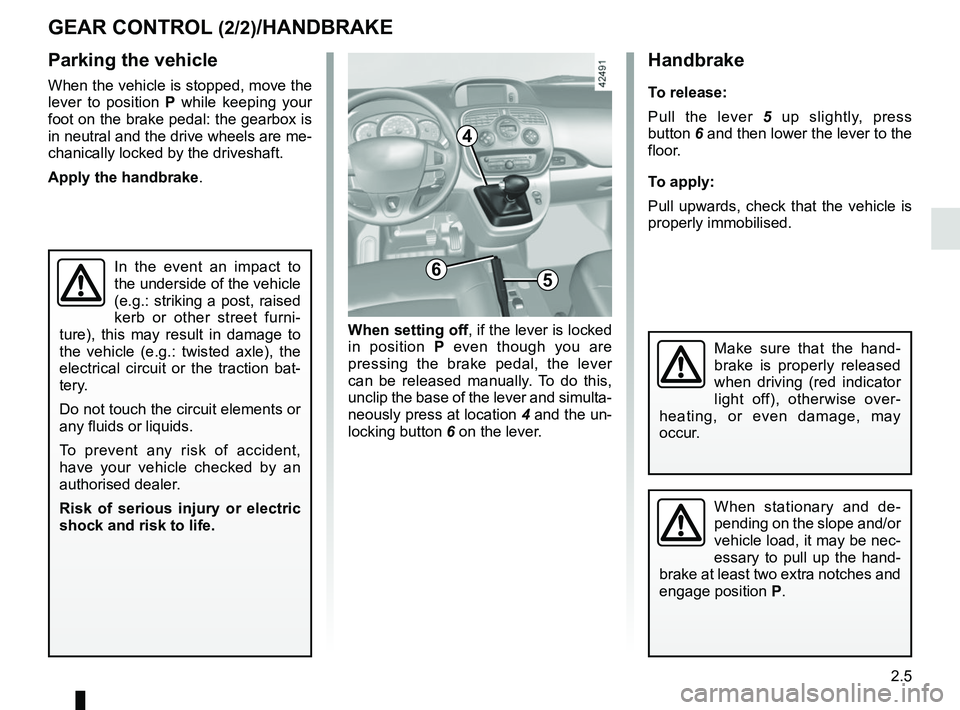
Pull the lever 5 up slightly, press
button 6 and then lower the lever to the
floor.
To apply:
Pull upwards, check that the vehicle is
properly immobilised.
GEAR CONTROL (2/2)/HANDBRAKE
Parking the vehicle
When the vehicle is stopped, move the
lever to position P while keeping your
foot on the brake pedal: the gearbox is
in neutral and the drive wheels are me-
chanically locked by the driveshaft.
Apply the handbrake.
In the event an impact to
the underside of the vehicle
(e.g.: striking a post, raised
kerb or other street furni-
ture), this may result in damage to
the vehicle (e.g.: twisted axle), the
electrical circuit or the traction bat-
tery.
Do not touch the circuit elements or
any fluids or liquids.
To prevent any risk of accident,
have your vehicle checked by an
authorised dealer.
Risk of serious injury or electric
shock and risk to life.
When setting off , if the lever is locked
in position P even though you are
pressing the brake pedal, the lever
can be released manually. To do this,
unclip the base of the lever and simulta-
neously press at location 4 and the un-
locking button 6 on the lever.
When stationary and de-
pending on the slope and/or
vehicle load, it may be nec-
essary to pull up the hand-
brake at least two extra notches and
engage position P.
Make sure that the hand-
brake is properly released
when driving (red indicator
light off), otherwise over-
heating, or even damage, may
occur.
6
4
5
Page 107 of 230
2.7
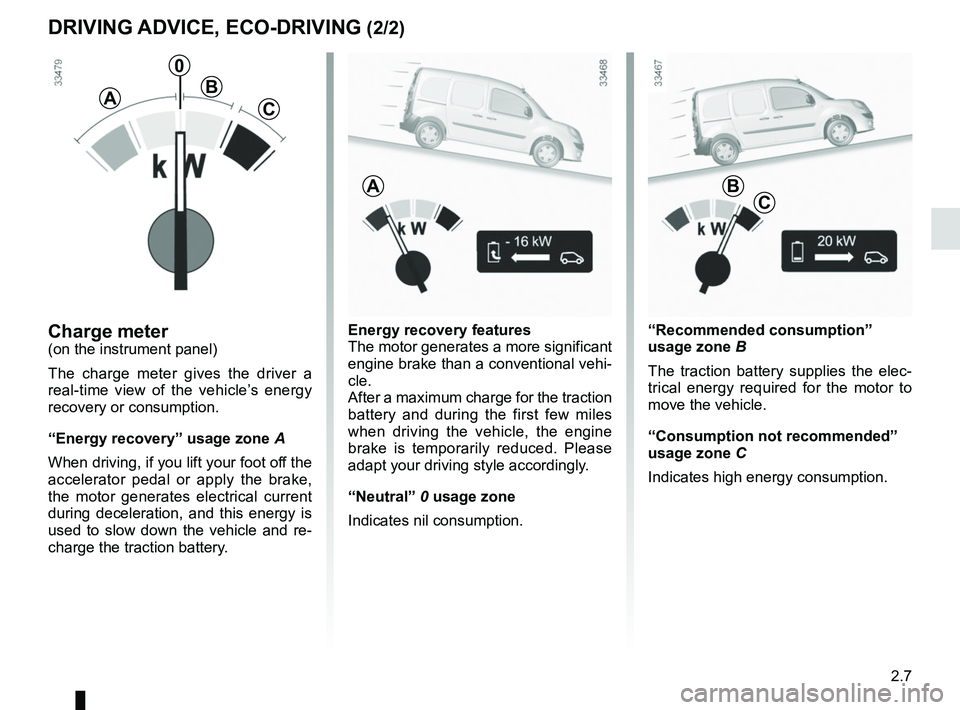
Energy recovery features
The motor generates a more significant
engine brake than a conventional vehi-
cle.
After a maximum charge for the traction
battery and during the first few miles
when driving the vehicle, the engine
brake is temporarily reduced. Please
adapt your driving style accordingly.
“Neutral” 0 usage zone
Indicates nil consumption.Charge meter(on the instrument panel)
The charge meter gives the driver a
real-time view of the vehicle’s energy
recovery or consumption.
“Energy recovery” usage zone A
When driving, if you lift your foot off the
accelerator pedal or apply the brake,
the motor generates electrical current
during deceleration, and this energy is
used to slow down the vehicle and re-
charge the traction battery.
A
0
B
C
“Recommended consumption”
usage zone B
The traction battery supplies the elec-
trical energy required for the motor to
move the vehicle.
“Consumption not recommended”
usage zone C
Indicates high energy consumption.
A
DRIVING ADVICE, ECO-DRIVING (2/2)
BC
Page 115 of 230
2.15
DRIVER CORRECTION DEVICES AND AIDS (1/3)
Depending on the vehicle, this is com-
posed of:
– of the ABS (anti-lock braking
system);
– electronic stability program (ESC) with understeer control and trac-
tion control;
– emergency brake assist;
– hill start assistance.
In an emergency, apply firm and
continuous pressure to the brake
pedal. There is no need to pump
it repeatedly. The ABS will modu-
late the force applied in the braking
system.
These functions are an ad-
ditional aid in the event of
critical driving conditions,
enabling the vehicle behav-
iour to be adapted to suit the driving
conditions.
However, the functions do not take
the place of the driver. They do
not increase the vehicle’s limits
and should not encourage you
to drive more quickly. Therefore,
they can under no circumstances
replace the vigilance or responsibil-
ity of the driver when manoeuvring
the vehicle (the driver must always
be ready for sudden incidents which
may occur when driving).
Your braking systems
are partially operational.
However, it is dangerous
to brake suddenly and
it is essential to stop immediately,
as soon as traffic conditions allow.
Contact an approved dealer.
ABS (anti-lock braking
system)
Under heavy braking, the ABS prevents
the wheels from locking, allowing the
stopping distance to be managed and
keeping control of the vehicle.
Under these circumstances, the vehi-
cle can be steered to avoid an obstacle
whilst braking. In addition, this system
can increase stopping distances, par-
ticularly on roads with low surface grip
(wet ground etc.).
You will feel a pulsation through the
brake pedal each time the system is
activated. The ABS does not in any way
improve the vehicle’s physical perform-
ance relating to the road surface and
roadholding. It is still essential to follow
the rules of good driving practice (such
as driving at a safe distance from the
vehicle in front, etc.). Operating faults:
– if the x warning light on the in-
strument panel comes on while driv-
ing, braking is still operational ;
– if the
x and D warning
lights on the instrument panel come
on while driving, this indicates a
fault in the braking system.
In such cases, ABS, ESC and emer-
gency brake assist are also deactivated
and, depending on the vehicle, the
messages “CHECK ABS”, “BRAKES
TO BE CHECKED” and “CHECK ESC”
appear on the instrument panel.
Consult an approved dealer.
Page 116 of 230
2.16
DRIVER CORRECTION DEVICES AND AIDS (2/3)
Electronic stability program
ESC with understeer control
and traction control
Electronic stability control ESC
This system helps you to keep control
of the vehicle in critical driving condi-
tions (avoiding an obstacle, loss of grip
on a bend, etc.).
Operating principle
A sensor in the steering wheel detects
the direction selected by the driver.
Other sensors throughout the vehicle
measure the actual direction.
The system compares driver input to
the actual trajectory of the vehicle and
corrects the trajectory if necessary by
controlling the braking of certain wheels
and/or engine power. In the event that
the system is engaged, indicator light
flashes on the instrument panel. Understeer control
This system optimises the action of the
ESC in the case of pronounced under-
steer (loss of front axle road holding).
Traction control
This system helps to limit wheelspin of
the drive wheels and to control the ve-
hicle when pulling away accelerating or
decelerating.
Operating principle
Using the wheel sensors, the system
measures and compares the speed of
the drive wheels at all times and slows
down their over-rotation. If a wheel is
starting to slip, the system brakes au-
tomatically until the drive supplied be-
comes compatible with the level of grip
under the wheel again.
The system also adjusts the engine
speed to the grip available under the
wheels, independently of the pressure
exerted on the accelerator pedal. Operating faults
When the system detects an operating
fault the message “CHECK ESC” and
warning light
© appear on the in-
strument panel. In this case, the ESC
and traction control system are deacti-
vated.
Consult an approved dealer.
Page 117 of 230
2.17
Emergency brake assistThis is an additional system to ABS
which helps reduce vehicle stopping
distances.
Operating principle
The system detects an emergency
braking situation. In this case, the brak-
ing assistance immediately develops
maximum power and may trigger ABS
regulation.
ABS braking is maintained as long as
the brake pedal is not released.
Hazard warning lights switching on
Depending on the vehicle, these may
light up in the event of sudden decel-
eration.
Operating faultsWhen the system detects an operating
fault the message “BRAKING FAULT”
appears on the instrument panel along
with the
© warning light. Please
consult an authorised dealer.
DRIVER CORRECTION DEVICES AND AIDS (3/3)
Hill start assistance
Depending on the gradient of the in-
cline, this system assists the driver
when starting on a hill. It prevents the
vehicle from rolling backwards, de-
pending on the slope, by automatically
applying the brakes when the driver lifts
his/her foot off the brake pedal to de-
press the accelerator pedal.
System operation
It only operates when the gear lever is
in a position other than neutral and the
vehicle is completely stationary (brake
pedal depressed).
The system holds the vehicle for ap-
proximately 2 seconds. The brakes are
then gradually released (the vehicle will
move according to the slope).
The hill start assistance
system cannot completely
prevent the vehicle from
rolling backwards in all sit-
uations (extremely steep gradients,
etc.).
In all cases, the driver may depress
the brake pedal to prevent the ve-
hicle from rolling forwards or back-
wards.
The hill start assistance function
should not be used for prolonged
stops: use the brake pedal.
This function is not designed to im-
mobilise the vehicle permanently.
If necessary, use the brake pedal to
stop the vehicle.
The driver must remain particularly
vigilant when driving on slippery or
low-grip surfaces and/or on hills.
Risk of serious injury.
Page 121 of 230
2.21
The cruise control function helps you to
maintain your driving speed at a speed
that you choose, called the cruising
speed.
This cruising speed may be set at any
speed above 18 mph (30 km/h).
CRUISE CONTROL (1/4)
The cruise control function
is in no way linked to the
braking system.
This function is an addi-
tional driving aid. The func-
tion does not take the place
of the driver.
Therefore, it can under no circum-
stances replace the driver’s respon-
sibility to respect speed limits and to
be vigilant (the driver must always
be ready to brake).
Cruise control must not be used in
heavy traffic, on undulating or slip-
pery roads (black ice, aquaplan-
ing, gravel) and during bad weather
(fog, rain, side winds etc.).
There is a risk of accidents.
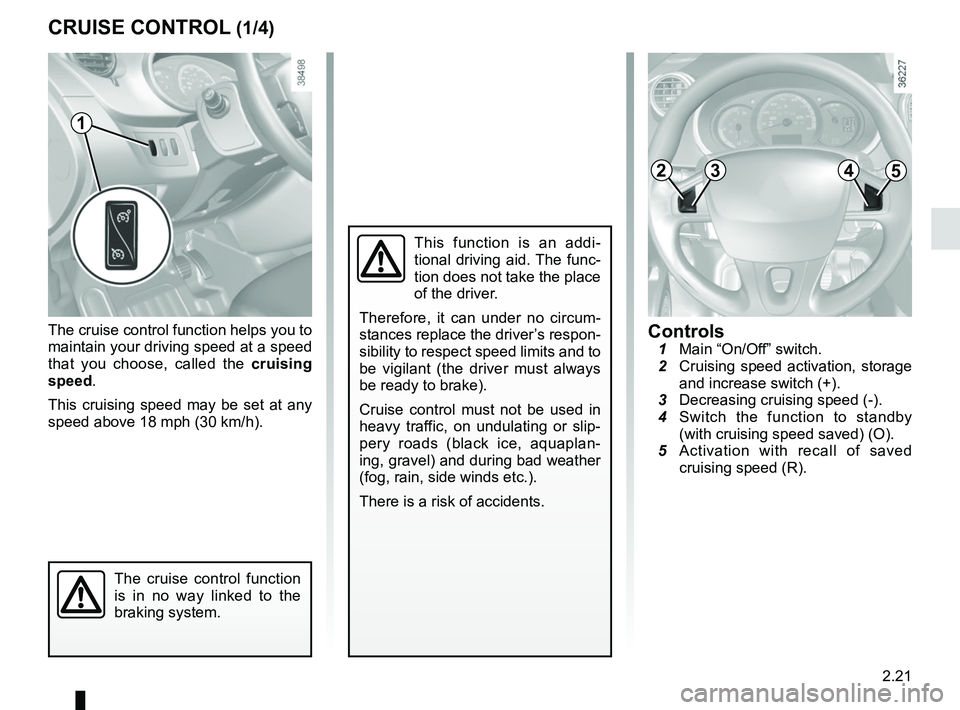
Controls 1 Main “On/Off” switch.
2 Cruising speed activation, storage
and increase switch (+).
3 Decreasing cruising speed (-).
4 Switch the function to standby
(with cruising speed saved) (O).
5 Activation with recall of saved
cruising speed (R).
1
2453
Page 124 of 230
2.24
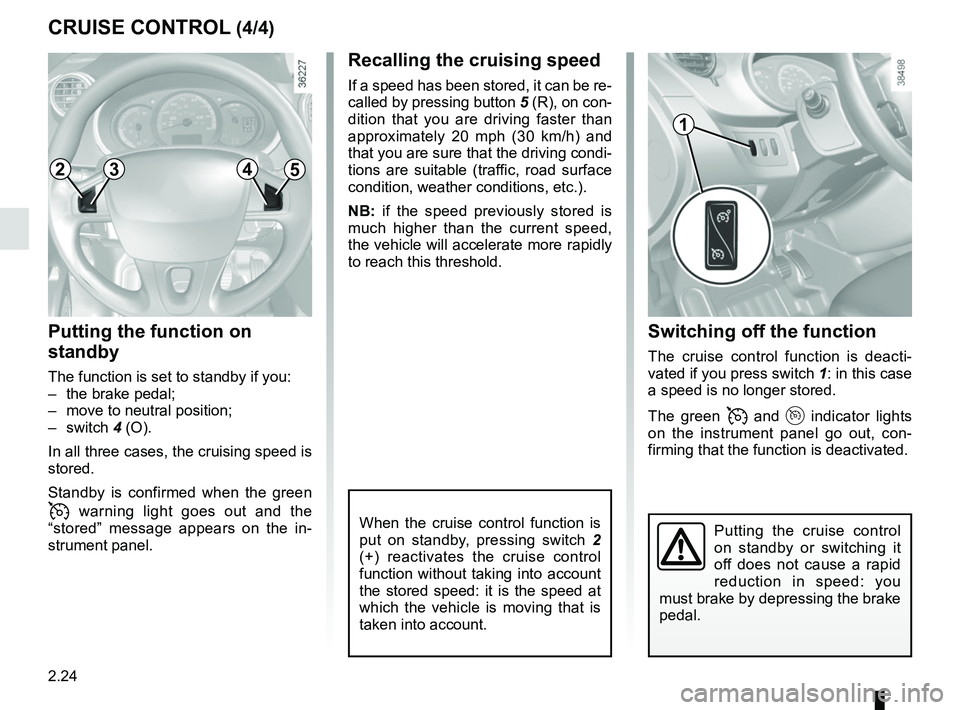
Switching off the function
The cruise control function is deacti-
vated if you press switch 1: in this case
a speed is no longer stored.
The green
and indicator lights
on the instrument panel go out, con-
firming that the function is deactivated.
Recalling the cruising speed
If a speed has been stored, it can be re-
called by pressing button 5 (R), on con-
dition that you are driving faster than
approximately 20 mph (30 km/h) and
that you are sure that the driving condi-
tions are suitable (traffic, road surface
condition, weather conditions, etc.).
NB: if the speed previously stored is
much higher than the current speed,
the vehicle will accelerate more rapidly
to reach this threshold.
When the cruise control function is
put on standby, pressing switch 2
(+) reactivates the cruise control
function without taking into account
the stored speed: it is the speed at
which the vehicle is moving that is
taken into account.
Putting the function on
standby
The function is set to standby if you:
– the brake pedal;
– move to neutral position;
– switch 4 (O).
In all three cases, the cruising speed is
stored.
Standby is confirmed when the green
warning light goes out and the
“stored” message appears on the in-
strument panel.
CRUISE CONTROL (4/4)
Putting the cruise control
on standby or switching it
off does not cause a rapid
reduction in speed: you
must brake by depressing the brake
pedal.
1
2453
Page 153 of 230
3.25
Always position the heavi-
est items directly on the
floor.
Use the lashing points on
the floor of the luggage compart-
ment, if these are fitted to the vehi-
cle.
The luggage should be loaded in
such a way that no items will be
thrown forward and strike the occu-
pants if the driver has to brake sud-
denly.
Fasten the rear seat belts, even if
the seats are not occupied.
TRANSPORTING OBJECTS IN THE BOOT (1/2)
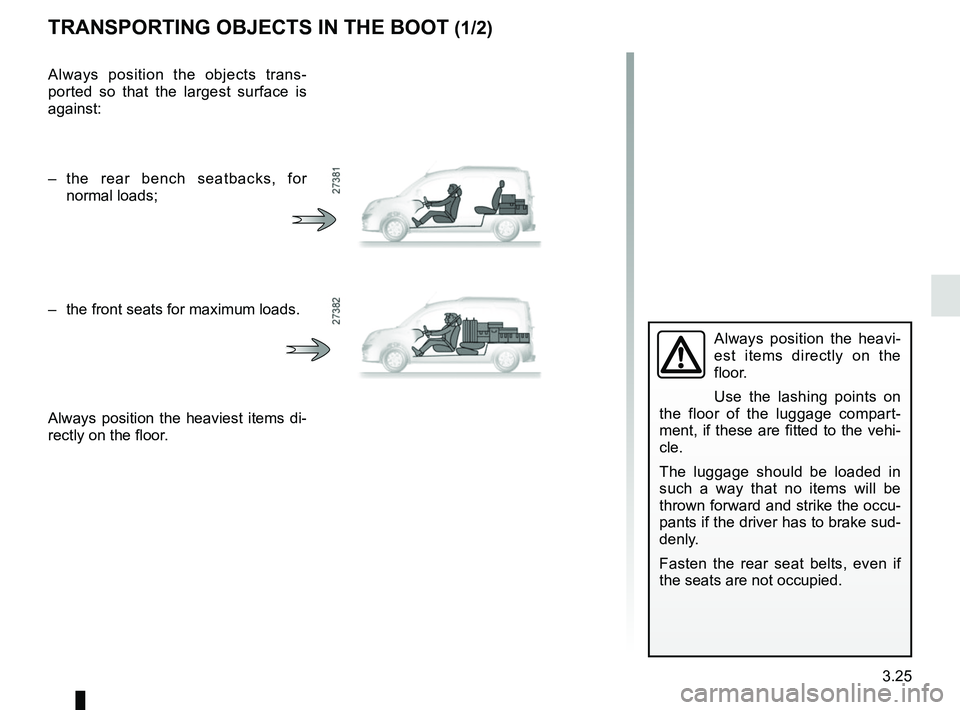
Always position the objects trans-
ported so that the largest surface is
against:
– the rear bench seatbacks, for normal loads;
– the front seats for maximum loads.
Always position the heaviest items di-
rectly on the floor.
Page 154 of 230
3.26
TRANSPORTING OBJECTS IN THE BOOT (2/2)/TOWING
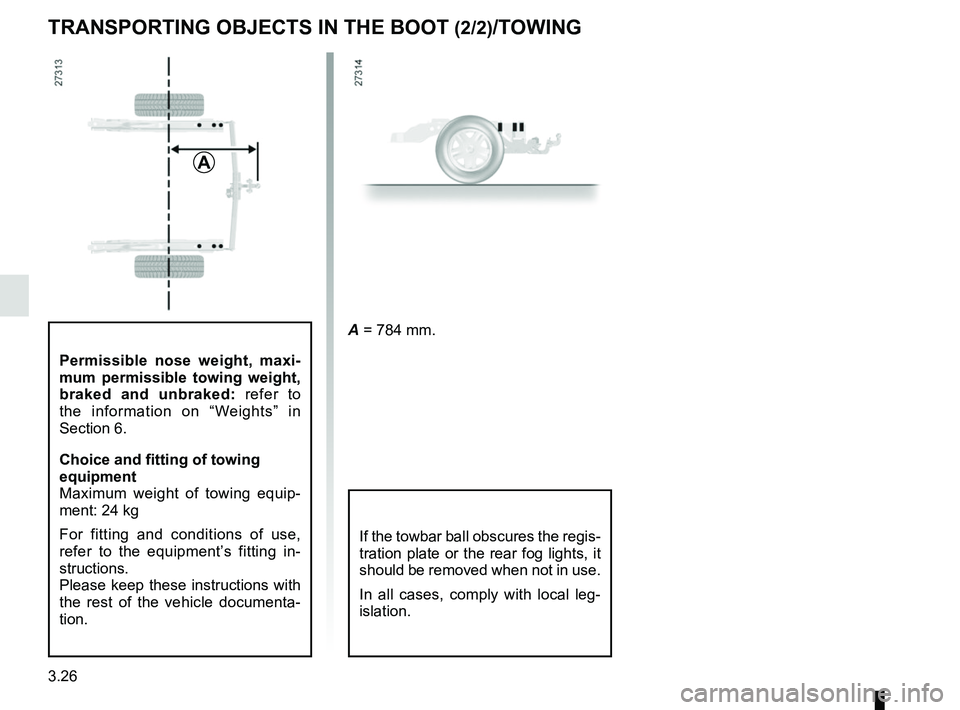
If the towbar ball obscures the regis-
tration plate or the rear fog lights, it
should be removed when not in use.
In all cases, comply with local leg-
islation.
A = 784 mm.
A
Permissible nose weight, maxi-
mum permissible towing weight,
braked and unbraked: refer to
the information on “Weights” in
Section 6.
Choice and fitting of towing
equipment
Maximum weight of towing equip-
ment: 24 kg
For fitting and conditions of use,
refer to the equipment’s fitting in-
structions.
Please keep these instructions with
the rest of the vehicle documenta-
tion.
Page 155 of 230

4.1
Section 4: Maintenance
Bonnet . . . . . . . . . . . . . . . . . . . . . . . . . . . . . . . . . . . . \
. . . . . . . . . . . . . . . . . . . . . . . . . . . . . . . . . . . . 4.2
Levels . . . . . . . . . . . . . . . . . . . . . . . . . . . . . . . . . . . .\
. . . . . . . . . . . . . . . . . . . . . . . . . . . . . . . . . . . . 4.4coolant . . . . . . . . . . . . . . . . . . . . . . . . . . . . . . . . . . . .\
. . . . . . . . . . . . . . . . . . . . . . . . . . . . . . 4.4
brake fluid . . . . . . . . . . . . . . . . . . . . . . . . . . . . . . . . . . . . \
. . . . . . . . . . . . . . . . . . . . . . . . . . . . 4.5
windscreen washer reservoir . . . . . . . . . . . . . . . . . . . . . . . . . . . . . . . . . . . . \
. . . . . . . . . . . . . 4.5
12 volt battery . . . . . . . . . . . . . . . . . . . . . . . . . . . . . . . . . . . .\
. . . . . . . . . . . . . . . . . . . . . . . . . . . . . . 4.6
Tyre pressure. . . . . . . . . . . . . . . . . . . . . . . . . . . . . . . . . . . . \
. . . . . . . . . . . . . . . . . . . . . . . . . . . . . . . 4.8
Bodywork maintenance . . . . . . . . . . . . . . . . . . . . . . . . . . . . . . . . . . . . \
. . . . . . . . . . . . . . . . . . . . . . . 4.10
Interior trim maintenance . . . . . . . . . . . . . . . . . . . . . . . . . . . . . . . . . . . . \
. . . . . . . . . . . . . . . . . . . . . . 4.13