charging RENAULT KANGOO Z.E. 2018 User Guide
[x] Cancel search | Manufacturer: RENAULT, Model Year: 2018, Model line: KANGOO Z.E., Model: RENAULT KANGOO Z.E. 2018Pages: 230, PDF Size: 5.03 MB
Page 21 of 230
1.15
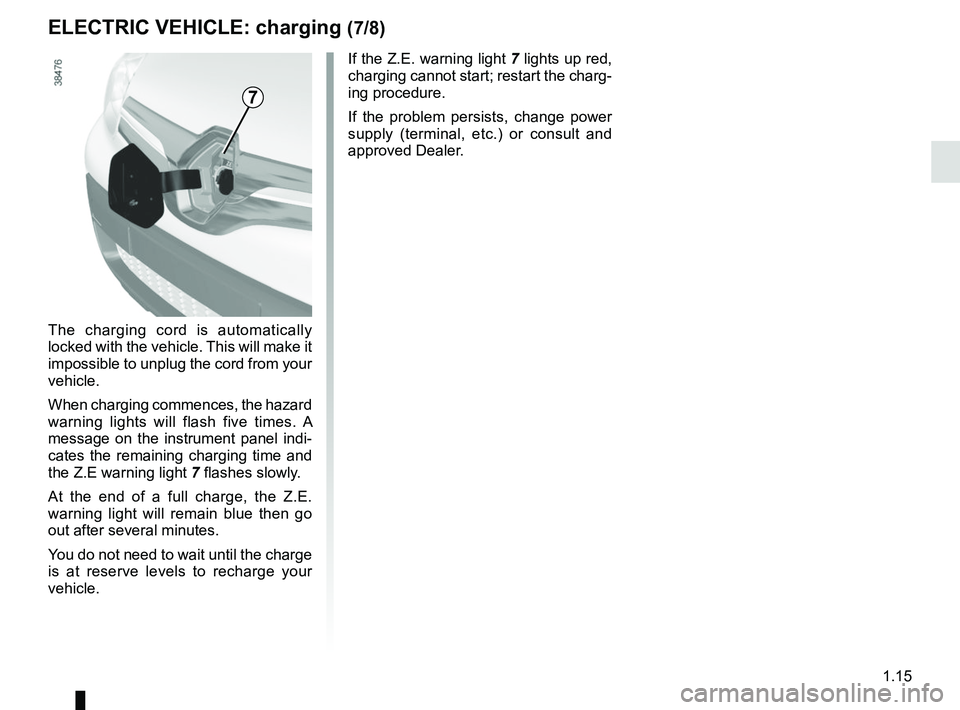
The charging cord is automatically
locked with the vehicle. This will make it
impossible to unplug the cord from your
vehicle.
When charging commences, the hazard
warning lights will flash five times. A
message on the instrument panel indi-
cates the remaining charging time and
the Z.E warning light 7 flashes slowly.
At the end of a full charge, the Z.E.
warning light will remain blue then go
out after several minutes.
You do not need to wait until the charge
is at reserve levels to recharge your
vehicle.
ELECTRIC VEHICLE: charging (7/8)
7
If the Z.E. warning light 7 lights up red,
charging cannot start; restart the charg-
ing procedure.
If the problem persists, change power
supply (terminal, etc.) or consult and
approved Dealer.
Page 22 of 230
1.16
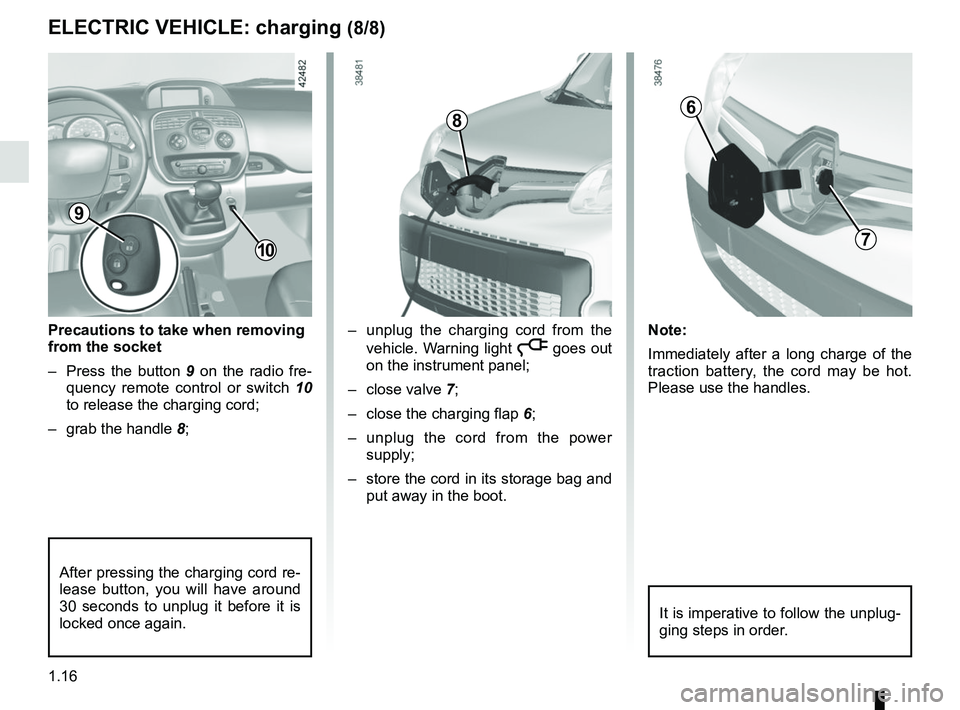
Precautions to take when removing
from the socket
– Press the button 9 on the radio fre-
quency remote control or switch 10
to release the charging cord;
– grab the handle 8;– unplug the charging cord from the
vehicle. Warning light
ṋ goes out
on the instrument panel;
– close valve 7;
– close the charging flap 6;
– unplug the cord from the power supply;
– store the cord in its storage bag and put away in the boot.
ELECTRIC VEHICLE: charging (8/8)
10
6
7
After pressing the charging cord re-
lease button, you will have around
30 seconds to unplug it before it is
locked once again.
Note:
Immediately after a long charge of the
traction battery, the cord may be hot.
Please use the handles.
8
It is imperative to follow the unplug-
ging steps in order.
9
Page 23 of 230

1.17
KEY, RADIO FREQUENCY REMOTE CONTROL: general information (1/2)
Radio frequency remote
control A
1 Locking all the opening elements.
2 Unlocking all opening elements and
the charging cord.
3 Coded key for ignition switch, dri- ver’s door and fuel filler cap.
1
2
3
The key must not be used for any
function other than those described
in the handbook (removing the cap
from a bottle, etc.).Advice
Avoid leaving the remote control in
hot, cold or humid areas.
Driver’s responsibility
when parking or stopping
the vehicle
Never leave an animal,
child or adult who is not self-suffi-
cient alone in your vehicle, even for
a short time.
They may pose a risk to themselves
or to others by starting the engine,
activating equipment such as the
electric windows or locking the
doors, for example.
Also, in hot and/or sunny weather,
please remember that the tempera-
ture inside the passenger compart-
ment increases very quickly.
RISK OF DEATH OR SERIOUS
INJURY.
Radio frequency remote
control B
1 Locking all the opening elements.
2 Unlocking all the opening elements.
3 Coded key for ignition switch, driv-
er’s door and fuel filler cap.
4 Locking/unlocking the luggage com- partment and, depending on the ve-
hicle, the sliding side doors.
1
2
3
4
BA
Page 26 of 230
1.20
2
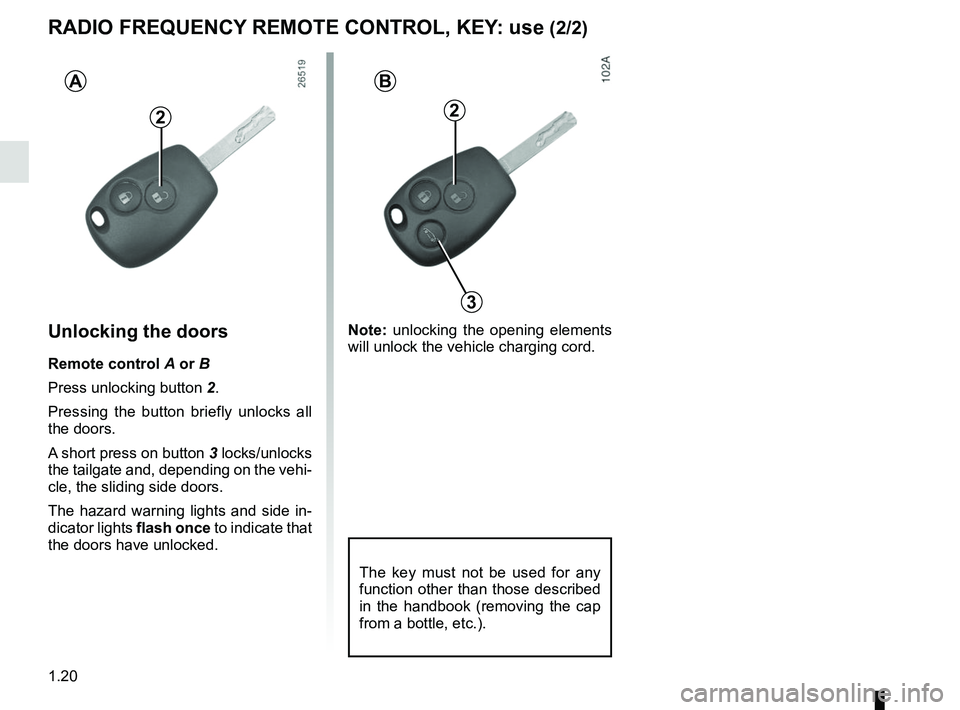
Unlocking the doors
Remote control A or B
Press unlocking button 2.
Pressing the button briefly unlocks all
the doors.
A short press on button 3 locks/unlocks
the tailgate and, depending on the vehi-
cle, the sliding side doors.
The hazard warning lights and side in-
dicator lights flash once to indicate that
the doors have unlocked.
AB
2
3
RADIO FREQUENCY REMOTE CONTROL, KEY: use (2/2)
The key must not be used for any
function other than those described
in the handbook (removing the cap
from a bottle, etc.).
Note: unlocking the opening elements
will unlock the vehicle charging cord.
Page 27 of 230
1.21
DEADLOCKING
Never use deadlocking if
someone is still inside the
vehicle.
1
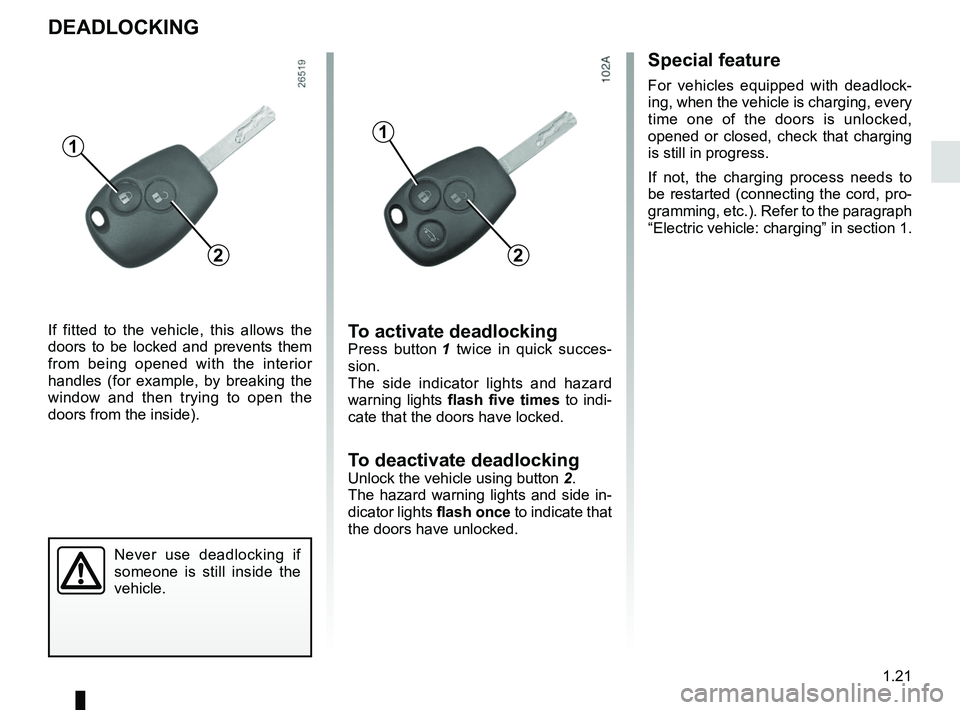
If fitted to the vehicle, this allows the
doors to be locked and prevents them
from being opened with the interior
handles (for example, by breaking the
window and then trying to open the
doors from the inside).
2
To activate deadlockingPress button 1 twice in quick succes-
sion.
The side indicator lights and hazard
warning lights flash five times to indi-
cate that the doors have locked.
To deactivate deadlocking
Unlock the vehicle using button 2.
The hazard warning lights and side in-
dicator lights flash once to indicate that
the doors have unlocked.
1
2
Special feature
For vehicles equipped with deadlock-
ing, when the vehicle is charging, every
time one of the doors is unlocked,
opened or closed, check that charging
is still in progress.
If not, the charging process needs to
be restarted (connecting the cord, pro-
gramming, etc.). Refer to the paragraph
“Electric vehicle: charging” in section 1.
Page 32 of 230
1.26
Locking the opening
elements without the remote
control
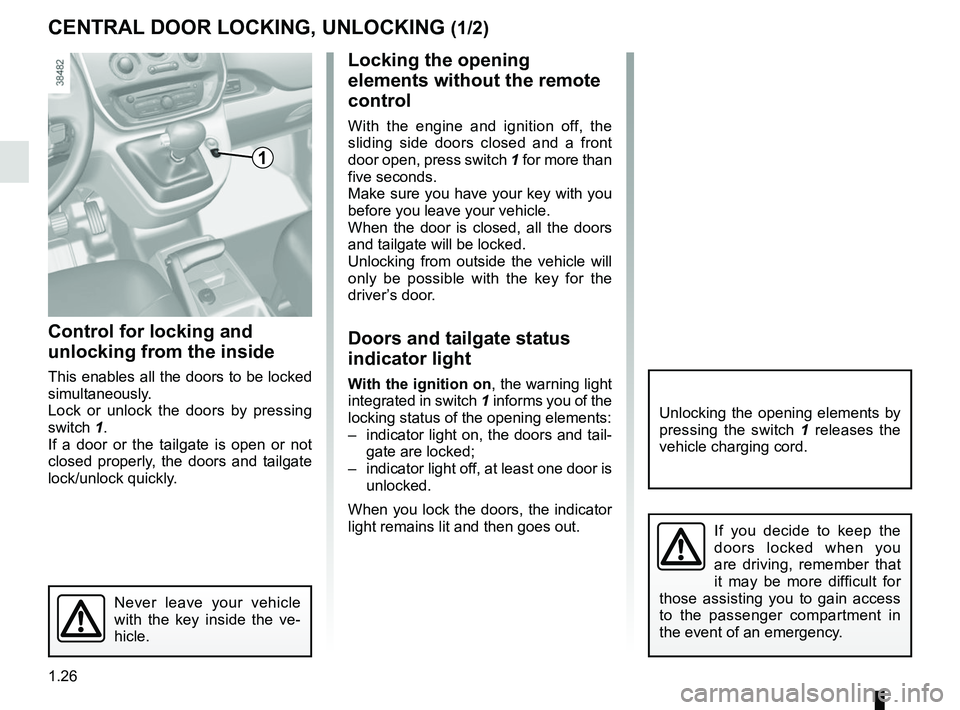
With the engine and ignition off, the
sliding side doors closed and a front
door open, press switch 1 for more than
five seconds.
Make sure you have your key with you
before you leave your vehicle.
When the door is closed, all the doors
and tailgate will be locked.
Unlocking from outside the vehicle will
only be possible with the key for the
driver’s door.
Doors and tailgate status
indicator light
With the ignition on , the warning light
integrated in switch 1 informs you of the
locking status of the opening elements:
– indicator light on, the doors and tail- gate are locked;
– indicator light off, at least one door is unlocked.
When you lock the doors, the indicator
light remains lit and then goes out.
Control for locking and
unlocking from the inside
This enables all the doors to be locked
simultaneously.
Lock or unlock the doors by pressing
switch 1.
If a door or the tailgate is open or not
closed properly, the doors and tailgate
lock/unlock quickly.
CENTRAL DOOR LOCKING, UNLOCKING (1/2)
Never leave your vehicle
with the key inside the ve-
hicle.
If you decide to keep the
doors locked when you
are driving, remember that
it may be more difficult for
those assisting you to gain access
to the passenger compartment in
the event of an emergency.
1
Unlocking the opening elements by
pressing the switch 1 releases the
vehicle charging cord.
Page 72 of 230
1.66
Ú12V battery charge warning
light
If it comes on when you are driving, it
indicates that the circuit is overcharged
or has discharged. Stop and consult an
approved Dealer as soon as possible.
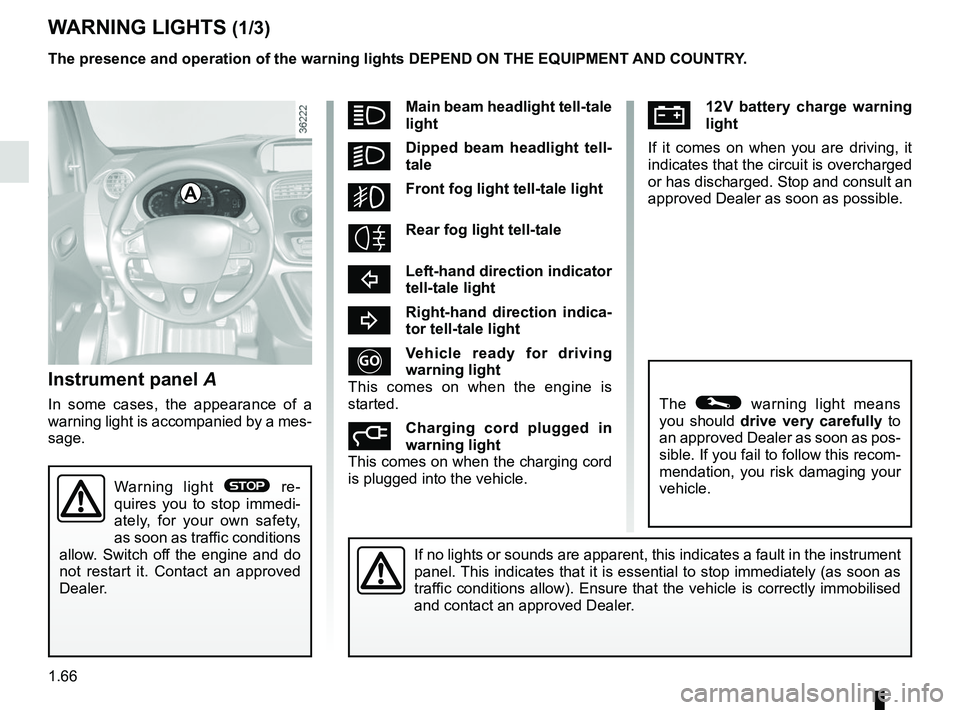
Instrument panel A
In some cases, the appearance of a
warning light is accompanied by a mes-
sage.
WARNING LIGHTS (1/3)
If no lights or sounds are apparent, this indicates a fault in the instr\
ument
panel. This indicates that it is essential to stop immediately (as soon as
traffic conditions allow). Ensure that the vehicle is correctly immobilised\
and contact an approved Dealer.
A
Warning light ® re-
quires you to stop immedi-
ately, for your own safety,
as soon as traffic conditions
allow. Switch off the engine and do
not restart it. Contact an approved
Dealer.
The presence and operation of the warning lights DEPEND ON THE EQUIPMENT\
AND COUNTRY.
The © warning light means
you should drive very carefully to
an approved Dealer as soon as pos-
sible. If you fail to follow this recom-
mendation, you risk damaging your
vehicle.
áMain beam headlight tell-tale
light
kDipped beam headlight tell-
tale
gFront fog light tell-tale light
Rear fog light tell-tale
cLeft-hand direction indicator
tell-tale light
bRight-hand direction indica-
tor tell-tale light
Vehicle ready for driving
warning light
This comes on when the engine is
started.
Charging cord plugged in
warning light
This comes on when the charging cord
is plugged into the vehicle.
Page 84 of 230

1.78
Information messagesThese can help in the vehicle starting phase, or give information about \
a selection or a driving status.
Examples of information messages are given in the following pages.Examples of messages Interpretation of messages
“CHARGE REMAIN 02:10” Indicates the time remaining before a full charge.
“NO MESSAGE AVAILABLE” No warning is stored.
“BRAKE THE VEHICLE” Follow these instructions: risk of damage to the motor.
“BOILER STOPPED” Indicates a halt to the additional heating due to lack of fuel in the ta\
nk.
“PERFORMANCE LIMITED” Indicates deterioration of vehicle performance.
“BATT CHARGE IMPOSSIBLE” Indicates that the charging is prohibited by your battery rental organis\
ation. Rectify
the situation.
“AUTO LIGHTS DEACTIVATED” Indicates that the automatic lights function is deactivated.
TRIP COMPUTER AND WARNING SYSTEM: information messages
Page 102 of 230
2.2
STARTING, STOPPING THE ENGINE (1/2)
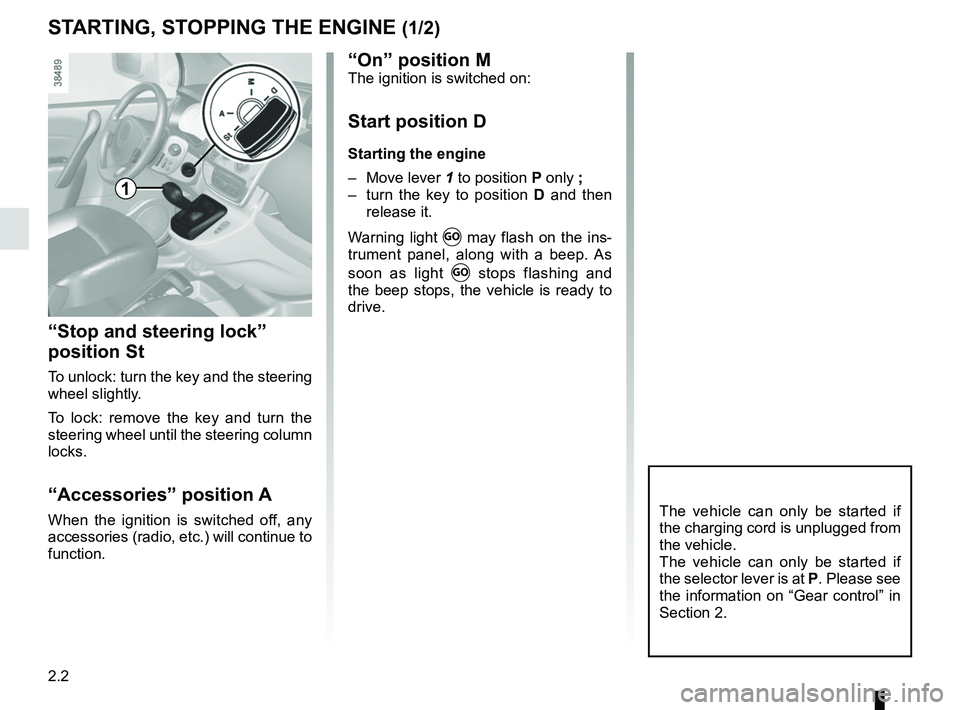
“Stop and steering lock”
position St
To unlock: turn the key and the steering
wheel slightly.
To lock: remove the key and turn the
steering wheel until the steering column
locks.
“Accessories” position A
When the ignition is switched off, any
accessories (radio, etc.) will continue to
function.The vehicle can only be started if
the charging cord is unplugged from
the vehicle.
The vehicle can only be started if
the selector lever is at P. Please see
the information on “Gear control” in
Section 2.
1
“On” position MThe ignition is switched on:
Start position D
Starting the engine
– Move lever 1 to position P only ;
– turn the key to position D and then
release it.
Warning light
Ṑ may flash on the ins-
trument panel, along with a beep. As
soon as light
Ṑ stops flashing and
the beep stops, the vehicle is ready to
drive.
Page 104 of 230

2.4
GEAR CONTROL (1/2)
Operates similar to an automatic gear-
box.
Selector lever 1
The display A on instrument panel indi-
cates the gear lever position as 3.
P : Park
R : Reverse
N : Neutral
D : Forward
Operation
Keeping your foot on the brake pedal
and with the selector lever 1 in position
P, turn the ignition.
Start the motor.
To move out of position P, you must de-
press the brake pedal before pressing
unlocking button 2.
With your foot on the brake pedal
(warning light
c in display A goes
out), move the lever out of position P.
Only engage D or R when the vehi-
cle is stopped, with your foot on the
brake and the accelerator pedal re-
leased.
1
Driving
Put lever 1 in position D.
Hill start
For hill starts, especially after a maxi-
mum traction battery charge and for the
first few miles, we recommend using
the handbrake.
While driving, press the accelerator
pedal to achieve the desired speed.
Reverse
Put lever 1 in position R.
The reversing lights will come on as
soon as reverse gear is selected (with
the ignition on).
32
A
The vehicle can only start if the gear
selector is in position P.
The vehicle can only be started if
the charging cord is unplugged from
the vehicle.