lights RENAULT KANGOO ZERO EMISSION 2012 X61 / 2.G User Guide
[x] Cancel search | Manufacturer: RENAULT, Model Year: 2012, Model line: KANGOO ZERO EMISSION, Model: RENAULT KANGOO ZERO EMISSION 2012 X61 / 2.GPages: 213, PDF Size: 6.08 MB
Page 64 of 213
JauneNoirNoir texte
1.59
ENG_UD29121_4
Poste de conduite à droite (X61 électrique - Renault)
ENG_NU_911-4_F61e_Renault_1
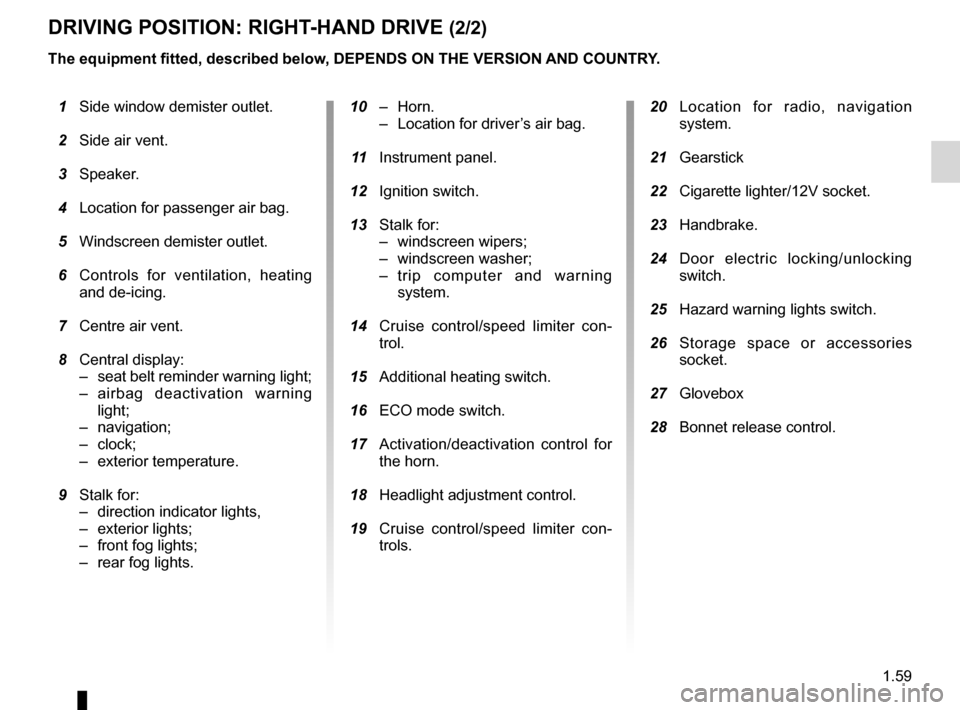
DriviNg POSitiON: right-hAND Drive (2/2)
20 Location for radio, navigation
system.
21 Gearstick
22 Cigarette lighter/12V socket.
23 Handbrake.
24 Door electric locking/unlocking
switch.
25 Hazard warning lights switch.
26 Storage space or accessories
socket.
27 Glovebox
28 Bonnet release control.
10 – Horn.
– Location for driver’s air bag.
11 Instrument panel.
12 Ignition switch.
13 Stalk for:
– windscreen wipers;
– windscreen washer;
– trip computer and warning
system.
14 Cruise control/speed limiter con -
trol.
15 Additional heating switch.
16 ECO mode switch.
17 Activation/deactivation control for
the horn.
18 Headlight adjustment control.
19 Cruise control/speed limiter con -
trols.
1 Side window demister outlet.
2 Side air vent.
3 Speaker.
4 Location for passenger air bag.
5 Windscreen demister outlet.
6 Controls for ventilation, heating
and de-icing.
7 Centre air vent.
8 Central display:
– seat belt reminder warning light;
– airbag deactivation warning
light;
– navigation;
– clock;
– exterior temperature.
9 Stalk for:
– direction indicator lights,
– exterior lights;
– front fog lights;
– rear fog lights.
the equipment fitted, described below, DePeNDS ON the verSiON AND cOUNtr
Y.
Page 65 of 213
display .................................................. (up to the end of the DU)
warning lights ........................................ (up to the end of the DU)
instrument panel ................................... (up to the end of the DU)
driver’s position .................................... (up to the end of the DU)
trip computer and warning system ........(up to the end of the DU)
indicators: instrument panel ............................. (up to the end of the DU)
operating faults ..................................... (up to the end of the DU)
lights: fog lights .......................................................... (current page)
lights: dipped beam headlights ................................... (current page)
lights: direction indicators ........................................... (current page)
lights: main beam headlights ...................................... (current page)
1.60
ENG_UD26204_4
Témoins lumineux (X61 électrique - Renault)
ENG_NU_911-4_F61e_Renault_1
Jaune NoirNoir texte
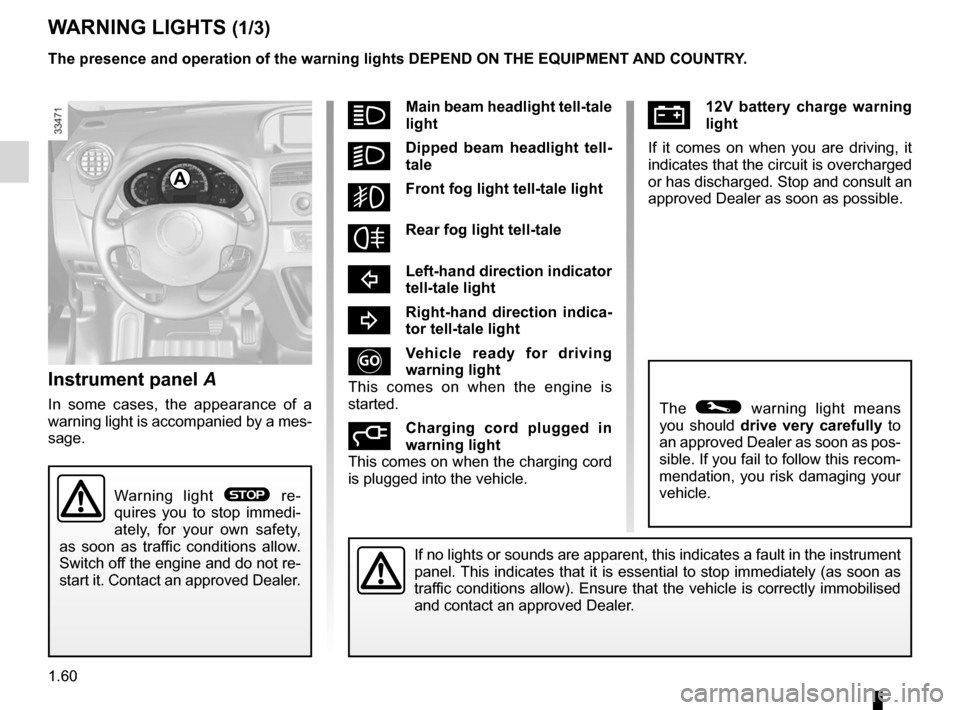
Ú12v battery charge warning
light
If it comes on when you are driving, it
indicates that the circuit is overcharged
or has discharged. Stop and consult an
approved Dealer as soon as possible.
Warning lights
instrument panel A
In some cases, the appearance of a
warning light is accompanied by a mes-
sage.
WArNiNg lightS (1/3)
If no lights or sounds are apparent, this indicates a fault in the instrument
panel. This indicates that it is essential to stop immediately (as soon as
traffic conditions allow). Ensure that the vehicle is correctly immobilised
and contact an approved Dealer.
A
Warning light ® re-
quires you to stop immedi -
ately, for your own safety,
as soon as traffic conditions allow.
Switch off the engine and do not re-
start it. Contact an approved Dealer.
the presence and operation of the warning lights DePeND ON the eQUiPmeNt AND cOUNtr Y.
The © warning light means
you should drive very carefully to
an approved Dealer as soon as pos-
sible. If you fail to follow this recom-
mendation, you risk damaging your
vehicle.
ámain beam headlight tell-tale
light
kDipped beam headlight tell -
tale
gFront fog light tell-tale light
frear fog light tell-tale
cleft-hand direction indicator
tell-tale light
br ight-hand direction indica -
tor tell-tale light
v ehicle ready for driving
warning light
This comes on when the engine is
started.
c harging cord plugged in
warning light
This comes on when the charging cord
is plugged into the vehicle.
Page 66 of 213
JauneNoirNoir texte
1.61
ENG_UD26204_4
Témoins lumineux (X61 électrique - Renault)
ENG_NU_911-4_F61e_Renault_1
WArNiNg lightS (2/3)
the presence and operation of the warning lights DePeND ON the eQUiPmeNt AND cOUNtr Y.
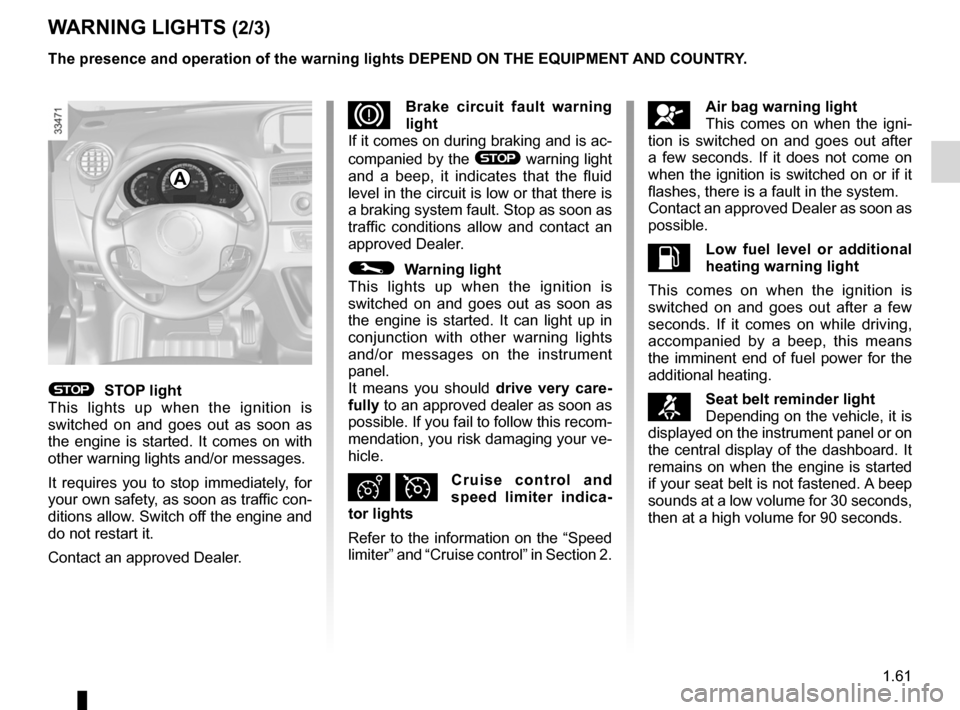
åAir bag warning light
This comes on when the igni-
tion is switched on and goes out after
a few seconds. If it does not come on
when the ignition is switched on or if it
flashes, there is a fault in the system.
Contact an approved Dealer as soon as
possible.
Ll ow fuel level or additional
heating warning light
This comes on when the ignition is
switched on and goes out after a few
seconds. If it comes on while driving,
accompanied by a beep, this means
the imminent end of fuel power for the
additional heating.
™Seat belt reminder light
Depending on the vehicle, it is
displayed on the instrument panel or on
the central display of the dashboard. It
remains on when the engine is started
if your seat belt is not fastened. A beep
sounds at a low volume for 30 seconds,
then at a high volume for 90 seconds.
DBrake circuit fault warning
light
If it comes on during braking and is ac-
companied by the
® warning light
and a beep, it indicates that the fluid
level in the circuit is low or that there is
a braking system fault. Stop as soon as
traffic conditions allow and contact an
approved Dealer.
© Warning light
This lights up when the ignition is
switched on and goes out as soon as
the engine is started. It can light up in
conjunction with other warning lights
and/or messages on the instrument
panel.
It means you should drive very care-
fully to an approved dealer as soon as
possible. If you fail to follow this recom-
mendation, you risk damaging your ve-
hicle.
Ð Ïcruise control and
speed limiter indica -
tor lights
Refer to the information on the “Speed
limiter” and “Cruise control” in Section 2.
® StOP light
This lights up when the ignition is
switched on and goes out as soon as
the engine is started. It comes on with
other warning lights and/or messages.
It requires you to stop immediately, for
your own safety, as soon as traffic con-
ditions allow. Switch off the engine and
do not restart it.
Contact an approved Dealer.
A
Page 67 of 213
1.62
ENG_UD26204_4
Témoins lumineux (X61 électrique - Renault)
ENG_NU_911-4_F61e_Renault_1
WArNiNg lightS (3/3)
the presence and operation of the warning lights DePeND ON the eQUiPmeNt AND cOUNtr Y.
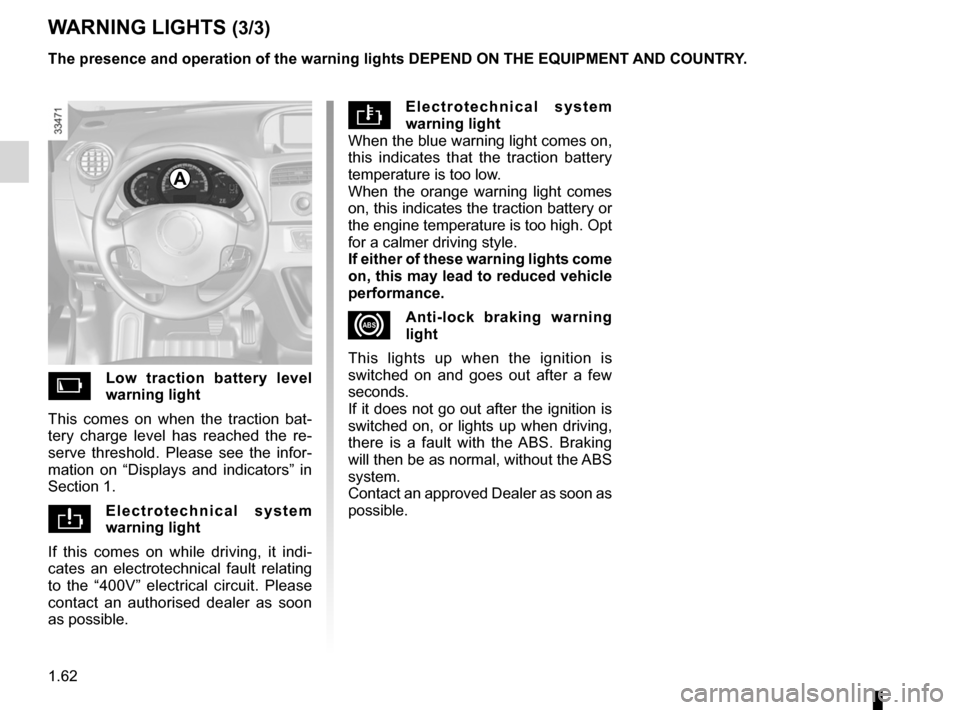
el e c t r o t e c h n i c a l s y s t e m
warning light
When the blue warning light comes on,
this indicates that the traction battery
temperature is too low.
When the orange warning light comes
on, this indicates the traction battery or
the engine temperature is too high. Opt
for a calmer driving style.
if either of these warning lights come
on, this may lead to reduced vehicle
performance.
xAnti-lock braking warning
light
This lights up when the ignition is
switched on and goes out after a few
seconds.
If it does not go out after the ignition is
switched on, or lights up when driving,
there is a fault with the ABS. Braking
will then be as normal, without the ABS
system.
Contact an approved Dealer as soon as
possible.
l ow traction battery level
warning light
This comes on when the traction bat -
tery charge level has reached the re -
serve threshold. Please see the infor -
mation on “Displays and indicators” in
Section 1.
e l e c t r o t e c h n i c a l s y s t e m
warning light
If this comes on while driving, it indi -
cates an electrotechnical fault relating
to the “400V” electrical circuit. Please
contact an authorised dealer as soon
as possible.
A
Page 71 of 213
control instruments ............................... (up to the end of the DU)
instrument panel messages ..................(up to the end of the DU)
instrument panel ................................... (up to the end of the DU)
warning lights ........................................ (up to the end of the DU)
1.66
ENG_UD23006_2
Ordinateur de bord : généralités (X61 électrique - Renault)\
ENG_NU_911-4_F61e_Renault_1
Jaune NoirNoir texte
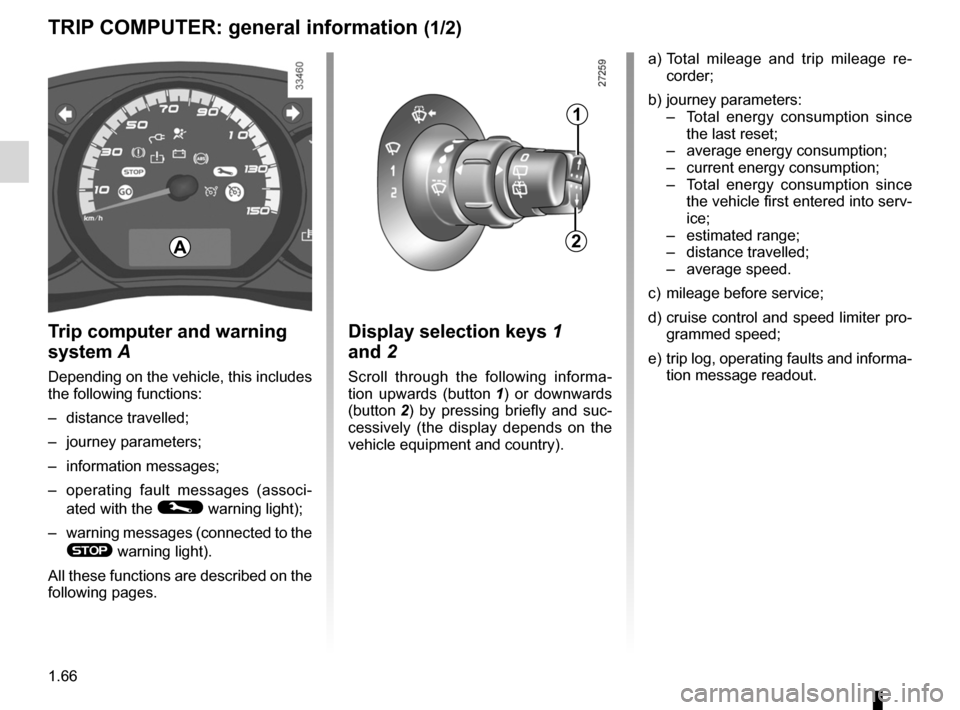
Trip computer
triP cOmPUter: general information (1/2)
t rip computer and warning
system A
Depending on the vehicle, this includes
the following functions:
– distance travelled;
– journey parameters;
– information messages;
– operating fault messages (associ -
ated with the
© warning light);
– warning messages (connected to the
® warning light).
All these functions are described on the
following pages. a)
Total mileage and trip mileage re -
corder;
b) journey parameters:
– Total energy consumption since
the last reset;
– average energy consumption;
– current energy consumption;
– Total energy consumption since
the vehicle first entered into serv-
ice;
– estimated range;
– distance travelled;
– average speed.
c) mileage before service;
d) cruise control and speed limiter pro-
grammed speed;
e) trip log, operating faults and informa-
tion message readout.
A
1
2
Display selection keys 1
and 2
Scroll through the following informa -
tion upwards (button 1 ) or downwards
(button 2 ) by pressing briefly and suc -
cessively (the display depends on the
vehicle equipment and country).
Page 77 of 213
instrument panel messages..................(up to the end of the DU)
instrument panel ................................... (up to the end of the DU)
trip computer and warning system ........(up to the end of the DU)
1.72
ENG_UD23044_1
Ordinateur de bord : messages d\’information (X61 électrique - R\
enault)
ENG_NU_911-4_F61e_Renault_1
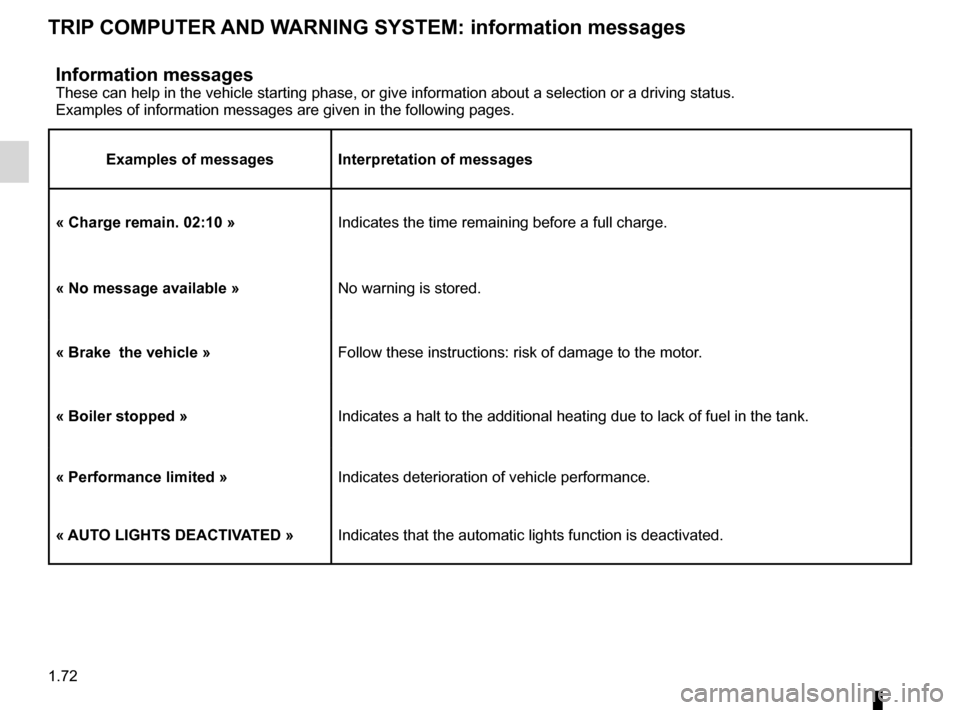
information messagesThese can help in the vehicle starting phase, or give information about \
a selection or a driving status.
Examples of information messages are given in the following pages.
examples of messages interpretation of messages
« charge remain. 02:10 » Indicates the time remaining before a full charge.
« No message available » No warning is stored.
« Brake the vehicle » Follow these instructions: risk of damage to the motor.
« Boiler stopped » Indicates a halt to the additional heating due to lack of fuel in the ta\
nk.
« Performance limited » Indicates deterioration of vehicle performance.
« AUt O lightS DeActiv AteD » Indicates that the automatic lights function is deactivated.
triP cOmPUter AND WArNiNg SYStem: information messages
Page 78 of 213
instrument panel messages...................................(current page)
trip computer and warning system .........................(current page)
instrument panel .................................................... (current page)
warning lights ......................................................... (current page)
1.73
ENG_UD25279_2
Ordinateur de bord : messages d’anomalie de fonctionnement (X61 é\
lectrique - Renault)
ENG_NU_911-4_F61e_Renault_1
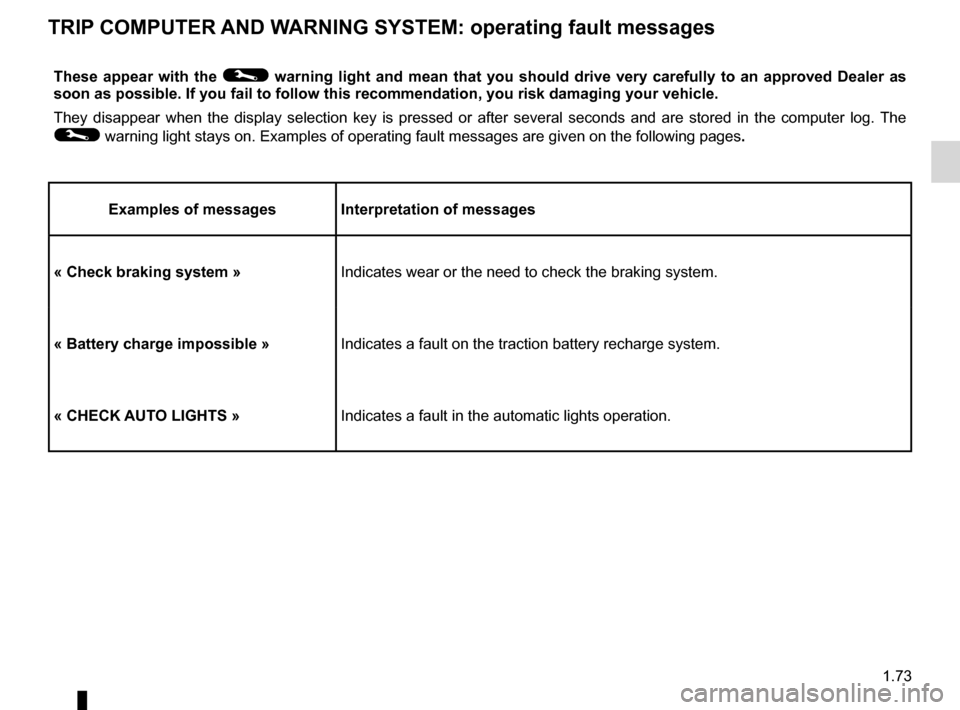
these appear with the © warning light and mean that you should drive very carefully to an approved Dealer as
soon as possible. if you fail to follow this recommendation, you risk damaging your vehicle\
.
They disappear when the display selection key is pressed or after several seconds and are stored in the computer log. The
© warning light stays on. Examples of operating fault messages are given \
on the following pages .
examples of messages interpretation of messages
« check braking system »Indicates wear or the need to check the braking system.
« Battery charge impossible » Indicates a fault on the traction battery recharge system.
« checK AUt O lightS » Indicates a fault in the automatic lights operation.
triP cOmPUter AND WArNiNg SYStem: operating fault messages
Page 81 of 213
rear view mirrors ................................... (up to the end of the DU)
1.76
ENG_UD20959_2
Rétroviseurs (X61 - F61 - Renault)
ENG_NU_911-4_F61e_Renault_1
Rear-view mirrors
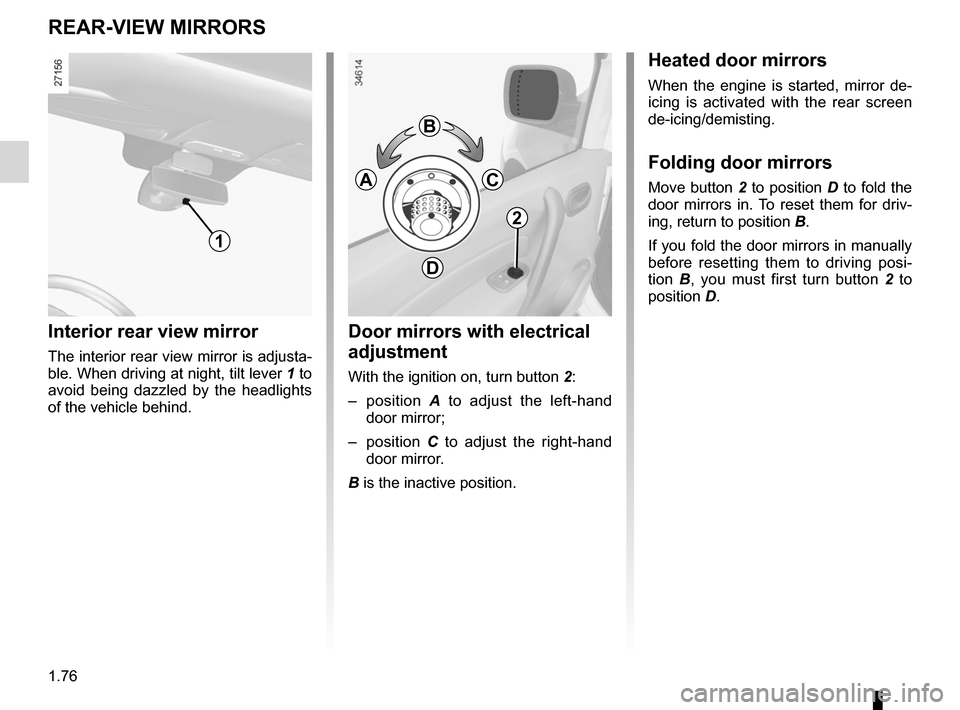
interior rear view mirror
The interior rear view mirror is adjusta-
ble. When driving at night, tilt lever 1 to
avoid being dazzled by the headlights
of the vehicle behind.
reAr-vieW mirrOrS
1
heated door mirrors
When the engine is started, mirror de-
icing is activated with the rear screen
de-icing/demisting.
Folding door mirrors
Move button 2 to position D to fold the
door mirrors in. To reset them for driv-
ing, return to position B.
If you fold the door mirrors in manually
before resetting them to driving posi -
tion B , you must first turn button 2 to
position D.
Door mirrors with electrical
adjustment
With the ignition on, turn button 2:
– position A to adjust the left-hand
door mirror;
– position C to adjust the right-hand
door mirror.
B is the inactive position.
2
B
c
D
A
Page 82 of 213
audible and visual signals.....................(up to the end of the DU)
hazard warning lights signal ................. (up to the end of the DU)
hazard warning lights signal ................. (up to the end of the DU)
indicators ............................................................... (current page)
horn ...................................................... (up to the end of the DU)
lights: hazard warning ............................... (up to the end of the DU)
horn: flash ................................................ (up to the end of the DU)
horn: sounding the horn ........................... (up to the end of the DU)
lights: direction indicators ........................................... (current page)
1.77
ENG_UD19078_1
Avertisseurs sonores et lumineux (X61 - F61 - Renault)
ENG_NU_911-4_F61e_Renault_1
Audible and visual signals
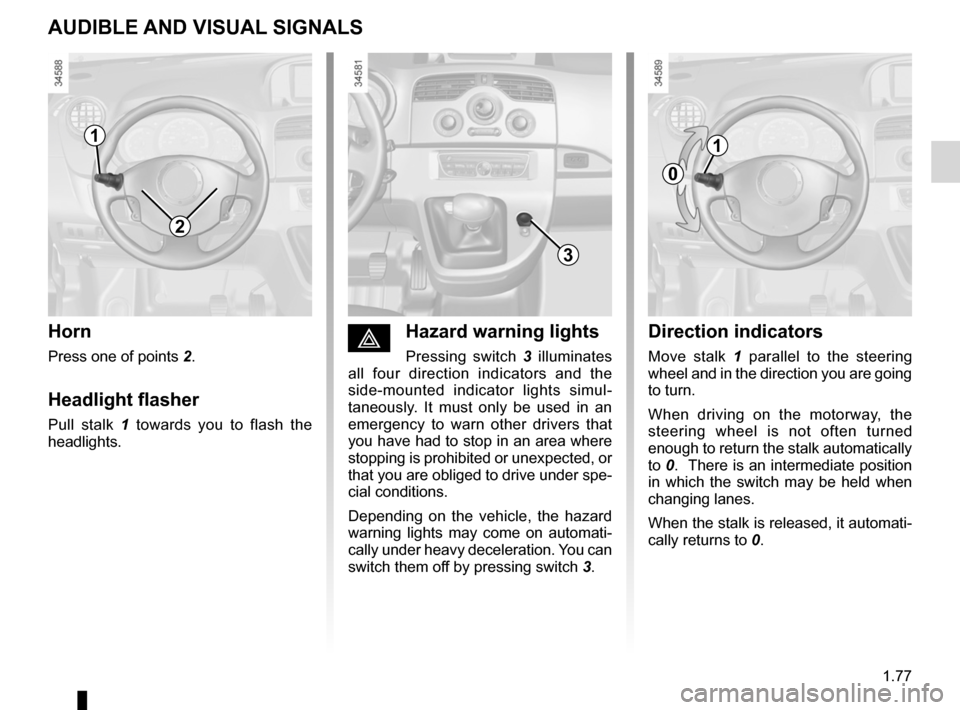
éhazard warning lights
Pressing switch 3 illuminates
all four direction indicators and the
side-mounted indicator lights simul -
taneously. It must only be used in an
emergency to warn other drivers that
you have had to stop in an area where
stopping is prohibited or unexpected, or
that you are obliged to drive under spe-
cial conditions.
Depending on the vehicle, the hazard
warning lights may come on automati -
cally under heavy deceleration. You can
switch them off by pressing switch 3.
Direction indicators
Move stalk 1 parallel to the steering
wheel and in the direction you are going
to turn.
When driving on the motorway, the
steering wheel is not often turned
enough to return the stalk automatically
to 0. There is an intermediate position
in which the switch may be held when
changing lanes.
When the stalk is released, it automati-
cally returns to 0.
horn
Press one of points 2.
headlight flasher
Pull stalk 1 towards you to flash the
headlights.
AUDiBle AND viSUAl SigNAlS
2
3
1
0
1
Page 84 of 213
signals and lights .................................. (up to the end of the DU)
lights: side lights ......................................................... (current page)
lights: dipped beam headlights ................................... (current page)
lights: main beam headlights ...................................... (current page)
1.79
ENG_UD19079_1
Eclairage et signalisation extérieure (X61 - F61 - Renault)
ENG_NU_911-4_F61e_Renault_1
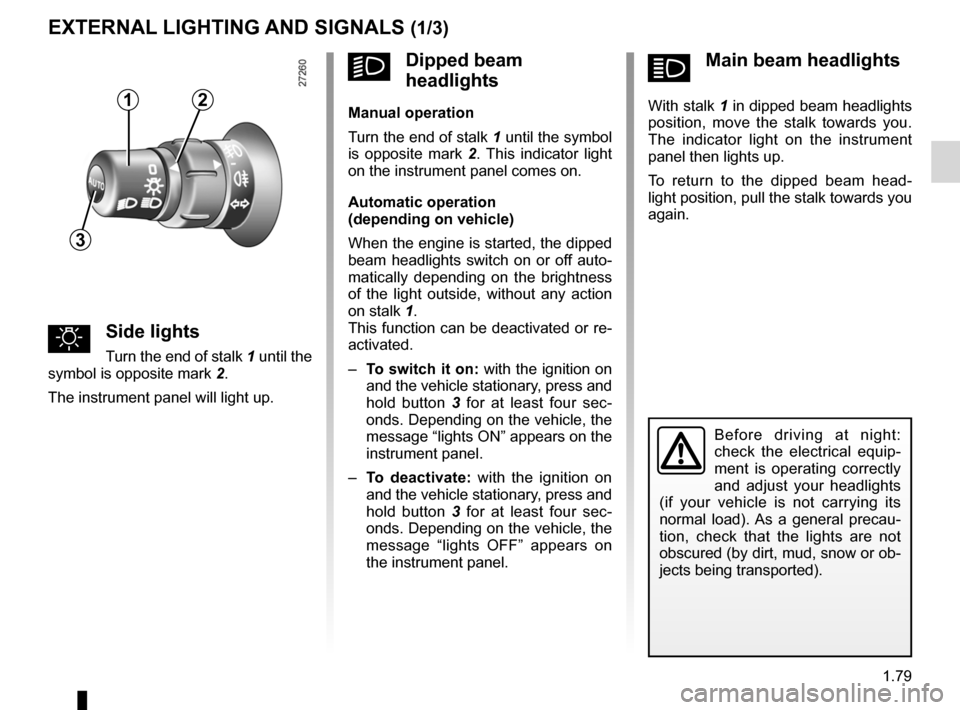
ámain beam headlights
With stalk 1 in dipped beam headlights
position, move the stalk towards you.
The indicator light on the instrument
panel then lights up.
To return to the dipped beam head -
light position, pull the stalk towards you
again.
External lighting and signals
uSide lights
Turn the end of stalk 1 until the
symbol is opposite mark 2.
The instrument panel will light up.
eXterNAl lightiNg AND SigNAlS (1/3)
Before driving at night:
check the electrical equip -
ment is operating correctly
and adjust your headlights
(if your vehicle is not carrying its
normal load). As a general precau -
tion, check that the lights are not
obscured (by dirt, mud, snow or ob-
jects being transported).
kDipped beam
headlights
manual operation
Turn the end of stalk 1 until the symbol
is opposite mark 2 . This indicator light
on the instrument panel comes on.
Automatic operation
(depending on vehicle)
When the engine is started, the dipped
beam headlights switch on or off auto-
matically depending on the brightness
of the light outside, without any action
on stalk 1.
This function can be deactivated or re-
activated.
– to switch it on: with the ignition on
and the vehicle stationary, press and
hold button 3 for at least four sec -
onds. Depending on the vehicle, the
message “lights ON” appears on the
instrument panel.
– to deactivate: with the ignition on
and the vehicle stationary, press and
hold button 3 for at least four sec -
onds. Depending on the vehicle, the
message “lights OFF” appears on
the instrument panel.12
3