Accident RENAULT KOLEOS 2012 1.G User Guide
[x] Cancel search | Manufacturer: RENAULT, Model Year: 2012, Model line: KOLEOS, Model: RENAULT KOLEOS 2012 1.GPages: 233, PDF Size: 7.81 MB
Page 110 of 233
cruise control ........................................ (up to the end of the DU)
cruise control-speed limiter................... (up to the end of the DU)
driving ................................................... (up to the end of the DU)
2.32
ENG_UD23498_5
Régulateur-limiteur de vitesse : fonction régulateur (X45 - H45 - Renault)
ENG_NU_977-2_H45_Ph2_Renault_2
Jaune NoirNoir texte
Cruise control
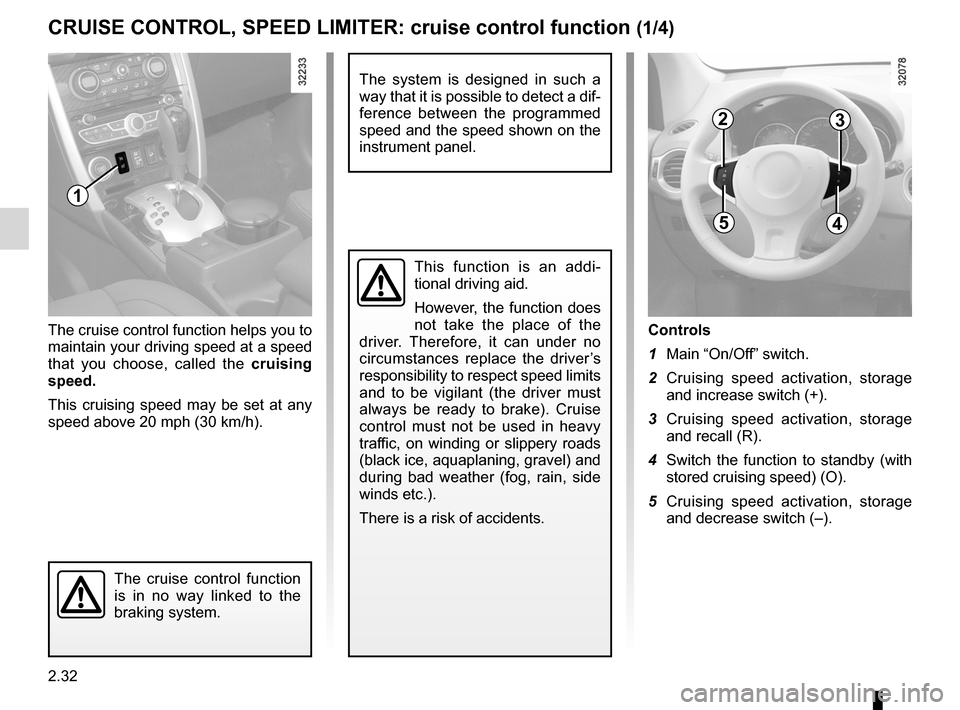
Controls
1 Main “On/Off” switch.
2 Cruising speed activation, storage
and increase switch (+).
3 Cruising speed activation, storage
and recall (R).
4 Switch the function to standby (with
stored cruising speed) (O).
5 Cruising speed activation, storage
and decrease switch (–).
The cruise control function helps you to
maintain your driving speed at a speed
that you choose, called the
cruising
speed.
This cruising speed may be set at any
speed above 20 mph (30 km/h).
The cruise control function
is in no way linked to the
braking system.
This function is an addi -
tional driving aid.
However, the function does
not take the place of the
driver. Therefore, it can under no
circumstances replace the driver’s
responsibility to respect speed limits
and to be vigilant (the driver must
always be ready to brake). Cruise
control must not be used in heavy
traffic, on winding or slippery roads
(black ice, aquaplaning, gravel) and
during bad weather (fog, rain, side
winds etc.).
There is a risk of accidents.
CRUISE CONTROL, SPEED LIMITER: cruise control function (1/4)
1
23
45
The system is designed in such a
way that it is possible to detect a dif-
ference between the programmed
speed and the speed shown on the
instrument panel.
Page 115 of 233
JauneNoirNoir texte
2.37
ENG_UD27281_8
Aide au parking (X45 - H45 - Renault)
ENG_NU_977-2_H45_Ph2_Renault_2
PARKING DISTANCE CONTROL (2/3)
Automatic activation/deactivation of
rear parking distance control
The system deactivates:
– when the electronic parking brake is
applied;
– when the vehicle speed is above ap-
proximately 7 mph (12 km/h);
– when the vehicle is in neutral or
when the gear lever has been shifted
to N or P for automatic gearboxes.
An impact to the under -
side of the vehicle while
manoeuvring (e.g.: strik -
ing a post, raised kerb or
other street furniture) may result in
damage to the vehicle (e.g.: defor -
mation of an axle).
To avoid any risk of accident, have
your vehicle checked by an ap -
proved Dealer.
If there are obstacles located close to
both the front and rear of the vehicle,
only the closest of the two will be ac -
knowledged and the corresponding
front or rear beep sound will be emit -
ted. If obstacles are detected both to
the front and to the rear of the vehicle
at the same time, and they are both
within 30 centimetres from the vehicle,
the corresponding front and rear beeps
will be emitted alternately.
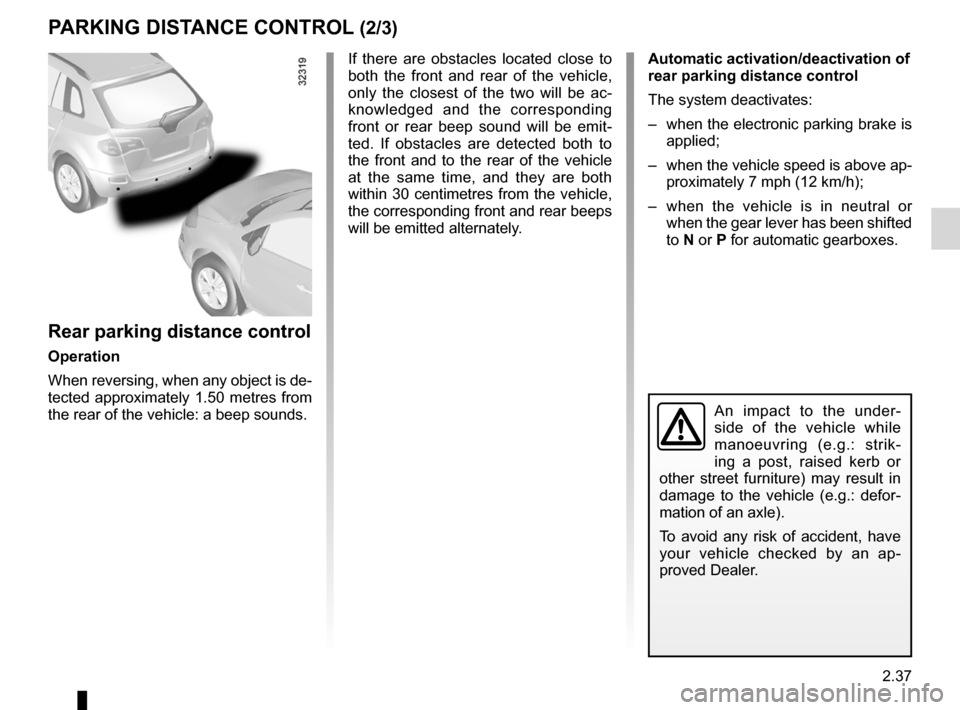
Rear parking distance control
Operation
When reversing, when any object is de-
tected approximately 1.50 metres from
the rear of the vehicle: a beep sounds.
Page 118 of 233
2.40
ENG_UD27292_7
Bo tes de vitesses automatiques ou variation continue (X45 - H45 - Renault)
ENG_NU_977-2_H45_Ph2_Renault_2
Jaune NoirNoir texte
AUTOMATIC OR CONTINUOUSLY vARIABLE TRANSMISSION (2/3)
Driving in manual mode
With the selector lever in position D,
move the lever to the left. Shifting the
lever repeatedly allows you to change
gears manually:
– backwards to shift down the gears;
– forwards to shift up the gears.
The gear selected is displayed on the
instrument panel.
Special cases
Under certain driving conditions (e.g.
engine protection, or electronic stability
control (ESC) operational etc.) the au -
tomatic system may change gear auto-
matically.
Likewise, to prevent incorrect manoeu -
vres, a gear change may be refused by
the automatic system: in this case the
gear display flashes for a few seconds
as a warning.
Special circumstances
– If the bends and road surface do
not allow you to stay in automatic
mode (e.g. in the mountains), we
recommend that you change to
manual mode.
This will prevent repeated gear
changes when climbing and will
enable engine braking on long de -
scents.
– In very cold weather, to avoid stall-
ing the engine, start the engine and
wait a few seconds before moving
the lever from position P or N to po-
sition D or R.
– v ehicles not fitted with traction
control: to avoid wheelspin when
starting on a slippery or low grip sur-
face, change to manual mode and
select second gear before moving
off.
Parking the vehicle
When the vehicle is stopped, move the
lever to position P while keeping your
foot on the brake pedal: the gearbox is
in neutral and the drive wheels are me-
chanically locked by the driveshaft.
Depending on the vehicle, apply the
handbrake or check that the elec -
tronic parking brake is on (refer to
the information on the Parking brake in
Section 2).
In very cold weather, the system may prevent the gears from being shifted in
manual mode until the gearbox reaches the right temperature.
An impact to the under -
side of the vehicle while
manoeuvring (e.g.: strik -
ing a post, raised kerb or
other street furniture) may result in
damage to the vehicle (e.g.: defor -
mation of an axle).
To avoid any risk of accident, have
your vehicle checked by an ap -
proved Dealer.
Page 154 of 233
luggage compartment cover ................. (up to the end of the DU)
rear parcel shelf .................................... (up to the end of the DU)
rear parcel shelf .................................... (up to the end of the DU)
3.34
ENG_UD27218_3
Cache-bagages (X45 - H45 - Renault)
ENG_NU_977-2_H45_Ph2_Renault_3
Luggage cover
luggAgE coMPARTMENT coVER (DEPENDINg oN ThE VEhIclE)
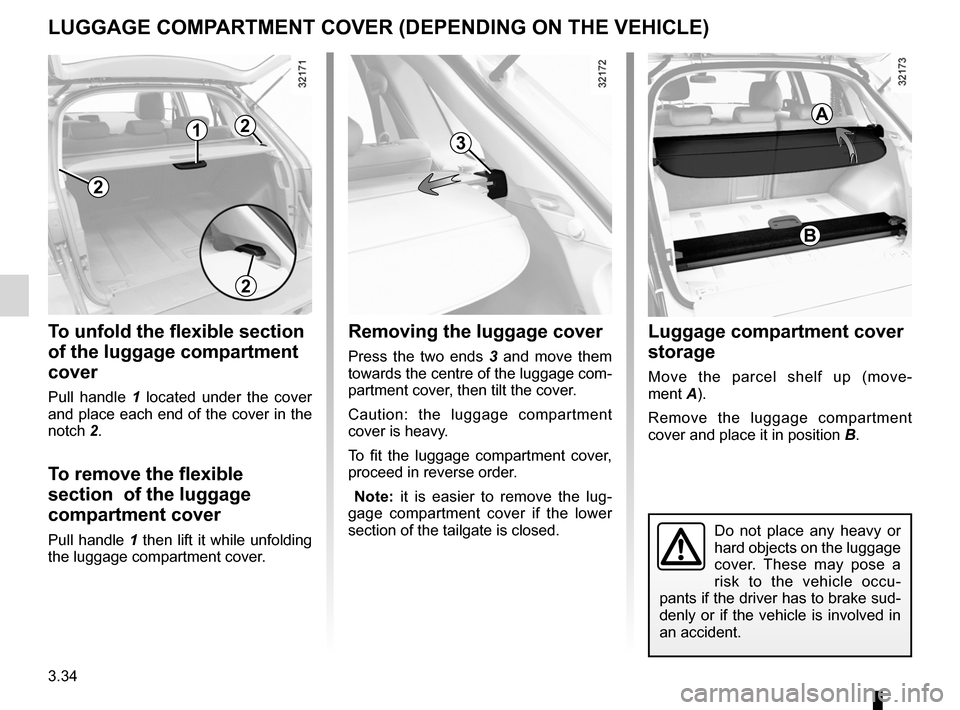
To unfold the flexible section
of the luggage compartment
cover
Pull handle 1 located under the cover
and place each end of the cover in the
notch 2.
To remove the flexible
section of the luggage
compartment cover
Pull handle 1 then lift it while unfolding
the luggage compartment cover.
Removing the luggage cover
Press the two ends 3 and move them
towards the centre of the luggage com-
partment cover, then tilt the cover.
Caution: the luggage compartment
cover is heavy.
To fit the luggage compartment cover,
proceed in reverse order.
Note: it is easier to remove the lug -
gage compartment cover if the lower
section of the tailgate is closed.
luggage compartment cover
storage
Move the parcel shelf up (move -
ment A).
Remove the luggage compartment
cover and place it in position B.
Do not place any heavy or
hard objects on the luggage
cover. These may pose a
risk to the vehicle occu-
pants if the driver has to brake sud-
denly or if the vehicle is involved in
an accident.
2
1
2
3
B
A2