Door RENAULT KOLEOS 2012 1.G Owner's Manual
[x] Cancel search | Manufacturer: RENAULT, Model Year: 2012, Model line: KOLEOS, Model: RENAULT KOLEOS 2012 1.GPages: 233, PDF Size: 7.81 MB
Page 60 of 233
1.54
ENG_UD27277_8
Ordinateur de bord (X45 - H45 - Renault)
ENG_NU_977-2_H45_Ph2_Renault_1
Jaune NoirNoir texte
TRIp cOMpUTER ANd WARNINg sYsTEM (5/10)
The display of information shown below dEpENds ON ThE vEhIcLE EQUIpMENT ANd cOUNTRY.
Examples of selections Interpreting the display selected
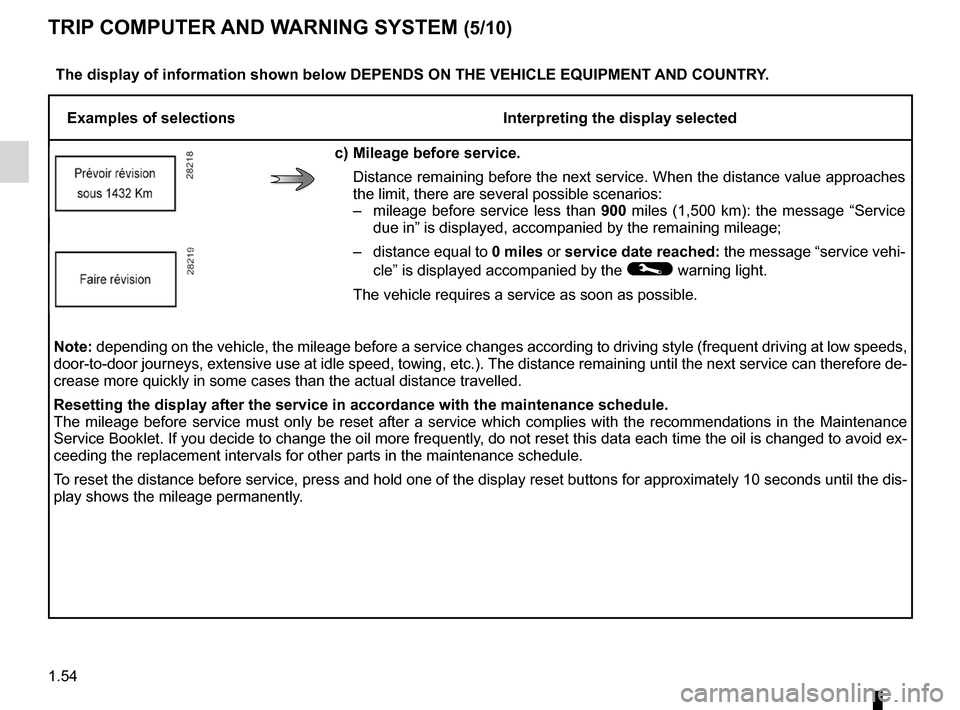
c) Mileage before service.
Distance remaining before the next service. When the distance value approaches
the limit, there are several possible scenarios:
– mileage before service less than 900 miles (1,500 km): the message “Service
due in ” is displayed, accompanied by the remaining mileage;
– distance equal to 0 miles or service date reached: the message “service vehi-
cle” is displayed accompanied by the
© warning light.
The vehicle requires a service as soon as possible.
Note: depending on the vehicle, the mileage before a service changes according to driving style (frequent driving at low speeds,
door-to-door journeys, extensive use at idle speed, towing, etc.). The distance remaining until the next service can therefore de-
crease more quickly in some cases than the actual distance travelled.
Resetting the display after the service in accordance with the maintenance schedule.
The mileage before service must only be reset after a service which complies with the recommendations in the Maintenance
Service Booklet. If you decide to change the oil more frequently, do not reset this data each time the oil is changed to avoid ex-
ceeding the replacement intervals for other parts in the maintenance schedule.
To reset the distance before service, press and hold one of the display reset buttons for approximately 10 seconds until the dis-
play shows the mileage permanently.
Page 67 of 233
rear view mirrors ................................... (up to the end of the DU)
1.61
ENG_UD7744_2
Rétroviseurs (X45 - H45 - Renault)
ENG_NU_977-2_H45_Ph2_Renault_1
Rear-view mirrors
REAR vIEW MIRRORs
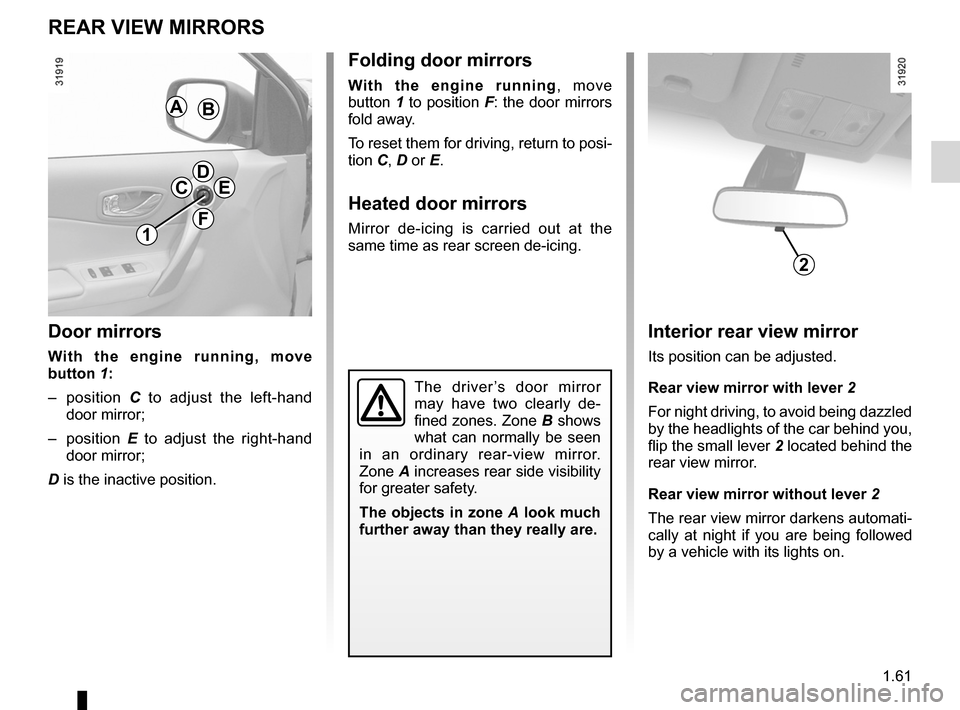
door mirrors
With the engine running, move
button 1:
– position C to adjust the left-hand
door mirror;
– position E to adjust the right-hand
door mirror;
D is the inactive position.
folding door mirrors
With the engine running , move
button 1 to position F: the door mirrors
fold away.
To reset them for driving, return to posi-
tion C, D or E.
heated door mirrors
Mirror de-icing is carried out at the
same time as rear screen de-icing.
The driver ’s door mirror
may have two clearly de -
fined zones. Zone B shows
what can normally be seen
in an ordinary rear-view mirror.
Zone A increases rear side visibility
for greater safety.
The objects in zone A look much
further away than they really are.
1
cdE
f
AB
Interior rear view mirror
Its position can be adjusted.
Rear view mirror with lever 2
For night driving, to avoid being dazzled
by the headlights of the car behind you,
flip the small lever 2 located behind the
rear view mirror.
Rear view mirror without lever 2
The rear view mirror darkens automati-
cally at night if you are being followed
by a vehicle with its lights on.
2
Page 70 of 233
lightsmobile directional ............................................. (current page)
see-me-home lighting ............................................ (current page)
lights-on warning buzzer ........................................ (current page)
1.64
ENG_UD23490_3
Eclairages et signalisations extérieures (X45 - H45 - Renault)
ENG_NU_977-2_H45_Ph2_Renault_1
Jaune NoirNoir texte
EXTERIOR LIghTINg ANd sIgNALs (2/3)
cornering lights
Depending on the vehicle, if the dipped
beam headlights are on when corner -
ing, and under certain driving condi -
tions (speed, steering wheel angle,
etc.), additional lights are switched on
to light the inside of the bend.
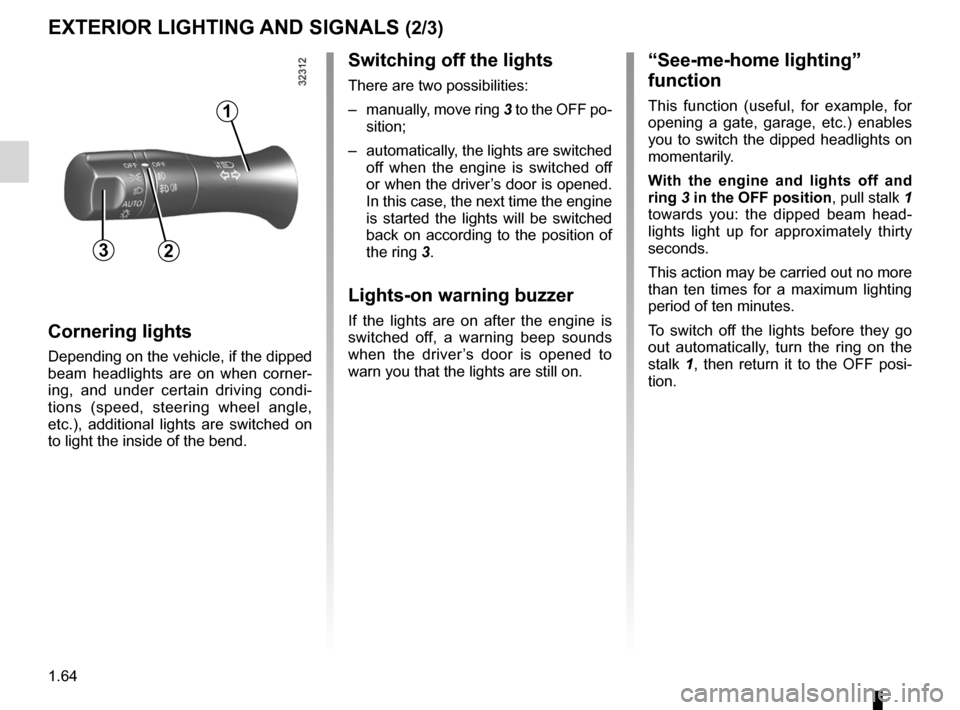
switching off the lights
There are two possibilities:
– manually, move ring 3 to the OFF po-
sition;
– automatically, the lights are switched
off when the engine is switched off
or when the driver’s door is opened.
In this case, the next time the engine
is started the lights will be switched
back on according to the position of
the ring 3.
Lights-on warning buzzer
If the lights are on after the engine is
switched off, a warning beep sounds
when the driver ’s door is opened to
warn you that the lights are still on.
“see-me-home lighting”
function
This function (useful, for example, for
opening a gate, garage, etc.) enables
you to switch the dipped headlights on
momentarily.
With the engine and lights off and
ring 3 in the Off position , pull stalk 1
towards you: the dipped beam head -
lights light up for approximately thirty
seconds.
This action may be carried out no more
than ten times for a maximum lighting
period of ten minutes.
To switch off the lights before they go
out automatically, turn the ring on the
stalk 1 , then return it to the OFF posi -
tion.
32
1
Page 83 of 233
stopping the engine .............................. (up to the end of the DU)
driving ................................................... (up to the end of the DU)
2.5
ENG_UD27287_4
Arr t du moteur (X45 - H45 - Renault)
ENG_NU_977-2_H45_Ph2_Renault_2
Stopping the engine
STOPPING THE ENGINE
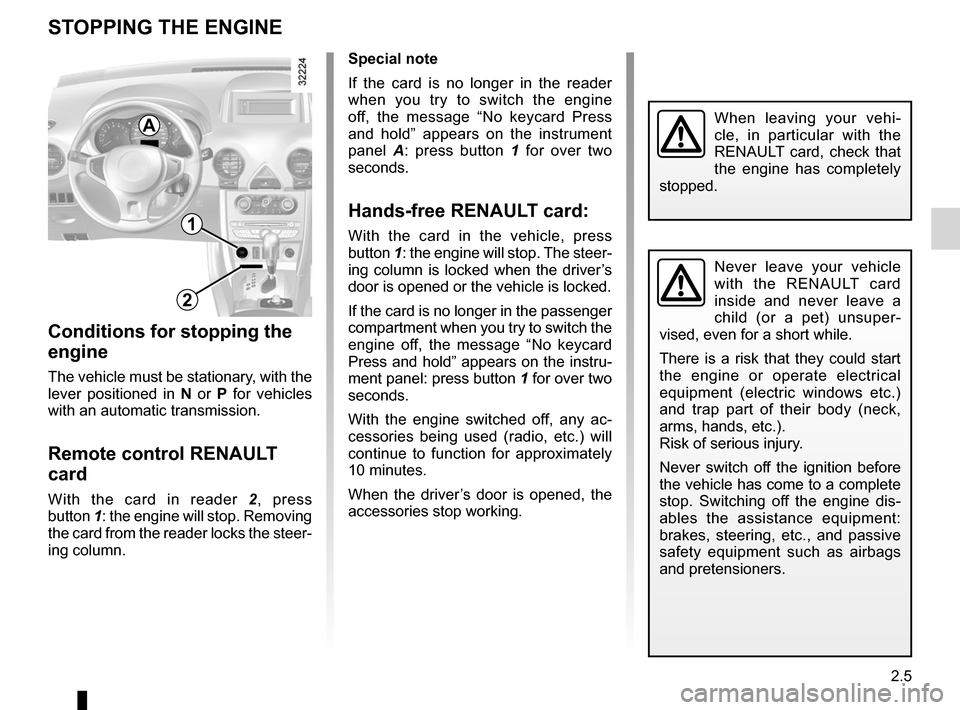
Special note
If the card is no longer in the reader
when you try to switch the engine
off, the message “ No keycard Press
and hold ” appears on the instrument
panel A : press button 1 for over two
seconds.
Hands-free RENAULT card:
With the card in the vehicle, press
button 1: the engine will stop. The steer-
ing column is locked when the driver’s
door is opened or the vehicle is locked.
If the card is no longer in the passenger
compartment when you try to switch the
engine off, the message “ No keycard
Press and hold ” appears on the instru-
ment panel: press button 1 for over two
seconds.
With the engine switched off, any ac -
cessories being used (radio, etc.) will
continue to function for approximately
10 minutes.
When the driver’s door is opened, the
accessories stop working.
Conditions for stopping the
engine
The vehicle must be stationary, with the
lever positioned in N or P for vehicles
with an automatic transmission.
Remote control RENAULT
card
With the card in reader 2, press
button 1: the engine will stop. Removing
the card from the reader locks the steer-
ing column.
Never leave your vehicle
with the RENAULT card
inside and never leave a
child (or a pet) unsuper -
vised, even for a short while.
There is a risk that they could start
the engine or operate electrical
equipment (electric windows etc.)
and trap part of their body (neck,
arms, hands, etc.).
Risk of serious injury.
Never switch off the ignition before
the vehicle has come to a complete
stop. Switching off the engine dis -
ables the assistance equipment:
brakes, steering, etc., and passive
safety equipment such as airbags
and pretensioners.
When leaving your vehi -
cle, in particular with the
RENAULT card, check that
the engine has completely
stopped.
1
2
A
Page 88 of 233
electronic parking brake ....................... (up to the end of the DU)
driving ................................................... (up to the end of the DU)
2.10
ENG_UD27280_8
Frein de parking assist (X45 - H45 - Renault)
ENG_NU_977-2_H45_Ph2_Renault_2
Jaune NoirNoir texte
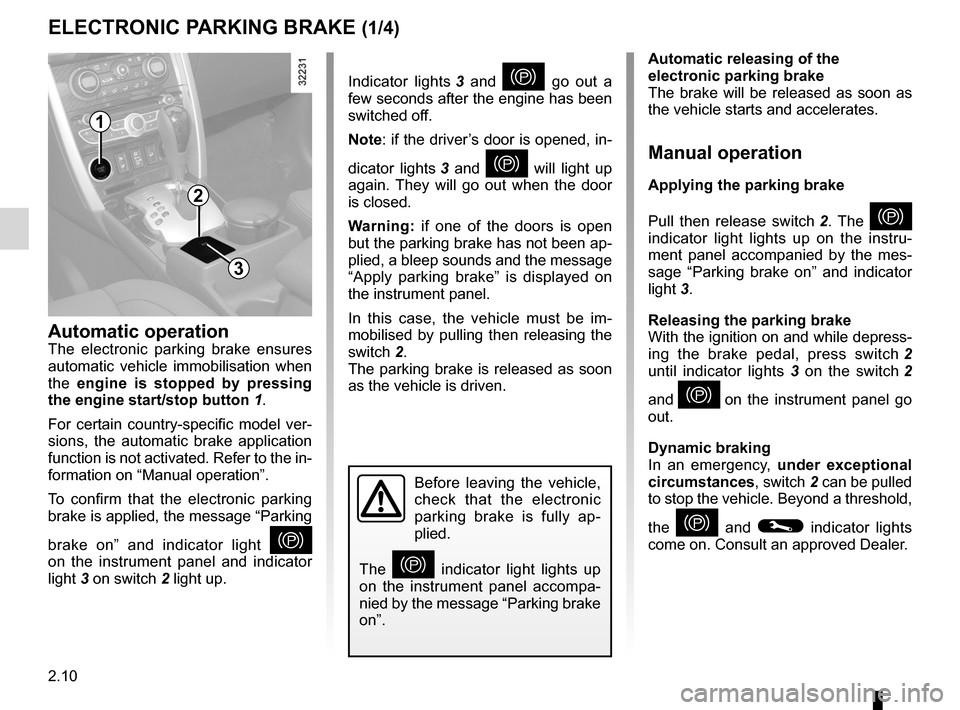
Indicator lights 3 and } go out a
few seconds after the engine has been
switched off.
Note: if the driver’s door is opened, in-
dicator lights 3 and
} will light up
again. They will go out when the door
is closed.
w arning: if one of the doors is open
but the parking brake has not been ap-
plied, a bleep sounds and the message
“ Apply parking brake ” is displayed on
the instrument panel.
In this case, the vehicle must be im -
mobilised by pulling then releasing the
switch 2.
The parking brake is released as soon
as the vehicle is driven.
Electronic parking brake
ELECTRONIC PARKING BRAKE (1/4)
Automatic releasing of the
electronic parking brake
The brake will be released as soon as
the vehicle starts and accelerates.
Manual operation
Applying the parking brake
Pull then release switch 2 . The
}
indicator light lights up on the instru -
ment panel accompanied by the mes -
sage “ Parking brake on ” and indicator
light 3.
Releasing the parking brake
With the ignition on and while depress-
ing the brake pedal, press switch 2
until indicator lights 3 on the switch 2
and
} on the instrument panel go
out.
Dynamic braking
In an emergency, under exceptional
circumstances , switch 2 can be pulled
to stop the vehicle. Beyond a threshold,
the
} and © indicator lights
come on. Consult an approved Dealer.
Before leaving the vehicle,
check that the electronic
parking brake is fully ap -
plied.
The
} indicator light lights up
on the instrument panel accompa -
nied by the message “Parking brake
on”.
Automatic operationThe electronic parking brake ensures
automatic vehicle immobilisation when
the engine is stopped by pressing
the engine start/stop button 1.
For certain country-specific model ver-
sions, the automatic brake application
function is not activated. Refer to the in-
formation on “Manual operation”.
To confirm that the electronic parking
brake is applied, the message “Parking
brake on ” and indicator light
}
on the instrument panel and indicator
light 3 on switch 2 light up.
2
1
3
Page 89 of 233
JauneNoirNoir texte
2.11
ENG_UD27280_8
Frein de parking assist (X45 - H45 - Renault)
ENG_NU_977-2_H45_Ph2_Renault_2
ELECTRONIC PARKING BRAKE (2/4)
Special cases
When the vehicle is on an incline or
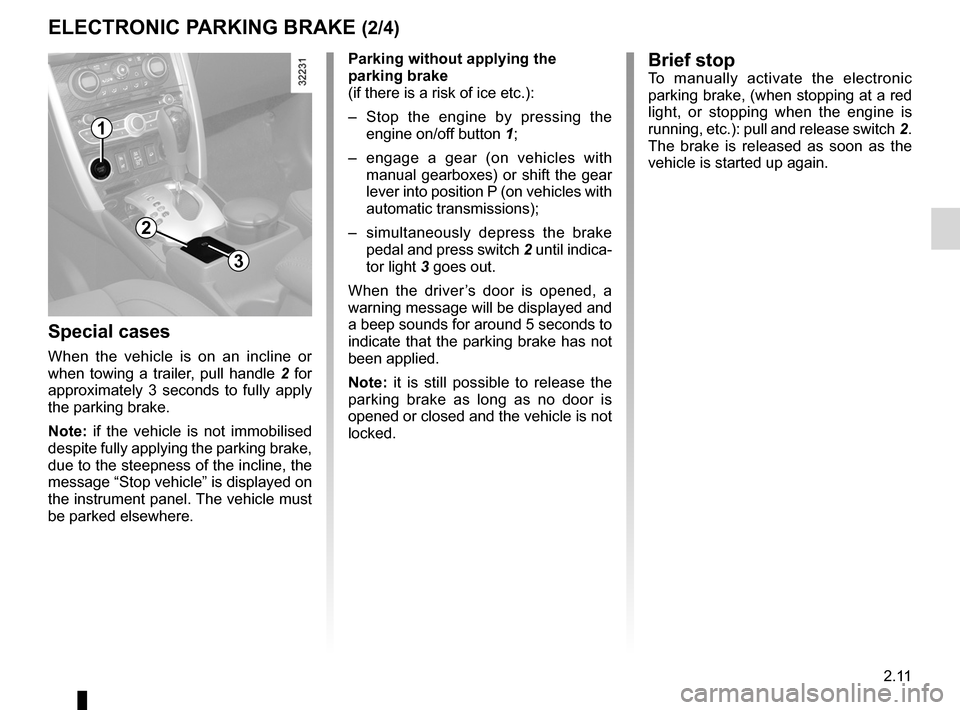
when towing a trailer, pull handle 2 for
approximately 3 seconds to fully apply
the parking brake.
Note: if the vehicle is not immobilised
despite fully applying the parking brake,
due to the steepness of the incline, the
message “Stop vehicle ” is displayed on
the instrument panel. The vehicle must
be parked elsewhere. Parking without applying the
parking brake
(if there is a risk of ice etc.):
–
Stop the engine by pressing the
engine on/off button 1;
– engage a gear (on vehicles with
manual gearboxes) or shift the gear
lever into position P (on vehicles with
automatic transmissions);
– simultaneously depress the brake
pedal and press switch 2 until indica-
tor light 3 goes out.
When the driver ’s door is opened, a
warning message will be displayed and
a beep sounds for around 5 seconds to
indicate that the parking brake has not
been applied.
Note: it is still possible to release the
parking brake as long as no door is
opened or closed and the vehicle is not
locked.
1
2
3
Brief stopTo manually activate the electronic
parking brake, (when stopping at a red
light, or stopping when the engine is
running, etc.): pull and release switch 2.
The brake is released as soon as the
vehicle is started up again.
Page 90 of 233
2.12
ENG_UD27280_8
Frein de parking assist (X45 - H45 - Renault)
ENG_NU_977-2_H45_Ph2_Renault_2
Jaune NoirNoir texte
ELECTRONIC PARKING BRAKE (3/4)
Operating faults
When indicator lights © and in cer-
tain cases
} light up on the instru-
ment panel accompanied by the mes -
sage “Check parking brake”, contact an
approved dealer urgently.
v ersions with an automatic
gearbox
For safety reasons, automatic release
is deactivated when the driver’s door
is open or not shut properly and the
engine is running (in order to prevent
the vehicle from moving without the
driver). The “Release manually parking
brake” message appears on the instru-
ment panel when the driver depresses
the accelerator.
Never leave your vehicle
without moving the selec -
tor lever to position P or N.
This is because when the
vehicle is stationary with the engine
running and a gear engaged, the
vehicle may begin to move if you
accelerate.
There is a risk of accidents.
It is therefore essential to
immobilise the vehicle by
engaging first gear (manual
gearbox) or position P (au -
tomatic transmission). If the slope
requires it, chock the vehicle.
If no lights or sounds are
apparent, this indicates
a fault in the instrument
panel. This indicates that it
is essential to stop immediately
(as soon as traffic conditions
allow). Ensure that the vehicle is
correctly immobilised and contact
an approved Dealer.
Indicator light } flashes, accom -
panied by indicator lights
® and
© and the message “ Parking
brake fault”: this indicates that it is es-
sential to stop immediately (as soon as
traffic conditions allow). Contact an ap-
proved Dealer.
Page 94 of 233
2.16
ENG_UD27288_2
Conseils : antipollution, conomies de carburant, conduite (X45 - H45 - Renault)
ENG_NU_977-2_H45_Ph2_Renault_2
ADvICE: antipollution, fuel economy and driving (3/3)
Advice on use
– Electricity is fuel; switch off all the
electrical components which are
not really needed. However (safety
first), keep your lights on when the
visibility is bad (“see and be seen”).
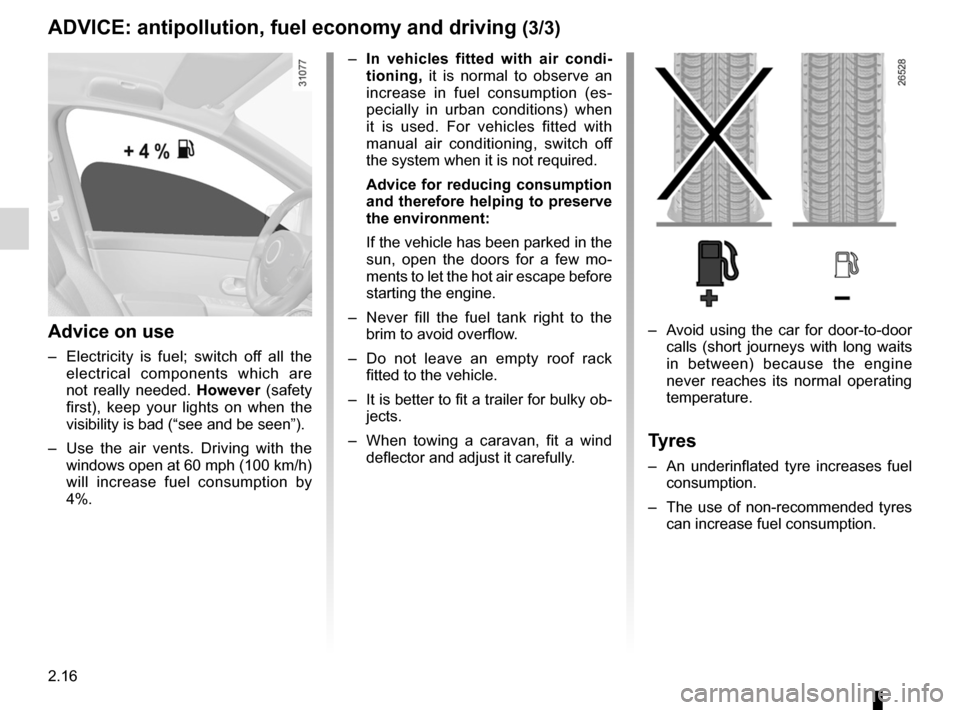
– Use the air vents. Driving with the
windows open at 60 mph (100 km/h)
will increase fuel consumption by
4%.
– Avoid using the car for door-to-door
calls (short journeys with long waits
in between) because the engine
never reaches its normal operating
temperature.
Tyres
– An underinflated tyre increases fuel
consumption.
– The use of non-recommended tyres
can increase fuel consumption.
–
In vehicles fitted with air condi -
tioning, it is normal to observe an
increase in fuel consumption (es -
pecially in urban conditions) when
it is used. For vehicles fitted with
manual air conditioning, switch off
the system when it is not required.
Advice for reducing consumption
and therefore helping to preserve
the environment:
If the vehicle has been parked in the
sun, open the doors for a few mo -
ments to let the hot air escape before
starting the engine.
– Never fill the fuel tank right to the
brim to avoid overflow.
– Do not leave an empty roof rack
fitted to the vehicle.
– It is better to fit a trailer for bulky ob-
jects.
– When towing a caravan, fit a wind
deflector and adjust it carefully.
Page 124 of 233
heating system ..................................... (up to the end of the DU)
air conditioning ..................................... (up to the end of the DU)
ventilation ............................................. (up to the end of the DU)
air conditioning ..................................... (up to the end of the DU)
3.4
ENG_UD16310_4
Chauffage/air conditionné manuel (X45 - H45 - Renault)
ENG_NU_977-2_H45_Ph2_Renault_3
Jaune NoirNoir texte
Manual air conditioning/heating system
MANuAl AIR coNDITIoNINg/hEATINg SySTEM (1/3)
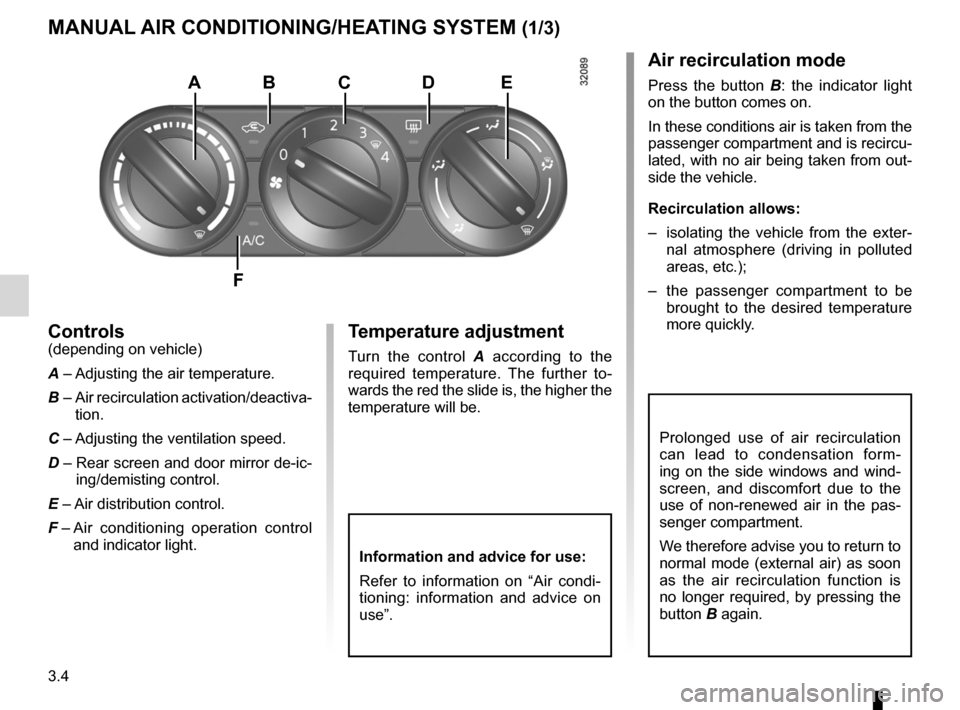
controls(depending on vehicle)
A – Adjusting the air temperature.
B –
Air recirculation activation/deactiva-
tion.
C – Adjusting the ventilation speed.
D – Rear screen and door mirror de-ic-
ing/demisting control.
E – Air distribution control.
F –
Air conditioning operation control
and indicator light.Temperature adjustment
Turn the control A according to the
required temperature. The further to -
wards the red the slide is, the higher the
temperature will be.
Air recirculation mode
Press the button B : the indicator light
on the button comes on.
In these conditions air is taken from the
passenger compartment and is recircu-
lated, with no air being taken from out-
side the vehicle.
Recirculation allows:
– isolating the vehicle from the exter -
nal atmosphere (driving in polluted
areas, etc.);
– the passenger compartment to be
brought to the desired temperature
more quickly.ABcDE
F
Information and advice for use:
Refer to information on “Air condi -
tioning: information and advice on
use”.
Prolonged use of air recirculation
can lead to condensation form -
ing on the side windows and wind -
screen, and discomfort due to the
use of non-renewed air in the pas -
senger compartment.
We therefore advise you to return to
normal mode (external air) as soon
as the air recirculation function is
no longer required, by pressing the
button B again.
Page 127 of 233
heating and air conditioning system ..... (up to the end of the DU)
air conditioning ..................................... (up to the end of the DU)
heating system ..................................... (up to the end of the DU)
temperature regulation ......................... (up to the end of the DU)
ventilation heating and air conditioning system (up to the end of the DU)
air conditioning ..................................... (up to the end of the DU)
3.7
ENG_UD20983_3
Conditionnement d’air automatique bizone (X45 - H45 - Renault)
ENG_NU_977-2_H45_Ph2_Renault_3
Automatic climate control
AuT oMATIc clIMATE coNTRol (1/6)
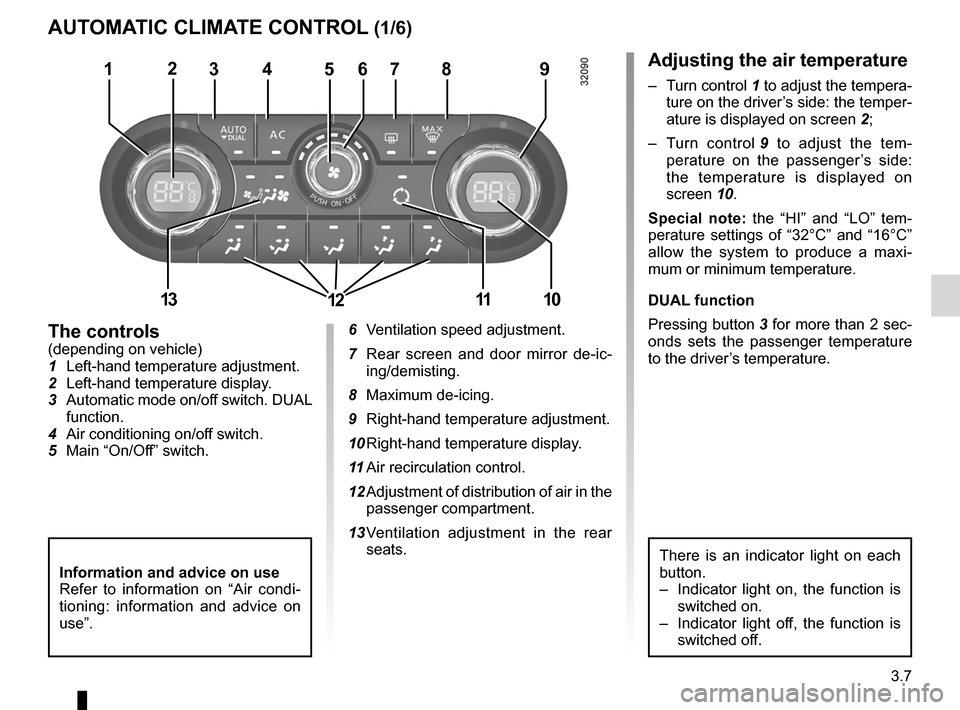
The controls(depending on vehicle)
1 Left-hand temperature adjustment.
2 Left-hand temperature display.
3 Automatic mode on/off switch. DUAL
function.
4 Air conditioning on/off switch.
5 Main “On/Off” switch. 6
Ventilation speed adjustment.
7 Rear screen and door mirror de -ic -
ing/demisting.
8 Maximum de-icing.
9 Right-hand temperature adjustment.
10 Right-hand temperature display.
11 Air recirculation control.
12 Adjustment of distribution of air in the
passenger compartment.
13 Ventilation adjustment in the rear
seats.
Adjusting the air temperature
– Turn control 1 to adjust the tempera-
ture on the driver’s side: the temper-
ature is displayed on screen 2;
– Turn control 9 to adjust the tem -
perature on the passenger ’s side:
the temperature is displayed on
screen 10.
Special note: the “HI” and “LO” tem -
perature settings of “32°C” and “16°C”
allow the system to produce a maxi -
mum or minimum temperature.
DuAl function
Pressing button 3 for more than 2 sec-
onds sets the passenger temperature
to the driver’s temperature.
There is an indicator light on each
button.
– Indicator light on, the function is
switched on.
– Indicator light off, the function is
switched off.
13457896
10
2
Information and advice on use
Refer to information on “Air condi -
tioning: information and advice on
use”.
131112