parking brake RENAULT KOLEOS 2018 User Guide
[x] Cancel search | Manufacturer: RENAULT, Model Year: 2018, Model line: KOLEOS, Model: RENAULT KOLEOS 2018Pages: 332, PDF Size: 8.91 MB
Page 115 of 332
2.11
Conditions for coming out of
the engine standby
For automatic gearboxes:
– the brake pedal is released, position D or M engaged or,
– the brake pedal is released, position N engaged and the parking brake
off, or
– the brake pedal is pressed again, with position P engaged or position
N engaged with the parking brake
applied, or
– position R is engaged or,
– the accelerator pedal is pressed or,
– in manual mode, the gear lever is moved towards + or -.
For manual gearboxes:
– the gearbox is in neutral and the clutch pedal is slightly depressed
To fill up with fuel, the engine must
be stopped (and not on standby):
always stop the engine (please see
“Starting, stopping the engine”).
STOP AND START FUNCTION (2/4)
Preventing the standby of the
engine
In certain situations, such as a cross-
roads for instance, it is possible (with
the system activated) to keep the
engine running so as to be ready to
move off quickly.
Automatic gearbox:
Keep the vehicle stationary with pres-
sing the brake pedal slightly.
Manual gearbox:
Keep the clutch pedal pressed right
down.
Special note: depending on the vehi-
cle, if you switch off the ignition when
the engine is on standby, the warning
light
Ä is displayed for a few sec-
onds on the instrument panel.
Page 116 of 332
2.12
STOP AND START FUNCTION (3/4)
Conditions for preventing the
standby of the engine
Certain conditions prevent the system
from using the engine standby function,
including when:
for vehicles equipped with a
RENAULT card:
– the driver’s door is not closed;
– the driver’s seatbelt is not fastened;
for all vehicles:
– reverse gear is engaged;
– the bonnet is not locked;
– the outdoor temperature is too low or too high;
– the battery is not sufficiently char- ged;
– if available, “4WD Lock” mode is activated (please see the section
“Transmission: 4-wheel drive (4WD)”
in Section 2);
– the difference between the vehicle interior temperature and the auto-
matic climate control instruction is
too high; – parking distance control is in opera-
tion;
– for vehicles with automatic gear- boxes, the gradient is steeper than
approximately 12%;
– the “Clear View” function is activa- ted (please see “Automatic Climate
Control” in Section 3);
– the engine temperature is too low or high;
– the emission control system is being regenerated;
or
– ...
Warning light
is displayed on the
instrument panel. This notifies you that
engine standby is not available.
Deactivate the Stop and
Start function when perfor-
ming any operations in the
engine compartment.
Special cases for vehicles
with a RENAULT card
With the engine on standby (traffic jam,
traffic lights, etc.), if the driver unfas-
tens the seat belt and opens the driv-
er’s door, or gets out of the seat, the
ignition is switched off.
The assisted parking brake is applied
automatically.
To restart and reactivate the Stop and
Start system, start the engine (please
refer to “Starting, stopping the engine”
in Section 2).
Special cases of vehicles
with a key
With the engine on standby (traffic
jam, traffic lights, etc.), if you get out of
the vehicle, a beep warns you that the
engine is on standby and has not been
stopped.
After engine standby, even
driver takes off the vehicle,
it could be restarted. Please
check the safety before you
leave.
Page 121 of 332
2.17
PARKING BRAKE
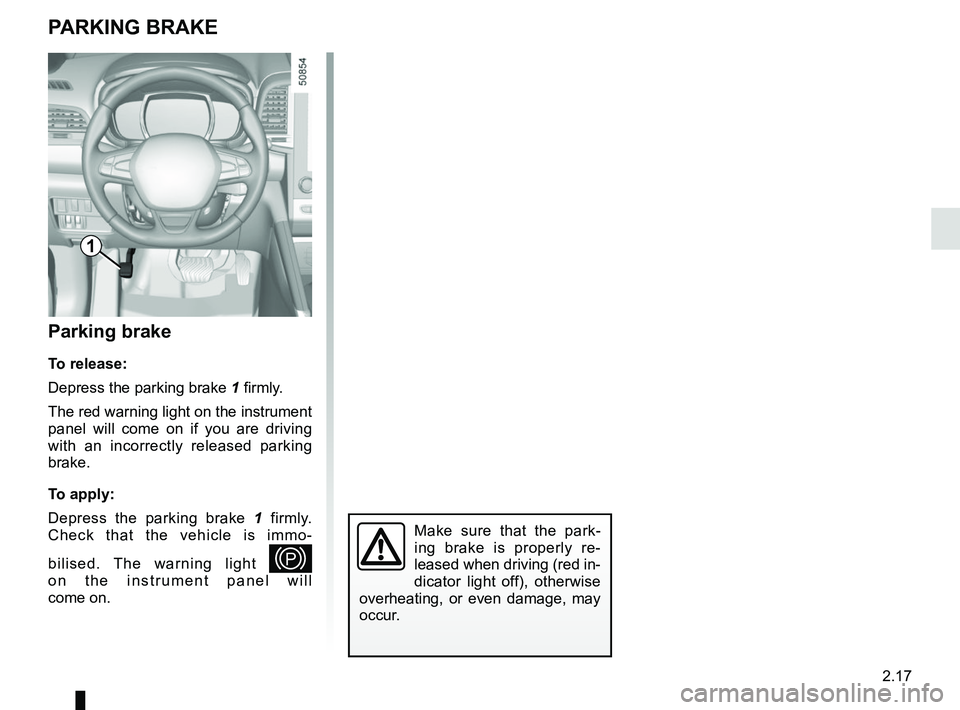
Parking brake
To release:
Depress the parking brake 1 firmly.
The red warning light on the instrument
panel will come on if you are driving
with an incorrectly released parking
brake.
To apply:
Depress the parking brake 1 firmly.
Check that the vehicle is immo-
bilised. The warning light
—
on the instrument panel will
come on.
Make sure that the park-
ing brake is properly re-
leased when driving (red in-
dicator light off), otherwise
overheating, or even damage, may
occur.
1
Page 122 of 332
2.18
ELECTRONIC PARKING BRAKE (1/3)
Note:
To indicate that the electronic parking
brake is released, a beep sounds and
the message “Apply parking brake” ap-
pears on the instrument panel:
– with the engine running: when the driver’s door is opened;
– with the engine switched off (eg. when the engine stalls): when a front
door is opened.
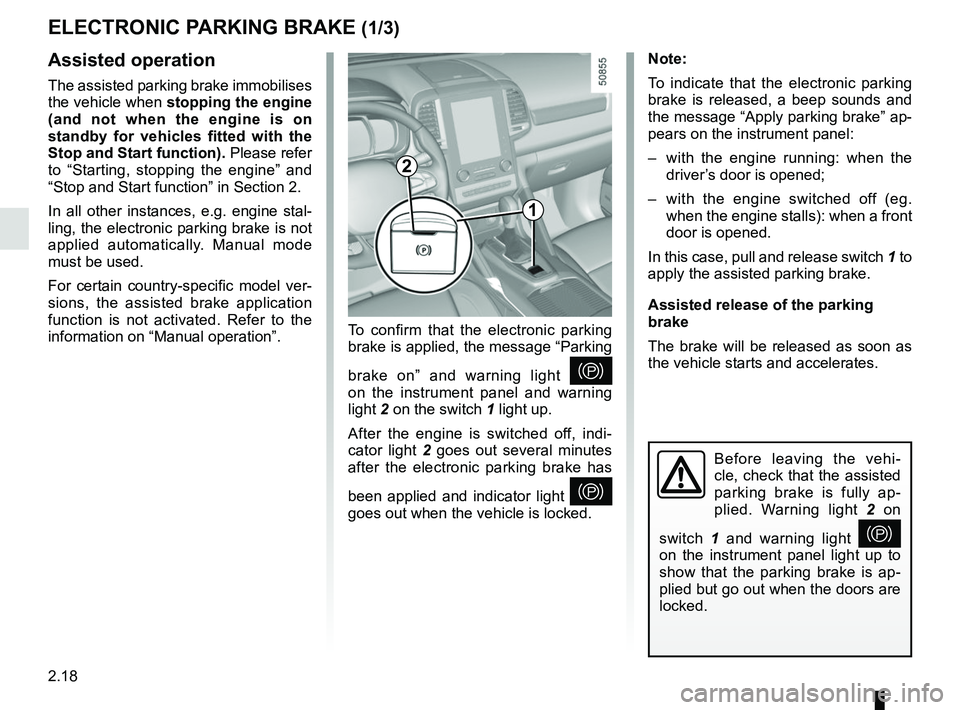
In this case, pull and release switch 1 to
apply the assisted parking brake.
Assisted release of the parking
brake
The brake will be released as soon as
the vehicle starts and accelerates.Assisted operation
The assisted parking brake immobilises
the vehicle when stopping the engine
(and not when the engine is on
standby for vehicles fitted with the
Stop and Start function). Please refer
to “Starting, stopping the engine” and
“Stop and Start function” in Section 2.
In all other instances, e.g. engine stal-
ling, the electronic parking brake is not
applied automatically. Manual mode
must be used.
For certain country-specific model ver-
sions, the assisted brake application
function is not activated. Refer to the
information on “Manual operation”. To confirm that the electronic parking
brake is applied, the message “Parking
brake on” and warning light
}
on the instrument panel and warning
light 2 on the switch 1 light up.
After the engine is switched off, indi-
cator light 2 goes out several minutes
after the electronic parking brake has
been applied and indicator light
}
goes out when the vehicle is locked.
Before leaving the vehi-
cle, check that the assisted
parking brake is fully ap-
plied. Warning light 2 on
switch 1 and warning light
}
on the instrument panel light up to
show that the parking brake is ap-
plied but go out when the doors are
locked.
2
1
Page 123 of 332
2.19
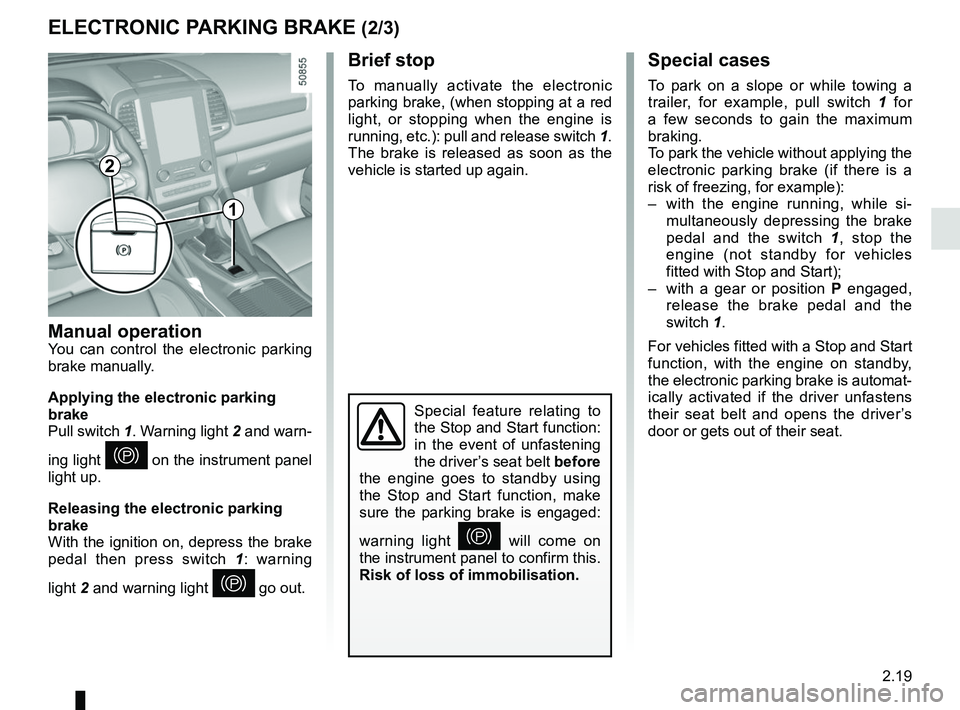
ELECTRONIC PARKING BRAKE (2/3)Special cases
To park on a slope or while towing a
trailer, for example, pull switch 1 for
a few seconds to gain the maximum
braking.
To park the vehicle without applying the
electronic parking brake (if there is a
risk of freezing, for example):
– with the engine running, while si- multaneously depressing the brake
pedal and the switch 1, stop the
engine (not standby for vehicles
fitted with Stop and Start);
– with a gear or position P engaged,
release the brake pedal and the
switch 1.
For vehicles fitted with a Stop and Start
function, with the engine on standby,
the electronic parking brake is automat-
ically activated if the driver unfastens
their seat belt and opens the driver’s
door or gets out of their seat.
Brief stop
To manually activate the electronic
parking brake, (when stopping at a red
light, or stopping when the engine is
running, etc.): pull and release switch 1.
The brake is released as soon as the
vehicle is started up again.
Manual operationYou can control the electronic parking
brake manually.
Applying the electronic parking
brake
Pull switch 1. Warning light 2 and warn-
ing light
} on the instrument panel
light up.
Releasing the electronic parking
brake
With the ignition on, depress the brake
pedal then press switch 1: warning
light 2 and warning light
} go out.
Special feature relating to
the Stop and Start function:
in the event of unfastening
the driver’s seat belt before
the engine goes to standby using
the Stop and Start function, make
sure the parking brake is engaged:
warning light
} will come on
the instrument panel to confirm this.
Risk of loss of immobilisation.
2
1
Page 124 of 332
2.20
Operating faults
– If there is a fault, the © warning
light illuminates on the instrument
panel accompanied by the “Check
parking brake” message and, in
some cases, the
} warning
light.
Please contact an authorised dealer
as soon as possible.
– If there is an assisted parking brake fault, the warning light
® comes
on, along with the message “Braking
system fault”, a beep and, in some
cases, the warning light
}.
This means that you must stop as
soon as traffic conditions allow.
Versions with an automatic
gearbox
For safety reasons, automatic release
is deactivated when the driver’s door
is open or not shut properly and the
engine is running (in order to prevent
the vehicle from moving without the
driver). The “Release parking brake
manually” message appears on the
instrument panel when the driver de-
presses the accelerator.
ELECTRONIC PARKING BRAKE (3/3)
It is therefore essential to
immobilise the vehicle by
engaging first gear (manual
gearbox) or position P (au-
tomatic gearbox). If the slope re-
quires it, chock the vehicle.
Never leave your vehicle
without moving the selector
lever to position P. This is
because when the vehicle
is stationary with the engine running
and a gear engaged, the vehicle
may begin to move if you accele-
rate.
There is a risk of accidents.
If no lights or sounds are
apparent, this indicates
a fault in the instrument
panel. This indicates that
it is essential to stop immediately
(as soon as traffic conditions allow).
Ensure that the vehicle is correctly
immobilised and contact an appro-
ved Dealer.
In the event of message
“Electric failure DANGER”
or “Check battery”, manu-
ally activate the electronic
parking brake by pulling switch 1 (or
position the gear lever in P for au-
tomatic gearboxes) before stopping
the engine.
Risk of loss of immobilisation of the
vehicle.
Contact an authorised dealer.
Page 145 of 332
2.41
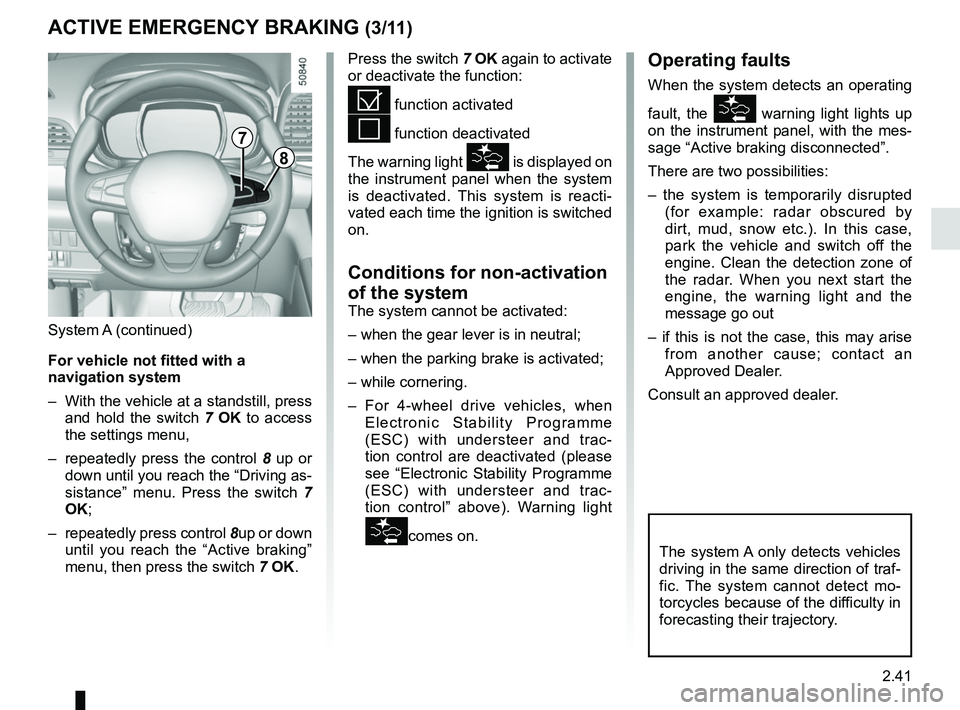
8
7
System A (continued)
For vehicle not fitted with a
navigation system
– With the vehicle at a standstill, press and hold the switch 7 OK to access
the settings menu,
– repeatedly press the control 8 up or
down until you reach the “Driving as-
sistance” menu. Press the switch 7
OK;
– repeatedly press control 8up or down
until you reach the “Active braking”
menu, then press the switch 7 OK.
ACTIVE EMERGENCY BRAKING (3/11)
Operating faults
When the system detects an operating
fault, the
warning light lights up
on the instrument panel, with the mes-
sage “Active braking disconnected”.
There are two possibilities:
– the system is temporarily disrupted (for example: radar obscured by
dirt, mud, snow etc.). In this case,
park the vehicle and switch off the
engine. Clean the detection zone of
the radar. When you next start the
engine, the warning light and the
message go out
– if this is not the case, this may arise from another cause; contact an
Approved Dealer.
Consult an approved dealer.
Press the switch 7
OK again to activate
or deactivate the function:= function activated
< function deactivated
The warning light
is displayed on
the instrument panel when the system
is deactivated. This system is reacti-
vated each time the ignition is switched
on.
Conditions for non-activation
of the system
The system cannot be activated:
– when the gear lever is in neutral;
– when the parking brake is activated;
– while cornering.
– For 4-wheel drive vehicles, when Electronic Stability Programme
(ESC) with understeer and trac-
tion control are deactivated (please
see “Electronic Stability Programme
(ESC) with understeer and trac-
tion control” above). Warning light
comes on.The system A only detects vehicles
driving in the same direction of traf-
fic. The system cannot detect mo-
torcycles because of the difficulty in
forecasting their trajectory.
Page 151 of 332
2.47
ACTIVE EMERGENCY BRAKING (9/11)
System B (continued)
Conditions for non-activation
of the system
The system cannot be activated:
– when the gear lever is in neutral;
– when the parking brake is activated;
– while cornering.
As a general rule, if the driver shows
signs of attention (action on the steering
wheel, pedals etc.), the system delays
its operation or does not activate.
Operating faults
When the system detects an operating
fault, the
warning light lights up
on the instrument panel, with the mes-
sage “Active braking disconnected”.
Consult an approved dealer.
Temporarily not available
When the system detects a tempo-
rary unavailability, the
warning
light lights up on the instrument panel
accompanied by the message “Active
braking: sensor blind” or, depending on
the vehicle, “Radar-camera: no visibil-
ity”.
The possible causes are:
– the system is temporarily blinded (glare from the sun, dipped beam
headlights, bad weather conditions
etc.). The system will be operational
again when visibility conditions are
better.
– The system is temporarily disrupted (for example: windscreen obscured
by dirt, ice, snow etc.). In this case,
park the vehicle and switch off the
engine. Clean the windscreen. When
you next start the engine, the warn-
ing light and the message go out.
– If this is not the case, this may arise from another cause; contact an
Approved Dealer.
Page 190 of 332
2.86
Special note
– Drive slowly and always be ready to use the brake;
– The system can not detect parking spaces between objects except for
vehicles such as a post, motorbike or
obstacle;
– The system can not detect park- ing spaces made after detecting or
before detecting;
– Maintain the distance about 50~150 cm from the parked vehicles
when looking for parking spaces.
The system may not detect spaces
when the distance is less than 50 cm
or over 150 cm;
– You can move the gear lever position R to D or D to R while parking. The system is still available.
– The driver should look out for the de- tected space if it is possible to park
(obstacles in the space);
– If you fit a different tire or wheel, the system performance may be
changed. For the best performance,
fit the same size with original one;
– The system may not work if the wheels are misaligned. Contact an
approved dealer.
ASSISTED PARKING (3/6)
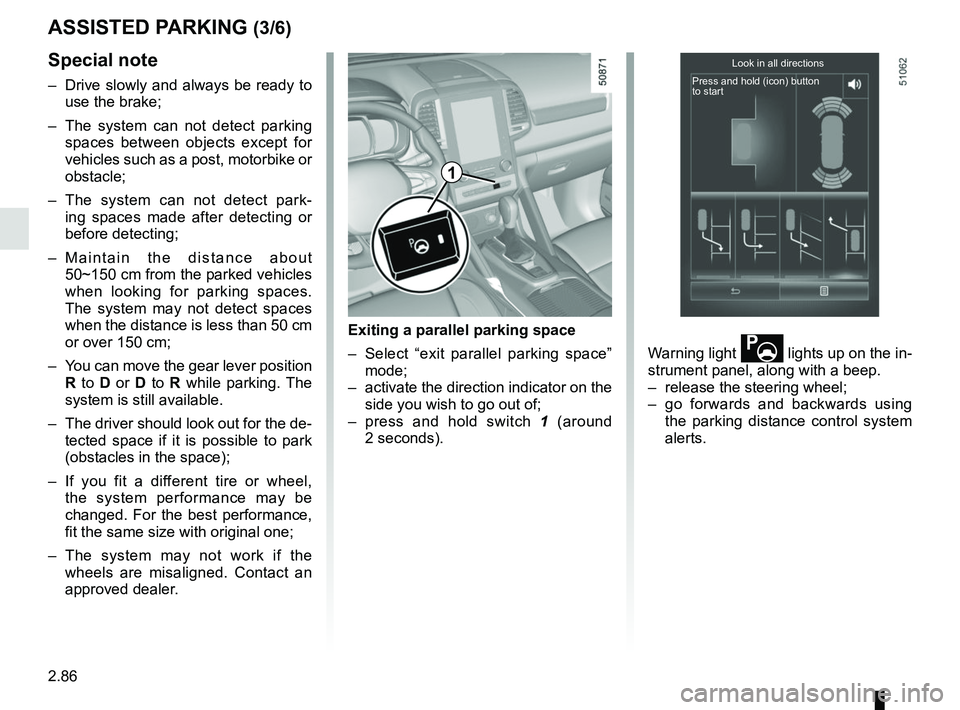
Exiting a parallel parking space
– Select “exit parallel parking space” mode;
– activate the direction indicator on the side you wish to go out of;
– press and hold switch 1 (around
2 seconds). Warning light
lights up on the in-
strument panel, along with a beep.
– release the steering wheel;
– go forwards and backwards using the parking distance control system
alerts.
Look in all directions
Press and hold (icon) button
to start
1
Page 196 of 332
2.92
AUTOMATIC TRANSMISSION (3/3)
Parking the vehicle
When the vehicle is stopped, move the
lever to position P while keeping your
foot on the brake pedal: the gearbox is
in neutral and the drive wheels are me-
chanically locked by the driveshaft.
Apply the parking brake or, depen-
ding on the vehicle, ensure that the
electronic parking brake is applied.
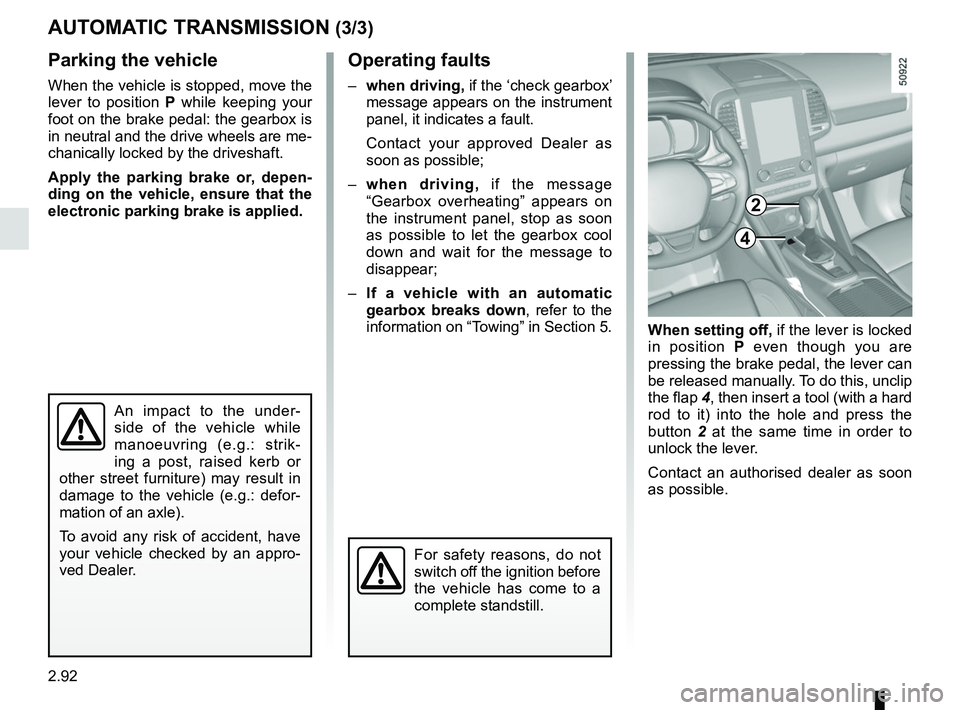
When setting off, if the lever is locked
in position P even though you are
pressing the brake pedal, the lever can
be released manually. To do this, unclip
the flap 4, then insert a tool (with a hard
rod to it) into the hole and press the
button 2 at the same time in order to
unlock the lever.
Contact an authorised dealer as soon
as possible.
Operating faults
– when driving, if the ‘check gearbox’
message appears on the instrument
panel, it indicates a fault.
Contact your approved Dealer as
soon as possible;
– when driving, if the message
“Gearbox overheating” appears on
the instrument panel, stop as soon
as possible to let the gearbox cool
down and wait for the message to
disappear;
– If a vehicle with an automatic
gearbox breaks down, refer to the
information on “Towing” in Section 5.
4
For safety reasons, do not
switch off the ignition before
the vehicle has come to a
complete standstill.
An impact to the under-
side of the vehicle while
manoeuvring (e.g.: strik-
ing a post, raised kerb or
other street furniture) may result in
damage to the vehicle (e.g.: defor-
mation of an axle).
To avoid any risk of accident, have
your vehicle checked by an appro-
ved Dealer.
2