air condition RENAULT KOLEOS 2018 Owner's Manual
[x] Cancel search | Manufacturer: RENAULT, Model Year: 2018, Model line: KOLEOS, Model: RENAULT KOLEOS 2018Pages: 332, PDF Size: 8.91 MB
Page 206 of 332
3.10
AUTOMATIC CLIMATE CONTROL: Controls A (4/5)
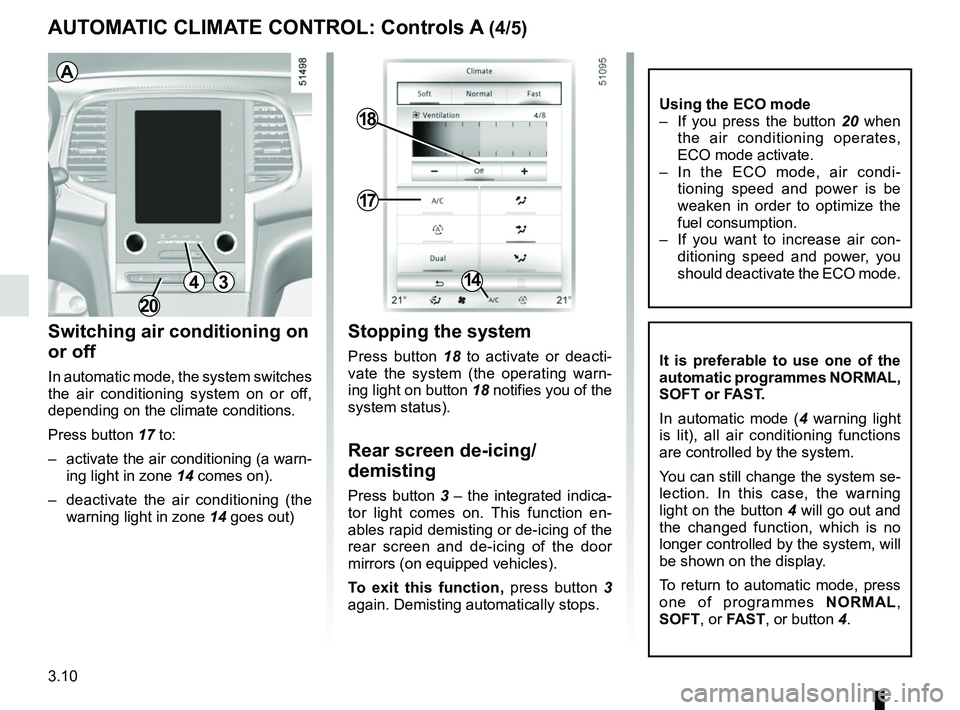
Switching air conditioning on
or off
In automatic mode, the system switches
the air conditioning system on or off,
depending on the climate conditions.
Press button 17 to:
– activate the air conditioning (a warn-ing light in zone 14 comes on).
– deactivate the air conditioning (the warning light in zone 14 goes out)
17
18
14
Stopping the system
Press button 18 to activate or deacti-
vate the system (the operating warn-
ing light on button 18 notifies you of the
system status).
Rear screen de-icing/
demisting
Press button 3 – the integrated indica-
tor light comes on. This function en-
ables rapid demisting or de-icing of the
rear screen and de-icing of the door
mirrors (on equipped vehicles).
To exit this function, press button 3
again. Demisting automatically stops.
It is preferable to use one of the
automatic programmes NORMAL,
SOFT or FAST.
In automatic mode ( 4 warning light
is lit), all air conditioning functions
are controlled by the system.
You can still change the system se-
lection. In this case, the warning
light on the button 4 will go out and
the changed function, which is no
longer controlled by the system, will
be shown on the display.
To return to automatic mode, press
one of programmes NORMAL,
SOFT , or FAST, or button 4.
3
A
4
Using the ECO mode
– If you press the button 20 when
the air conditioning operates,
ECO mode activate.
– In the ECO mode, air condi- tioning speed and power is be
weaken in order to optimize the
fuel consumption.
– If you want to increase air con- ditioning speed and power, you
should deactivate the ECO mode.
20
Page 208 of 332
3.12
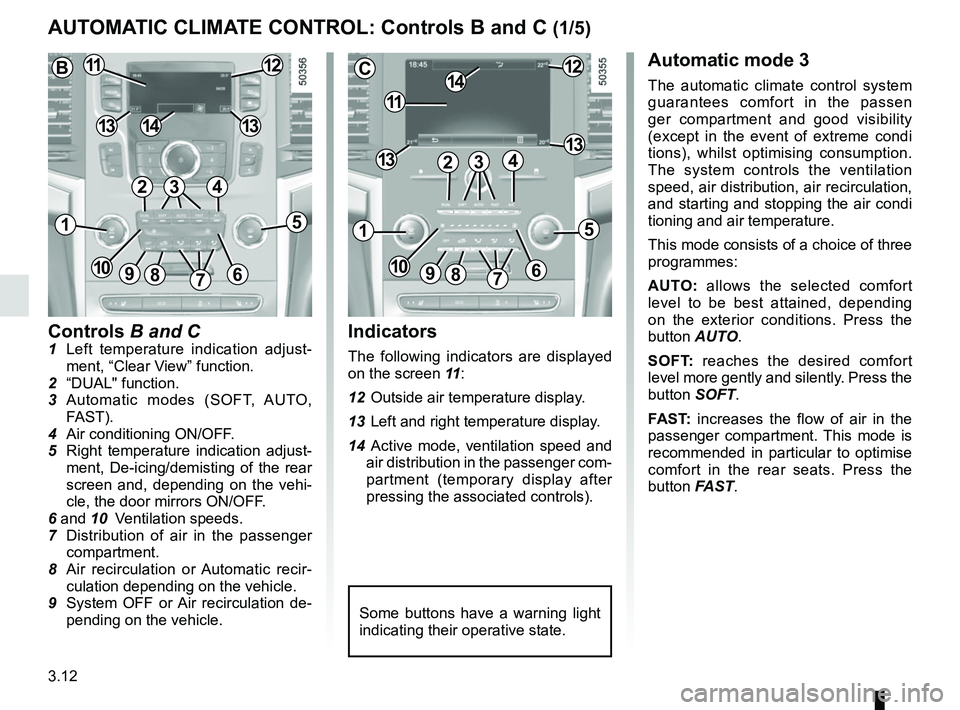
Controls B and C1 Left temperature indication adjust-ment, “Clear View” function.
2 “DUAL" function.
3 Automatic modes (SOFT, AUTO, FAST).
4 Air conditioning ON/OFF.
5 Right temperature indication adjust- ment, De-icing/demisting of the rear
screen and, depending on the vehi-
cle, the door mirrors ON/OFF.
6 and 10 Ventilation speeds.
7 Distribution of air in the passenger
compartment.
8 Air recirculation or Automatic recir- culation depending on the vehicle.
9 System OFF or Air recirculation de- pending on the vehicle.
AUTOMATIC CLIMATE CONTROL: Controls B and C (1/5)
Indicators
The following indicators are displayed
on the screen 11 :
12 Outside air temperature display.
13 Left and right temperature display.
14 Active mode, ventilation speed and air distribution in the passenger com-
partment (temporary display after
pressing the associated controls).
Automatic mode 3
The automatic climate control system
guarantees comfort in the passen
ger compartment and good visibility
(except in the event of extreme condi
tions), whilst optimising consumption.
The system controls the ventilation
speed, air distribution, air recirculation,
and starting and stopping the air condi
tioning and air temperature.
This mode consists of a choice of three
programmes:
AUTO: allows the selected comfort
level to be best attained, depending
on the exterior conditions. Press the
button AUTO.
SOFT: reaches the desired comfort
level more gently and silently. Press the
button SOFT.
FAST: increases the flow of air in the
passenger compartment. This mode is
recommended in particular to optimise
comfort in the rear seats. Press the
button FAST.
Some buttons have a warning light
indicating their operative state.
C
11
1412
131342
1
91086
5
7
3
13
B1112
1413
42
15
7
3
69810
Page 210 of 332
3.14
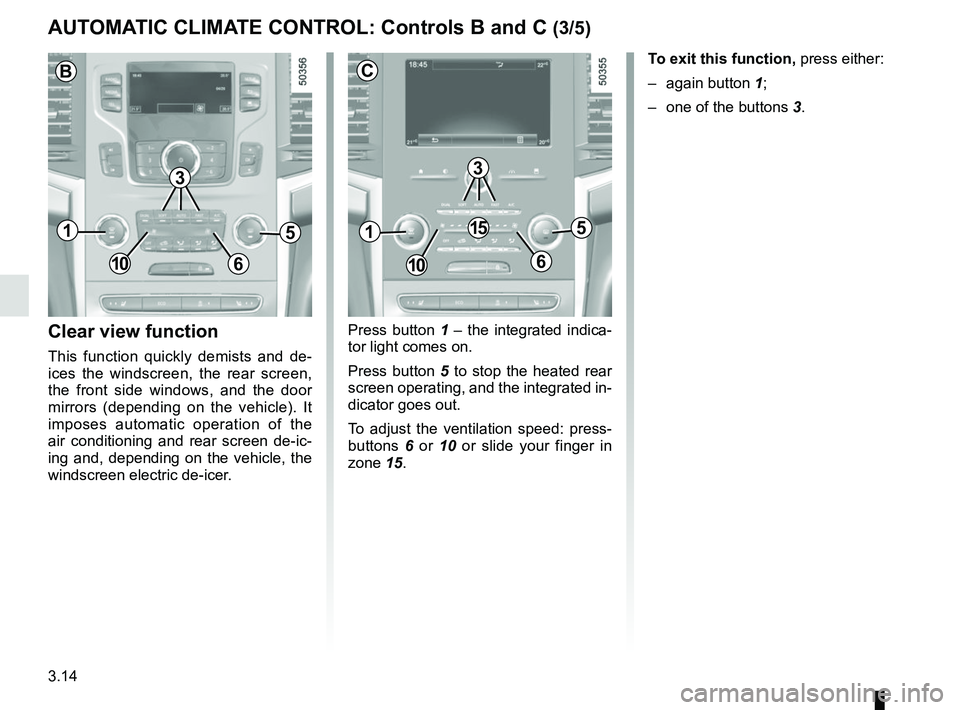
Press button 1 – the integrated indica-
tor light comes on.
Press button 5 to stop the heated rear
screen operating, and the integrated in-
dicator goes out.
To adjust the ventilation speed: press-
buttons 6 or 10 or slide your finger in
zone 15.Clear view function
This function quickly demists and de-
ices the windscreen, the rear screen,
the front side windows, and the door
mirrors (depending on the vehicle). It
imposes automatic operation of the
air conditioning and rear screen de-ic-
ing and, depending on the vehicle, the
windscreen electric de-icer. To exit this function,
press either:
– again button 1;
– one of the buttons 3.
AUTOMATIC CLIMATE CONTROL: Controls B and C (3/5)
51
106
15
3
C
51
106
B
3
Page 211 of 332
3.15
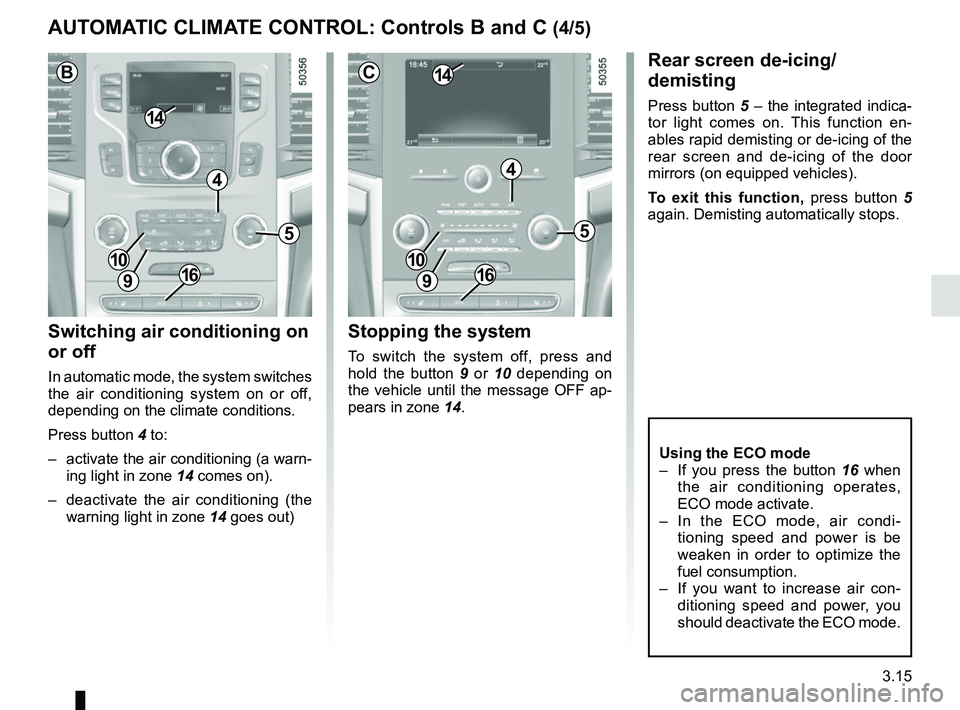
Switching air conditioning on
or off
In automatic mode, the system switches
the air conditioning system on or off,
depending on the climate conditions.
Press button 4 to:
– activate the air conditioning (a warn-ing light in zone 14 comes on).
– deactivate the air conditioning (the warning light in zone 14 goes out)
Rear screen de-icing/
demisting
Press button 5 – the integrated indica-
tor light comes on. This function en-
ables rapid demisting or de-icing of the
rear screen and de-icing of the door
mirrors (on equipped vehicles).
To exit this function, press button 5
again. Demisting automatically stops.
Stopping the system
To switch the system off, press and
hold the button 9 or 10 depending on
the vehicle until the message OFF ap-
pears in zone 14.
AUTOMATIC CLIMATE CONTROL: Controls B and C (4/5)
5
4
9
1410
C
5
4
9
14
B
10
9
10
Using the ECO mode
– If you press the button 16 when
the air conditioning operates,
ECO mode activate.
– In the ECO mode, air condi- tioning speed and power is be
weaken in order to optimize the
fuel consumption.
– If you want to increase air con- ditioning speed and power, you
should deactivate the ECO mode.
1616
Page 212 of 332
3.16
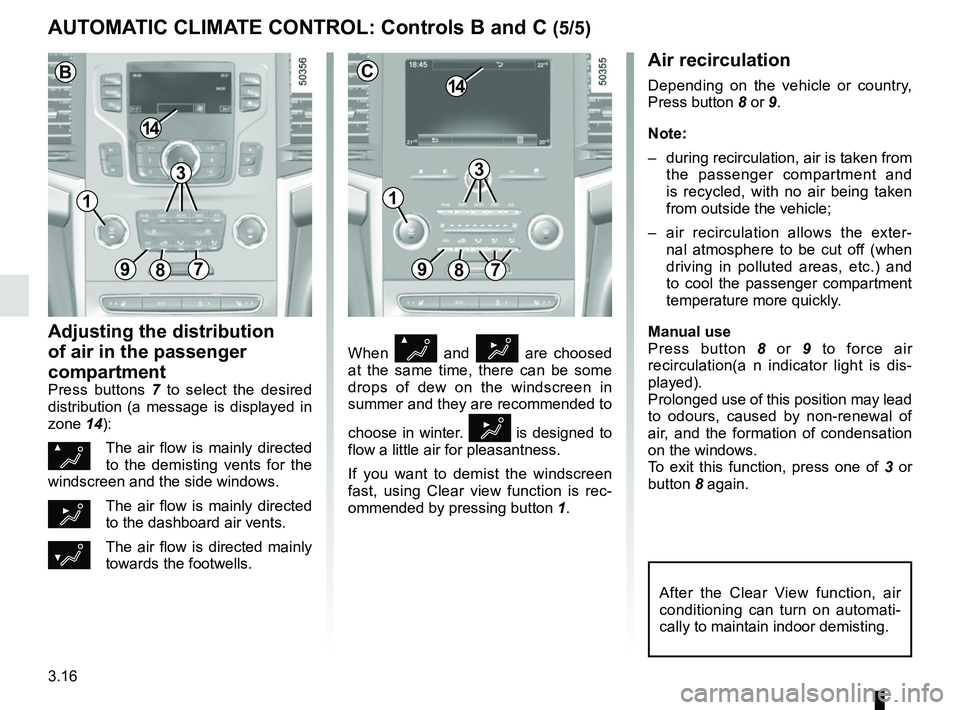
When Ø and ½ are choosed
at the same time, there can be some
drops of dew on the windscreen in
summer and they are recommended to
choose in winter.
½ is designed to
flow a little air for pleasantness.
If you want to demist the windscreen
fast, using Clear view function is rec-
ommended by pressing button 1.
Air recirculation
Depending on the vehicle or country,
Press button 8 or 9.
Note:
– during recirculation, air is taken from
the passenger compartment and
is recycled, with no air being taken
from outside the vehicle;
– air recirculation allows the exter- nal atmosphere to be cut off (when
driving in polluted areas, etc.) and
to cool the passenger compartment
temperature more quickly.
Manual use
Press button 8 or 9 to force air
recirculation(a n indicator light is dis-
played).
Prolonged use of this position may lead
to odours, caused by non-renewal of
air, and the formation of condensation
on the windows.
To exit this function, press one of 3 or
button 8 again.
Adjusting the distribution
of air in the passenger
compartment
Press buttons 7 to select the desired
distribution (a message is displayed in
zone 14):
ØThe air flow is mainly directed
to the demisting vents for the
windscreen and the side windows.
½The air flow is mainly directed
to the dashboard air vents.
¿The air flow is directed mainly
towards the footwells.
AUTOMATIC CLIMATE CONTROL: Controls B and C (5/5)
89
14
7
C
After the Clear View function, air
conditioning can turn on automati-
cally to maintain indoor demisting.
3
897
14
B
3
11
Page 213 of 332
3.17
Operating faults
As a general rule, contact your ap-
proved dealer in the event of an oper-
ating fault.
– Reduction in de-icing, demisting or air conditioning performance.
This may be caused by the passen-
ger compartment filter cartridge be-
coming clogged.
– No cold air is being produced .
Check that the controls are set cor-
rectly and that the fuses are sound.
Otherwise, switch off the system.
Presence of water under the
vehicle
After prolonged use of the air condi-
tioning system, it is normal for water
to be present under the vehicle. This is
caused by condensation.
AIR CONDITIONING: information and advice on use
Do not open the refriger-
ant fluid circuit. The fluid
may damage eyes or skin.
Fuel consumption
You will normally notice an increase in
fuel consumption (especially in town)
when the air conditioning is operating.
For vehicles fitted with air conditioning
with no automatic mode, switch off the
system when it is not required.
Advice for reducing consumption
and helping to preserve the environ-
ment
Drive with the air vents open and the
windows closed.
If the vehicle has been parked in the
sun, open the doors for a few moments
to let the hot air escape before starting
the engine.
Advice on use
In some situations, (air conditioning
off, air recirculation activated, ventila-
tion speed at zero or low, etc.) you may
notice that condensation starts to form
on the windows and windscreen.
If there is condensation, use the “Clear
View” function to remove it, then use
the air conditioning in automatic mode
to stop it forming again.
Maintenance
Refer to the Maintenance Document
for your vehicle for the inspection fre-
quency.
Do not add anything to the
vehicle’s ventilation circuit
(for example, to remove
bad odours).
There is a risk of damage or of
fire.
Page 214 of 332
3.18
OUTSIDE AIR QUALITY AND DEODORISATION FUNCTION
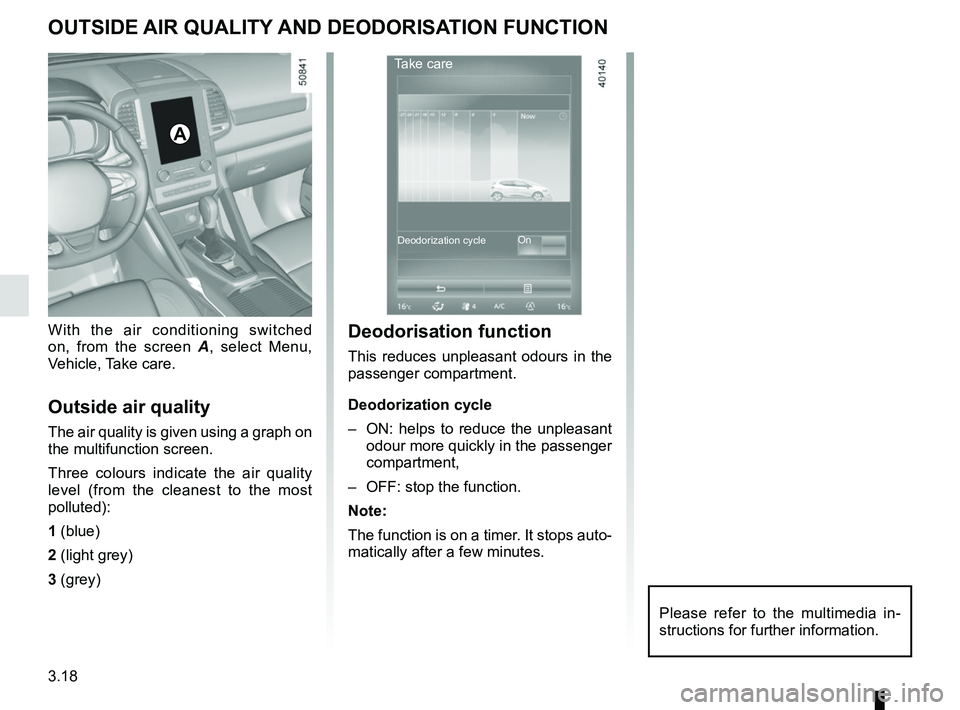
With the air conditioning switched
on, from the screen A, select Menu,
Vehicle, Take care.
Outside air quality
The air quality is given using a graph on
the multifunction screen.
Three colours indicate the air quality
level (from the cleanest to the most
polluted):
1 (blue)
2 (light grey)
3 (grey)
A
Deodorisation function
This reduces unpleasant odours in the
passenger compartment.
Deodorization cycle
– ON: helps to reduce the unpleasant odour more quickly in the passenger
compartment,
– OFF: stop the function.
Note:
The function is on a timer. It stops auto-
matically after a few minutes.
Take care
On
Deodorization cycle
Please refer to the multimedia in-
structions for further information.
Page 223 of 332
3.27
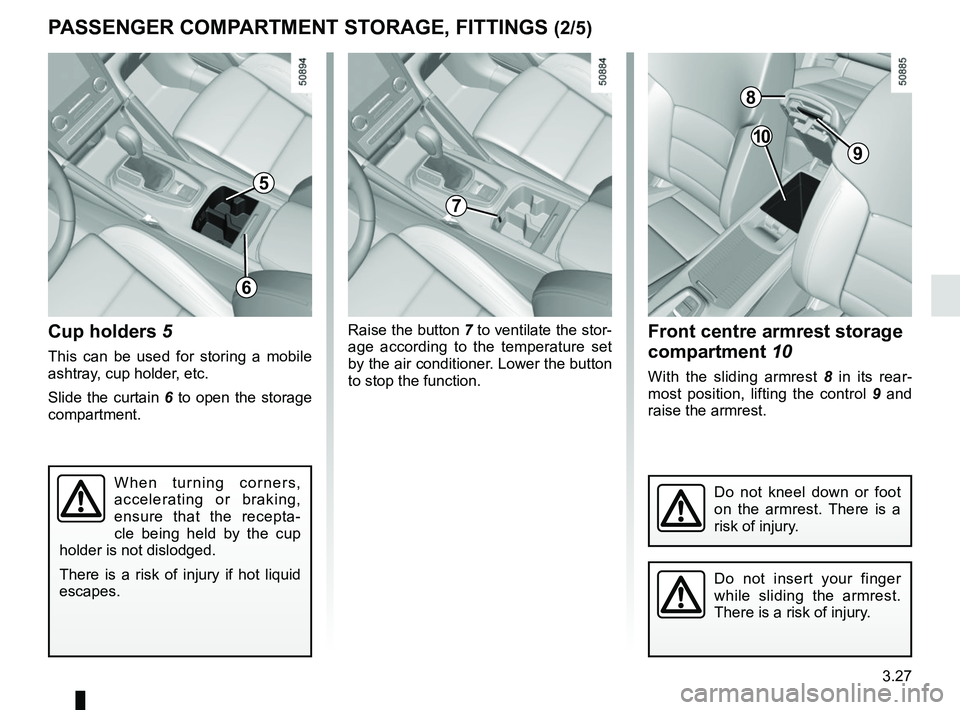
Front centre armrest storage
compartment 10
With the sliding armrest 8 in its rear-
most position, lifting the control 9 and
raise the armrest.
Cup holders 5
This can be used for storing a mobile
ashtray, cup holder, etc.
Slide the curtain 6 to open the storage
compartment.
When turning corners,
accelerating or braking,
ensure that the recepta-
cle being held by the cup
holder is not dislodged.
There is a risk of injury if hot liquid
escapes.
PASSENGER COMPARTMENT STORAGE, FITTINGS (2/5)
5
Raise the button 7 to ventilate the stor-
age according to the temperature set
by the air conditioner. Lower the button
to stop the function.
8
9
10
7
6
Do not kneel down or foot
on the armrest. There is a
risk of injury.
Do not insert your finger
while sliding the armrest.
There is a risk of injury.
Page 268 of 332
5.4
TYRE PRESSURE KIT (1/3)
The kit is only approved for
inflating the tyres of the ve-
hicle originally equipped
with the kit.
It must never be used to inflate
the tyres of another vehicle, or any
other inflatable object (rubber ring,
rubber boat, etc.).
Avoid spillage on skin when hand-
ling the repair product bottle. If drop-
lets do leak out, rinse them off with
plenty of water.
Keep the repair kit away from chil-
dren.
Do not dispose of the empty bottle
in the countryside. Return it to your
approved dealer or to a recycling or-
ganisation.
The bottle has a limited service
life which is indicated on its label.
Check the expiry date.
Contact an approved dealer to re-
place the inflation tube and repair
product bottle.
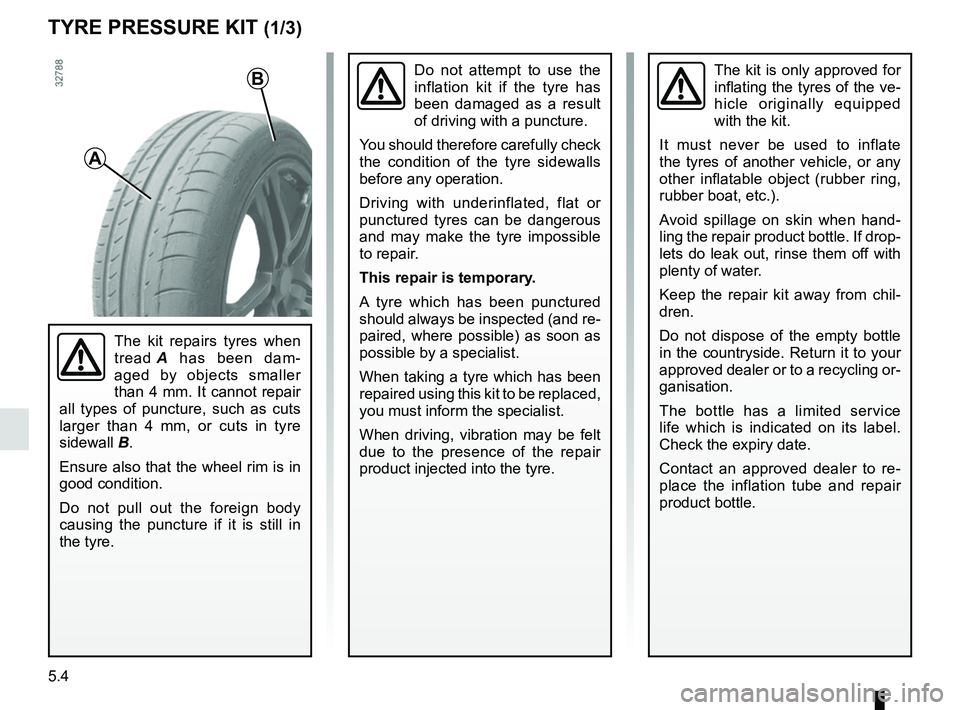
A
B
The kit repairs tyres when
tread A has been dam-
aged by objects smaller
than 4 mm. It cannot repair
all types of puncture, such as cuts
larger than 4 mm, or cuts in tyre
sidewall B.
Ensure also that the wheel rim is in
good condition.
Do not pull out the foreign body
causing the puncture if it is still in
the tyre.
Do not attempt to use the
inflation kit if the tyre has
been damaged as a result
of driving with a puncture.
You should therefore carefully check
the condition of the tyre sidewalls
before any operation.
Driving with underinflated, flat or
punctured tyres can be dangerous
and may make the tyre impossible
to repair.
This repair is temporary.
A tyre which has been punctured
should always be inspected (and re-
paired, where possible) as soon as
possible by a specialist.
When taking a tyre which has been
repaired using this kit to be replaced,
you must inform the specialist.
When driving, vibration may be felt
due to the presence of the repair
product injected into the tyre.
Page 289 of 332

Allocation of fuses
(the presence of certain fuses depends on the vehicle equipment level)\
Symbol Allocation Symbol AllocationSymbol Allocation
BLOWER Ventilation VDCVehicle dynami")
5.25
FUSES (3/3)
Allocation of fuses
(the presence of certain fuses depends on the vehicle equipment level)\
Symbol Allocation Symbol AllocationSymbol Allocation
BLOWER Ventilation VDCVehicle dynamic
control H/MIRR Heated door mirrors
TURN
HAZARD Hazard lamp
STOP LAMP Stop lamp HEATER
SEAT Heater seat
2ND
POWER
SOCKET 2nd power socket
POWER
DR LOCK2 Power door lock EC AUTO
ACC Air conditioner control
unit
REAR
WIPER Rear wiper CIGAR
LIGHTER Cigar lighter REAR
VIEW Rear view mirror
POWER
DR LOCK Power door lock HEAT
STEER
WHEEL Heat steering wheel
WASH
MTR Washer motor
ELEC B, B2 Electrical equipment RR DEFElectrically defrosted
rear window GEAR BOX
OIL PUMP Gear box oil pump
IMOB Immobilizer BOSE Bose amp BCM Body control module
AUDIO Audio ACC RADIOAccessory socket,
radio POWER
WINDOW Power window
ABS/EPS Anti lock brake system JUNCTION
MODULE Junction module SEAT BELT
WARNING Seat belt warning
module
MEDIA Multimedia equipment AIR CON Air condition control
unitSTRG
WHEEL ANGLE Steering wheel angle
sensor