Driving RENAULT KOLEOS 2018 Manual PDF
[x] Cancel search | Manufacturer: RENAULT, Model Year: 2018, Model line: KOLEOS, Model: RENAULT KOLEOS 2018Pages: 332, PDF Size: 8.91 MB
Page 162 of 332
2.58
Operating faults
If the system detects a fault, the mes-
sage “Check blind spot alert” is dis-
played on the instrument panel. Consult
an authorised dealer.
Note: When the engine is started, the
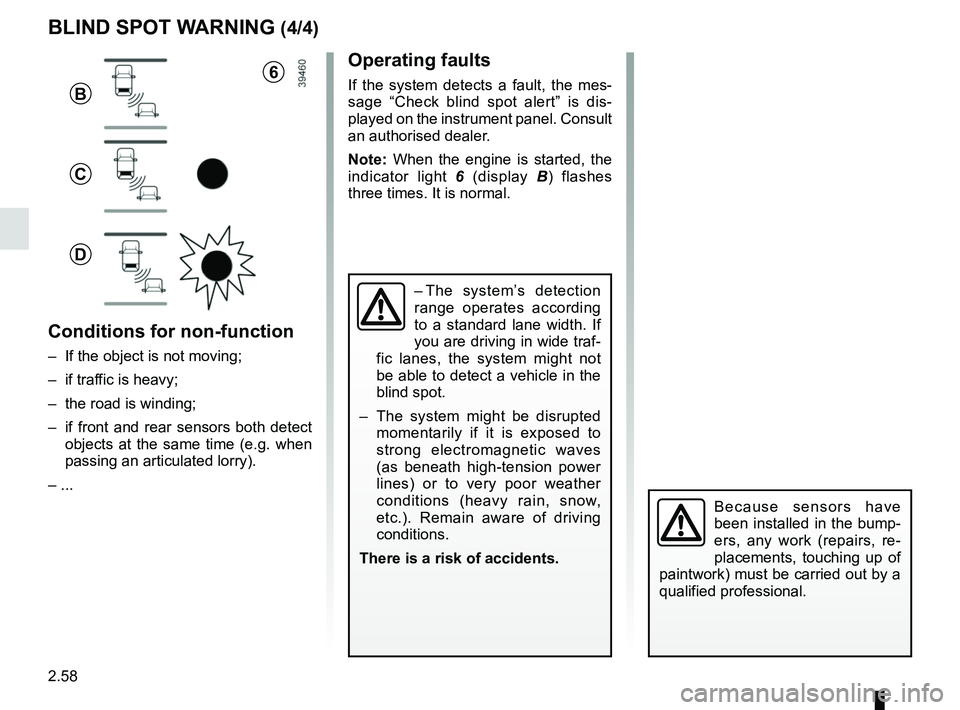
indicator light 6 (display B) flashes
three times. It is normal.
– The system’s detection
range operates according
to a standard lane width. If
you are driving in wide traf-
fic lanes, the system might not
be able to detect a vehicle in the
blind spot.
– The system might be disrupted momentarily if it is exposed to
strong electromagnetic waves
(as beneath high-tension power
lines) or to very poor weather
conditions (heavy rain, snow,
etc.). Remain aware of driving
conditions.
There is a risk of accidents.
BLIND SPOT WARNING (4/4)
Because sensors have
been installed in the bump-
ers, any work (repairs, re-
placements, touching up of
paintwork) must be carried out by a
qualified professional.
6
B
C
D
Conditions for non-function
– If the object is not moving;
– if traffic is heavy;
– the road is winding;
– if front and rear sensors both detect objects at the same time (e.g. when
passing an articulated lorry).
– ...
Page 164 of 332
2.60
OVERSPEED ALERT (2/3)
Activating/deactivating the
system
Vehicles fitted with a navigation
system
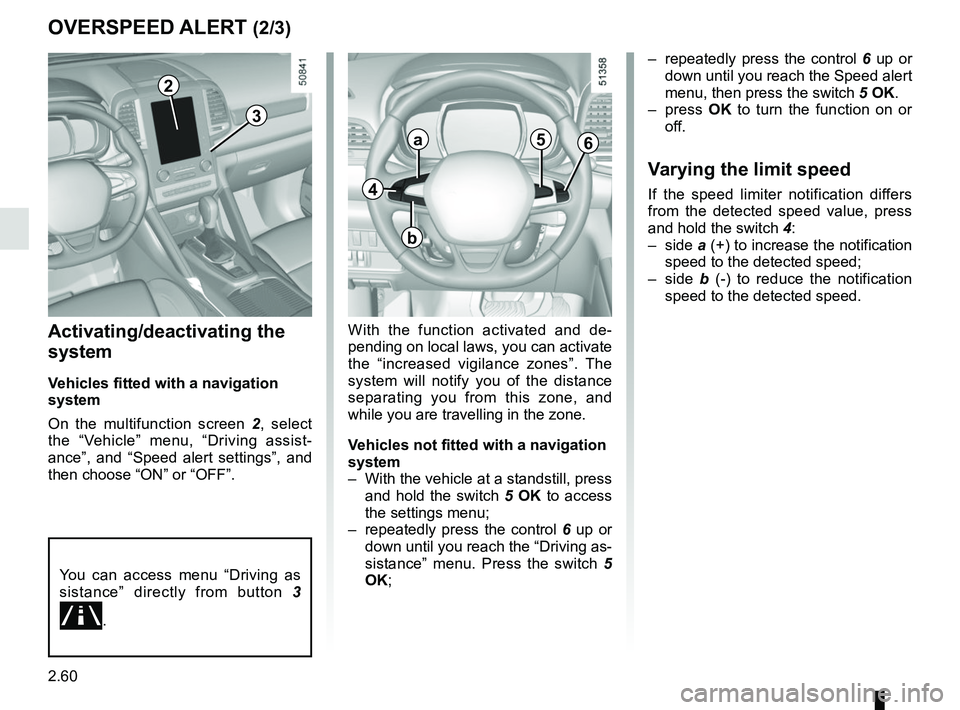
On the multifunction screen 2, select
the “Vehicle” menu, “Driving assist-
ance”, and “Speed alert settings”, and
then choose “ON” or “OFF”.
With the function activated and de-
pending on local laws, you can activate
the “increased vigilance zones”. The
system will notify you of the distance
separating you from this zone, and
while you are travelling in the zone.
Vehicles not fitted with a navigation
system
– With the vehicle at a standstill, press and hold the switch 5 OK to access
the settings menu;
– repeatedly press the control 6 up or
down until you reach the “Driving as-
sistance” menu. Press the switch 5
OK; – repeatedly press the control
6 up or
down until you reach the Speed alert
menu, then press the switch 5 OK.
– press OK to turn the function on or
off.
Varying the limit speed
If the speed limiter notification differs
from the detected speed value, press
and hold the switch 4:
– side a (+) to increase the notification
speed to the detected speed;
– side b (-) to reduce the notification
speed to the detected speed.
You can access menu “Driving as
sistance” directly from button 3
\b.
4
a
b
56
3
2
Page 165 of 332
2.61
OVERSPEED ALERT (3/3)
This function is an additional driving aid. This function is not under any
circumstances intended to replace the due care and attention of the
driver, who should at all times be in control of the vehicle.
The driver should always adapt their speed to the traffic conditions, re-
gardless of the system indications.
The system enables maximum speed signs to be detected and does not detec\
t
other signs.
The driver should not, however, ignore signs which are not detected by the system
and should as a priority comply with the traffic signage and the highway code.
In the event of poor visibility (fog, snow, frost, etc.), it is possible that the system
may not indicate the correct speed to the driver.
The driver should always adapt their speed to the traffic conditions, regardless of
the system indications.Operating fault
The system cannot detect the speed
limit if:
– the windscreen is not clean;
– the camera is blinded by the sun;
– there is insufficient visibility (night, fog, etc.);
– the signs are not legible (snow, etc.) or are hidden (by another vehicle or
by trees);
– the information taken from the navi- gation system is not up to date.
Page 166 of 332
2.62
SPEED LIMITER FUNCTION (1/3)
Switching on
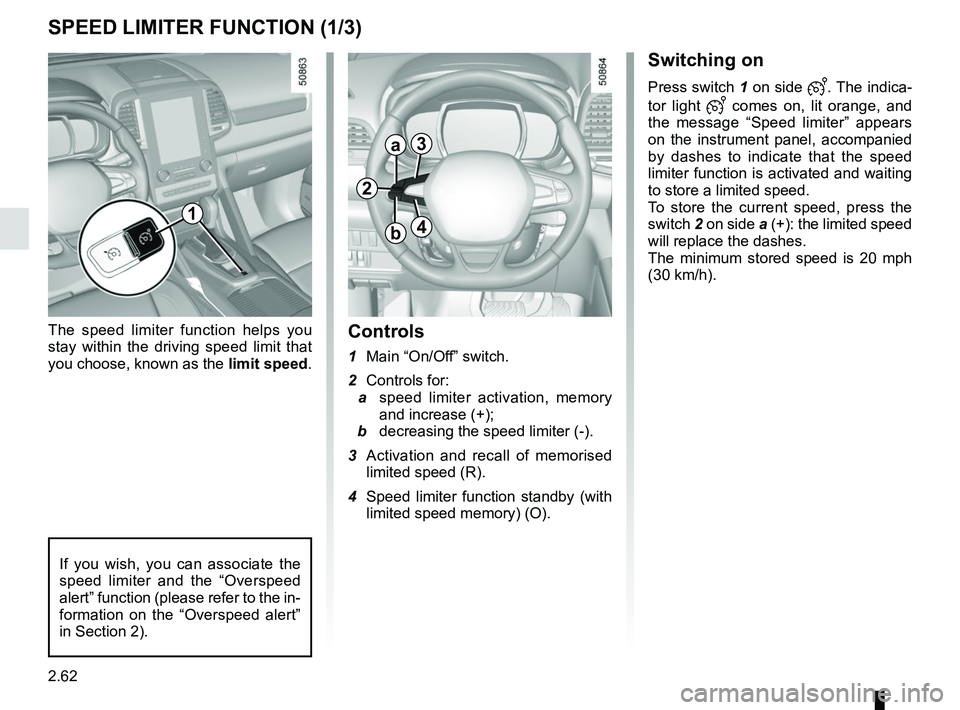
Press switch 1 on side . The indica-
tor light
comes on, lit orange, and
the message “Speed limiter” appears
on the instrument panel, accompanied
by dashes to indicate that the speed
limiter function is activated and waiting
to store a limited speed.
To store the current speed, press the
switch 2 on side a (+): the limited speed
will replace the dashes.
The minimum stored speed is 20 mph
(30 km/h).
Controls
1 Main “On/Off” switch.
2 Controls for:
a speed limiter activation, memory
and increase (+);
b decreasing the speed limiter (-).
3 Activation and recall of memorised limited speed (R).
4 Speed limiter function standby (with limited speed memory) (O).
The speed limiter function helps you
stay within the driving speed limit that
you choose, known as the
limit speed.
If you wish, you can associate the
speed limiter and the “Overspeed
alert” function (please refer to the in-
formation on the “Overspeed alert”
in Section 2).
1
2
a3
4b
Page 167 of 332
2.63
SPEED LIMITER FUNCTION (2/3)
Exceeding the limit speed
It is possible to exceed the limit speed
at any time. To do this: press the accel-
erator pedal firmly and fully (beyond
the resistance point).
While the speed is being exceeded, the
speed limiter flashes red on the instru-
ment panel.
Then, release the accelerator: the
speed limiter function will return as
soon as you reach a speed lower than
the stored speed.
Limited speed cannot be maintained
If driving up or down a steep gradient,
the system is unable to maintain the
limited speed: the memorised speed
flashes red on the instrument panel and
a beep sounds at regular intervals to
inform you.
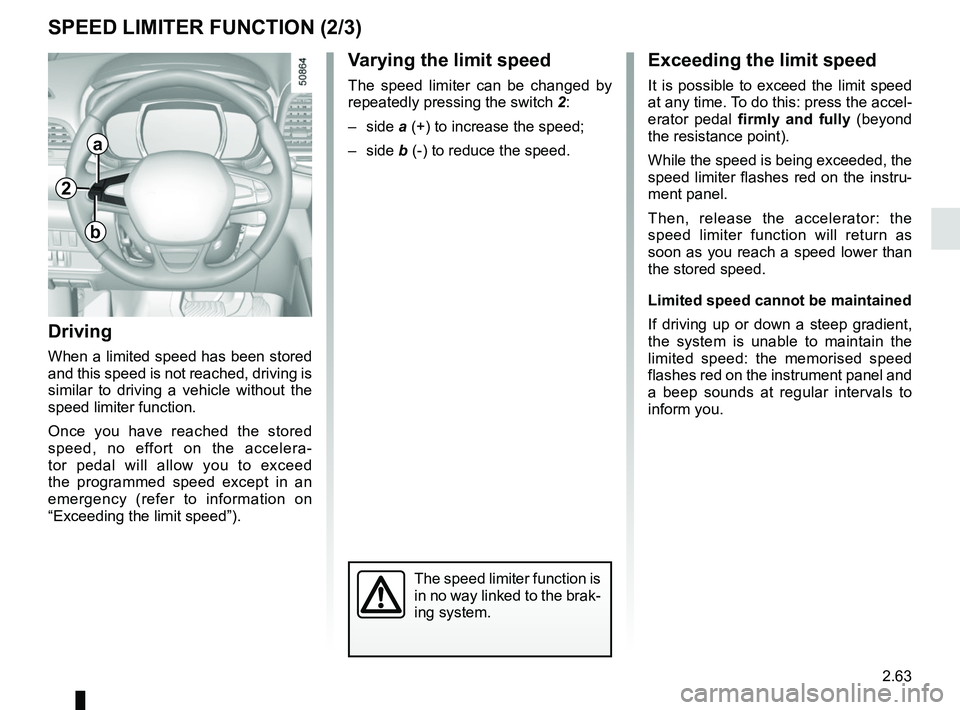
Varying the limit speed
The speed limiter can be changed by
repeatedly pressing the switch 2:
– side a (+) to increase the speed;
– side b (-) to reduce the speed.
Driving
When a limited speed has been stored
and this speed is not reached, driving is
similar to driving a vehicle without the
speed limiter function.
Once you have reached the stored
speed, no effort on the accelera-
tor pedal will allow you to exceed
the programmed speed except in an
emergency (refer to information on
“Exceeding the limit speed”).
The speed limiter function is
in no way linked to the brak-
ing system.
a
b
2
Page 169 of 332
2.65
CRUISE CONTROL FUNCTION (1/4)
The cruise control function helps you to
maintain your driving speed at a speed
that you choose, called the cruising
speed.
This cruising speed may be set at any
speed above 20 mph (30 km/h).
The cruise control function
is in no way linked to the
braking system.
This function is an addi-
tional driving aid. However,
the function does not take
the place of the driver.
Therefore, it can under no circum-
stances replace the driver’s respon-
sibility to respect speed limits and to
be vigilant (the driver must always
be ready to brake). Cruise control
must not be used in heavy traffic, on
undulating or slippery roads (black
ice, aquaplaning, gravel) and during
bad weather (fog, rain, side winds
etc.).
There is a risk of accidents.
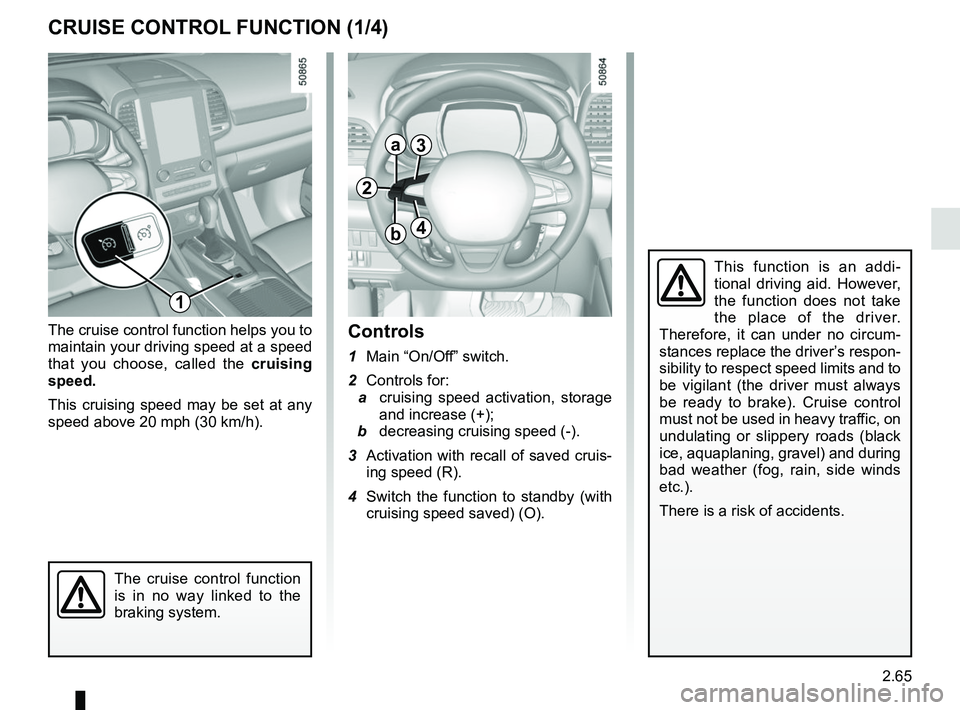
Controls
1 Main “On/Off” switch.
2 Controls for:
a cruising speed activation, storage
and increase (+);
b decreasing cruising speed (-).
3 Activation with recall of saved cruis- ing speed (R).
4 Switch the function to standby (with cruising speed saved) (O).
2
a
b
3
4
1
Page 170 of 332
2.66
CRUISE CONTROL FUNCTION (2/4)
Driving
Once a cruising speed is memorised
and the cruise control function is active,
you may lift your foot off the accelera-
tor pedal.
Please note that you are
strongly advised to keep
your feet close to the pedals
in order to react in an emer-
gency.
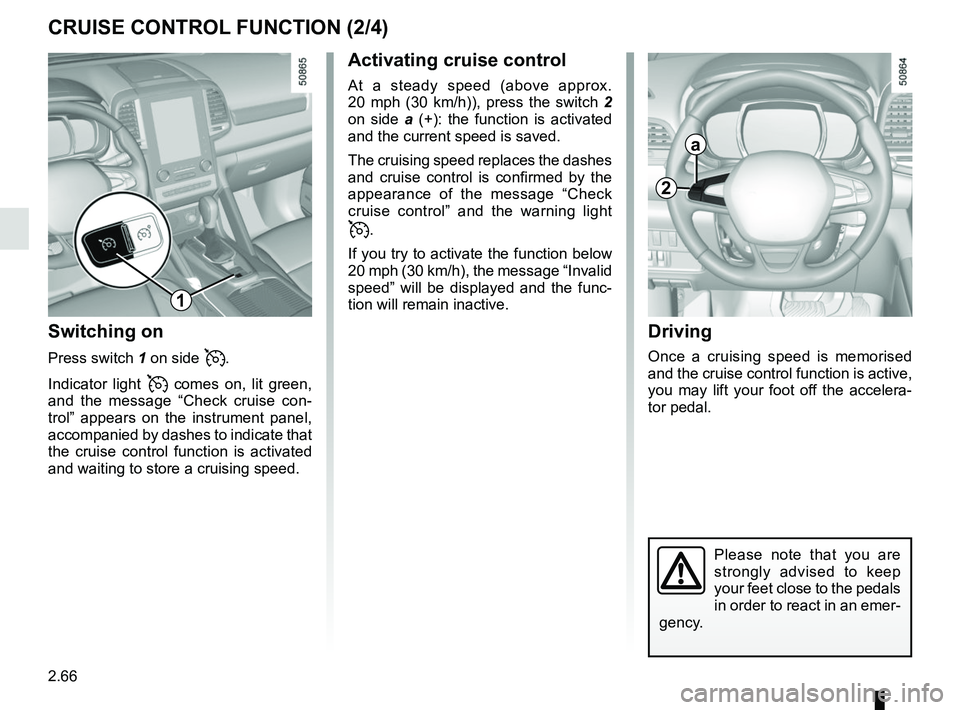
Activating cruise control
At a steady speed (above approx.
20 mph (30 km/h)), press the switch 2
on side a (+): the function is activated
and the current speed is saved.
The cruising speed replaces the dashes
and cruise control is confirmed by the
appearance of the message “Check
cruise control” and the warning light
.
If you try to activate the function below
20 mph (30 km/h), the message “Invalid
speed” will be displayed and the func-
tion will remain inactive.
Switching on
Press switch 1 on side .
Indicator light
comes on, lit green,
and the message “Check cruise con-
trol” appears on the instrument panel,
accompanied by dashes to indicate that
the cruise control function is activated
and waiting to store a cruising speed.
2
a
1
Page 171 of 332
2.67
CRUISE CONTROL FUNCTION (3/4)
Exceeding the cruising speed
The cruising speed may be exceeded
at any time by depressing the accelera-
tor pedal. While overtaking, the cruis-
ing speed flashes red on the instrument
panel.
Then, release the accelerator: after a
few seconds, the vehicle will automati-
cally return to its set cruising speed.
Cruising speed cannot be
maintained
If driving up or down a steep gradi-
ent, the system is unable to maintain
the cruising speed: the stored speed is
flashes red on the instrument panel to
inform you of this situation.
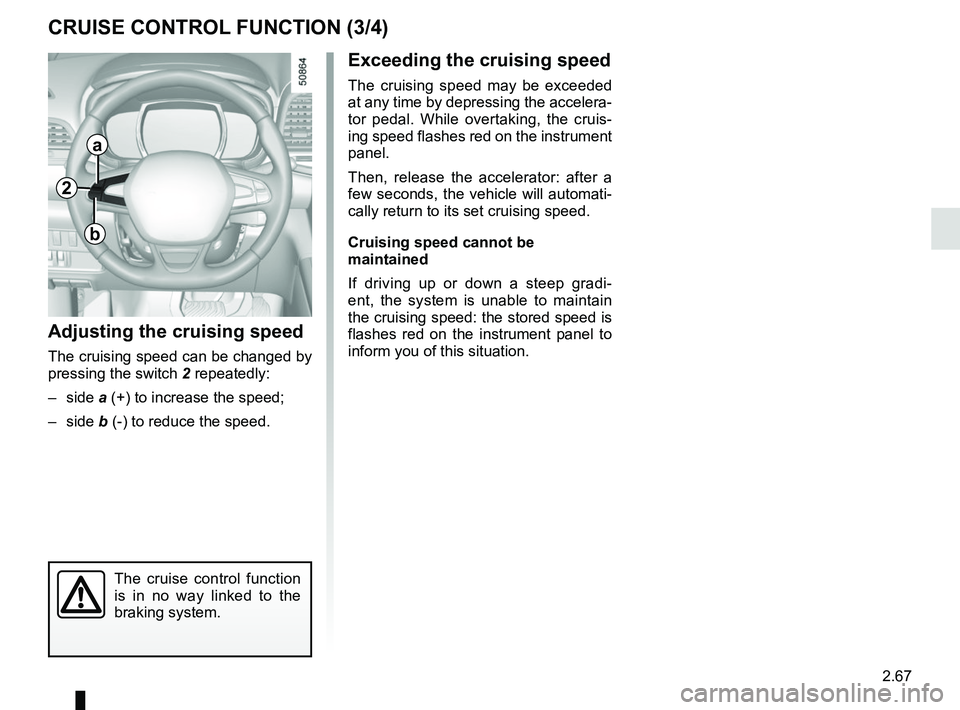
Adjusting the cruising speed
The cruising speed can be changed by
pressing the switch 2 repeatedly:
– side a (+) to increase the speed;
– side b (-) to reduce the speed.
The cruise control function
is in no way linked to the
braking system.
2
a
b
Page 173 of 332
2.69
ADAPTIVE CRUISE CONTROL (1/8)
The adaptive cruise control is a func-
tion which gives you the option, when
traffic conditions permit (large free-flow-
ing road or motorway), of maintaining
a chosen speed, known as the cruising
speed, while keeping a safe distance
from the vehicle in front in the same
lane.
The function can be adjusted from
31 mph (50 km/h) to 99.2 mph
(160 km/h).
The radar-camera has a range of
around 120 metres.
Note:
– the driver should take account of the maximum legally permissible speed
in the country where the vehicle is
travelling;
– the adaptive cruise control can brake the vehicle up to a third of the brak-
ing capacity. Depending on the situ-
ation, the driver may need to brake
harder.
This function is an addi-
tional driving aid.
Therefore, it can under no
circumstances replace the
driver’s responsibility to respect
speed limits and to be vigilant (the
driver must always be ready to
brake).
The adaptive cruise control should
not be used in heavy traffic, on
winding or slippery roads (black ice,
aquaplaning, gravel) and during bad
weather (fog, rain, side winds etc.).
There is a risk of accidents.
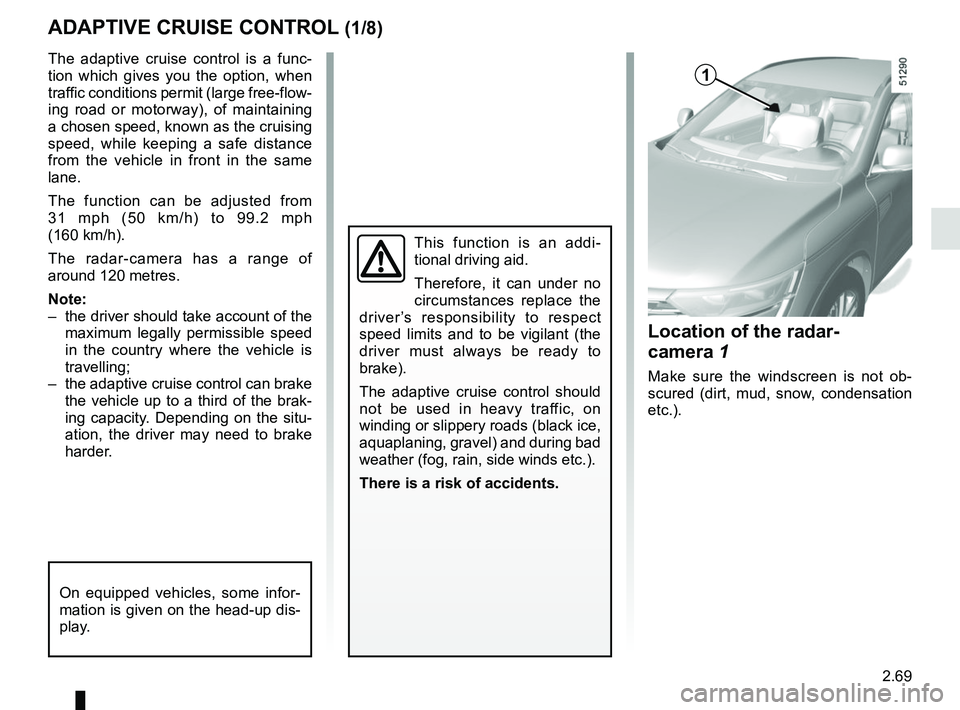
Location of the radar-
camera 1
Make sure the windscreen is not ob-
scured (dirt, mud, snow, condensation
etc.).
On equipped vehicles, some infor-
mation is given on the head-up dis-
play.
1
Page 175 of 332
2.71
Driving
Once a cruising speed is memorised
and the cruise control function is active,
you may lift your foot off the accelera-
tor pedal.
If a following distance is stored and a
vehicle travelling slower than yours is
detected by the system in your lane,
your vehicle will brake (with the brake
lights on) and adapt its speed to that of
the vehicle in front, respecting the fol-
lowing distance selected previously.
Overtaking
If your speed is lower than the cruise
control and you wish to perform an
overtaking manoeuvre, activating the
direction indicator will provide acceler-
ation enabling the overtaking manoeu-
vre.
Please note that you must
keep your feet close to the
pedals in order to react in
an emergency.
ADAPTIVE CRUISE CONTROL (3/8)
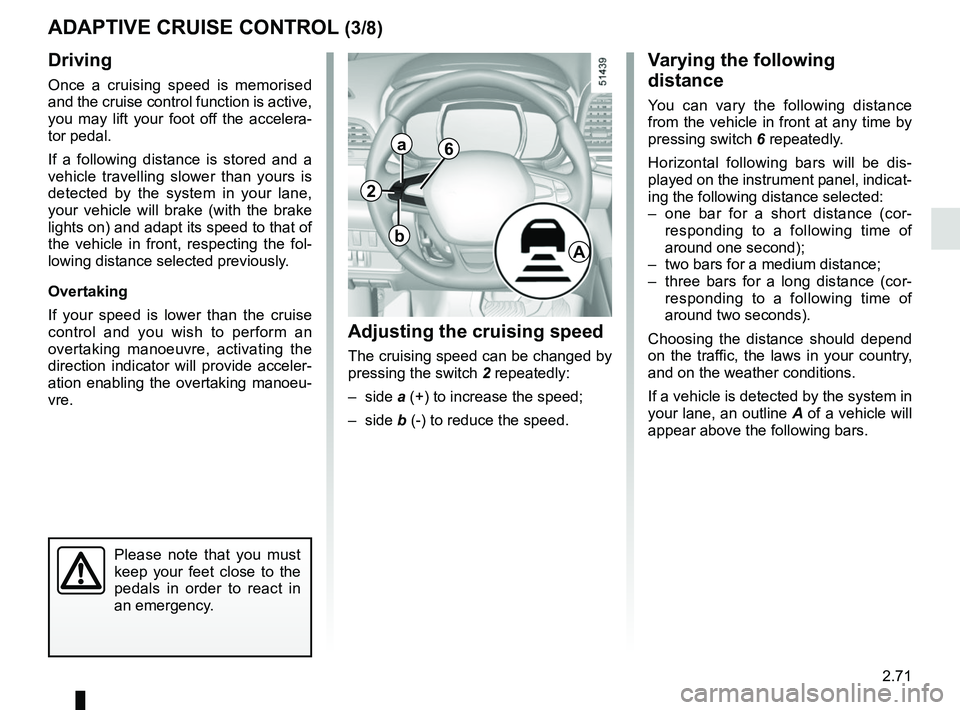
Adjusting the cruising speed
The cruising speed can be changed by
pressing the switch 2 repeatedly:
– side a (+) to increase the speed;
– side b (-) to reduce the speed.
Varying the following
distance
You can vary the following distance
from the vehicle in front at any time by
pressing switch 6 repeatedly.
Horizontal following bars will be dis-
played on the instrument panel, indicat-
ing the following distance selected:
– one bar for a short distance (cor- responding to a following time of
around one second);
– two bars for a medium distance;
– three bars for a long distance (cor- responding to a following time of
around two seconds).
Choosing the distance should depend
on the traffic, the laws in your country,
and on the weather conditions.
If a vehicle is detected by the system in
your lane, an outline A of a vehicle will
appear above the following bars.
6
A
2
a
b