remote control RENAULT KOLEOS 2018 Owners Manual
[x] Cancel search | Manufacturer: RENAULT, Model Year: 2018, Model line: KOLEOS, Model: RENAULT KOLEOS 2018Pages: 332, PDF Size: 8.91 MB
Page 7 of 332
1.1
Section 1: Getting to know your vehicle
Key, radio frequency remote control: general information, use . . . . . . . . . . . . . . . . . . . . . . . . . . . . . 1.2
RENAULT card: general information, use, deadlocking . . . . . . . . . . . . . . . . . . . . . . . . . . . . . . . . . . 1.5
Locking, unlocking the opening elements . . . . . . . . . . . . . . . . . . . . . . . . . . . . . . . . . . . .\
. . . . . . . . . 1.11
Opening and closing the doors . . . . . . . . . . . . . . . . . . . . . . . . . . . . . . . . . . . .\
. . . . . . . . . . . . . . . . . 1.14
Automatic locking when driving . . . . . . . . . . . . . . . . . . . . . . . . . . . . . . . . . . . . \
. . . . . . . . . . . . . . . . . 1.16
Emergency call . . . . . . . . . . . . . . . . . . . . . . . . . . . . . . . . . . . .\
. . . . . . . . . . . . . . . . . . . . . . . . . . . . . 1.17
Headrests - Seats . . . . . . . . . . . . . . . . . . . . . . . . . . . . . . . . . . . .\
. . . . . . . . . . . . . . . . . . . . . . . . . . . 1.19
Seat belts. . . . . . . . . . . . . . . . . . . . . . . . . . . . . . . . . . . . \
. . . . . . . . . . . . . . . . . . . . . . . . . . . . . . . . . . 1.23
Additional methods of restraint . . . . . . . . . . . . . . . . . . . . . . . . . . . . . . . . . . . .\
. . . . . . . . . . . . . . . . . 1.27in addition to the front seat belts . . . . . . . . . . . . . . . . . . . . . . . . . . . . . . . . . . . .\
. . . . . . . . . . 1.27
to the rear seat belts . . . . . . . . . . . . . . . . . . . . . . . . . . . . . . . . . . . .\
. . . . . . . . . . . . . . . . . . . 1.31
side . . . . . . . . . . . . . . . . . . . . . . . . . . . . . . . . . . . . \
. . . . . . . . . . . . . . . . . . . . . . . . . . . . . . . . . 1.32
Child safety: general information . . . . . . . . . . . . . . . . . . . . . . . . . . . . . . . . . . . . \
. . . . . . . . . . . . . . . . 1.34 Choosing a child seat mounting . . . . . . . . . . . . . . . . . . . . . . . . . . . . . . . . . . . . \
. . . . . . . . . . . 1.37
Fitting a child seat, general information . . . . . . . . . . . . . . . . . . . . . . . . . . . . . . . . . . . . \
. . . . . 1.39
Child seats: attachment by seat belt or by Isofix system . . . . . . . . . . . . . . . . . . . . . . . . . . . . . . . . . . 1.41 Deactivating, activating the front passenger airbag . . . . . . . . . . . . . . . . . . . . . . . . . . . . . . . . 1.47
Driving position . . . . . . . . . . . . . . . . . . . . . . . . . . . . . . . . . . . .\
. . . . . . . . . . . . . . . . . . . . . . . . . . . . . 1.50
Instrument panel . . . . . . . . . . . . . . . . . . . . . . . . . . . . . . . . . . . .\
. . . . . . . . . . . . . . . . . . . . . . . . . . . . 1.54 Trip computer and warning system . . . . . . . . . . . . . . . . . . . . . . . . . . . . . . . . . . . .\
. . . . . . . . 1.62
Vehicle settings customisation menu . . . . . . . . . . . . . . . . . . . . . . . . . . . . . . . . . . . . \
. . . . . . . 1.72
Steering wheel, Power-assisted steering . . . . . . . . . . . . . . . . . . . . . . . . . . . . . . . . . . . .\
. . . . . . . . . 1.74
Clock and exterior temperature . . . . . . . . . . . . . . . . . . . . . . . . . . . . . . . . . . . . \
. . . . . . . . . . . . . . . . . 1.76
Rear view mirrors . . . . . . . . . . . . . . . . . . . . . . . . . . . . . . . . . . . .\
. . . . . . . . . . . . . . . . . . . . . . . . . . . 1.77
Exterior lighting and signals. . . . . . . . . . . . . . . . . . . . . . . . . . . . . . . . . . . . \
. . . . . . . . . . . . . . . . . . . . 1.79
Audible and visual signals . . . . . . . . . . . . . . . . . . . . . . . . . . . . . . . . . . . . \
. . . . . . . . . . . . . . . . . . . . . 1.84
Headlight beam adjustment . . . . . . . . . . . . . . . . . . . . . . . . . . . . . . . . . . . . \
. . . . . . . . . . . . . . . . . . . . 1.85
Washers, wipers . . . . . . . . . . . . . . . . . . . . . . . . . . . . . . . . . . . .\
. . . . . . . . . . . . . . . . . . . . . . . . . . . . 1.87
Fuel tank (filling with fuel) . . . . . . . . . . . . . . . . . . . . . . . . . . . . . . . . . . . .\
. . . . . . . . . . . . . . . . . . . . . 1.95
Page 8 of 332
1.2
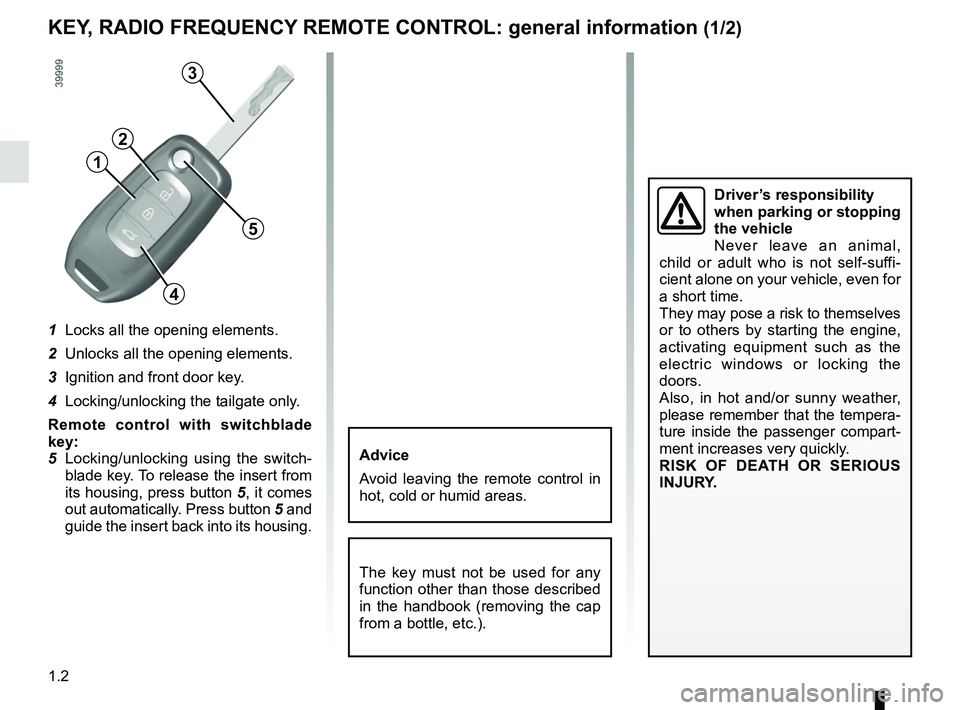
1 Locks all the opening elements.
2 Unlocks all the opening elements.
3 Ignition and front door key.
4 Locking/unlocking the tailgate only.
Remote control with switchblade
key:
5 Locking/unlocking using the switch-blade key. To release the insert from
its housing, press button 5, it comes
out automatically. Press button 5 and
guide the insert back into its housing.
KEY, RADIO FREQUENCY REMOTE CONTROL: general information (1/2)
The key must not be used for any
function other than those described
in the handbook (removing the cap
from a bottle, etc.).
Advice
Avoid leaving the remote control in
hot, cold or humid areas.
Driver’s responsibility
when parking or stopping
the vehicle
Never leave an animal,
child or adult who is not self-suffi-
cient alone on your vehicle, even for
a short time.
They may pose a risk to themselves
or to others by starting the engine,
activating equipment such as the
electric windows or locking the
doors.
Also, in hot and/or sunny weather,
please remember that the tempera-
ture inside the passenger compart-
ment increases very quickly.
RISK OF DEATH OR SERIOUS
INJURY.
5
1
2
3
4
Page 9 of 332
1.3
KEY, RADIO FREQUENCY REMOTE CONTROL: general information (2/2)
Radio frequency remote
control operating range
This varies according to the surround-
ings: take care not to lock or unlock the
doors by inadvertently pressing the but-
tons on the remote control.
Note: If a door or the boot is open or
not closed properly, the doors and boot
lock/unlock in quick succession.
Interference
Interference by factors in the immediate
vicinity (external installations or the use
of equipment operating on the same
frequency as the remote control) may
affect the operation of the remote con-
trol.
Replacement and additional keys
or remote controls.
You must only contact an approved
dealer:
– If you need to replace a key it will be necessary to take the vehicle
and all of its keys to an approved
Dealer in order to initialise the
system.
– Depending on the vehicle, you have the option of using up to
four remote controls.
Remote control unit failure
Make sure that the correct battery
type is being used, and that the
battery is in good condition and in-
serted correctly. These batteries
have a service life of approximately
two years.
Refer to Section 5: “Radio fre-
quency remote control: batteries”
for the battery changing procedure.
Page 10 of 332
1.4
Locking/unlocking only the
boot
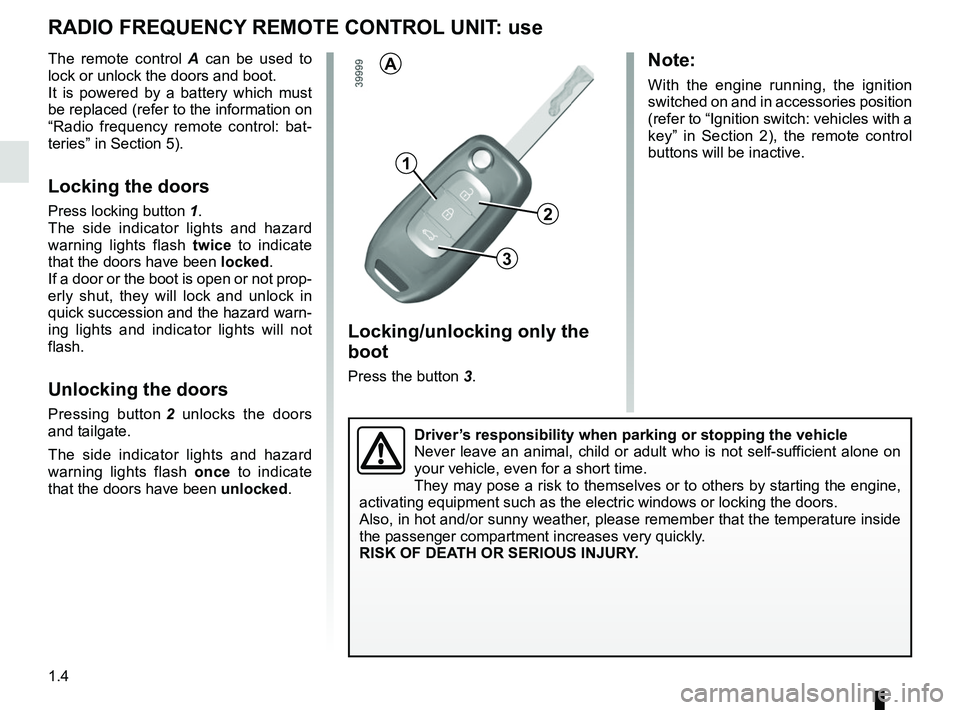
Press the button 3.
RADIO FREQUENCY REMOTE CONTROL UNIT: use
The remote control A can be used to
lock or unlock the doors and boot.
It is powered by a battery which must
be replaced (refer to the information on
“Radio frequency remote control: bat-
teries” in Section 5).
Locking the doors
Press locking button 1.
The side indicator lights and hazard
warning lights flash twice to indicate
that the doors have been locked.
If a door or the boot is open or not prop-
erly shut, they will lock and unlock in
quick succession and the hazard warn-
ing lights and indicator lights will not
flash.
Unlocking the doors
Pressing button 2 unlocks the doors
and tailgate.
The side indicator lights and hazard
warning lights flash once to indicate
that the doors have been unlocked.
1
3
A
2
Note:
With the engine running, the ignition
switched on and in accessories position
(refer to “Ignition switch: vehicles with a
key” in Section 2), the remote control
buttons will be inactive.
Driver’s responsibility when parking or stopping the vehicle
Never leave an animal, child or adult who is not self-sufficient alone on
your vehicle, even for a short time.
They may pose a risk to themselves or to others by starting the engine, \
activating equipment such as the electric windows or locking the doors.
Also, in hot and/or sunny weather, please remember that the temperature inside
the passenger compartment increases very quickly.
RISK OF DEATH OR SERIOUS INJURY.
Page 15 of 332
1.9
RENAULT CARD: usage (3/4)
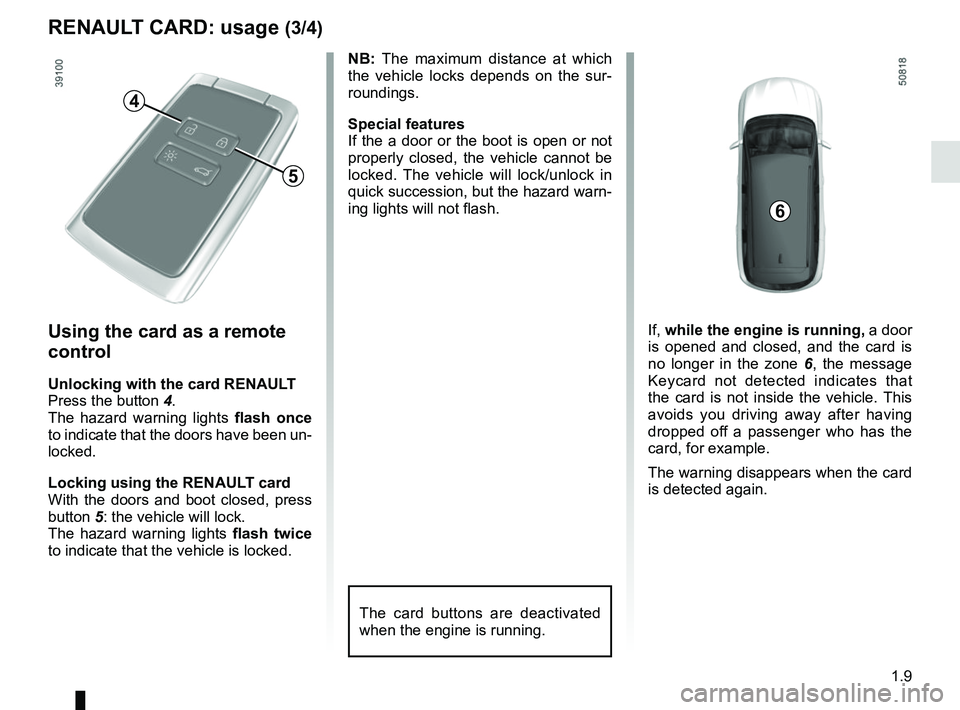
Using the card as a remote
control
Unlocking with the card RENAULT
Press the button 4.
The hazard warning lights flash once
to indicate that the doors have been un-
locked.
Locking using the RENAULT card
With the doors and boot closed, press
button 5: the vehicle will lock.
The hazard warning lights flash twice
to indicate that the vehicle is locked. NB: The maximum distance at which
the vehicle locks depends on the sur-
roundings.
Special features
If the a door or the boot is open or not
properly closed, the vehicle cannot be
locked. The vehicle will lock/unlock in
quick succession, but the hazard warn-
ing lights will not flash.
4
5
6
The card buttons are deactivated
when the engine is running.
If,
while the engine is running, a door
is opened and closed, and the card is
no longer in the zone 6, the message
Keycard not detected indicates that
the card is not inside the vehicle. This
avoids you driving away after having
dropped off a passenger who has the
card, for example.
The warning disappears when the card
is detected again.
Page 17 of 332
1.11
LOCKING, UNLOCKING THE DOORS (1/3)
If the remote control or,
depending on the vehicle, the
RENAULT card does not work
In some cases, the radio frequency
remote control or the RENAULT card
may not work:
– RENAULT card/radio frequency remote control battery worn or run
flat, vehicle battery flat, etc.
– use of appliances operating on the same frequency as the card (mobile
phone, etc.);
– vehicle located in a high electromag- netic radiation zone.
Never leave your vehicle
with the key or RENAULT
card inside.
It is then possible:
– depending on the vehicle, use the radio frequency remote control or
the emergency key integrated in the
card to unlock the front left-hand
door;
– to lock each of the doors manually;
– to use the interior door locking/un- locking control (refer to the following
pages).
2
1
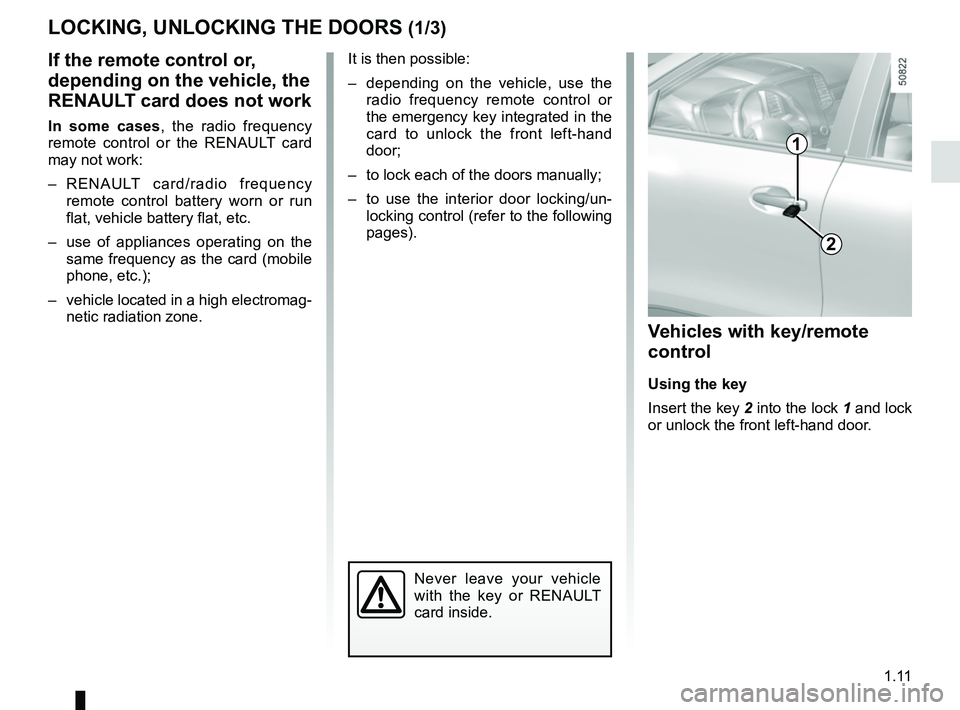
Vehicles with key/remote
control
Using the key
Insert the key 2 into the lock 1 and lock
or unlock the front left-hand door.
Page 57 of 332
1.51
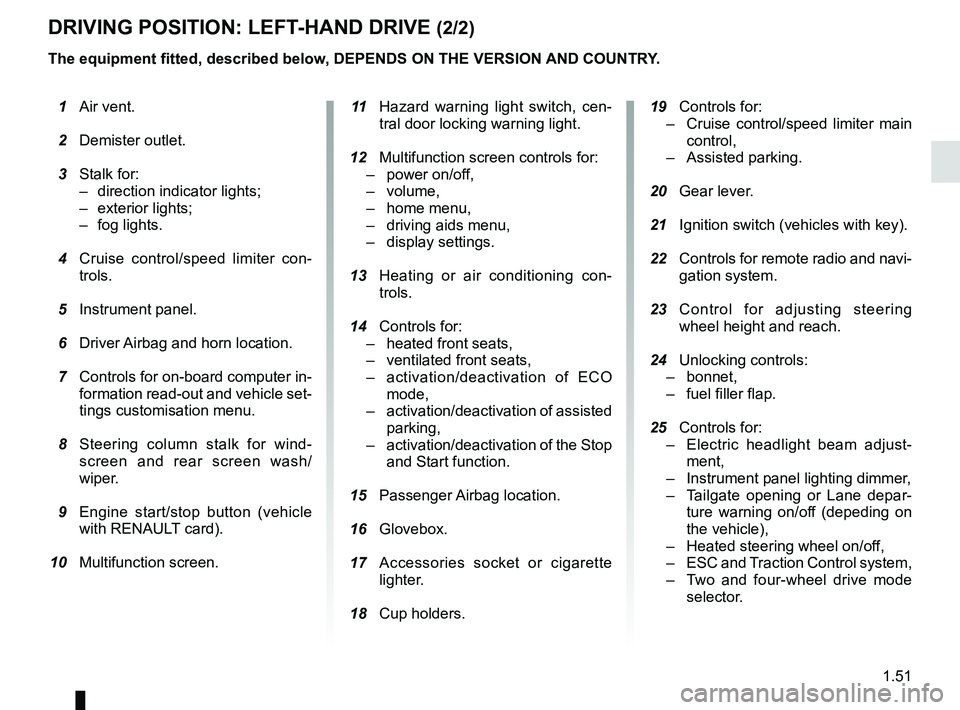
DRIVING POSITION: LEFT-HAND DRIVE (2/2)
The equipment fitted, described below, DEPENDS ON THE VERSION AND COUNTRY. 19 Controls for:
– Cruise control/speed limiter main
control,
– Assisted parking.
20 Gear lever.
21 Ignition switch (vehicles with key).
22 Controls for remote radio and navi-
gation system.
23 Control for adjusting steering
wheel height and reach.
24 Unlocking controls:
– bonnet,
– fuel filler flap.
25 Controls for:
– Electric headlight beam adjust-
ment,
– Instrument panel lighting dimmer,
– Tailgate opening or Lane depar-
ture warning on/off (depeding on
the vehicle),
– Heated steering wheel on/off,
– ESC and Traction Control system,
– Two and four-wheel drive mode
selector.
1 Air vent.
2 Demister outlet.
3 Stalk for:
– direction indicator lights;
– exterior lights;
– fog lights.
4 Cruise control/speed limiter con-
trols.
5 Instrument panel.
6 Driver Airbag and horn location.
7 Controls for on-board computer in-
formation read-out and vehicle set-
tings customisation menu.
8 Steering column stalk for wind-
screen and rear screen wash/
wiper.
9 Engine start/stop button (vehicle
with RENAULT card).
10 Multifunction screen.
11 Hazard warning light switch, cen-
tral door locking warning light.
12 Multifunction screen controls for:
– power on/off,
– volume,
– home menu,
– driving aids menu,
– display settings.
13 Heating or air conditioning con-
trols.
14 Controls for:
– heated front seats,
– ventilated front seats,
– activation/deactivation of ECO
mode,
– activation/deactivation of assisted
parking,
– activation/deactivation of the Stop
and Start function.
15 Passenger Airbag location.
16
Glovebox.
17 Accessories socket or cigarette
lighter.
18 Cup holders.
Page 59 of 332
1.53
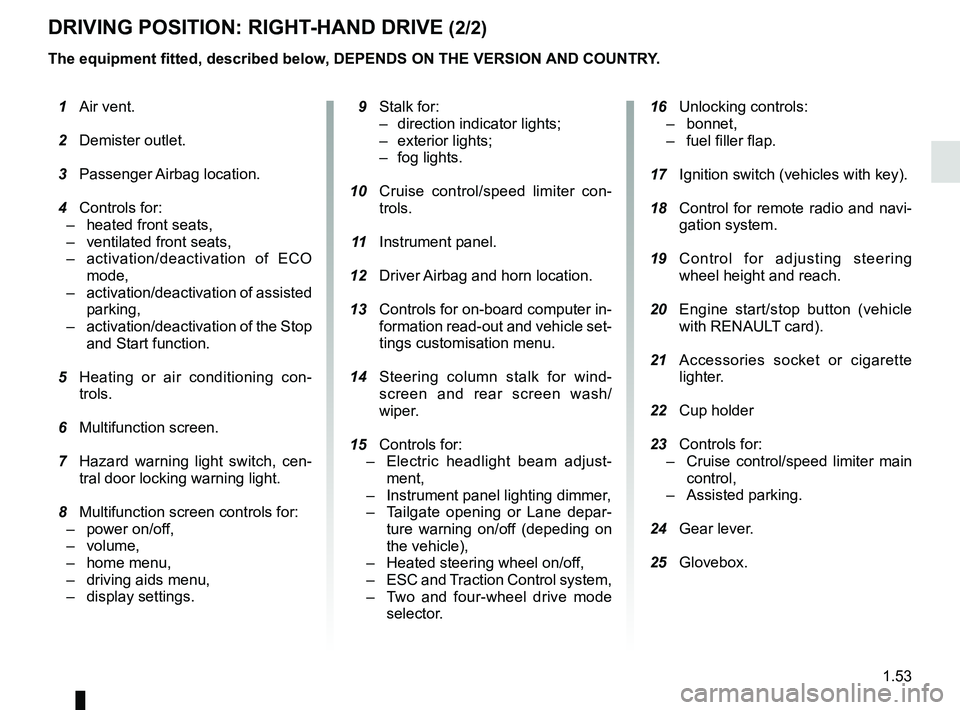
DRIVING POSITION: RIGHT-HAND DRIVE (2/2)
The equipment fitted, described below, DEPENDS ON THE VERSION AND COUNTRY.
16 Unlocking controls:
– bonnet,
– fuel filler flap.
17 Ignition switch (vehicles with key).
18 Control for remote radio and navi-
gation system.
19 Control for adjusting steering
wheel height and reach.
20 Engine start/stop button (vehicle
with RENAULT card).
21 Accessories socket or cigarette
lighter.
22 Cup holder
23 Controls for:
– Cruise control/speed limiter main
control,
– Assisted parking.
24 Gear lever.
25 Glovebox.
1 Air vent.
2 Demister outlet.
3 Passenger Airbag location.
4 Controls for:
– heated front seats,
– ventilated front seats,
– activation/deactivation of ECO
mode,
– activation/deactivation of assisted
parking,
– activation/deactivation of the Stop
and Start function.
5 Heating or air conditioning con-
trols.
6 Multifunction screen.
7 Hazard warning light switch, cen-
tral door locking warning light.
8 Multifunction screen controls for:
– power on/off,
– volume,
– home menu,
– driving aids menu,
– display settings.
9 Stalk for:
– direction indicator lights;
– exterior lights;
– fog lights.
10 Cruise control/speed limiter con-
trols.
11 Instrument panel.
12 Driver Airbag and horn location.
13 Controls for on-board computer in-
formation read-out and vehicle set-
tings customisation menu.
14 Steering column stalk for wind-
screen and rear screen wash/
wiper.
15
Controls for:
– Electric headlight beam adjust-
ment,
– Instrument panel lighting dimmer,
– Tailgate opening or Lane depar-
ture warning on/of
f (depeding on
the vehicle),
– Heated steering wheel on/off,
– ESC and Traction Control system,
– Two and four-wheel drive mode
selector.
Page 83 of 332
1.77
Welcome and goodbye function
(depending on the vehicle)
From the multifunction screen, select
menu “Vehicle”, “User settings”,
“External welcome” and activate or de-
activate the function (ON or OFF).
REAR VIEW MIRRORS (1/2)Folding rear view mirrors
The door mirrors automatically fold in
when the vehicle is locked using the
button on the RENAULT card or remote
“Hands-free” locking. In this case, when
the engine is started, the door mirrors
fold out.
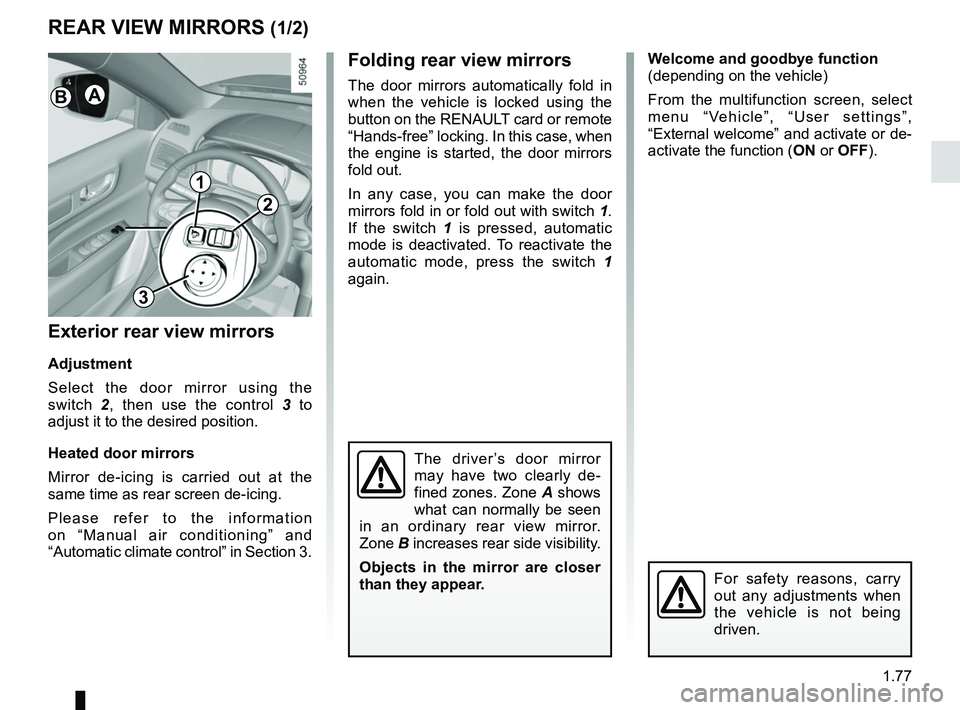
In any case, you can make the door
mirrors fold in or fold out with switch 1.
If the switch 1 is pressed, automatic
mode is deactivated. To reactivate the
automatic mode, press the switch 1
again.
Exterior rear view mirrors
Adjustment
Select the door mirror using the
switch 2, then use the control 3 to
adjust it to the desired position.
Heated door mirrors
Mirror de-icing is carried out at the
same time as rear screen de-icing.
Please refer to the information
on “Manual air conditioning” and
“Automatic climate control” in Section 3.
The driver’s door mirror
may have two clearly de-
fined zones. Zone A shows
what can normally be seen
in an ordinary rear view mirror.
Zone B increases rear side visibility.
Objects in the mirror are closer
than they appear.
For safety reasons, carry
out any adjustments when
the vehicle is not being
driven.
1
2
3
AB
Page 103 of 332
1.97
FUEL TANK (3/3)
Persistent fuel odour
If you notice a persistent
fuel odour you should:
– stop the vehicle as soon as traf- fic conditions allow and switch off
the ignition;
– switch on the hazard warning lights and ask your passengers to
leave the vehicle and stay clear
of the traffic;
– contact an approved Dealer.
No modifications what-
soever are permitted on
any part of the fuel supply
system (electronic units,
wiring, fuel circuit, injectors, pro-
tective covers, etc.) as this may be
dangerous (unless undertaken by
qualified Network personnel).Running out of fuel on diesel
versions
Vehicles with key/remote control
– Put the ignition key in “ON” posi- tion (please see the information on
the “Ignition switch” in Section 2) and
wait for a few minutes before start-
ing, to enable the fuel circuit to be
primed;
– turn the key to “START”. If the engine does not start, repeat the procedure.
– If the engine does not start after sev- eral attempts, please contact an au-
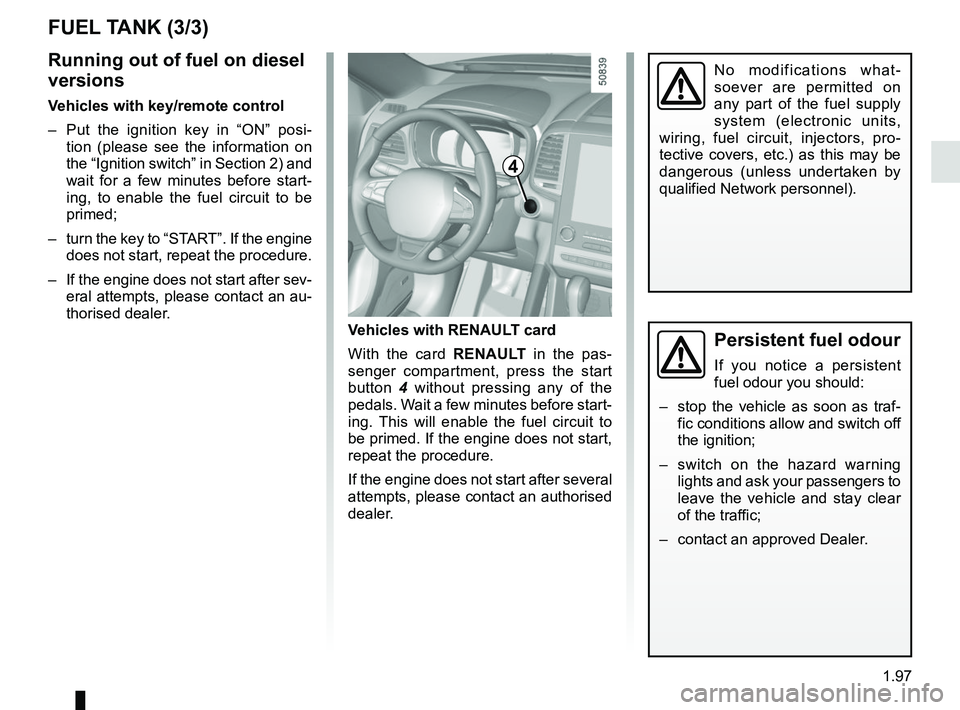
thorised dealer. Vehicles with RENAULT card
With the card RENAULT in the pas-
senger compartment, press the start
button 4 without pressing any of the
pedals. Wait a few minutes before start-
ing. This will enable the fuel circuit to
be primed. If the engine does not start,
repeat the procedure.
If the engine does not start after several
attempts, please contact an authorised
dealer.
4