display RENAULT LAGUNA 2012 X91 / 3.G Owner's Manual
[x] Cancel search | Manufacturer: RENAULT, Model Year: 2012, Model line: LAGUNA, Model: RENAULT LAGUNA 2012 X91 / 3.GPages: 241, PDF Size: 7.82 MB
Page 92 of 241
catalytic converter................................. (up to the end of the DU)
special features of diesel versions ........(up to the end of the DU)
driving ................................................... (up to the end of the DU)
2.10
ENG_UD6756_3
Particularités des versions diesel (X91 - B91 - K91 - Renault)
ENG_NU_936-5_BK91_Renault_2
Special features of diesel versions
SPeCIaL featUReS of DIeSeL veRSIoNS
Diesel engine speed
Diesel engines are fitted with injection
equipment which prevents the engine
speed being exceeded irrespective of
the gear selected.
If the message “Check antipollu -
tion” is displayed on the instrument
panel accompanied by the
Ä and
©warning light; consult an ap -
proved dealer straight away.
When driving, depending on the fuel
grade used, it is possible that white
smoke may be emitted.
This is due to the exhaust particle filter
being cleaned automatically, and does
not affect the way the vehicle runs.
Running out of fuel
If the tank has been completely
drained, the system must be reprimed
after the tank is refilled: see information
on the “fuel tank” in section 1 before re-
starting the engine.
Do not park the vehicle or
run the engine in locations
where combustible sub -
stances or materials such
as grass or leaves can come into
contact with the hot exhaust system.
Precautions to be taken in
winter
To avoid any faults in icy weather:
– ensure that the battery is always fully
charged,
– always keep the diesel tank rela -
tively full to avoid water vapour con-
densing in it and accumulating at the
bottom of the tank.
Page 101 of 241
tyres ...................................................... (up to the end of the DU)
tyre pressure monitor ............................(up to the end of the DU)
tyre pressure ......................................... (up to the end of the DU)
driving ................................................... (up to the end of the DU)
2.19
ENG_UD22198_5
Système de surveillance de pression des pneumatiques (X91 - B91 - K91 - Renault)
ENG_NU_936-5_BK91_Renault_2
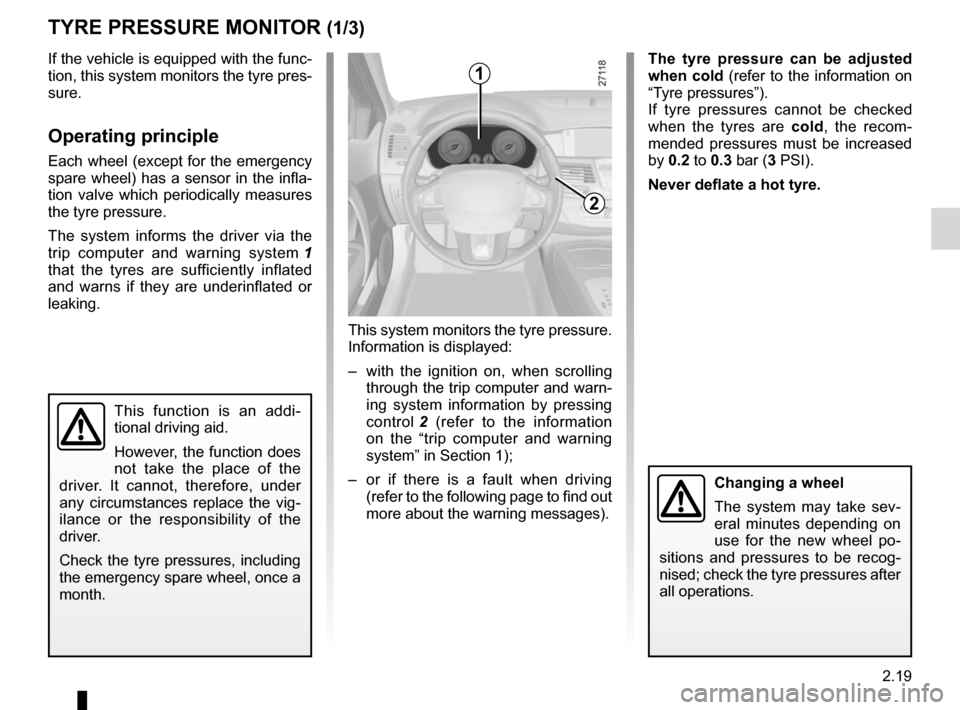
This system monitors the tyre pressure.
Information is displayed:
– with the ignition on, when scrolling
through the trip computer and warn-
ing system information by pressing
control 2 (refer to the information
on the “trip computer and warning
system” in Section 1);
– or if there is a fault when driving
(refer to the following page to find out
more about the warning messages).
Tyre pressure monitor
This function is an addi -
tional driving aid.
However, the function does
not take the place of the
driver. It cannot, therefore, under
any circumstances replace the vig -
ilance or the responsibility of the
driver.
Check the tyre pressures, including
the emergency spare wheel, once a
month.
tyRe PReSSURe MoNItoR (1/3)
If the vehicle is equipped with the func-
tion, this system monitors the tyre pres-
sure.
operating principle
Each wheel (except for the emergency
spare wheel) has a sensor in the infla-
tion valve which periodically measures
the tyre pressure.
The system informs the driver via the
trip computer and warning system 1
that the tyres are sufficiently inflated
and warns if they are underinflated or
leaking.
t he tyre pressure can be adjusted
when cold (refer to the information on
“Tyre pressures”).
If tyre pressures cannot be checked
when the tyres are cold, the recom -
mended pressures must be increased
by 0.2 to 0.3 bar (3 PSI).
Never deflate a hot tyre.1
2
Changing a wheel
The system may take sev -
eral minutes depending on
use for the new wheel po -
sitions and pressures to be recog -
nised; check the tyre pressures after
all operations.
Page 102 of 241
2.20
ENG_UD22198_5
Système de surveillance de pression des pneumatiques (X91 - B91 - K91 - Renault)
ENG_NU_936-5_BK91_Renault_2
Jaune NoirNoir texte
Display
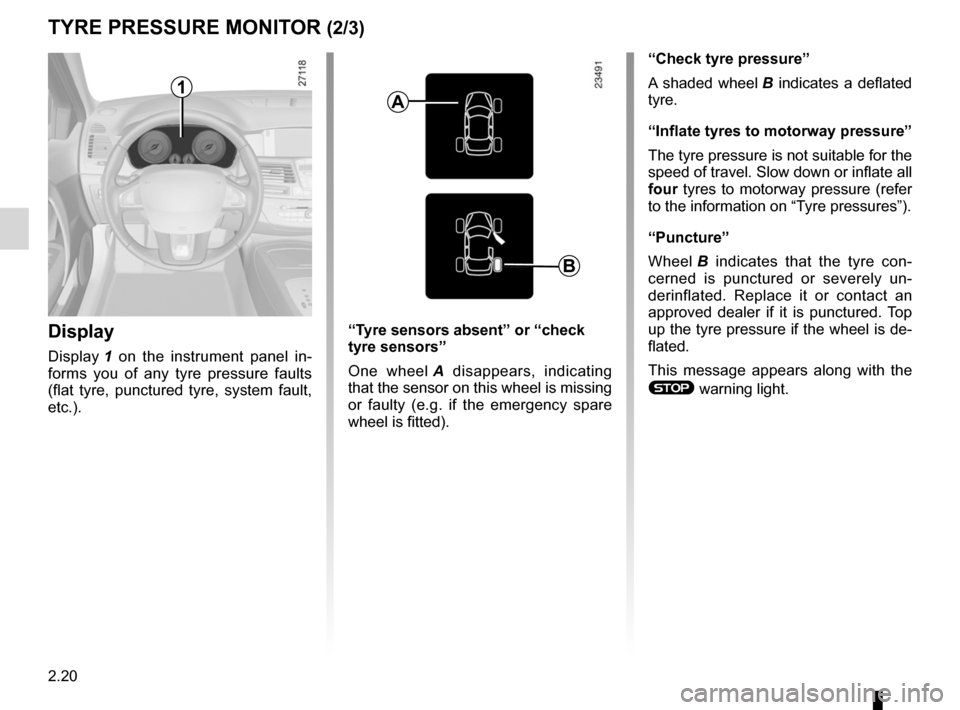
Display 1 on the instrument panel in -
forms you of any tyre pressure faults
(flat tyre, punctured tyre, system fault,
etc.).
tyRe PReSSURe MoNItoR (2/3)
1
“Check tyre pressure”
A shaded wheel B indicates a deflated
tyre.
“Inflate tyres to motorway pressure”
The tyre pressure is not suitable for the
speed of travel. Slow down or inflate all
four tyres to motorway pressure (refer
to the information on “Tyre pressures”).
“Puncture”
Wheel B indicates that the tyre con -
cerned is punctured or severely un -
derinflated. Replace it or contact an
approved dealer if it is punctured. Top
up the tyre pressure if the wheel is de-
flated.
This message appears along with the
® warning light.
“t
yre sensors absent” or “check
tyre sensors”
One wheel A disappears, indicating
that the sensor on this wheel is missing
or faulty (e.g. if the emergency spare
wheel is fitted).
a
b
Page 103 of 241
JauneNoirNoir texte
2.21
ENG_UD22198_5
Système de surveillance de pression des pneumatiques (X91 - B91 - K91 - Renault)
ENG_NU_936-5_BK91_Renault_2
Interchangeability of wheelsIf you wish to swap the wheels around,
please consult an approved dealer to
reinitialise the system.
emergency spare wheelIf the vehicle is equipped with an emer-
gency spare wheel, it will not have a
sensor. When it is fitted to the vehicle,
the message “tyre sensors absent” is
displayed on the instrument panel.
Replacing wheels/tyres
This system requires specific equip -
ment (wheels, tyres, hubcaps, etc.).
Contact an approved dealer to fit new
tyres and to find out about accessories
compatible with the system and avail -
able from manufacturer ’s accessory
outlets: the use of any other accessory
could affect the correct operation of the
system or damage the system.
t yre repair products
Because the valves are specially de -
signed, only use products approved by
our Technical Department.
tyRe PReSSURe MoNItoR (3/3)
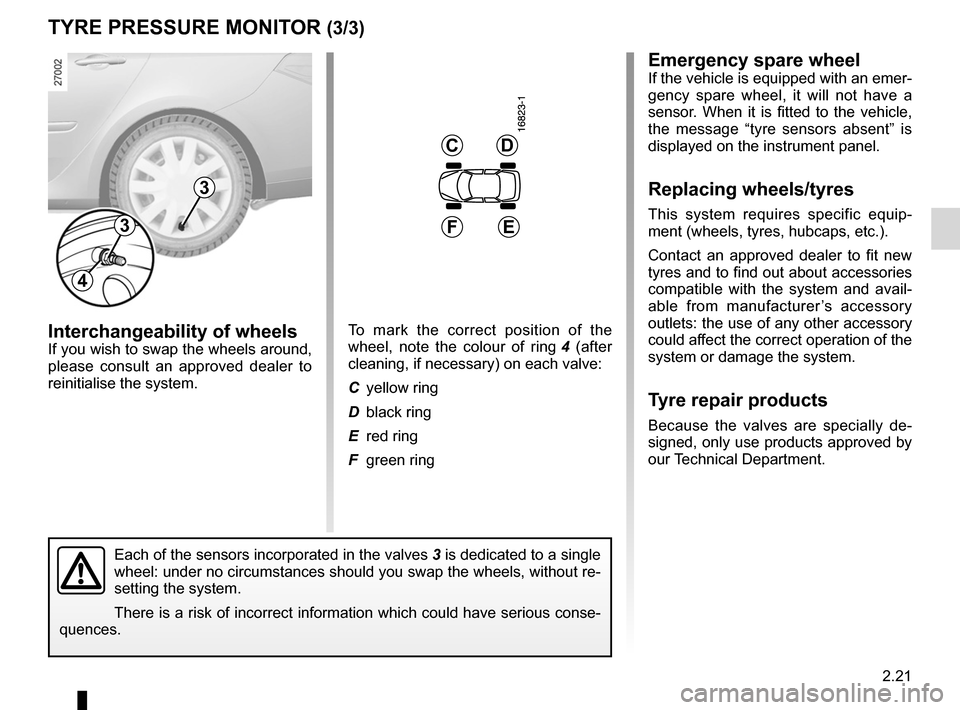
Each of the sensors incorporated in the valves 3 is dedicated to a single
wheel: under no circumstances should you swap the wheels, without re-
setting the system.
There is a risk of incorrect information which could have serious conse-
quences.
3
3
4
CD
ef
To mark the correct position of the
wheel, note the colour of ring 4 (after
cleaning, if necessary) on each valve:
C yellow ring
D black ring
E red ring
F green ring
Page 107 of 241
JauneNoirNoir texte
2.25
ENG_UD27695_10
Dispositifs de correction et d’assistance à la de conduite (X91 - B91 - K91 - D91 - Renault)
ENG_NU_936-5_BK91_Renault_2
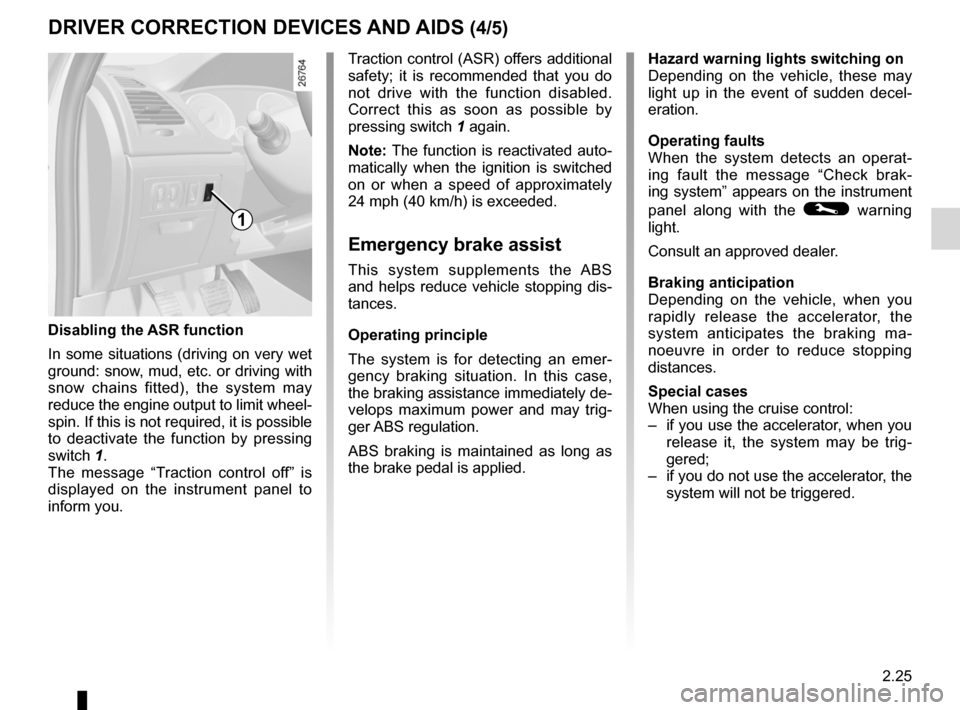
Disabling the aSR function
In some situations (driving on very wet
ground: snow, mud, etc. or driving with
snow chains fitted), the system may
reduce the engine output to limit wheel -
spin. If this is not required, it is possible
to deactivate the function by pressing
switch 1.
The message “ Traction control off ” is
displayed on the instrument panel to
inform you.
Traction control (ASR) offers additional
safety; it is recommended that you do
not drive with the function disabled.
Correct this as soon as possible by
pressing switch 1 again.
Note: The function is reactivated auto-
matically when the ignition is switched
on or when a speed of approximately
24 mph (40 km/h) is exceeded.
emergency brake assist
This system supplements the ABS
and helps reduce vehicle stopping dis-
tances.
operating principle
The system is for detecting an emer -
gency braking situation. In this case,
the braking assistance immediately de-
velops maximum power and may trig -
ger ABS regulation.
ABS braking is maintained as long as
the brake pedal is applied.
DRIveR CoRReCtIoN DevICeS aND aIDS (4/5)
1
hazard warning lights switching on
Depending on the vehicle, these may
light up in the event of sudden decel -
eration.
operating faults
When the system detects an operat -
ing fault the message “ Check brak-
ing system” appears on the instrument
panel along with the
© warning
light.
Consult an approved dealer.
braking anticipation
Depending on the vehicle, when you
rapidly release the accelerator, the
system anticipates the braking ma -
noeuvre in order to reduce stopping
distances.
Special cases
When using the cruise control:
– if you use the accelerator, when you
release it, the system may be trig -
gered;
– if you do not use the accelerator, the
system will not be triggered.
Page 108 of 241
rear drive wheels ................................................... (current page)
2.26
ENG_UD27695_10
Dispositifs de correction et d’assistance à la de conduite (X91 - B91 - K91 - D91 - Renault)
ENG_NU_936-5_BK91_Renault_2
Rear wheel steering
On equipped vehicles, this system,
when the vehicle is being driven, steers
the rear wheels according to driving
conditions: at low speed this system
offers manoeuvrability, at higher speeds
it optimises stability.
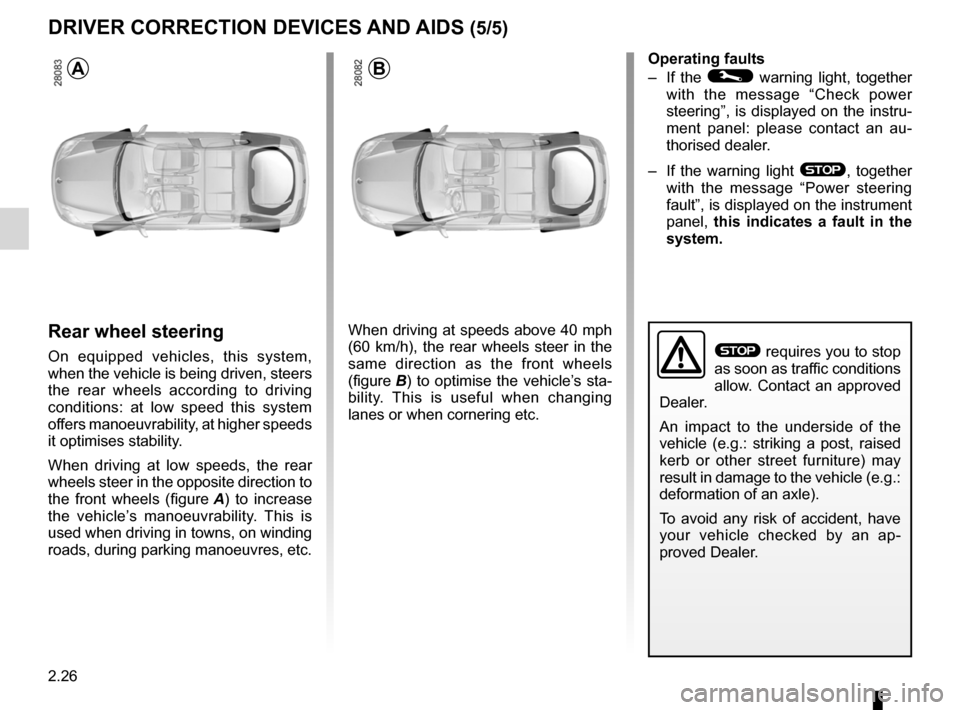
When driving at low speeds, the rear
wheels steer in the opposite direction to
the front wheels (figure A ) to increase
the vehicle’s manoeuvrability. This is
used when driving in towns, on winding
roads, during parking manoeuvres, etc.
When driving at speeds above 40 mph
(60 km/h), the rear wheels steer in the
same direction as the front wheels
(figure B) to optimise the vehicle’s sta-
bility. This is useful when changing
lanes or when cornering etc. operating faults
–
If the
© warning light, together
with the message “ Check power
steering ”, is displayed on the instru-
ment panel: please contact an au -
thorised dealer.
– If the warning light
®, together
with the message “ Power steering
fault”, is displayed on the instrument
panel, this indicates a fault in the
system.
DRIveR CoRReCtIoN DevICeS aND aIDS (5/5)
ab
® requires you to stop
as soon as traffic conditions
allow. Contact an approved
Dealer.
An impact to the underside of the
vehicle (e.g.: striking a post, raised
kerb or other street furniture) may
result in damage to the vehicle (e.g.:
deformation of an axle).
To avoid any risk of accident, have
your vehicle checked by an ap -
proved Dealer.
Page 110 of 241
2.28
ENG_UD22200_6
Régulateur-limiteur de vitesse : fonction limiteur (X91 - B91 - K91 - D91 - Renault)
ENG_NU_936-5_BK91_Renault_2
Jaune NoirNoir texte
CRUISe CoNtRoL/SPeeD LIMIteR: speed limiter function (2/3)
Driving
When a limited speed has been stored
and this speed is not reached, driving is
similar to driving a vehicle without the
speed limiter function.
Once you have reached the stored
speed, no effort on the accelera -
tor pedal will allow you to exceed
the programmed speed except in an
emergency (refer to information on
“Exceeding the limit speed”).
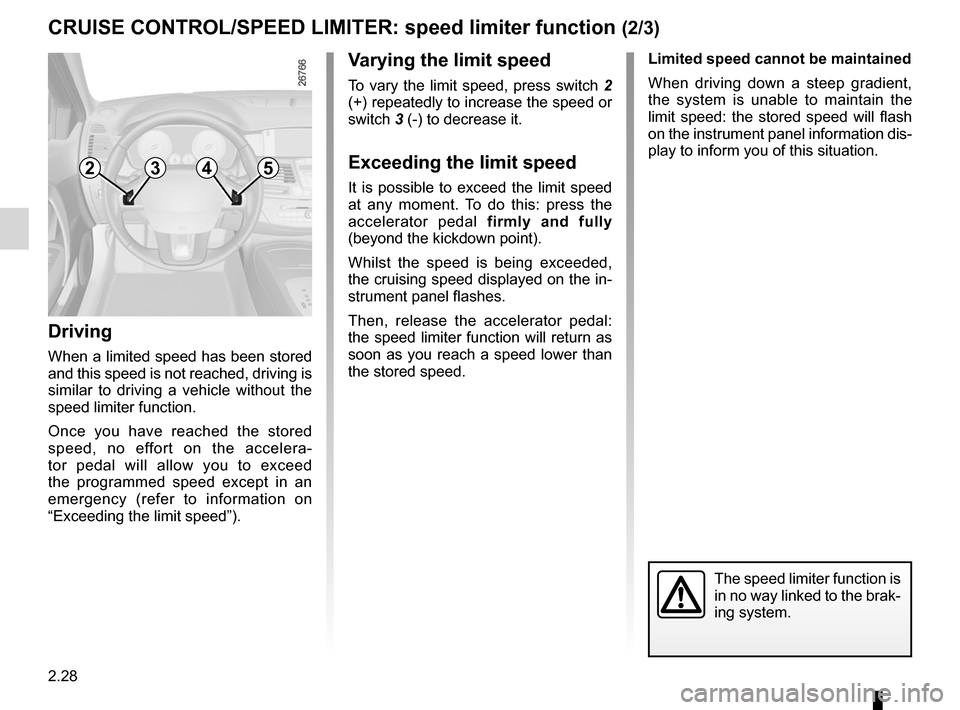
v arying the limit speed
To vary the limit speed, press switch 2
(+) repeatedly to increase the speed or
switch 3 (-) to decrease it.
exceeding the limit speed
It is possible to exceed the limit speed
at any moment. To do this: press the
accelerator pedal firmly and fully
(beyond the kickdown point).
Whilst the speed is being exceeded,
the cruising speed displayed on the in-
strument panel flashes.
Then, release the accelerator pedal:
the speed limiter function will return as
soon as you reach a speed lower than
the stored speed. Limited speed cannot be maintained
When driving down a steep gradient,
the system is unable to maintain the
limit speed: the stored speed will flash
on the instrument panel information dis-
play to inform you of this situation.
2354
The speed limiter function is
in no way linked to the brak-
ing system.
Page 114 of 241
2.32
ENG_UD22201_5
Régulateur-limiteur de vitesse : fonction régulateur (X91 - B91 - K91 - Renault)
ENG_NU_936-5_BK91_Renault_2
Jaune NoirNoir texte
CRUISe CoNtRoL/SPeeD LIMIteR: cruise control function (3/4)
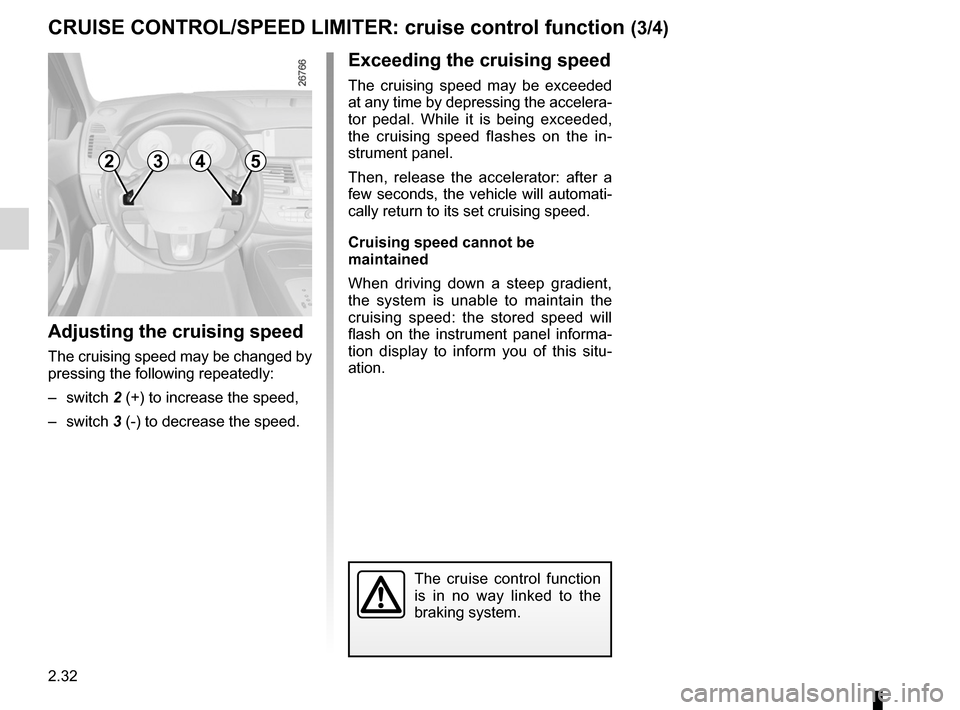
adjusting the cruising speed
The cruising speed may be changed by
pressing the following repeatedly:
– switch 2 (+) to increase the speed,
– switch 3 (-) to decrease the speed.
The cruise control function
is in no way linked to the
braking system.
exceeding the cruising speed
The cruising speed may be exceeded
at any time by depressing the accelera -
tor pedal. While it is being exceeded,
the cruising speed flashes on the in -
strument panel.
Then, release the accelerator: after a
few seconds, the vehicle will automati-
cally return to its set cruising speed.
Cruising speed cannot be
maintained
When driving down a steep gradient,
the system is unable to maintain the
cruising speed: the stored speed will
flash on the instrument panel informa -
tion display to inform you of this situ -
ation.
2354
Page 117 of 241
JauneNoirNoir texte
2.35
ENG_UD20299_1
Aide au parking (X91 - B91 - K91 - Renault)
ENG_NU_936-5_BK91_Renault_2
P aRkING DIStaNCe CoNtRoL (2/3)
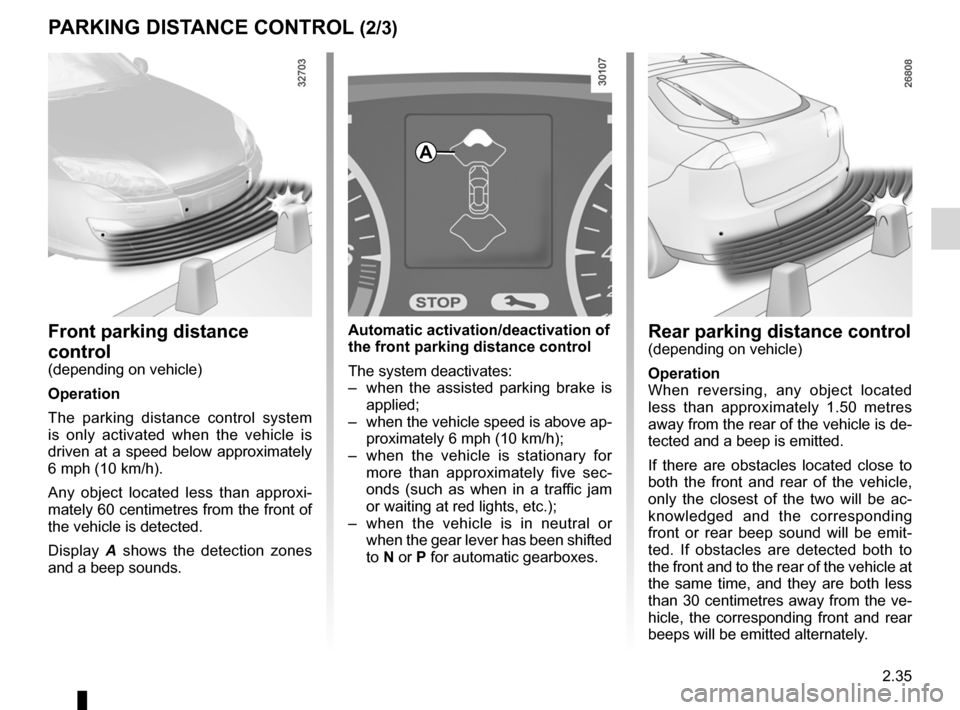
Rear parking distance control
(depending on vehicle)
operation
When reversing, any object located
less than approximately 1.50 metres
away from the rear of the vehicle is de-
tected and a beep is emitted.
If there are obstacles located close to
both the front and rear of the vehicle,
only the closest of the two will be ac -
knowledged and the corresponding
front or rear beep sound will be emit -
ted. If obstacles are detected both to
the front and to the rear of the vehicle at
the same time, and they are both less
than 30 centimetres away from the ve-
hicle, the corresponding front and rear
beeps will be emitted alternately.
automatic activation/deactivation of
the front parking distance control
The system deactivates:
– when the assisted parking brake is
applied;
– when the vehicle speed is above ap-
proximately 6 mph (10 km/h);
– when the vehicle is stationary for
more than approximately five sec -
onds (such as when in a traffic jam
or waiting at red lights, etc.);
– when the vehicle is in neutral or
when the gear lever has been shifted
to N or P for automatic gearboxes.front parking distance
control
(depending on vehicle)
operation
The parking distance control system
is only activated when the vehicle is
driven at a speed below approximately
6 mph (10 km/h).
Any object located less than approxi -
mately 60 centimetres from the front of
the vehicle is detected.
Display A shows the detection zones
and a beep sounds.
a
Page 119 of 241
automatic gearbox (use) ....................... (up to the end of the DU)
automatic gearbox selector lever ..........(up to the end of the DU)
changing gear ....................................... (up to the end of the DU)
reverse gear selecting .......................................... (up to the end of the DU)
driving ................................................... (up to the end of the DU)
2.37
ENG_UD27633_9
Boîte de vitesses automatique (X91 - B91 - K91 - D91 - Renault)
ENG_NU_936-5_BK91_Renault_2
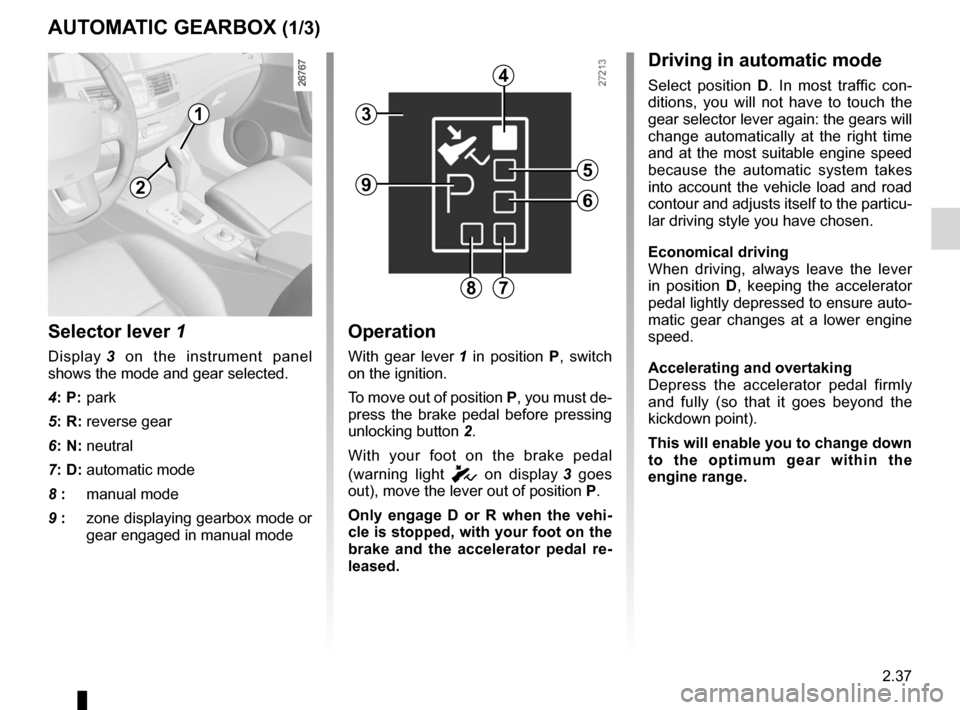
Automatic gearbox
Selector lever 1
Display 3 on the instrument panel
shows the mode and gear selected.
4: P: park
5: R: reverse gear
6: N: neutral
7: D: automatic mode
8 : manual mode
9 : zone displaying gearbox mode or
gear engaged in manual mode
operation
With gear lever 1 in position P, switch
on the ignition.
To move out of position P, you must de-
press the brake pedal before pressing
unlocking button 2.
With your foot on the brake pedal
(warning light
c on display 3 goes
out), move the lever out of position P.
o nly engage D or R when the vehi -
cle is stopped, with your foot on the
brake and the accelerator pedal re -
leased.
aUtoMatIC GeaRbox (1/3)
Driving in automatic mode
Select position D. In most traffic con -
ditions, you will not have to touch the
gear selector lever again: the gears will
change automatically at the right time
and at the most suitable engine speed
because the automatic system takes
into account the vehicle load and road
contour and adjusts itself to the particu-
lar driving style you have chosen.
economical driving
When driving, always leave the lever
in position D, keeping the accelerator
pedal lightly depressed to ensure auto-
matic gear changes at a lower engine
speed.
accelerating and overtaking
Depress the accelerator pedal firmly
and fully (so that it goes beyond the
kickdown point).
this will enable you to change down
to the optimum gear within the
engine range.
3
2
1
4
5
6
78
9