light RENAULT LAGUNA 2012 X91 / 3.G Repair Manual
[x] Cancel search | Manufacturer: RENAULT, Model Year: 2012, Model line: LAGUNA, Model: RENAULT LAGUNA 2012 X91 / 3.GPages: 241, PDF Size: 7.82 MB
Page 111 of 241
JauneNoirNoir texte
2.29
ENG_UD22200_6
Régulateur-limiteur de vitesse : fonction limiteur (X91 - B91 - K91 - D91 - Renault)
ENG_NU_936-5_BK91_Renault_2
CRUISe CoNtRoL/SPeeD LIMIteR: speed limiter function (3/3)
Putting the function on
standby
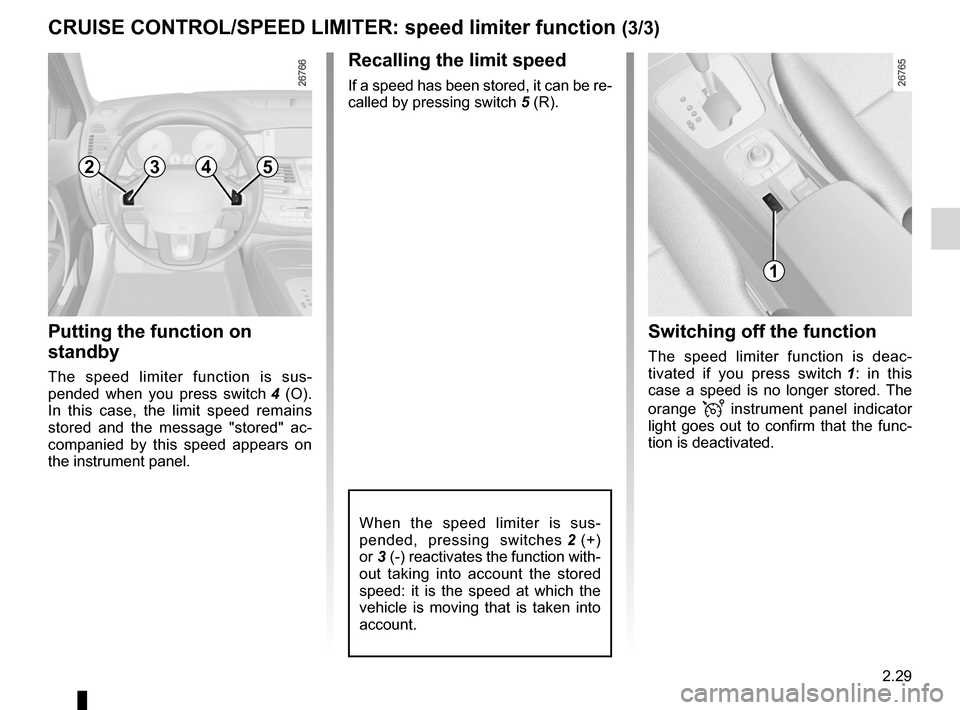
The speed limiter function is sus -
pended when you press switch 4 (O).
In this case, the limit speed remains
stored and the message "stored" ac -
companied by this speed appears on
the instrument panel.
1
2354
Recalling the limit speed
If a speed has been stored, it can be re-
called by pressing switch 5 (R).
When the speed limiter is sus -
pended, pressing switches 2 (+)
or 3 (-) reactivates the function with-
out taking into account the stored
speed: it is the speed at which the
vehicle is moving that is taken into
account.
Switching off the function
The speed limiter function is deac -
tivated if you press switch 1 : in this
case a speed is no longer stored. The
orange
instrument panel indicator
light goes out to confirm that the func-
tion is deactivated.
Page 113 of 241
JauneNoirNoir texte
2.31
ENG_UD22201_5
Régulateur-limiteur de vitesse : fonction régulateur (X91 - B91 - K91 - Renault)
ENG_NU_936-5_BK91_Renault_2
CRUISe CoNtRoL/SPeeD LIMIteR: cruise control function (2/4)
Switching on
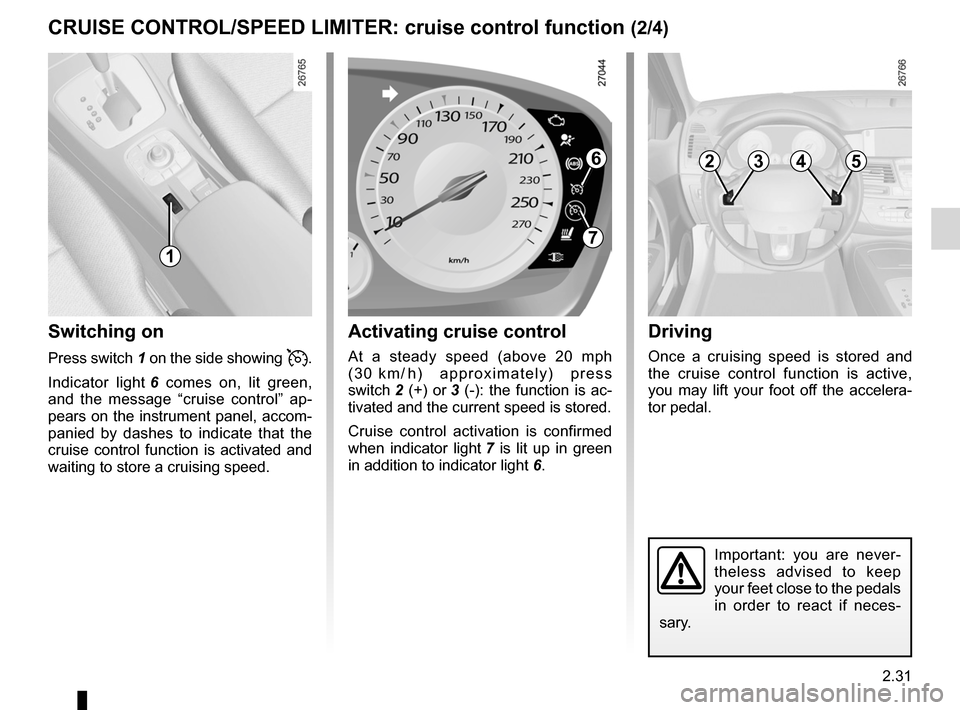
Press switch 1 on the side showing .
Indicator light 6 comes on, lit green,
and the message “cruise control” ap -
pears on the instrument panel, accom-
panied by dashes to indicate that the
cruise control function is activated and
waiting to store a cruising speed.
activating cruise control
At a steady speed (above 20 mph
( 3 0 k m / h ) a p p r o x i m a t e l y ) p r e s s
switch 2 (+) or 3 (-): the function is ac-
tivated and the current speed is stored.
Cruise control activation is confirmed
when indicator light 7 is lit up in green
in addition to indicator light 6.
Driving
Once a cruising speed is stored and
the cruise control function is active,
you may lift your foot off the accelera -
tor pedal.
Important: you are never -
theless advised to keep
your feet close to the pedals
in order to react if neces -
sary.
6
1
7
2354
Page 115 of 241
JauneNoirNoir texte
2.33
ENG_UD22201_5
Régulateur-limiteur de vitesse : fonction régulateur (X91 - B91 - K91 - Renault)
ENG_NU_936-5_BK91_Renault_2
CRUISe CoNtRoL/SPeeD LIMIteR: cruise control function (4/4)
Putting the function on
standby
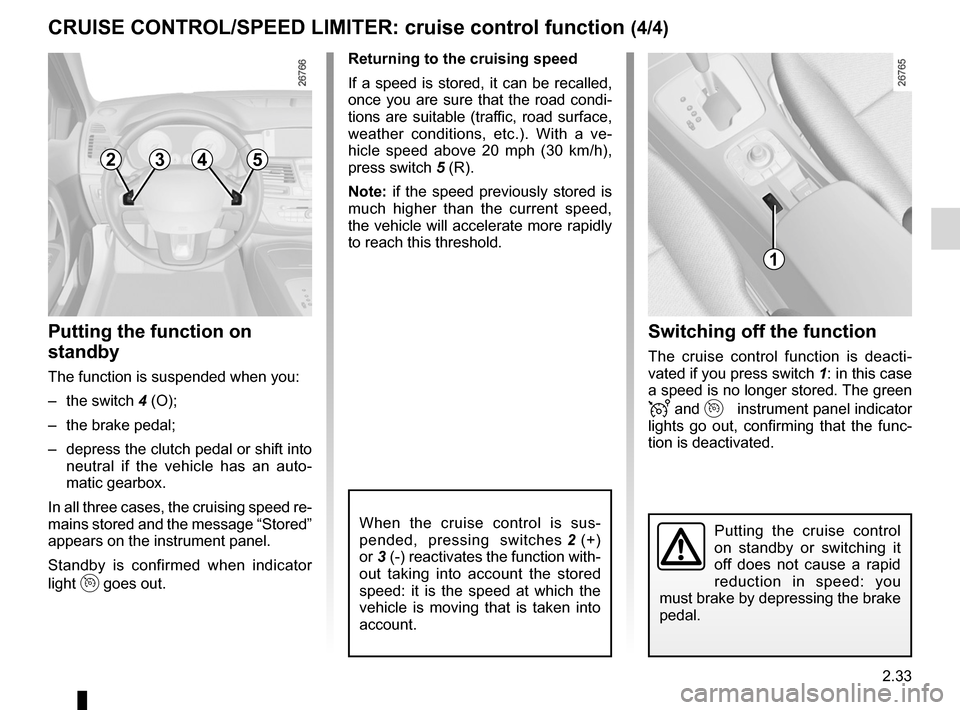
The function is suspended when you:
– the switch 4 (O);
– the brake pedal;
– depress the clutch pedal or shift into
neutral if the vehicle has an auto -
matic gearbox.
In all three cases, the cruising speed re-
mains stored and the message “Stored”
appears on the instrument panel.
Standby is confirmed when indicator
light
goes out. Returning to the cruising speed
If a speed is stored, it can be recalled,
once you are sure that the road condi
-
tions are suitable (traffic, road surface,
weather conditions, etc.). With a ve -
hicle speed above 20 mph (30 km/h),
press switch 5 (R).
Note: if the speed previously stored is
much higher than the current speed,
the vehicle will accelerate more rapidly
to reach this threshold.
When the cruise control is sus -
pended, pressing switches 2 (+)
or 3 (-) reactivates the function with-
out taking into account the stored
speed: it is the speed at which the
vehicle is moving that is taken into
account.
Switching off the function
The cruise control function is deacti -
vated if you press switch 1: in this case
a speed is no longer stored. The green
and instrument panel indicator
lights go out, confirming that the func -
tion is deactivated.
Putting the cruise control
on standby or switching it
off does not cause a rapid
reduction in speed: you
must brake by depressing the brake
pedal.
1
2354
Page 117 of 241
JauneNoirNoir texte
2.35
ENG_UD20299_1
Aide au parking (X91 - B91 - K91 - Renault)
ENG_NU_936-5_BK91_Renault_2
P aRkING DIStaNCe CoNtRoL (2/3)
Rear parking distance control
(depending on vehicle)
operation
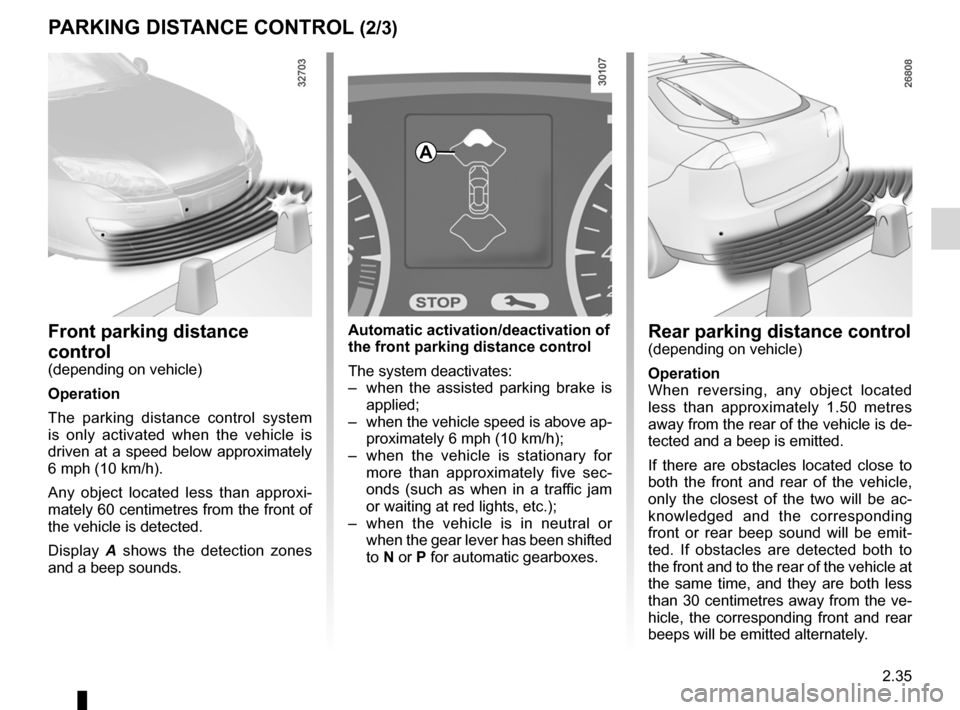
When reversing, any object located
less than approximately 1.50 metres
away from the rear of the vehicle is de-
tected and a beep is emitted.
If there are obstacles located close to
both the front and rear of the vehicle,
only the closest of the two will be ac -
knowledged and the corresponding
front or rear beep sound will be emit -
ted. If obstacles are detected both to
the front and to the rear of the vehicle at
the same time, and they are both less
than 30 centimetres away from the ve-
hicle, the corresponding front and rear
beeps will be emitted alternately.
automatic activation/deactivation of
the front parking distance control
The system deactivates:
– when the assisted parking brake is
applied;
– when the vehicle speed is above ap-
proximately 6 mph (10 km/h);
– when the vehicle is stationary for
more than approximately five sec -
onds (such as when in a traffic jam
or waiting at red lights, etc.);
– when the vehicle is in neutral or
when the gear lever has been shifted
to N or P for automatic gearboxes.front parking distance
control
(depending on vehicle)
operation
The parking distance control system
is only activated when the vehicle is
driven at a speed below approximately
6 mph (10 km/h).
Any object located less than approxi -
mately 60 centimetres from the front of
the vehicle is detected.
Display A shows the detection zones
and a beep sounds.
a
Page 119 of 241
automatic gearbox (use) ....................... (up to the end of the DU)
automatic gearbox selector lever ..........(up to the end of the DU)
changing gear ....................................... (up to the end of the DU)
reverse gear selecting .......................................... (up to the end of the DU)
driving ................................................... (up to the end of the DU)
2.37
ENG_UD27633_9
Boîte de vitesses automatique (X91 - B91 - K91 - D91 - Renault)
ENG_NU_936-5_BK91_Renault_2
Automatic gearbox
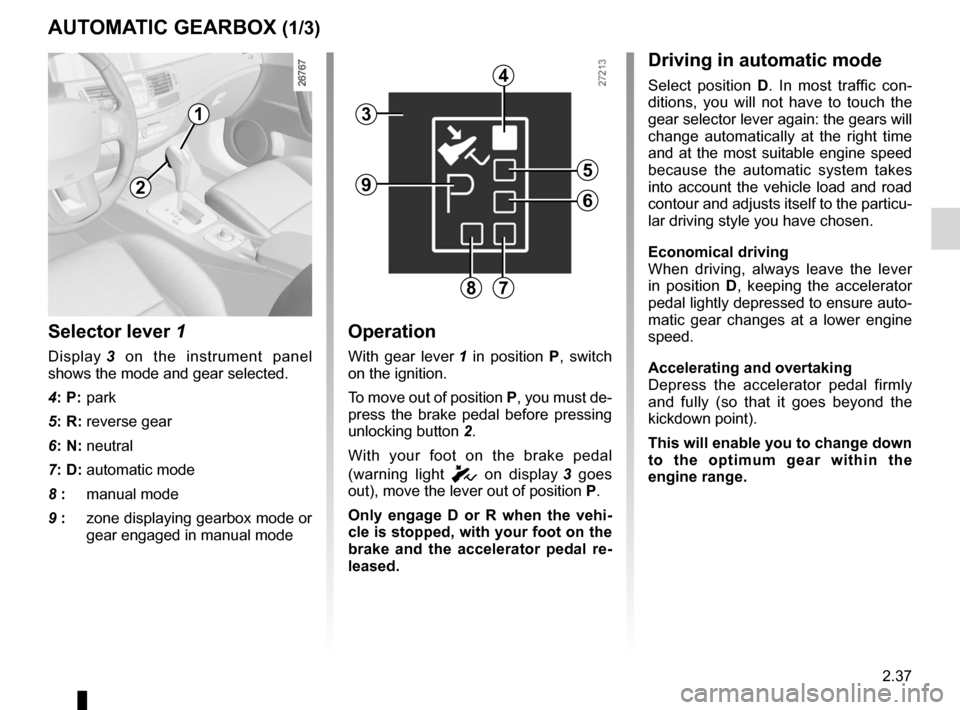
Selector lever 1
Display 3 on the instrument panel
shows the mode and gear selected.
4: P: park
5: R: reverse gear
6: N: neutral
7: D: automatic mode
8 : manual mode
9 : zone displaying gearbox mode or
gear engaged in manual mode
operation
With gear lever 1 in position P, switch
on the ignition.
To move out of position P, you must de-
press the brake pedal before pressing
unlocking button 2.
With your foot on the brake pedal
(warning light
c on display 3 goes
out), move the lever out of position P.
o nly engage D or R when the vehi -
cle is stopped, with your foot on the
brake and the accelerator pedal re -
leased.
aUtoMatIC GeaRbox (1/3)
Driving in automatic mode
Select position D. In most traffic con -
ditions, you will not have to touch the
gear selector lever again: the gears will
change automatically at the right time
and at the most suitable engine speed
because the automatic system takes
into account the vehicle load and road
contour and adjusts itself to the particu-
lar driving style you have chosen.
economical driving
When driving, always leave the lever
in position D, keeping the accelerator
pedal lightly depressed to ensure auto-
matic gear changes at a lower engine
speed.
accelerating and overtaking
Depress the accelerator pedal firmly
and fully (so that it goes beyond the
kickdown point).
this will enable you to change down
to the optimum gear within the
engine range.
3
2
1
4
5
6
78
9
Page 121 of 241
JauneNoirNoir texte
2.39
ENG_UD27633_9
Boîte de vitesses automatique (X91 - B91 - K91 - D91 - Renault)
ENG_NU_936-5_BK91_Renault_2
aUtoMatIC GeaRbox (3/3)
operating faults
– When driving , if the message
“ Check auto gearbox ” and the
© warning light appear on the
instrument panel, this indicates a
fault.
Contact your approved Dealer as
soon as possible.
– When driving, if the message “gear-
box overheating ” accompanied by
© warning light appears on the
instrument panel, stop the vehicle to
allow the gearbox to cool down.
Contact your approved Dealer as
soon as possible.
– If a vehicle with an automatic
gearbox breaks down , refer to the
information on “Towing” in Section 5.
10
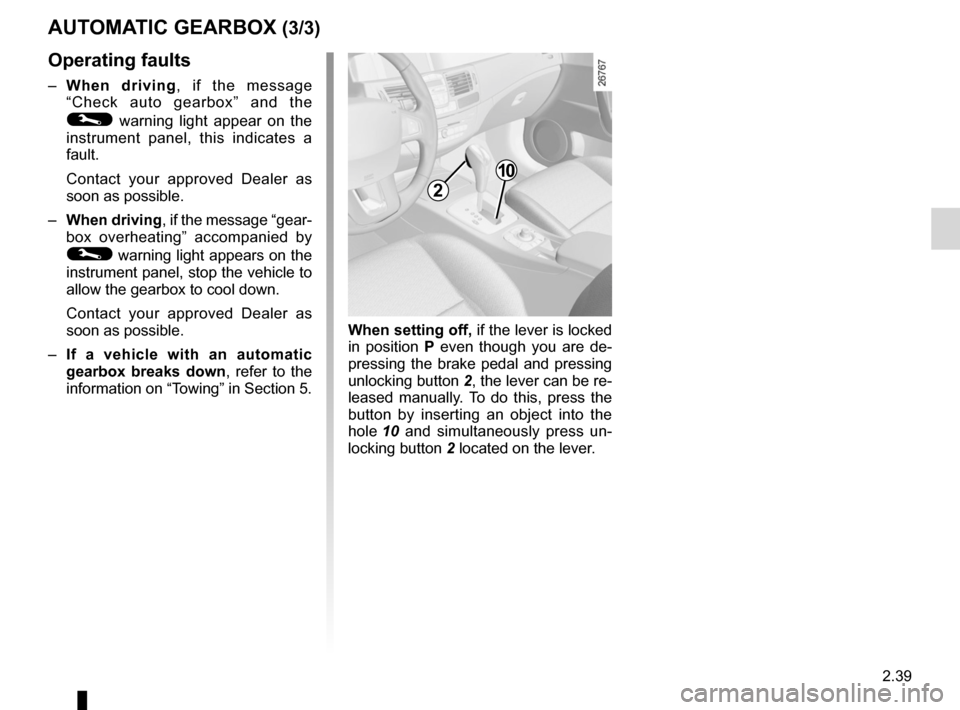
When setting off, if the lever is locked
in position P even though you are de -
pressing the brake pedal and pressing
unlocking button 2, the lever can be re-
leased manually. To do this, press the
button by inserting an object into the
hole 10 and simultaneously press un -
locking button 2 located on the lever.
2
Page 123 of 241

ENG_NU_936-5_BK91_Renault_3
Section 3: Your comfort
Air vents. . . . . . . . . . . . . . . . . . . . . . . . . . . . . . . . . . . . \
. . . .")
3.1
ENG_UD29777_15
Sommaire 3 (X91 - B91 - K91 - Renault)
ENG_NU_936-5_BK91_Renault_3
Section 3: Your comfort
Air vents. . . . . . . . . . . . . . . . . . . . . . . . . . . . . . . . . . . . \
. . . . . . . . . . . . . . . . . . . . . . . . . . . . . . . . . . . 3.2
Manual air conditioning/heating system . . . . . . . . . . . . . . . . . . . . . . . . . . . . . . . . . . . . . . . . . . . . . . 3.4
Automatic climate control . . . . . . . . . . . . . . . . . . . . . . . . . . . . . . . . . . . . . . . . . . . . . . . . . . . . . . . . . 3.6
Air conditioning: information and advice on use . . . . . . . . . . . . . . . . . . . . . . . . . . . . . . . . . . . . . . . . 3.10
Electric windows, Electric sunroof . . . . . . . . . . . . . . . . . . . . . . . . . . . . . . . . . . . . . . . . . . . . . . . . . . . 3.11
Sun visor . . . . . . . . . . . . . . . . . . . . . . . . . . . . . . . . . . . . . . . . . . . . . . . . . . . . . . . . . . . . . . . . . . . . . . 3.14
Interior lighting . . . . . . . . . . . . . . . . . . . . . . . . . . . . . . . . . . . . . . . . . . . . . . . . . . . . . . . . . . . . . . . . . . 3.15
Passenger compartment storage space and fittings . . . . . . . . . . . . . . . . . . . . . . . . . . . . . . . . . . . . . 3.17
Ashtray/cigarette lighter . . . . . . . . . . . . . . . . . . . . . . . . . . . . . . . . . . . . . . . . . . . . . . . . . . . . . . . . . . . 3.21
Accessories socket . . . . . . . . . . . . . . . . . . . . . . . . . . . . . . . . . . . . . . . . . . . . . . . . . . . . . . . . . . . . . . 3.21
Rear headrests . . . . . . . . . . . . . . . . . . . . . . . . . . . . . . . . . . . . . . . . . . . . . . . . . . . . . . . . . . . . . . . . . 3.22
Rear bench seat . . . . . . . . . . . . . . . . . . . . . . . . . . . . . . . . . . . . . . . . . . . . . . . . . . . . . . . . . . . . . . . . 3.23
Luggage compartment . . . . . . . . . . . . . . . . . . . . . . . . . . . . . . . . . . . . \
. . . . . . . . . . . . . . . . . . . . . . . . 3.24
Opening rear screen . . . . . . . . . . . . . . . . . . . . . . . . . . . . . . . . . . . . . . . . . . . . . . . . . . . . . . . . . . . . . 3.25
Rear parcel shelf . . . . . . . . . . . . . . . . . . . . . . . . . . . . . . . . . . . . . . . . . . . . . . . . . . . . . . . . . . . . . . . . 3.26
Luggage cover . . . . . . . . . . . . . . . . . . . . . . . . . . . . . . . . . . . . . . . . . . . . . . . . . . . . . . . . . . . . . . . . . . 3.27
Boot storage space and fittings . . . . . . . . . . . . . . . . . . . . . . . . . . . . . . . . . . . . . . . . . . . . . . . . . . . . . 3.28
Transporting objects: . . . . . . . . . . . . . . . . . . . . . . . . . . . . . . . . . . . . . . . . . . . . . . . . . . . . . . . . . . . . . 3.30
in the boot . . . . . . . . . . . . . . . . . . . . . . . . . . . . . . . . . . . . . . . . . . . . . . . . . . . . . . . . . . . . . . . 3.30
towbar . . . . . . . . . . . . . . . . . . . . . . . . . . . . . . . . . . . . . . . . . . . . . . . . . . . . . . . . . . . . . . . . . . 3.31
Luggage net . . . . . . . . . . . . . . . . . . . . . . . . . . . . . . . . . . . . \
. . . . . . . . . . . . . . . . . . . . . . . . . . . . . . . . 3.32
Multimedia equipment . . . . . . . . . . . . . . . . . . . . . . . . . . . . . . . . . . . . . . . . . . . . . . . . . . . . . . . . . . . . 3.35
Page 126 of 241
heating system ..................................... (up to the end of the DU)
air conditioning ..................................... (up to the end of the DU)
ventilation ............................................. (up to the end of the DU)
air conditioning ..................................... (up to the end of the DU)
3.4
ENG_UD12313_3
Chauffage / air conditionné (X91 - B91 - K91 - Renault)
ENG_NU_936-5_BK91_Renault_3
Jaune NoirNoir texte
Manual air conditioning/heating system
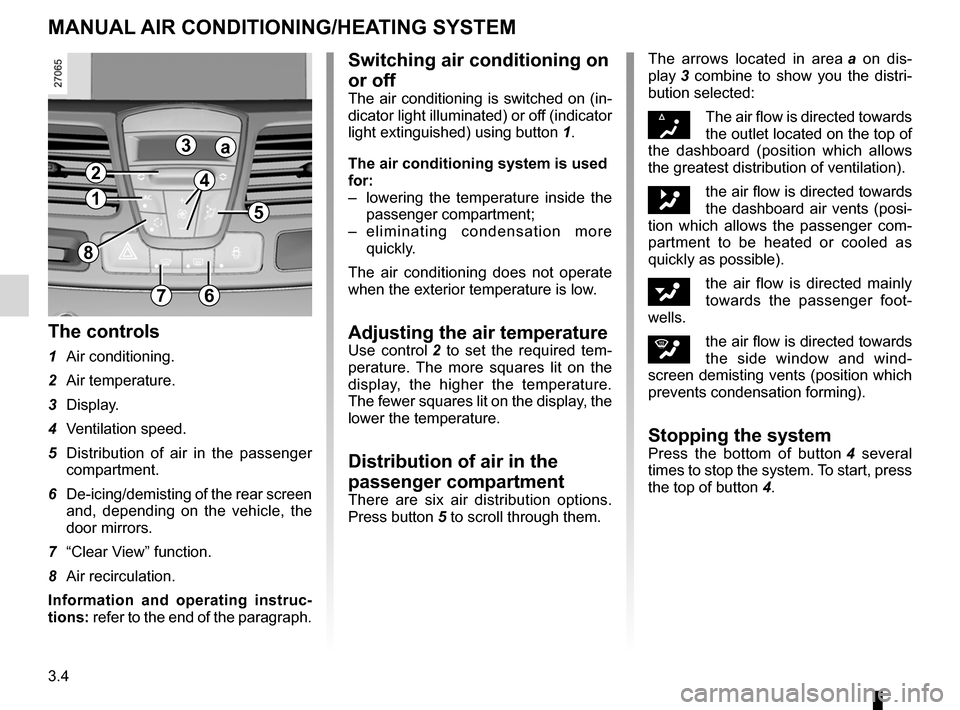
The controls
1 Air conditioning.
2 Air temperature.
3 Display.
4 Ventilation speed.
5 Distribution of air in the passenger
compartment.
6 De-icing/demisting of the rear screen
and, depending on the vehicle, the
door mirrors.
7 “Clear View” function.
8 Air recirculation.
Information and operating instruc -
tions: refer to the end of the paragraph. The arrows located in area
a on dis -
play 3 combine to show you the distri -
bution selected:
§The air flow is directed towards
the outlet located on the top of
the dashboard (position which allows
the greatest distribution of ventilation).
„the air flow is directed towards
the dashboard air vents (posi-
tion which allows the passenger com -
partment to be heated or cooled as
quickly as possible).
ƒthe air flow is directed mainly
towards the passenger foot -
wells.
‚the air flow is directed towards
the side window and wind -
screen demisting vents (position which
prevents condensation forming).
Stopping the systemPress the bottom of button 4 several
times to stop the system. To start, press
the top of button 4.
MANuAl AIR coNDITIoNINg/hEATINg SySTEM
7
8
1
2
3
4
5
6
a
Switching air conditioning on
or off
The air conditioning is switched on (in-
dicator light illuminated) or off (indicator
light extinguished) using button 1.
The air conditioning system is used
for:
– lowering the temperature inside the
passenger compartment;
– e l i m i n a t i n g c o n d e n s a t i o n m o r e
quickly.
The air conditioning does not operate
when the exterior temperature is low.
Adjusting the air temperatureUse control 2 to set the required tem -
perature. The more squares lit on the
display, the higher the temperature.
The fewer squares lit on the display, the
lower the temperature.
Distribution of air in the
passenger compartment
There are six air distribution options.
Press button 5 to scroll through them.
Page 127 of 241
rear screen de-icing/demisting .............................. (current page)
windscreen de-icing/demisting .............................. (current page)
JauneNoirNoir texte
3.5
ENG_UD12313_3
Chauffage / air conditionné (X91 - B91 - K91 - Renault)
ENG_NU_936-5_BK91_Renault_3
MANuAl AIR coNDITIoNINg/hEATINg SySTEM (continued)
Adjusting the ventilation
speed
Normal use
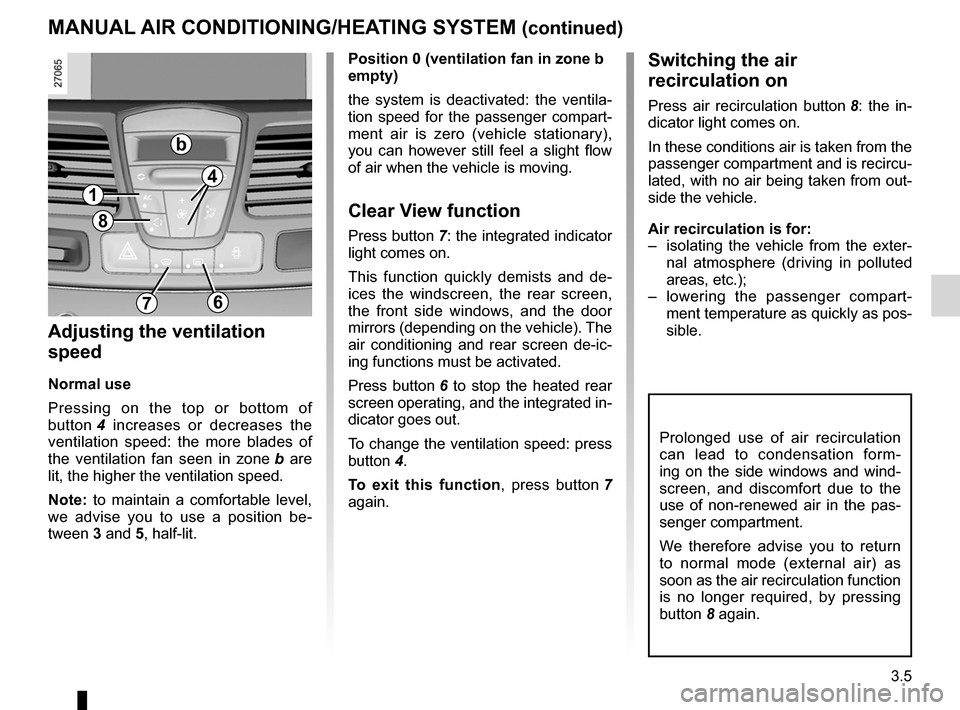
Pressing on the top or bottom of
button 4 increases or decreases the
ventilation speed: the more blades of
the ventilation fan seen in zone b are
lit, the higher the ventilation speed.
Note: to maintain a comfortable level,
we advise you to use a position be -
tween 3 and 5, half-lit. Position 0 (ventilation fan in zone b
empty)
the system is deactivated: the ventila
-
tion speed for the passenger compart-
ment air is zero (vehicle stationary),
you can however still feel a slight flow
of air when the vehicle is moving.
clear View function
Press button 7: the integrated indicator
light comes on.
This function quickly demists and de -
ices the windscreen, the rear screen,
the front side windows, and the door
mirrors (depending on the vehicle). The
air conditioning and rear screen de -ic -
ing functions must be activated.
Press button 6 to stop the heated rear
screen operating, and the integrated in-
dicator goes out.
To change the ventilation speed: press
button 4.
To exit this function , press button 7
again.
Switching the air
recirculation on
Press air recirculation button 8: the in -
dicator light comes on.
In these conditions air is taken from the
passenger compartment and is recircu-
lated, with no air being taken from out-
side the vehicle.
Air recirculation is for:
– isolating the vehicle from the exter -
nal atmosphere (driving in polluted
areas, etc.);
– lowering the passenger compart -
ment temperature as quickly as pos-
sible.
Prolonged use of air recirculation
can lead to condensation form -
ing on the side windows and wind -
screen, and discomfort due to the
use of non-renewed air in the pas -
senger compartment.
We therefore advise you to return
to normal mode (external air) as
soon as the air recirculation function
is no longer required, by pressing
button 8 again.
1
4
b
8
76
Page 129 of 241
JauneNoirNoir texte
3.7
ENG_UD22215_6
Air conditionné automatique (X91 - B91 - K91 - Renault)
ENG_NU_936-5_BK91_Renault_3
AuT oMATIc clIMATE coNTRol (2/4)
The displayed temperature values
show a comfort level.
When starting the engine, increas -
ing or decreasing the value dis -
played will not allow the com -
fort level to be reached any more
quickly. The system will always op-
timise the temperature increase or
decrease (the ventilation system
does not start instantly at maximum
speed: it gradually increases). This
may take several minutes.
Generally speaking, unless there is
a particular reason not to, the dash-
board air vents should remain open.
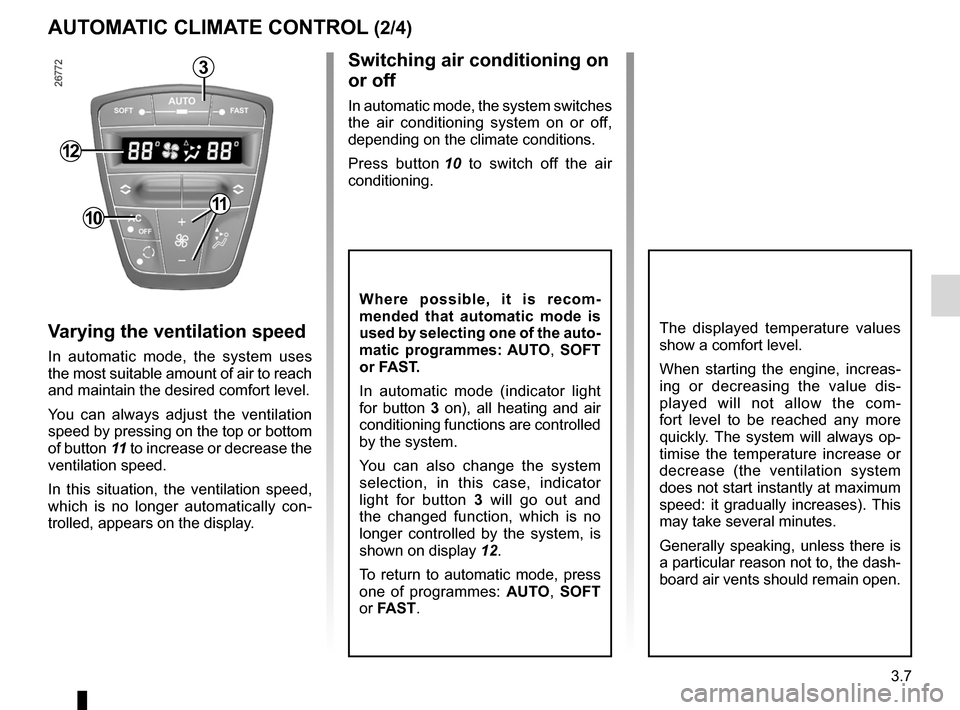
Switching air conditioning on
or off
In automatic mode, the system switches
the air conditioning system on or off,
depending on the climate conditions.
Press button 10 to switch off the air
conditioning.
Varying the ventilation speed
In automatic mode, the system uses
the most suitable amount of air to reach
and maintain the desired comfort level.
You can always adjust the ventilation
speed by pressing on the top or bottom
of button 11 to increase or decrease the
ventilation speed.
In this situation, the ventilation speed,
which is no longer automatically con -
trolled, appears on the display.
Where possible, it is recom -
mended that automatic mode is
used by selecting one of the auto-
matic programmes: AuT o, SoFT
or FAST.
In automatic mode (indicator light
for button 3 on), all heating and air
conditioning functions are controlled
by the system.
You can also change the system
selection, in this case, indicator
light for button 3 will go out and
the changed function, which is no
longer controlled by the system, is
shown on display 12.
To return to automatic mode, press
one of programmes: AuTo , S o FT
or FAST.
10
3
11
12