key RENAULT MASTER 2018 User Guide
[x] Cancel search | Manufacturer: RENAULT, Model Year: 2018, Model line: MASTER, Model: RENAULT MASTER 2018Pages: 290, PDF Size: 7.1 MB
Page 23 of 290
1.17
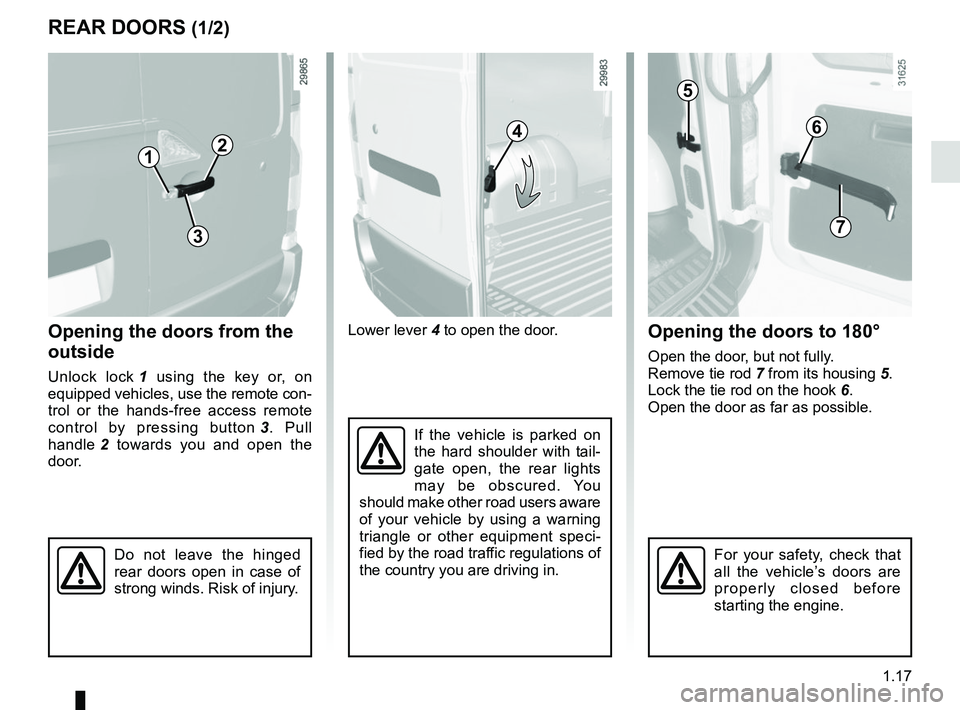
Lower lever 4 to open the door.
If the vehicle is parked on
the hard shoulder with tail-
gate open, the rear lights
may be obscured. You
should make other road users aware
of your vehicle by using a warning
triangle or other equipment speci-
fied by the road traffic regulations of
the country you are driving in.
REAR DOORS (1/2)
Opening the doors from the
outside
Unlock lock 1 using the key or, on
equipped vehicles, use the remote con-
trol or the hands-free access remote
control by pressing button 3. Pull
handle 2 towards you and open the
door.
Opening the doors to 180°
Open the door, but not fully.
Remove tie rod 7 from its housing 5.
Lock the tie rod on the hook 6.
Open the door as far as possible.
1
24
1
Do not leave the hinged
rear doors open in case of
strong winds. Risk of injury.For your safety, check that
all the vehicle’s doors are
properly closed before
starting the engine.
3
5
6
7
Page 90 of 290
1.84
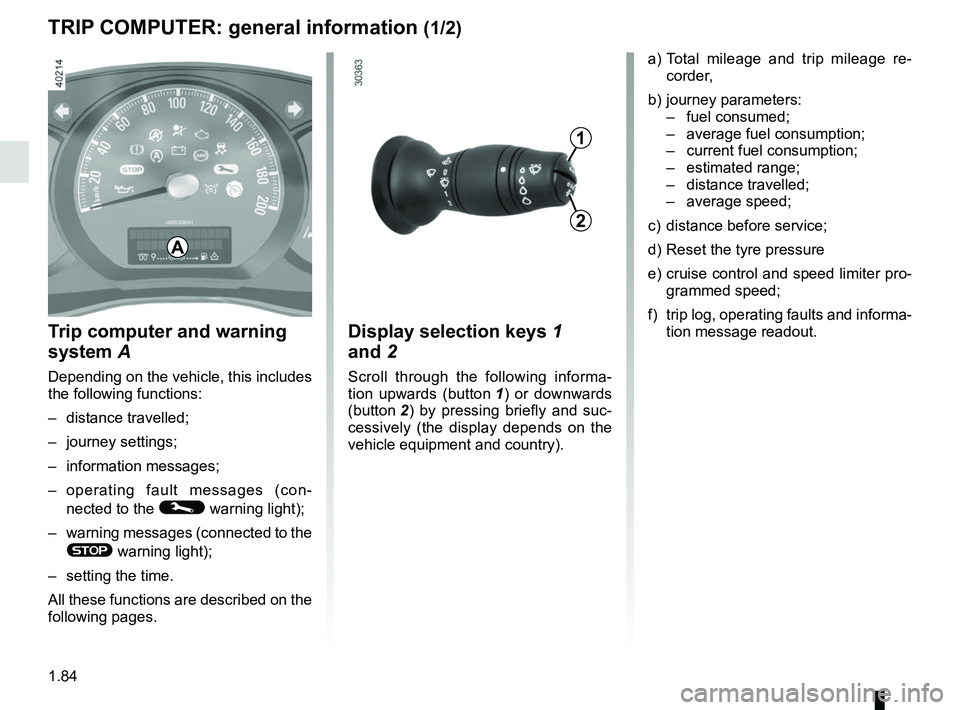
TRIP COMPUTER: general information (1/2)
Trip computer and warning
system A
Depending on the vehicle, this includes
the following functions:
– distance travelled;
– journey settings;
– information messages;
– operating fault messages (con-
nected to the
© warning light);
– warning messages (connected to the
® warning light);
– setting the time.
All these functions are described on the
following pages.
Display selection keys 1
and 2
Scroll through the following informa-
tion upwards (button 1) or downwards
(button 2 ) by pressing briefly and suc-
cessively (the display depends on the
vehicle equipment and country). a) Total mileage and trip mileage re-
corder,
b) journey parameters: – fuel consumed;
– average fuel consumption;
– current fuel consumption;
– estimated range;
– distance travelled;
– average speed;
c) distance before service;
d) Reset the tyre pressure
e) cruise control and speed limiter pro- grammed speed;
f) trip log, operating faults and informa- tion message readout.
A
1
2
Page 91 of 290
1.85
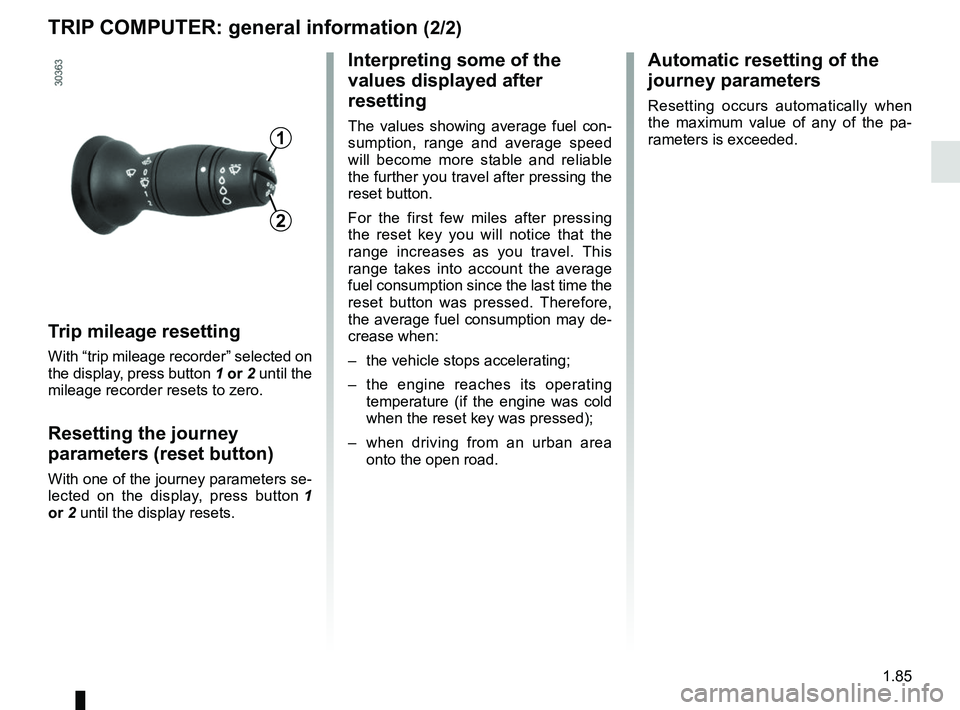
TRIP COMPUTER: general information (2/2)
Trip mileage resetting
With “trip mileage recorder” selected on
the display, press button 1 or 2 until the
mileage recorder resets to zero.
Resetting the journey
parameters (reset button)
With one of the journey parameters se-
lected on the display, press button 1
or 2 until the display resets.
Interpreting some of the
values displayed after
resetting
The values showing average fuel con-
sumption, range and average speed
will become more stable and reliable
the further you travel after pressing the
reset button.
For the first few miles after pressing
the reset key you will notice that the
range increases as you travel. This
range takes into account the average
fuel consumption since the last time the
reset button was pressed. Therefore,
the average fuel consumption may de-
crease when:
– the vehicle stops accelerating;
– the engine reaches its operating
temperature (if the engine was cold
when the reset key was pressed);
– when driving from an urban area
onto the open road.
Automatic resetting of the
journey parameters
Resetting occurs automatically when
the maximum value of any of the pa-
rameters is exceeded.
1
2
Page 97 of 290

1.91
These appear with the © warning light and mean that you should drive very carefully to an author\
ised dealer as soon
as possible. If you fail to follow this recommendation, you risk damagin\
g your vehicle.
They disappear when the display selection key is pressed or after severa\
l seconds and are stored in the computer log. The
©
warning light stays on. Examples of operating fault messages are given o\
n the following pages .
TRIP COMPUTER: operating fault messages
Examples of messagesInterpretation of messages
CHECK ESC Indicates a fault in the traction control system or in the Electronic St\
ability
Program system (please refer to the information on “Driver correctio\
n de-
vices and aids” in Section 2).
CHECK FUEL FILTER Indicates that there is water present in the diesel fuel.
Contact an approved Dealer as soon as possible.
CHECK GEARBOX Indicates that a fault has occurred in the gearbox; contact an approved
Dealer as soon as possible.
CHECK AUTO LIGHTS Indicates an automatic lighting operating fault; contact an approved Dea\
ler.
CHECK ANTI- POLLUTION – Indicates a fault in the vehicle’s emission control system.
– Indicates a fault in the emissions reduction system when it is acco\
mpanied
by the
warning light. Refer to the information on “Additive tank” in
Section 1.
Page 108 of 290
1.102
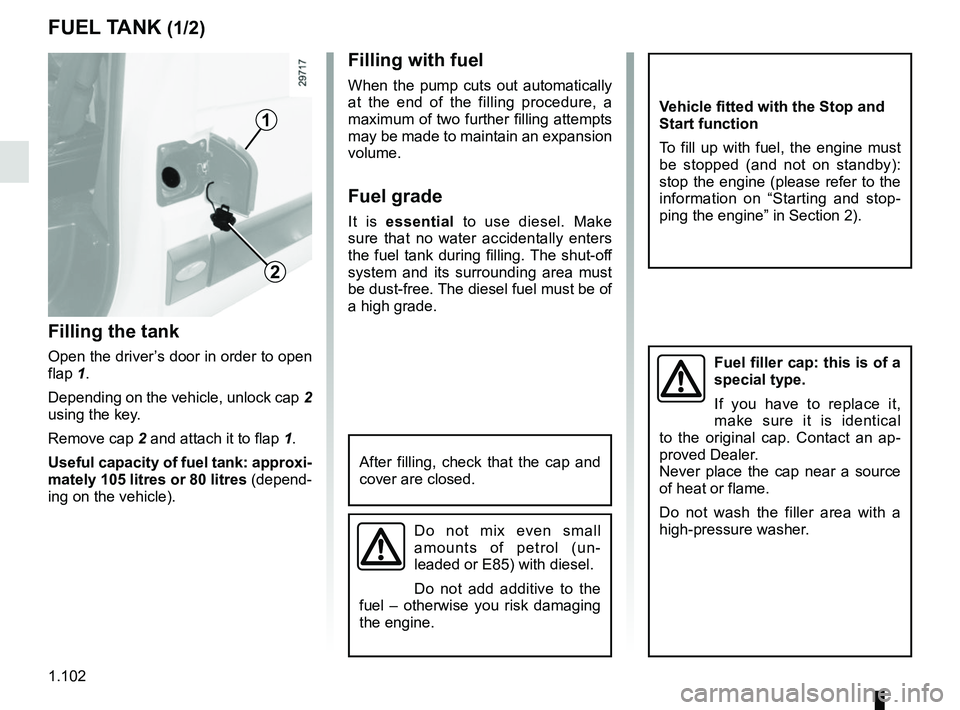
FUEL TANK (1/2)
Filling the tank
Open the driver’s door in order to open
flap 1.
Depending on the vehicle, unlock cap 2
using the key.
Remove cap 2 and attach it to flap 1.
Useful capacity of fuel tank: approxi-
mately 105 litres or 80 litres (depend-
ing on the vehicle).
Filling with fuel
When the pump cuts out automatically
at the end of the filling procedure, a
maximum of two further filling attempts
may be made to maintain an expansion
volume.
Fuel grade
It is essential to use diesel. Make
sure that no water accidentally enters
the fuel tank during filling. The shut-off
system and its surrounding area must
be dust-free. The diesel fuel must be of
a high grade.
2
1
After filling, check that the cap and
cover are closed.
Fuel filler cap: this is of a
special type.
If you have to replace it,
make sure it is identical
to the original cap. Contact an ap-
proved Dealer.
Never place the cap near a source
of heat or flame.
Do not wash the filler area with a
high-pressure washer.
Do not mix even small
amounts of petrol (un-
leaded or E85) with diesel.
Do not add additive to the
fuel – otherwise you risk damaging
the engine.
Vehicle fitted with the Stop and
Start function
To fill up with fuel, the engine must
be stopped (and not on standby):
stop the engine (please refer to the
information on “Starting and stop-
ping the engine” in Section 2).
Page 118 of 290
2.2
RUNNING IN, IGNITION SWITCH
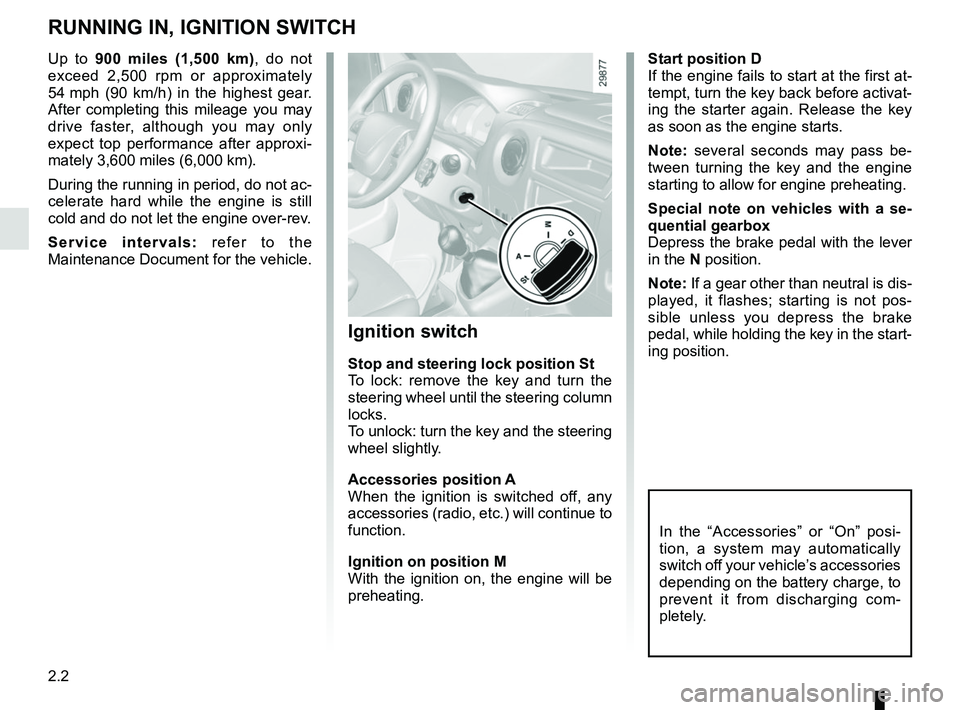
Start position D
If the engine fails to start at the first at-
tempt, turn the key back before activat-
ing the starter again. Release the key
as soon as the engine starts.
Note: several seconds may pass be-
tween turning the key and the engine
starting to allow for engine preheating.
Special note on vehicles with a se-
quential gearbox
Depress the brake pedal with the lever
in the N position.
Note: If a gear other than neutral is dis-
played, it flashes; starting is not pos-
sible unless you depress the brake
pedal, while holding the key in the start-
ing position.
Ignition switch
Stop and steering lock position St
To lock: remove the key and turn the
steering wheel until the steering column
locks.
To unlock: turn the key and the steering
wheel slightly.
Accessories position A
When the ignition is switched off, any
accessories (radio, etc.) will continue to
function.
Ignition on position M
With the ignition on, the engine will be
preheating.
In the “Accessories” or “On” posi-
tion, a system may automatically
switch off your vehicle’s accessories
depending on the battery charge, to
prevent it from discharging com-
pletely.
Up to 900 miles (1,500 km), do not exceed 2,500 rpm or approximately
54 mph (90 km/h) in the highest gear.
After completing this mileage you may
drive faster, although you may only
expect top performance after approxi-
mately 3,600 miles (6,000 km).
During the running in period, do not ac-
celerate hard while the engine is still
cold and do not let the engine over-rev.
Service intervals: refer to the
Maintenance Document for the vehicle.
Page 119 of 290
2.3
STARTING, STOPPING THE ENGINE
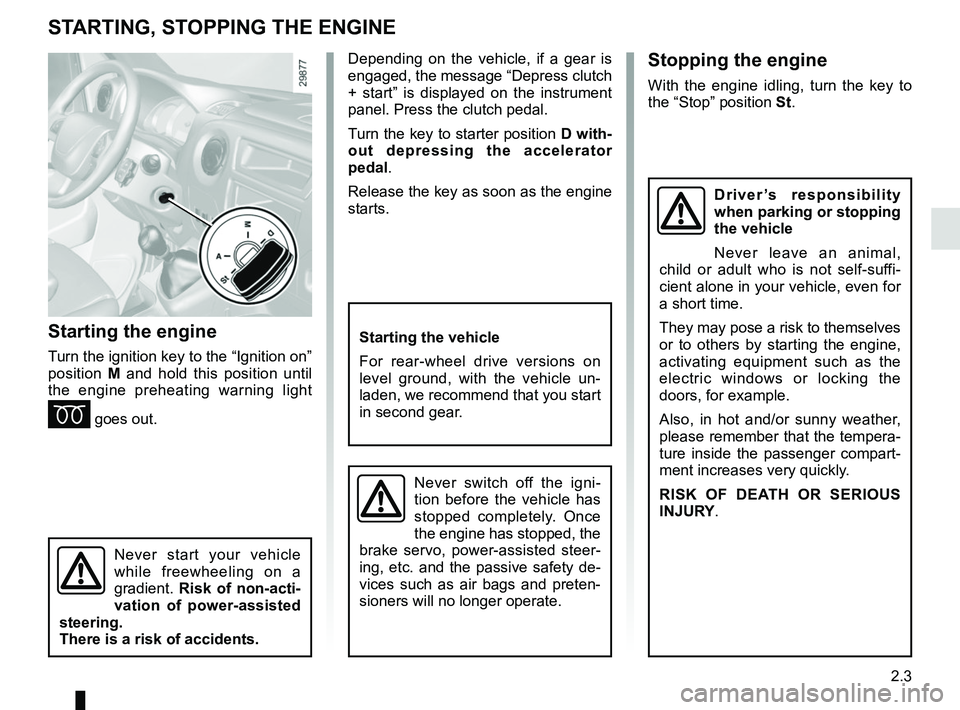
Starting the engine
Turn the ignition key to the “Ignition on”
position M and hold this position until
the engine preheating warning light
É goes out.
Stopping the engine
With the engine idling, turn the key to
the “Stop” position St.
Starting the vehicle
For rear-wheel drive versions on
level ground, with the vehicle un-
laden, we recommend that you start
in second gear.
Never switch off the igni-
tion before the vehicle has
stopped completely. Once
the engine has stopped, the
brake servo, power-assisted steer-
ing, etc. and the passive safety de-
vices such as air bags and preten-
sioners will no longer operate.
Driver’s responsibility
when parking or stopping
the vehicle
Never leave an animal,
child or adult who is not self-suffi-
cient alone in your vehicle, even for
a short time.
They may pose a risk to themselves
or to others by starting the engine,
activating equipment such as the
electric windows or locking the
doors, for example.
Also, in hot and/or sunny weather,
please remember that the tempera-
ture inside the passenger compart-
ment increases very quickly.
RISK OF DEATH OR SERIOUS
INJURY.
Never start your vehicle
while freewheeling on a
gradient. Risk of non-acti-
vation of power-assisted
steering.
There is a risk of accidents.
Depending on the vehicle, if a gear is
engaged, the message “Depress clutch
+ start” is displayed on the instrument
panel. Press the clutch pedal.
Turn the key to starter position D with-
out depressing the accelerator
pedal.
Release the key as soon as the engine
starts.
Page 164 of 290
2.48
SEQUENTIAL GEARBOX (4/5)
Operation in automatic mode
Automatic mode is selected by default
every time the ignition is switched on.
The letter A appears on the display.
The vehicle is controlled using the ac-
celerator and the brake. Gears will
change automatically at the correct
moment and at a suitable engine speed
because the automatic mode takes the
road surface and the chosen driving
style into consideration.
Gears may be shifted manually in this
mode. Pushing the lever forwards
or backwards shifts a gear upwards
(except if there is a risk of underrev-
ving) or downwards (except if there is a
risk of overrevving).
Note: automatic mode takes account
of:
– the position and speed of depression of the accelerator pedal to assess
driving style and select the optimum
gear;
– action on the brake pedal, to com- mence engine braking in preparation
for a downshift.
You can stop the vehicle at red lights,
with the gear engaged, by depressing
the brake pedal; there is no need to
change to neutral (N).
The vehicle will move off again:
– either slowly, if you release the brake without accelerating (e.g. when in a
traffic jam);
– or quickly, if you release the brake and accelerate.
Accelerating and overtaking
– Slowly depress the accelerator pedal to accelerate gradually;
The oil level in the automatic gear-
box system reservoir varies depend-
ing on use. Adding oil is strictly
forbidden (except by qualified ap-
proved network personnel).
– to obtain maximum vehicle per-
formance regardless of the mode
selected (automatic or manual),
quickly depress the accelerator
pedal beyond the kickdown point.
The speed with which you depress the
pedal will allow you to downshift ac-
cording to the vehicle’s capabilities.
Parking the vehicle
It is possible to park in gear (for exam-
ple, on a slope):
– with the ignition on, select a gear with your foot on the brake ;
– check that a gear other than N is dis- played on the instrument panel, then
remove the ignition key;
– apply the handbrake.
To disengage the gear, switch on the
ignition without starting the engine and
shift the selector lever to neutral with
the brake pedal depressed . Check
that N is displayed on the instrument
panel.
Page 181 of 290
3.15
WINDOWS (1/2)
Avoid resting any objects against a
half-open window: there is a risk that
the electric window winder could be
damaged.
1
2
3
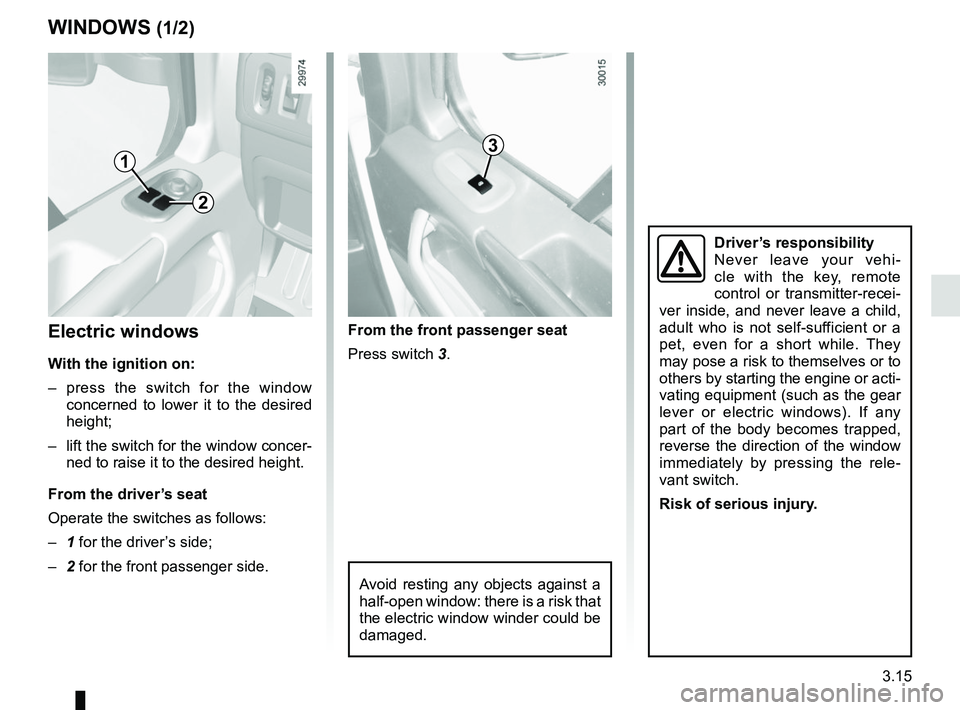
Electric windows
With the ignition on:
– press the switch for the window concerned to lower it to the desired
height;
– lift the switch for the window concer- ned to raise it to the desired height.
From the driver’s seat
Operate the switches as follows:
– 1 for the driver’s side;
– 2 for the front passenger side. From the front passenger seat
Press switch 3.
Driver’s responsibility
Never leave your vehi-
cle with the key, remote
control or transmitter-recei-
ver inside, and never leave a child,
adult who is not self-sufficient or a
pet, even for a short while. They
may pose a risk to themselves or to
others by starting the engine or acti-
vating equipment (such as the gear
lever or electric windows). If any
part of the body becomes trapped,
reverse the direction of the window
immediately by pressing the rele-
vant switch.
Risk of serious injury.
Page 215 of 290

5.1
Section 5: Practical advice
Puncture . . . . . . . . . . . . . . . . . . . . . . . . . . . . . . . . . . . .\
. . . . . . . . . . . . . . . . . . . . . . . . . . . . . . . . . . 5.2
Emergency spare wheel . . . . . . . . . . . . . . . . . . . . . . . . . . . . . . . . . . . .\
. . . . . . . . . . . . . . . . . . . . . . 5.2
Tool kit . . . . . . . . . . . . . . . . . . . . . . . . . . . . . . . . . . . . \
. . . . . . . . . . . . . . . . . . . . . . . . . . . . . . . . . . . . 5.4
Tyre inflation kit . . . . . . . . . . . . . . . . . . . . . . . . . . . . . . . . . . . .\
. . . . . . . . . . . . . . . . . . . . . . . . . . . . . 5.5
Wheel trims . . . . . . . . . . . . . . . . . . . . . . . . . . . . . . \
. . . . . . . . . . . . . . . . . . . . . . . . . . . . . . . . . . . . . . 5.11
Changing a wheel: hydraulic jack . . . . . . . . . . . . . . . . . . . . . . . . . . . . . . . . . . . .\
. . . . . . . . . . . . . . . 5.13
Changing a wheel: jack . . . . . . . . . . . . . . . . . . . . . . . . . . . . . . . . . . . . \
. . . . . . . . . . . . . . . . . . . . . . . 5.16
Tyres . . . . . . . . . . . . . . . . . . . . . . . . . . . . . . . . . . . .\
. . . . . . . . . . . . . . . . . . . . . . . . . . . . . . . . . . . . . 5.18
Headlights (changing bulbs) . . . . . . . . . . . . . . . . . . . . . . . . . . . . . . . . . . . .\
. . . . . . . . . . . . . . . . . . . 5.21front fog lights . . . . . . . . . . . . . . . . . . . . . . . . . . . . . . . . . . . . \
. . . . . . . . . . . . . . . . . . . . . . . . . 5.23
side lights . . . . . . . . . . . . . . . . . . . . . . . . . . . . . . . . . . . . \
. . . . . . . . . . . . . . . . . . . . . . . . . . . . 5.24
rear lights . . . . . . . . . . . . . . . . . . . . . . . . . . . . . . . . . . . . \
. . . . . . . . . . . . . . . . . . . . . . . . . . . . 5.25
interior lighting . . . . . . . . . . . . . . . . . . . . . . . . . . . . . . . . . . . .\
. . . . . . . . . . . . . . . . . . . . . . . . 5.27
Fuses . . . . . . . . . . . . . . . . . . . . . . . . . . . . . . . . . . . . \
. . . . . . . . . . . . . . . . . . . . . . . . . . . . . . . . . . . . . 5.28
Battery: troubleshooting. . . . . . . . . . . . . . . . . . . . . . . . . . . . . . . . . . . . \
. . . . . . . . . . . . . . . . . . . . . . . 5.33
Key, radio frequency remote control: battery . . . . . . . . . . . . . . . . . . . . . . . . . . . . . . . . . . . . \
. . . . . . . 5.35
Hands-free access transmitter/receiver: battery . . . . . . . . . . . . . . . . . . . . . . . . . . . . . . . . . . . .\
. . . . 5.36
Replacing wiper blades . . . . . . . . . . . . . . . . . . . . . . . . . . . . . . . . . . . . \
. . . . . . . . . . . . . . . . . . . . . . . 5.37
Towing . . . . . . . . . . . . . . . . . . . . . . . . . . . . . . . . . . . . \
. . . . . . . . . . . . . . . . . . . . . . . . . . . . . . . . . . . . 5.38
Fitting a radio . . . . . . . . . . . . . . . . . . . . . . . . . . . . . . . . . . . . \
. . . . . . . . . . . . . . . . . . . . . . . . . . . . . . . 5.40
Accessories . . . . . . . . . . . . . . . . . . . . . . . . . . . . . . . . . . . . \
. . . . . . . . . . . . . . . . . . . . . . . . . . . . . . . . 5.41
Operating faults . . . . . . . . . . . . . . . . . . . . . . . . . . . . . . . . . . . . \
. . . . . . . . . . . . . . . . . . . . . . . . . . . . . 5.42