lock RENAULT MEGANE 2005 X84 / 2.G Service Manual
[x] Cancel search | Manufacturer: RENAULT, Model Year: 2005, Model line: MEGANE, Model: RENAULT MEGANE 2005 X84 / 2.GPages: 250, PDF Size: 5.72 MB
Page 132 of 250
Downloaded from www.Manualslib.com manuals search engine
NU761_2_G2-FRA.qxd 4/11/05 10:48 Page 2.32
2.32
PARKING PROXIMITY SENSOR
Operating faults
When the system detects an
operating fault there will be a 5
second continuous beep as a warning
when reverse gear is selected.
Contact your RENAULT Dealer.
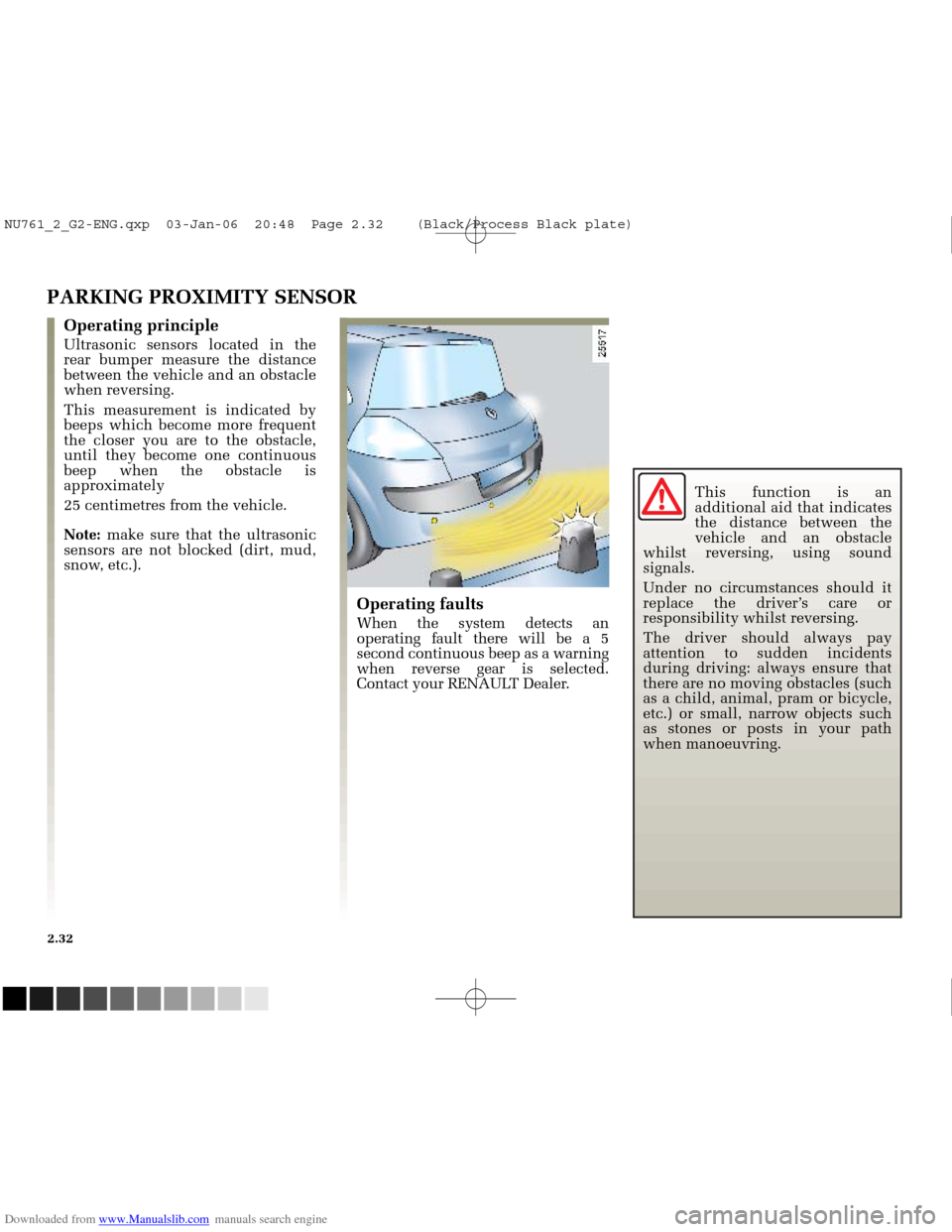
Operating principle
Ultrasonic sensors located in the
rear bumper measure the distance
between the vehicle and an obstacle
when reversing.
This measurement is indicated by
beeps which become more frequent
the closer you are to the obstacle,
until they become one continuous
beep when the obstacle is
approximately
25 centimetres from the vehicle.
Note:make sure that the ultrasonic
sensors are not blocked (dirt, mud,
snow, etc.). This function is an
additional aid that indicates
the distance between the
vehicle and an obstacle
whilst reversing, using sound
signals.
Under no circumstances should it
replace the driver’s care or
responsibility whilst reversing.
The driver should always pay
attention to sudden incidents
during driving: always ensure that
there are no moving obstacles (such
as a child, animal, pram or bicycle,
etc.) or small, narrow objects such
as stones or posts in your path
when manoeuvring.
NU761_2_G2-ENG.qxp 03-Jan-06 20:48 Page 2.32 (Black/Process Black\
plate)
Page 134 of 250
Downloaded from www.Manualslib.com manuals search engine
1
1
NU761_2_G2-FRA.qxd 4/11/05 10:48 Page 2.34
2.34
AUTOMATIC GEARBOX
Operation
With the lever in position Por N,
switch on the ignition.
Foot on the brake pedal (the warning
light goes out), move the lever out of
position P.
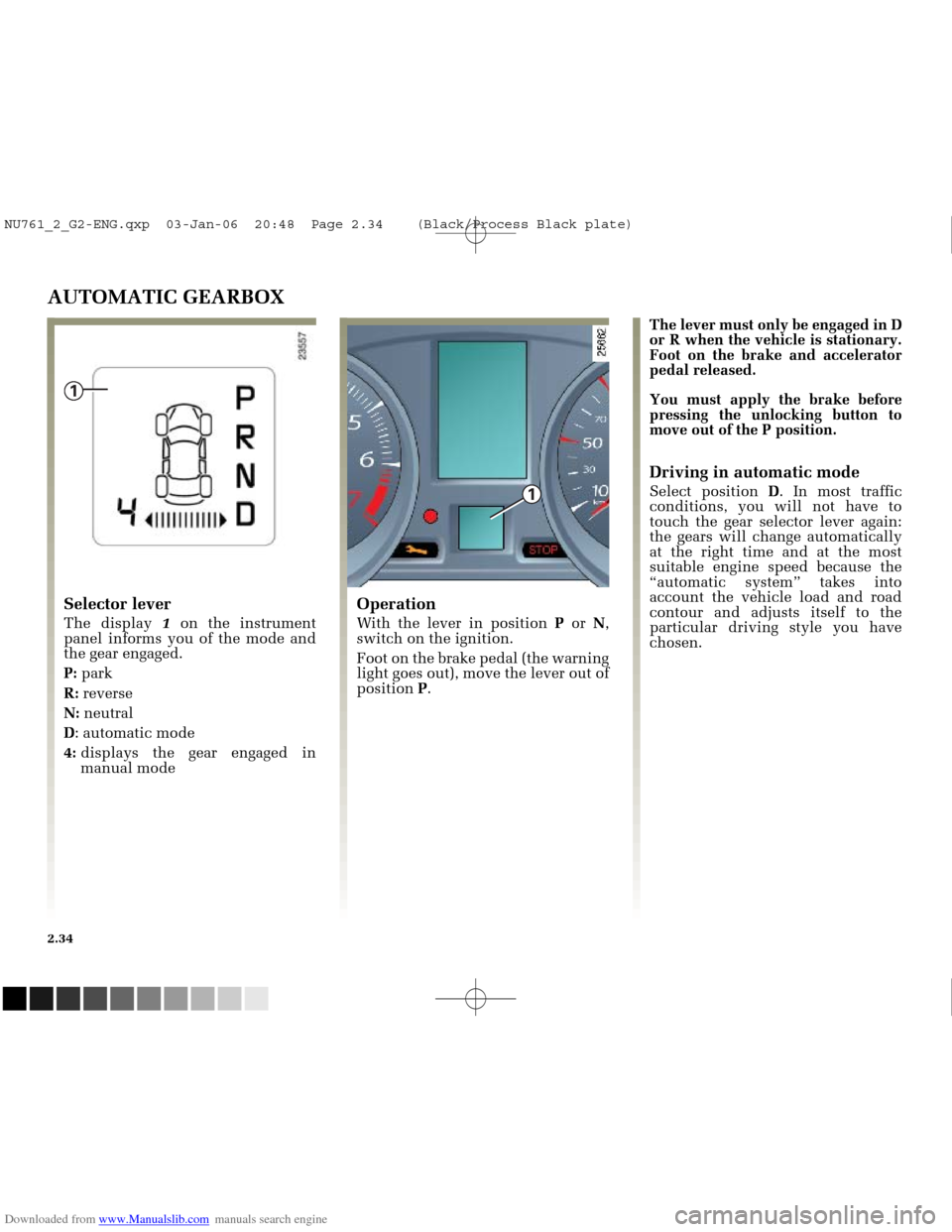
Selector lever
The display 1on the instrument
panel informs you of the mode and
the gear engaged.
P: park
R: reverse
N: neutral
D : automatic mode
4: displays the gear engaged in
manual mode The lever must only be engaged in D
or R when the vehicle is stationary.
Foot on the brake and accelerator
pedal released.
You must apply the brake before
pressing the unlocking button to
move out of the P position.
Driving in automatic mode
Select position
D. In most traffic
conditions, you will not have to
touch the gear selector lever again:
the gears will change automatically
at the right time and at the most
suitable engine speed because the
“automatic system” takes into
account the vehicle load and road
contour and adjusts itself to the
particular driving style you have
chosen.
NU761_2_G2-ENG.qxp 03-Jan-06 20:48 Page 2.34 (Black/Process Black\
plate)
Page 136 of 250
Downloaded from www.Manualslib.com manuals search engine
NU761_2_G2-FRA.qxd 4/11/05 10:48 Page 2.36
2.36
AUTOMATIC TRANSMISSION (continued)Parking the vehicle
When the vehicle is stationary,
keeping your foot on the brake
pedal, move the lever to position P
(park): the gearbox is in neutral and
the drive wheels are mechanically
locked by the transmission.
Engage the handbrake.
Special circumstances
- If the bends and hills on the road
do not allow you to stay in
automatic mode (e.g.: in the
mountains), we recommend that
you change to manual mode.
This will prevent the automatic
transmission from changing gears
repeatedly when climbing, and
permit engine braking on long
descents.
- To prevent the engine stalling in
cold weather, start the engine and
wait a few seconds before shifting
the selector lever from position P
or Nand engaging it in Dor R.
- Vehicles not fitted with traction
control: on a slippery surface or
surface with a low level of
adhesion, change to manual mode
and select second gear (or even
third) before starting the engine to
avoid wheelspin when starting.
NU761_2_G2-ENG.qxp 03-Jan-06 20:48 Page 2.36 (Black/Process Black\
plate)
Page 137 of 250
Downloaded from www.Manualslib.com manuals search engine
NU761_2_G2-FRA.qxd 4/11/05 10:49 Page 2.37
AUTOMATIC TRANSMISSION (continued)
Operating faults
- when driving , if the message
“Check gearbox” along with the
warning light appears on the
instrument panel, this indicates a
fault.
Consult your RENAULT Dealer as
soon as possible.
- when driving , if the message
“Gearbox overheating” along with
the warning light appears on
the instrument panel, avoid leaving
the lever in position D(or R), traffic
permitting: systematically return to
position Nwhile stopping.
Consult your RENAULT Dealer as
soon as possible.
- Recovering a vehicle with an
automatic transmission : refer to
the information on Towing in
Section 5.
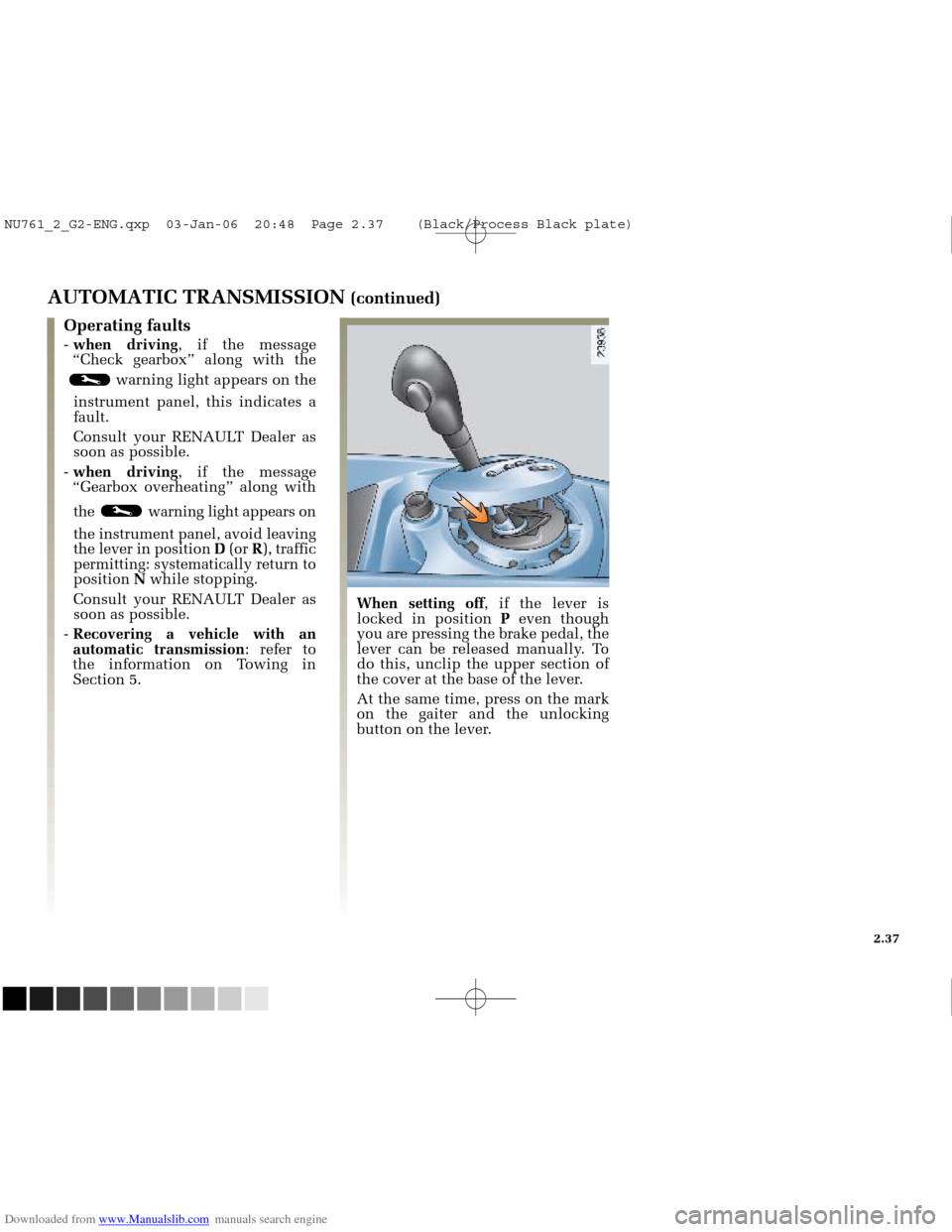
When setting off , if the lever is
locked in position Peven though
you are pressing the brake pedal, the
lever can be released manually. To
do this, unclip the upper section of
the cover at the base of the lever.
At the same time, press on the mark
on the gaiter and the unlocking
button on the lever.
2.37
NU761_2_G2-ENG.qxp 03-Jan-06 20:48 Page 2.37 (Black/Process Black\
plate)
Page 157 of 250
Downloaded from www.Manualslib.com manuals search engine
NU761_2_G3-FRA.qxd 4/11/05 10:51 Page 3.19
3.19
“ONE-TOUCH” ELECTRIC WINDOWS (continued)
Normal mode
- Press down on the relevant switch
to lower the window and release
when the window is at the desired
height.
- Lift the relevant button to raise the
window and release it when the
window is at the desired height.
One-touch mode
- Briefly press the relevant switch
down fully : the window will open
completely.
- Briefly lift the switch relevant
fully : the window will close
completely.
Pressing the switch again while the
window is moving will stop its
movement.
Remote window closing
(for vehicles equipped with one-
touch windows on all windows).
When you lock the doors from the
outside and press the unlocking
button on the RENAULT card, door
or luggage compartment twice in
quick succession (in Hands-Free
mode), the windows close
automatically.
Special note
If the window detects resistance
when closing (e.g.: a person’s
fingers, an animal’s paw, the branch
of a tree, etc.) it stops and then
lowers again by a few centimetres.
It is therefore recommended that the
user only operate the system when
the vehicle can be seen clearly and
no one is inside the vehicle.
Operating faults
In the event that a window does not
close, the system switches to normal
mode: press the relevant button as
often as necessary until the window
closes, then keep the button
depressed (on the window close
side of the button) for one second to
reinitialise the system.
If necessary, consult your RENAULT
Dealer.
Closing windows can
cause serious injury.
NU761_2_G3-ENG.qxp 1/5/2006 5:28 PM Page 3.19 (Black plate)
Page 160 of 250
Downloaded from www.Manualslib.com manuals search engine
1
2
B
D
C
A
0
3
NU761_2_G3-FRA.qxd 4/11/05 10:51 Page 3.22
3.22
ELECTRIC SUNROOF
The system operates:
- with the ignition on,
- with the ignition off until thedriver’s door is opened/closed
(limited to approximately
20 minutes).
Sunblind
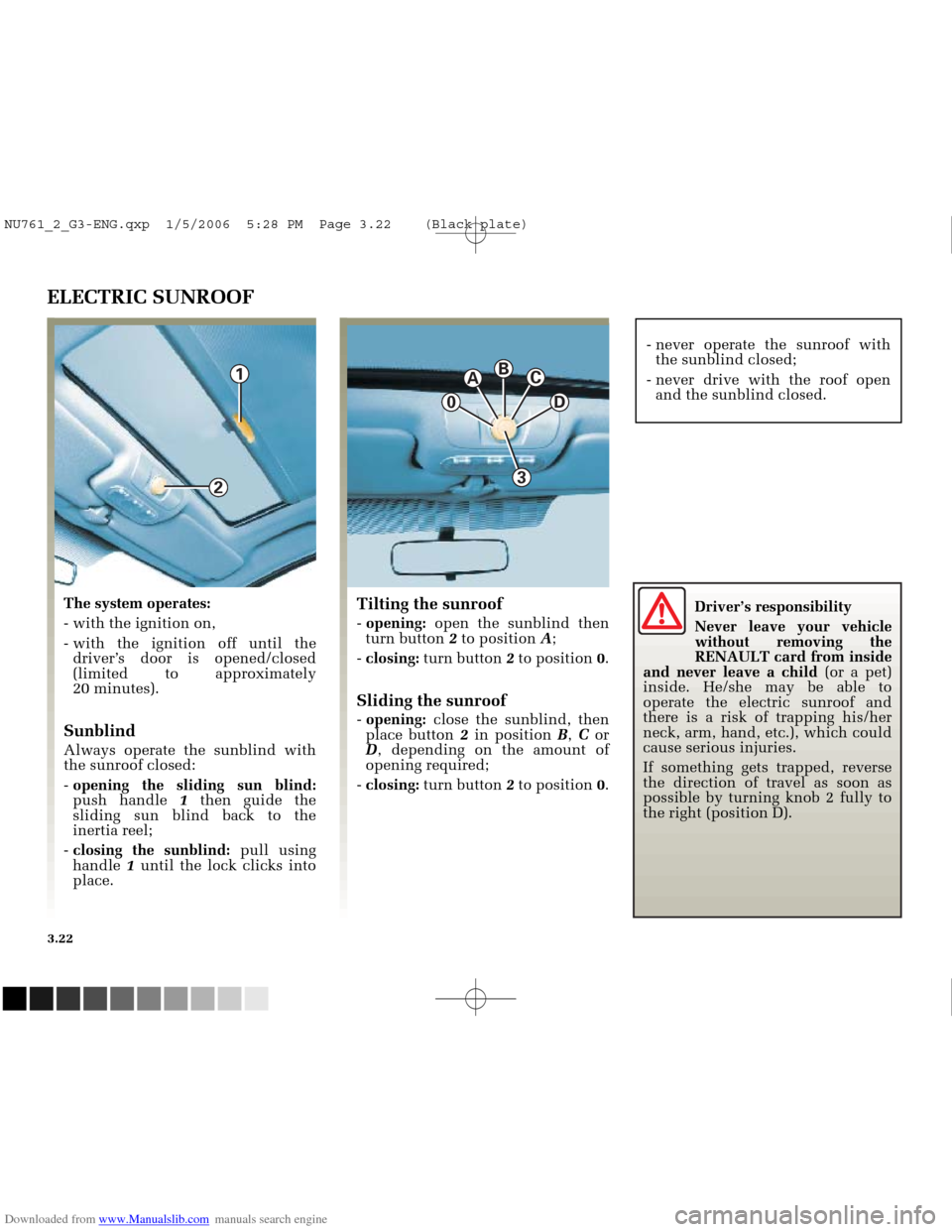
Always operate the sunblind with
the sunroof closed:
- opening the sliding sun blind:
push handle 1then guide the
sliding sun blind back to the
inertia reel;
- closing the sunblind: pull using
handle 1until the lock clicks into
place.
Tilting the sunroof
- opening: open the sunblind then
turn button 2to position A;
- closing: turn button 2to position 0.
Sliding the sunroof
- opening: close the sunblind, then
place button 2in position B, C or
D , depending on the amount of
opening required;
- closing: turn button 2to position 0. - never operate the sunroof with
the sunblind closed;
- never drive with the roof open and the sunblind closed.
Driver’s responsibility
Never leave your vehicle
without removing the
RENAULT card from inside
and never leave a child (or a pet)
inside. He/she may be able to
operate the electric sunroof and
there is a risk of trapping his/her
neck, arm, hand, etc.), which could
cause serious injuries.
If something gets trapped, reverse
the direction of travel as soon as
possible by turning knob 2 fully to
the right (position D).
NU761_2_G3-ENG.qxp 1/5/2006 5:28 PM Page 3.22 (Black plate)
Page 161 of 250
Downloaded from www.Manualslib.com manuals search engine
NU761_2_G3-FRA.qxd 4/11/05 10:51 Page 3.23
3.23
ELECTRIC SUNROOF (continued)
Remote closure of the sunroof
(on vehicles equipped with the one-
touch window function on all the
windows).
When you lock the doors with the
Hands-free RENAULT card and
press the locking button on the
RENAULT card or a door handle
button or the luggage compartment
button twice in quick succession,
the windows and the sunroof close
automatically.
After closing the sunroof by remote
control, pressing button 3allows the
sunroof to return to its previous
position.Special note
For your safety your vehicle is fitted
with an anti-pinch function. When a
window encounters resistance
whilst closing (someone’s fingers, an
animal’s paw or the branch of a tree,
for example), it stops and lowers by
several centimetres.
It is therefore recommended that the
user only operates the system when
the vehicle can be seen clearly and
no one is inside the vehicle.
Sunroof closing operating fault
In this case, check that there is no
obstacle, then turn button 2to
position 0,then press button 3, until
the sunroof closes completely.
Important: during this operation,
the sunroof anti-pinch function
is deactivated.
Consult your RENAULT Dealer
as soon as possible.
Advice for use
- vehicle with roof bars
Generally, it is not advisable to
operate the sunroof.
Before using the sunroof, check the
objects and/or accessories (bike
racks, roof box etc.) attached to the
roof rack bars: they should be
properly arranged and secured and
should not interfere with the
operation of the sunroof.
Consult your RENAULT Dealer for
details of possible adaptations;
- check that the sunroof is properly
closed before leaving your vehicle;
- clean the seal every three months
using agents selected by our
technical department;
- Do not open the sunroof
immediately after the vehicle has
been in the rain or after it has been
washed.
Closing the sunroof can
cause severe injuries.
NU761_2_G3-ENG.qxp 1/5/2006 5:28 PM Page 3.23 (Black plate)
Page 162 of 250
Downloaded from www.Manualslib.com manuals search engine
1
2
3
4
5
6
7
A
B
NU761_2_G3-FRA.qxd 4/11/05 10:51 Page 3.24
3.24
INTERIOR LIGHTING
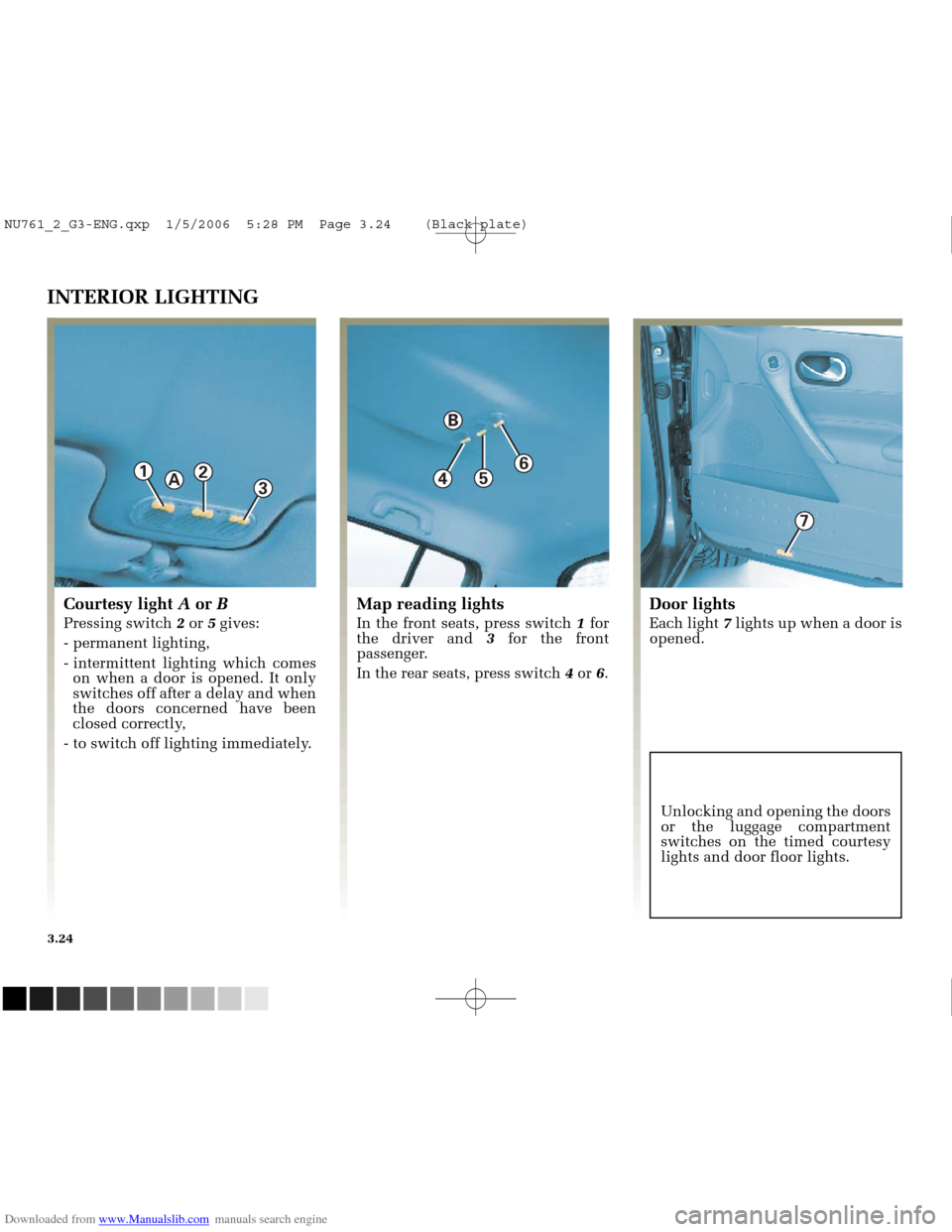
Courtesy light Aor B
Pressing switch 2or 5gives:
- permanent lighting,
- intermittent lighting which comes on when a door is opened. It only
switches off after a delay and when
the doors concerned have been
closed correctly,
- to switch off lighting immediately.
Map reading lights
In the front seats, press switch 1for
the driver and 3for the front
passenger.
In the rear seats, press switch 4or 6.
Door lights
Each light 7lights up when a door is
opened.
Unlocking and opening the doors
or the luggage compartment
switches on the timed courtesy
lights and door floor lights.
NU761_2_G3-ENG.qxp 1/5/2006 5:28 PM Page 3.24 (Black plate)
Page 164 of 250
Downloaded from www.Manualslib.com manuals search engine
6
5
NU761_2_G3-FRA.qxd 4/11/05 10:52 Page 3.26
3.26
PASSENGER COMPARTMENT STORAGE SPACE AND FITTINGS (continued)
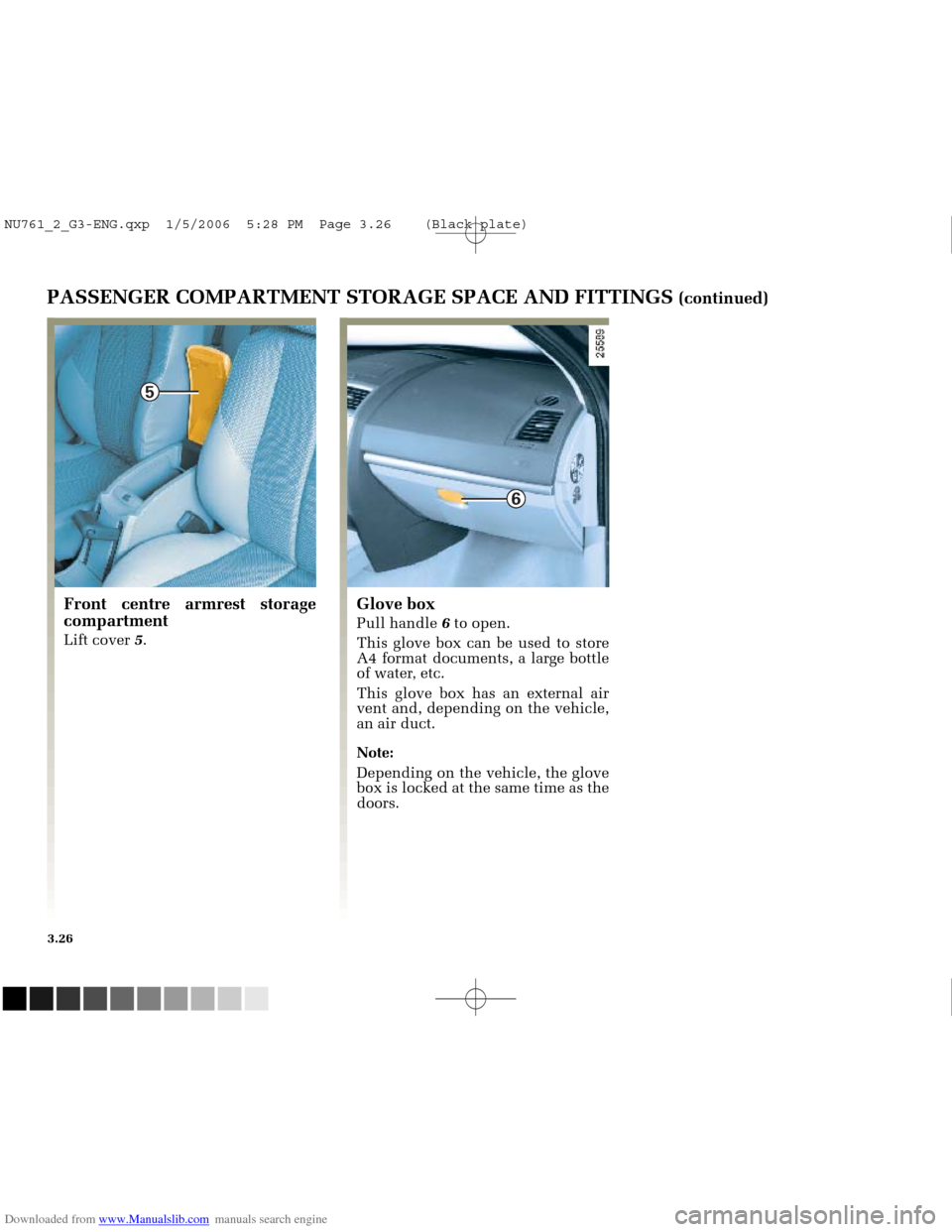
Front centre armrest storage
compartment
Lift cover 5.
Glove box
Pull handle 6to open.
This glove box can be used to store
A4 format documents, a large bottle
of water, etc.
This glove box has an external air
vent and, depending on the vehicle,
an air duct.
Note:
Depending on the vehicle, the glove
box is locked at the same time as the
doors.
NU761_2_G3-ENG.qxp 1/5/2006 5:28 PM Page 3.26 (Black plate)
Page 168 of 250
Downloaded from www.Manualslib.com manuals search engine
A
1
B
NU761_2_G3-FRA.qxd 4/11/05 10:52 Page 3.30
3.30
REAR BENCH SEAT
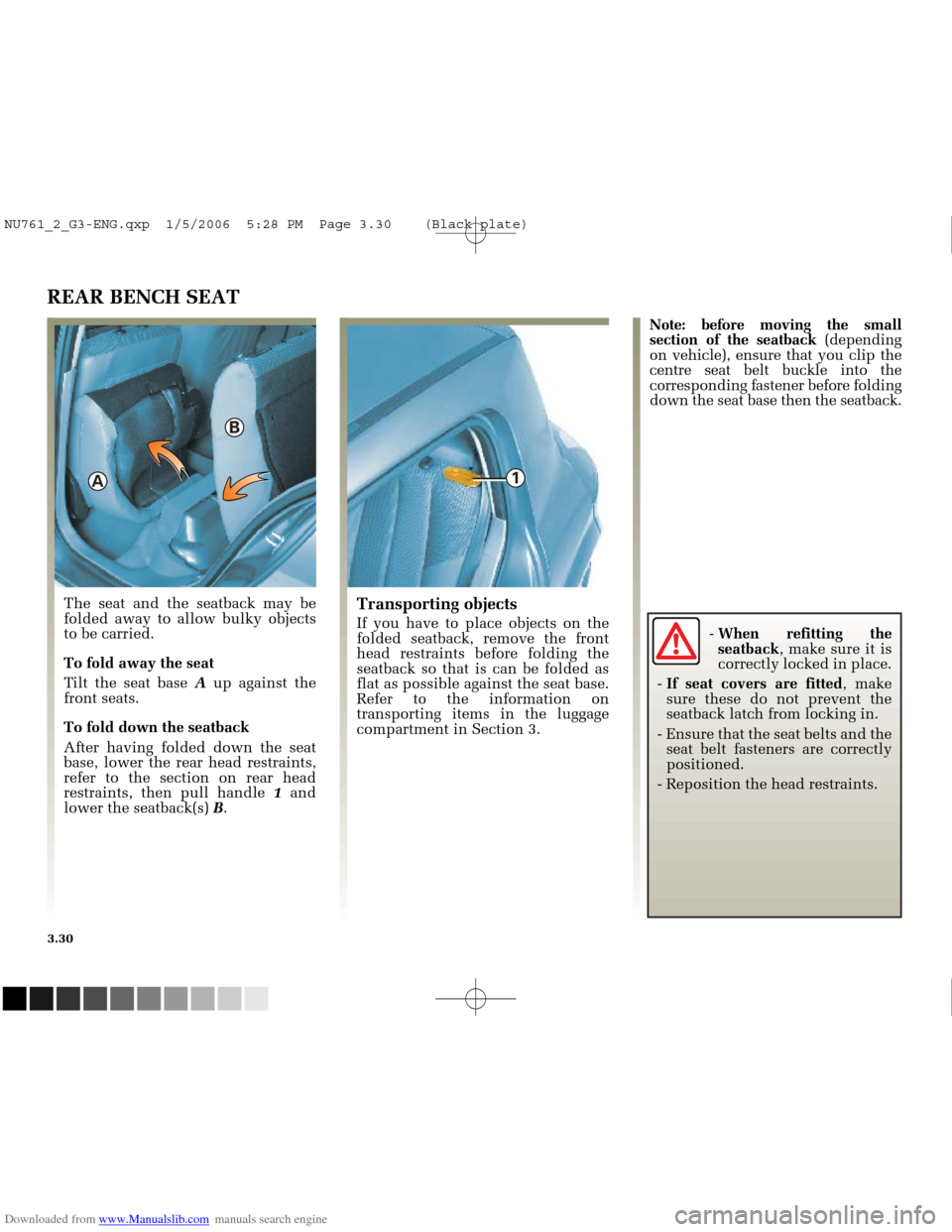
The seat and the seatback may be
folded away to allow bulky objects
to be carried.
To fold away the seat
Tilt the seat base Aup against the
front seats.
To fold down the seatback
After having folded down the seat
base, lower the rear head restraints,
refer to the section on rear head
restraints, then pull handle 1and
lower the seatback(s) B.Transporting objects
If you have to place objects on the
folded seatback, remove the front
head restraints before folding the
seatback so that is can be folded as
flat as possible against the seat base.
Refer to the information on
transporting items in the luggage
compartment in Section 3. Note: before moving the small
section of the seatback
(depending
on vehicle), ensure that you clip the
centre seat belt buckle into the
corresponding fastener before folding
down the seat base then the seatback.
- When refitting the
seatback , make sure it is
correctly locked in place.
- If seat covers are fitted , make
sure these do not prevent the
seatback latch from locking in.
- Ensure that the seat belts and the seat belt fasteners are correctly
positioned.
- Reposition the head restraints.
NU761_2_G3-ENG.qxp 1/5/2006 5:28 PM Page 3.30 (Black plate)