light RENAULT MEGANE 2005 X84 / 2.G Manual PDF
[x] Cancel search | Manufacturer: RENAULT, Model Year: 2005, Model line: MEGANE, Model: RENAULT MEGANE 2005 X84 / 2.GPages: 250, PDF Size: 5.72 MB
Page 135 of 250
Downloaded from www.Manualslib.com manuals search engine
NU761_2_G2-FRA.qxd 4/11/05 10:48 Page 2.35
AUTOMATIC TRANSMISSION (continued)Driving in manual mode
With the selector lever in position D,
move the lever to the left.
Pushing the lever repeatedly allows
you to change gears manually.
- to move down through the gears, push the lever backwards.
- to move up through the gears, push the lever forwards.
The gear selected is displayed on the
instrument panel. Special cases
Under certain driving conditions
(e.g.: engine protection, with
electronic stability program (ESP)
operational: etc.) the “automatic
system” may change gear
automatically.
Likewise, to prevent “incorrect
manoeuvres”, a gear change may be
refused by the “automatic system”:
in this case the gear display flashes
for a few seconds as a warning.
How to drive as economically as
possible
Leave the selector in position
Don
the open road, depress the
accelerator pedal slightly to ensure
automatic gear changes at
comparatively low engine speeds.
Accelerating and overtaking
Depress the accelerator pedal
briskly and fully (so that it goes
beyond the kickdown point).
This will enable you to change
down to the optimal gear within the
engine range.
2.35
NU761_2_G2-ENG.qxp 03-Jan-06 20:48 Page 2.35 (Black/Process Black\
plate)
Page 137 of 250
Downloaded from www.Manualslib.com manuals search engine
NU761_2_G2-FRA.qxd 4/11/05 10:49 Page 2.37
AUTOMATIC TRANSMISSION (continued)
Operating faults
- when driving , if the message
“Check gearbox” along with the
warning light appears on the
instrument panel, this indicates a
fault.
Consult your RENAULT Dealer as
soon as possible.
- when driving , if the message
“Gearbox overheating” along with
the warning light appears on
the instrument panel, avoid leaving
the lever in position D(or R), traffic
permitting: systematically return to
position Nwhile stopping.
Consult your RENAULT Dealer as
soon as possible.
- Recovering a vehicle with an
automatic transmission : refer to
the information on Towing in
Section 5.
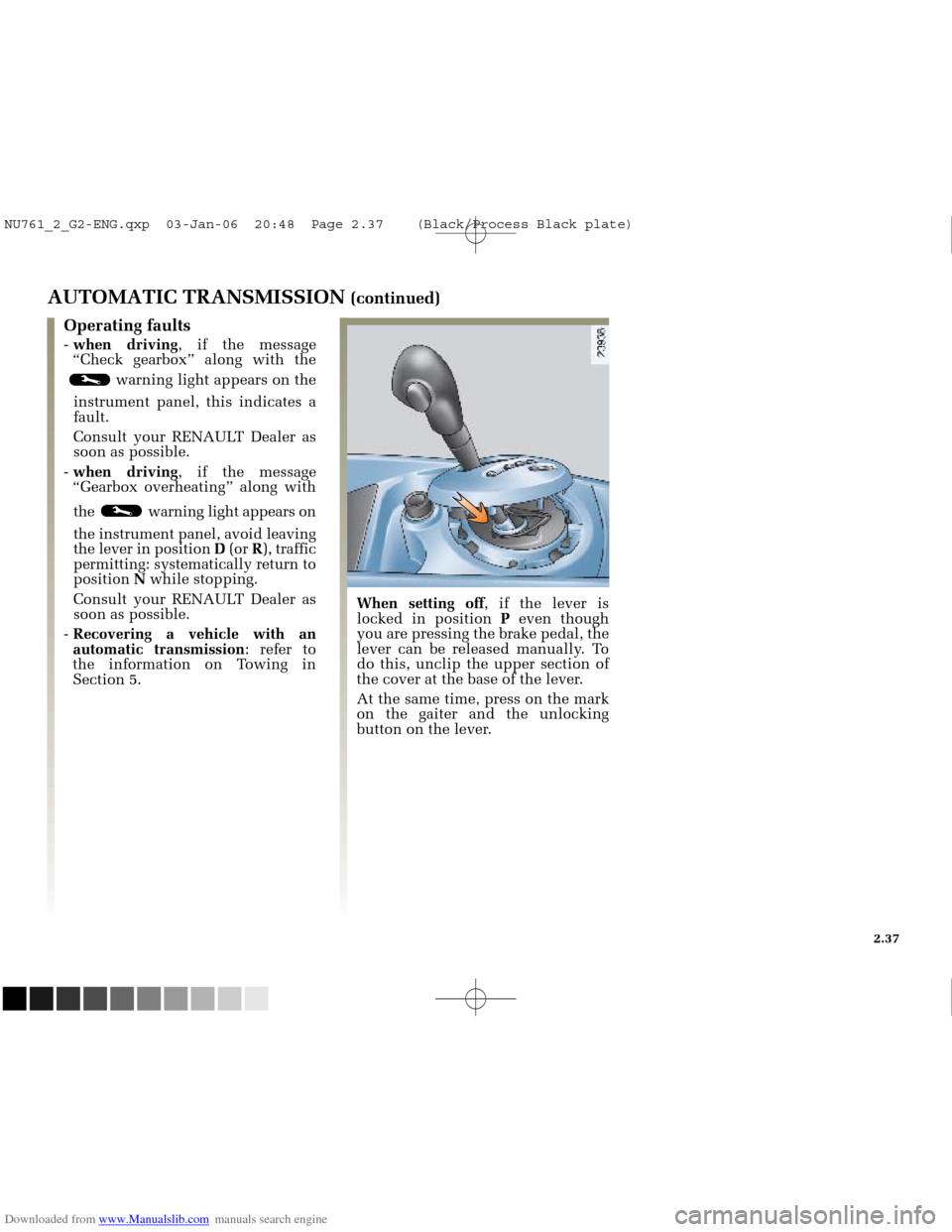
When setting off , if the lever is
locked in position Peven though
you are pressing the brake pedal, the
lever can be released manually. To
do this, unclip the upper section of
the cover at the base of the lever.
At the same time, press on the mark
on the gaiter and the unlocking
button on the lever.
2.37
NU761_2_G2-ENG.qxp 03-Jan-06 20:48 Page 2.37 (Black/Process Black\
plate)
Page 139 of 250
Downloaded from www.Manualslib.com manuals search engine
NU761_2_G3-FRA.qxd 4/11/05 10:50 Page 3.01
Section 3: Your comfort
Air vents ........................................................................\
..........................................................................................3.02 - 3.03
Heating and air conditioning
........................................................................\
....................................................3.04 ➟3.16
Electric windows
........................................................................\
....................................................... ..................3.17 ➟3.20
Windscreen
........................................................................\
....................................................... .........................................3.20
Sun visor
........................................................................\
....................................................... ..............................................3.21
Electric sunroof
........................................................................\
....................................................... .......................3.22 - 3.23
Interior lighting
........................................................................\
....................................................... ..................................3.24
Storage compartments/passenger compartment fittings
........................................................................\
.....3.25 ➟3.28
Ashtrays/Cigarette lighter
........................................................................\
....................................................... ................3.29
Rear bench seat
........................................................................\
....................................................... ..................................3.30
Luggage compartment
........................................................................\
....................................................... .......................3.31
Rear parcel shelf
........................................................................\
....................................................... ..................................3.32
Storage compartments/luggage compartment fittings
........................................................................\
......................3.33
Transporting items in the luggage compartment
........................................................................\
...............................3.34
Roof rack
........................................................................\
....................................................... ..............................................3.35
3.01
NU761_2_G3-ENG.qxp 1/5/2006 5:28 PM Page 3.01 (Black plate)
Page 142 of 250
Downloaded from www.Manualslib.com manuals search engine
ABC D
FE
NU761_2_G3-FRA.qxd 4/11/05 10:51 Page 3.04
3.04
HEATING/AIR CONDITIONING
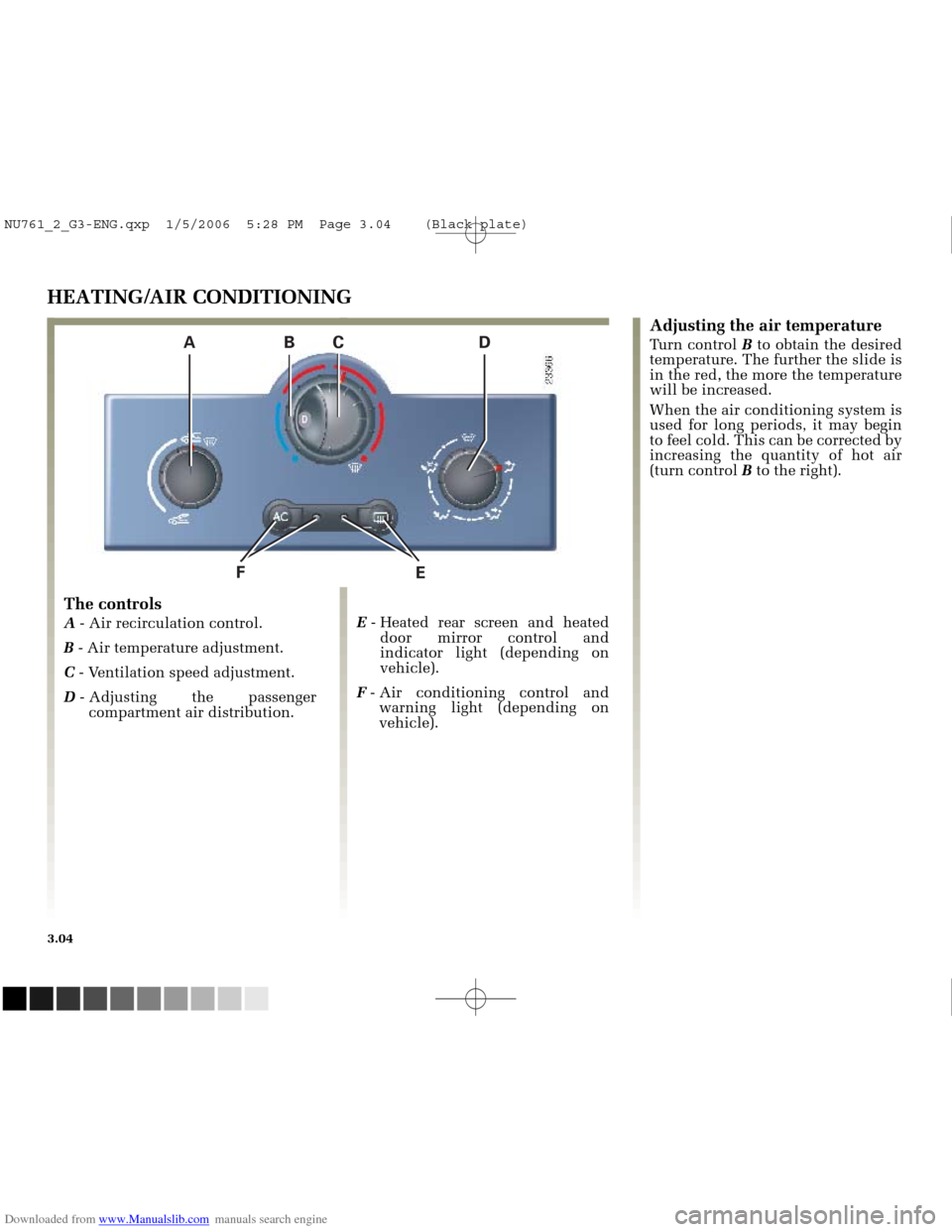
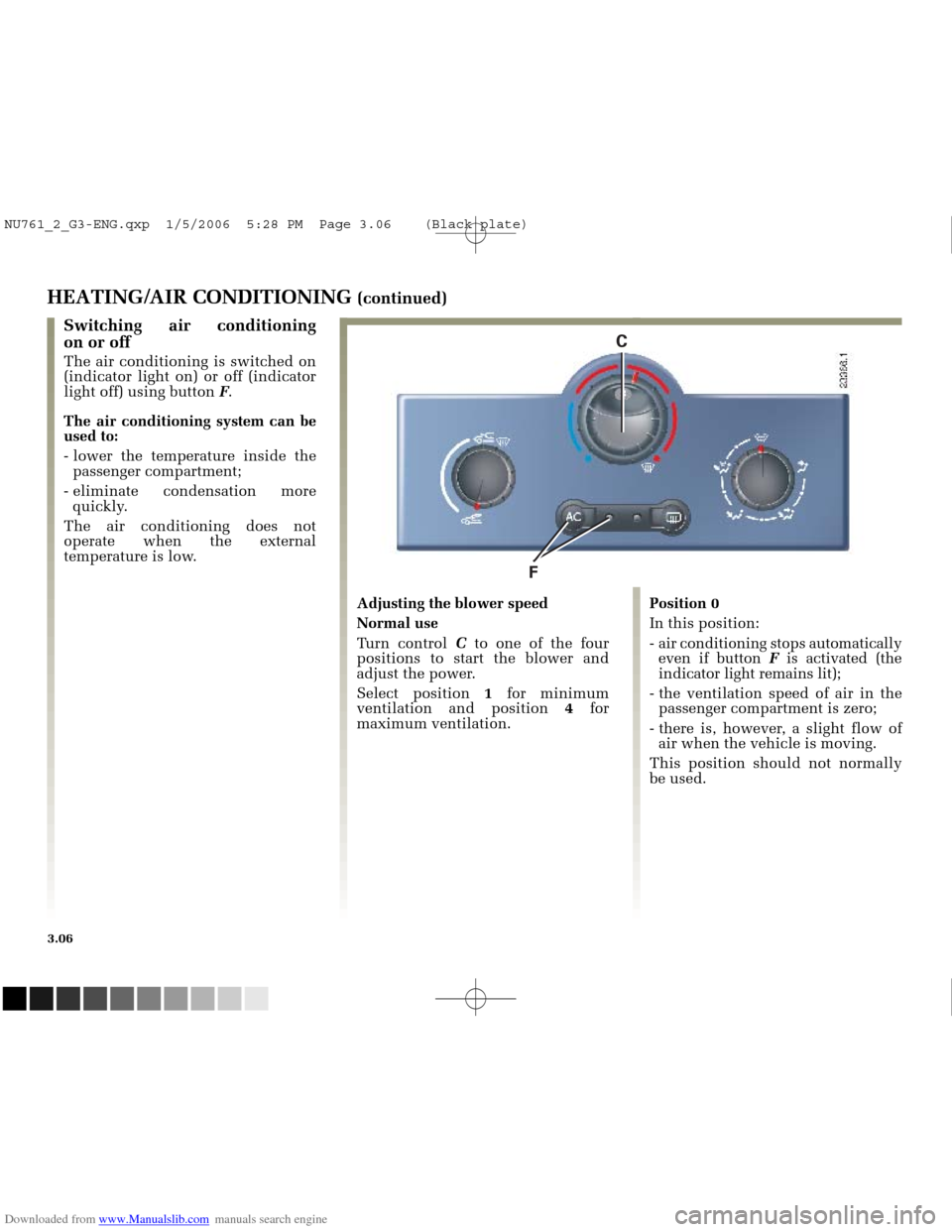
The controls
A - Air recirculation control.
B - Air temperature adjustment.
C - Ventilation speed adjustment.
D - Adjusting the passenger
compartment air distribution. E
- Heated rear screen and heated
door mirror control and
indicator light (depending on
vehicle).
F - Air conditioning control and
warning light (depending on
vehicle).
Adjusting the air temperature
Turn control Bto obtain the desired
temperature. The further the slide is
in the red, the more the temperature
will be increased.
When the air conditioning system is
used for long periods, it may begin
to feel cold. This can be corrected by
increasing the quantity of hot air
(turn control Bto the right).
NU761_2_G3-ENG.qxp 1/5/2006 5:28 PM Page 3.04 (Black plate)
Page 144 of 250
Downloaded from www.Manualslib.com manuals search engine
F
C
NU761_2_G3-FRA.qxd 4/11/05 10:51 Page 3.06
3.06
HEATING/AIR CONDITIONING (continued)
Position 0
In this position:
- air conditioning stops automaticallyeven if button Fis activated (the
indicator light remains lit);
- the ventilation speed of air in the passenger compartment is zero;
- there is, however, a slight flow of air when the vehicle is moving.
This position should not normally
be used.
Switching air conditioning
on or off
The air conditioning is switched on
(indicator light on) or off (indicator
light off) using button F.
The air conditioning system can be
used to:
- lower the temperature inside the passenger compartment;
- eliminate condensation more quickly.
The air conditioning does not
operate when the external
temperature is low.
Adjusting the blower speed
Normal use
Turn control Cto one of the four
positions to start the blower and
adjust the power.
Select position 1for minimum
ventilation and position 4for
maximum ventilation.
NU761_2_G3-ENG.qxp 1/5/2006 5:28 PM Page 3.06 (Black plate)
Page 146 of 250
Downloaded from www.Manualslib.com manuals search engine
12345 67 813 12 11 10
14 9
NU761_2_G3-FRA.qxd 4/11/05 10:51 Page 3.08
3.08
CLIMATE CONTROL
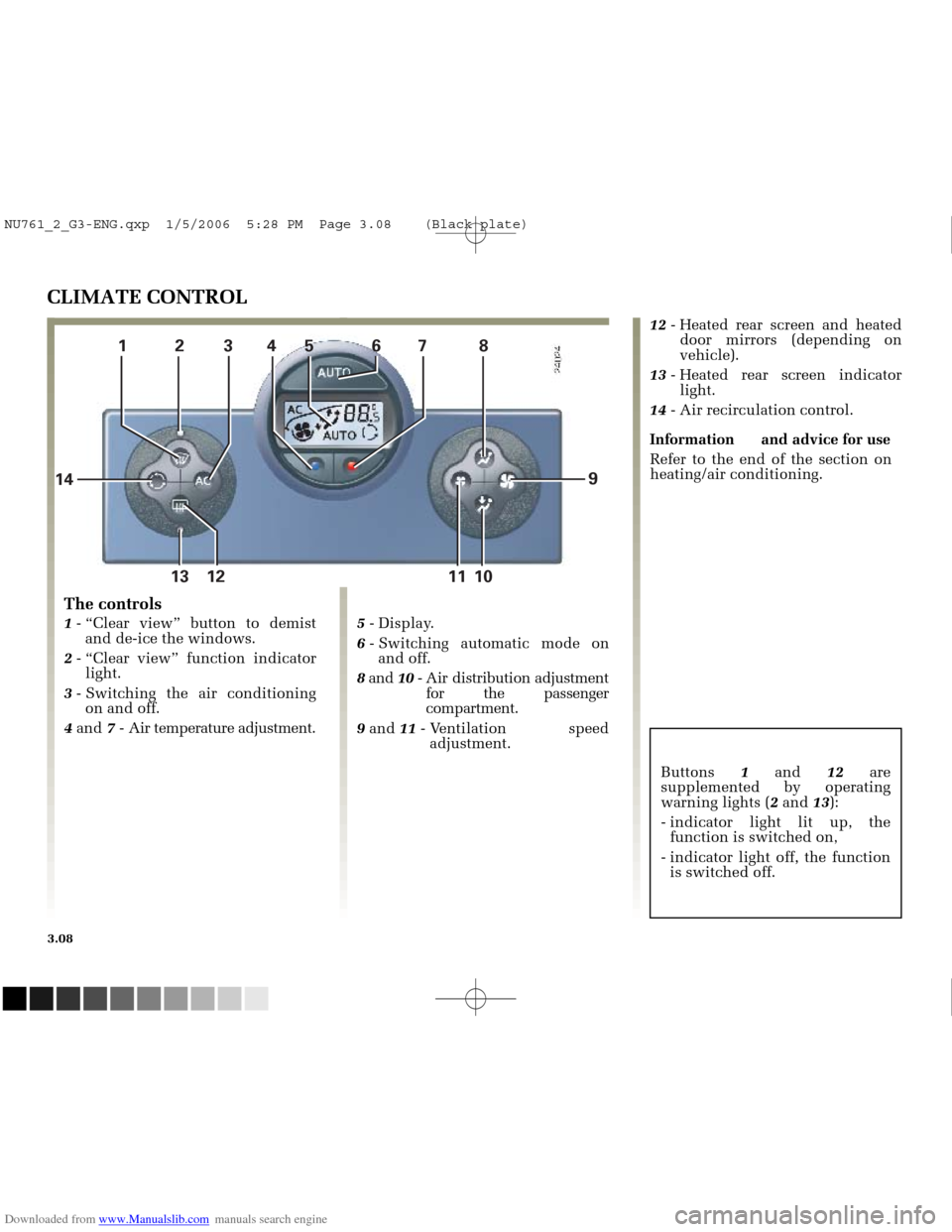
The controls
1
- “Clear view” button to demist
and de-ice the windows.
2 - “Clear view” function indicator
light.
3 - Switching the air conditioning
on and off.
4 and 7- Air temperature adjustment. 5
- Display.
6 - Switching automatic mode on
and off.
8 and 10- Air distribution adjustment
for the passenger
compartment.
9 and 11- Ventilation speed
adjustment. 12
- Heated rear screen and heated
door mirrors (depending on
vehicle).
13 - Heated rear screen indicator
light.
14 - Air recirculation control.
Information and advice for use Refer to the end of the section on
heating/air conditioning.
Buttons 1and 12are
supplemented by operating
warning lights ( 2and 13):
- indicator light lit up, the function is switched on,
- indicator light off, the function is switched off.
NU761_2_G3-ENG.qxp 1/5/2006 5:28 PM Page 3.08 (Black plate)
Page 147 of 250
Downloaded from www.Manualslib.com manuals search engine
7
4
NU761_2_G3-FRA.qxd 4/11/05 10:51 Page 3.09
3.09
CLIMATE CONTROL (continued)
Ambient temperature (automatic
mode)
The climate control system
guarantees comfort in the passenger
compartment and good visibility
(except in the event of extreme
conditions), while optimising
consumption.
This is the recommended mode of
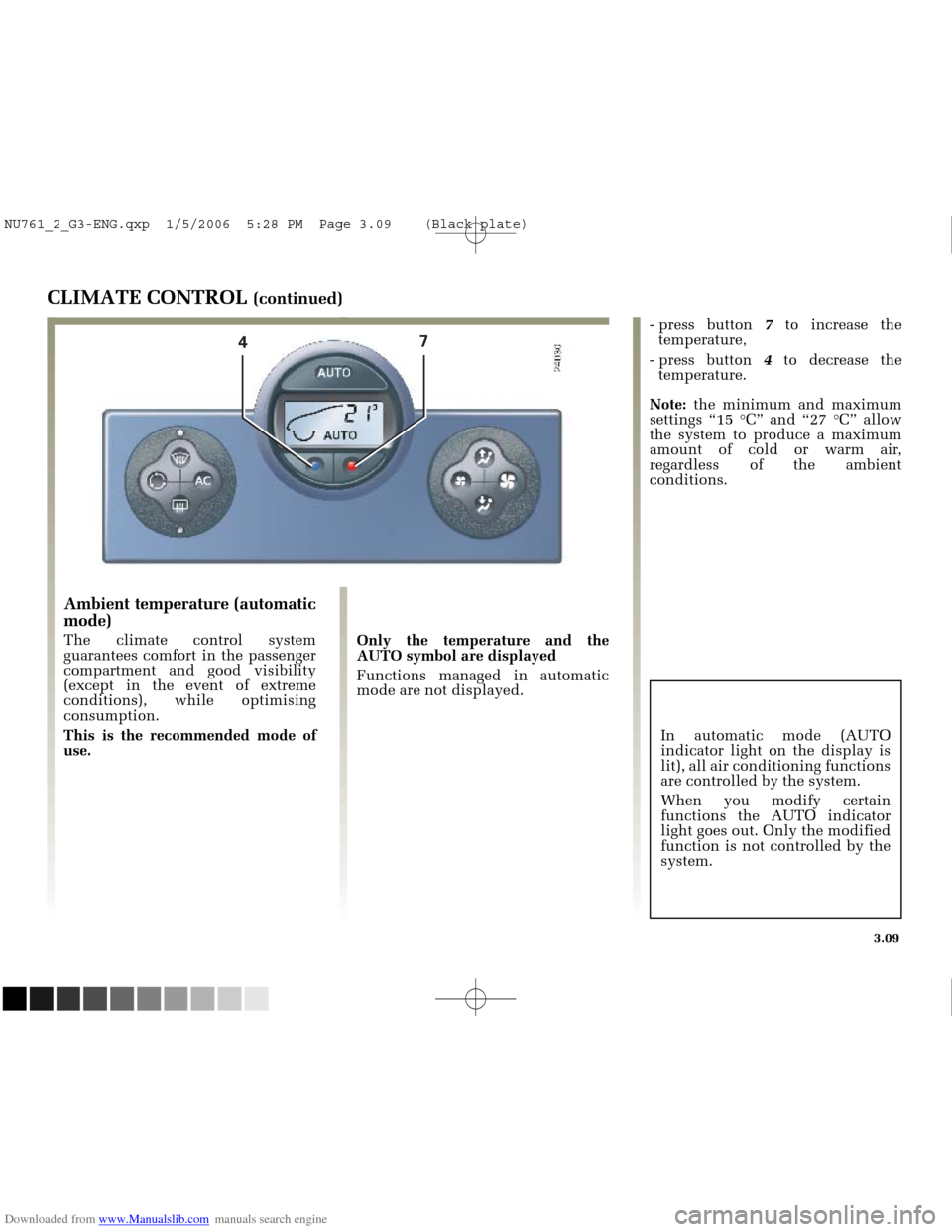
use. Only the temperature and the
AUTO symbol are displayed
Functions managed in automatic
mode are not displayed.- press button
7to increase the
temperature,
- press button 4to decrease the
temperature.
Note: the minimum and maximum
settings “15 °C” and “27 °C” allow
the system to produce a maximum
amount of cold or warm air,
regardless of the ambient
conditions.
In automatic mode (AUTO
indicator light on the display is
lit), all air conditioning functions
are controlled by the system.
When you modify certain
functions the AUTO indicator
light goes out. Only the modified
function is not controlled by the
system.
NU761_2_G3-ENG.qxp 1/5/2006 5:28 PM Page 3.09 (Black plate)
Page 150 of 250
Downloaded from www.Manualslib.com manuals search engine
13 12 1111
56
93
NU761_2_G3-FRA.qxd 4/11/05 10:51 Page 3.12
3.12
CLIMATE CONTROL (continued)
Varying the ventilation speed
In automatic mode, the system uses
the most suitable amount of air to
reach and maintain the desired
comfort level.
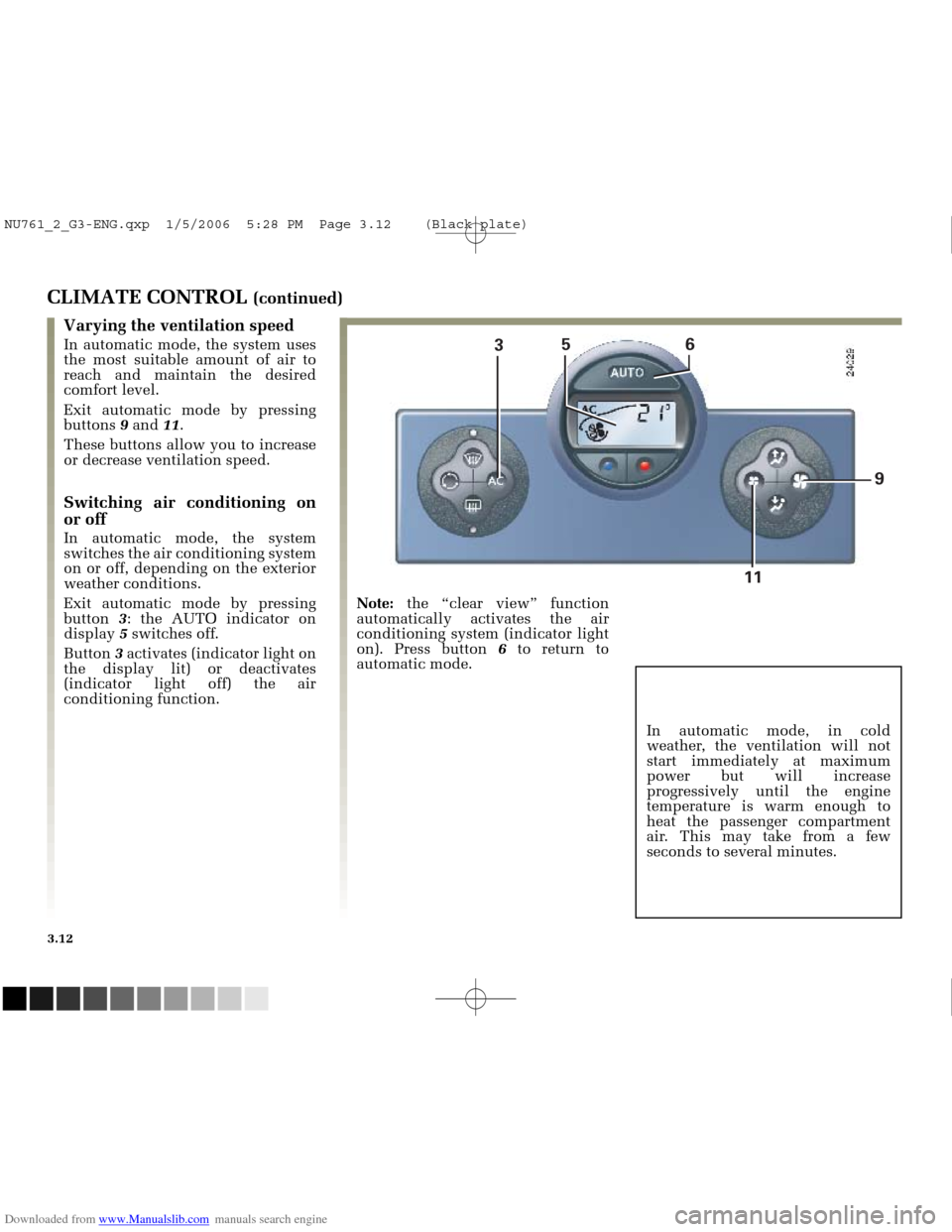
Exit automatic mode by pressing
buttons 9and 11.
These buttons allow you to increase
or decrease ventilation speed.
Switching air conditioning on
or off
In automatic mode, the system
switches the air conditioning system
on or off, depending on the exterior
weather conditions.
Exit automatic mode by pressing
button 3: the AUTO indicator on
display 5switches off.
Button 3activates (indicator light on
the display lit) or deactivates
(indicator light off) the air
conditioning function. Note:
the “clear view” function
automatically activates the air
conditioning system (indicator light
on). Press button 6to return to
automatic mode.
In automatic mode, in cold
weather, the ventilation will not
start immediately at maximum
power but will increase
progressively until the engine
temperature is warm enough to
heat the passenger compartment
air. This may take from a few
seconds to several minutes.
NU761_2_G3-ENG.qxp 1/5/2006 5:28 PM Page 3.12 (Black plate)
Page 151 of 250
Downloaded from www.Manualslib.com manuals search engine
13 12
NU761_2_G3-FRA.qxd 4/11/05 10:51 Page 3.13
3.13
CLIMATE CONTROL (continued)
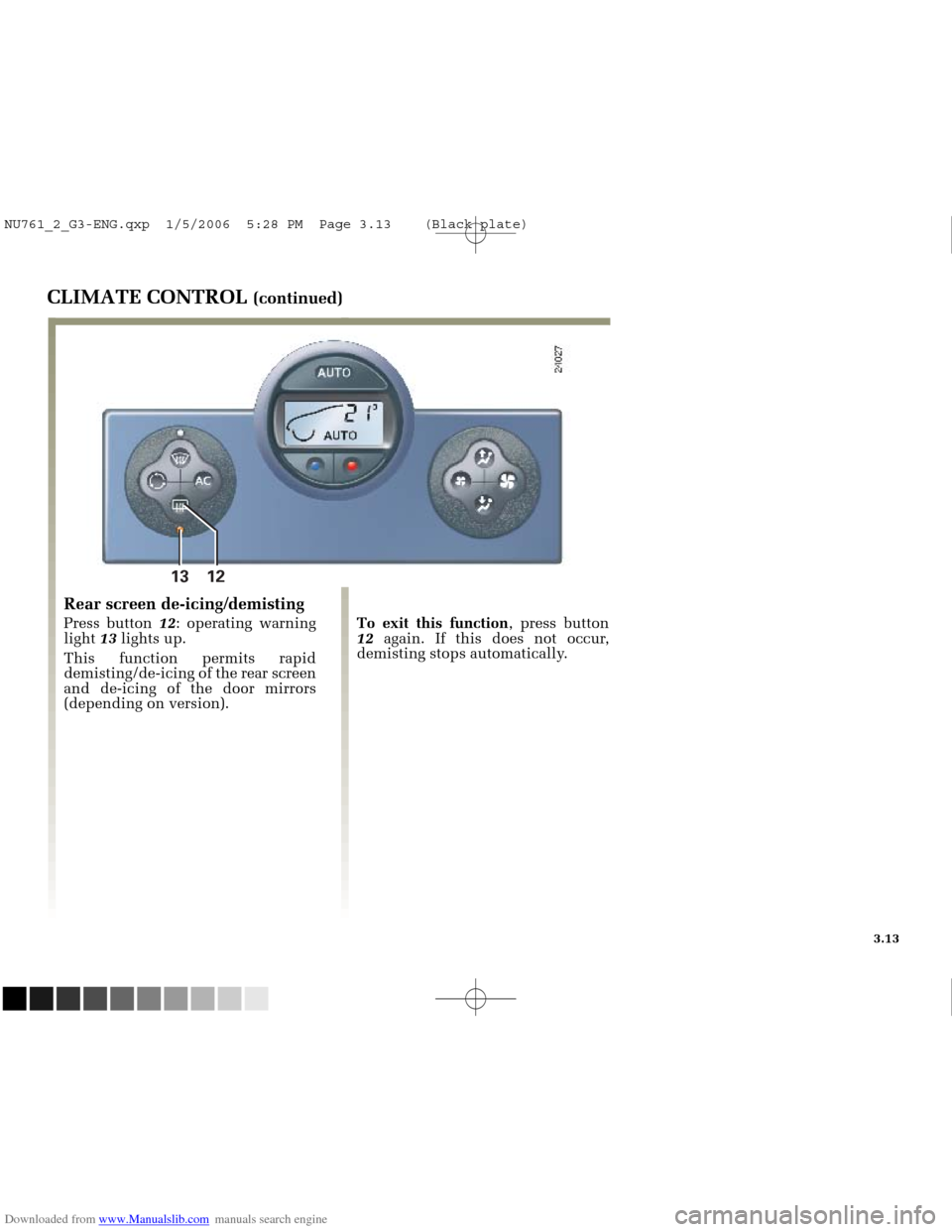
Rear screen de-icing/demisting
Press button 12: operating warning
light 13lights up.
This function permits rapid
demisting/de-icing of the rear screen
and de-icing of the door mirrors
(depending on version). To exit this function
, press button
12 again. If this does not occur,
demisting stops automatically.
NU761_2_G3-ENG.qxp 1/5/2006 5:28 PM Page 3.13 (Black plate)
Page 152 of 250
Downloaded from www.Manualslib.com manuals search engine
12 613 12 11
NU761_2_G3-FRA.qxd 4/11/05 10:51 Page 3.14
3.14
CLIMATE CONTROL (continued)
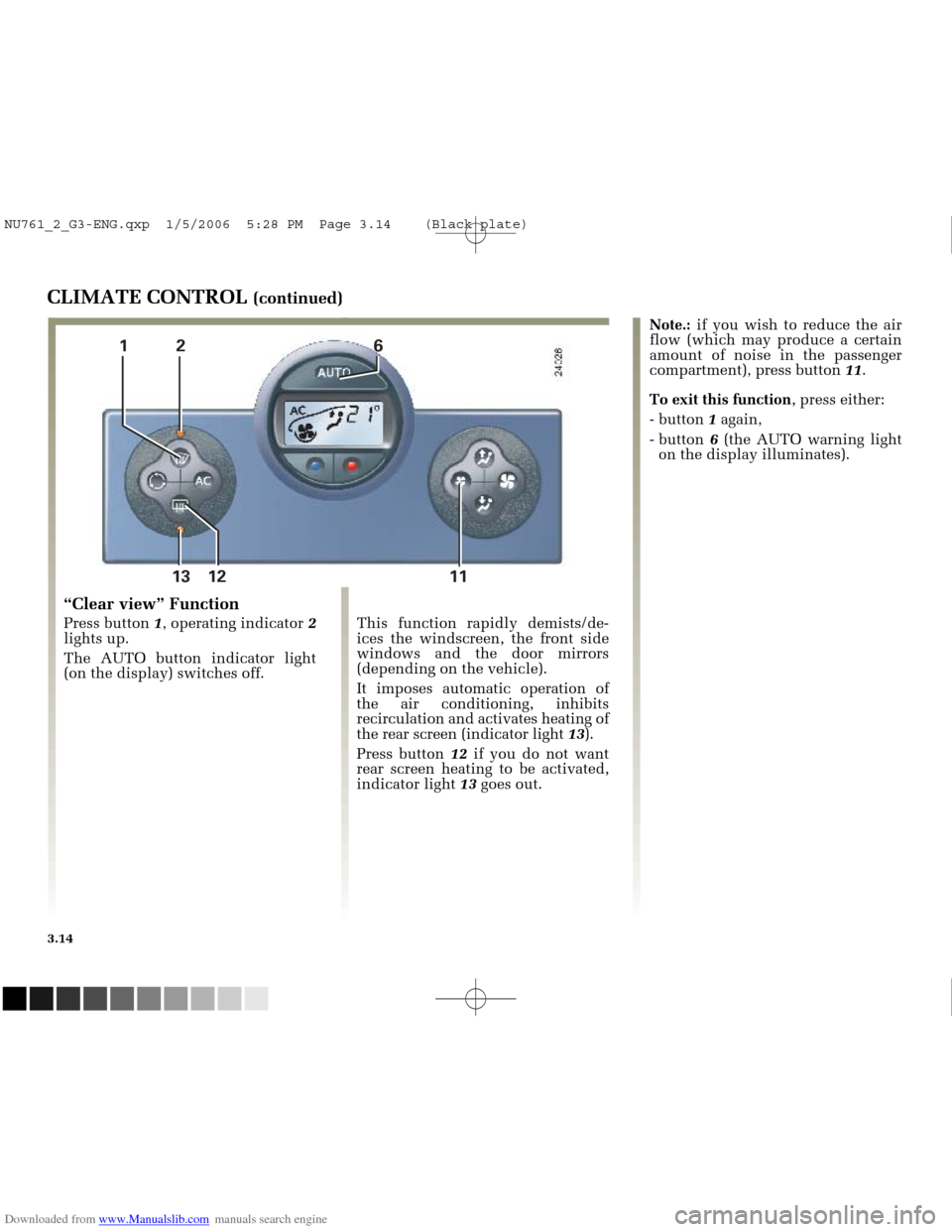
This function rapidly demists/de-
ices the windscreen, the front side
windows and the door mirrors
(depending on the vehicle).
It imposes automatic operation of
the air conditioning, inhibits
recirculation and activates heating of
the rear screen (indicator light 13).
Press button 12if you do not want
rear screen heating to be activated,
indicator light 13goes out.
“Clear view” Function
Press button 1, operating indicator 2
lights up.
The AUTO button indicator light
(on the display) switches off. Note.:
if you wish to reduce the air
flow (which may produce a certain
amount of noise in the passenger
compartment), press button 11.
To exit this function , press either:
- button 1again,
- button 6 (the AUTO warning light
on the display illuminates).
NU761_2_G3-ENG.qxp 1/5/2006 5:28 PM Page 3.14 (Black plate)