Mph RENAULT MEGANE 2017 4.G Owner's Manual
[x] Cancel search | Manufacturer: RENAULT, Model Year: 2017, Model line: MEGANE, Model: RENAULT MEGANE 2017 4.GPages: 346, PDF Size: 7.04 MB
Page 157 of 346
2.45
1
BLIND SPOT WARNING (3/4)
Operation
This function will indicate:
– when the vehicle speed is between approximately 30 km/h (19 mph) and
140 km/h (87 mph);
– when another vehicle is in the blind spot area and travelling in the same
direction as your vehicle.
If another vehicle is being overtaken,
the indicator 6 will be activated only if
that vehicle remains in the blind spot for
more than one second.
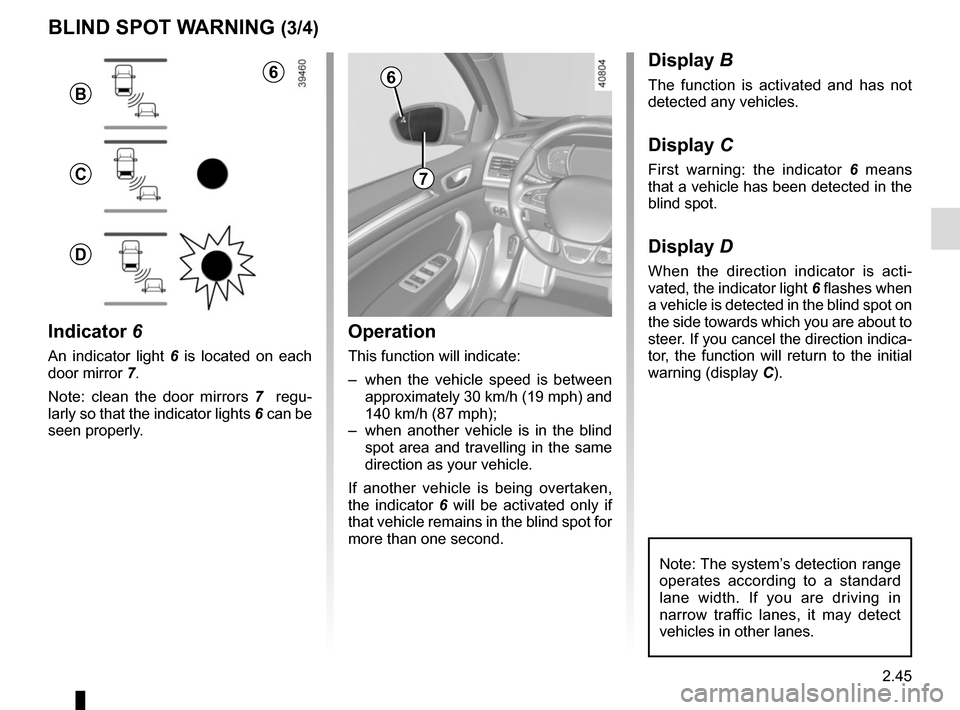
Indicator 6
An indicator light 6 is located on each
door mirror 7.
Note: clean the door mirrors 7 regu-
larly so that the indicator lights 6 can be
seen properly.
Display B
The function is activated and has not
detected any vehicles.
Display C
First warning: the indicator 6 means
that a vehicle has been detected in the
blind spot.
Display D
When the direction indicator is acti-
vated, the indicator light 6 flashes when
a vehicle is detected in the blind spot on
the side towards which you are about to
steer. If you cancel the direction indica-
tor, the function will return to the initial
warning (display C).
7
6
B
C
D
Note: The system’s detection range
operates according to a standard
lane width. If you are driving in
narrow traffic lanes, it may detect
vehicles in other lanes.
6
Page 159 of 346
2.47
SAFE DISTANCE ALERT (1/2)
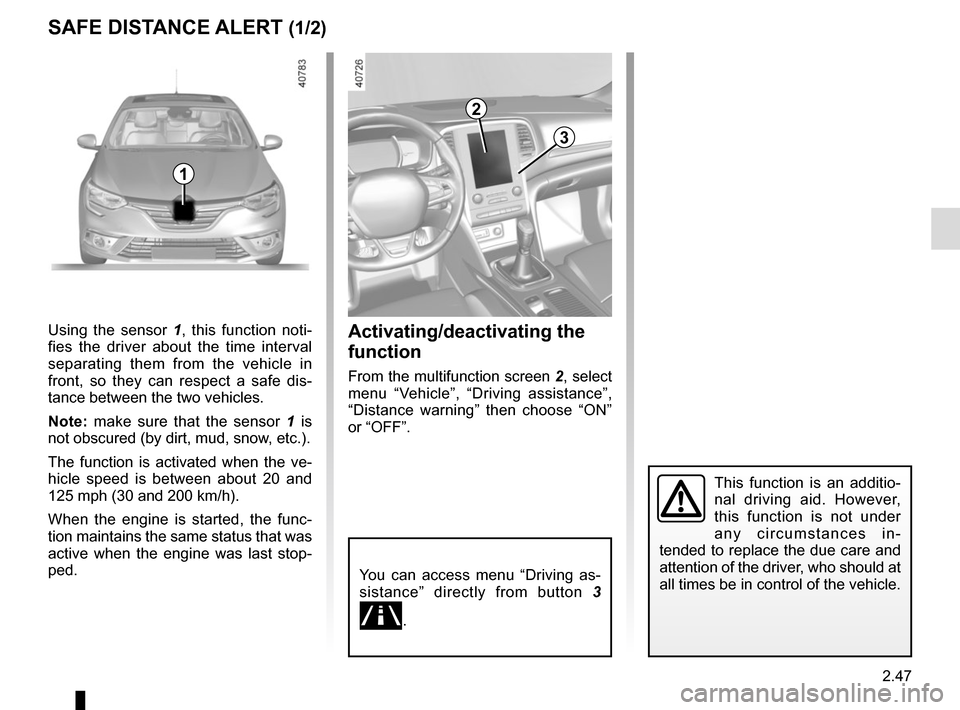
Activating/deactivating the
function
From the multifunction screen 2, select
menu “Vehicle”, “Driving assistance”,
“Distance warning” then choose “ON”
or “OFF”.
1
Using the sensor 1 , this function noti-
fies the driver about the time interval
separating them from the vehicle in
front, so they can respect a safe dis-
tance between the two vehicles.
Note: make sure that the sensor 1 is
not obscured (by dirt, mud, snow, etc.).
The function is activated when the ve-
hicle speed is between about 20 and
125 mph (30 and 200 km/h).
When the engine is started, the func-
tion maintains the same status that was
active when the engine was last stop-
ped.
You can access menu “Driving as-
sistance” directly from button 3
\b.
This function is an additio-
nal driving aid. However,
this function is not under
any circumstances in-
tended to replace the due care and
attention of the driver, who should at
all times be in control of the vehicle.
3
2
Page 162 of 346
2.50
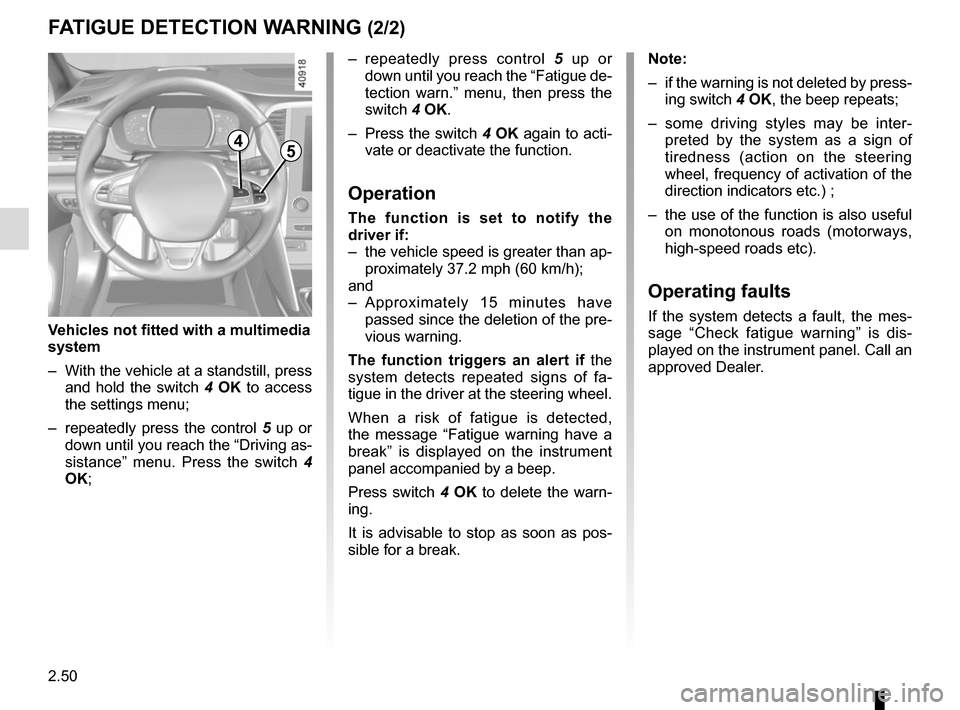
– repeatedly press control 5 up or
down until you reach the “Fatigue de-
tection warn.” menu, then press the
switch 4 OK.
– Press the switch 4 OK again to acti-
vate or deactivate the function.
Operation
The function is set to notify the
driver if:
– the vehicle speed is greater than ap- proximately 37.2 mph (60 km/h);
and
– Approximately 15 minutes have passed since the deletion of the pre-
vious warning.
The function triggers an alert if the
system detects repeated signs of fa-
tigue in the driver at the steering wheel.
When a risk of fatigue is detected,
the message “Fatigue warning have a
break” is displayed on the instrument
panel accompanied by a beep.
Press switch 4 OK to delete the warn-
ing.
It is advisable to stop as soon as pos-
sible for a break.
FATIGUE DETECTION WARNING (2/2)
Note:
– if the warning is not deleted by press- ing switch 4 OK, the beep repeats;
– some driving styles may be inter- preted by the system as a sign of
tiredness (action on the steering
wheel, frequency of activation of the
direction indicators etc.) ;
– the use of the function is also useful on monotonous roads (motorways,
high-speed roads etc).
Operating faults
If the system detects a fault, the mes-
sage “Check fatigue warning” is dis-
played on the instrument panel. Call an
approved Dealer.
4
Vehicles not fitted with a multimedia
system
– With the vehicle at a standstill, press and hold the switch 4 OK to access
the settings menu;
– repeatedly press the control 5 up or
down until you reach the “Driving as-
sistance” menu. Press the switch 4
OK;
5
Page 163 of 346
2.51
SPEED LIMITER (1/3)
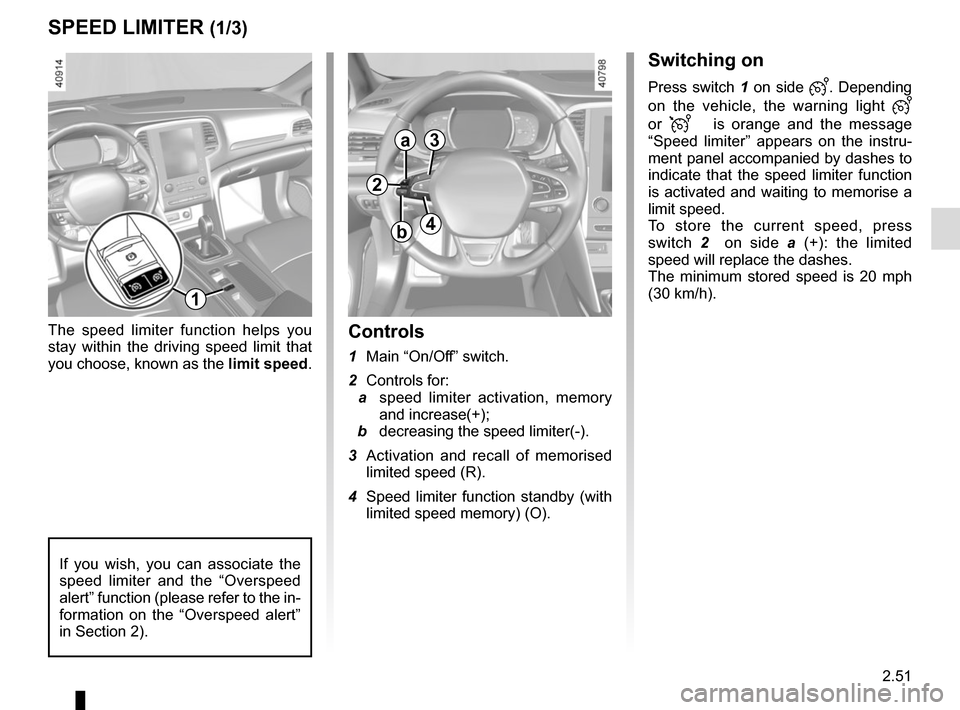
Switching on
Press switch 1 on side . Depending
on the vehicle, the warning light
or
is orange and the message
“Speed limiter” appears on the instru-
ment panel accompanied by dashes to
indicate that the speed limiter function
is activated and waiting to memorise a
limit speed.
To store the current speed, press
switch 2 on side a (+): the limited
speed will replace the dashes.
The minimum stored speed is 20 mph
(30 km/h).
Controls
1 Main “On/Off” switch.
2 Controls for:
a speed limiter activation, memory
and increase(+);
b decreasing the speed limiter(-).
3 Activation and recall of memorised limited speed (R).
4 Speed limiter function standby (with limited speed memory) (O).
The speed limiter function helps you
stay within the driving speed limit that
you choose, known as the
limit speed.
If you wish, you can associate the
speed limiter and the “Overspeed
alert” function (please refer to the in-
formation on the “Overspeed alert”
in Section 2).
1
2
a3
4b
Page 169 of 346
2.57
CRUISE CONTROL (1/4)
The cruise control function helps you to
maintain your driving speed at a speed
that you choose, called the cruising
speed.
This cruising speed may be set at any
speed above 20 mph (30 km/h).
The cruise control function
is in no way linked to the
braking system.
This function is an addi-
tional driving aid. This func-
tion does not take the place
of the driver. Therefore, it
can under no circumstances replace
the driver’s responsibility to respect
speed limits and to be vigilant (the
driver must always be ready to
brake). Cruise control must not be
used in heavy traffic, on winding or
slippery roads (black ice, aquaplan-
ing, gravel) and during bad weather
(fog, rain, side winds etc.).
There is a risk of accidents.
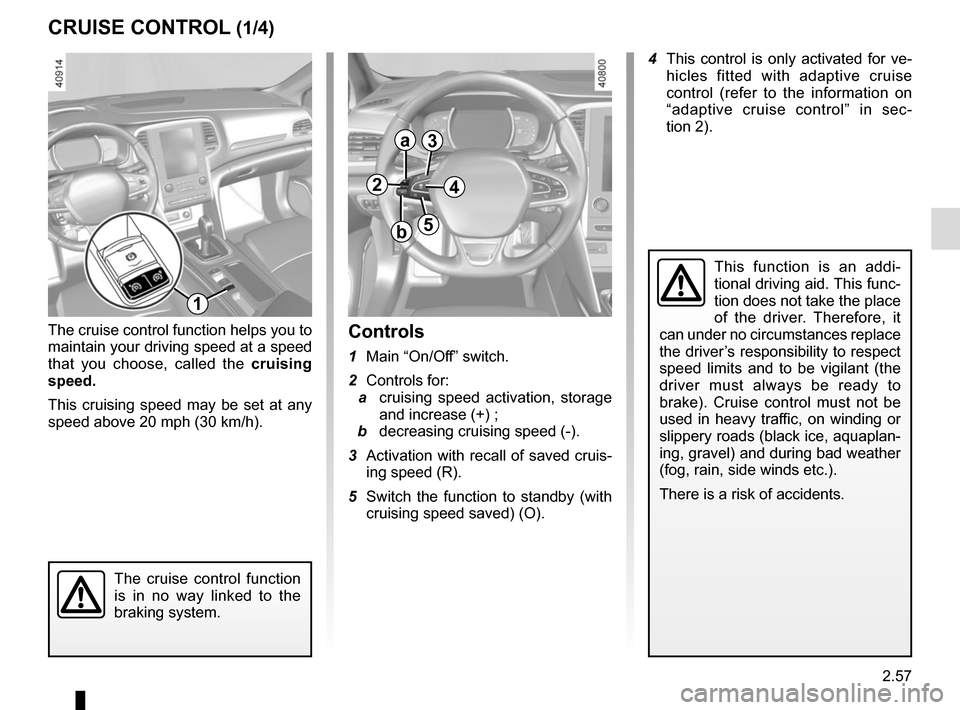
Controls
1 Main “On/Off” switch.
2 Controls for:
a cruising speed activation, storage
and increase (+) ;
b decreasing cruising speed (-).
3 Activation with recall of saved cruis- ing speed (R).
5 Switch the function to standby (with cruising speed saved) (O).
1
2
a
b
3
5
4
4 This control is only activated for ve- hicles fitted with adaptive cruise
control (refer to the information on
“adaptive cruise control” in sec-
tion 2).
Page 170 of 346
2.58
CRUISE CONTROL (2/4)Driving
Once a cruising speed is memorised
and the cruise control function is active,
you may lift your foot off the accelera-
tor pedal.
Please note that you are
strongly advised to keep
your feet close to the pedals
in order to react in an emer-
gency.
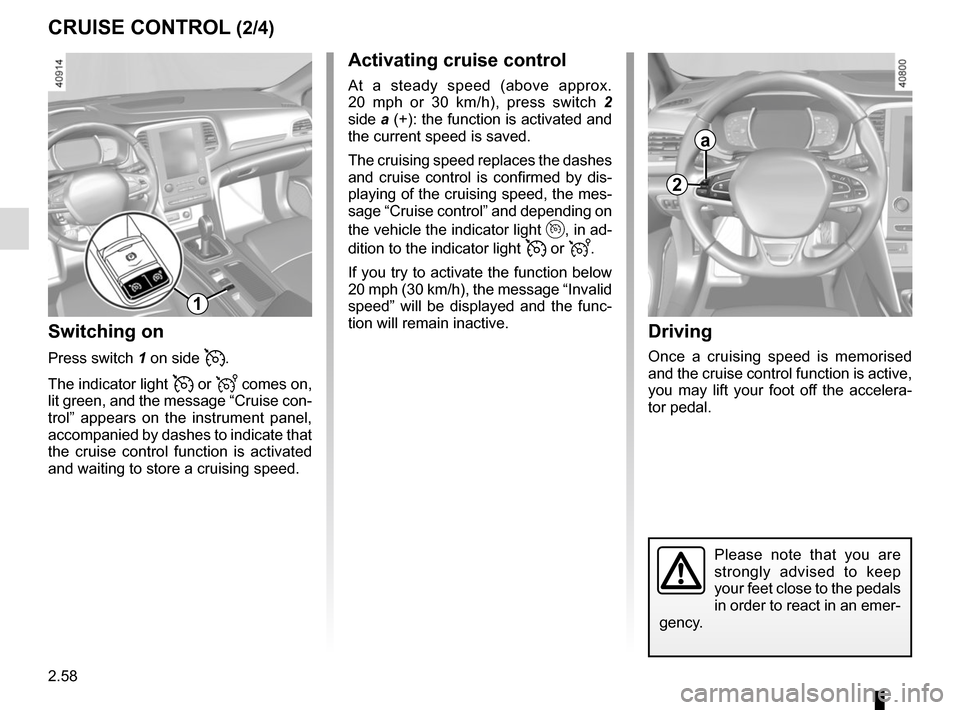
Activating cruise control
At a steady speed (above approx.
20 mph or 30 km/h), press switch 2
side a (+): the function is activated and
the current speed is saved.
The cruising speed replaces the dashes
and cruise control is confirmed by dis-
playing of the cruising speed, the mes-
sage “Cruise control” and depending on
the vehicle the indicator light
, in ad-
dition to the indicator light
or .
If you try to activate the function below
20 mph (30 km/h), the message “Invalid
speed” will be displayed and the func-
tion will remain inactive.
Switching on
Press switch 1 on side .
The indicator light
or comes on,
lit green, and the message “Cruise con-
trol” appears on the instrument panel,
accompanied by dashes to indicate that
the cruise control function is activated
and waiting to store a cruising speed.
2
a
1
Page 172 of 346
2.60
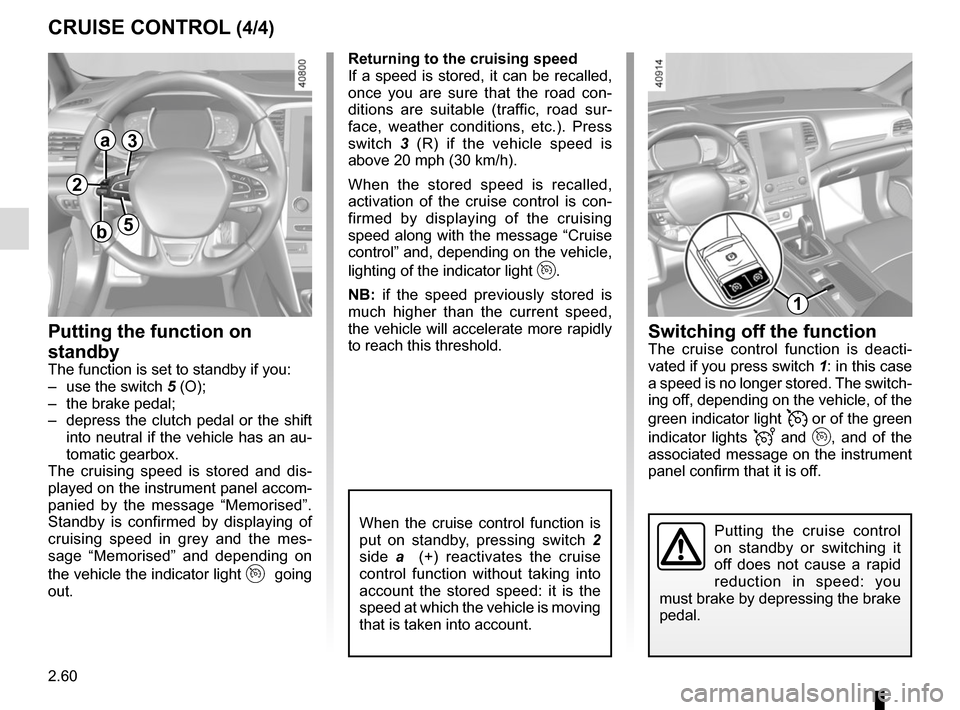
CRUISE CONTROL (4/4)Switching off the function
The cruise control function is deacti-
vated if you press switch 1: in this case
a speed is no longer stored. The switch-
ing off, depending on the vehicle, of the
green indicator light
or of the green
indicator lights
and , and of the
associated message on the instrument
panel confirm that it is off.
Returning to the cruising speed
If a speed is stored, it can be recalled,
once you are sure that the road con-
ditions are suitable (traffic, road sur-
face, weather conditions, etc.). Press
switch
3 (R) if the vehicle speed is
above 20 mph (30 km/h).
When the stored speed is recalled,
activation of the cruise control is con-
firmed by displaying of the cruising
speed along with the message “Cruise
control” and, depending on the vehicle,
lighting of the indicator light
.
NB: if the speed previously stored is
much higher than the current speed,
the vehicle will accelerate more rapidly
to reach this threshold.
When the cruise control function is
put on standby, pressing switch 2
side a (+) reactivates the cruise
control function without taking into
account the stored speed: it is the
speed at which the vehicle is moving
that is taken into account.
Putting the function on
standby
The function is set to standby if you:
– use the switch 5 (O);
– the brake pedal;
– depress the clutch pedal or the shift into neutral if the vehicle has an au-
tomatic gearbox.
The cruising speed is stored and dis-
played on the instrument panel accom-
panied by the message “Memorised”.
Standby is confirmed by displaying of
cruising speed in grey and the mes-
sage “Memorised” and depending on
the vehicle the indicator light
going
out.
Putting the cruise control
on standby or switching it
off does not cause a rapid
reduction in speed: you
must brake by depressing the brake
pedal.
2
a
b
3
5
1
Page 173 of 346
2.61
ADAPTIVE CRUISE CONTROL (1/7)
When traffic conditions permit (large
free-flowing road or motorway), the
adaptive cruise control gives you the
option of maintaining a chosen speed,
known as the cruising speed, adjust-
able from 31 mph to 93 mph (50 and
150 km/h), or 68.2 mph (110 km/h) de-
pending on the vehicle, while keeping
a following distance from the vehicle in
front in the same lane.
The sensor has a range of 120 metres.
Note: The driver should take into ac-
count the maximum speed limit in the
country where they are driving.
Note: the adaptive cruise control can
brake the vehicle up to a third of the
braking capacity. Depending on the
situation, the driver may need to brake
harder.
This function is an additio-
nal driving aid. This function
does not take the place of
the driver.
Therefore, it can under no circum-
stances replace the driver’s respon-
sibility to respect speed limits and to
be vigilant (the driver must always
be ready to brake).
The adaptive cruise control should
not be used in heavy traffic, on
winding or slippery roads (black ice,
aquaplaning, gravel) and during bad
weather (fog, rain, side winds etc.).
There is a risk of accidents.
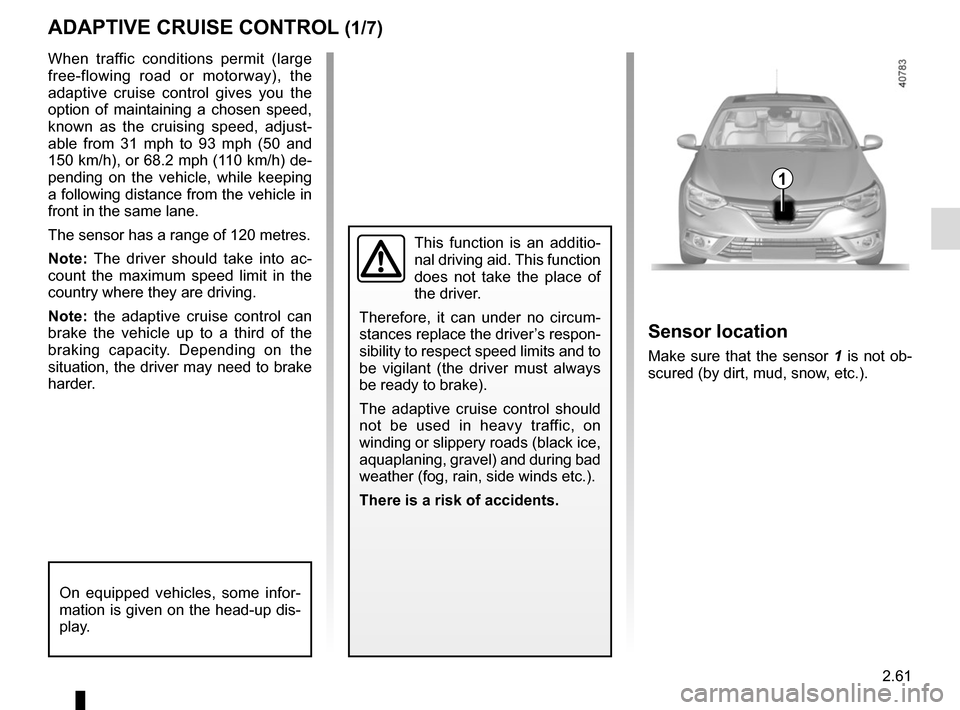
Sensor location
Make sure that the sensor 1 is not ob-
scured (by dirt, mud, snow, etc.).
1
On equipped vehicles, some infor-
mation is given on the head-up dis-
play.
Page 174 of 346
2.62
The cruising speed replaces the dashes
and cruise control is confirmed by the
appearance of the message “Adaptive
cruise ctrl” and the indicator light
.
If you try to activate the function below
30 mph (50 km/h) or above 90 mph
(150 km/h), the message «Invalid
speed» is displayed and the function
remains inactive.
Adjusting the following
distance
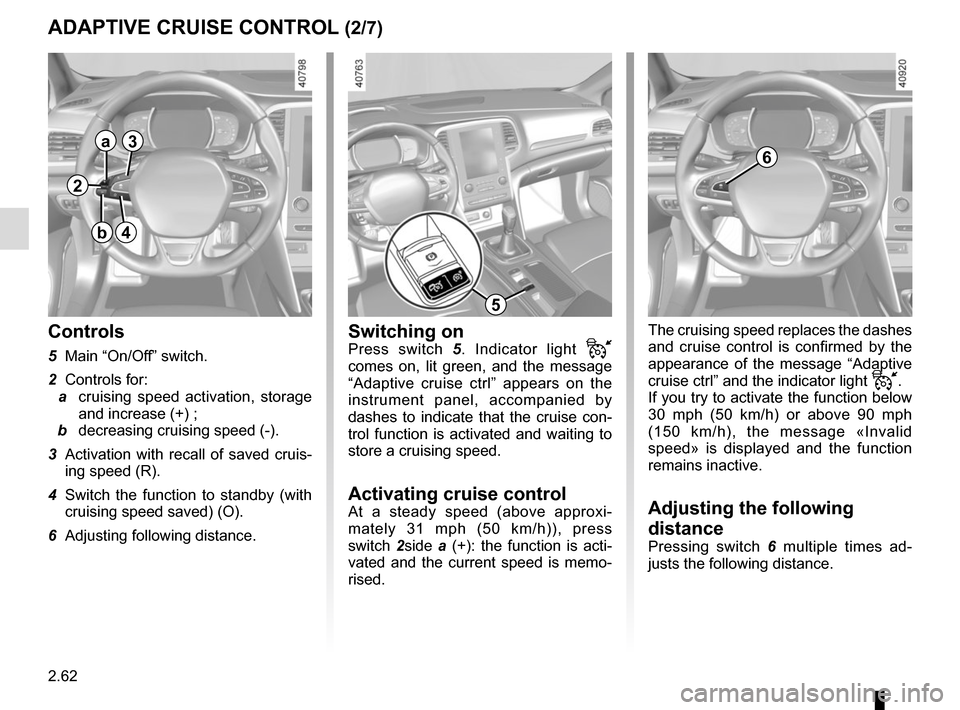
Pressing switch 6 multiple times ad-
justs the following distance.
Switching onPress switch 5 . Indicator light
comes on, lit green, and the message
“Adaptive cruise ctrl” appears on the
instrument panel, accompanied by
dashes to indicate that the cruise con-
trol function is activated and waiting to
store a cruising speed.
Activating cruise controlAt a steady speed (above approxi-
mately 31 mph (50 km/h)), press
switch 2side a (+): the function is acti-
vated and the current speed is memo-
rised.
Controls
5 Main “On/Off” switch.
2 Controls for:
a cruising speed activation, storage
and increase (+) ;
b decreasing cruising speed (-).
3 Activation with recall of saved cruis- ing speed (R).
4 Switch the function to standby (with cruising speed saved) (O).
6 Adjusting following distance.
ADAPTIVE CRUISE CONTROL (2/7)
6
2
a
b
3
4
5
Page 176 of 346
2.64
ADAPTIVE CRUISE CONTROL (4/7)
Exceeding the cruising speed
The cruising speed may be exceeded
at any time by depressing the accelera-
tor pedal.
When exceeding this speed, the crui-
sing speed and the following bars are
shown in red, and the cruising speed
flashes on the instrument panel: the
distance control function is no longer
active.
Then, release the accelerator: cruise
and distance control will automatically
reactivate unless the function has been
set to standby.
Putting the function on
standby
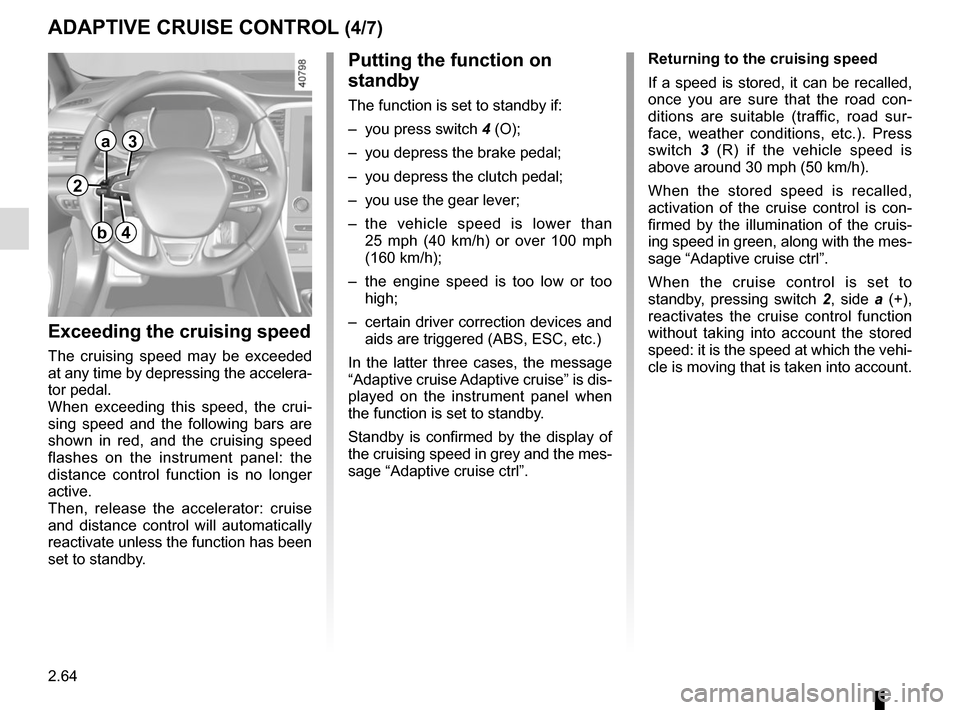
The function is set to standby if:
– you press switch 4 (O);
– you depress the brake pedal;
– you depress the clutch pedal;
– you use the gear lever;
– the vehicle speed is lower than 25 mph (40 km/h) or over 100 mph
(160 km/h);
– the engine speed is too low or too high;
– certain driver correction devices and aids are triggered (ABS, ESC, etc.)
In the latter three cases, the message
“Adaptive cruise Adaptive cruise” is dis-
played on the instrument panel when
the function is set to standby.
Standby is confirmed by the display of
the cruising speed in grey and the mes-
sage “Adaptive cruise ctrl”. Returning to the cruising speed
If a speed is stored, it can be recalled,
once you are sure that the road con-
ditions are suitable (traffic, road sur-
face, weather conditions, etc.). Press
switch
3 (R) if the vehicle speed is
above around 30 mph (50 km/h).
When the stored speed is recalled,
activation of the cruise control is con-
firmed by the illumination of the cruis-
ing speed in green, along with the mes-
sage “Adaptive cruise ctrl”.
When the cruise control is set to
standby, pressing switch 2, side a (+),
reactivates the cruise control function
without taking into account the stored
speed: it is the speed at which the vehi-
cle is moving that is taken into account.
2
a
b
3
4