phone RENAULT MEGANE 2017 4.G R Link 2 User Guide
[x] Cancel search | Manufacturer: RENAULT, Model Year: 2017, Model line: MEGANE, Model: RENAULT MEGANE 2017 4.GPages: 130, PDF Size: 5.83 MB
Page 26 of 130
1.20
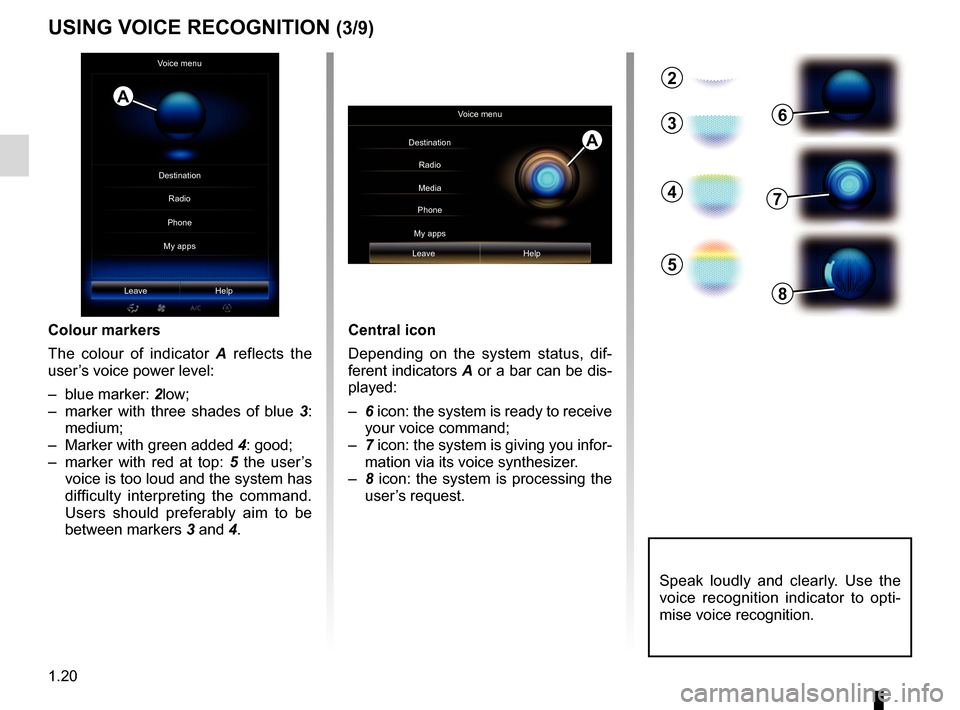
Central icon
Depending on the system status, dif-
ferent indicators A or a bar can be dis-
played:
– 6 icon: the system is ready to receive
your voice command;
– 7 icon: the system is giving you infor-
mation via its voice synthesizer.
– 8 icon: the system is processing the
user’s request.
2
3
4
5
6
7
8
Colour markers
The colour of indicator A reflects the
user’s voice power level:
– blue marker: 2low;
– marker with three shades of blue 3:
medium;
– Marker with green added 4: good;
– marker with red at top: 5 the user’s
voice is too loud and the system has
difficulty interpreting the command.
Users should preferably aim to be
between markers 3 and 4.
Speak loudly and clearly. Use the
voice recognition indicator to opti-
mise voice recognition.
A
Voice menu
Leave Help
Voice menu
Destination Radio
Phone
My apps Media
Leave Help
A
USING VOICE RECOGNITION (3/9)
Destination Phone
My apps Radio
Page 27 of 130
1.21
“Previous destinations”
To retrieve an address already entered
using voice control:
– say “Previous destinations” after the second beep, then select your desti-
nation;
– the system will give you the address it has understood - confirm your des-
tination to begin guidance.
Note: When using voice recognition,
always wait for a beep before speaking.
Note: When you enter an address, you
can change country as long as this
country is supported by the system’s
language.
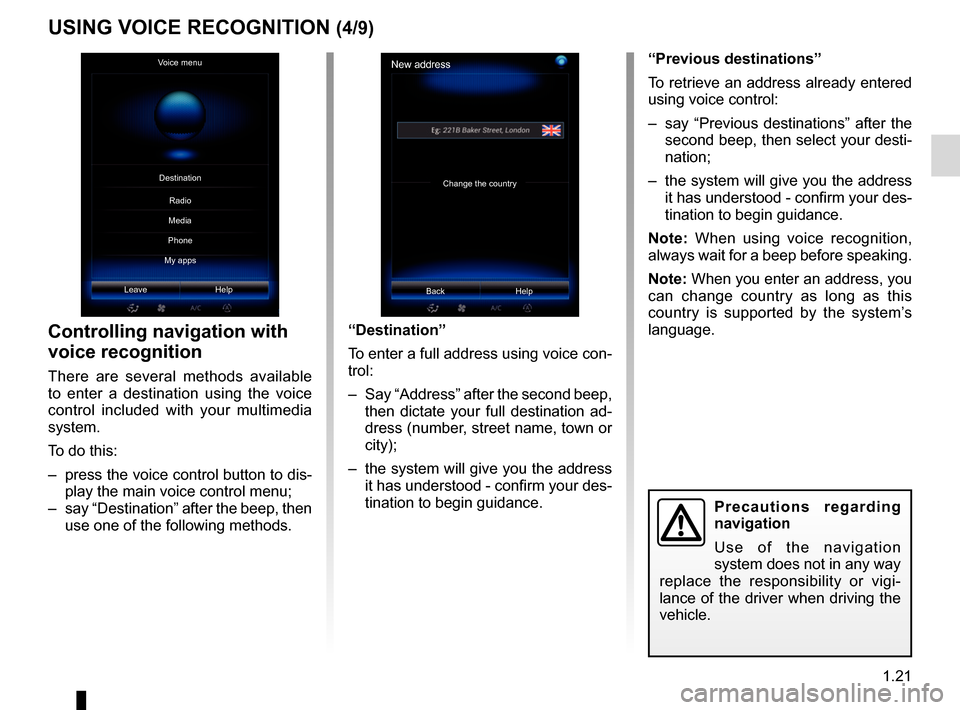
Controlling navigation with
voice recognition
There are several methods available
to enter a destination using the voice
control included with your multimedia
system.
To do this:
– press the voice control button to dis- play the main voice control menu;
– say “Destination” after the beep, then use one of the following methods. “Destination”
To enter a full address using voice con-
trol:
– Say “Address” after the second beep,
then dictate your full destination ad-
dress (number, street name, town or
city);
– the system will give you the address it has understood - confirm your des-
tination to begin guidance.
USING VOICE RECOGNITION (4/9)
Precautions regarding
navigation
Use of the navigation
system does not in any way
replace the responsibility or vigi-
lance of the driver when driving the
vehicle.
New address
Change the country
Back Help
Voice menu
Leave Help
Destination
Phone
My apps Radio
Media
Page 28 of 130
1.22
USING VOICE RECOGNITION (5/9)
“Address book”
To retrieve an address saved in he ad-
dress book using voice control:
– say “Address book” after the second beep, then select your destination;
– the system will give you the address it has understood - confirm your des-
tination to begin guidance.
“Home”
To retrieve your home address using
voice control:
– after the second beep, say “go home”;
– the system will indicate your pre-re- corded home address. Confirm your
destination to begin guidance.
Note: To use the “go home” voice func-
tion, you have to save a home address.
For further information on saving a
home address, please refer to the sec-
tion on “Navigation settings”.Multimodality
Multimodality enables the user to
complete an address or a telephone
number, using voice control, which was
entered using the multimedia screen,
and vice versa.
Use
When you start to enter an address
using the multimedia system keypad:
– press the voice control button;
– complete the address after the beep (for example if you have entered your
destination city, the system will ask
you for the street name and number).
“Work”
To retrieve your work address using
voice control:
– after the second beep, say “go to
work”;
– the system gives your pre-recorded work address. Confirm your destina-
tion to begin guidance.
Note: To use the “go to work” voice
function, you have to save a work ad-
dress. For further information on saving
a work address, please refer to the sec-
tion on “Navigation settings”.
Page 29 of 130
1.23
USING VOICE RECOGNITION (6/9)
“Points of interest”
To search for a point of interest using
voice control:
– press the voice control button to dis-play the main voice control menu;
– say “Destination” after the beep;
– after a second bleep, say “points of interest”;
– search for a point of interest (petrol station, car park etc.);
– search for the place where the place of interest is.
For further information about using
points of interest, please refer to the
section on “Entering a destination”.Using favourites with voice
recognition
The favourite contacts added to your
home pages with a saved telephone
number or address can be called di-
rectly using voice recognition. To do
this:
– press the voice control button to dis- play the main voice control menu;
– say “Display my favourites” after the beep.
The system displays the saved
favourite(s).
– Say the “favourite” you want to use (e.g.: if the “Favourites” saved is
“Jane”, say “Call Jane” or “Go to
Jane”).
Controlling radio with voice
recognition
You can activate the radio using the
voice control included in your multime-
dia system. To do this:
– press the voice control button to dis-play the main voice control menu;
– say “Radio” after the beep, then the radio band you wish to listen to (FM
or AM):
– “FM";
– “AM";
– “DR".
– Say the desired frequency (for exam- ple “Listen to 94.4”) or your choice
of search mode to find a radio sta-
tion: stations (not available for AM)
or "Presets” (for example “Listen to
preset 1”);
To change the band while listening, say
“change band” in the radio menu.
Page 30 of 130
1.24
To change the audio source, say
“change source” from the “Media
menu”.
USING VOICE RECOGNITION (7/9)
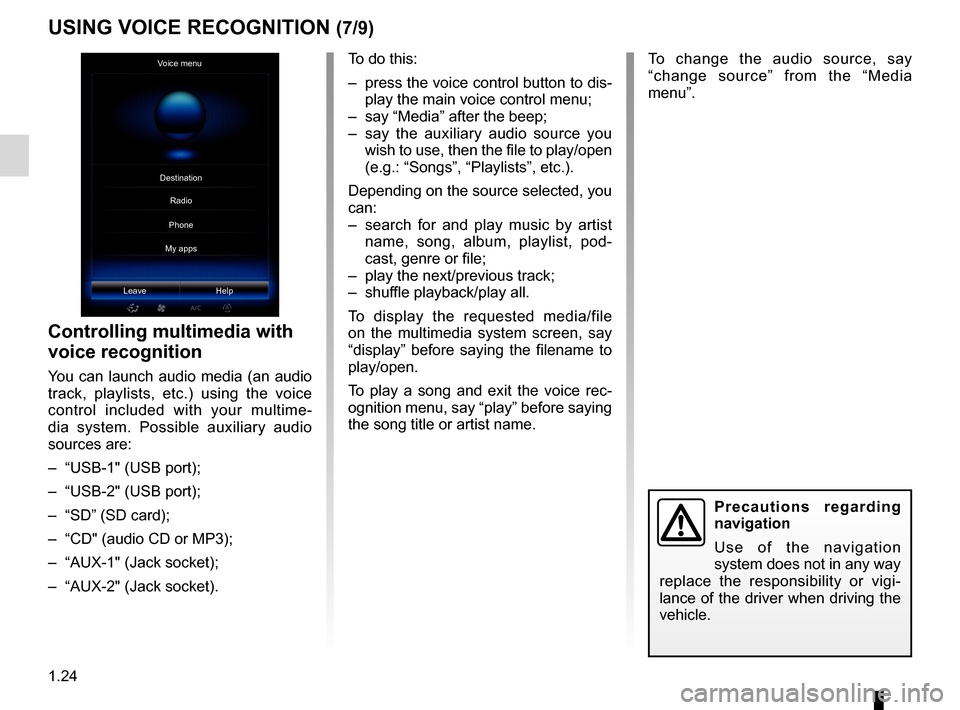
Voice menu
Leave Help
Controlling multimedia with
voice recognition
You can launch audio media (an audio
track, playlists, etc.) using the voice
control included with your multime-
dia system. Possible auxiliary audio
sources are:
– “USB-1" (USB port);
– “USB-2" (USB port);
– “SD” (SD card);
– “CD" (audio CD or MP3);
– “AUX-1" (Jack socket);
– “AUX-2" (Jack socket). To do this:
– press the voice control button to dis-
play the main voice control menu;
– say “Media” after the beep;
– say the auxiliary audio source you wish to use, then the file to play/open
(e.g.: “Songs”, “Playlists”, etc.).
Depending on the source selected, you
can:
– search for and play music by artist name, song, album, playlist, pod-
cast, genre or file;
– play the next/previous track;
– shuffle playback/play all.
To display the requested media/file
on the multimedia system screen, say
“display” before saying the filename to
play/open.
To play a song and exit the voice rec-
ognition menu, say “play” before saying
the song title or artist name.
Precautions regarding
navigation
Use of the navigation
system does not in any way
replace the responsibility or vigi-
lance of the driver when driving the
vehicle.
Destination
Phone
My apps Radio
Page 31 of 130
1.25
USING VOICE RECOGNITION (8/9)Multimodality
Multimodality enables the user to
complete an address or a telephone
number, using voice control, which was
entered using the multimedia screen,
and vice versa.
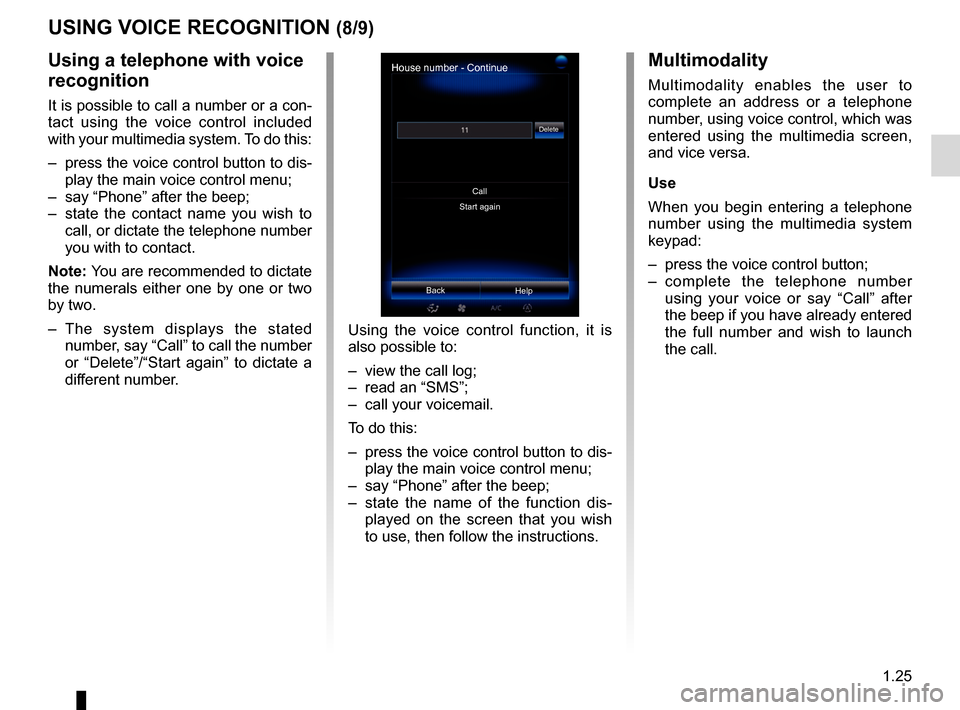
Use
When you begin entering a telephone
number using the multimedia system
keypad:
– press the voice control button;
– complete the telephone number using your voice or say “Call” after
the beep if you have already entered
the full number and wish to launch
the call.
House number - Continue
Start again
Help
Call
Delete
Back
Using a telephone with voice
recognition
It is possible to call a number or a con-
tact using the voice control included
with your multimedia system. To do this:
– press the voice control button to dis-
play the main voice control menu;
– say “Phone” after the beep;
– state the contact name you wish to call, or dictate the telephone number
you with to contact.
Note: You are recommended to dictate
the numerals either one by one or two
by two.
– The system displays the stated number, say “Call” to call the number
or “Delete”/“Start again” to dictate a
different number. Using the voice control function, it is
also possible to:
– view the call log;
– read an “SMS”;
– call your voicemail.
To do this:
– press the voice control button to dis-
play the main voice control menu;
– say “Phone” after the beep;
– state the name of the function dis- played on the screen that you wish
to use, then follow the instructions.
Page 32 of 130
1.26
USING VOICE RECOGNITION (9/9)
“Help”
To find out more about using voice
functions:
– press the voice control button, then say “Help”.
The system displays a number of help
categories on the screen.
– Select the required function.
The “Help” function is available at all
times. For example, if you wish to find
the “Phone” on the screen and you say
“Help”, the help voice will assist you in
using the function.
Launch an application using
voice recognition
You can launch an app using the voice
control included with your multimedia
system. To do this:
– press the voice control button to dis- play the main voice control menu;
– say “My apps” after the beep;
– state the name or number (displayed in front of the app name) of the app
you wish to run to start using it imme-
diately.
Precautions regarding
navigation
Use of the navigation
system does not in any way
replace the responsibility or vigi-
lance of the driver when driving the
vehicle.
Page 73 of 130

4.1
Phone
Pairing/unpairing a telephone . . . . . . . . . . . . . . . . . . . . . . . . . . . . . . . . . . . .\
. . . . . . . . . . . . . . . . . . 4.2
Connecting/disconnecting a telephone . . . . . . . . . . . . . . . . . . . . . . . . . . . . . . . . . . . . \
. . . . . . . . . . . 4.4
Phone call . . . . . . . . . . . . . . . . . . . . . . . . . . . . . . . . . . . .\
. . . . . . . . . . . . . . . . . . . . . . . . . . . . . . . . . 4.6
Phonebook . . . . . . . . . . . . . . . . . . . . . . . . . . . . . . . . . . . .\
. . . . . . . . . . . . . . . . . . . . . . . . . . . . . . . . 4.8
Call log. . . . . . . . . . . . . . . . . . . . . . . . . . . . . . . . . . . . \
. . . . . . . . . . . . . . . . . . . . . . . . . . . . . . . . . . . . 4.9
Dial number . . . . . . . . . . . . . . . . . . . . . . . . . . . . . . . . . . . . \
. . . . . . . . . . . . . . . . . . . . . . . . . . . . . . . . 4.10
SMS . . . . . . . . . . . . . . . . . . . . . . . . . . . . . . . . . . . . \
. . . . . . . . . . . . . . . . . . . . . . . . . . . . . . . . . . . . . . 4.11
Voice mail . . . . . . . . . . . . . . . . . . . . . . . . . . . . . . . . . . . .\
. . . . . . . . . . . . . . . . . . . . . . . . . . . . . . . . . 4.12
Phone Settings . . . . . . . . . . . . . . . . . . . . . . . . . . . . . . . . . . . .\
. . . . . . . . . . . . . . . . . . . . . . . . . . . . . 4.13
Page 74 of 130
4.2
PAIRING, UNPAIRING A TELEPHONE (1/2)
– select your phone on the proposed list.
Your phone is now paired to the multi-
media system.
Depending on the model, and if
the system so requests, enter the
Bluetooth® code on your telephone to
pair it to the multimedia system, or con-
firm the pairing request.
Your phone may ask for authorisation
to share your contacts, call logs and
media.
Accept sharing to find this information
on the multimedia system.
"Discovery mode"
When the multimedia system searches
for a telephone, press the button
Discovery mode to make the multime-
dia system visible to other Bluetooth®
devices for a short period of time. This
function enables your phone to be
paired to the multimedia system via
your phone.
For more information about activating
the visible status of your phone, please
refer to your telephone instructions.
Searching device
No
To use the hands-free features, you need to establish a Bluetooth connection between
your phone and your system. Do you want to do that now ?
OK
For safety reasons, carry
out these operations when
the vehicle is stationary.
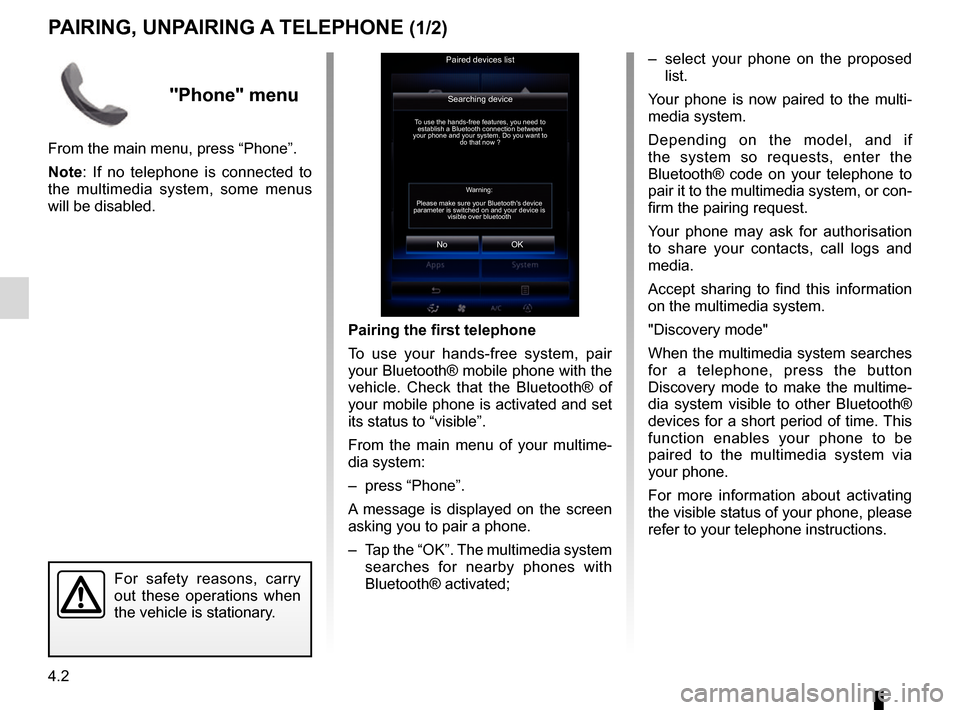
Pairing the first telephone
To use your hands-free system, pair
your Bluetooth® mobile phone with the
vehicle. Check that the Bluetooth® of
your mobile phone is activated and set
its status to “visible”.
From the main menu of your multime-
dia system:
– press “Phone”.
A message is displayed on the screen
asking you to pair a phone.
– Tap the “OK”. The multimedia system
searches for nearby phones with
Bluetooth® activated;
Paired devices list
Warning:
Please make sure your Bluetooth's device
parameter is switched on and your device is visible over bluetooth
"Phone" menu
From the main menu, press “Phone”.
Note: If no telephone is connected to
the multimedia system, some menus
will be disabled.
Page 75 of 130
4.3
Pairing another telephone
To pair a new telephone to the system:
– Activate the Bluetooth® connection on your telephone and set its status
to “visible”.
– From the main menu of the mul- timedia system, press “Phone”,
“Settings”, “Paired devices list” then
“Add device” at the bottom of the
screen.
A message is displayed on the screen
asking you to confirm the device search.
– Confirm by pressing “OK”.
The multimedia system searches for
nearby phones with Bluetooth® acti-
vated.
– Select your telephone from the list of devices detected.
Your phone is now paired to the multi-
media system.
Depending on the model, and if
the system so requests, enter the
Bluetooth® code on your telephone to
pair it to the multimedia system, or con-
firm the pairing request.
PAIRING, UNPAIRING A TELEPHONE (2/2)
Unpairing a phone
To unpair a telephone from the multi-
media system:
– from the main menu select “Phone”, “Settings” then “Paired devices list”.
– From the list of paired telephones on the “Paired devices list” menu, press
the pop-up menu button and select
“Delete devices”.
– Select the device(s) to delete a telephone from the list then press
“Delete”.
Note: If you want to delete all the paired
devices, press the pop-up menu button,
then "Select All" and "Delete".
Your phone may ask for authorisation
to share your contacts, call logs and
media. Accept sharing to find this infor-
mation on the multimedia system.
Note: The multimedia system can save
up to six telephones.
You can pair two phones simulta-
neously: one for multimedia and an-
other for calling.