warning lights RENAULT MEGANE 2018 Owner's Manual
[x] Cancel search | Manufacturer: RENAULT, Model Year: 2018, Model line: MEGANE, Model: RENAULT MEGANE 2018Pages: 348, PDF Size: 9.25 MB
Page 70 of 348

The display of information shown below DEPENDS ON THE VEHICLE EQUIPMENT \
AND COUNTRY.
\fFree wheel warning light in
mode ECO
It lights up in mode ECO when the
“Free whee")
1.64
WARNING LIGHTS (5/6)
The display of information shown below DEPENDS ON THE VEHICLE EQUIPMENT \
AND COUNTRY.
\fFree wheel warning light in
mode ECO
It lights up in mode ECO when the
“Free wheel in mode ECO” is activated
(ON) in the user settings.
The warning light colour is dim when
the vehicle is not while freewheeling.
This warning light is bright when the ve-
hicle is while freewheeling (automatic
neutral).
Please refer to the information on
“Driving advice, ECO-driving” in
Section 2.Assisted parking brake fault
light
Please refer to the information on the
“Assisted parking brake” in Section 2.
Emergency active brake
assist
Refer to the information on “Driving cor-
rection devices and aids” in Section 2.
Mode warning light ECO
This comes on when ECO
mode is activated.
Please refer to the information on “Eco-
driving” in Section 2.
Tyre pressure monitoring
system
Refer to the information on the “Tyre
pressure monitoring system” in
Section 2.
Rear seat belt reminder (depending
on vehicle)
Warning light
ß comes on, accom-
panied (depending on the vehicle) by
a message indicating the number of
fastened seat belts on the instrument
panel for approximately 30 seconds,
each time the vehicle is started, a door
is opened or a rear seat belt is fas-
tened/unfastened. Check that the rear
passengers are wearing seat belts and
that the number of seat belts shown as
fastened corresponds to the number of
rear seat places occupied.
Page 71 of 348

The display of information shown below DEPENDS ON THE VEHICLE EQUIPMENT \
AND COUNTRY.
On display C
Passenger airbag ON
Please refer to the information
on “Child safe")
1.65
WARNING LIGHTS (6/6)
The display of information shown below DEPENDS ON THE VEHICLE EQUIPMENT \
AND COUNTRY.
On display C
Passenger airbag ON
Please refer to the information
on “Child safety: deactivating/activating
the front passenger airbag” in Section 1.
¹Passenger airbag OFF
Please refer to the information
on “Child safety: deactivating/activating
the front passenger airbag” in Section 1.
ßDriver’s seat belt reminder
and, depending on the vehi-
cle, front passenger seat belt re-
minder.
This lights up when the ignition is
switched on. If the driver's or front pas-
senger's seat belt (if this seat is occu-
pied) is not fastened as soon as the
vehicle has reached approximately
12.4 mph (20 km/h), it flashes and a
bleep sounds for around 120 seconds.
Note: an object placed on the passen-
ger seat base can activate the warning
light.
C
Page 72 of 348
1.66
DISPLAYS AND INDICATORS (1/6)
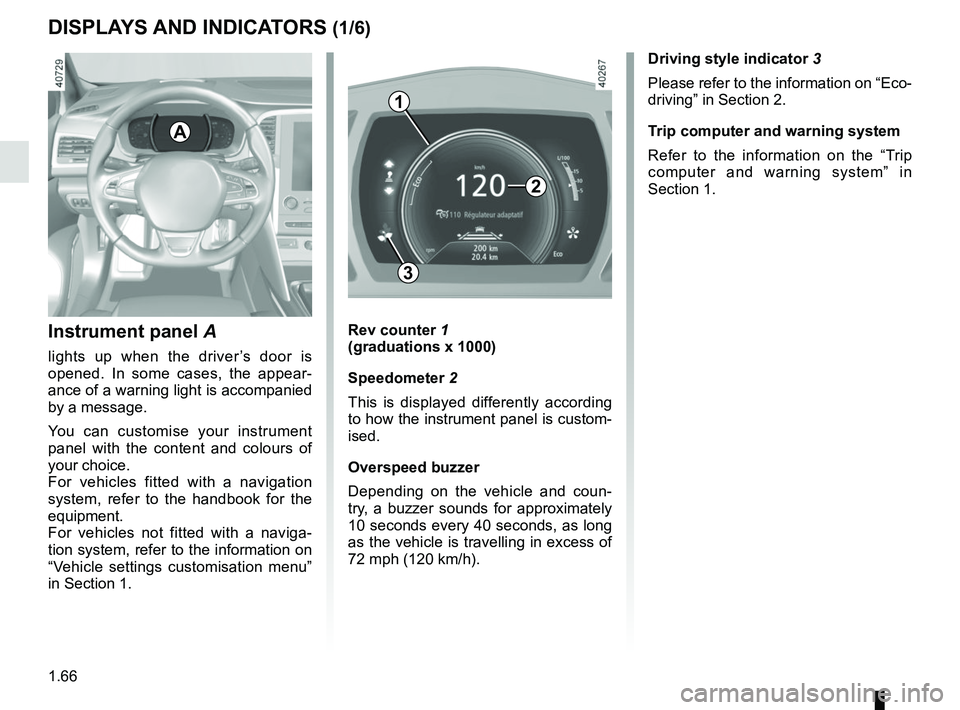
Instrument panel A
lights up when the driver’s door is
opened. In some cases, the appear-
ance of a warning light is accompanied
by a message.
You can customise your instrument
panel with the content and colours of
your choice.
For vehicles fitted with a navigation
system, refer to the handbook for the
equipment.
For vehicles not fitted with a naviga-
tion system, refer to the information on
“Vehicle settings customisation menu”
in Section 1.
Rev counter 1
(graduations x 1000)
Speedometer 2
This is displayed differently according
to how the instrument panel is custom-
ised.
Overspeed buzzer
Depending on the vehicle and coun-
try, a buzzer sounds for approximately
10 seconds every 40 seconds, as long
as the vehicle is travelling in excess of
72 mph (120 km/h).
3
A
Driving style indicator 3
Please refer to the information on “Eco-
driving” in Section 2.
Trip computer and warning system
Refer to the information on the “Trip
computer and warning system” in
Section 1.
1
2
Page 74 of 348
1.68
DISPLAYS AND INDICATORS (3/6)
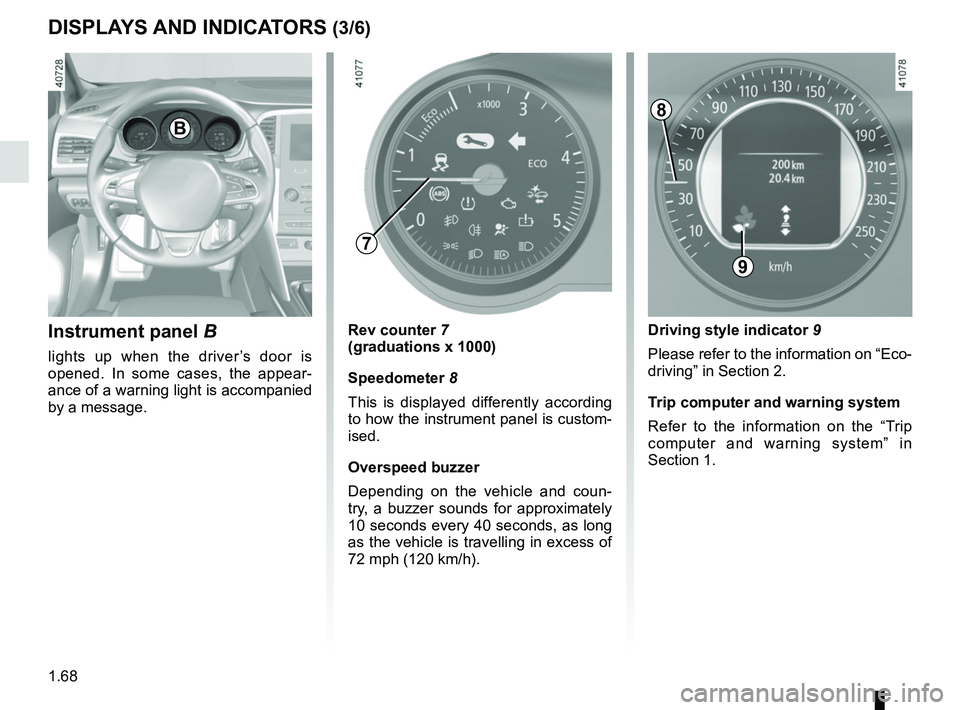
Instrument panel B
lights up when the driver’s door is
opened. In some cases, the appear-
ance of a warning light is accompanied
by a message.
Rev counter 7
(graduations x 1000)
Speedometer 8
This is displayed differently according
to how the instrument panel is custom-
ised.
Overspeed buzzer
Depending on the vehicle and coun-
try, a buzzer sounds for approximately
10 seconds every 40 seconds, as long
as the vehicle is travelling in excess of
72 mph (120 km/h).
9
B
Driving style indicator 9
Please refer to the information on “Eco-
driving” in Section 2.
Trip computer and warning system
Refer to the information on the “Trip
computer and warning system” in
Section 1.
8
7
Page 86 of 348

1.80
TRIP COMPUTER AND WARNING SYSTEM: operating fault messages
These appear with the © warning light and mean that you should drive very carefully to an author\
ised dealer as
soon as possible. If you fail to follow this recommendation, you risk da\
maging your vehicle.
They disappear when the display selection key is pressed or after severa\
l seconds and are stored in the computer log. The
© warning light stays on. Examples of operating fault messages are given \
in the following pages.
Examples of messages Interpreting the display selected
“Clean diesel filter” Indicates the presence of water in the diesel filter; contact an approve\
d Dealer
as soon as possible.
“Check lighting” Indicates a fault in the headlights.
“Check vehicle” Indicates a fault in one of the pedal sensors, battery management system\
or oil
level sensor.
“Check airbag” Indicates a fault in the restraint system in addition to the seat belts.\
In the event
of an accident, it is possible that they may not be triggered.
“Check antipollution system” Indicates a fault in the vehicle’s particle filter system.
Page 89 of 348
1.83
VEHICLE SETTINGS CUSTOMISATION MENU (2/2)
34
Once a line has been selected, press
the switch 3 OK to adjust the function.
If you select either “PARKING ASSIST
VOLUME” or “LANGUAGE”, you will
have to make a further selection (sound
volume of the parking distance control
or instrument panel language). In this
case, make your selection and con-
firm it by holding the switch 3 OK – the
selected value is shown by a
~ in
front of the line.
To exit the menu, press the control 4
upwards or downwards. It may be nec-
essary to carry out this operation sev-
eral times.
For further explanations of the Free
wheel in ECO mode function refer to
the information on “Driving Advice,
ECO driving” in section 2.
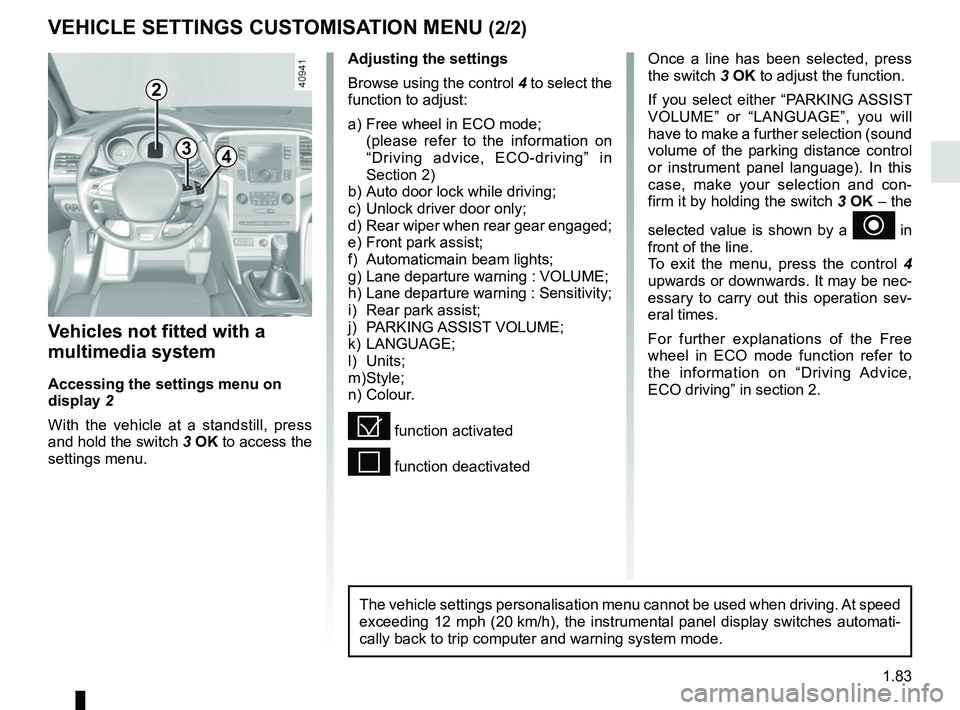
Vehicles not fitted with a
multimedia system
Accessing the settings menu on
display 2
With the vehicle at a standstill, press
and hold the switch 3 OK to access the
settings menu.
Adjusting the settings
Browse using the control 4 to select the
function to adjust:
a) Free wheel in ECO mode;
(please refer to the information on “Driving advice, ECO-driving” in
Section 2)
b) Auto door lock while driving;
c) Unlock driver door only;
d) Rear wiper when rear gear engaged;
e) Front park assist;
f) Automaticmain beam lights;
g) Lane departure warning : VOLUME;
h) Lane departure warning : Sensitivity;
i) Rear park assist;
j) PARKING ASSIST VOLUME;
k) LANGUAGE;
l) Units;
m) Style;
n) Colour.
= function activated
< function deactivated
2
The vehicle settings personalisation menu cannot be used when driving. At speed
exceeding 12 mph (20 km/h), the instrumental panel display switches automati-
cally back to trip computer and warning system mode.
Page 98 of 348
1.92
3
2
EXTERIOR LIGHTING AND SIGNALS (3/6)
1
5
6
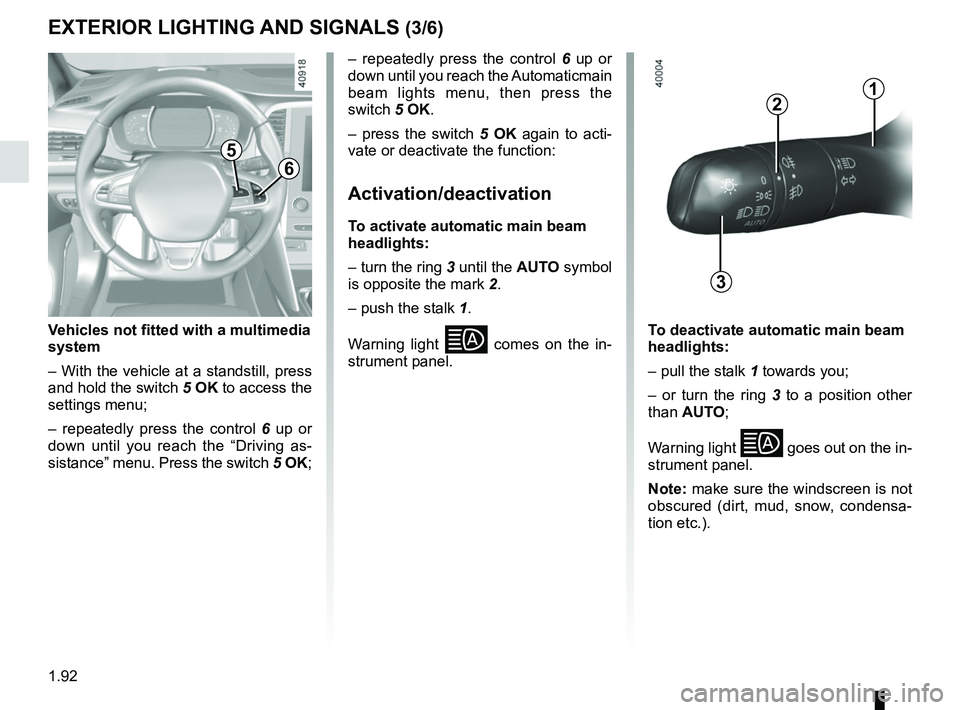
Vehicles not fitted with a multimedia
system
– With the vehicle at a standstill, press
and hold the switch 5 OK to access the
settings menu;
– repeatedly press the control 6 up or
down until you reach the “Driving as-
sistance” menu. Press the switch 5 OK; – repeatedly press the control
6 up or
down until you reach the Automaticmain
beam lights menu, then press the
switch 5 OK.
– press the switch 5 OK again to acti-
vate or deactivate the function:
Activation/deactivation
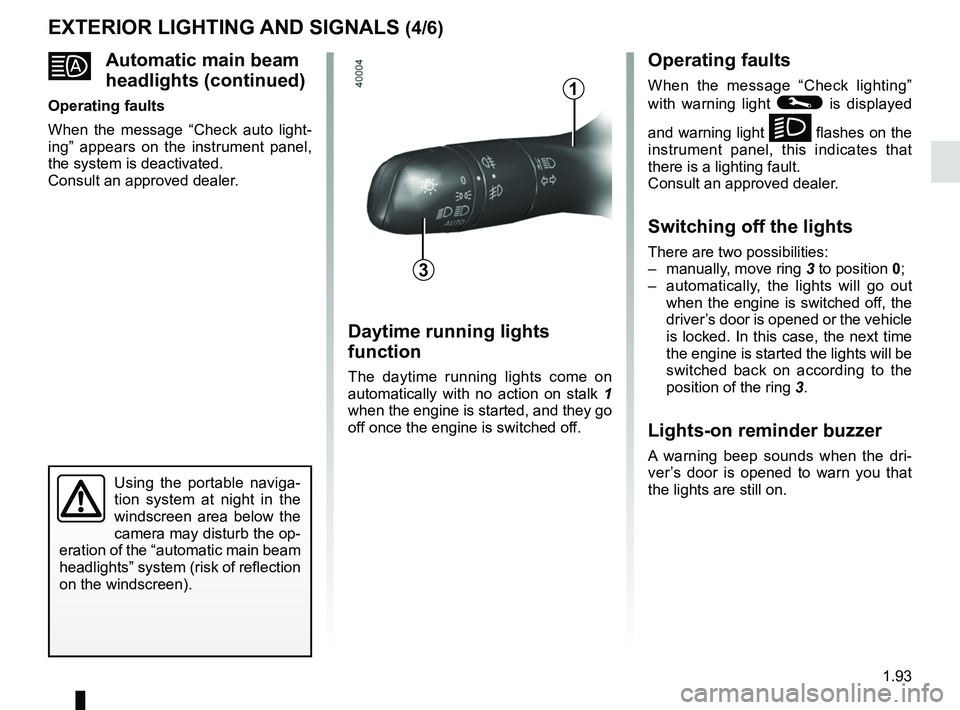
To activate automatic main beam
headlights:
– turn the ring 3 until the AUTO symbol
is opposite the mark 2.
– push the stalk 1.
Warning light
comes on the in-
strument panel. To deactivate automatic main beam
headlights:
– pull the stalk 1 towards you;
– or turn the ring 3 to a position other
than AUTO;
Warning light
goes out on the in-
strument panel.
Note: make sure the windscreen is not
obscured (dirt, mud, snow, condensa-
tion etc.).
Page 99 of 348
1.93
Automatic main beam
headlights (continued)
Operating faults
When the message “Check auto light-
ing” appears on the instrument panel,
the system is deactivated.
Consult an approved dealer.
EXTERIOR LIGHTING AND SIGNALS (4/6)Operating faults
When the message “Check lighting”
with warning light
© is displayed
and warning light
k flashes on the
instrument panel, this indicates that
there is a lighting fault.
Consult an approved dealer.
Switching off the lights
There are two possibilities:
– manually, move ring 3 to position 0;
– automatically, the lights will go out when the engine is switched off, the
driver’s door is opened or the vehicle
is locked. In this case, the next time
the engine is started the lights will be
switched back on according to the
position of the ring 3.
Lights-on reminder buzzer
A warning beep sounds when the dri-
ver’s door is opened to warn you that
the lights are still on.
Daytime running lights
function
The daytime running lights come on
automatically with no action on stalk 1
when the engine is started, and they go
off once the engine is switched off.
3
1
Using the portable naviga-
tion system at night in the
windscreen area below the
camera may disturb the op-
eration of the “automatic main beam
headlights” system (risk of reflection
on the windscreen).
Page 112 of 348
1.106
Persistent smell of
fuel
If you notice a persistent
smell of fuel you should:
– stop the vehicle as soon as traf- fic conditions allow and switch off
the ignition;
– switch on the hazard warning lights and ask your passengers
to leave the vehicle and to keep
away from traffic;
– contact an approved Dealer.
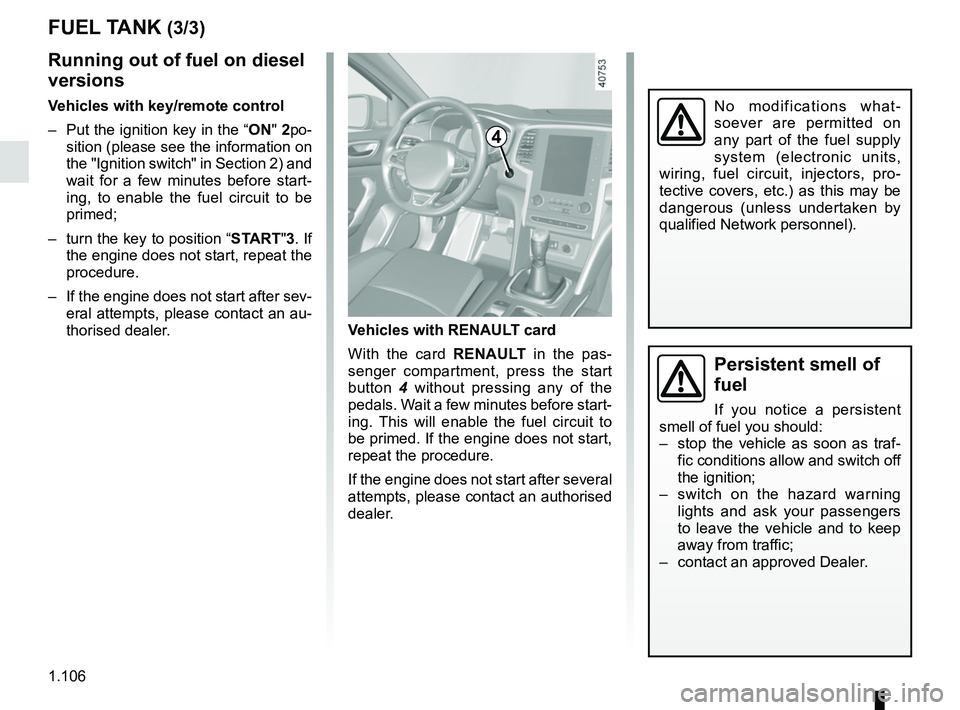
Vehicles with RENAULT card
With the card RENAULT in the pas-
senger compartment, press the start
button 4 without pressing any of the
pedals. Wait a few minutes before start-
ing. This will enable the fuel circuit to
be primed. If the engine does not start,
repeat the procedure.
If the engine does not start after several
attempts, please contact an authorised
dealer.
No modifications what-
soever are permitted on
any part of the fuel supply
system (electronic units,
wiring, fuel circuit, injectors, pro-
tective covers, etc.) as this may be
dangerous (unless undertaken by
qualified Network personnel).
4
FUEL TANK (3/3)
Running out of fuel on diesel
versions
Vehicles with key/remote control
– Put the ignition key in the “ON" 2po-
sition (please see the information on
the "Ignition switch" in Section 2) and
wait for a few minutes before start-
ing, to enable the fuel circuit to be
primed;
– turn the key to position “START"3. If the engine does not start, repeat the
procedure.
– If the engine does not start after sev- eral attempts, please contact an au-
thorised dealer.
Page 122 of 348
2.10
For all vehicles:
The warning light
on the instru-
ment panel is lit when the engine is on
standby. The vehicle equipment re-
mains operational while the engine is
stopped.
Depending on the vehicle, when the
engine switches to standby, the steer-
ing assistance may no longer be opera-
tional.
In this case it becomes operational
again when the engine is no longer on
standby or the speed exceeds approxi-
mately 0.62 mph (1 km/h) (downhill,
slope, etc.).
For manual gearboxes:
– the gearbox is in neutral;
– and the clutch pedal is released. If
the warning light
flashes, this
means that the clutch pedal is not
sufficiently released;
– and the vehicle speed is less than approximately 1.86 mph (3 km/h).
FUNCTION STOP AND START (1/4)
This system enables a reduced fuel
consumption and lower greenhouse
gas emissions.
The system is activated automati-
cally when the vehicle is started. While
driving, the system stops the engine
(standby) when the vehicle is at a
standstill (traffic jam, traffic lights, etc).
Conditions for engine
standby
The vehicle has set off from where it
was parked;
For automatic gearboxes:
– the gearbox is in position D, M or N;
– and the brake pedal is pressed (suf-ficiently hard);
– and the accelerator pedal is not pressed;
– and the speed is zero for around 1 second.
The engine remains on standby if posi-
tion P is selected, or if position N is se-
lected with the handbrake engaged and
the brake pedal released.
If the engine is put in
standby, the electronic
parking brake (depending
on the vehicle) is not ap-
plied automatically.If the engine stalls while the system
is in operation, pressing the clutch
pedal right down will start it again.
Keep your vehicle station-
ary when the engine is
on standby (shown by the
warning light
on the
instrument panel).
The ignition must be
switched off before leav-
ing the vehicle (please see
the information on “Starting,
stopping the engine” in Section 2).