light RENAULT MEGANE 2018 Repair Manual
[x] Cancel search | Manufacturer: RENAULT, Model Year: 2018, Model line: MEGANE, Model: RENAULT MEGANE 2018Pages: 348, PDF Size: 9.25 MB
Page 124 of 348
2.12
FUNCTION STOP AND START (3/4)
Conditions preventing the
standby of the engine
Certain conditions prevent the system
from using the engine standby function,
including when:
for vehicles equipped with a
RENAULT card:
– the driver’s door is not closed;
– the driver’s seatbelt is not fastened.
for all vehicles:
– reverse gear is engaged;
– the bonnet is not locked;
– the outdoor temperature is too low or too high (less than around 5°C or
higher than around 35°C);
– the battery is not sufficiently charged;
– the difference between the vehicle interior temperature and the auto-
matic climate control instruction is
too high;
– parking distance control is in opera- tion; – for vehicles with automatic gear-
boxes, the gradient is steeper than
approximately 12%;
– the “Clear View” function is activated (please see “Automatic climate con-
trol” in Section 3);
– the engine temperature is too low;
– the emission control system is being regenerated;
– Multi-Sense Sport mode is activated (depending on the vehicle);
– ...
Warning light
is displayed on the
instrument panel. This notifies you that
engine standby is not available.
Deactivate the Stop and
Start function for any opera-
tion performed in the engine
compartment.
Special case for vehicles with
a RENAULT card
With the engine on standby (traffic jam,
traffic lights, etc.), if the driver unfas-
tens the seat belt and opens the driv-
er’s door, or gets out of the seat, the
ignition is switched off.
The assisted parking brake is applied
automatically.
To restart and reactivate the Stop and
Start system, start the engine (please
refer to the information on "Starting,
stopping the engine" in Section 2).
Special case of vehicles with
a key
With the engine on standby (traffic
jam, traffic lights, etc.), if you get out of
the vehicle, a beep warns you that the
engine is on standby and has not been
stopped.
Page 125 of 348
2.13
FUNCTION STOP AND START (4/4)
Special feature of the automatic
engine re-start
Under certain conditions, the engine
can restart on its own in order to guar-
antee your safety and comfort.
This can occur especially when:
– the outdoor temperature is too low or too high (less than around 5°C or
higher than around 35°C);
– the “Clear View” function is activated (please see “Automatic climate con-
trol” in Section 3);
– the battery is not sufficiently charged;
– the vehicle speed is above 3 mph (5 km/h) (downhill slope, etc.);
– repeated pressing on the brake pedal or braking system require-
ment;
– ...
For vehicles fitted with a manual gear-
box, the restarting of the engine may be
stopped if the clutch pedal is released
too quickly and a gear is engaged.
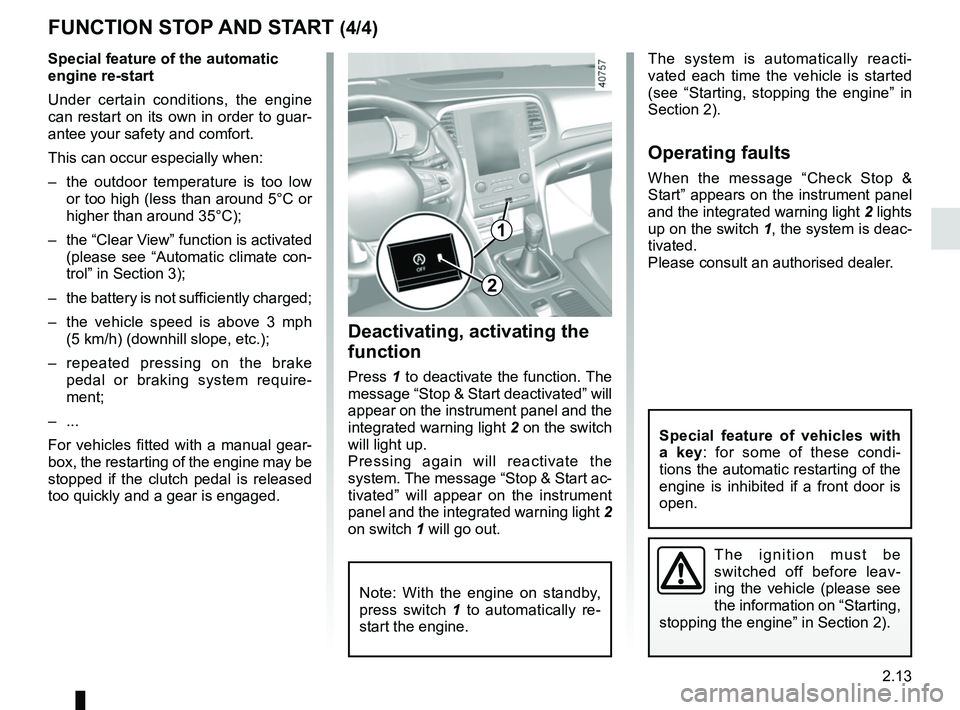
1
2
Deactivating, activating the
function
Press 1 to deactivate the function. The
message “Stop & Start deactivated” will
appear on the instrument panel and the
integrated warning light 2 on the switch
will light up.
Pressing again will reactivate the
system. The message “Stop & Start ac-
tivated” will appear on the instrument
panel and the integrated warning light 2
on switch 1 will go out.
Note: With the engine on standby,
press switch 1 to automatically re-
start the engine.
The system is automatically reacti-
vated each time the vehicle is started
(see “Starting, stopping the engine” in
Section 2).
Operating faults
When the message “Check Stop &
Start” appears on the instrument panel
and the integrated warning light 2 lights
up on the switch 1, the system is deac-
tivated.
Please consult an authorised dealer.
The ignition must be
switched off before leav-
ing the vehicle (please see
the information on “Starting,
stopping the engine” in Section 2).
Special feature of vehicles with
a key: for some of these condi-
tions the automatic restarting of the
engine is inhibited if a front door is
open.
Page 126 of 348
2.14
SPECIAL FEATURES OF PETROL VERSIONS
The following operating conditions:
– driving for long periods when the low fuel level warning light is lit;
– using leaded petrol;
– using fuel or lubrication additives which are not approved.
Or operating faults such as:
– faulty ignition system, running out of fuel or disconnected spark plugs re-
sulting in the engine misfiring or cut-
ting out when driving;
– loss of power,
as they may cause the catalytic con-
verter to overheat and thus reduce its
efficiency, or damage it irreparably
and cause heat damage to the vehi-
cle. If you notice any of the above operating
faults, have the necessary repairs car-
ried out as soon as possible by an ap-
proved Dealer.
These faults may be avoided by regu-
larly taking your vehicle to an approved
Dealer at the intervals specified in the
Maintenance document.
Starting problems
To avoid damaging the catalytic con-
verter,
do not keep trying to start the
engine (using the start button, or by
pushing or towing the vehicle) without
having identified and corrected the
starting fault.
If the fault cannot be identified, do not
keep trying to start the engine, but con-
tact an approved Dealer.
Do not park the vehicle or
run the engine in locations
where combustible sub-
stances or materials such as
grass or leaves can come into con-
tact with the hot exhaust system.
Page 127 of 348
2.15
SPECIAL FEATURES OF DIESEL VERSIONS
Diesel engine speed
Diesel engines are fitted with an injec-
tion pump which prevents the engine
speed being exceeded irrespective of
the gear selected.
If the message “Check antipollution
system” is displayed along with warn-
ing lights
Ä and ©, consult an
authorised dealer immediately.
When driving, depending on the fuel
grade used, it is possible that white
smoke may be emitted.
This is due to the exhaust particle filter
being cleaned automatically, and does
not affect the way the vehicle runs.
Running out of fuel
If the tank has been completely
drained, the system must be reprimed
after the tank is refilled: See “Fuel
tank” in section 1 before restarting the
engine.
Do not park the vehicle or
run the engine in locations
where combustible sub-
stances or materials such
as grass or leaves can come into
contact with the hot exhaust system.
Precautions to be taken in
winter
To avoid any faults in icy weather:
– ensure that the battery is always fully charged,
– always keep the diesel tank rela- tively full to avoid water vapour con-
densing in it and accumulating at the
bottom of the tank.
Page 128 of 348
2.16
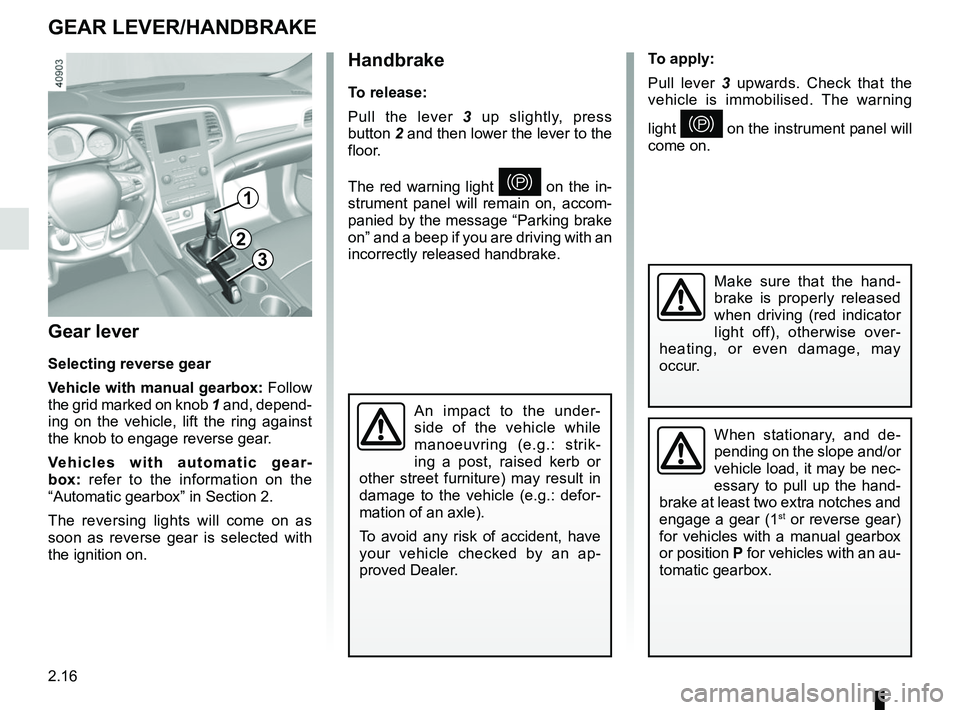
Gear lever
Selecting reverse gear
Vehicle with manual gearbox: Follow
the grid marked on knob 1 and, depend-
ing on the vehicle, lift the ring against
the knob to engage reverse gear.
Vehicles with automatic gear-
box: refer to the information on the
“Automatic gearbox” in Section 2.
The reversing lights will come on as
soon as reverse gear is selected with
the ignition on.
1
GEAR LEVER/HANDBRAKE
Handbrake
To release:
Pull the lever 3 up slightly, press
button 2 and then lower the lever to the
floor.
The red warning light
} on the in-
strument panel will remain on, accom-
panied by the message “Parking brake
on” and a beep if you are driving with an
incorrectly released handbrake.
3
2
When stationary, and de-
pending on the slope and/or
vehicle load, it may be nec-
essary to pull up the hand-
brake at least two extra notches and
engage a gear (1
st or reverse gear)
for vehicles with a manual gearbox
or position P for vehicles with an au-
tomatic gearbox.
An impact to the under-
side of the vehicle while
manoeuvring (e.g.: strik-
ing a post, raised kerb or
other street furniture) may result in
damage to the vehicle (e.g.: defor-
mation of an axle).
To avoid any risk of accident, have
your vehicle checked by an ap-
proved Dealer.
Make sure that the hand-
brake is properly released
when driving (red indicator
light off), otherwise over-
heating, or even damage, may
occur.
To apply:
Pull lever 3 upwards. Check that the
vehicle is immobilised. The warning
light
} on the instrument panel will
come on.
Page 129 of 348
2.17
ELECTRONIC PARKING BRAKE (1/3)
Note:
To indicate that the electronic parking
brake is released, a beep sounds and
the message “Apply parking brake” ap-
pears on the instrument panel:
– with the engine running: when the driver’s door is opened;
– with the engine switched off (eg. when the engine stalls): when a front
door is opened.
In this case, pull and release switch 2 to
apply the assisted parking brake.
Assisted release of the parking
brake
The brake will be released as soon as
the vehicle starts and accelerates.
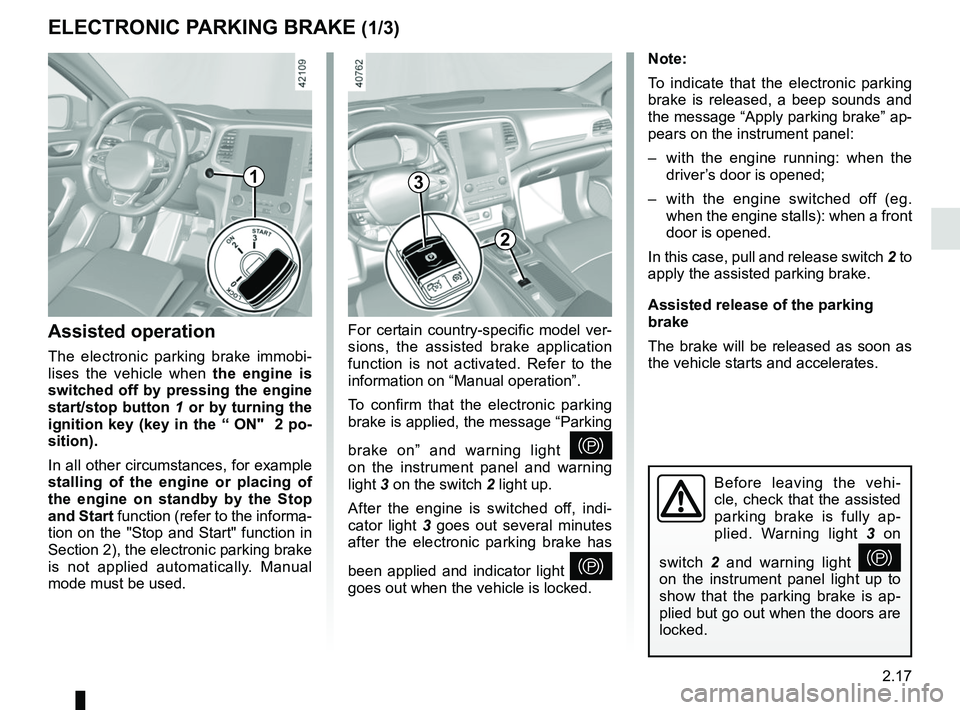
Assisted operation
The electronic parking brake immobi-
lises the vehicle when the engine is
switched off by pressing the engine
start/stop button 1 or by turning the
ignition key (key in the “ ON" 2 po-
sition).
In all other circumstances, for example
stalling of the engine or placing of
the engine on standby by the Stop
and Start function (refer to the informa-
tion on the "Stop and Start" function in
Section 2), the electronic parking brake
is not applied automatically. Manual
mode must be used. For certain country-specific model ver-
sions, the assisted brake application
function is not activated. Refer to the
information on “Manual operation”.
To confirm that the electronic parking
brake is applied, the message “Parking
brake on” and warning light
}
on the instrument panel and warning
light 3 on the switch 2 light up.
After the engine is switched off, indi-
cator light 3 goes out several minutes
after the electronic parking brake has
been applied and indicator light
}
goes out when the vehicle is locked.
Before leaving the vehi-
cle, check that the assisted
parking brake is fully ap-
plied. Warning light 3 on
switch 2 and warning light
}
on the instrument panel light up to
show that the parking brake is ap-
plied but go out when the doors are
locked.
3
2
1
Page 130 of 348
2.18
ELECTRONIC PARKING BRAKE (2/3)Special cases
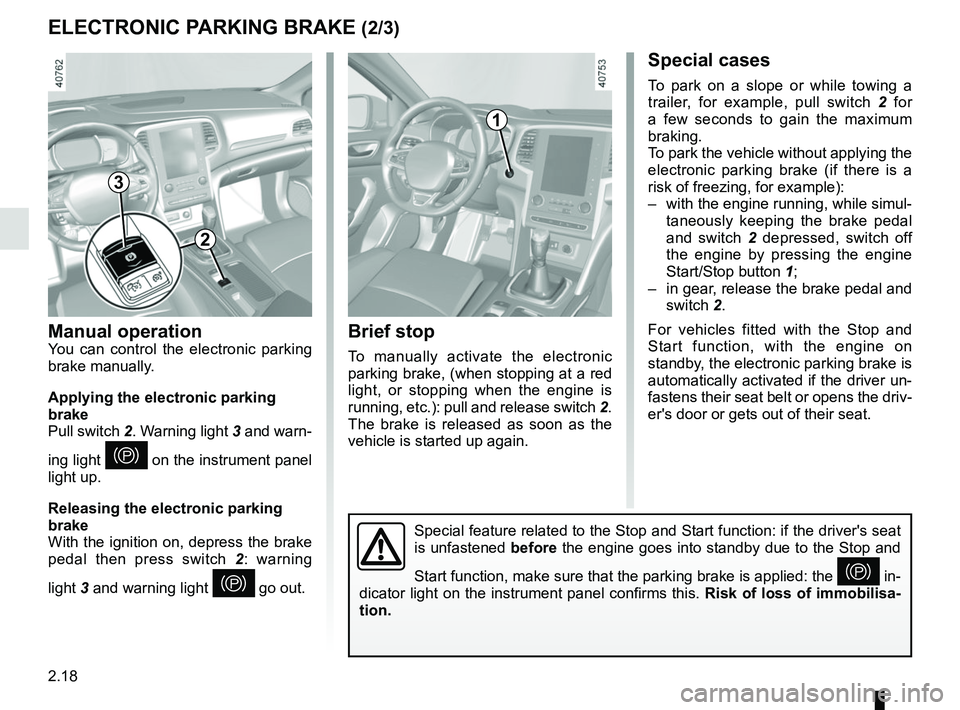
To park on a slope or while towing a
trailer, for example, pull switch 2 for
a few seconds to gain the maximum
braking.
To park the vehicle without applying the
electronic parking brake (if there is a
risk of freezing, for example):
– with the engine running, while simul- taneously keeping the brake pedal
and switch 2 depressed, switch off
the engine by pressing the engine
Start/Stop button 1;
– in gear, release the brake pedal and switch 2.
For vehicles fitted with the Stop and
Start function, with the engine on
standby, the electronic parking brake is
automatically activated if the driver un-
fastens their seat belt or opens the driv-
er's door or gets out of their seat.
Brief stop
To manually activate the electronic
parking brake, (when stopping at a red
light, or stopping when the engine is
running, etc.): pull and release switch 2.
The brake is released as soon as the
vehicle is started up again.
Manual operationYou can control the electronic parking
brake manually.
Applying the electronic parking
brake
Pull switch 2. Warning light 3 and warn-
ing light
} on the instrument panel
light up.
Releasing the electronic parking
brake
With the ignition on, depress the brake
pedal then press switch 2: warning
light 3 and warning light
} go out.
1
Special feature related to the Stop and Start function: if the driver's \
seat
is unfastened before the engine goes into standby due to the Stop and
Start function, make sure that the parking brake is applied: the
} in-
dicator light on the instrument panel confirms this. Risk of loss of immobilisa-
tion.
3
2
Page 131 of 348
2.19
Operating faults
– If there is a fault, the © warning
light illuminates on the instrument
panel accompanied by the “Check
parking brake” message and, in
some cases, the
} warning
light.
Please contact an authorised dealer
as soon as possible.
– If there is an assisted parking brake fault, the warning light
® comes
on, along with the message “Braking
system fault”, a beep and, in some
cases, the warning light
}.
This means that you must stop as
soon as traffic conditions allow.
Versions with an automatic
gearbox
For safety reasons, automatic release
is deactivated when the driver’s door
is open or not shut properly and the
engine is running (in order to prevent
the vehicle from moving without the
driver). The “Release parking brake
manually” message appears on the
instrument panel when the driver de-
presses the accelerator.
ELECTRONIC PARKING BRAKE (3/3)
It is therefore essential to
immobilise the vehicle by
engaging first gear (manual
gearbox) or position P (au-
tomatic gearbox). If the slope re-
quires it, chock the vehicle.
Never leave your vehicle
without moving the selec-
tor lever to position P and
switching off the engine.
This is because when the vehicle is
stationary with the engine running
and a gear engaged, the vehicle
may begin to move.
There is a risk of accidents.If no lights or sounds are ap-
parent, this indicates a fault
in the instrument panel. This
indicates that it is essential
to stop immediately (as soon as traf-
fic conditions allow). Ensure that the
vehicle is correctly immobilised and
contact an approved Dealer.
If the message “Electric fail-
ure DANGER” or “Check
battery” appears, manually
activate the electronic park-
ing brake by pulling switch 2 (or po-
sition the gear lever in P for auto-
matic gearboxes) before stopping
the engine.
Risk of loss of immobilisation of the
vehicle.
Contact an authorised dealer.
Page 132 of 348
2.20
DRIVING ADVICE, ECO-DRIVING (1/5)
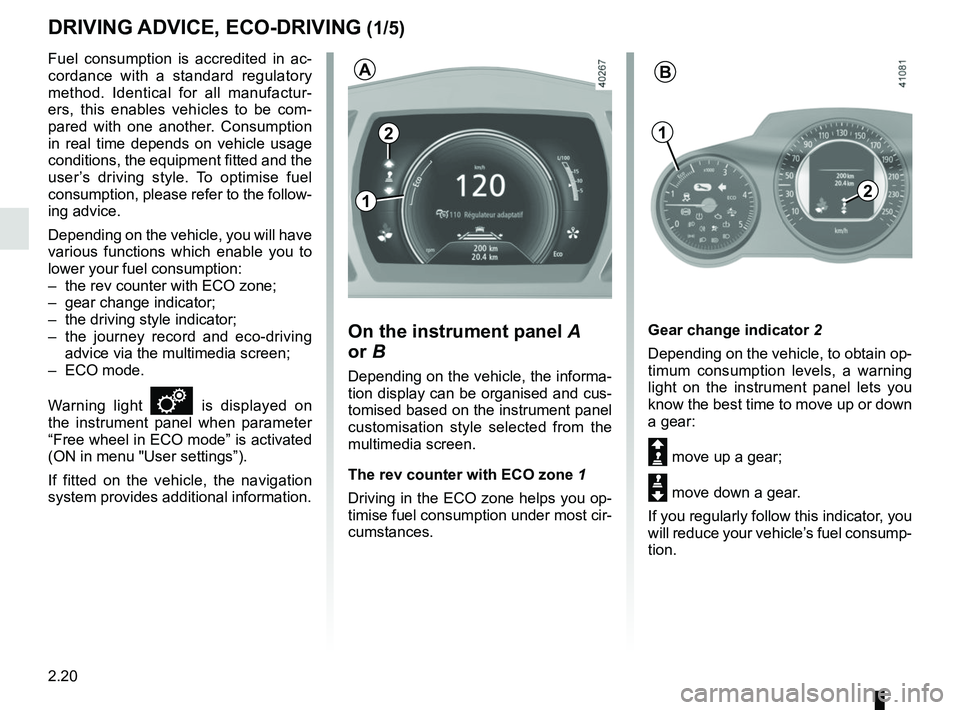
Gear change indicator 2
Depending on the vehicle, to obtain op-
timum consumption levels, a warning
light on the instrument panel lets you
know the best time to move up or down
a gear:
Š move up a gear;
‰ move down a gear.
If you regularly follow this indicator, you
will reduce your vehicle’s fuel consump-
tion.
Fuel consumption is accredited in ac-
cordance with a standard regulatory
method. Identical for all manufactur-
ers, this enables vehicles to be com-
pared with one another. Consumption
in real time depends on vehicle usage
conditions, the equipment fitted and the
user’s driving style. To optimise fuel
consumption, please refer to the follow-
ing advice.
Depending on the vehicle, you will have
various functions which enable you to
lower your fuel consumption:
– the rev counter with ECO zone;
– gear change indicator;
– the driving style indicator;
– the journey record and eco-driving
advice via the multimedia screen;
– ECO mode.
Warning light
is displayed on
the instrument panel when parameter
“Free wheel in ECO mode” is activated
(ON in menu "User settings”).
If fitted on the vehicle, the navigation
system provides additional information.
On the instrument panel A
or B
Depending on the vehicle, the informa-
tion display can be organised and cus-
tomised based on the instrument panel
customisation style selected from the
multimedia screen.
The rev counter with ECO zone 1
Driving in the ECO zone helps you op-
timise fuel consumption under most cir-
cumstances.
2
1
AB
2
1
Page 133 of 348
2.21
DRIVING ADVICE, ECO-DRIVING (2/5)
4
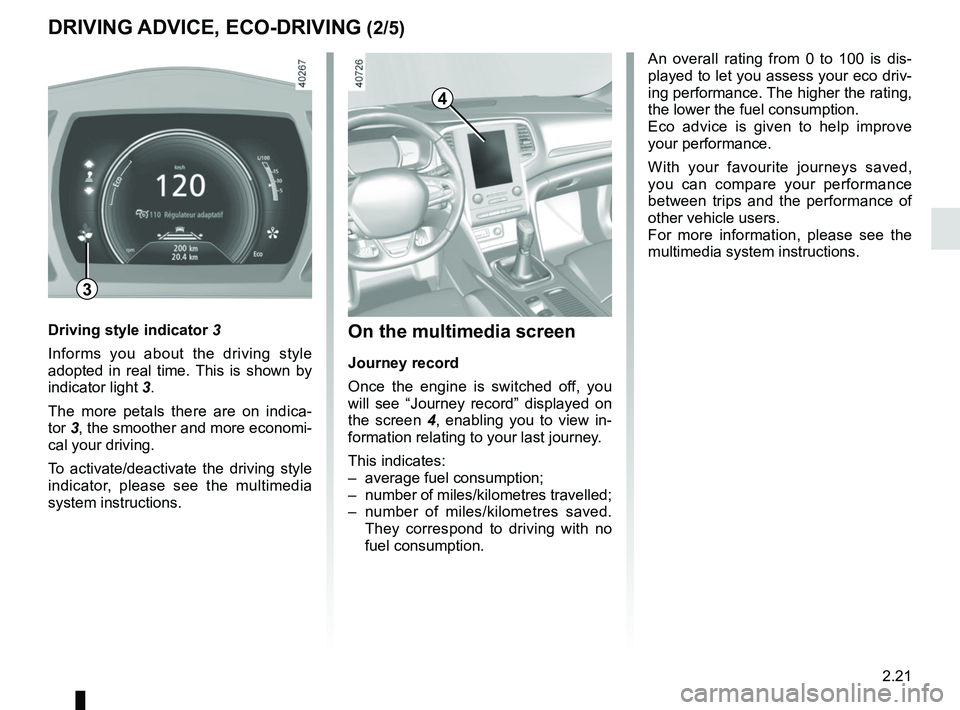
On the multimedia screen
Journey record
Once the engine is switched off, you
will see “Journey record” displayed on
the screen 4, enabling you to view in-
formation relating to your last journey.
This indicates:
– average fuel consumption;
– number of miles/kilometres travelled;
– number of miles/kilometres saved. They correspond to driving with no
fuel consumption.
An overall rating from 0 to 100 is dis-
played to let you assess your eco driv-
ing performance. The higher the rating,
the lower the fuel consumption.
Eco advice is given to help improve
your performance.
With your favourite journeys saved,
you can compare your performance
between trips and the performance of
other vehicle users.
For more information, please see the
multimedia system instructions.
Driving style indicator 3
Informs you about the driving style
adopted in real time. This is shown by
indicator light 3.
The more petals there are on indica-
tor 3, the smoother and more economi-
cal your driving.
To activate/deactivate the driving style
indicator, please see the multimedia
system instructions.
3