light RENAULT MEGANE HATCHBACK 2015 X95 / 3.G Manual PDF
[x] Cancel search | Manufacturer: RENAULT, Model Year: 2015, Model line: MEGANE HATCHBACK, Model: RENAULT MEGANE HATCHBACK 2015 X95 / 3.GPages: 268, PDF Size: 5.01 MB
Page 135 of 268
2.41
REVERSING CAMERA (1/2)
1
3
C
B
A
4
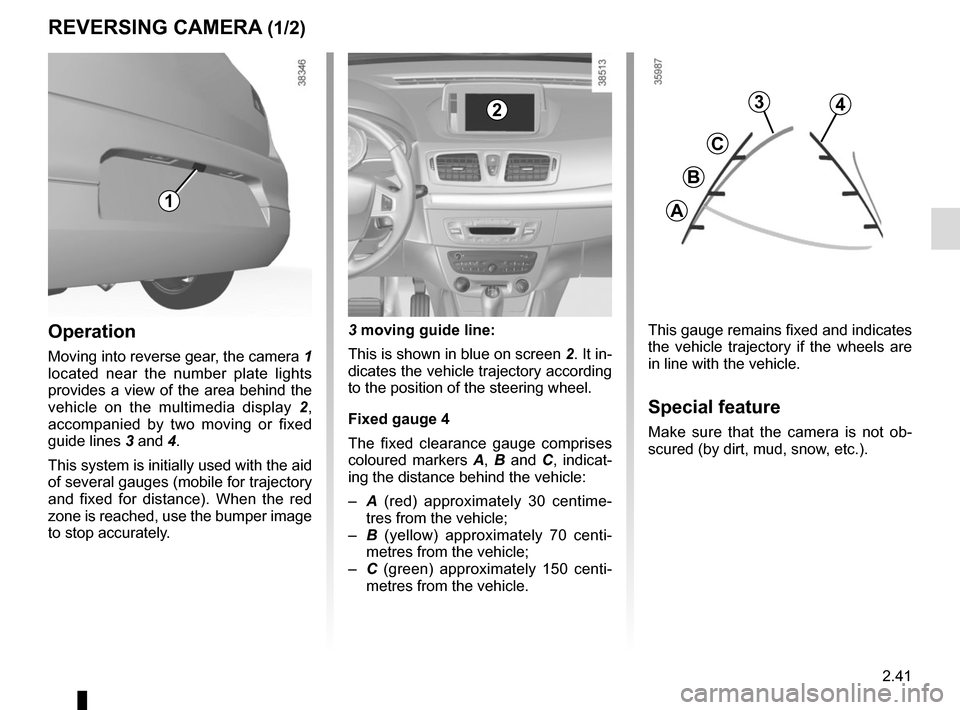
This gauge remains fixed and indicates
the vehicle trajectory if the wheels are
in line with the vehicle.
Special feature
Make sure that the camera is not ob-
scured (by dirt, mud, snow, etc.).
3 moving guide line:
This is shown in blue on screen
2. It in-
dicates the vehicle trajectory according
to the position of the steering wheel.
Fixed gauge 4
The fixed clearance gauge comprises
coloured markers A, B and C , indicat-
ing the distance behind the vehicle:
– A (red) approximately 30 centime-
tres from the vehicle;
– B (yellow) approximately 70 centi-
metres from the vehicle;
– C (green) approximately 150 centi-
metres from the vehicle.
Operation
Moving into reverse gear, the camera 1
located near the number plate lights
provides a view of the area behind the
vehicle on the multimedia display 2,
accompanied by two moving or fixed
guide lines 3 and 4.
This system is initially used with the aid
of several gauges (mobile for trajectory
and fixed for distance). When the red
zone is reached, use the bumper image
to stop accurately.
2
Page 136 of 268

2.42
REVERSING CAMERA (2/2)
Park Assist
Rear parking sensor
Volume
Image settings Rear camera view settings
You can also adjust the camera image
settings (brightness, contrast, etc.)
The screen shows a reverse image.
The frames are a representation
projected onto flat ground; this in-
formation must not be taken into
account when superimposed on a
vertical object or an object on the
ground.
Objects which appear on the edge
of the screen may be deformed.
In very bright light (snow, vehicle in
sunshine etc.), the camera vision
may be adversely affected.
If the boot is open or poorly closed,
the message “Boot open” appears
and the camera display disappears.
This function is an additional aid. It cannot, therefore, under any circ\
um-
stances replace the vigilance or the responsibility of the driver.
The driver should always pay attention to sudden incidents during driv-
ing: always ensure that there are no moving obstacles (such as a child,\
animal, pram, bicycle, etc.) or small, narrow objects such as stones or\
posts in
your path when manoeuvring.
Activating, deactivating the
reversing camera
From the multimedia display 2 , select
“menu”, “Settings”, “Park Assist” then
“Rear camera view settings”. Activate
or deactivate the reversing camera and
confirm your choice by selecting
“Done”.
2
Done
Page 137 of 268
2.43
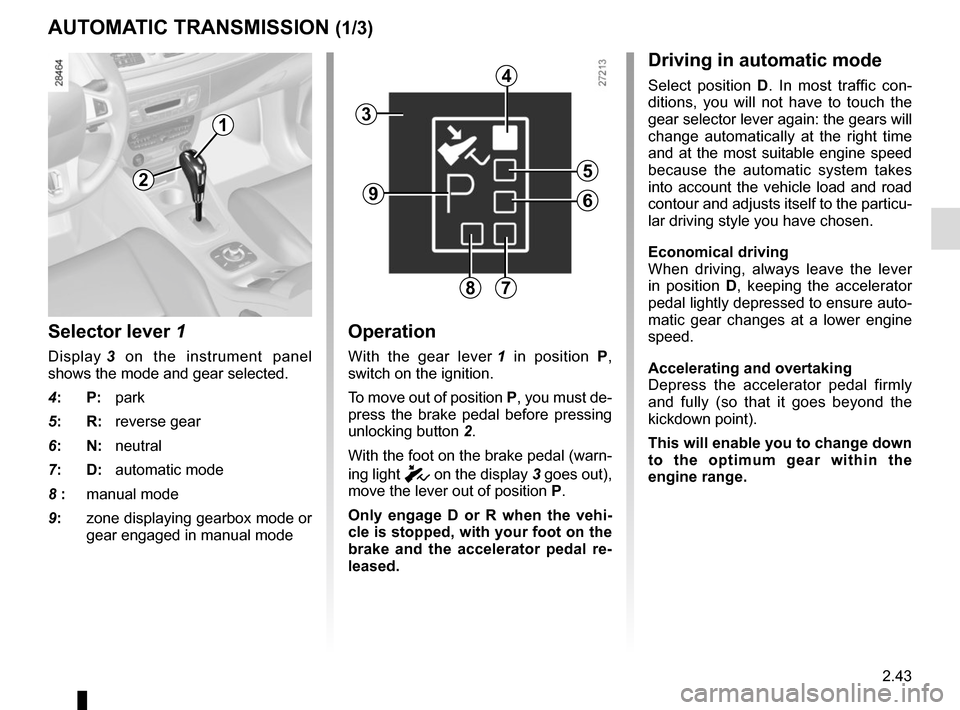
Selector lever 1
Display 3 on the instrument panel
shows the mode and gear selected.
4: P: park
5: R: reverse gear
6: N: neutral
7: D: automatic mode
8 : manual mode
9: zone displaying gearbox mode or
gear engaged in manual mode
Operation
With the gear lever 1 in position P,
switch on the ignition.
To move out of position P, you must de-
press the brake pedal before pressing
unlocking button 2.
With the foot on the brake pedal (warn-
ing light
c on the display 3 goes out),
move the lever out of position P.
Only engage D or R when the vehi-
cle is stopped, with your foot on the
brake and the accelerator pedal re-
leased.
AUTOMATIC TRANSMISSION (1/3)
Driving in automatic mode
Select position D. In most traffic con-
ditions, you will not have to touch the
gear selector lever again: the gears will
change automatically at the right time
and at the most suitable engine speed
because the automatic system takes
into account the vehicle load and road
contour and adjusts itself to the particu-
lar driving style you have chosen.
Economical driving
When driving, always leave the lever
in position D, keeping the accelerator
pedal lightly depressed to ensure auto-
matic gear changes at a lower engine
speed.
Accelerating and overtaking
Depress the accelerator pedal firmly
and fully (so that it goes beyond the
kickdown point).
This will enable you to change down
to the optimum gear within the
engine range.
3
2
1
4
5
6
78
9
Page 141 of 268

3.1
Section 3: Your comfort
Air vents. . . . . . . . . . . . . . . . . . . . . . . . . . . . . . . .\
. . . . . . . . . . . . . . . . . . . . . . . . . . . . . . . . . . . . . . . 3.2
Manual air conditioning . . . . . . . . . . . . . . . . . . . . . . . . \
. . . . . . . . . . . . . . . . . . . . . . . . . . . . . . . . . . . 3.4
Automatic climate control . . . . . . . . . . . . . . . . . . . . . . . . . . . . . . . . . . . .\
. . . . . . . . . . . . . . . . . . . . . 3.6
Air conditioning: information and advice on use . . . . . . . . . . . . . . . . . . . . . . . . . . . . . . . . . . . .\
. . . . 3.11
Electric windows, Electric sunroof . . . . . . . . . . . . . . . . . . . . . . . . . . . . . . . . . . . . \
. . . . . . . . . . . . . . . 3.12
Manual window winders - Sun visor . . . . . . . . . . . . . . . . . . . . . . . . . . . . . . . . . . . .\
. . . . . . . . . . . . . 3.15
Interior lighting . . . . . . . . . . . . . . . . . . . . . . . . . . . . . . . . . . . . \
. . . . . . . . . . . . . . . . . . . . . . . . . . . . . . 3.16
Passenger compartment storage space and fittings . . . . . . . . . . . . . . . . . . . . . . . . . . . . . . . . . . . . \
. 3.18
Accessories socket . . . . . . . . . . . . . . . . . . . . . . . . . . . . . . . . . . . .\
. . . . . . . . . . . . . . . . . . . . . . . . . . 3.22
Ashtray – Cigarette lighter . . . . . . . . . . . . . . . . . . . . . . . . . . . . . . . . . . . . \
. . . . . . . . . . . . . . . . . . . . . 3.22
Rear bench seat . . . . . . . . . . . . . . . . . . . . . . . . . . . . . . . . . . . .\
. . . . . . . . . . . . . . . . . . . . . . . . . . . . 3.23
Boot . . . . . . . . . . . . . . . . . . . . . . . . . . . . . . . . . . . . \
. . . . . . . . . . . . . . . . . . . . . . . . . . . . . . . . . . . . . . 3.25
Rear parcel shelf . . . . . . . . . . . . . . . . . . . . . . . . . . . . . . . . . . . . \
. . . . . . . . . . . . . . . . . . . . . . . . . . . . 3.26
Boot cover: estate models . . . . . . . . . . . . . . . . . . . . . . . . . . . . . . . . . . . . \
. . . . . . . . . . . . . . . . . . . . . 3.27
Boot storage space and fittings . . . . . . . . . . . . . . . . . . . . . . . . . . . . . . . . . . . . \
. . . . . . . . . . . . . . . . . 3.28
Transporting objects in the boot . . . . . . . . . . . . . . . . . . . . . . . . . . . . . . . . . . . .\
. . . . . . . . . . . . . . . . 3.31 Towbar . . . . . . . . . . . . . . . . . . . . . . . . . . . . . . . . . . . .\
. . . . . . . . . . . . . . . . . . . . . . . . . . . . . . 3.32
Luggage net. . . . . . . . . . . . . . . . . . . . . . . . . . . . . . .\
. . . . . . . . . . . . . . . . . . . . . . . . . . . . . . . . . . . . . 3.33
Roof bars . . . . . . . . . . . . . . . . . . . . . . . . . . . . . . . . . . . . \
. . . . . . . . . . . . . . . . . . . . . . . . . . . . . . . . . . 3.35
Multimedia equipment . . . . . . . . . . . . . . . . . . . . . . . . . . . . . . . . . . . . \
. . . . . . . . . . . . . . . . . . . . . . . . 3.36
Page 144 of 268
3.4
MANUAL AIR CONDITIONING (1/2)
1234
56
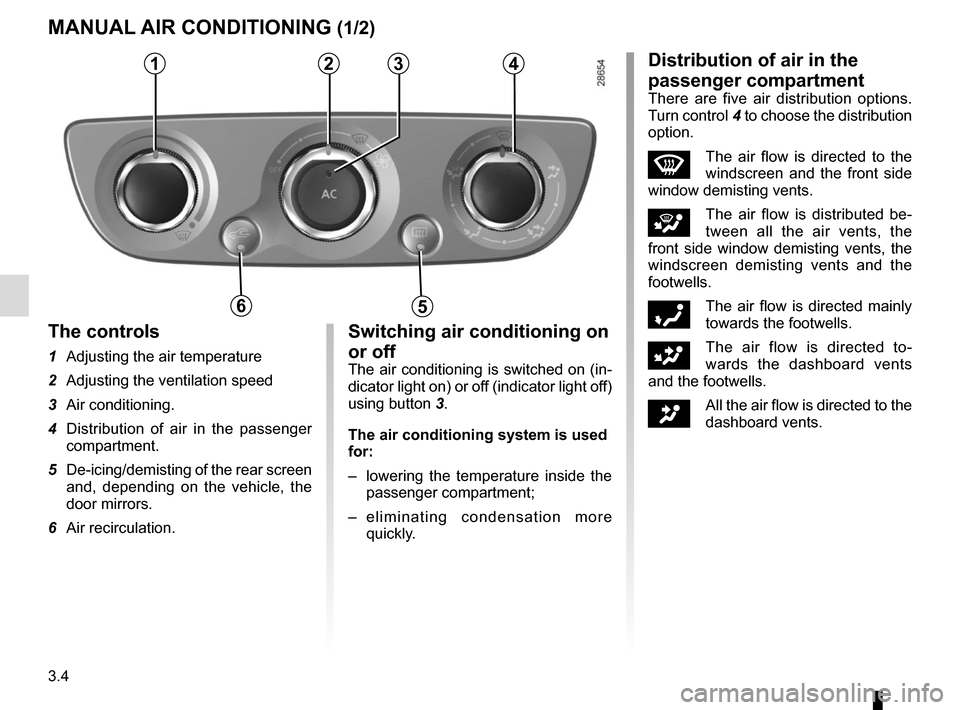
The controls
1 Adjusting the air temperature
2 Adjusting the ventilation speed
3 Air conditioning.
4 Distribution of air in the passenger compartment.
5 De-icing/demisting of the rear screen and, depending on the vehicle, the
door mirrors.
6 Air recirculation.
Switching air conditioning on
or off
The air conditioning is switched on (in-
dicator light on) or off (indicator light off)
using button 3.
The air conditioning system is used
for:
– lowering the temperature inside the
passenger compartment;
– eliminating condensation more quickly.
Distribution of air in the
passenger compartment
There are five air distribution options.
Turn control 4 to choose the distribution
option.
WThe air flow is directed to the
windscreen and the front side
window demisting vents.
iThe air flow is distributed be-
tween all the air vents, the
front side window demisting vents, the
windscreen demisting vents and the
footwells.
óThe air flow is directed mainly
towards the footwells.
GThe air flow is directed to-
wards the dashboard vents
and the footwells.
JAll the air flow is directed to the
dashboard vents.
Page 145 of 268
3.5
Adjusting the ventilation
speed
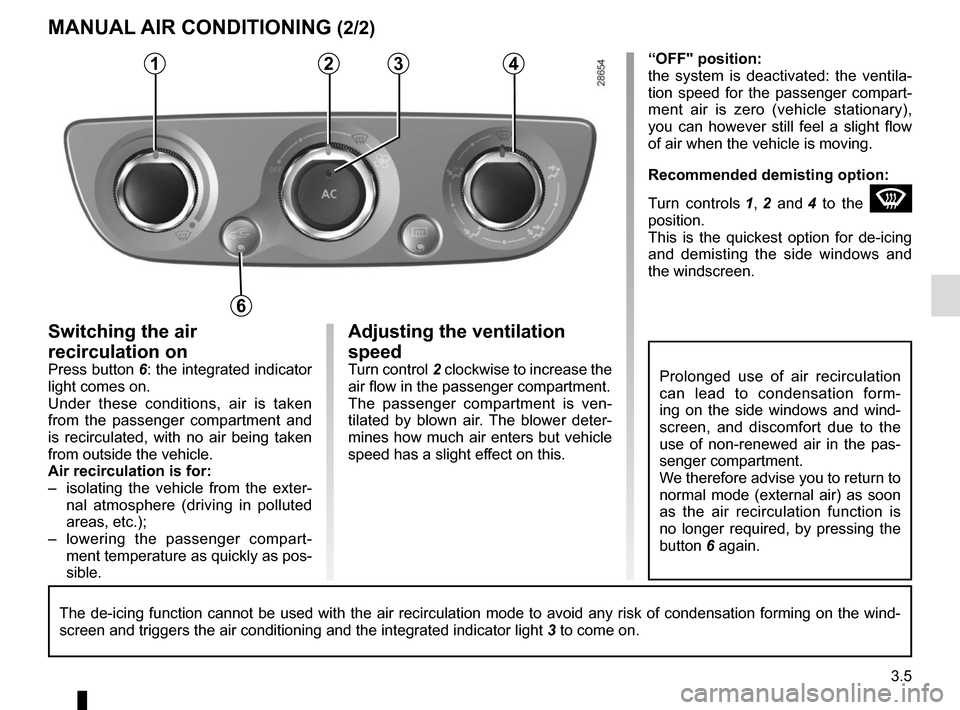
Turn control 2 clockwise to increase the
air flow in the passenger compartment.
The passenger compartment is ven-
tilated by blown air. The blower deter-
mines how much air enters but vehicle
speed has a slight effect on this.
Switching the air
recirculation on
Press button 6: the integrated indicator
light comes on.
Under these conditions, air is taken
from the passenger compartment and
is recirculated, with no air being taken
from outside the vehicle.
Air recirculation is for:
– isolating the vehicle from the exter- nal atmosphere (driving in polluted
areas, etc.);
– lowering the passenger compart- ment temperature as quickly as pos-
sible. “OFF" position:
the system is deactivated: the ventila-
tion speed for the passenger compart-
ment air is zero (vehicle stationary),
you can however still feel a slight flow
of air when the vehicle is moving.
Recommended demisting option:
Turn controls
1, 2 and 4 to the
W
position.
This is the quickest option for de-icing
and demisting the side windows and
the windscreen.
MANUAL AIR CONDITIONING (2/2)
Prolonged use of air recirculation
can lead to condensation form-
ing on the side windows and wind-
screen, and discomfort due to the
use of non-renewed air in the pas-
senger compartment.
We therefore advise you to return to
normal mode (external air) as soon
as the air recirculation function is
no longer required, by pressing the
button 6 again.
The de-icing function cannot be used with the air recirculation mode to \
avoid any risk of condensation forming on the wind-
screen and triggers the air conditioning and the integrated indicator li\
ght 3 to come on.
1234
6
Page 147 of 268
3.7
AUTOMATIC CLIMATE CONTROL (2/5)
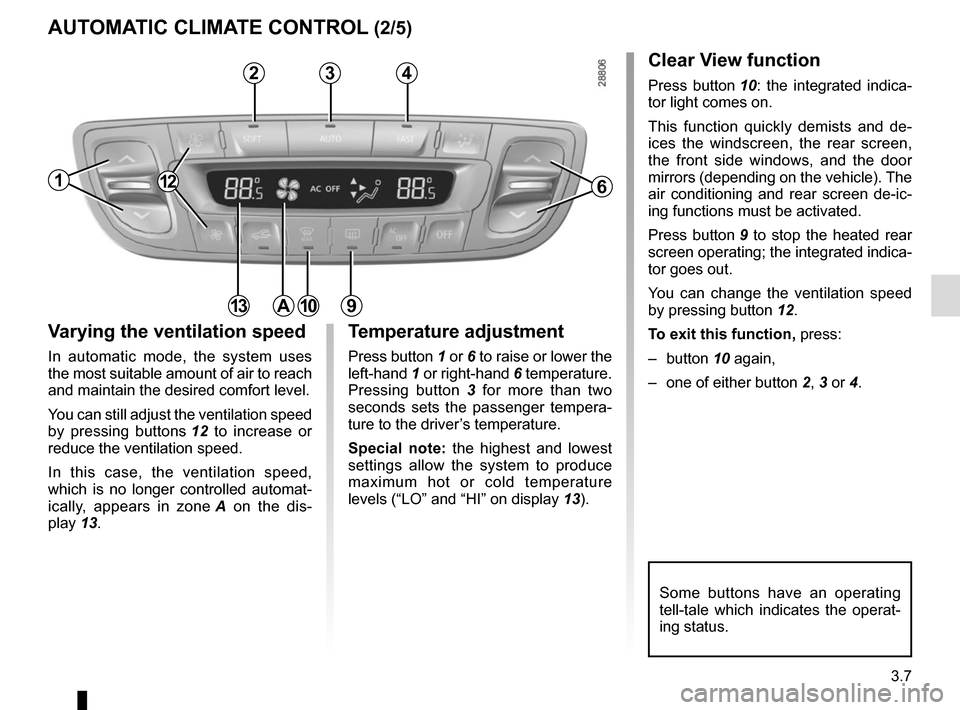
Varying the ventilation speed
In automatic mode, the system uses
the most suitable amount of air to reach
and maintain the desired comfort level.
You can still adjust the ventilation speed
by pressing buttons 12 to increase or
reduce the ventilation speed.
In this case, the ventilation speed,
which is no longer controlled automat-
ically, appears in zone A on the dis-
play 13.
Some buttons have an operating
tell-tale which indicates the operat-
ing status.
1
3
Temperature adjustment
Press button 1 or 6 to raise or lower the
left-hand 1 or right-hand 6 temperature.
Pressing button 3 for more than two
seconds sets the passenger tempera-
ture to the driver’s temperature.
Special note: the highest and lowest
settings allow the system to produce
maximum hot or cold temperature
levels (“LO” and “HI” on display 13).
6
13
Clear View function
Press button 10: the integrated indica-
tor light comes on.
This function quickly demists and de-
ices the windscreen, the rear screen,
the front side windows, and the door
mirrors (depending on the vehicle). The
air conditioning and rear screen de-ic-
ing functions must be activated.
Press button 9 to stop the heated rear
screen operating; the integrated indica-
tor goes out.
You can change the ventilation speed
by pressing button 12.
To exit this function, press:
– button 10 again,
– one of either button 2, 3 or 4.
109
24
A
12
Page 148 of 268
3.8
The displayed temperature values
show a comfort level.
When starting the engine, increas-
ing or decreasing the value dis-
played will not allow the com-
fort level to be reached any more
quickly. The system will always op-
timise the temperature increase or
decrease (the ventilation system
does not start instantly at maximum
speed: it gradually increases). This
may take several minutes.
Generally speaking, unless there is
a particular reason not to, the dash-
board air vents should remain open.
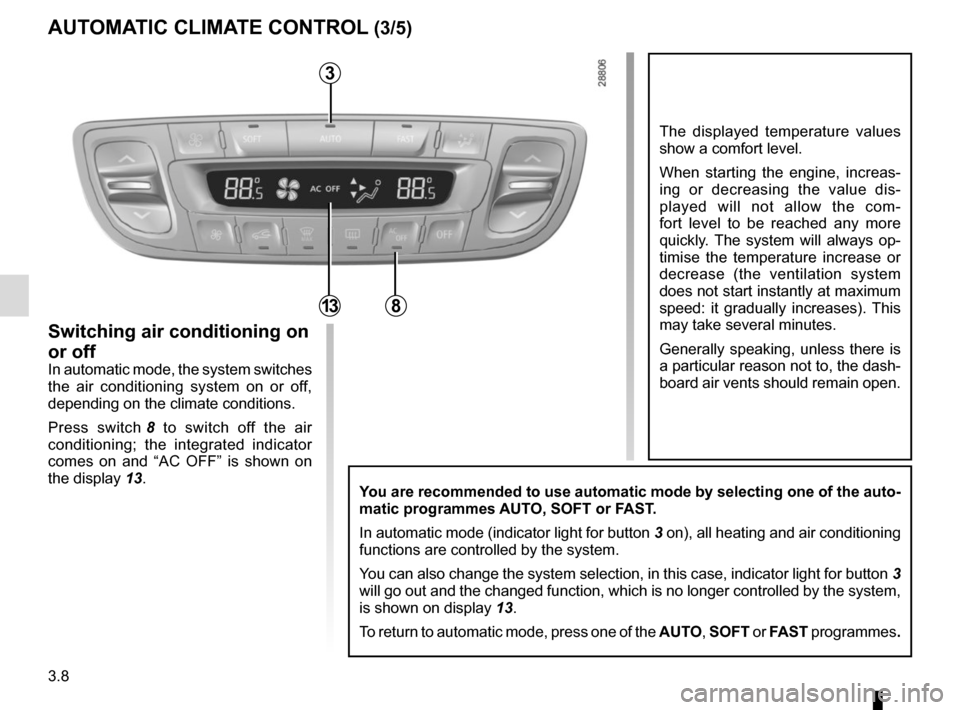
You are recommended to use automatic mode by selecting one of the auto-
matic programmes AUTO, SOFT or FAST.
In automatic mode (indicator light for button 3 on), all heating and air conditioning
functions are controlled by the system.
You can also change the system selection, in this case, indicator light f\
or button 3
will go out and the changed function, which is no longer controlled by t\
he system,
is shown on display 13.
To return to automatic mode, press one of the AUTO, SOFT or FAST programmes.
AUTOMATIC CLIMATE CONTROL (3/5)
Switching air conditioning on
or off
In automatic mode, the system switches
the air conditioning system on or off,
depending on the climate conditions.
Press switch 8 to switch off the air
conditioning; the integrated indicator
comes on and “AC OFF” is shown on
the display 13.
3
813
Page 149 of 268

3.9
AUTOMATIC CLIMATE CONTROL (4/5)
Rear screen de-icing/
demisting
Press button 9: the integrated indica-
tor light comes on. This function per-
mits rapid demisting/de-icing of the rear
screen and de-icing of the door mirrors
(on equipped vehicles).
To exit this function, press button 9
again. Demisting automatically stops
by default.
ØThe air flow is directed to the
windscreen and the front side
window demisting vents.
×The air flow is distributed be-
tween front side window de-
misting vents, the windscreen demist-
ing vents and the footwells.
¿The air flow is directed mainly
towards the footwells.
¾The air flow is directed towards
the dashboard vents and the
footwells.
½All the air flow is directed to the
dashboard vents.
In this situation, the distribution of air in
the passenger compartment, which is
no longer automatically controlled, ap-
pears on the display.9
Adjusting the distribution
of air in the passenger
compartment
There are five air distribution options.
Press switch 5 to scroll through them.
The arrows located in area B on the
display 13 combine to show you the
distribution selected:
5
B13
12
Page 150 of 268
3.10
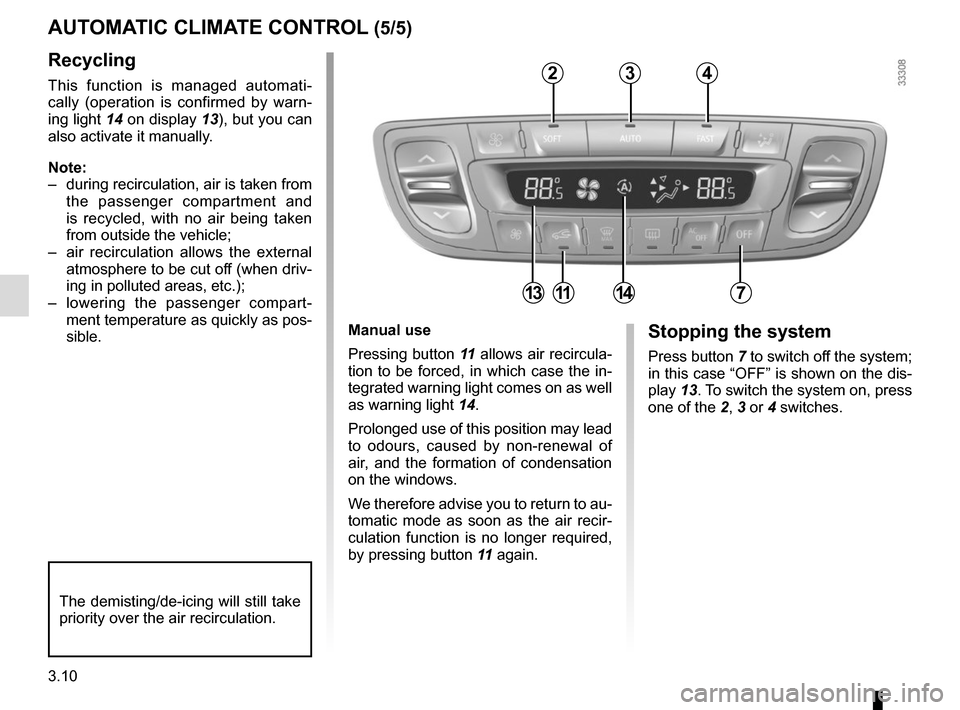
Manual use
Pressing button 11 allows air recircula-
tion to be forced, in which case the in-
tegrated warning light comes on as well
as warning light 14.
Prolonged use of this position may lead
to odours, caused by non-renewal of
air, and the formation of condensation
on the windows.
We therefore advise you to return to au-
tomatic mode as soon as the air recir-
culation function is no longer required,
by pressing button 11 again.Stopping the system
Press button 7 to switch off the system;
in this case “OFF” is shown on the dis-
play 13. To switch the system on, press
one of the 2, 3 or 4 switches.
Recycling
This function is managed automati-
cally (operation is confirmed by warn-
ing light 14 on display 13), but you can
also activate it manually.
Note:
– during recirculation, air is taken from the passenger compartment and
is recycled, with no air being taken
from outside the vehicle;
– air recirculation allows the external atmosphere to be cut off (when driv-
ing in polluted areas, etc.);
– lowering the passenger compart- ment temperature as quickly as pos-
sible.
AUTOMATIC CLIMATE CONTROL (5/5)
The demisting/de-icing will still take
priority over the air recirculation.
234
7111314