lock RENAULT MEGANE HATCHBACK 2016 X95 / 3.G Owner's Guide
[x] Cancel search | Manufacturer: RENAULT, Model Year: 2016, Model line: MEGANE HATCHBACK, Model: RENAULT MEGANE HATCHBACK 2016 X95 / 3.GPages: 242, PDF Size: 3.54 MB
Page 69 of 242
trip computer and warning system......................... (current page)
warning lights......................................................... (current page)
instrument panel messages................................... (current page)
instrument panel .................................................... (current page)
1.63
ENG_UD23625_1
Ordinateur de bord : messages d’information (X95 - B95 - D95 - K95 -\
Renault)
ENG_NU_837-8_BDK95_Renault_1
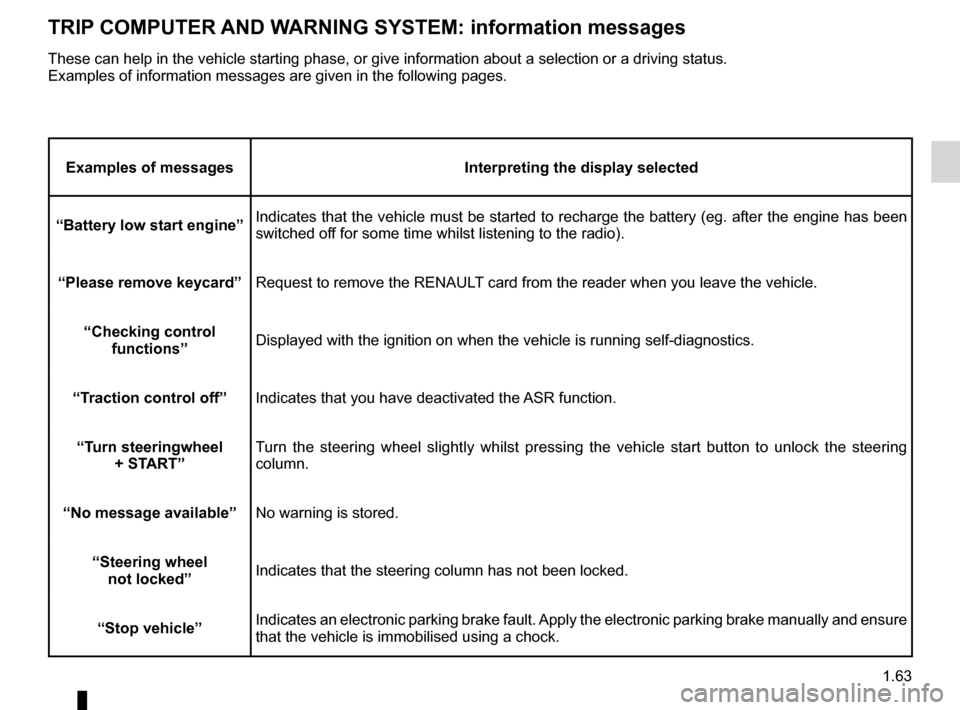
TRIp c O mp UTER AN d WARNIN g s Y s TE m : information messages
Examples of messages Interpreting the display selected
“Battery low start engine” Indicates that the vehicle must be started to recharge the battery (eg. after the engine has been
switched off for some time whilst listening to the radio).
“
p lease remove keycard” Request to remove the RENAULT card from the reader when you leave the vehicle.
“
c hecking control functions” Displayed with the ignition on when the vehicle is running self-diagnost\
ics.
“Traction control off” Indicates that you have deactivated the ASR function.
“Turn steeringwheel +
s TART” Turn the steering wheel slightly whilst pressing the vehicle start button to unlock the steering
column.
“No message available” No warning is stored.
“
s teering wheel
not locked” Indicates that the steering column has not been locked.
“
s top vehicle” Indicates an electronic parking brake fault. Apply the electronic parking brake manually and ensure
that the vehicle is immobilised using a chock.
These can help in the vehicle starting phase, or give information about \
a selection or a driving status.
Examples of information messages are given in the following pages.
Page 71 of 242
trip computer and warning system......................... (current page)
warning lights......................................................... (current page)
instrument panel messages................................... (current page)
instrument panel .................................................... (current page)
1.65
ENG_UD23627_1
Ordinateur de bord : messages d’alerte (X95 - B95 - D95 - K95 - Rena\
ult)
ENG_NU_837-8_BDK95_Renault_1
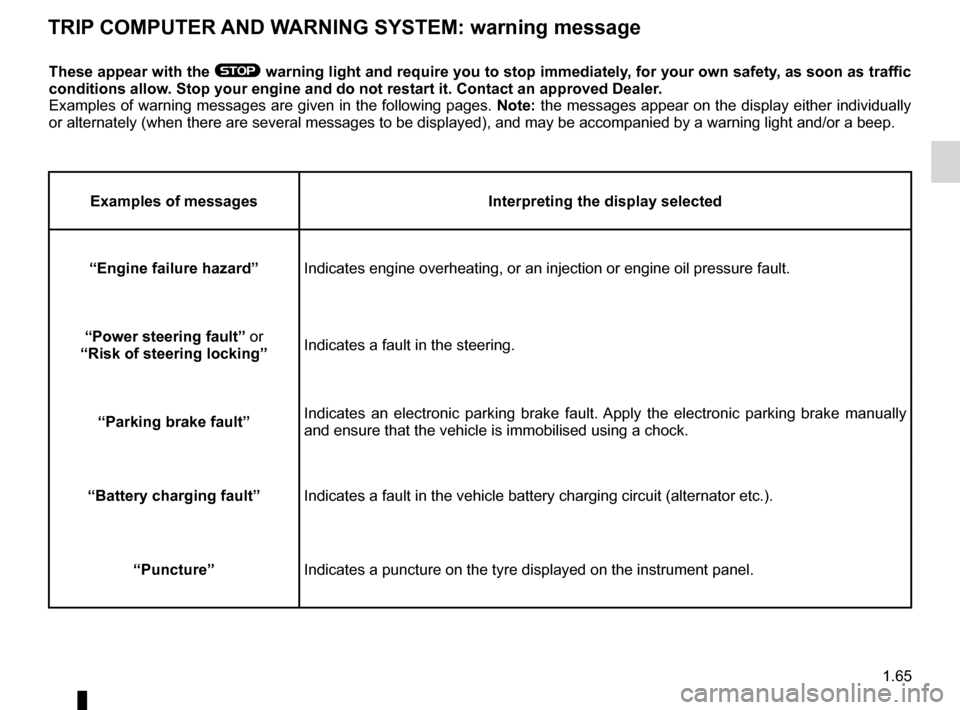
TRIp c O mp UTER AN d WARNIN g s Y s TE m : warning message
These appear with the ® warning light and require you to stop immediately, for your own safety, as soon as traffic
conditions allow.
s
top your engine and do not restart it. c ontact an approved d ealer.
Examples of warning messages are given in the following pages. Note: the messages appear on the display either individually
or alternately (when there are several messages to be displayed), and \
may be accompanied by a warning light and/or a beep.
Examples of messages Interpreting the display selected
“Engine failure hazard” Indicates engine overheating, or an injection or engine oil pressure fau\
lt.
“
p
ower steering fault” or
“Risk of steering locking” Indicates a fault in the steering.
“
p
arking brake fault” Indicates an electronic parking brake fault. Apply the electronic parking brake manually
and ensure that the vehicle is immobilised using a chock.
“Battery charging fault” Indicates a fault in the vehicle battery charging circuit (alternator e\
tc.).
“
p
uncture” Indicates a puncture on the tyre displayed on the instrument panel.
Page 72 of 242
menu for customising the vehicle settings
(up to the end of the DU)
customising the vehicle settings ........... (up to the end of the DU)
customised vehicle settings .................. (up to the end of the DU)
1.66
ENG_UD11347_2
Menu de personnalisation des réglages du véhicule (X95 - B95 - D9\
5 - Renault)
ENG_NU_837-8_BDK95_Renault_1
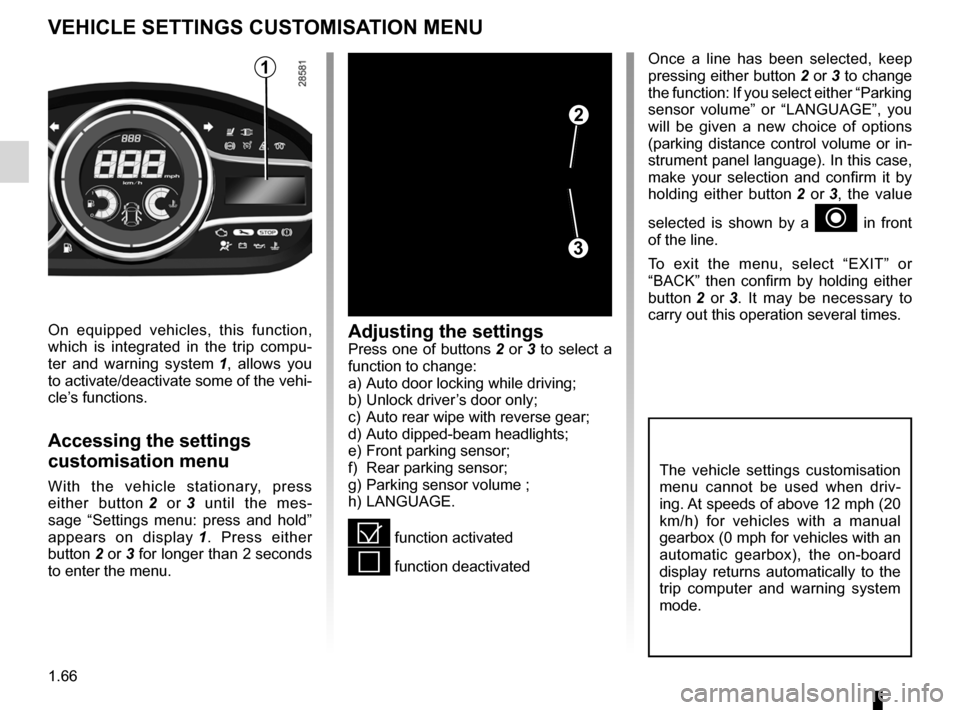
vehicle settings customisation menu
vEHIcLE sETTINgs cUsTOmIsATION mENU
Adjusting the settingsPress one of buttons 2 or 3 to select a
function to change:
a)
Auto door locking while driving;
b)
Unlock driver
’s door only;
c)
Auto rear wipe with reverse gear;
d)
Auto dipped-beam headlights;
e)
Front parking sensor;
f)
Rear parking sensor;
g)
Parking sensor volume ;
h)
LANGUAGE
.
= function activated
< function deactivated
On equipped vehicles, this function,
which is integrated in the trip compu-
ter and warning system
1
,
allows you
to activate/deactivate some of the vehi-
cle’s functions.
Accessing the settings
customisation menu
With the vehicle stationary, press
either button 2
or 3
until the mes-
sage “Settings menu: press and hold”
appears on display
1 .
Press either
button
2 or 3 for longer than 2 seconds
to enter the menu.
Once a line has been selected, keep
pressing either button 2 or 3 to change
the function: If you select either “Parking
sensor volume” or “LANGUAGE”, you
will be given a new choice of options
(parking distance control volume or in-
strument panel language). In this case,
make your selection and confirm it by
holding either button
2
or
3,
the value
selected is shown by a
~ in front
of the line.
To exit the menu, select “EXIT” or
“BACK” then confirm by holding either
button
2
or
3 .
It may be necessary to
carry out this operation several times.
2
3
1
The vehicle settings customisation
menu cannot be used when driv-
ing. At speeds of above 12 mph (20
km/h) for vehicles with a manual
gearbox (0 mph for vehicles with an
automatic gearbox), the on-board
display returns automatically to the
trip computer and warning system
mode.
Page 73 of 242
steering wheeladjustment ...................................... (up to the end of the DU)
power-assisted steering........................ (up to the end of the DU)
power-assisted steering........................ (up to the end of the DU)
1.67
ENG_UD18894_3
Volant de direction (X95 - B95 - D95 - Renault)
ENG_NU_837-8_BDK95_Renault_1
Operating faults
The steering may become stiff when
driving or when the steering wheel is
turned repeatedly. This is due to the
power assistance overheating. In this
case, it must be allowed to cool down.power-assisted steering
variable power-assisted steering
T he variable power-assisted steering
system is equipped with an electronic
control system which alters the level of
assistance to suit the vehicle speed.
Steering is made easier during parking
manoeuvres (for added comfort) whilst
the force needed to steer increases
progressively as the speed rises (for
enhanced safety at high speeds).
Steering wheel
Power-assisted steering
sTEERINg WHEEL/pOWER-AssIsTEd sTEERINg
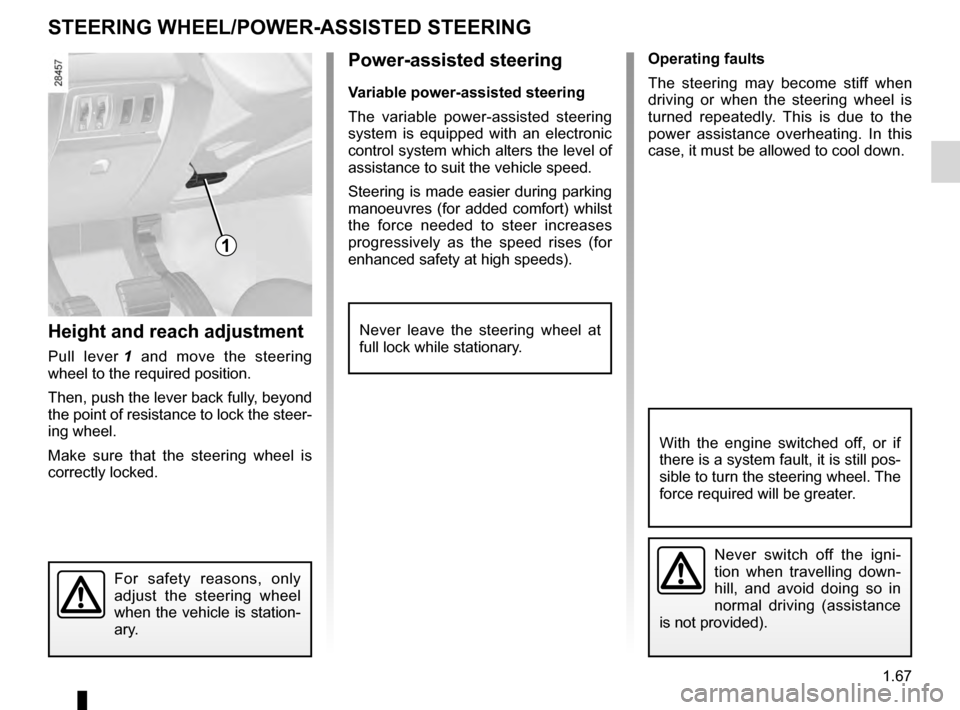
Height and reach adjustment
Pull lever 1 and move the steering
wheel to the required position.
Then, push the lever back fully, beyond
the point of resistance to lock the steer-
ing wheel.
Make sure that the steering wheel is
correctly locked.
For safety reasons, only
adjust the steering wheel
when the vehicle is station-
ary.
Never leave the steering wheel at
full lock while stationary.
1
Never switch off the igni-
tion when travelling down-
hill, and avoid doing so in
normal driving (assistance
is not provided).
With the engine switched off, or if
there is a system fault, it is still pos-
sible to turn the steering wheel. The
force required will be greater.
Page 74 of 242
clock ..................................................... (up to the end of the DU)
clock ..................................................... (up to the end of the DU)
external temperature ............................ (up to the end of the DU)
indicators: exterior temperature indicator .......................... (current page)
1.68
ENG_UD6287_1
Heure et température extérieure (X95 - B95 - D95 - Renault)
ENG_NU_837-8_BDK95_Renault_1
Clock and external temperature
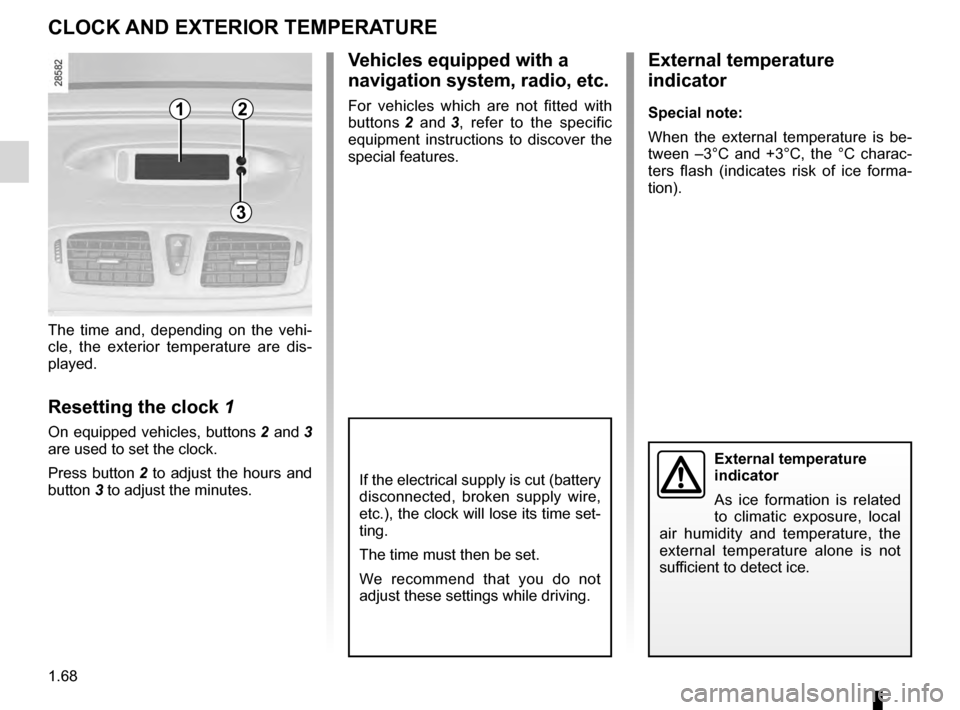
The time and, depending on the vehi-
cle, the exterior temperature are dis-
played.
Resetting the clock 1
On equipped vehicles, buttons 2 and 3
are used to set the clock.
Press
button 2 to adjust the hours and
button
3 to adjust the minutes.
External temperature
indicator
As ice formation is related
to climatic exposure, local
air humidity and temperature, the
external temperature alone is not
sufficient to detect ice.
cLOcK AN d EXTERIOR TE mp ERATURE
If the electrical supply is cut (battery
disconnected, broken supply wire,
etc.), the clock will lose its time set-
ting.
The time must then be set.
We recommend that you do not
adjust these settings while driving.
External temperature
indicator
special note:
W hen the external temperature is be-
tween –3°C and +3°C, the °C charac-
ters flash (indicates risk of ice forma-
tion).
vehicles equipped with a
navigation system, radio, etc.
For vehicles which are not fitted with
buttons 2
and 3,
refer to the specific
equipment instructions to discover the
special features.12
3
Page 75 of 242
rear view mirrors ................................... (up to the end of the DU)
1.69
ENG_UD21504_2
Rétroviseurs (X95 - B95 - D95 - Renault)
ENG_NU_837-8_BDK95_Renault_1
Door mirrors
folding door mirrors
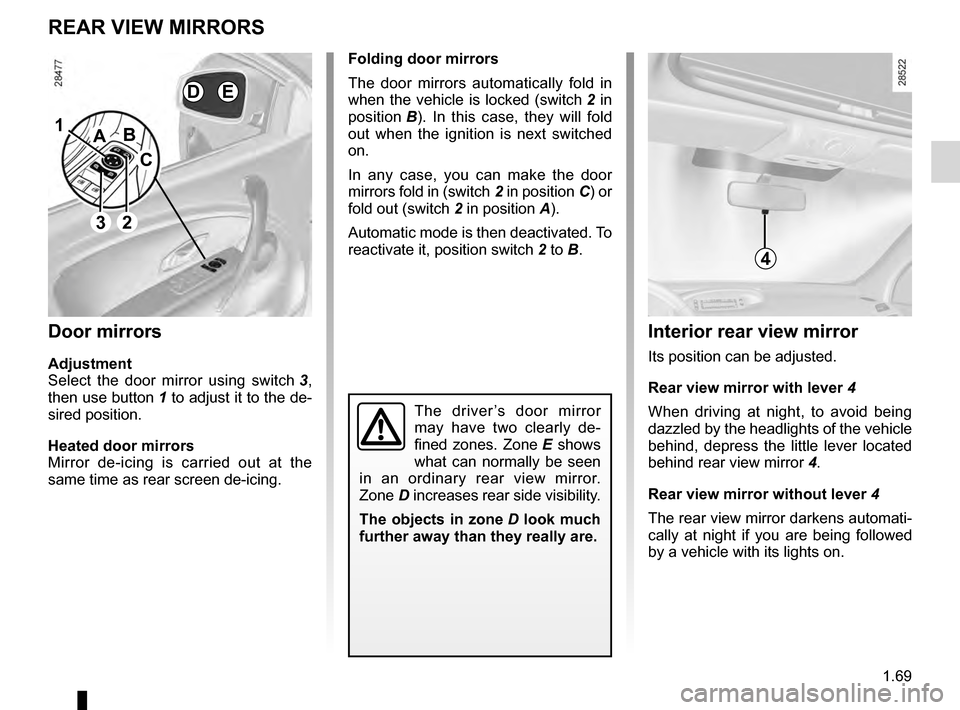
T he door mirrors automatically fold in
when the vehicle is locked (switch
2 in
position
B )
. In this case, they will fold
out when the ignition is next switched
on.
In any case, you can make the door
mirrors fold in (switch
2 in position C) or
fold out (switch
2 in position
A
).
Automatic mode is then deactivated. To
reactivate it, position switch
2
to B.
REAR vIEW mIRRORs
door mirrors
Adjustment
Select the door mirror using switch 3,
then
use button 1 to adjust it to the de-
sired position.
Heated door mirrors
Mirror de-icing is carried out at the
same time as rear screen de-icing.
The driver ’s door mirror
may have two clearly de-
fined zones. Zone
E shows
what can normally be seen
in an ordinary rear view mirror.
Zone
D increases rear side visibility.
The objects in zone
D look much
further away than they really are.
Interior rear view mirror
Its position can be adjusted.
Rear view mirror with lever
4
When driving at night, to avoid being
dazzled by the headlights of the vehicle
behind, depress the little lever located
behind rear view mirror
4
.
Rear view mirror without lever
4
The rear view mirror darkens automati-
cally at night if you are being followed
by a vehicle with its lights on.
1
2
A
c
B
4
dE
3
Page 78 of 242
lights:main beam headlights ...................................... (current page)
warning buzzer ...................................................... (current page)
see-me-home lighting ............................................ (current page)
lights mobile directional ............................................. (current page)
1.72
ENG_UD24014_3
Éclairages et signalisations extérieurs (X95 - B95 - Renault)
ENG_NU_837-8_BDK95_Renault_1
Jaune NoirNoir texte
EXTERIOR LIgHTINg AN d s I g NAL s (2/3)
1
special note:
– I f the dipped beam headlights are
manually switched on and if the light
is sufficient, the directional head-
lights will remain fixed;
–
I
f the lights come on automatically
when cornering, the directional
headlights will start working from the
next time the vehicle corners;
–
W
hen the dipped beam headlights
are switched on with the engine
running and the vehicle stationary,
the lights move to reinitialise them-
selves. If not, there is a system fault.
switching off the lights
There are two possibilities:
– Manually , move ring 2 to position 0;
–
a
utomatically, the lights will go out
when the engine is switched off, the
driver’s door is opened or the vehicle
is locked. In this case, the next time
the engine is started the lights will be
switched back on according to the
position of the ring
2
.
NB: if the fog lights are lit, the lights are
not switched off automatically.
“see-me-home lighting”
function
This function allows you to briefly switch
on the dipped beam headlights (to pro-
vide light when opening a gate, etc.).
With the engine and lights off and
ring
2
in the 0 position, pull stalk
1
to-
wards you: the dipped beam headlights
light up for approximately thirty sec-
onds. To increase this duration, you
may pull the stalk up to four times (total
time restricted to two minutes). The
message “See-me-home _ _ _” along
with the times the lights will be on for
is displayed on the instrument panel to
confirm this action.
To switch off the lights before they go
out automatically, turn ring
2 to any po-
sition, then return it to position 0.
directional headlights
Depending on the vehicle, with the
dipped beam headlights on and under
certain conditions (speed, steering
wheel angle, forwards gear selected,
etc.) when cornering, the dipped beam
headlights move to light the inside of
the bend.
Operating faults
When the message “Check lighting”,
accompanied by the
© warning
light is displayed on the instrument
panel, there is a lighting fault.
Consult an approved dealer.
2
Page 84 of 242
fuel tank capacity .................................. (up to the end of the DU)
fuel filling ................................................ (up to the end of the DU)
fuel grade ............................................... (up to the end of the DU)
fuel tank capacity ........................................... (up to the end of the DU)
fuel capacity ............................................................ (current page)
fuel filler cap ......................................... (up to the end of the DU)
1.78
ENG_UD23616_6
Réservoir à carburant (X95 - B95 - Renault)
ENG_NU_837-8_BDK95_Renault_1
Jaune NoirNoir texte
vehicles running on ethanol- based
fuel
It is essential to use unleaded petrol or
fuel containing a maximum of 85% eth-
anol (E85).
In very cold conditions, it may be very
difficult or even impossible to start the
engine. To avoid this problem, use un-
leaded petrol or, on equipped vehicles,
use the heater integrated in the engine:
connect the special end of the exten-
sion piece supplied into the socket in-
tegrated into the radiator grille and the
other end into a 220
v socket for at least
6 hours before starting.
Note: you may notice an increase in
fuel consumption with this type of fuel
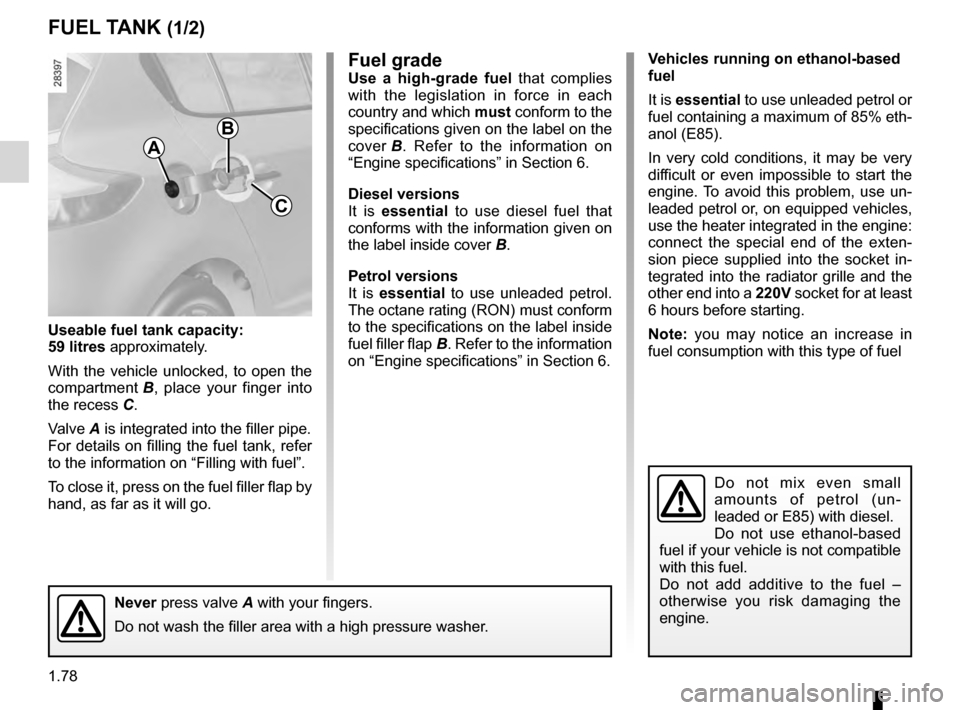
Useable fuel tank capacity:
59 litres approximately.
With the vehicle unlocked, to open the
compartment
B ,
place your finger into
the recess
C.
Valve
A is integrated into the filler pipe.
For details on filling the fuel tank, refer
to the information on “Filling with fuel”.
To close it, press on the fuel filler flap by
hand, as far as it will go.
fuel gradeUse a high-grade fuel that complies
with the legislation in force in each
country and which must conform to the
specifications given on the label on the
cover
B .
Refer to the information on
“Engine specifications” in Section 6.
d
iesel versions
It is essential to use diesel fuel that
conforms with the information given on
the label inside cover
B
.
p
etrol versions
It is essential to use unleaded petrol.
The octane rating (RON) must conform
to the specifications on the label inside
fuel filler flap
B. Refer to the information
on “Engine specifications” in Section 6.
Fuel tank (filling with fuel)
fUEL TANK (1/2)
B
c
Never press valve A with your fingers.
Do not wash the filler area with a high pressure washer.
Do not mix even small
amounts of petrol (un-
leaded or E85) with diesel.
Do not use ethanol-based
fuel if your vehicle is not compatible
with this fuel.
Do not add additive to the fuel –
otherwise you risk damaging the
engine.
A
Page 89 of 242
starting the engine ................................ (up to the end of the DU)
engine start/stop button ........................ (up to the end of the DU)
starting the engine ................................ (up to the end of the DU)
driving ................................................... (up to the end of the DU)
2.3
ENG_UD18932_3
Démarrage / Arrêt moteur avec carte RENAULT mains libres (X95 - B95 - D95 - Renault)
ENG_NU_837-8_BDK95_Renault_2
Starting the engine
STARTING THE ENGINE (1/2)
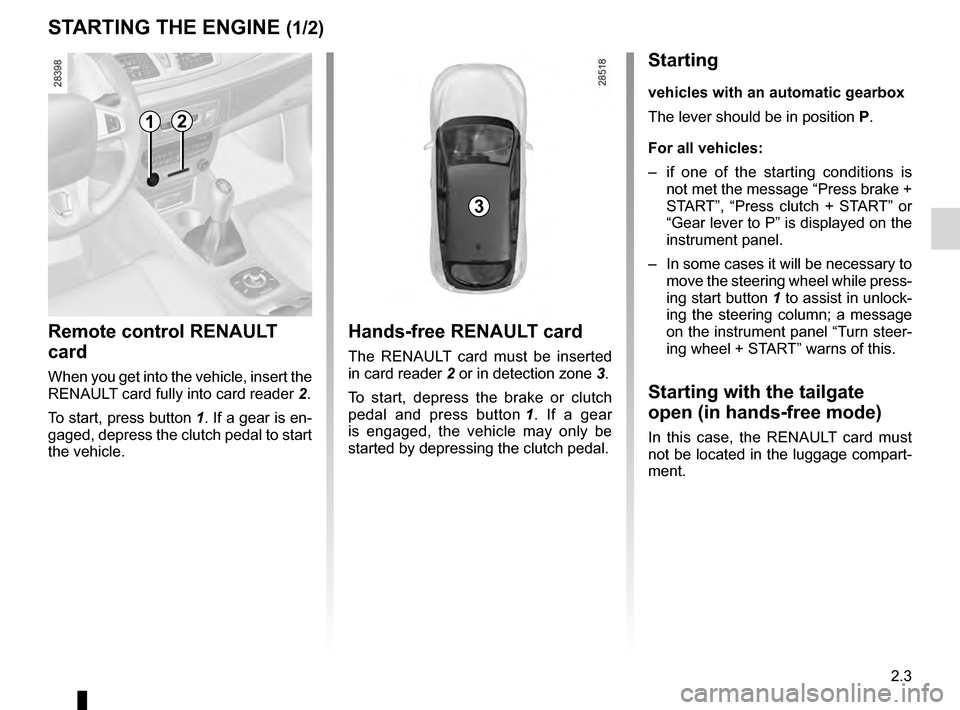
Remote control RENAULT
card
When you get into the vehicle, insert the
RENAULT card fully into card reader
2 .
To start, press button
1. If a gear is en-
gaged, depress the clutch pedal to start
the vehicle.
Hands-free RENAULT card
The RENAULT card must be inserted
in card reader 2 or in detection zone 3 .
To start, depress the brake or clutch
pedal and press button
1 .
If a gear
is engaged, the vehicle may only be
started by depressing the clutch pedal.
Starting
vehicles with an automatic gearbox
The lever should be in position P.
For all vehicles:
–
i
f one of the starting conditions is
not met the message “Press brake +
START”, “Press clutch + START” or
“Gear lever to P” is displayed on the
instrument panel.
–
In
some cases it will be necessary to
move the steering wheel while press-
ing start button
1 to assist in unlock-
ing the steering column; a message
on the instrument panel “Turn steer-
ing wheel + START” warns of this.
Starting with the tailgate
open (in hands-free mode)
In this case, the RENAULT card must
not be located in the luggage compart-
ment.
3
12
Page 91 of 242
stopping the engine .............................. (up to the end of the DU)
engine start/stop button ........................ (up to the end of the DU)
2.5
ENG_UD18930_1
Arret du moteur (X95 - B95 - D95 - K95 - Renault)
ENG_NU_837-8_BDK95_Renault_2
Stopping the engine
STOPPING THE ENGINE
Never leave your vehicle
with the RENAULT card
inside and never leave a
child (or a pet) unsuper-
vised, even for a short while.
There is a risk that they could start
the engine or operate electrical
equipment (electric windows etc.)
and trap part of their body (neck,
arms, hands, etc.).
Risk of serious injury.
Never switch off the ignition before
the vehicle has stopped completely.
Once the engine has stopped, the
brake servo, power-assisted steer-
ing, etc. and the passive safety de-
vices such as air bags and preten-
sioners will no longer operate.
When you leave your vehi-
cle, especially if you have
your RENAULT card with
you, check that the engine
is completely switched off.
Special note
If the card is no longer in the reader
when you try to switch the engine off,
the message “No keycard Press and
hold” appears on the instrument panel:
press button
1 for longer than two sec-
onds.
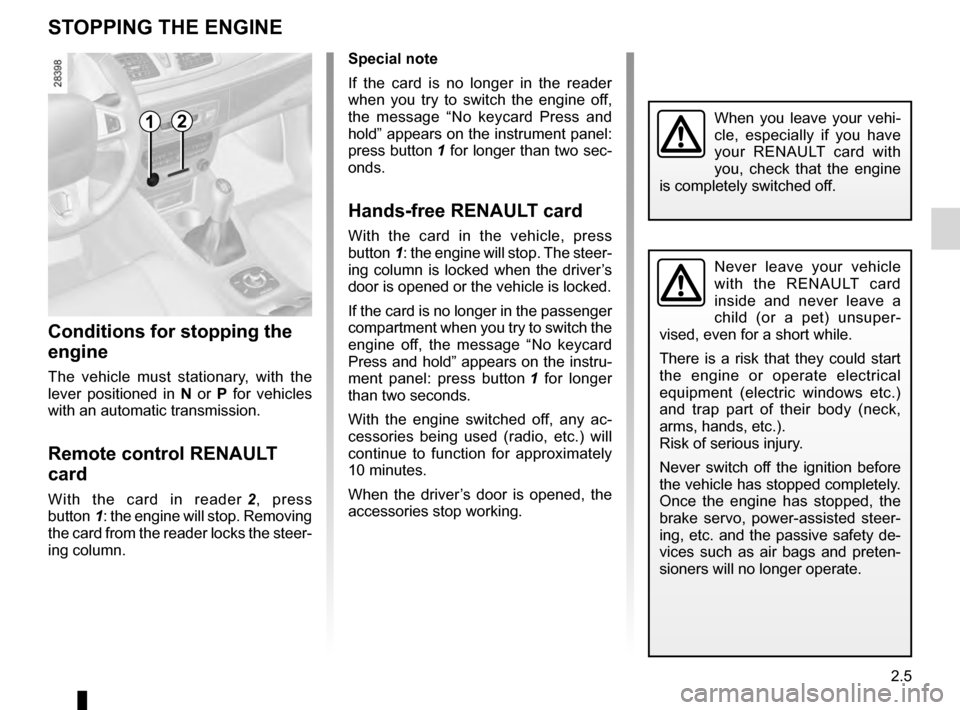
Hands-free RENAULT card
With the card in the vehicle, press
button 1: the engine will stop. The steer-
ing column is locked when the driver’s
door is opened or the vehicle is locked.
If the card is no longer in the passenger
compartment when you try to switch the
engine off, the message “No keycard
Press and hold” appears on the instru-
ment panel: press button
1
for longer
than two seconds.
With the engine switched off, any ac-
cessories being used (radio, etc.) will
continue to function for approximately
10 minutes.
When the driver’s door is opened, the
accessories stop working.
Conditions for stopping the
engine
The vehicle must stationary, with the
lever positioned in N or P for vehicles
with an automatic transmission.
Remote control RENAULT
card
With the card in reader 2 , press
button 1: the engine will stop. Removing
the card from the reader locks the steer-
ing column.
12