light RENAULT MEGANE RS 2012 X95 / 3.G Workshop Manual
[x] Cancel search | Manufacturer: RENAULT, Model Year: 2012, Model line: MEGANE RS, Model: RENAULT MEGANE RS 2012 X95 / 3.GPages: 239, PDF Size: 9.2 MB
Page 103 of 239

ENG_NU_837-6_BDK95_Renault_2
Display
Display 1 on the instrument panel")
JauneNoirNoir texte
2.17
ENG_UD6303_1
Système de surveillance de pression des pneumatiques (X95 - B95 - D9\
5 - Renault)
ENG_NU_837-6_BDK95_Renault_2
Display
Display 1 on the instrument panel and
trip computer and warning system 2 in-
forms you of any tyre pressure faults
(flat tyre, punctured tyre, system fault,
etc.).
TyRE PRESSURE MONITOR (2/3)
1“Puncture”
Wheel F indicates that the wheel con -
cerned is punctured or severely un -
derinflated. Replace it or contact an
approved dealer if it is punctured. Top
up the tyre pressure if the wheel is de-
flated,
This message appears along with the
® warning light.
“Tyre pressure sensors absent ” or
“Check tyre pressure sensors ”
One wheel E disappears, indicating
that the sensor on this wheel is missing
or faulty (e.g. if the emergency spare
wheel is fitted).
“Adjust tyre pressure
”
A shaded wheel F indicates a deflated
tyre.
“Inflate tyres for motorway”
All four wheels F become full, the tyre
pressure is not adapted to the driving
speed. Slow down or inflate all four
tyres to “motorway pressure” (refer to
the label located on the label on the
edge of the driver’s door).
E
F
2
Page 106 of 239
2.20
ENG_UD14885_2
Dispositifs de correction de conduite (X95 - B95 - D95 - Renault)
ENG_NU_837-6_BDK95_Renault_2
Jaune NoirNoir texte
DRIVER CORRECTION DEVICES/AIDS (2/4)
Electronic stability program
(E.S.P.) with understeer
control and traction control
(A.S.R.)
Electronic stability program (E.S.P.)
This system helps you to keep control
of the vehicle in critical driving condi -
tions (avoiding an obstacle, loss of grip
on a bend, etc.).
Operating principle
A sensor in the steering wheel detects
the direction selected by the driver.
Other sensors throughout the vehicle
measure the actual direction.
The system compares driver input to
the actual trajectory of the vehicle and
corrects the trajectory if necessary by
controlling the braking of certain wheels
and/or engine power. In the event that
the system is engaged, indicator light
ù flashes on the instrument panel. Understeer control
This system optimises the action of
the E.S.P. in the case of pronounced
understeering (loss of front axle road
holding).
Traction control (A.S.R.)
This system helps to limit wheelspin of
the drive wheels and to control the ve-
hicle when pulling away accelerating or
decelerating.
Operating principle
Using the wheel sensors, the system
measures and compares the speed of
the drive wheels at all times and slows
down their over-rotation. If a wheel is
starting to slip, the system brakes au
-
tomatically until the drive supplied be -
comes compatible with the level of grip
under the wheel again.
The system also adjusts the engine
speed to the grip available under the
wheels, independently of the pressure
exerted on the accelerator pedal. Operating faults
When the system detects an operating
fault the message “Check ESP” and the
indicator light
© appears on the in-
strument panel. In this case, the E.S.P.
and A.S.R. are deactivated.
Consult an approved dealer.
Page 107 of 239
JauneNoirNoir texte
2.21
ENG_UD14885_2
Dispositifs de correction de conduite (X95 - B95 - D95 - Renault)
ENG_NU_837-6_BDK95_Renault_2
Traction control (A.S.R.) offers addi -
tional safety; it is recommended that
you do not drive with the function disa-
bled. Correct this as soon as possible
by pressing switch 1 again.
Note: the function is reactivated auto -
matically when the ignition is switched
on or when a speed of approximately
24 mph (40 km/h) is exceeded.
Emergency brake assist
This system supplements the ABS
and helps reduce vehicle stopping dis-
tances.
Operating principle
The system is for detecting an emer -
gency braking situation. In this case,
the braking assistance immediately de-
velops maximum power and may trig -
ger ABS regulation.
ABS braking is maintained as long as
the brake pedal is applied.
Hazard warning lights switching on
Depending on the vehicle, these may
light up in the event of sudden decel -
eration.
Operating faults
When the system detects an operat -
ing fault the message “ Check brak-
ing system” appears on the instrument
panel along with the
© warning
light.
Consult an approved dealer.
braking anticipation
Depending on the vehicle, when you
rapidly release the accelerator, the
system anticipates the braking ma -
noeuvre in order to reduce stopping
distances.
Special cases
When using the cruise control:
– if you use the accelerator, when you
release it, the system may be trig -
gered;
– if you do not use the accelerator, the
system will not be triggered.
DRIVER CORRECTION DEVICES/AIDS (3/4)
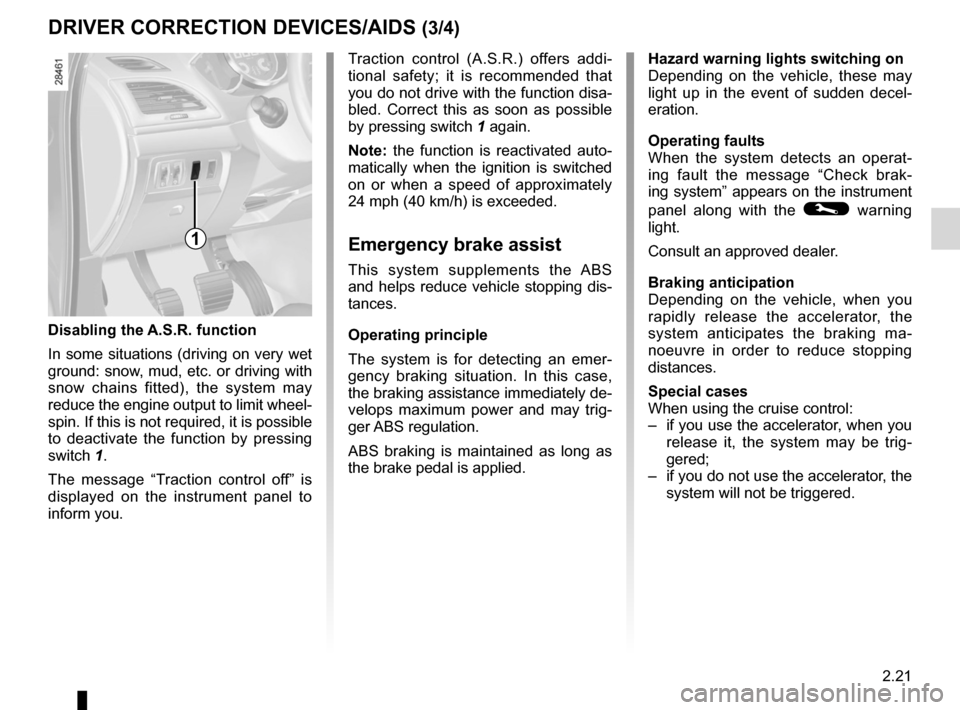
Disabling the A.S.R. function
In some situations (driving on very wet
ground: snow, mud, etc. or driving with
snow chains fitted), the system may
reduce the engine output to limit wheel -
spin. If this is not required, it is possible
to deactivate the function by pressing
switch 1.
The message “ Traction control off ” is
displayed on the instrument panel to
inform you.
1
Page 109 of 239
speed limiter ......................................... (up to the end of the DU)
cruise control-speed limiter................... (up to the end of the DU)
cruise control ........................................ (up to the end of the DU)
driving ................................................... (up to the end of the DU)
2.23
ENG_UD18934_2
Régulateur-limiteur de vitesse : fonction limiteur (X95 - B95 - D95 \
- Renault)
ENG_NU_837-6_BDK95_Renault_2
Speed limiter
CRUISE CONTROL/SPEED LIMITER: speed limiter function (1/3)
The speed limiter function helps you
stay within the driving speed limit that
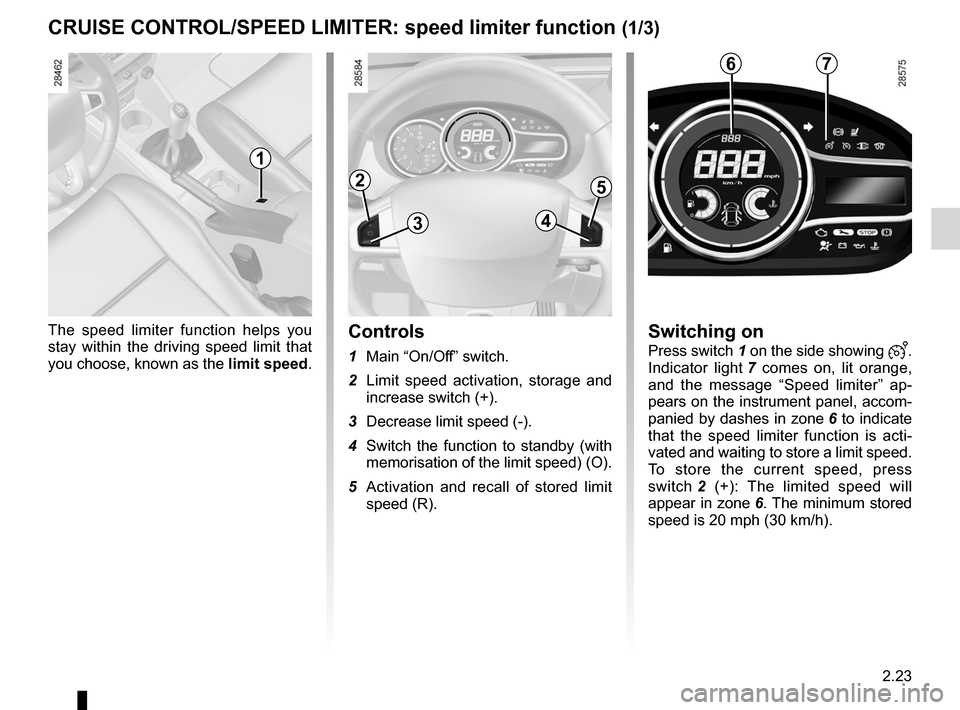
you choose, known as the limit speed.Controls
1 Main “On/Off” switch.
2 Limit speed activation, storage and
increase switch (+).
3 Decrease limit speed (-).
4 Switch the function to standby (with
memorisation of the limit speed) (O).
5 Activation and recall of stored limit
speed (R).
Switching on
Press switch 1 on the side showing .
Indicator light 7 comes on, lit orange,
and the message “ Speed limiter” ap-
pears on the instrument panel, accom-
panied by dashes in zone 6 to indicate
that the speed limiter function is acti -
vated and waiting to store a limit speed.
To store the current speed, press
switch 2 (+): The limited speed will
appear in zone 6. The minimum stored
speed is 20 mph (30 km/h).
2
3
5
4
76
1
Page 110 of 239

ENG_NU_837-6_BDK95_Renault_2
Jaune NoirNoir texte
Driving
When a limited speed has been stored
and")
2.24
ENG_UD18934_2
Régulateur-limiteur de vitesse : fonction limiteur (X95 - B95 - D95 \
- Renault)
ENG_NU_837-6_BDK95_Renault_2
Jaune NoirNoir texte
Driving
When a limited speed has been stored
and this speed is not reached, driving is
similar to driving a vehicle without the
speed limiter function.
Once you have reached the stored
speed, no effort on the accelera -
tor pedal will allow you to exceed
the programmed speed except in an
emergency (refer to information on
“Exceeding the limit speed”).
Varying the limit speed
The limit speed may be changed by re-
peatedly pressing:
– switch 2 (+) to increase the speed;
– switch 3 (-) to decrease the speed.
Exceeding the limit speed
It is possible to exceed the limit speed
at any moment. To do this: press the
accelerator pedal firmly and fully
(beyond the kickdown point).
While the speed is being exceeded, the
limit speed flashes on the instrument
panel and area C lights up red.
Then, as far as is possible, release
the accelerator pedal: the speed lim -
iter function will return as soon as you
reach a speed lower than the stored
speed.
Limited speed cannot be maintained
If driving up or down a steep gradient,
the system is unable to maintain the
limit speed: the stored speed on the
instrument panel will flash and zone C
will light up in red to inform you of this
situation.
The speed limiter function is
in no way linked to the brak-
ing system.
C
2
3
5
4
CRUISE CONTROL/SPEED LIMITER: speed limiter function (2/3)
Page 111 of 239

ENG_NU_837-6_BDK95_Renault_2
Recalling the limit speed
If a speed has been stor")
JauneNoirNoir texte
2.25
ENG_UD18934_2
Régulateur-limiteur de vitesse : fonction limiteur (X95 - B95 - D95 \
- Renault)
ENG_NU_837-6_BDK95_Renault_2
Recalling the limit speed
If a speed has been stored, it can be re-
called by pressing switch 5 (R).
CRUISE CONTROL/SPEED LIMITER: speed limiter function (3/3)
Putting the function on
standby
The speed limiter function is sus -
pended when you press switch 4 (O).
In this case, the limit speed will remain
stored and is no longer displayed in
zone 6 and the message “ Memorised”
along with the stored speed will appear
on the display.
1
When the speed limiter is put on
standby, pressing switch 2 (+) re -
activates the function without taking
into account the stored speed: it is
the speed at which the vehicle is
moving that is taken into account.
Switching off the function
The speed limiter function is deacti -
vated if you press switch 1: in this case
a speed is no longer stored. The in -
strument panel orange indicator light 7
goes out to confirm that the function is
deactivated.
6
2
3
5
4
7
Page 113 of 239

ENG_NU_837-6_BDK95_Renault_2
CRUISE CONTROL/SPEED LIMITER: cruise control f")
JauneNoirNoir texte
2.27
ENG_UD18935_2
Régulateur-limiteur de vitesse : fonction régulateur (X95 - B95 -\
D95 - Renault)
ENG_NU_837-6_BDK95_Renault_2
CRUISE CONTROL/SPEED LIMITER: cruise control function (2/4)
Switching on
Press switch 1 on the side showing .
Indicator light 7 comes on, lit green, and
the message “ Cruise control” appears
on the instrument panel and dashes
appear in zone 6 to indicate that the
cruise control function is activated and
waiting to store a cruising speed.
Activating cruise control
At a steady speed (above 20 mph
( 3 0 k m / h ) a p p r o x i m a t e l y ) p r e s s
switch 2 (+): the speed is stored. The
cruising speed will appear in zone 6.
Cruise control activation is confirmed
when area A lights up green in addition
to indicator light 7 . Area B also lights
up green to indicate that the cruising
speed has been reached.
Driving
Once a cruising speed is stored and
the cruise control function is active,
you may lift your foot off the accelera -
tor pedal.
Important: you are never -
theless advised to keep
your feet close to the pedals
in order to react if neces -
sary.
7
A
bC6
2
3
5
4
1
Page 114 of 239

ENG_NU_837-6_BDK95_Renault_2
Jaune NoirNoir texte
Putting the function on
standby
The function")
2.28
ENG_UD18935_2
Régulateur-limiteur de vitesse : fonction régulateur (X95 - B95 -\
D95 - Renault)
ENG_NU_837-6_BDK95_Renault_2
Jaune NoirNoir texte
Putting the function on
standby
The function is suspended when you:
– press switch 4 (O);
– depress the brake pedal;
– depress the clutch pedal or shift into
neutral if the vehicle has an auto -
matic gearbox.
In all three cases, the cruising speed re-
mains stored, it is no longer displayed in
zone 6 and the message “ Memorised”
along with the stored speed will appear
on the instrument panel.
Standby is confirmed when zones A, B
and C go out.
Exceeding the cruising speed
The cruising speed may be exceeded
at any time by depressing the acceler-
ator pedal. The cruising speed flashes
on the instrument panel along with the
illumination of zone C in red.
Then, release the accelerator: after a
few seconds, the vehicle will automati-
cally return to its set cruising speed.
Cruising speed cannot be
maintained
If driving up or down a steep gradient,
the system is unable to maintain the
cruising speed: the stored speed on the
instrument panel will flash and zone C
will light up in red to inform you of this
situation.
CRUISE CONTROL/SPEED LIMITER: cruise control function (3/4)
Adjusting the cruising speed
The cruising speed may be changed by
pressing the following repeatedly:
– switch 2 (+) to increase the speed;
– switch 3 (-) to decrease the speed.
The cruise control function
is in no way linked to the
braking system.
A
bC6
2
3
5
4
Page 115 of 239

ENG_NU_837-6_BDK95_Renault_2
CRUISE CONTROL/SPEED LIMITER: cruise control f")
JauneNoirNoir texte
2.29
ENG_UD18935_2
Régulateur-limiteur de vitesse : fonction régulateur (X95 - B95 -\
D95 - Renault)
ENG_NU_837-6_BDK95_Renault_2
CRUISE CONTROL/SPEED LIMITER: cruise control function (4/4)
Note: if the speed previously stored is
much higher than the current speed,
the vehicle will accelerate more rapidly
to reach this threshold.
When the cruise control function is
put on standby, pressing switch 2 (+)
reactivates the cruise control func -
tion without taking into account the
stored speed: it is the speed at
which the vehicle is moving that is
taken into account.
Switching off the function
The cruise control function is deacti -
vated if you press switch 1: in this case
a speed is no longer stored. The instru-
ment panel green indicator light 7 and
zones A , B and C go out, confirming
that the function is deactivated.
Putting the cruise control
on standby or switching it
off does not cause a rapid
reduction in speed: you
must brake by depressing the brake
pedal.
1
Returning to the cruising speed
If a speed is stored, it can be recalled,
once you are sure that the road condi -
tions are suitable (traffic, road surface,
weather conditions, etc.).
Press switch 5 (R) if the vehicle speed
is above 20 mph (30 km/h).
When recalling the stored speed
zone A lights up to confirm activation.
Zone B lights up as soon as the cruis-
ing speed is reached.
A
bC
2
3
5
4
7
Page 118 of 239
2.32
ENG_UD14786_3
Aide au parking (X95 - B95 - D95 - Renault)
ENG_NU_837-6_BDK95_Renault_2
PARkING DISTANCE CONTROL (3/3)
Special features
Ensure that the ultrasonic sensors are
not obscured (by dirt, mud, snow, etc.).
Operating faultsWhen the system detects an operating
fault there will be a 5-second continu -
ous beep as a warning. Consult an ap-
proved dealer.
When the vehicle is being driven at
a speed below approximately 6 mph
(10 km/h), certain noises (motorcy -
cle, lorry, pneumatic drill, etc.) may
trigger the beeping sound.
Temporary deactivation of
the system
(depending on the vehicle)
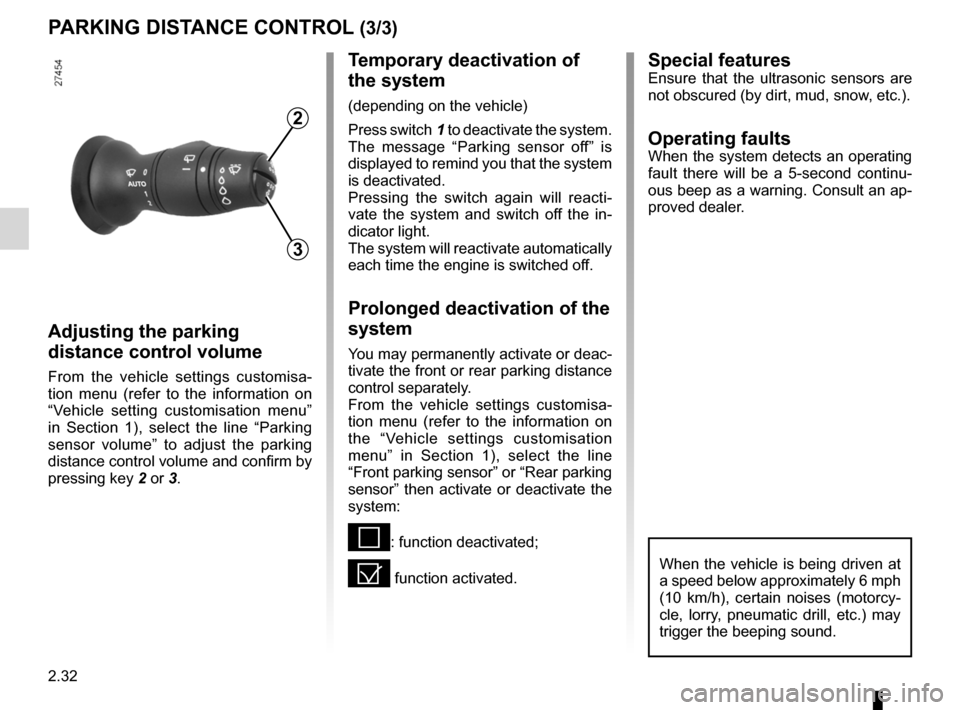
Press switch 1 to deactivate the system.
The message “ Parking sensor off ” is
displayed to remind you that the system
is deactivated.
Pressing the switch again will reacti -
vate the system and switch off the in -
dicator light.
The system will reactivate automatically
each time the engine is switched off.
Prolonged deactivation of the
system
You may permanently activate or deac-
tivate the front or rear parking distance
control separately.
From the vehicle settings customisa -
tion menu (refer to the information on
the “Vehicle settings customisation
menu” in Section 1), select the line
“Front parking sensor” or “Rear parking
sensor” then activate or deactivate the
system:
<: function deactivated;
= function activated.
Adjusting the parking
distance control volume
From the vehicle settings customisa -
tion menu (refer to the information on
“Vehicle setting customisation menu”
in Section 1), select the line “ Parking
sensor volume ” to adjust the parking
distance control volume and confirm by
pressing key 2 or 3.
2
3