fuse chart RENAULT SCENIC 2011 J95 / 3.G Air Bag ACU4 - Seat Belt Pretensioners Workshop Manual
[x] Cancel search | Manufacturer: RENAULT, Model Year: 2011, Model line: SCENIC, Model: RENAULT SCENIC 2011 J95 / 3.GPages: 68, PDF Size: 0.38 MB
Page 4 of 68
AIRBAG - SEAT BELT PRETENSIONERS
Fault finding - Introduction
88C
88C - 4V3 MR-372-J84-88C000$010.mif
AIRBAG ACU4
Vdiag: 04
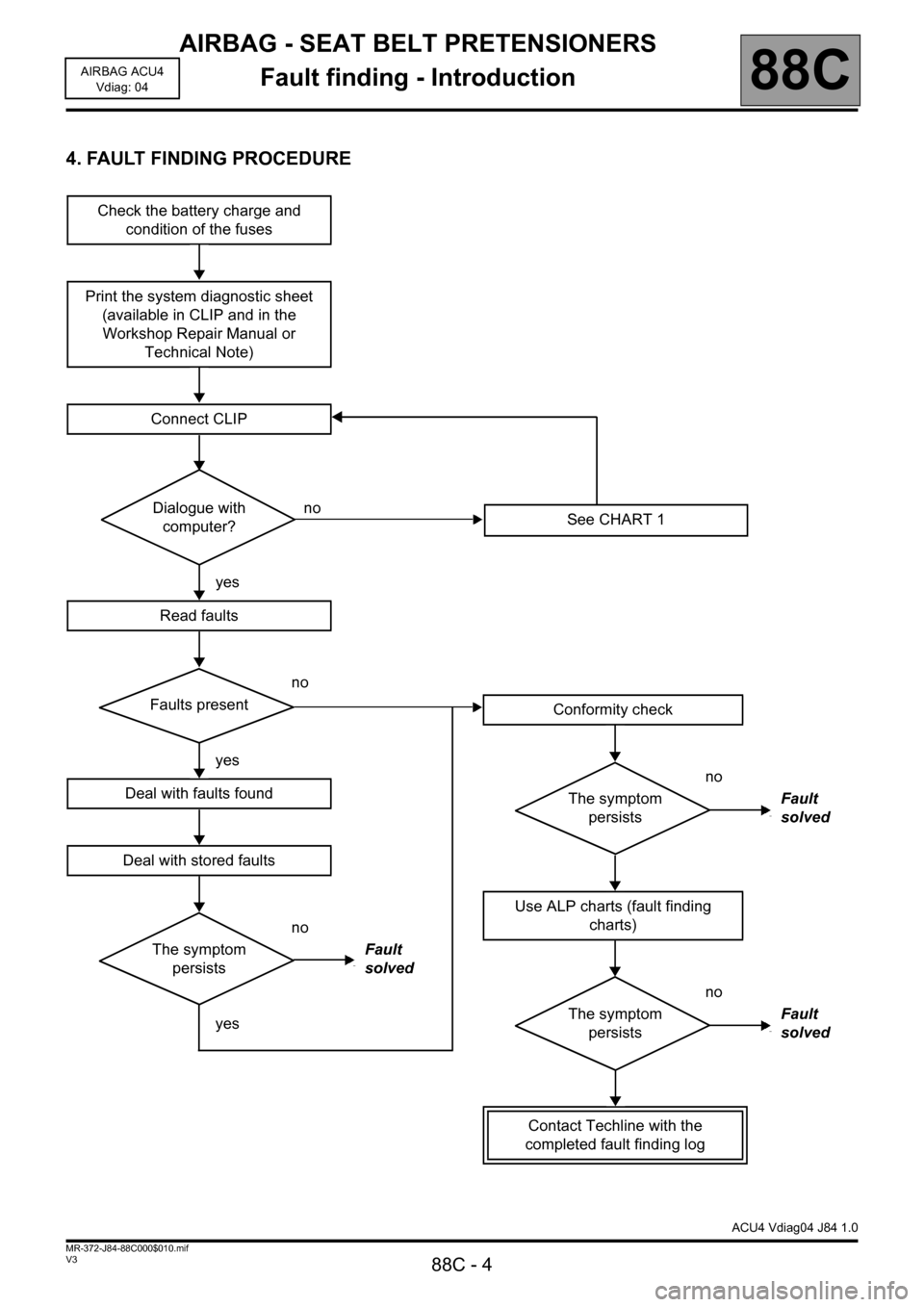
4. FAULT FINDING PROCEDURE
Check the battery charge and
condition of the fuses
Print the system diagnostic sheet
(available in CLIP and in the
Workshop Repair Manual or
Technical Note)
Connect CLIP
Dialogue with
computer?no
yes
Read faults
no
Faults present
yes
Deal with faults found
Deal with stored faults
no
The symptom
persistsFault
solved
yes
See CHART 1
ACU4 Vdiag04 J84 1.0
Conformity check
no
The symptom
persistsFault
solved
Use ALP charts (fault finding
charts)
no
The symptom
persistsFault
solved
Contact Techline with the
completed fault finding log
Page 68 of 68
AIRBAG - SEAT BELT PRETENSIONERS
Fault finding - Fault finding chart
88C - 68
88C
V3 MR-372-J84-88C000$100.mif
AIRBAG ACU4
Vdiag: 04
AIRBAG - SEAT BELT PRETENSIONERS
Fault finding - Fault finding chart
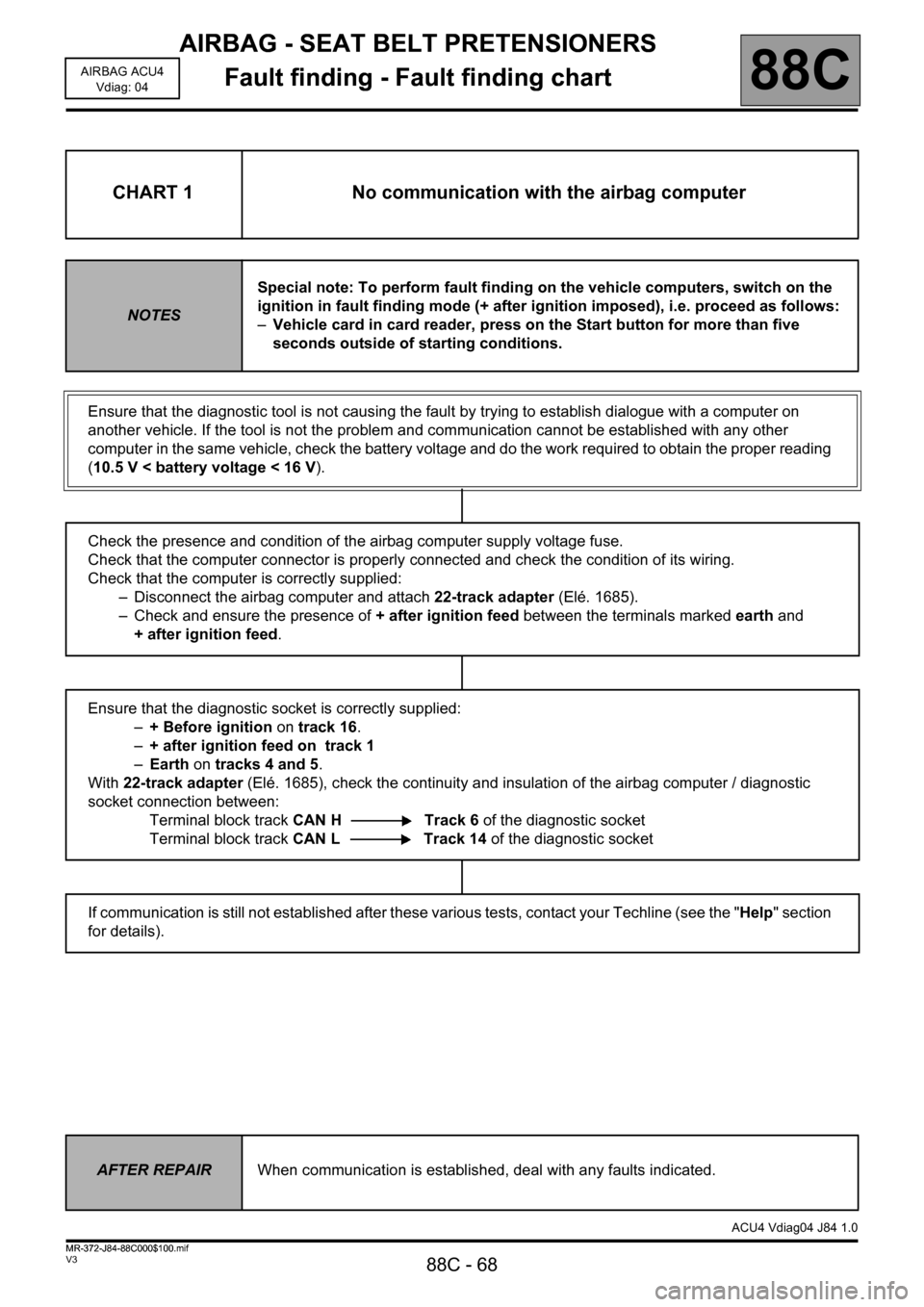
CHART 1 No communication with the airbag computer
NOTESSpecial note: To perform fault finding on the vehicle computers, switch on the
ignition in fault finding mode (+ after ignition imposed), i.e. proceed as follows:
–Vehicle card in card reader, press on the Start button for more than five
seconds outside of starting conditions.
Ensure that the diagnostic tool is not causing the fault by trying to establish dialogue with a computer on
another vehicle. If the tool is not the problem and communication cannot be established with any other
computer in the same vehicle, check the battery voltage and do the work required to obtain the proper reading
(10.5 V < battery voltage < 16 V).
Check the presence and condition of the airbag computer supply voltage fuse.
Check that the computer connector is properly connected and check the condition of its wiring.
Check that the computer is correctly supplied:
– Disconnect the airbag computer and attach 22-track adapter (Elé. 1685).
– Check and ensure the presence of + after ignition feed between the terminals marked earth and
+ after ignition feed.
Ensure that the diagnostic socket is correctly supplied:
–+ Before ignition on track 16.
–+ after ignition feed on track 1
–Earth on tracks 4 and 5.
With 22-track adapter (Elé. 1685), check the continuity and insulation of the airbag computer / diagnostic
socket connection between:
Terminal block track CAN H Track 6 of the diagnostic socket
Terminal block track CAN L Track 14 of the diagnostic socket
If communication is still not established after these various tests, contact your Techline (see the "Help" section
for details).
AFTER REPAIRWhen communication is established, deal with any faults indicated.
ACU4 Vdiag04 J84 1.0
MR-372-J84-88C000$100.mif