trip computer RENAULT SCENIC 2015 J95 / 3.G User Guide
[x] Cancel search | Manufacturer: RENAULT, Model Year: 2015, Model line: SCENIC, Model: RENAULT SCENIC 2015 J95 / 3.GPages: 270, PDF Size: 6.08 MB
Page 76 of 270
1.70
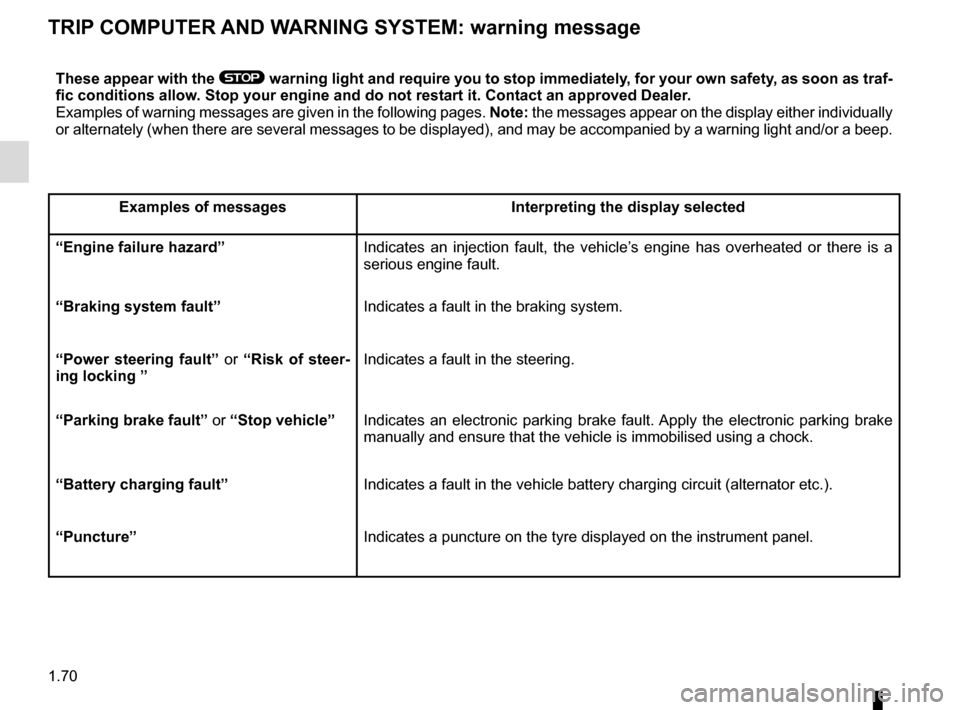
TRIP COMPUTER AND WARNING SYSTEM: warning message
These appear with the ® warning light and require you to stop immediately, for your own safety, as soon as traf-
fic conditions allow. Stop your engine and do not restart it. Contact an approved Dealer.
Examples of warning messages are given in the following pages. Note: the messages appear on the display either individually
or alternately (when there are several messages to be displayed), and \
may be accompanied by a warning light and/or a beep.
Examples of messages Interpreting the display selected
“Engine failure hazard” Indicates an injection fault, the vehicle’s engine has overheated or there is a
serious engine fault.
“Braking system fault” Indicates a fault in the braking system.
“Power steering fault” or “Risk of steer-
ing locking ” Indicates a fault in the steering.
“Parking brake fault” or “Stop vehicle” Indicates an electronic parking brake fault. Apply the electronic parking brake
manually and ensure that the vehicle is immobilised using a chock.
“Battery charging fault” Indicates a fault in the vehicle battery charging circuit (alternator e\
tc.).
“Puncture” Indicates a puncture on the tyre displayed on the instrument panel.
Page 77 of 270

1.71
VEHICLE SETTINGS CUSTOMISATION MENU
Adjusting the settings
Depending on the vehicle equipment,
press button 3 or 4 to select the func-
tion to be modified:
a) Auto door locking while driving;
b) Unlock driver’s door only;
c) Auto rear wipe with reverse gear;
d) Auto dipped-beam headlights;
e) Front parking sensor;
f) Automatic main beam lights;
g) Lane departure warning: volume;
h) Lane departure warning: sensitivity;
i) Rear parking sensor;
j) Parking sensor: volume;
k) TIME;
l) LANGUAGE.
On equipped vehicles, this function,
which is integrated in trip computer and
warning system 1, allows you to acti-
vate/deactivate and adjust some of the
vehicle’s functions.
Accessing the vehicle
settings personalisation
menu
With the vehicle stationary, press
button 2 , 3 or 4 to access the various
settings.
Once the function has been selected,
activate or deactivate it using button
“OK” 2:
= function activated
< function deactivated
If you select either “Parking sensor:
volume” or “LANGUAGE”, you will
have to make a further selection (sound
volume of the parking distance control
or instrument panel language). In this
case, make your selection and confirm
it by pressing button “OK” 2.
To exit the menu, select “EXIT”, then
confirm by pressing button “OK” 2.
Note: for vehicles which are fitted with
switch 5, please refer to the specific in-
structions for the multimedia display.
The vehicle settings personalisation menu cannot be used when driving. At
speeds of above 12 mph (20 km/h) for vehicles with a manual gearbox (\
0 mph for
vehicles with an automatic gearbox), the on-board display returns autom\
atically
to the trip computer and warning system mode.
1
2
3
4
5
Page 267 of 270

telephone ..............................................................\
............. 3.42
temperature regulation ............................................3.6 → 3.1")
7.5
ALPHABETICAL INDEX (5/5)
telephone ..............................................................\
............. 3.42
temperature regulation ............................................3.6 → 3.10
tool kit ....................................................................... 5.9 – 5.10
towing breakdown ........................................................ 5.32 – 5.33
towing equipment .............................................. 3.37 – 3.38
towing a caravan ............................................. 3.37 – 3.38, 6.8
towing equipment fitting ................................................................. 3.37 – 3.38
towing hitch........................................... 5.9 – 5.10, 5.32 – 5.33
towing rings ................................................... 3.37 – 3.38, 3.40
towing weights ..................................................................... 6.8
traction control ..............................................1.56, 2.25 → 2.29
transporting children ..........................1.30 – 1.31, 1.33 → 1.45
transporting objects in the luggage compartment ............................. 3.37 – 3.38
luggage net ....................................................... 3.39 – 3.40
trims ..................................................................\
................. 5.10
trip computer and warning system... 1.54 → 1.58, 1.61 → 1.70
tyre inflation kit......................................................\
.....5.4 → 5.8
tyre pressure............................. 2.21 → 2.24, 4.11 – 4.12, 5.14
tyre pressure monitor.............................................2.21 → 2.24
tyre pressures ......................................................... 4.11 – 4.12
tyres ............................. 2.21 → 2.24, 4.11 – 4.12, 5.13 → 5.15
U
unlocking the doors ................................................ 1.11 – 1.12
V
ventilation ............................................................\
....3.4 → 3.10
W
warning buzzer ........................................................... 1.9, 1.74
warning lights................................... 1.54 → 1.58, 1.61 → 1.70
washing .................................................................. 4.15 – 4.16
weights ................................................................\
................ 6.8 wheelbrace ............................................................... 5.9 – 5.10
wheels (safety) ......................................................5.13
→ 5.15
windscreen de-icing/demisting ..................................... 3.5, 3.9
windscreen washer ................................................... 1.83, 4.10
wiper blades ...................................................................... 5.31
wipers blades .................................................................\
......... 5.31