ignition RENAULT SCENIC 2018 User Guide
[x] Cancel search | Manufacturer: RENAULT, Model Year: 2018, Model line: SCENIC, Model: RENAULT SCENIC 2018Pages: 364, PDF Size: 10.43 MB
Page 69 of 364
1.63
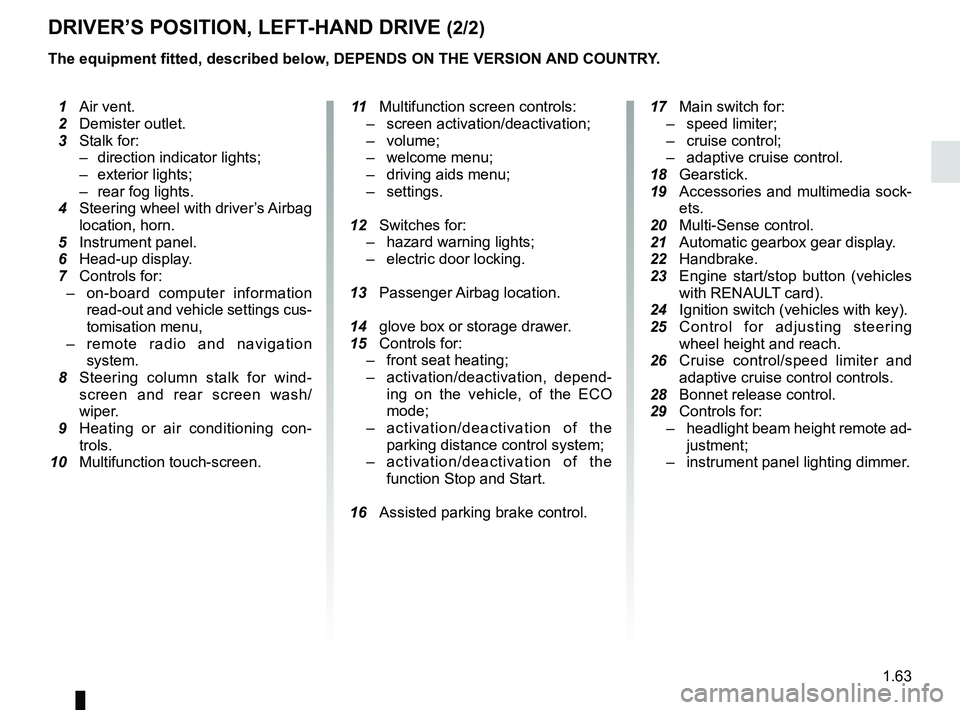
DRIVER’S POSITION, LEFT-HAND DRIVE (2/2)
The equipment fitted, described below, DEPENDS ON THE VERSION AND COUNTRY.
1 Air vent.
2 Demister outlet.
3 Stalk for:
– direction indicator lights;
– exterior lights;
– rear fog lights.
4 Steering wheel with driver’s Airbag
location, horn.
5 Instrument panel.
6 Head-up display.
7 Controls for:
– on-board computer information
read-out and vehicle settings cus-
tomisation menu,
– remote radio and navigation
system.
8 Steering column stalk for wind-
screen and rear screen wash/
wiper.
9 Heating or air conditioning con-
trols.
10 Multifunction touch-screen.
11 Multifunction screen controls:
– screen activation/deactivation;
– volume;
– welcome menu;
– driving aids menu;
– settings.
12 Switches for:
– hazard warning lights;
– electric door locking.
13 Passenger Airbag location.
14 glove box or storage drawer.
15 Controls for:
– front seat heating;
– activation/deactivation, depend-
ing on the vehicle, of the ECO
mode;
– activation/deactivation of the
parking distance control system;
– activation/deactivation of the
function Stop and Start.
16 Assisted parking brake control.
17 Main switch for:
– speed limiter;
– cruise control;
– adaptive cruise control.
18 Gearstick.
19 Accessories and multimedia sock-
ets.
20 Multi-Sense control.
21
Automatic gearbox gear display.
22 Handbrake.
23 Engine start/stop button (vehicles
with RENAUL
T card).
24 Ignition switch (vehicles with key).
25 Control for adjusting steering
wheel height and reach.
26 Cruise control/speed limiter and
adaptive cruise control controls.
28 Bonnet release control.
29 Controls for:
– headlight beam height remote ad-
justment;
– instrument panel lighting dimmer.
Page 71 of 364
1.65
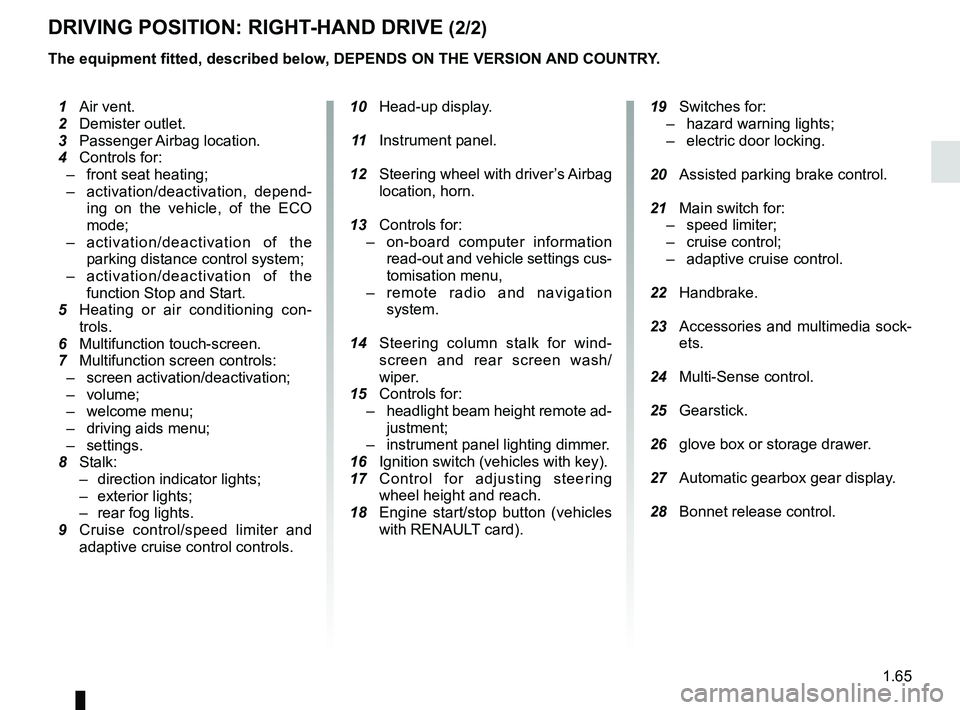
DRIVING POSITION: RIGHT-HAND DRIVE (2/2)
The equipment fitted, described below, DEPENDS ON THE VERSION AND COUNTRY.
10 Head-up display.
11 Instrument panel.
12 Steering wheel with driver’s Airbag
location, horn.
13 Controls for:
– on-board computer information
read-out and vehicle settings cus-
tomisation menu,
– remote radio and navigation
system.
14 Steering column stalk for wind-
screen and rear screen wash/
wiper.
15 Controls for:
– headlight beam height remote ad-
justment;
– instrument panel lighting dimmer.
16 Ignition switch (vehicles with key).
17 Control for adjusting steering
wheel height and reach.
18 Engine start/stop button (vehicles
with RENAULT card).
19 Switches for:
– hazard warning lights;
– electric door locking.
20 Assisted parking brake control.
21 Main switch for:
– speed limiter;
– cruise control;
– adaptive cruise control.
22 Handbrake.
23 Accessories and multimedia sock-
ets.
24 Multi-Sense control.
25 Gearstick.
26 glove box or storage drawer.
27 Automatic gearbox gear display.
28 Bonnet release control.
1 Air vent.
2 Demister outlet.
3 Passenger Airbag location.
4 Controls for:
– front seat heating;
– activation/deactivation, depend-
ing on the vehicle, of the ECO
mode;
– activation/deactivation of the
parking distance control system;
– activation/deactivation of the
function Stop and Start.
5
Heating or air conditioning con-
trols.
6 Multifunction touch-screen.
7 Multifunction screen controls:
– screen activation/deactivation;
– volume;
– welcome menu;
– driving aids menu;
– settings.
8 Stalk:
– direction indicator lights;
– exterior lights;
– rear fog lights.
9 Cruise control/speed limiter and
adaptive cruise control controls.
Page 73 of 364
1.67
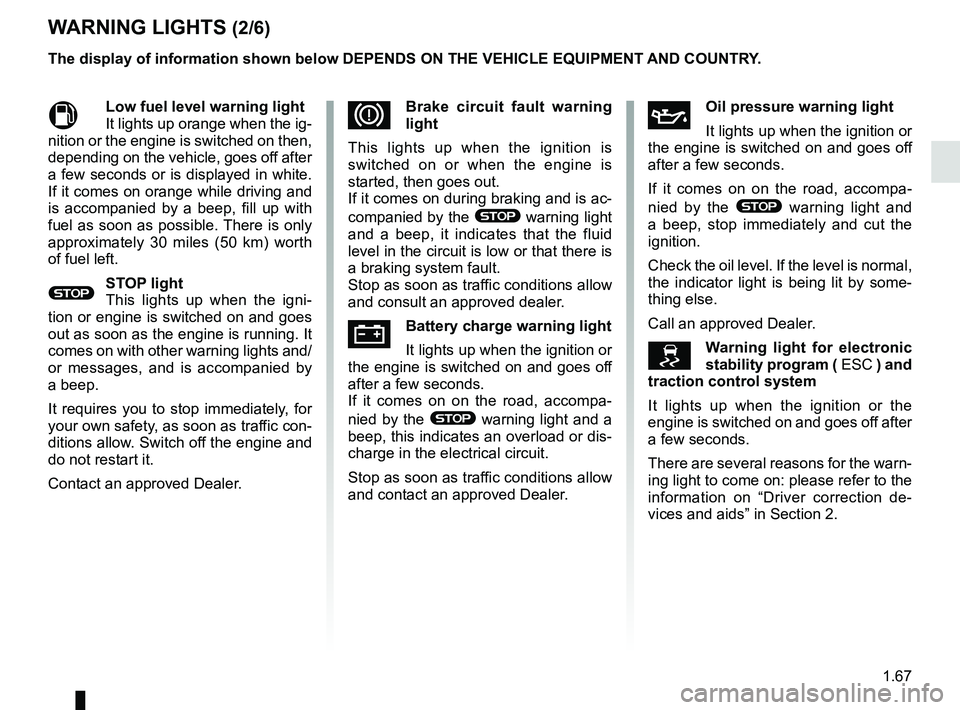
WARNING LIGHTS (2/6)
MLow fuel level warning light
It lights up orange when the ig-
nition or the engine is switched on then,
depending on the vehicle, goes off after
a few seconds or is displayed in white.
If it comes on orange while driving and
is accompanied by a beep, fill up with
fuel as soon as possible. There is only
approximately 30 miles (50 km) worth
of fuel left.
®STOP light
This lights up when the igni-
tion or engine is switched on and goes
out as soon as the engine is running. It
comes on with other warning lights and/
or messages, and is accompanied by
a beep.
It requires you to stop immediately, for
your own safety, as soon as traffic con-
ditions allow. Switch off the engine and
do not restart it.
Contact an approved Dealer.
ÀOil pressure warning light
It lights up when the ignition or
the engine is switched on and goes off
after a few seconds.
If it comes on on the road, accompa-
nied by the
® warning light and
a beep, stop immediately and cut the
ignition.
Check the oil level. If the level is normal,
the indicator light is being lit by some-
thing else.
Call an approved Dealer.
\bWarning light for electronic
stability program ( ESC ) and
traction control system
It lights up when the ignition or the
engine is switched on and goes off after
a few seconds.
There are several reasons for the warn-
ing light to come on: please refer to the
information on “Driver correction de-
vices and aids” in Section 2.
DBrake circuit fault warning
light
This lights up when the ignition is
switched on or when the engine is
started, then goes out.
If it comes on during braking and is ac-
companied by the
® warning light
and a beep, it indicates that the fluid
level in the circuit is low or that there is
a braking system fault.
Stop as soon as traffic conditions allow
and consult an approved dealer.
ÚBattery charge warning light
It lights up when the ignition or
the engine is switched on and goes off
after a few seconds.
If it comes on on the road, accompa-
nied by the
® warning light and a
beep, this indicates an overload or dis-
charge in the electrical circuit.
Stop as soon as traffic conditions allow
and contact an approved Dealer.
The display of information shown below DEPENDS ON THE VEHICLE EQUIPMENT \
AND COUNTRY.
Page 74 of 364
1.68
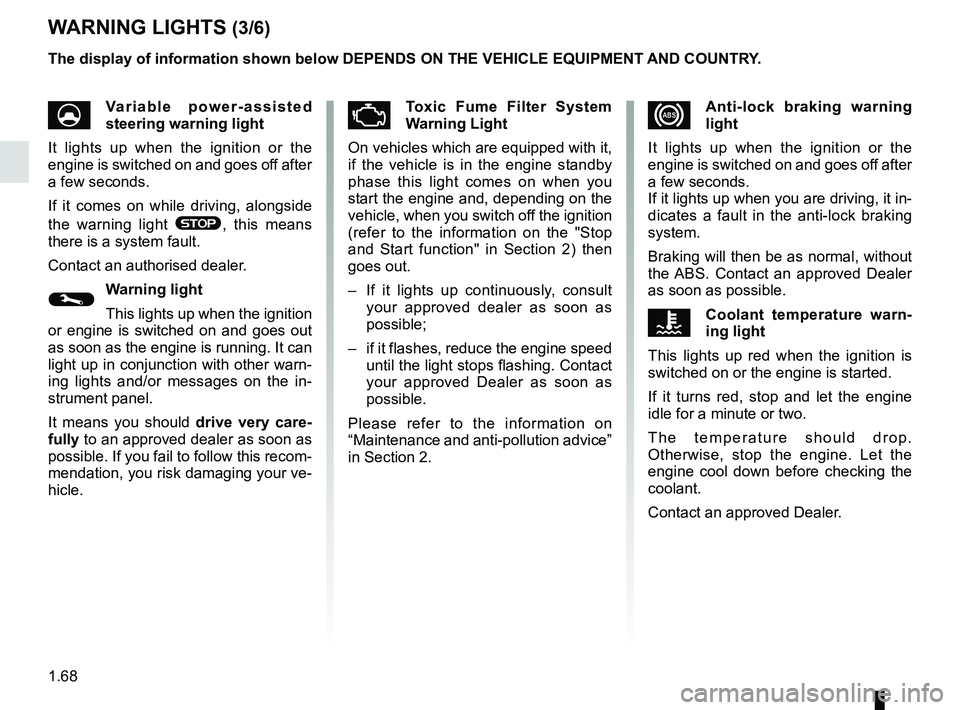
xAnti-lock braking warning
light
It lights up when the ignition or the
engine is switched on and goes off after
a few seconds.
If it lights up when you are driving, it in-
dicates a fault in the anti-lock braking
system.
Braking will then be as normal, without
the ABS. Contact an approved Dealer
as soon as possible.
ÔCoolant temperature warn-
ing light
This lights up red when the ignition is
switched on or the engine is started.
If it turns red, stop and let the engine
idle for a minute or two.
The temperature should drop.
Otherwise, stop the engine. Let the
engine cool down before checking the
coolant.
Contact an approved Dealer.
WARNING LIGHTS (3/6)
UVariable power-assisted
steering warning light
It lights up when the ignition or the
engine is switched on and goes off after
a few seconds.
If it comes on while driving, alongside
the warning light
®, this means
there is a system fault.
Contact an authorised dealer.
©Warning light
This lights up when the ignition
or engine is switched on and goes out
as soon as the engine is running. It can
light up in conjunction with other warn-
ing lights and/or messages on the in-
strument panel.
It means you should drive very care-
fully to an approved dealer as soon as
possible. If you fail to follow this recom-
mendation, you risk damaging your ve-
hicle.
ÄToxic Fume Filter System
Warning Light
On vehicles which are equipped with it,
if the vehicle is in the engine standby
phase this light comes on when you
start the engine and, depending on the
vehicle, when you switch off the ignition
(refer to the information on the "Stop
and Start function" in Section 2) then
goes out.
– If it lights up continuously, consult your approved dealer as soon as
possible;
– if it flashes, reduce the engine speed until the light stops flashing. Contact
your approved Dealer as soon as
possible.
Please refer to the information on
“Maintenance and anti-pollution advice”
in Section 2.
The display of information shown below DEPENDS ON THE VEHICLE EQUIPMENT \
AND COUNTRY.
Page 75 of 364
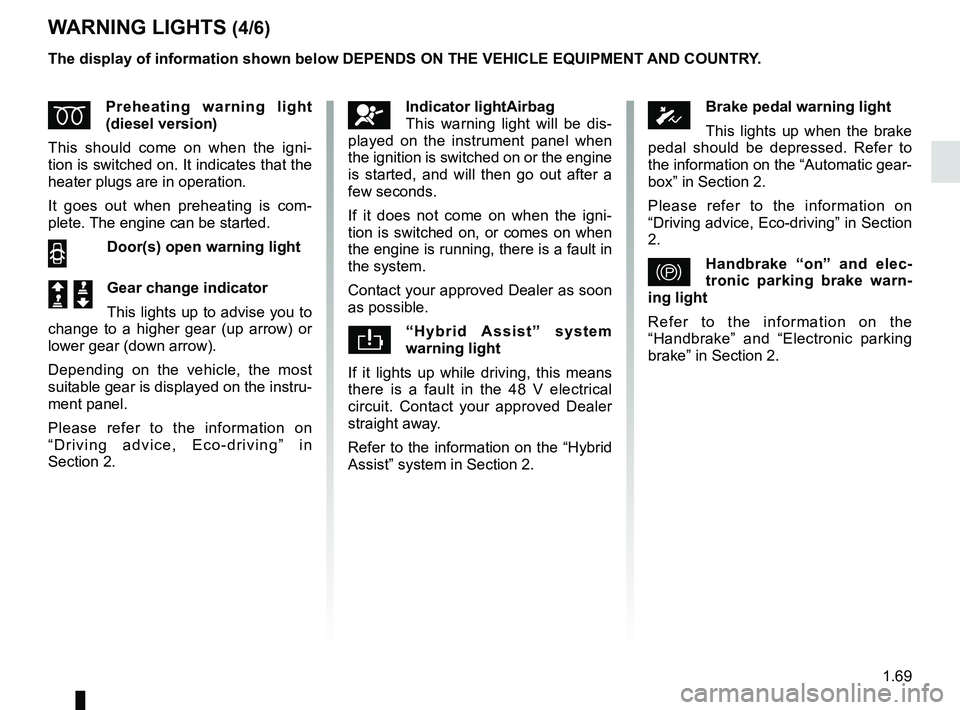
1.69
WARNING LIGHTS (4/6)
ÉPreheating warning light
(diesel version)
This should come on when the igni-
tion is switched on. It indicates that the
heater plugs are in operation.
It goes out when preheating is com-
plete. The engine can be started.
2 Door(s) open warning light
Š ‰Gear change indicator
This lights up to advise you to
change to a higher gear (up arrow) or
lower gear (down arrow).
Depending on the vehicle, the most
suitable gear is displayed on the instru-
ment panel.
Please refer to the information on
“Driving advice, Eco-driving” in
Section 2.
The display of information shown below DEPENDS ON THE VEHICLE EQUIPMENT \
AND COUNTRY.
ÓBrake pedal warning light
This lights up when the brake
pedal should be depressed. Refer to
the information on the “Automatic gear-
box” in Section 2.
Please refer to the information on
“Driving advice, Eco-driving” in Section
2.
}Handbrake “on” and elec-
tronic parking brake warn-
ing light
Refer to the information on the
“Handbrake” and “Electronic parking
brake” in Section 2.
åIndicator lightAirbag
This warning light will be dis-
played on the instrument panel when
the ignition is switched on or the engine
is started, and will then go out after a
few seconds.
If it does not come on when the igni-
tion is switched on, or comes on when
the engine is running, there is a fault in
the system.
Contact your approved Dealer as soon
as possible.
“Hybrid Assist” system
warning light
If it lights up while driving, this means
there is a fault in the 48 V electrical
circuit. Contact your approved Dealer
straight away.
Refer to the information on the “Hybrid
Assist” system in Section 2.
Page 77 of 364

The display of information shown below DEPENDS ON THE VEHICLE EQUIPMENT \
AND COUNTRY.
On display C or, depending on the
vehicle, on the rear-view mirror D
Passenger Air")
1.71
WARNING LIGHTS (6/6)
The display of information shown below DEPENDS ON THE VEHICLE EQUIPMENT \
AND COUNTRY.
On display C or, depending on the
vehicle, on the rear-view mirror D
Passenger Airbag ON
Refer to the information on
“Child safety: deactivating/activating
the front passenger airbag” in Section 1.
¹Passenger Airbag OFF
Refer to the information on
“Child safety: deactivating/activating
the front passenger airbag” in
Section 1).
ßDriver’s seat belt reminder
and, depending on the vehi-
cle, front passenger seat belt re-
minder.
This lights up when the ignition is
switched on if the driver's or front pas-
senger's seat belt (if the passenger
seat is occupied) is not fastened and
the vehicle has reached approximately
12.4 mph (20 km/h), it flashes and a
beep sounds for around 2 minutes.
Note: an object placed on the passen-
ger seat base can activate the warning
light.
C
D
Page 81 of 364
1.75
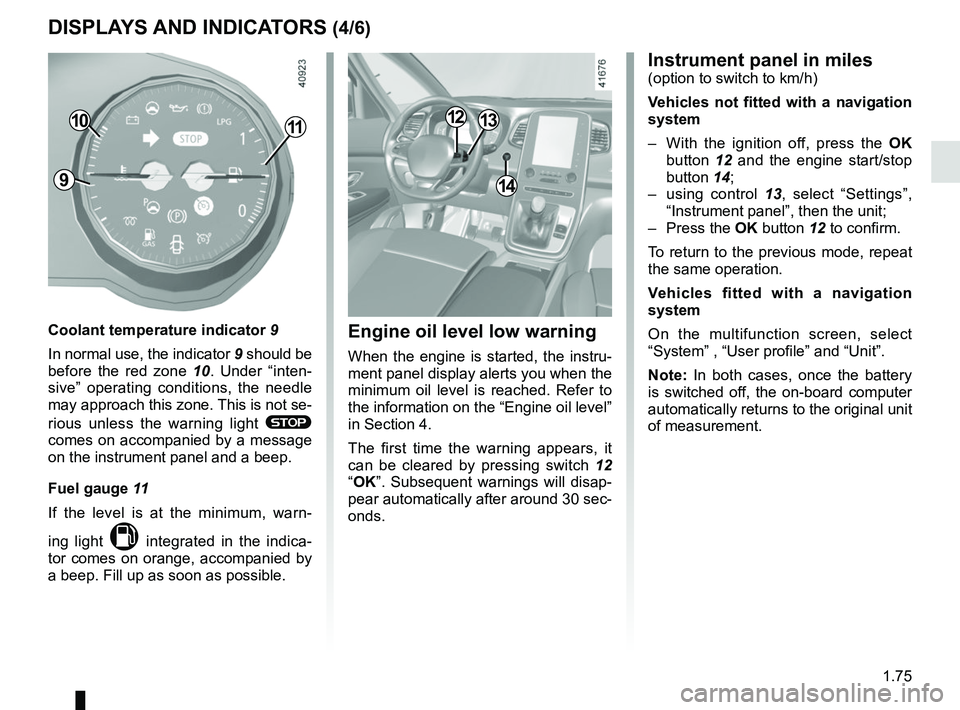
DISPLAYS AND INDICATORS (4/6)
1110
Coolant temperature indicator 9
In normal use, the indicator 9 should be
before the red zone 10. Under “inten-
sive” operating conditions, the needle
may approach this zone. This is not se-
rious unless the warning light
®
comes on accompanied by a message
on the instrument panel and a beep.
Fuel gauge 11
If the level is at the minimum, warn-
ing light
M integrated in the indica-
tor comes on orange, accompanied by
a beep. Fill up as soon as possible.
914
1213
Instrument panel in miles(option to switch to km/h)
Vehicles not fitted with a navigation
system
– With the ignition off, press the OK
button 12 and the engine start/stop
button 14;
– using control 13, select “Settings”,
“Instrument panel”, then the unit;
– Press the OK button 12 to confirm.
To return to the previous mode, repeat
the same operation.
Vehicles fitted with a navigation
system
On the multifunction screen, select
“System” , “User profile” and “Unit”.
Note: In both cases, once the battery
is switched off, the on-board computer
automatically returns to the original unit
of measurement.
Engine oil level low warning
When the engine is started, the instru-
ment panel display alerts you when the
minimum oil level is reached. Refer to
the information on the “Engine oil level”
in Section 4.
The first time the warning appears, it
can be cleared by pressing switch 12
“OK”. Subsequent warnings will disap-
pear automatically after around 30 sec-
onds.
Page 88 of 364

The display of information shown below DEPENDS ON THE VEHICLE EQUIPMENT \
AND COUNTRY.
Examples of selectionsInterpreting the display selected
On-board comp")
1.82
ON-BOARD COMPUTER: trip settings (3/5)
The display of information shown below DEPENDS ON THE VEHICLE EQUIPMENT \
AND COUNTRY.
Examples of selectionsInterpreting the display selected
On-board computer with mileage-
before-service message
d) Mileage before service or oil change.Mileage before service
With the ignition switched on, the engine not running and
the display set to “SERVICE INTERVALS”, press button OK for
approximately 5 seconds to display the mileage before service
(distance or time to the next service). When the distance value
approaches its limit, there are several possible scenarios:
– range less than 930 miles (1,500 km) or one month: the
message “Service due in” is displayed accompanied by the
nearest term (distance or time);
– range equal to 0 miles (0 km) or date of service reached:
the message “Service required” is displayed accompanied by
the warning light
©.
The vehicle requires a service as soon as possible.
SERVICE
INTERVALS
Service in
30 000 Kms / 12 mo
Service due in
300 Kms / 24 days
Service required
Resetting: to reset the distance before service, press and hold button 2 for approximately 10 seconds until the display shows
the mileage permanently.
NB: if a service is performed without changing the engine oil, only the mi\
leage before the next service should be reset. In the
event of an oil change, both the distance before the next service and th\
e next oil change should be reset.
Page 89 of 364

The display of information shown below DEPENDS ON THE VEHICLE EQUIPMENT \
AND COUNTRY.
Examples of selectionsInterpreting the display selected
On-board computer")
1.83
TRIP COMPUTER: trip settings (4/5)
The display of information shown below DEPENDS ON THE VEHICLE EQUIPMENT \
AND COUNTRY.
Examples of selectionsInterpreting the display selected
On-board computer with distance before
next service message (cntd.)
d) Mileage before service or oil change.Mileage before service
With the ignition on, the engine not running and the display
selected “SERVICE INTERVALS”, press button OK for about
5 seconds to display the mileage before the next service, then
press button 2 to view the mileage before the next oil change
(distance or time remaining before the next service). When the
distance value approaches its limit, there are several possible
scenarios:
– range less than 930 miles (1,500 km) or one month: the
message “Service due in” is displayed accompanied by the
nearest term (distance or time);
– range equal to 0 miles (0 km) or date of oil change reached:
the message “Service required” is displayed accompanied by
the warning light
©.
The vehicle requires an oil change as soon as possible.
SERVICE
INTERVALS
Oil change in
30 000 Kms / 24 mo
Service due in
300 Kms / 24 days
Service required
Depending on the vehicle, the mileage before an oil change varies accord\
ing to the driving style (frequent driving at low speed ,
door-to-door journeys, extensive use at idling speed, towing a trailer, etc.). The distance remaining until the next oil change can
therefore decrease more quickly in some cases than the actual distance t\
ravelled.
Resetting: to reset the mileage before a service, press and hold button 2 for approximately 10 seconds until the display shows
the range permanently.
NB: if a service is performed without changing the engine oil, only the mi\
leage before the next service should be reset. In the
event of an oil change, both the distance before the next service and th\
e next oil change should be reset.
Page 91 of 364
1.85
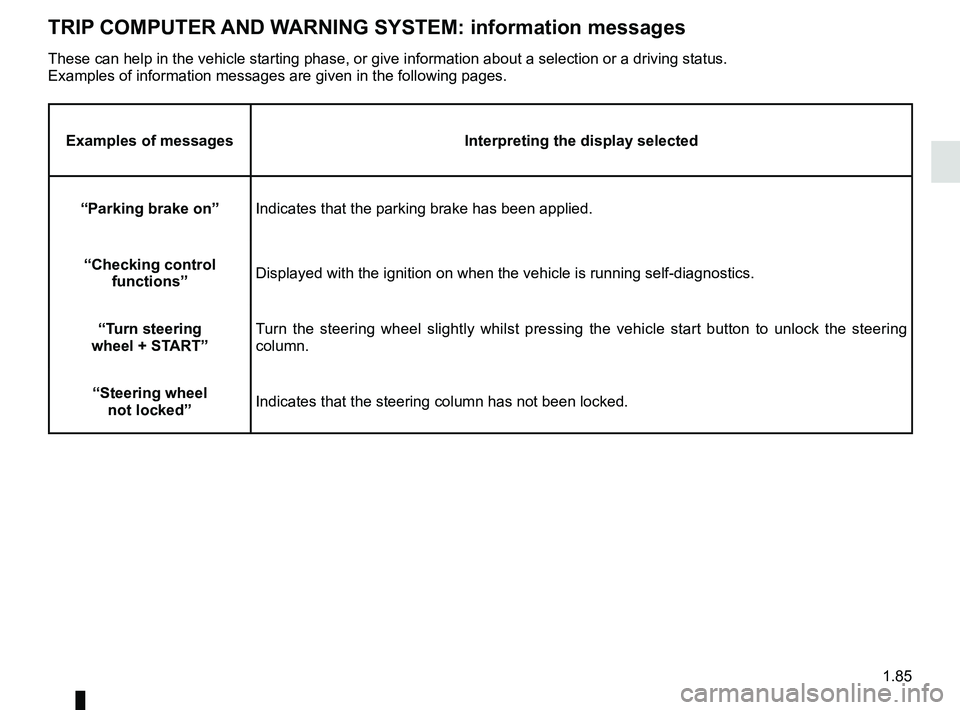
TRIP COMPUTER AND WARNING SYSTEM: information messages
Examples of messagesInterpreting the display selected
“Parking brake on” Indicates that the parking brake has been applied.
“Checking control functions” Displayed with the ignition on when the vehicle is running self-diagnost\
ics.
“Turn steering
wheel + START” Turn the steering wheel slightly whilst pressing the vehicle start button\
to unlock the steering
column.
“Steering wheel not locked” Indicates that the steering column has not been locked.
These can help in the vehicle starting phase, or give information about \
a selection or a driving status.
Examples of information messages are given in the following pages.