Wheel RENAULT TALISMAN 2016 1.G User Guide
[x] Cancel search | Manufacturer: RENAULT, Model Year: 2016, Model line: TALISMAN, Model: RENAULT TALISMAN 2016 1.GPages: 328, PDF Size: 3.39 MB
Page 90 of 328
1.84
AUDIBLE AND VISUAL SIGNALS
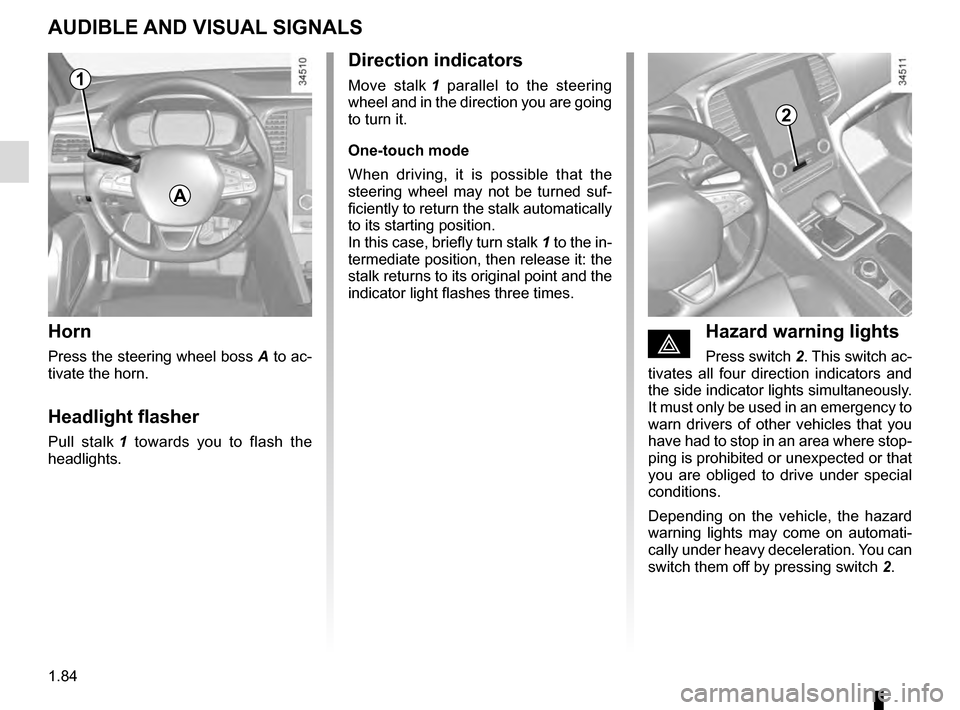
Horn
Press the steering wheel boss A to ac-
tivate the horn.
Headlight flasher
Pull stalk 1 towards you to flash the
headlights.
éHazard warning lights
Press switch 2. This switch ac-
tivates all four direction indicators and
the side indicator lights simultaneously.
It must only be used in an emergency to
warn drivers of other vehicles that you
have had to stop in an area where stop-
ping is prohibited or unexpected or that
you are obliged to drive under special
conditions.
Depending on the vehicle, the hazard
warning lights may come on automati-
cally under heavy deceleration. You can
switch them off by pressing switch 2.
Direction indicators
Move stalk 1 parallel to the steering
wheel and in the direction you are going
to turn it.
One-touch mode
When driving, it is possible that the
steering wheel may not be turned suf-
ficiently to return the stalk automatically
to its starting position.
In this case, briefly turn stalk 1 to the in-
termediate position, then release it: the
stalk returns to its original point and the
indicator light flashes three times.
2
A
1
Page 95 of 328
1.89
EXTERIOR LIGHTING AND SIGNALS (5/5)
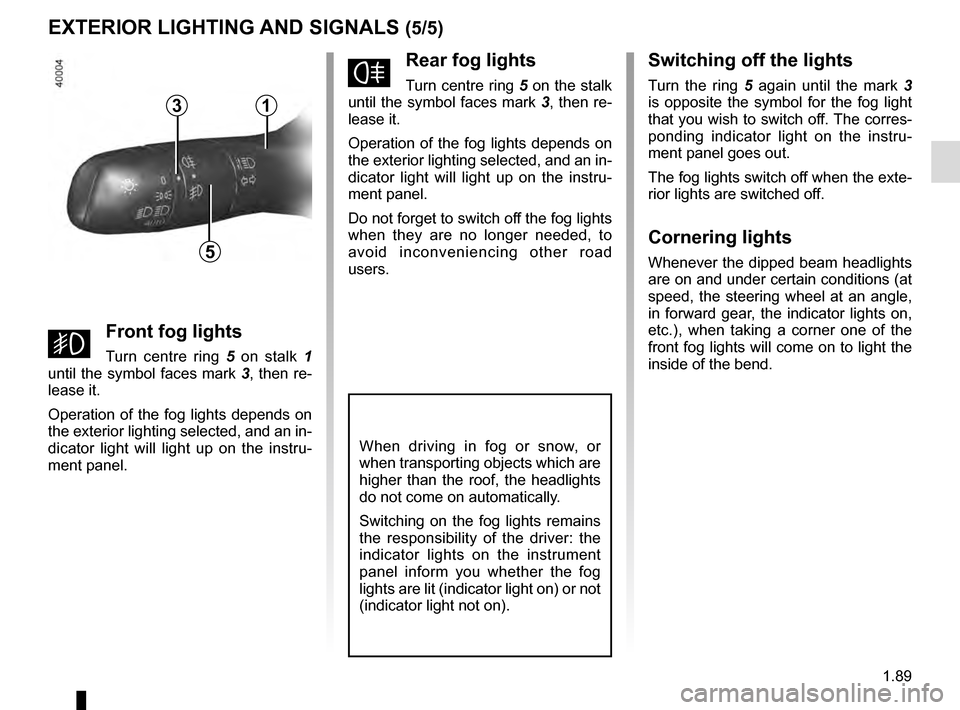
fRear fog lights
Turn centre ring 5 on the stalk
until the symbol faces mark 3, then re-
lease it.
Operation of the fog lights depends on
the exterior lighting selected, and an in-
dicator light will light up on the instru-
ment panel.
Do not forget to switch off the fog lights
when they are no longer needed, to
avoid inconveniencing other road
users.
Switching off the lights
Turn the ring 5 again until the mark 3
is opposite the symbol for the fog light
that you wish to switch off. The corres-
ponding indicator light on the instru-
ment panel goes out.
The fog lights switch off when the exte-
rior lights are switched off.
Cornering lights
Whenever the dipped beam headlights
are on and under certain conditions (at
speed, the steering wheel at an angle,
in forward gear, the indicator lights on,
etc.), when taking a corner one of the
front fog lights will come on to light the
inside of the bend.
When driving in fog or snow, or
when transporting objects which are
higher than the roof, the headlights
do not come on automatically.
Switching on the fog lights remains
the responsibility of the driver: the
indicator lights on the instrument
panel inform you whether the fog
lights are lit (indicator light on) or not
(indicator light not on).
5
31
gFront fog lights
Turn centre ring 5 on stalk 1
until the symbol faces mark 3, then re-
lease it.
Operation of the fog lights depends on
the exterior lighting selected, and an in-
dicator light will light up on the instru-
ment panel.
Page 105 of 328
1.99
Fuel grade
Use a high-grade fuel that complies
with the legislation in force in each
country and which must comply with
the specifications given on the label
on the cover 1 . Please refer to the in-
formation on “Engine specifications” in
Section 6.
Diesel versions
Only use diesel fuel which complies
with the information on the label located
inside the cover 1.
Petrol versions
It is essential to use unleaded petrol.
The octane rating (RON) must comply
with the information given on the label
on the cover 1. Refer to Section 6 for
information on “Engine specifications”.
FUEL TANK (1/3)
Useable fuel tank capacity:
– Approximately 11.22 gallons
(51 litres) for the petrol versions;
– Approximately 11.44 gallons
(52 litres) for the diesel versions
with two-wheel steering mode;
– Approximately 10.34 gallons
(47 litres) for the diesel versions
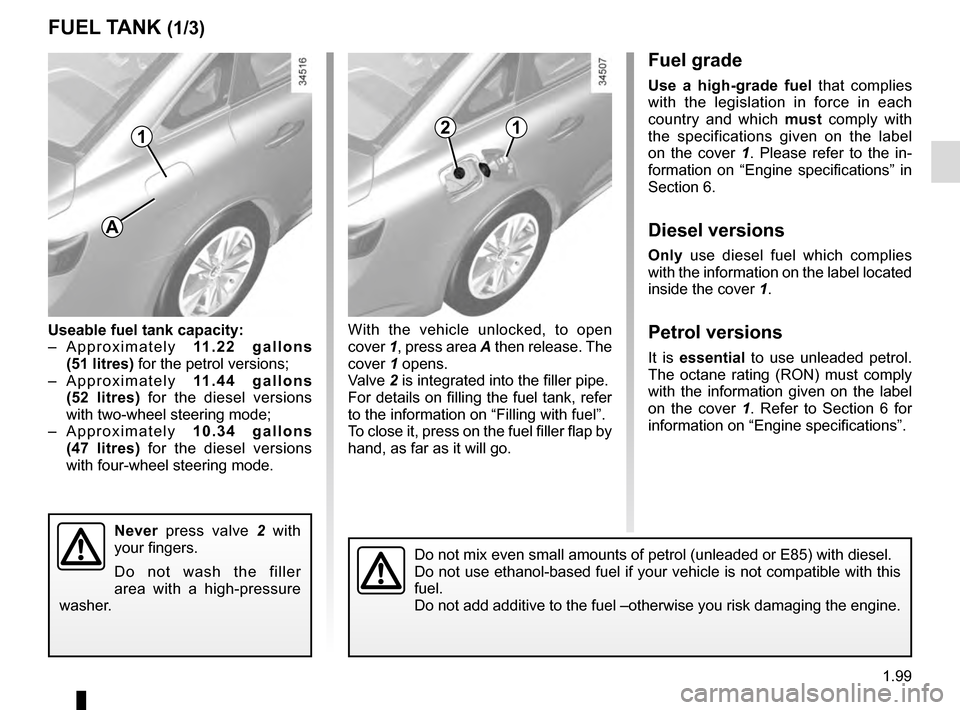
with four-wheel steering mode. With the vehicle unlocked, to open
cover
1, press area A then release. The
cover 1 opens.
Valve 2 is integrated into the filler pipe.
For details on filling the fuel tank, refer
to the information on “Filling with fuel”.
To close it, press on the fuel filler flap by
hand, as far as it will go.
Never press valve 2 with
your fingers.
Do not wash the filler
area with a high-pressure
washer.
Do not mix even small amounts of petrol (unleaded or E85) with diesel.\
Do not use ethanol-based fuel if your vehicle is not compatible with thi\
s
fuel.
Do not add additive to the fuel –otherwise you risk damaging the engi\
ne.
1
A
21
Page 111 of 328
2.3
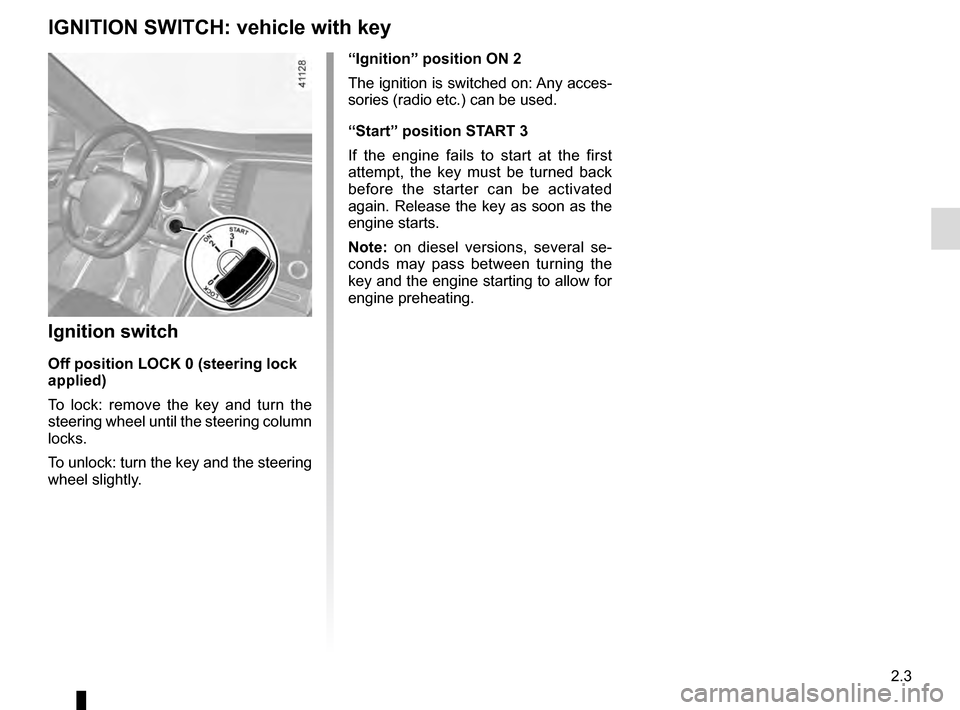
“Ignition” position ON 2
The ignition is switched on: Any acces-
sories (radio etc.) can be used.
“Start” position START 3
If the engine fails to start at the first
attempt, the key must be turned back
before the starter can be activated
again. Release the key as soon as the
engine starts.
Note: on diesel versions, several se-
conds may pass between turning the
key and the engine starting to allow for
engine preheating.
Ignition switch
Off position LOCK 0 (steering lock
applied)
To lock: remove the key and turn the
steering wheel until the steering column
locks.
To unlock: turn the key and the steering
wheel slightly.
IGNITION SWITCH: vehicle with key
Page 112 of 328
2.4
STARTING, STOPPING THE ENGINE: vehicle with key
Starting the engine
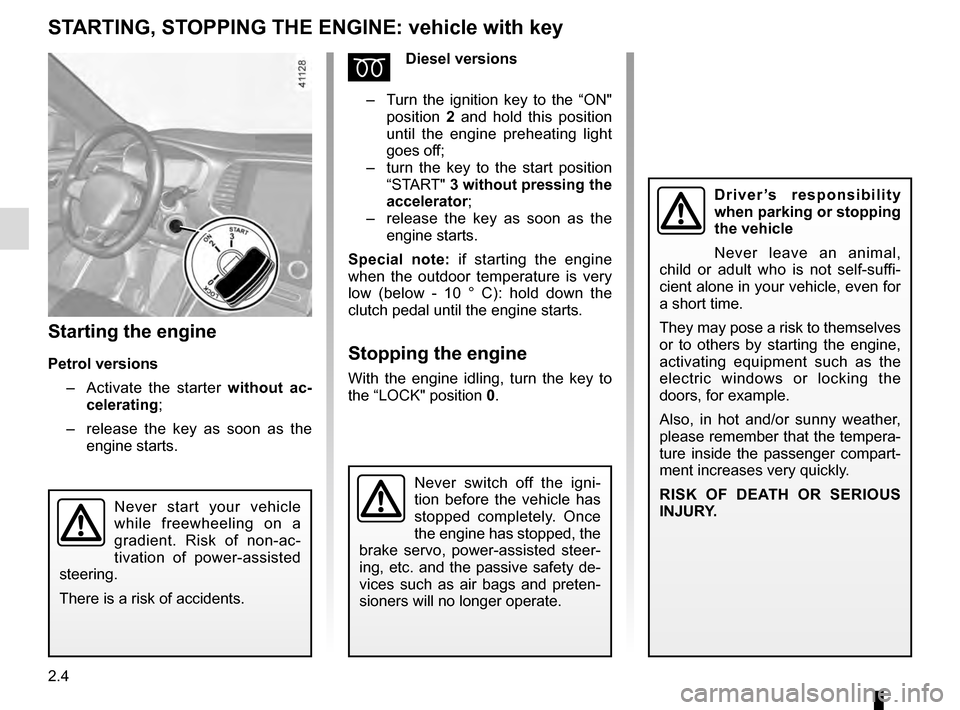
Petrol versions– Activate the starter without ac-
celerating;
– release the key as soon as the
engine starts.
ÉDiesel versions
– Turn the ignition key to the “ON"
position 2 and hold this position
until the engine preheating light
goes off;
– turn the key to the start position
“START" 3 without pressing the
accelerator ;
– release the key as soon as the
engine starts.
Special note: if starting the engine
when the outdoor temperature is very
low (below - 10 ° C): hold down the
clutch pedal until the engine starts.
Stopping the engine
With the engine idling, turn the key to
the “LOCK" position 0.
Never start your vehicle
while freewheeling on a
gradient. Risk of non-ac-
tivation of power-assisted
steering.
There is a risk of accidents.
Driver’s responsibility
when parking or stopping
the vehicle
Never leave an animal,
child or adult who is not self-suffi-
cient alone in your vehicle, even for
a short time.
They may pose a risk to themselves
or to others by starting the engine,
activating equipment such as the
electric windows or locking the
doors, for example.
Also, in hot and/or sunny weather,
please remember that the tempera-
ture inside the passenger compart-
ment increases very quickly.
RISK OF DEATH OR SERIOUS
INJURY.
Never switch off the igni-
tion before the vehicle has
stopped completely. Once
the engine has stopped, the
brake servo, power-assisted steer-
ing, etc. and the passive safety de-
vices such as air bags and preten-
sioners will no longer operate.
Page 113 of 328
2.5
STARTING, STOPPING THE ENGINE: vehicle with RENAULT CARD (1/3)
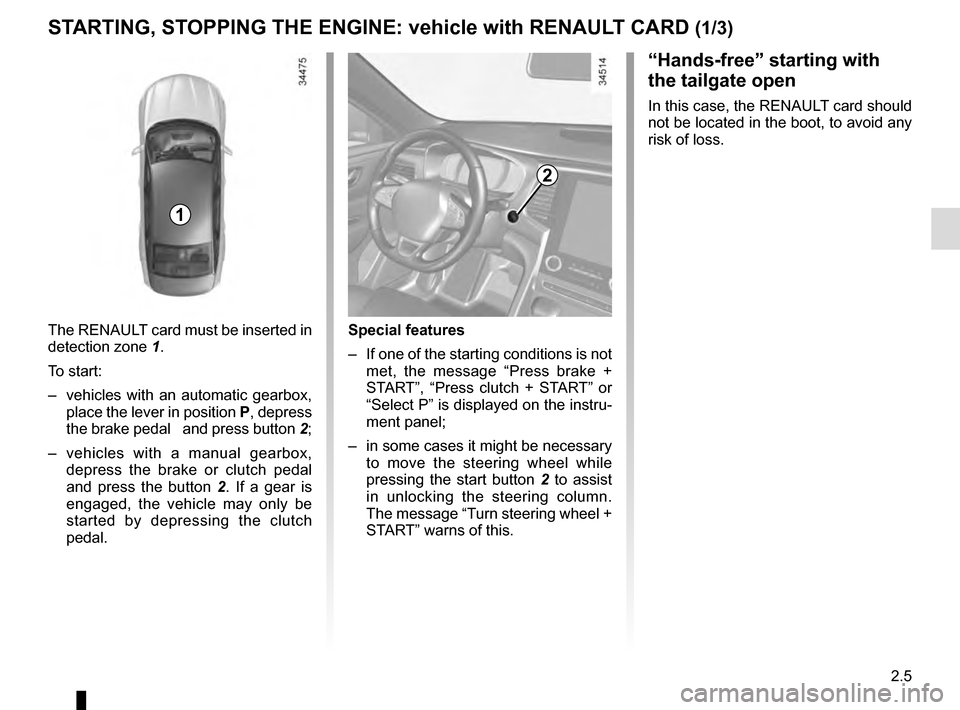
The RENAULT card must be inserted in
detection zone 1.
To start:
– vehicles with an automatic gearbox, place the lever in position P, depress
the brake pedal and press button 2;
– vehicles with a manual gearbox, depress the brake or clutch pedal
and press the button 2 . If a gear is
engaged, the vehicle may only be
started by depressing the clutch
pedal.
“Hands-free” starting with
the tailgate open
In this case, the RENAULT card should
not be located in the boot, to avoid any
risk of loss.
2
1
Special features
– If one of the starting conditions is not met, the message “Press brake +
START”, “Press clutch + START” or
“Select P” is displayed on the instru-
ment panel;
– in some cases it might be necessary to move the steering wheel while
pressing the start button 2 to assist
in unlocking the steering column.
The message “Turn steering wheel +
START” warns of this.
Page 129 of 328
2.21
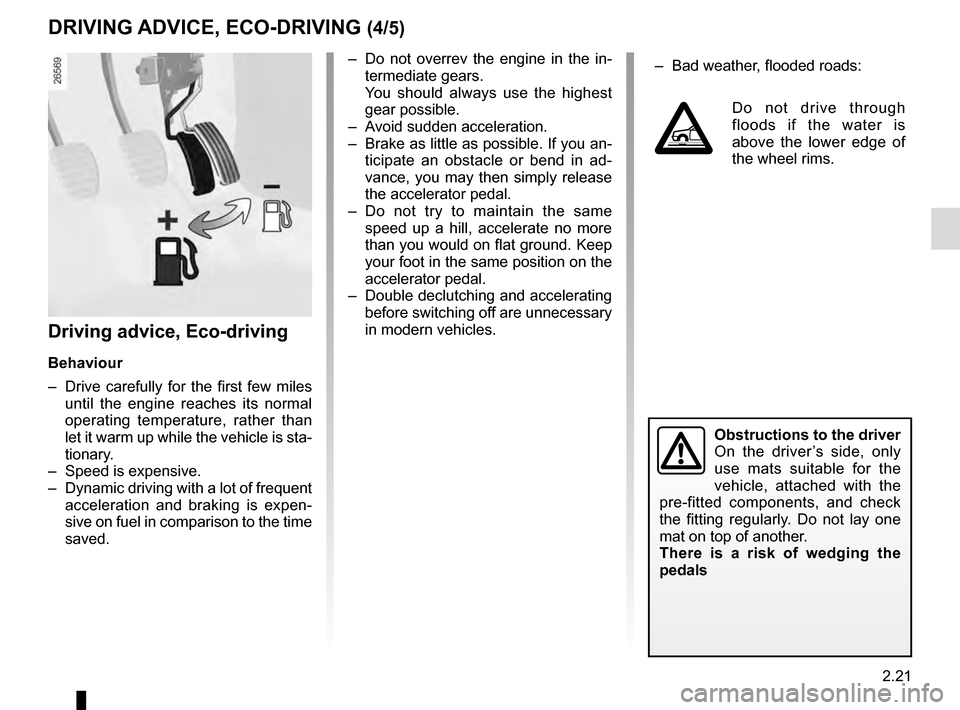
– Do not overrev the engine in the in-termediate gears.
You should always use the highest gear possible.
– Avoid sudden acceleration.
– Brake as little as possible. If you an- ticipate an obstacle or bend in ad-
vance, you may then simply release
the accelerator pedal.
– Do not try to maintain the same speed up a hill, accelerate no more
than you would on flat ground. Keep
your foot in the same position on the
accelerator pedal.
– Double declutching and accelerating before switching off are unnecessary
in modern vehicles.
Obstructions to the driver
On the driver’s side, only
use mats suitable for the
vehicle, attached with the
pre-fitted components, and check
the fitting regularly. Do not lay one
mat on top of another.
There is a risk of wedging the
pedals
DRIVING ADVICE, ECO-DRIVING (4/5)
– Bad weather, flooded roads:
Do not drive through
floods if the water is
above the lower edge of
the wheel rims.
Driving advice, Eco-driving
Behaviour
– Drive carefully for the first few miles until the engine reaches its normal
operating temperature, rather than
let it warm up while the vehicle is sta-
tionary.
– Speed is expensive.
– Dynamic driving with a lot of frequent acceleration and braking is expen-
sive on fuel in comparison to the time
saved.
Page 133 of 328
2.25
TYRE PRESSURE MONITORING SYSTEM (1/3)
If the vehicle is equipped with the func-
tion, this system monitors the tyre pres-
sure.
Operating principle
Each wheel (except for the emergency
spare wheel) has a sensor in the infla-
tion valve which periodically measures
the tyre pressure.
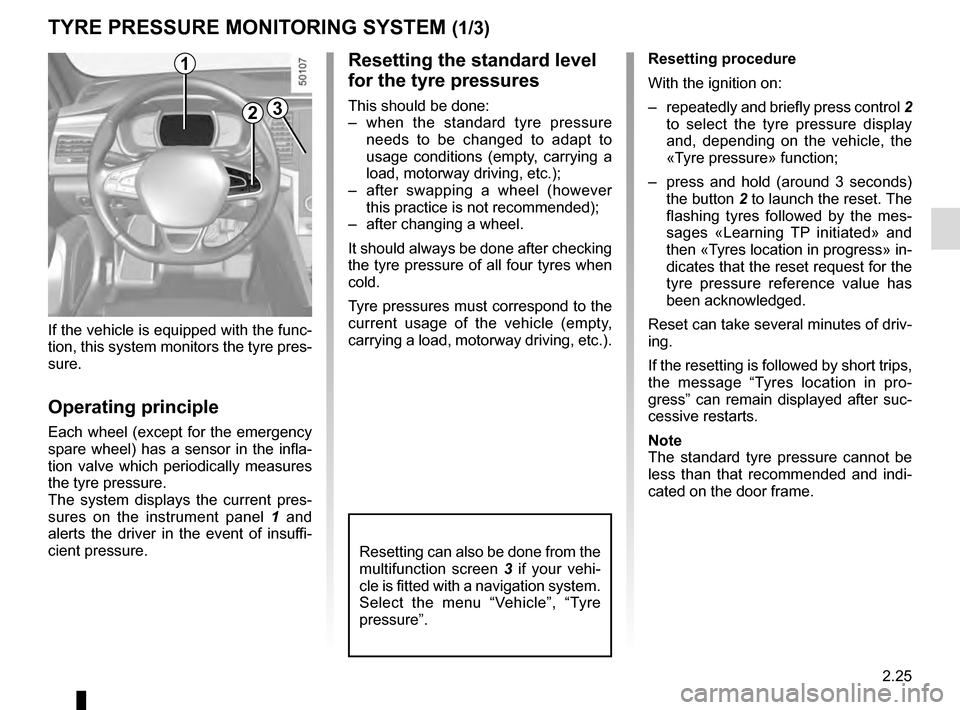
The system displays the current pres-
sures on the instrument panel 1 and
alerts the driver in the event of insuffi-
cient pressure.
2
1Resetting procedure
With the ignition on:
– repeatedly and briefly press control 2
to select the tyre pressure display
and, depending on the vehicle, the
«Tyre pressure» function;
– press and hold (around 3 seconds) the button 2 to launch the reset. The
flashing tyres followed by the mes-
sages «Learning TP initiated» and
then «Tyres location in progress» in-
dicates that the reset request for the
tyre pressure reference value has
been acknowledged.
Reset can take several minutes of driv-
ing.
If the resetting is followed by short trips,
the message “Tyres location in pro-
gress” can remain displayed after suc-
cessive restarts.
Note
The standard tyre pressure cannot be
less than that recommended and indi-
cated on the door frame.
3
Resetting the standard level
for the tyre pressures
This should be done:
– when the standard tyre pressure needs to be changed to adapt to
usage conditions (empty, carrying a
load, motorway driving, etc.);
– after swapping a wheel (however this practice is not recommended);
– after changing a wheel.
It should always be done after checking
the tyre pressure of all four tyres when
cold.
Tyre pressures must correspond to the
current usage of the vehicle (empty,
carrying a load, motorway driving, etc.).
Resetting can also be done from the
multifunction screen 3 if your vehi-
cle is fitted with a navigation system.
Select the menu “Vehicle”, “Tyre
pressure”.
Page 134 of 328
2.26
TYRE PRESSURE MONITORING SYSTEM (2/3)
Display
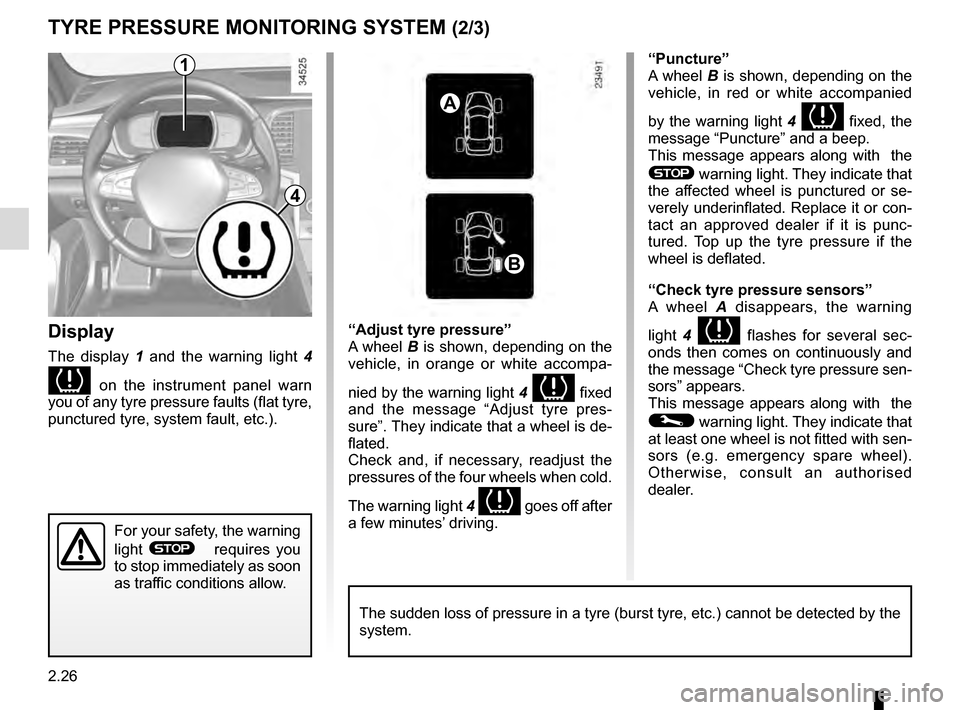
The display 1 and the warning light 4
on the instrument panel warn
you of any tyre pressure faults (flat tyre,
punctured tyre, system fault, etc.).
A
B
1
For your safety, the warning
light
® requires you
to stop immediately as soon
as traffic conditions allow.
The sudden loss of pressure in a tyre (burst tyre, etc.) cannot be det\
ected by the
system.
4
“Puncture”
A wheel B is shown, depending on the
vehicle, in red or white accompanied
by the warning light 4
fixed, the
message “Puncture” and a beep.
This message appears along with the
® warning light. They indicate that
the affected wheel is punctured or se-
verely underinflated. Replace it or con-
tact an approved dealer if it is punc-
tured. Top up the tyre pressure if the
wheel is deflated.
“Check tyre pressure sensors”
A wheel A disappears, the warning
light 4
flashes for several sec-
onds then comes on continuously and
the message “Check tyre pressure sen-
sors” appears.
This message appears along with the
© warning light. They indicate that
at least one wheel is not fitted with sen-
sors (e.g. emergency spare wheel).
Otherwise, consult an authorised
dealer.
“Adjust tyre pressure”
A wheel B is shown, depending on the
vehicle, in orange or white accompa-
nied by the warning light
4
fixed
and the message “Adjust tyre pres-
sure”. They indicate that a wheel is de-
flated.
Check and, if necessary, readjust the
pressures of the four wheels when cold.
The warning light 4
goes off after
a few minutes’ driving.
Page 135 of 328
2.27
Tyre repair product and
inflation kit
Because the valves are specially desi-
gned, only use equipment approved by
the approved network. Please refer to
“Tyre inflation kit” in Section 5.
Replacing wheels/tyres
This system requires specific equip-
ment (wheels, tyres, hubcaps, etc.).
Please see the information on “Tyres”
in Section 5.
Contact an Approved Dealer to replace
the tyres and to find out about acces-
sories compatible with the system and
available from your dealer network: the
use of any other accessory could affect
the correct operation of the system.
Emergency spare wheel
If the vehicle is equipped with an emer- -
gency spare wheel, it will not have a
sensor.
TYRE PRESSURE MONITORING SYSTEM (3/3)
Changing a wheel
The system may take seve-
ral minutes depending on
use for the new wheel po-
sitions and pressures to be recogni-
sed; check the tyre pressures after
all operations.
This function is an additio-
nal driving aid.
However, the function is
not intended to replace the
driver. It cannot, therefore, under
any circumstances replace the vi-
gilance or the responsibility of the
driver. Check the tyre pressures, in-
cluding the emergency spare wheel,
once a month.
“Tyres location in progress”
This message “Tyres location in pro-
gress” appears when driving if one or
more wheels have been fitted with sen-
sors not recognised by Renault.
Consult an approved dealer
Readjustment of tyre
pressures
The tyre pressures should be ad-
justed when cold (please refer to the
label located on the edge of the driver’s
door). If the tyre pressures cannot be
checked when the tyres are cold, the
recommended pressures should be in-
creased by 0.2 to 0.3 bar (3 PSI).
Never deflate a hot tyre.