speed RENAULT TRAFIC 2017 X82 / 3.G User Guide
[x] Cancel search | Manufacturer: RENAULT, Model Year: 2017, Model line: TRAFIC, Model: RENAULT TRAFIC 2017 X82 / 3.GPages: 294, PDF Size: 7.94 MB
Page 95 of 294
1.89
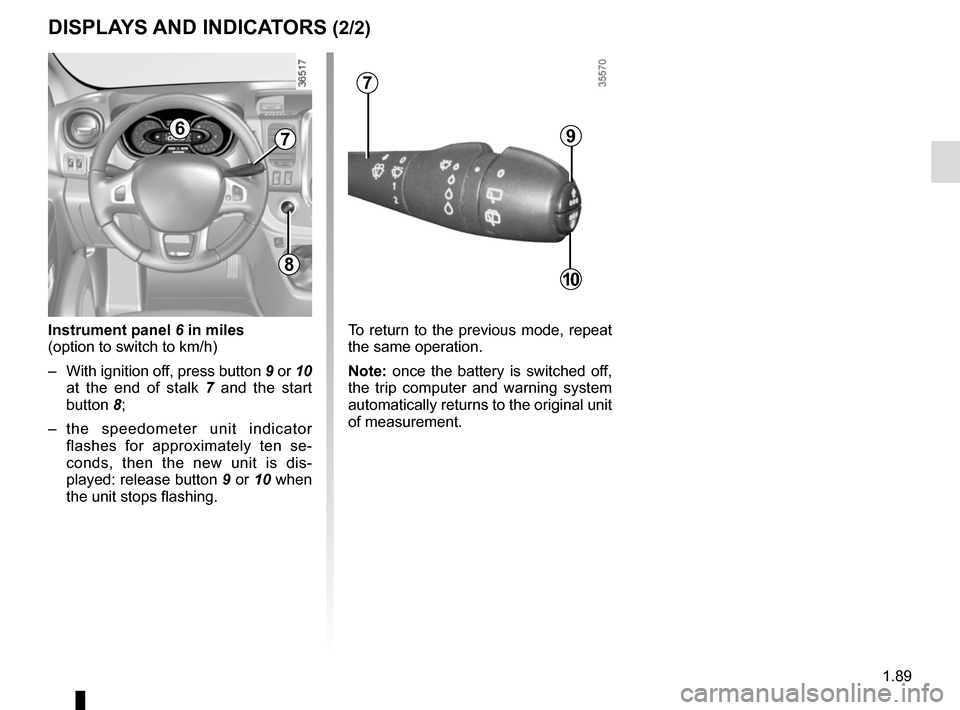
Instrument panel 6 in miles
(option to switch to km/h)
– With ignition off, press button 9 or 10 at the end of stalk 7 and the start
button 8;
– the speedometer unit indicator flashes for approximately ten se-
conds, then the new unit is dis-
played: release button 9 or 10 when
the unit stops flashing.
9
10
67
7
To return to the previous mode, repeat
the same operation.
Note: once the battery is switched off,
the trip computer and warning system
automatically returns to the original unit
of measurement.
DISPLAYS AND INDICATORS (2/2)
8
Page 96 of 294
1.90
ON-BOARD COMPUTER: general information (1/2)
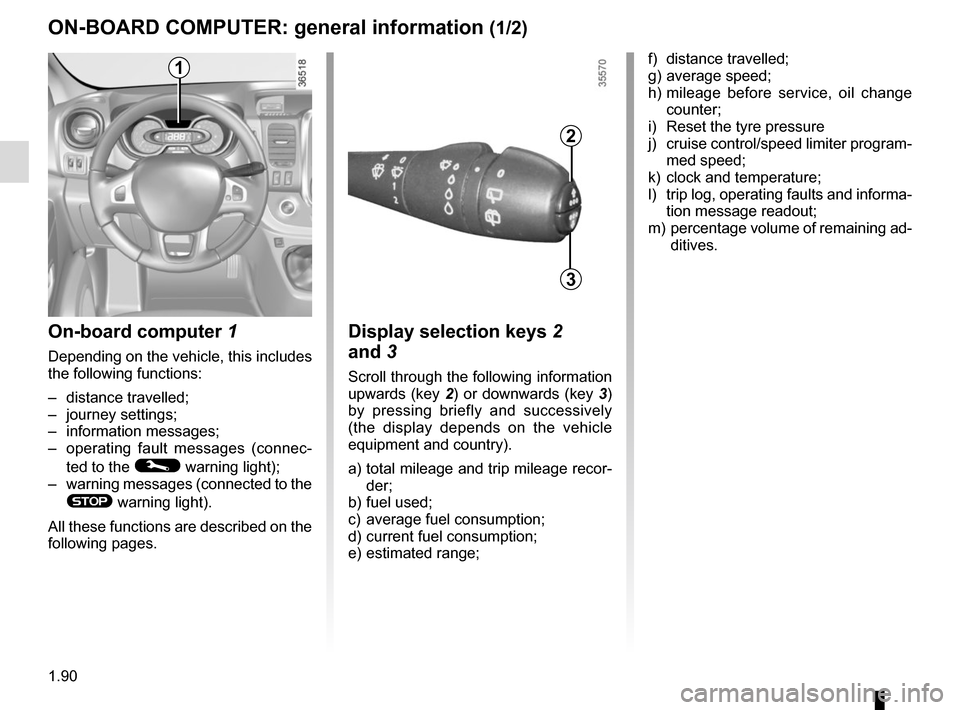
On-board computer 1
Depending on the vehicle, this includes
the following functions:
– distance travelled;
– journey settings;
– information messages;
– operating fault messages (connec-
ted to the
© warning light);
– warning messages (connected to the
® warning light).
All these functions are described on the
following pages.
Display selection keys 2
and 3
Scroll through the following information
upwards (key 2) or downwards (key 3)
by pressing briefly and successively
(the display depends on the vehicle
equipment and country).
a) total mileage and trip mileage recor-
der;
b) fuel used;
c) average fuel consumption;
d) current fuel consumption;
e) estimated range;
2
3
f) distance travelled;
g) average speed;
h) mileage before service, oil change counter;
i) Reset the tyre pressure
j) cruise control/speed limiter program- med speed;
k) clock and temperature;
l) trip log, operating faults and informa- tion message readout;
m) percentage volume of remaining ad-
ditives.1
Page 97 of 294
1.91
ON-BOARD COMPUTER: general information (2/2)
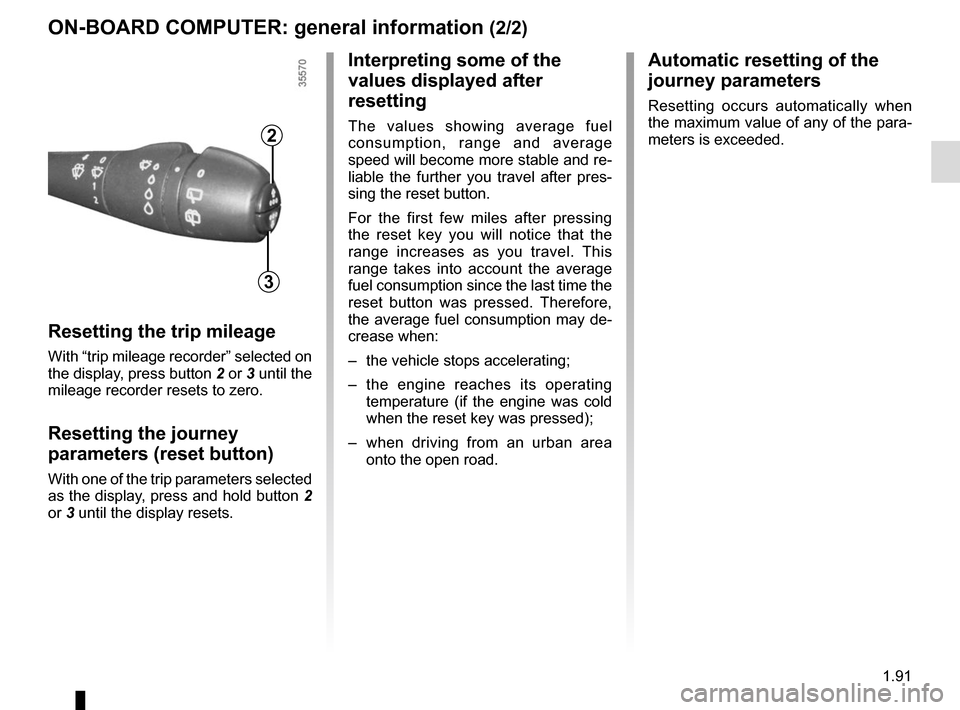
Resetting the trip mileage
With “trip mileage recorder” selected on
the display, press button 2 or 3 until the
mileage recorder resets to zero.
Resetting the journey
parameters (reset button)
With one of the trip parameters selected
as the display, press and hold button 2
or 3 until the display resets.
Interpreting some of the
values displayed after
resetting
The values showing average fuel
consumption, range and average
speed will become more stable and re-
liable the further you travel after pres-
sing the reset button.
For the first few miles after pressing
the reset key you will notice that the
range increases as you travel. This
range takes into account the average
fuel consumption since the last time the
reset button was pressed. Therefore,
the average fuel consumption may de-
crease when:
– the vehicle stops accelerating;
– the engine reaches its operating
temperature (if the engine was cold
when the reset key was pressed);
– when driving from an urban area
onto the open road.
Automatic resetting of the
journey parameters
Resetting occurs automatically when
the maximum value of any of the para-
meters is exceeded.
2
3
Page 98 of 294

The display of information shown below DEPENDS ON THE VEHICLE EQUIPMENT \
AND COUNTRY.
Examples of selectionsInterpreting the display selected
101778 km
a)")
1.92
ON-BOARD COMPUTER: trip settings (1/4)
The display of information shown below DEPENDS ON THE VEHICLE EQUIPMENT \
AND COUNTRY.
Examples of selectionsInterpreting the display selected
101778 km
a) Total mileage and trip mileage recorder.
112.4 km
FUEL USED
b) Journey parameters. Fuel used.
Fuel consumed since the last reset.
8L
AVERAGE c) Average fuel consumption since the last reset.
The value is displayed after having travelled at least 400 metres since \
the last
reset.
5.8 L/100
CURRENT
d) Current fuel consumption.
This value is displayed after a speed of approximately 20 mph (30 km/h)\
is reached.
7.4 L/100
Page 99 of 294

The display of information shown below DEPENDS ON THE VEHICLE EQUIPMENT \
AND COUNTRY.
Examples of selectionsInterpreting the display selected
RANGE
e) Est")
1.93
ON-BOARD COMPUTER: trip settings (2/4)
The display of information shown below DEPENDS ON THE VEHICLE EQUIPMENT \
AND COUNTRY.
Examples of selectionsInterpreting the display selected
RANGE
e) Estimated range with remaining fuel.
The value is displayed after driving 400 metres.
541 km
DISTANCE
f) Distance travelled since last reset.
522 km
AVERAGE
g) Average speed since the last reset.
The value is displayed after driving 400 metres.
89.4 km/h
Page 100 of 294

Examples of selectionsInterpreting the display selected
On-board comp")
1.94
The display of information shown below DEPENDS ON THE VEHICLE EQUIPMENT \
AND COUNTRY.
ON-BOARD COMPUTER: trip settings (3/4)
Examples of selectionsInterpreting the display selected
On-board computer with distance before
next service message (cntd.)
h) Mileage before serviceWith the ignition switched on and the engine not running ,
when the message “SERVICE INTERVALS” is displayed, press
button 2 or 3 for around 5 seconds to display the mileage before
the next service (distance or time remaining before the next oil
change). When the range approaches its limit, there are several
possible scenarios:
– distance/time remaining less than 900 miles (1,500 km) or
one month : the message “Service due in” is displayed ac-
companied by the nearest term (distance or time);
– range equal to 0 km/miles or service date reached: the
message “SERVICE REQUIRED” is displayed accompanied
by warning light
©.
The vehicle requires an oil change as soon as possible.
SERVICE
INTERVALS
OIL CHANGE IN
30 000 km / 24 MO
SERVICE DUE IN
300 km / 24 DAYS
SERVICE REQUIRED
Depending on the vehicle, the mileage before an oil change varies accord\
ing to the driving style (frequent driving at low speed ,
door-to-door journeys, extensive use at idling speed, towing a trailer, etc.). The distance remaining until the next oil change can
therefore decrease more quickly in some cases than the actual distance t\
ravelled.
Resetting: To reset the mileage before the next oil change, display the remaining ra\
nge (distance and time), then press and hold
button 2 or 3 for approximately 10 seconds until the display shows the mileage before\
oil change without flashing.
Page 101 of 294

Examples of selectionsInterpreting the display selected
TYRE PRESSURE")
1.95
The display of information shown below DEPENDS ON THE VEHICLE EQUIPMENT \
AND COUNTRY.
ON-BOARD COMPUTER: trip settings (4/4)
Examples of selectionsInterpreting the display selected
TYRE PRESSURE SET
i) Reset the tyre pressure.Please refer to the information on the “Tyre pressure loss warning” in Section 2.
SPEED LIMITER
j) Cruise control/speed limiter programmed speed.Refer to the information on the “Speed limiter” and “Cruise con\
trol” in Section 2.
90 km/h
CRUISE CONTROL 90 km/h
k) Clock and temperature.Please refer to the information on the “Clock and exterior temperatur\
e” in Section 1.
13° 16:30
NO MESSAGE
MEMORISED l) Trip log. Successive display:
– information messages (passenger airbag OFF etc.);
– operating fault messages (check the injection system, etc.).
ADBLUE 62%
m) Percentage volume of remaining additives. Refer to the information on “Additive tank” in Section 1.
Page 112 of 294
1.106
EXTERIOR LIGHTING AND SIGNALS (4/4)
Cornering lights function
Whenever the dipped beam headlights
are on and under certain conditions (at
speed, the steering wheel at an angle,
in forward gear, the indicator lights on,
etc.), when taking a corner one of the
front fog lights will come on to light the
inside of the bend.
fRear fog light
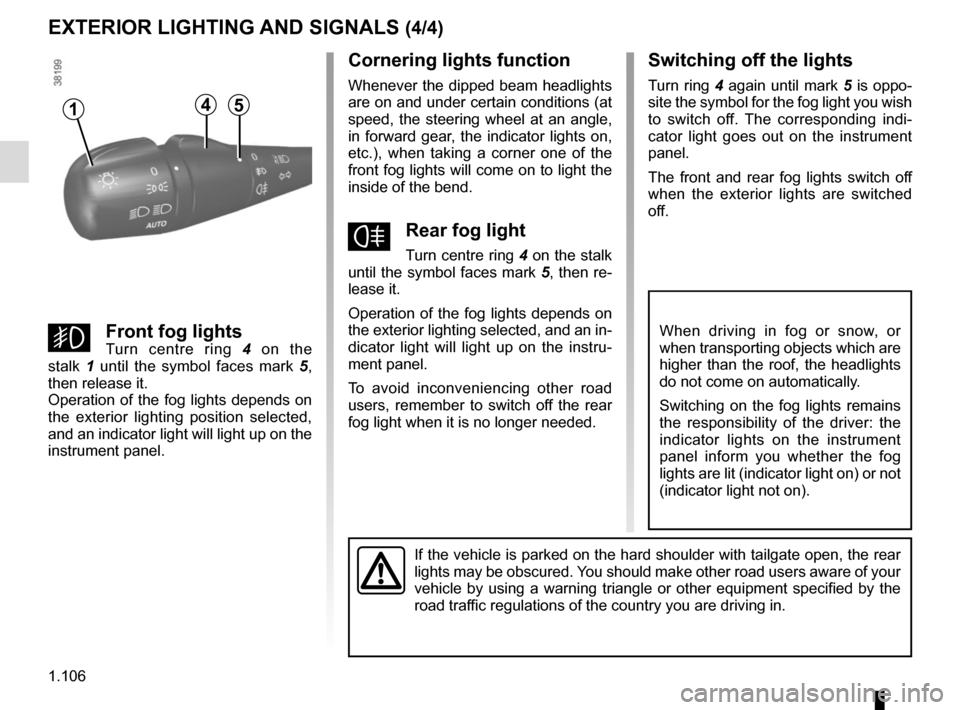
Turn centre ring 4 on the stalk
until the symbol faces mark 5, then re-
lease it.
Operation of the fog lights depends on
the exterior lighting selected, and an in-
dicator light will light up on the instru-
ment panel.
To avoid inconveniencing other road
users, remember to switch off the rear
fog light when it is no longer needed.
Switching off the lights
Turn ring 4 again until mark 5 is oppo-
site the symbol for the fog light you wish
to switch off. The corresponding indi-
cator light goes out on the instrument
panel.
The front and rear fog lights switch off
when the exterior lights are switched
off.
gFront fog lightsTurn centre ring 4 on the
stalk 1 until the symbol faces mark 5,
then release it.
Operation of the fog lights depends on
the exterior lighting position selected,
and an indicator light will light up on the
instrument panel.
When driving in fog or snow, or
when transporting objects which are
higher than the roof, the headlights
do not come on automatically.
Switching on the fog lights remains
the responsibility of the driver: the
indicator lights on the instrument
panel inform you whether the fog
lights are lit (indicator light on) or not
(indicator light not on).
If the vehicle is parked on the hard shoulder with tailgate open, the re\
ar
lights may be obscured. You should make other road users aware of your
vehicle by using a warning triangle or other equipment specified by the \
road traffic regulations of the country you are driving in.
415
Page 116 of 294
1.110
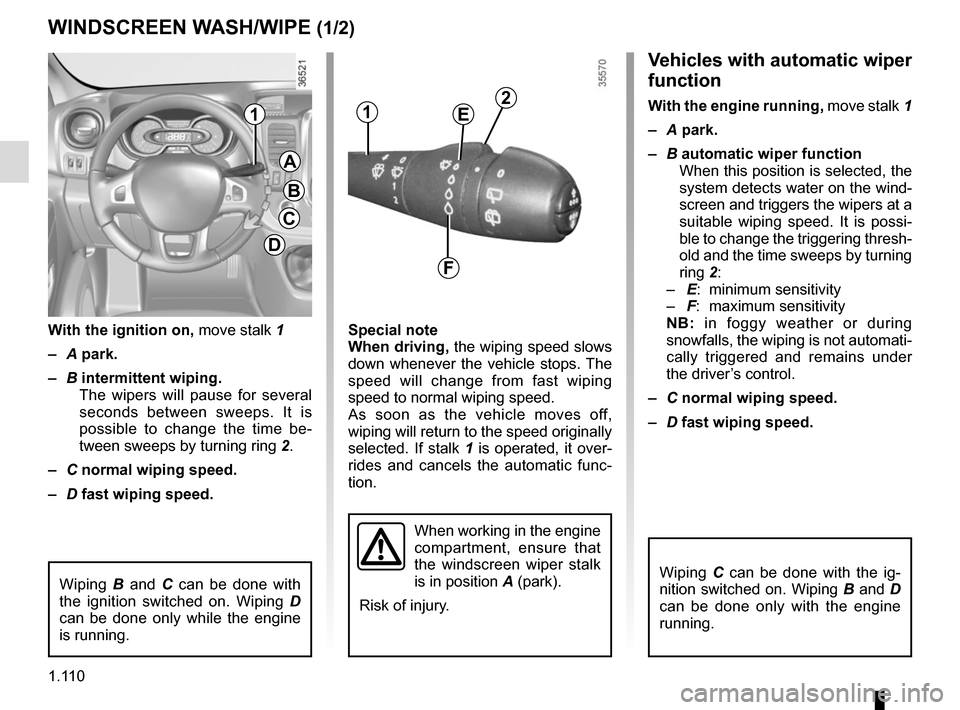
Vehicles with automatic wiper
function
With the engine running, move stalk 1
– A park.
– B automatic wiper function
When this position is selected, the
system detects water on the wind-
screen and triggers the wipers at a
suitable wiping speed. It is possi-
ble to change the triggering thresh-
old and the time sweeps by turning
ring 2:
– E: minimum sensitivity
– F: maximum sensitivity
NB: in foggy weather or during
snowfalls, the wiping is not automati-
cally triggered and remains under
the driver’s control.
– C normal wiping speed.
– D fast wiping speed.
Special note
When driving,
the wiping speed slows
down whenever the vehicle stops. The
speed will change from fast wiping
speed to normal wiping speed.
As soon as the vehicle moves off,
wiping will return to the speed originally
selected. If stalk 1 is operated, it over-
rides and cancels the automatic func-
tion.
With the ignition on,
move stalk 1
– A park.
– B intermittent wiping.
The wipers will pause for several
seconds between sweeps. It is
possible to change the time be-
tween sweeps by turning ring 2.
– C normal wiping speed.
– D fast wiping speed.
WINDSCREEN WASH/WIPE (1/2)
A
B
C
D
11
When working in the engine
compartment, ensure that
the windscreen wiper stalk
is in position A (park).
Risk of injury.
2E
F
Wiping B and C can be done with
the ignition switched on. Wiping D
can be done only while the engine
is running.Wiping C can be done with the ig-
nition switched on. Wiping B and D
can be done only with the engine
running.
Page 118 of 294
1.112
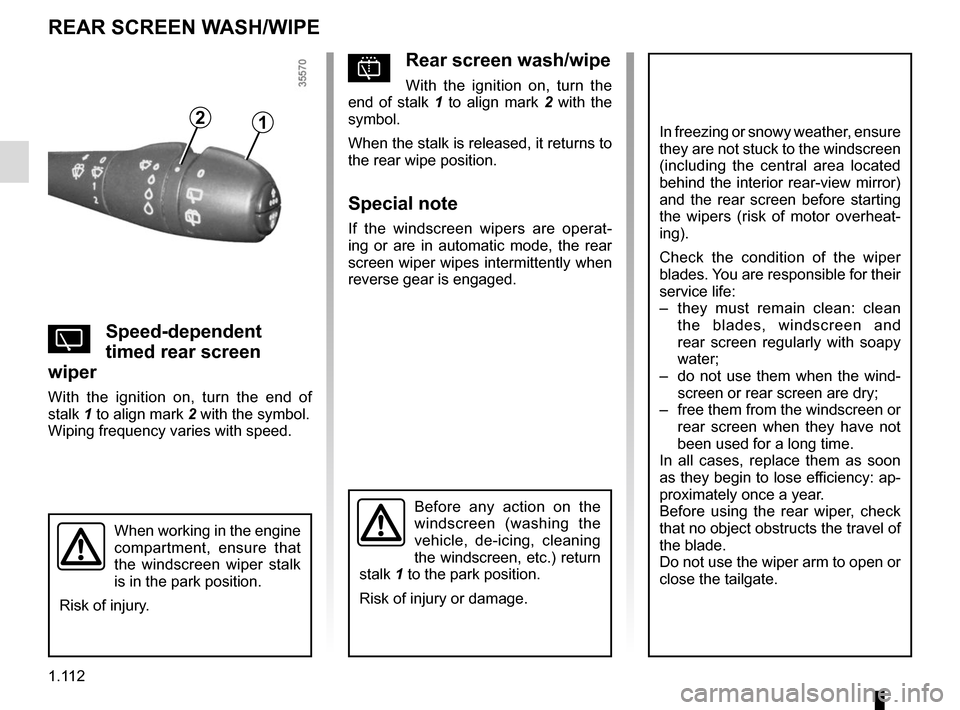
pRear screen wash/wipe
With the ignition on, turn the
end of stalk 1 to align mark 2 with the
symbol.
When the stalk is released, it returns to
the rear wipe position.
Special note
If the windscreen wipers are operat-
ing or are in automatic mode, the rear
screen wiper wipes intermittently when
reverse gear is engaged.
YSpeed-dependent
timed rear screen
wiper
With the ignition on, turn the end of
stalk 1 to align mark 2 with the symbol.
Wiping frequency varies with speed.
REAR SCREEN WASH/WIPE
12In freezing or snowy weather, ensure
they are not stuck to the windscreen
(including the central area located
behind the interior rear-view mirror)
and the rear screen before starting
the wipers (risk of motor overheat-
ing).
Check the condition of the wiper
blades. You are responsible for their
service life:
– they must remain clean: clean the blades, windscreen and
rear screen regularly with soapy
water;
– do not use them when the wind- screen or rear screen are dry;
– free them from the windscreen or rear screen when they have not
been used for a long time.
In all cases, replace them as soon
as they begin to lose efficiency: ap-
proximately once a year.
Before using the rear wiper, check
that no object obstructs the travel of
the blade.
Do not use the wiper arm to open or
close the tailgate.
Before any action on the
windscreen (washing the
vehicle, de-icing, cleaning
the windscreen, etc.) return
stalk 1 to the park position.
Risk of injury or damage.
When working in the engine
compartment, ensure that
the windscreen wiper stalk
is in the park position.
Risk of injury.