display RENAULT TRAFIC 2018 Owner's Manual
[x] Cancel search | Manufacturer: RENAULT, Model Year: 2018, Model line: TRAFIC, Model: RENAULT TRAFIC 2018Pages: 298, PDF Size: 8.05 MB
Page 111 of 298
1.105
áMain beam headlightsWith the engine running and
the dipped beam headlights lit, push
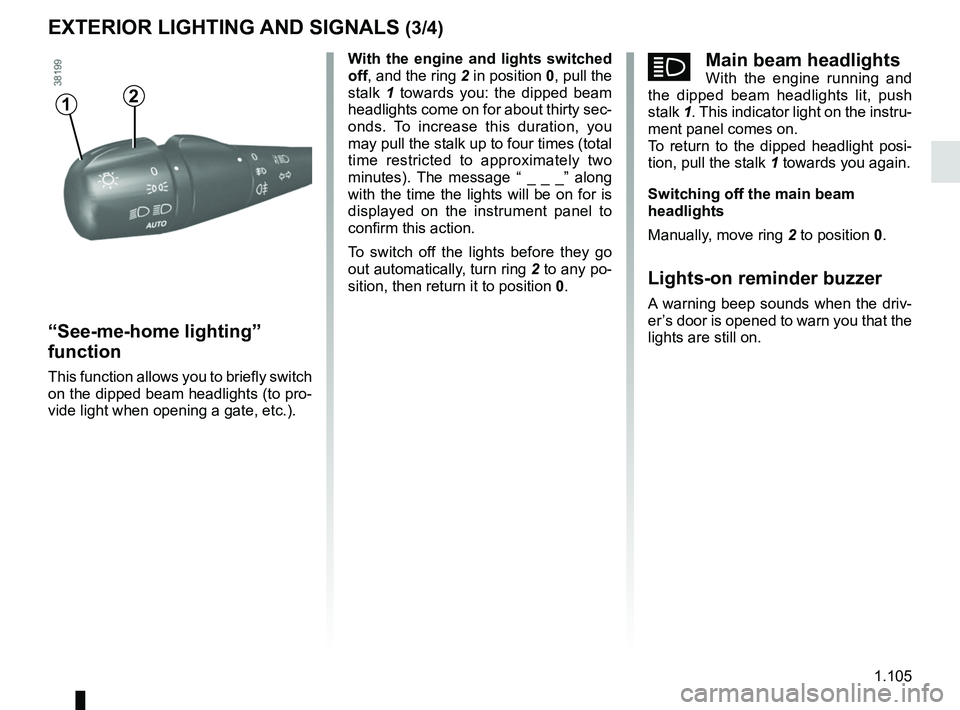
stalk 1. This indicator light on the instru-
ment panel comes on.
To return to the dipped headlight posi-
tion, pull the stalk 1 towards you again.
Switching off the main beam
headlights
Manually, move ring 2 to position 0.
Lights-on reminder buzzer
A warning beep sounds when the driv-
er’s door is opened to warn you that the
lights are still on.
EXTERIOR LIGHTING AND SIGNALS (3/4)
With the engine and lights switched
off, and the ring 2 in position 0, pull the
stalk 1 towards you: the dipped beam
headlights come on for about thirty sec-
onds. To increase this duration, you
may pull the stalk up to four times (total
time restricted to approximately two
minutes). The message “ _ _ _” along
with the time the lights will be on for is
displayed on the instrument panel to
confirm this action.
To switch off the lights before they go
out automatically, turn ring 2 to any po-
sition, then return it to position 0.
“See-me-home lighting”
function
This function allows you to briefly switch
on the dipped beam headlights (to pro-
vide light when opening a gate, etc.).
12
Page 131 of 298
2.5
STARTING, STOPPING THE ENGINE: vehicle with RENAULT CARD (2/3)
Operating faults
In certain cases, the hands-free
RENAULT card may not work:
– when the RENAULT card battery is drained, flat battery, etc.
– near to appliances operating on the same frequency as the card (moni-
tor, mobile phone, video game, etc.);
– vehicle located in a high electromag- netic radiation zone.
The message “PLEASE INSERT
KEYCARD” appears on the instrument
panel.
Insert the RENAULT card fully into card
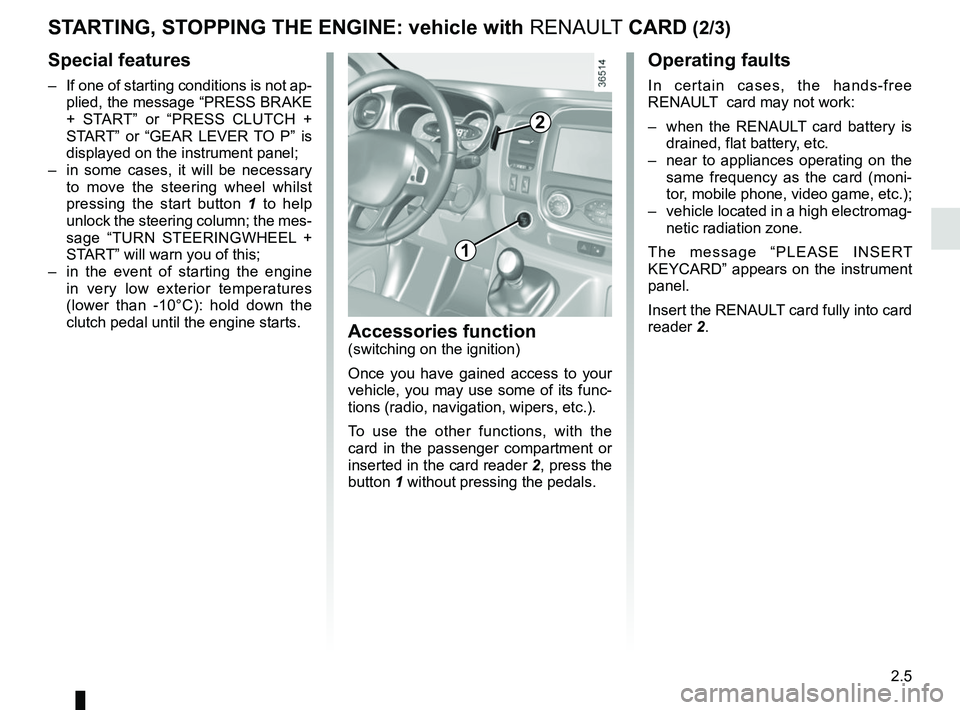
reader 2.
Accessories function(switching on the ignition)
Once you have gained access to your
vehicle, you may use some of its func-
tions (radio, navigation, wipers, etc.).
To use the other functions, with the
card in the passenger compartment or
inserted in the card reader 2, press the
button 1 without pressing the pedals.
1
2
Special features
– If one of starting conditions is not ap- plied, the message “PRESS BRAKE
+ START” or “PRESS CLUTCH +
START” or “GEAR LEVER TO P” is
displayed on the instrument panel;
– in some cases, it will be necessary to move the steering wheel whilst
pressing the start button 1 to help
unlock the steering column; the mes-
sage “TURN STEERINGWHEEL +
START” will warn you of this;
– in the event of starting the engine in very low exterior temperatures
(lower than -10°C): hold down the
clutch pedal until the engine starts.
Page 133 of 298

2.7
The warning light is displayed on
the instrument panel to notify you that
the engine is on standby.
The vehicle equipment remain opera-
tional while the engine is stopped.
The engine will restart when you press
the clutch pedal and move into gear.
Special feature of the automatic
engine re-start
Under certain conditions, the engine
can restart on its own in order to guar-
antee your safety and comfort.
STOP AND START function (1/3)
This system enables a reduced fuel
consumption and lower greenhouse
gas emissions.
The system is activated automatically
when the vehicle is started.
While driving, the system stops the
engine (standby) when the vehicle is
at a standstill (traffic jam, traffic lights,
etc).
System operating conditionsEngine standby is activated if:
– the vehicle has been driven since its last stop;
– the gearbox is in neutral;
– the clutch pedal is released;
and
– the vehicle speed is less than ap- proximately 1.86 mph (3 km/h). This can occur especially when:
– the outdoor temperature is too low or
too high (less than around 0 °C or
higher than around 35 °C);
– the “Clear View” function is activated (please see the information on “Air
conditioning” in Section 3);
– the battery is not sufficiently charged;
– the vehicle speed is above 3 mph (5 km/h) (downhill slope etc.);
– repeated pressing on the brake pedal or braking system require-
ment;
– the engine restart may be interrupted if the clutch pedal is released too
quickly while a gear is engaged.
– ...
Before leaving the vehicle,
the engine must be stopped
and not put on standby
(please see the information
on “Starting, stopping the engine” in
Section 2).
Do not drive off when the
engine is on standby (warn-
ing light
is displayed
on the instrument panel).
If you get out of the vehicle, a beep
and the message “IGNITION OFF”
notifies you that the engine is on
standby and has not been switched
off.
Page 134 of 298
2.8
STOP AND START function (2/3)
Special cases
– For vehicles using a RENAULT card, while the system is operating and
the engine is in standby (traffic jam,
traffic lights, etc.), if the driver gets
out of their seat or unfastens their
seatbelt and opens the driver's door,
the ignition will be switched off. To
restart and reactivate the Stop and
Start system, press the start button
(please refer to "Starting, stopping
the engine" in Section 2).
– In the event of the engine stalling, if the system is operational, press
down the clutch pedal as far as it will
go to restart.
– the outdoor temperature is too low or
too high (less than around 0 °C or
higher than around 35 °C);
– the battery is not sufficiently charged;
– the difference between the vehicle interior temperature and the auto-
matic climate control instruction is
too high;
– the “Clear View” function is activated (please see the information on “Air
conditioning” in Section 3);
– the engine coolant temperature is too low;
– automatic particle filter cleaning is underway;
– the “Fast Idle Speed” function is acti- vated (please refer to the information
on “Fast Idle Speed” in section 2);
– ...
Warning light
is displayed on the
instrument panel. This notifies you that
engine standby is not available.
To fill up with fuel, the engine must
be stopped (and not on standby):
stop the engine (please refer to the
information on “Starting and stop-
ping the engine” in Section 2).
Special features of vehicles with
remote control
Some of these conditions prevent the
engine from automatically restarting
upon opening:
– one of the doors for vehicles using a key;
– the passenger side door for vehicles using a RENAULT card.
Conditions preventing the
standby of the engine
Depending on the vehicle, certain con-
ditions prevent the system from using
the engine standby function, including
when:
– reverse gear is engaged;
– the bonnet is not locked;
– for vehicles using a RENAULT card, the driver’s side door is not closed;
– for vehicles using a RENAULT card, the driver’s seat belt is not buckled;
Page 136 of 298

2.10
SPECIAL FEATURES OF DIESEL VERSIONS
Diesel engine speed
Diesel engines are fitted with injection
equipment which prevents the engine
speed being exceeded irrespective of
the gear selected.
If the message “Check antipollution
system” is displayed along with warn-
ing lights
Ä and ©, consult an
authorised dealer immediately.
When driving, depending on the fuel
grade used, it is possible that white
smoke may be emitted.
This is due to the exhaust particle filter
being cleaned automatically, and does
not affect the way the vehicle runs.
Running out of fuel
If the tank has been completely
drained, the system must be reprimed
after the tank is refilled: see information
on the “fuel tank” in section 1 before re-
starting the engine.
Do not park the vehicle or
run the engine in locations
where combustible sub-
stances or materials such
as grass or leaves can come into
contact with the hot exhaust system.
Precautions to be taken in
winter
To avoid any faults in icy weather:
– ensure that the battery is always fully charged,
– always keep the diesel tank rela- tively full to avoid water vapour con-
densing in it and accumulating at the
bottom of the tank.
Page 138 of 298

2.12
DRIVING ADVICE, ECO-DRIVING (1/4)
Driving style indicator 2
Informs you about the driving style
adopted in real time. You will be notified
by the colour of warning light 2.
– Green: measured, economical driv- ing;
– Yellow: opt for a calmer driving style;
– Orange: driving too fast.
To activate/deactivate the driving style
indicator, please see the multimedia
system instructions.
1
2
Gear change indicator 1
Depending on the vehicle, to obtain op-
timum consumption levels, a warning
light on the instrument panel lets you
know the best time to move up or down
a gear:
Š move up a gear;
‰ move down a gear.
Fuel consumption is accredited in ac-
cordance with a standard regulatory
method. Identical for all manufactu-
rers, this enables vehicles to be com-
pared with one another. Consumption
in real time depends on vehicle usage
conditions, the equipment fitted and the
user’s driving style. To optimise fuel
consumption, please refer to the fol-
lowing advice.
Depending on the vehicle, you will have
various functions which enable you to
lower your fuel consumption:
– the rev counter;
– gear change indicator;
– the driving style indicator;
– the journey record and eco-driving
advice via the multimedia display;
– ECO mode – activated by the ECO button.
If fitted on the vehicle, the navigation
system provides additional information.
Page 139 of 298

2.13
DRIVING ADVICE, ECO-DRIVING (2/4)
An overall rating from 0 to 100 is dis-
played to let you assess your eco driv-
ing performance. The higher the rating,
the lower the fuel consumption.
Eco advice is given to help improve
your performance.
With your favourite journeys saved, you
can evaluate your performance.
For more information, please see the
multimedia system instructions.
5
ECO mode
ECO mode is a function which op-
timises fuel consumption. It acts on
certain power consuming systems in
the vehicle (heating, air conditioning,
power-assisted steering, etc.) and on
certain driving actions (acceleration,
gear changing, cruise control, deceler-
ation, etc.).
Activating the function
Press switch 4.
The 5
warning light comes on on
the instrument panel to confirm activa-
tion.
While driving, it is possible to leave the
ECO mode temporarily in order to im-
prove engine performance.
For this, depress the accelerator pedal
firmly and fully.
ECO mode is reactivated when you
take pressure off the accelerator pedal.
Disabling the function
Press switch 4.
The 5
light goes out on the instru-
ment panel to confirm deactivation.
4
3
Journey record
Once the engine is switched off, you
will see “Journey record” displayed on
the screen 3, enabling you to view in-
formation relating to your last journey.
This indicates:
– average fuel consumption;
– number of miles/kilometres travelled;
– number of miles/kilometres saved.
Page 145 of 298

2.19
TYRE PRESSURE LOSS WARNING (2/3)
2
3
4
Note:
The standard tyre pressure cannot be
less than that recommended and indi-
cated on the door frame.
Display
Display 2 on the instrument panel in-
forms you of any tyre pressure faults
(flat tyre, punctured tyre, etc.).
« ADJUST TYRE PRESSURE »
Warning light
comes on, along
with the message “ADJUST TYRE
PRESSURE”.
These indicate that at least one tyre is
flat.
Check and, if necessary, readjust the
pressures of the four wheels when cold.
The warning light
goes off after a
few minutes’ driving.
« PUNCTURE »
The warning light
comes on
steady, accompanied by the message
“PUNCTURE” and a beep.
This message appears along with the
® warning light.
They indicate that at least one wheel
is punctured or severely underinflated.
Replace it or contact an approved
dealer if it is punctured. Top up the tyre
pressure if the wheel is deflated.
Warning light ® re-
quires you to stop immedi-
ately, for your own safety,
as soon as traffic conditions
allow.
Resetting procedure
With the ignition on:
– repeatedly press button 3 or 4 to
select the “TYRE PRESSURE SET
display 2;
– press and hold (around 3 seconds) button 3 or 4 to start initialisation.
Display of the message “PRESSURE
REF ONGOING” indicates that the
reset request for the tyre pressure
reference value has been taken into
account.
Reinitialisation is carried out after a few
minutes’ driving.
The sudden loss of pressure in a
tyre (burst tyre, etc.) cannot be de-
tected by the system.
Page 150 of 298
2.24
DRIVER CORRECTION DEVICES AND AIDS (4/5)
Grip control
If fitted on the vehicle, grip control
makes it easier to control the vehicle on
low grip surfaces (soft ground, etc.).“Soft ground” mode
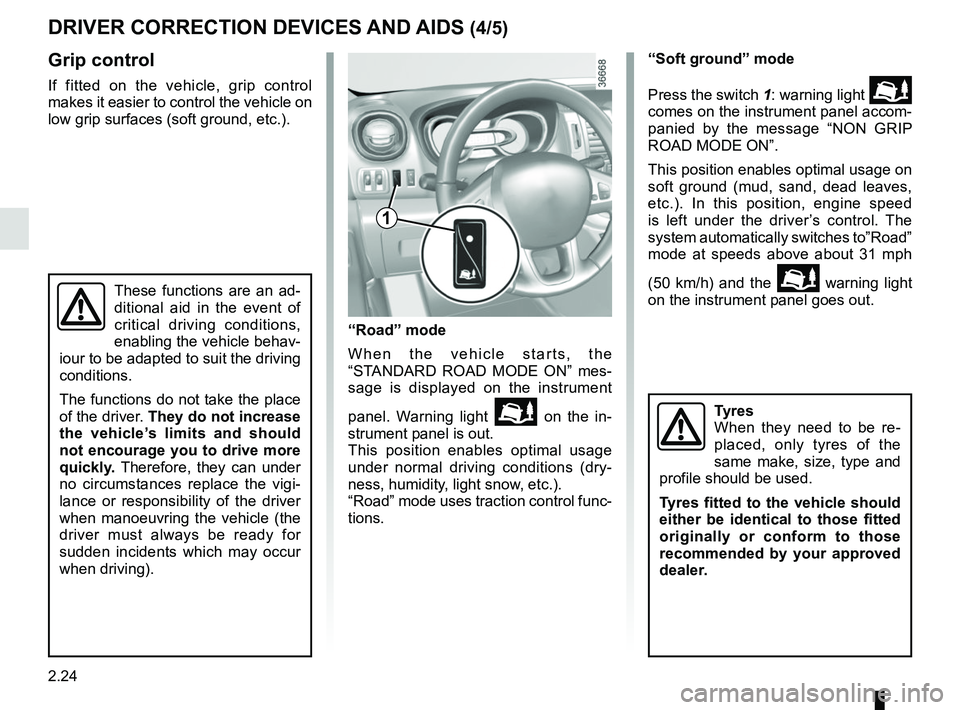
Press the switch 1: warning light
comes on the instrument panel accom-
panied by the message “NON GRIP
ROAD MODE ON”.
This position enables optimal usage on
soft ground (mud, sand, dead leaves,
etc.). In this position, engine speed
is left under the driver’s control. The
system automatically switches to”Road”
mode at speeds above about 31 mph
(50 km/h) and the
warning light
on the instrument panel goes out.
Tyres
When they need to be re-
placed, only tyres of the
same make, size, type and
profile should be used.
Tyres fitted to the vehicle should
either be identical to those fitted
originally or conform to those
recommended by your approved
dealer.
1
These functions are an ad-
ditional aid in the event of
critical driving conditions,
enabling the vehicle behav-
iour to be adapted to suit the driving
conditions.
The functions do not take the place
of the driver. They do not increase
the vehicle’s limits and should
not encourage you to drive more
quickly. Therefore, they can under
no circumstances replace the vigi-
lance or responsibility of the driver
when manoeuvring the vehicle (the
driver must always be ready for
sudden incidents which may occur
when driving).
“Road” mode
When the vehicle starts, the
“STANDARD ROAD MODE ON” mes-
sage is displayed on the instrument
panel. Warning light
on the in-
strument panel is out.
This position enables optimal usage
under normal driving conditions (dry-
ness, humidity, light snow, etc.).
“Road” mode uses traction control func-
tions.
Page 157 of 298

2.31
CRUISE CONTROL (3/4)
Exceeding the cruising speed
The cruising speed may be exceeded
at any time by depressing the accelera-
tor pedal. While it is being exceeded,
the cruising speed flashes on the in-
strument panel.
Then, release the accelerator: after a
few seconds, the vehicle will automati-
cally return to its set cruising speed.
Cruising speed cannot be
maintained
When driving down a steep gradient,
the system is unable to maintain the
cruising speed: the stored speed will
flash on the instrument panel informa-
tion display to inform you of this situ-
ation.
Adjusting the cruising speed
The cruising speed may be changed by
pressing the following repeatedly:
– switch 2 (+) to increase speed;
– switch 3 (-) to decrease the speed.
The cruise control function
is in no way linked to the
braking system.
23