light RENAULT TRAFIC 2018 Repair Manual
[x] Cancel search | Manufacturer: RENAULT, Model Year: 2018, Model line: TRAFIC, Model: RENAULT TRAFIC 2018Pages: 298, PDF Size: 8.05 MB
Page 148 of 298
2.22
Operating faults
When the system detects an operat-
ing fault the message “Check ESC” and
warning light
© and appear
on the instrument panel. In this case,
the ESC and traction control system
are deactivated.
Consult an approved dealer.
Electronic stability program
(ESC) with understeer control
and traction control
Electronic stability control ESC
This system helps you to keep control
of the vehicle in critical driving condi-
tions (avoiding an obstacle, loss of grip
on a bend, etc.).
Operating principle
A sensor in the steering wheel detects
the direction selected by the driver.
Other sensors throughout the vehicle
measure the actual direction.
The system compares driver input to
the actual trajectory of the vehicle and
corrects the trajectory if necessary by
controlling the braking of certain wheels
and/or engine power. In the event that
the system is engaged, indicator light
flashes on the instrument panel.
DRIVING CORRECTION DEVICES AND AIDS (2/5)
Understeer control
This system optimises the action of the
ESC in the case of pronounced under-
steer (loss of front axle road holding).
Traction control
This system helps to limit wheelspin of
the drive wheels and to control the ve-
hicle when pulling away accelerating or
decelerating.
Operating principle
Using the wheel sensors, the system
measures and compares the speed of
the drive wheels at all times and slows
down their over-rotation. If a wheel is
starting to slip, the system brakes au-
tomatically until the drive supplied be-
comes compatible with the level of grip
under the wheel again.
The system also adjusts the engine
speed to the grip available under the
wheels, independently of the pressure
exerted on the accelerator pedal.
These functions are an ad-
ditional aid in the event of
critical driving conditions,
enabling the vehicle behav-
iour to be adapted to suit the driving
conditions.
The functions do not take the place
of the driver. They do not increase
the vehicle’s limits and should
not encourage you to drive more
quickly. Therefore, they can under
no circumstances replace the vigi-
lance or responsibility of the driver
when manoeuvring the vehicle (the
driver must always be ready for
sudden incidents which may occur
when driving).
Page 149 of 298

2.23
DRIVING CORRECTION DEVICES AND AIDS (3/5)
Emergency brake assist
This system supplements the ABS
and helps reduce vehicle stopping dis-
tances.
Operating principle
The system is for detecting an emer-
gency braking situation. In this case,
the braking assistance immediately de-
velops maximum power and may trig-
ger ABS regulation.
ABS braking is maintained as long as
the brake pedal is applied.
Hazard warning lights switching on
Depending on the vehicle, these may
light up in the event of sudden decel-
eration. Braking anticipation
Depending on the vehicle, when you
rapidly release the accelerator, the
system anticipates the braking ma-
noeuvre in order to reduce stopping
distances.
When using the cruise control:
– if you use the accelerator, when you
release it, the system may be trig-
gered;
– if you do not use the accelerator, the system will not be triggered.
Operating faults
When the system detects an operating
fault the message “CHECK BRAKING
SYSTEM” appears on the instrument
panel along with the
© warning
light.
Consult an approved dealer.
Driver assistance with a
trailer
This system helps to maintain control
over the vehicle while using a trailer.
It detects shaking caused by towing a
trailer under certain driving conditions.
Operating conditions
– The towbar must be approved by an authorised dealer;
– the harness must be approved by an authorised dealer;
– the towbar must be connected to the vehicle.
Operating principle
The function stabilises the vehicle by:
– asymmetric braking of the front wheels to reduce shaking caused by
the trailer;
– braking of all four wheels and limita- tion on engine torque to reduce the
vehicle speed until the shaking has
stopped.
Warning light
flashes on the in-
strument panel to inform the driver.
Page 150 of 298
2.24
DRIVER CORRECTION DEVICES AND AIDS (4/5)
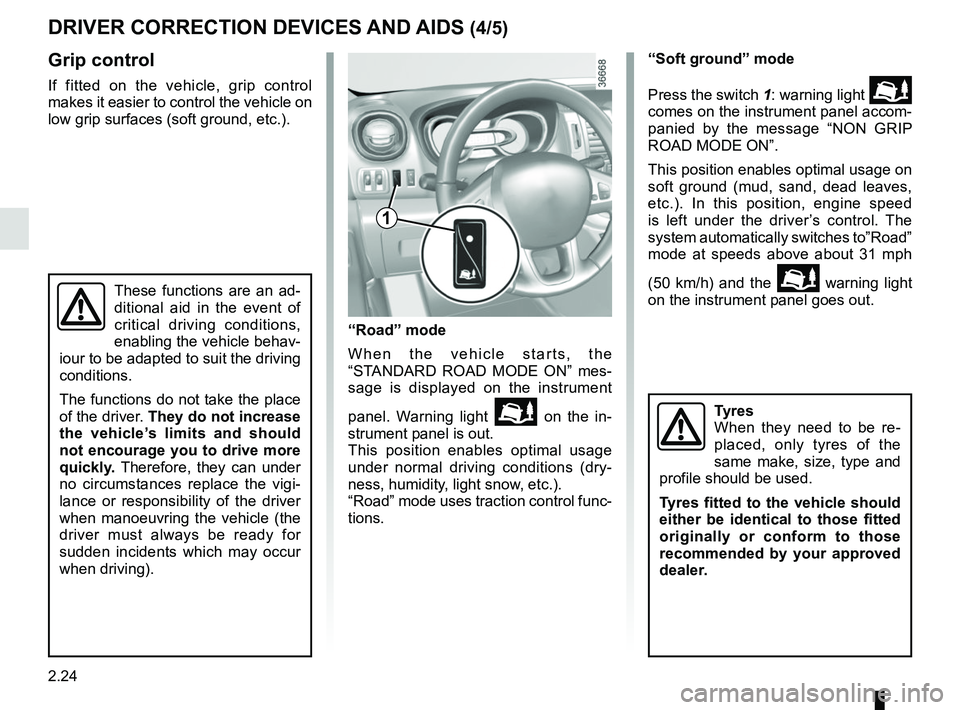
Grip control
If fitted on the vehicle, grip control
makes it easier to control the vehicle on
low grip surfaces (soft ground, etc.).“Soft ground” mode
Press the switch 1: warning light
comes on the instrument panel accom-
panied by the message “NON GRIP
ROAD MODE ON”.
This position enables optimal usage on
soft ground (mud, sand, dead leaves,
etc.). In this position, engine speed
is left under the driver’s control. The
system automatically switches to”Road”
mode at speeds above about 31 mph
(50 km/h) and the
warning light
on the instrument panel goes out.
Tyres
When they need to be re-
placed, only tyres of the
same make, size, type and
profile should be used.
Tyres fitted to the vehicle should
either be identical to those fitted
originally or conform to those
recommended by your approved
dealer.
1
These functions are an ad-
ditional aid in the event of
critical driving conditions,
enabling the vehicle behav-
iour to be adapted to suit the driving
conditions.
The functions do not take the place
of the driver. They do not increase
the vehicle’s limits and should
not encourage you to drive more
quickly. Therefore, they can under
no circumstances replace the vigi-
lance or responsibility of the driver
when manoeuvring the vehicle (the
driver must always be ready for
sudden incidents which may occur
when driving).
“Road” mode
When the vehicle starts, the
“STANDARD ROAD MODE ON” mes-
sage is displayed on the instrument
panel. Warning light
on the in-
strument panel is out.
This position enables optimal usage
under normal driving conditions (dry-
ness, humidity, light snow, etc.).
“Road” mode uses traction control func-
tions.
Page 152 of 298

2.26
Switching on
Press the side switch 1 . Indicator
light 6 comes on, lit orange, and the
message “SPEED LIMITER” appears
on the instrument panel, accompanied
by dashes to indicate that the speed
limiter function is activated and waiting
to store a limited speed.
To store the current speed, press
switch 2 (+): the limit speed will replace
the dashes.
The minimum stored speed is 20 mph
(30 km/h).
Controls
1 Main “On/Off” switch.
2 Limit speed activation, storage and increase switch (+).
3 Decreasing the limit speed (-).
4 Activation and recall of memorised limit speed (R).
5 Speed limiter function standby (with limited speed memory) (O).
The speed limiter function helps you
stay within the driving speed limit that
you choose, known as the
limit speed.
SPEED LIMITER (1/3)
6
2354
1
Page 154 of 298

2.28
SPEED LIMITER (3/3)
Recalling the limit speed
If a speed has been saved, it can be re-
called by pressing switch 4 ((R)).
Putting the function on
standby
The speed limiter function is suspended
when you press switch 5 (O). In this
case, the limit speed remains stored
and the message “MEMORISED” ac-
companied by this speed appears on
the instrument panel.
Switching off the function
The speed limiter function is deac-
tivated if you press switch 1 : in this
case a speed is no longer stored. The
orange instrument panel warning light
goes out, confirming that the func-
tion is stopped.
When the speed limiter is put on
standby, pressing switch 2 (+) re-
activates the function without taking
into account the stored speed: it is
the speed at which the vehicle is
moving that is taken into account.
2354
1
Page 156 of 298

2.30
Driving
Once a cruising speed is stored and
the cruise control function is active,
you may lift your foot off the accelera-
tor pedal.
Please note that you must
keep your feet close to the
pedals in order to react in
an emergency.
Activating cruise control
At a steady speed (above 18 mph
(30 km/h approximately)) press switch 2
or (+): the function is activated and the
current speed is saved.
The cruising speed replaces the dashes
and the cruise control is confirmed by
the appearance of warning light 6 lit
green, as well as warning light 7.
Switching on
Press switch 1 side .
Indicator light 7 comes on, lit green, and
the message “CRUISE CONTROL” ap-
pears on the instrument panel, accom-
panied by dashes to indicate that the
cruise control function is activated and
waiting to store a cruising speed.
CRUISE CONTROL (2/4)
7
6
23
1
Page 158 of 298

2.32
Switching off the function
The cruise control function is deacti-
vated if you press switch 1: in this case
a speed is no longer stored. The two in-
strument panel warning lights
and
go out to confirm that the function is
deactivated.
Returning to the cruising speed
If a speed is stored, it can be recalled,
once you are sure that the road con-
ditions are suitable (traffic, road sur-
face, weather conditions, etc.). Press
switch
4 (R) if the vehicle speed is
above 20 mph (30 km/h).
When the stored speed is recalled, acti-
vation of the cruise control is confirmed
by the illumination of the
warning
light.
NB: if the speed previously stored is
much higher than the current speed,
the vehicle will accelerate more rapidly
to reach this threshold.
When the cruise control function is
put on standby, pressing switch 2
(+) reactivates the cruise control
function without taking into account
the stored speed: it is the speed at
which the vehicle is moving that is
taken into account.
Putting the function on
standby
The function is set to standby if you:
– use the switch 5 (O);
– the brake pedal;
– the clutch pedal;
In all three cases, the cruising speed
remains stored and the message
“MEMORISED” appears on the instru-
ment panel.
Standby is confirmed when indicator
light
goes out.
CRUISE CONTROL (4/4)
Putting the cruise control
on standby or switching it
off does not cause a rapid
reduction in speed: you
must brake by depressing the brake
pedal.
2354
1
Page 159 of 298

2.33
VEHICLE WITH OVERSPEED FUNCTION
The vehicle speed may be permanently
set at a fixed value depending on the
vehicle or on local legislation.
To adjust the value or activate/deacti-
vate the function, consult an approved
dealer.
In the event of statutory limits (depend-
ing on the vehicle), this function may
not be deactivated.
Label 1 attached to the dashboard
shows the speed limit. Special case:
if your vehicle is fitted
with the Cruise control/Speed limiter,
fully depressing the accelerator pedal
(beyond the kickdown point) will not
allow you to exceed the overspeed
function set speed (refer to the informa-
tion on the “Speed limiter” in Section 2).
In exceptional circumstances (e.g.
steep gradient), the overspeed
function speed may be exceeded
slightly as the function does not
affect the braking system.
The function does not take
the place of the driver.
Under no circumstances
should it replace observa-
tion of speed limits nor vigilance
and responsibility on the part of the
driver.
1
Page 160 of 298

2.34
FAST IDLE SPEED
Press control 1, and the function will be
activated after a few seconds.
Modifying fast idle speed
To increase or reduce the speed, con-
tact an approved dealer.
Switching off the function
The function is interrupted when:
– you depress the clutch pedal and/or accelerator pedal;
– the vehicle speed is above 0 mph;
– the
® indicator light is lit up on
the instrument panel;
– the
© indicator light is lit up on
the instrument panel;
– the
Ô indicator light is lit up on
the instrument panel.
1
Special feature relating to the
Stop and Start function: activation
of the “Fast Idle Speed” function
stops the engine going into standby
(refer to the information on “Stop
and Start" in section 2).
Page 162 of 298

2.36
Temporary deactivation of
the system
Press switch 2 to deactivate the system.
The indicator light built into the switch
lights up to remind you that the system
is deactivated.
Pressing the switch again will react-
ivate the system and switch off the in-
dicator light.
Depending on the vehicle, you can de-
activate the parking distance control
from the multimedia screen. Please
see the equipment instructions for fur-
ther information.
PARKING DISTANCE CONTROL (2/2)
Adjusting the parking
distance control volume
Depending on the vehicle, certain set-
tings can be adjusted from the multime-
dia screen 1. Please see the equipment
instructions for further information.
The system is automatically reactivated
after the ignition is switched off and the
engine restarted.
Prolonged deactivation of the
system
You can deactivate the system perma-
nently by pressing and holding switch 2.
The warning light built into the switch
remains lit constantly.
The deactivated system can be re-
activated by pressing and holding the
switch again.
Operating faults
Depending on the vehicle, when the
system detects an operating fault, the
message “check parking distance con-
trol” appears on the instrument panel,
accompanied by the warning light
© and a beep lasting approxi-
mately 5 seconds. Please contact an
authorised dealer.
2
1