brake RENAULT TWINGO 2012 2.G User Guide
[x] Cancel search | Manufacturer: RENAULT, Model Year: 2012, Model line: TWINGO, Model: RENAULT TWINGO 2012 2.GPages: 220, PDF Size: 6.73 MB
Page 86 of 220
2.14
ENG_UD25058_2
Dispositifs de correction de conduite (X44 - Renault)
ENG_NU_952-4_X44_Renault_2
emergency brake assist
This is an additional system to ABS
which helps reduce vehicle stopping
distances.
operating principle
The system detects an emergency
braking situation. In this case, the brak-
ing assistance immediately develops
maximum power and may trigger ABS
regulation.
ABS braking is maintained as long as
the brake pedal is not released.
hazard warning lights switching on
Depending on the vehicle, these may
light up in the event of sudden decel -
eration.
DRIvING coRRectIoN DevIce (continued)
Special note on vehicles with a
Quickshift gearbox
When driving on some roads with low
surface grip (grass, snow, mud, etc.),
the system may reduce the engine
output to limit wheelspin. If this is not
required, it is recommended to switch
to manual mode on the Quickshift gear-
box (using the gear lever).
operating faults
When the system detects an operat -
ing fault the warning lights
and
© appear on the instrument panel.
In this situation, ESP and ASR are de-
activated.
Consult an approved dealer.
Page 90 of 220
cruise control ........................................ (up to the end of the DU)
cruise control-speed limiter................... (up to the end of the DU)
driving ................................................... (up to the end of the DU)
2.18
ENG_UD24754_4
Régulateur-limiteur de vitesses : fonction régulateur (X44 - Renault)
ENG_NU_952-4_X44_Renault_2
Jaune NoirNoir texte
Cruise control - speed limiter: cruise control function
cRUISe coNtRol - SPeeD lIMIteR: cruise control function (1/4)
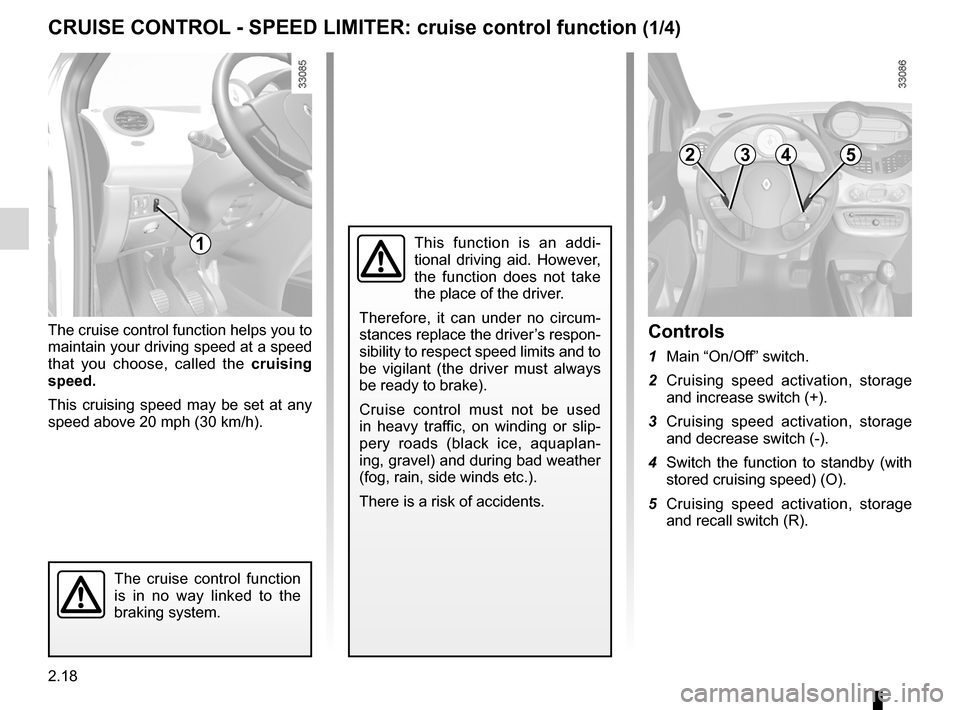
The cruise control function helps you to
maintain your driving speed at a speed
that you choose, called the cruising
speed.
This cruising speed may be set at any
speed above 20 mph (30 km/h).
The cruise control function
is in no way linked to the
braking system.
This function is an addi -
tional driving aid. However,
the function does not take
the place of the driver.
Therefore, it can under no circum -
stances replace the driver’s respon-
sibility to respect speed limits and to
be vigilant (the driver must always
be ready to brake).
Cruise control must not be used
in heavy traffic, on winding or slip -
pery roads (black ice, aquaplan -
ing, gravel) and during bad weather
(fog, rain, side winds etc.).
There is a risk of accidents.
controls
1 Main “On/Off” switch.
2 Cruising speed activation, storage
and increase switch (+).
3 Cruising speed activation, storage
and decrease switch (-).
4 Switch the function to standby (with
stored cruising speed) (O).
5 Cruising speed activation, storage
and recall switch (R).
1
2345
Page 93 of 220
JauneNoirNoir texte
2.21
ENG_UD24754_4
Régulateur-limiteur de vitesses : fonction régulateur (X44 - Renault)
ENG_NU_952-4_X44_Renault_2
cRUISe coNtRol - SPeeD lIMIteR: cruise control function (4/4)
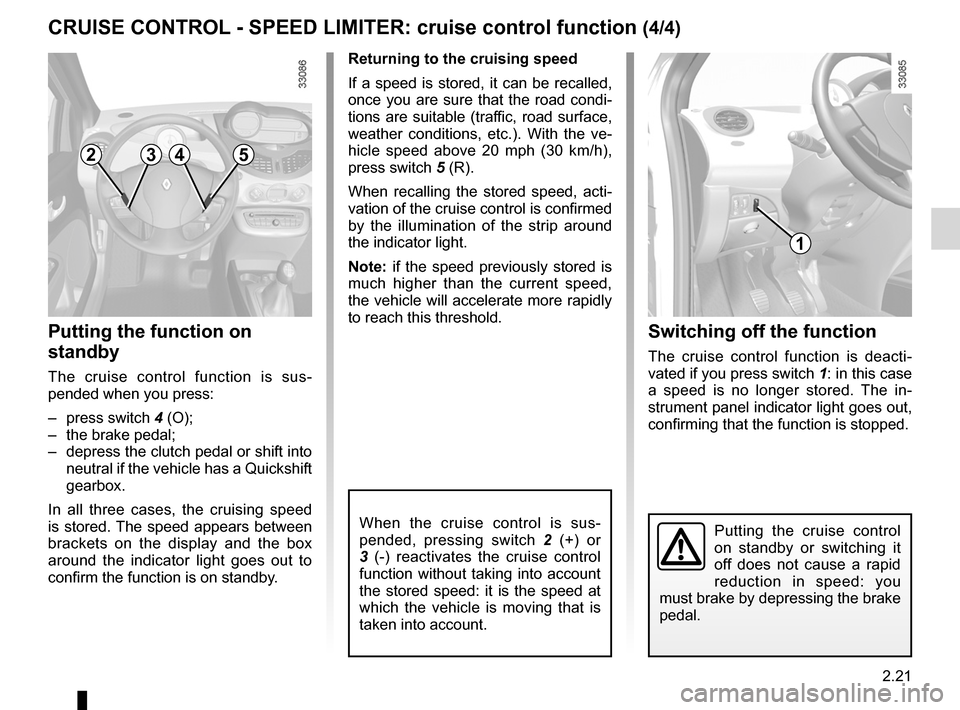
Putting the function on
standby
The cruise control function is sus -
pended when you press:
– press switch 4 (O);
– the brake pedal;
– depress the clutch pedal or shift into
neutral if the vehicle has a Quickshift
gearbox.
In all three cases, the cruising speed
is stored. The speed appears between
brackets on the display and the box
around the indicator light goes out to
confirm the function is on standby. Returning to the cruising speed
If a speed is stored, it can be recalled,
once you are sure that the road condi
-
tions are suitable (traffic, road surface,
weather conditions, etc.). With the ve -
hicle speed above 20 mph (30 km/h),
press switch 5 (R).
When recalling the stored speed, acti -
vation of the cruise control is confirmed
by the illumination of the strip around
the indicator light.
Note: if the speed previously stored is
much higher than the current speed,
the vehicle will accelerate more rapidly
to reach this threshold.
When the cruise control is sus -
pended, pressing switch 2 (+) or
3 (-) reactivates the cruise control
function without taking into account
the stored speed: it is the speed at
which the vehicle is moving that is
taken into account.
Switching off the function
The cruise control function is deacti -
vated if you press switch 1: in this case
a speed is no longer stored. The in -
strument panel indicator light goes out,
confirming that the function is stopped.
Putting the cruise control
on standby or switching it
off does not cause a rapid
reduction in speed: you
must brake by depressing the brake
pedal.
2345
1
Page 94 of 220
Quickshift gearbox ................................ (up to the end of the DU)
2.22
ENG_UD24716_6
Boîte de vitesses Quickshift (X44 - Renault)
ENG_NU_952-4_X44_Renault_2
Jaune NoirNoir texte
Quickshift gearbox
QUIcKShIFt GeARBoX (1/5)
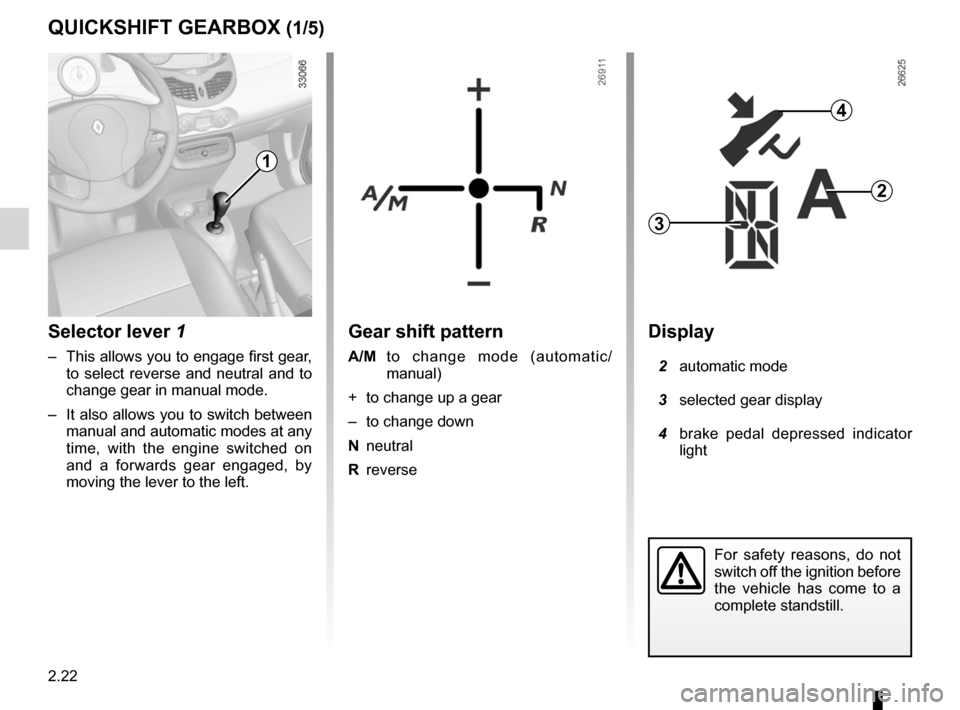
Gear shift pattern
A/M to change mode (automatic/
manual)
+ to change up a gear
– to change down
N neutral
R reverse
For safety reasons, do not
switch off the ignition before
the vehicle has come to a
complete standstill.
Display
2 automatic mode
3 selected gear display
4 brake pedal depressed indicator
light
2
3
4
Selector lever 1
– This allows you to engage first gear,
to select reverse and neutral and to
change gear in manual mode.
– It also allows you to switch between
manual and automatic modes at any
time, with the engine switched on
and a forwards gear engaged, by
moving the lever to the left.
1
Page 95 of 220
automatic gearbox (use) ........................................ (current page)
JauneNoirNoir texte
2.23
ENG_UD24716_6
Boîte de vitesses Quickshift (X44 - Renault)
ENG_NU_952-4_X44_Renault_2
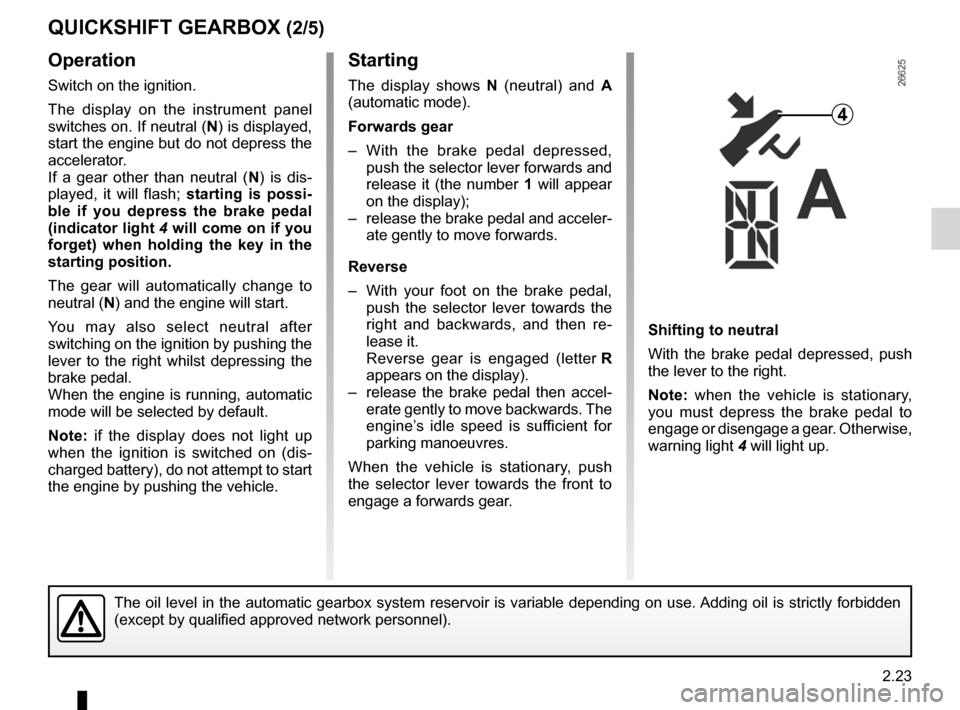
Starting
The display shows N (neutral) and A
(automatic mode).
Forwards gear
– With the brake pedal depressed,
push the selector lever forwards and
release it (the number 1 will appear
on the display);
– release the brake pedal and acceler-
ate gently to move forwards.
Reverse
– With your foot on the brake pedal,
push the selector lever towards the
right and backwards, and then re -
lease it.
Reverse gear is engaged (letter R
appears on the display).
– release the brake pedal then accel -
erate gently to move backwards. The
engine’s idle speed is sufficient for
parking manoeuvres.
When the vehicle is stationary, push
the selector lever towards the front to
engage a forwards gear.
operation
Switch on the ignition.
The display on the instrument panel
switches on. If neutral (N) is displayed,
start the engine but do not depress the
accelerator.
If a gear other than neutral ( N) is dis -
played, it will flash; starting is possi-
ble if you depress the brake pedal
(indicator light 4 will come on if you
forget) when holding the key in the
starting position.
The gear will automatically change to
neutral (N) and the engine will start.
You may also select neutral after
switching on the ignition by pushing the
lever to the right whilst depressing the
brake pedal.
When the engine is running, automatic
mode will be selected by default.
Note: if the display does not light up
when the ignition is switched on (dis -
charged battery), do not attempt to start
the engine by pushing the vehicle. Shifting to neutral
With the brake pedal depressed, push
the lever to the right.
Note:
when the vehicle is stationary,
you must depress the brake pedal to
engage or disengage a gear. Otherwise,
warning light 4 will light up.
QUIcKShIFt GeARBoX (2/5)
4
The oil level in the automatic gearbox system reservoir is variable depending on use. Adding oil is strictly forbidden
(except by qualified approved network personnel).
Page 96 of 220
horn ....................................................................... (current page)
2.24
ENG_UD24716_6
Boîte de vitesses Quickshift (X44 - Renault)
ENG_NU_952-4_X44_Renault_2
Jaune NoirNoir texte
changing mode
You can change mode at any time
by pushing the lever to the left. This
switches mode without changing gear.
Driving in manual mode
Using the selector lever
Pushing the lever repeatedly allows
you to change gears manually:
– To change up a gear: push the lever
forwards;
– to change down a gear: push the
lever backwards;
– to change to neutral: with the brake
pedal depressed (indicator light 4
will come on if you forget), push the
lever towards the right.
Note: when the vehicle is stationary
(braking, red light, etc.), the system au-
tomatically switches to first gear.
By pushing the lever forwards twice
you can move up two gears at a time
(unless this causes low engine speeds).
By pushing the lever backwards twice
you can move down two gears at a time
(unless this causes overrevving).
Note: neutral may only be selected
when the vehicle is being driven or is
stationary when the brake pedal is
depressed (if you forget, warning
light 4 will light up).
Accelerating and overtaking
To obtain maximum vehicle perform -
ance, in automatic or manual mode,
quickly depress the accelerator pedal
beyond the kickdown point.
This will activate the kickdown func -
tion allowing you to change down to the
most suitable gear.
QUIcKShIFt GeARBoX (3/5)
Driving in automatic mode
Each time the ignition is switched on,
automatic mode is selected by default
(letter A on the display).
The vehicle is controlled using the ac -
celerator and the brake.
Gears will change automatically at
the correct moment and at a suitable
engine speed because automatic mode
takes into consideration the road sur -
face and the chosen driving style.
You may change the gear selection
made by the automatic system (unless
this risks the engine being overrevved
or underrevved):
– by pushing the lever forwards or
backwards.
You can stop the vehicle at red lights,
with the gear engaged, by pressing the
brake pedal; there is no need to change
to neutral.
If the engine is being overrevved or underevved, the system will select the opti-
mal gear.
Page 97 of 220
JauneNoirNoir texte
2.25
ENG_UD24716_6
Boîte de vitesses Quickshift (X44 - Renault)
ENG_NU_952-4_X44_Renault_2
QUIcKShIFt GeARBoX (4/5)
Parking
To park the vehicle with a gear en -
gaged (on a slope, for example): before
switching off the engine, check that a
gear other than N is displayed on the
instrument panel.
The next time the engine is started, de-
press the brake pedal. The vehicle will
then automatically change to neutral
(letter N on the display).
Audible warning
If you hold the vehicle on a slope for
too long without applying the brakes or
handbrake you will strain the system
and there is a risk that the clutch will
overheat.
In this case, an intermittent beeping
sound will remind you that you should
put your foot on the brake pedal or
apply the handbrake.
Never leave the vehicle with the engine
running when in gear. For safety rea -
sons you will hear an intermittent beep -
ing sound when you open the door if
you have not shifted into neutral or you
have not switched off the ignition or de-
pressed the brake pedal.
An impact to the underside of the vehicle (e.g.: striking a post, raised kerb
or other street furniture) may result in damage to the vehicle (e.g.: defor-
mation of an axle).
To avoid any risk of accident, have your vehicle checked by an approved
Dealer.
Page 98 of 220
2.26
ENG_UD24716_6
Boîte de vitesses Quickshift (X44 - Renault)
ENG_NU_952-4_X44_Renault_2
QUIcKShIFt GeARBoX (5/5)
t owing the vehicle
If the gearbox is stuck in a gear:
– Switch on the ignition;
– select neutral with the brake pedal
depressed;
– check that the gearbox is in neutral
(by pushing the vehicle, for exam -
ple).
If you cannot find neutral you must tow
the vehicle with the front wheels raised.
the vehicle should always be towed
with the ignition switched off.operating faults
ÒWhen driving, if this warning
light comes on together with
warning light
©, this indicates a
system fault. In most cases, you may
still drive the vehicle, although it will not
function perfectly. Contact an approved
dealer as soon as possible.
the vehicle will not start
If you cannot start the engine and if the
battery is not discharged (display lit up):
– Switch on the ignition;
– select neutral;
– push the vehicle or roll it down a suf-
ficiently steep slope. Then push the
selector lever forwards.
The optimum gear for starting the
engine will then be automatically se -
lected.
Note: never attempt this manoeuvre in
reverse.
Page 132 of 220
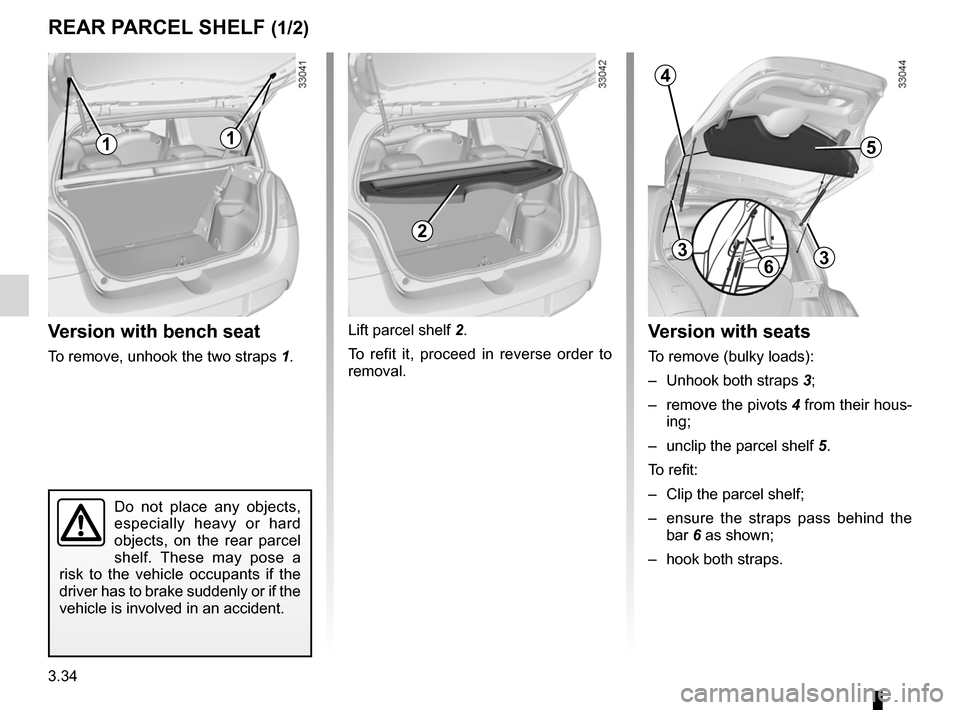
rear parcel shelf .................................... (up to the end of the DU)
3.34
ENG_UD24694_3
Coffre à bagages (X44 - Renault)
ENG_NU_952-4_X44_Renault_3
Jaune NoirNoir texte
Rear parcel shelf
REAR PARCEl ShElF (1/2)
Version with bench seat
To remove, unhook the two straps 1.Lift parcel shelf 2.
To refit it, proceed in reverse order to
removal.
Version with seats
To remove (bulky loads):
–
Unhook both straps 3;
– remove the pivots 4 from their hous-
ing;
– unclip the parcel shelf 5.
To refit:
– Clip the parcel shelf;
– ensure the straps pass behind the
bar 6 as shown;
– hook both straps.
Do not place any objects,
especially heavy or hard
objects, on the rear parcel
shelf. These may pose a
risk to the vehicle occupants if the
driver has to brake suddenly or if the
vehicle is involved in an accident.
11
2
5
4
3
63
Page 134 of 220

luggage compartment cover ................. (up to the end of the DU)
3.36
ENG_UD24695_2
Cache-bagages : versions société (X44 - Renault)
ENG_NU_952-4_X44_Renault_3
Luggage cover: utility versions
luggAgE CoMPARTMENT CoVER: utility versions
The luggage cover consists of three
rigid sections.
It can be used in one of three ways:
– The luggage compartment cover is
in the unfolded position or the semi-
folded position.– The luggage cover is removed.
To remove it, in the semi-folded po -
sition, lift the luggage compartment
cover, holding it at either end.
Do not place any objects,
especially heavy or solid
objects on the luggage
compartment cover. These
may pose a risk to the vehicle occu-
pants if the driver has to brake sud-
denly or if the vehicle is involved in
an accident.