vent RENAULT TWINGO 2016 3.G Owner's Guide
[x] Cancel search | Manufacturer: RENAULT, Model Year: 2016, Model line: TWINGO, Model: RENAULT TWINGO 2016 3.GPages: 216, PDF Size: 7.15 MB
Page 116 of 216
3.4
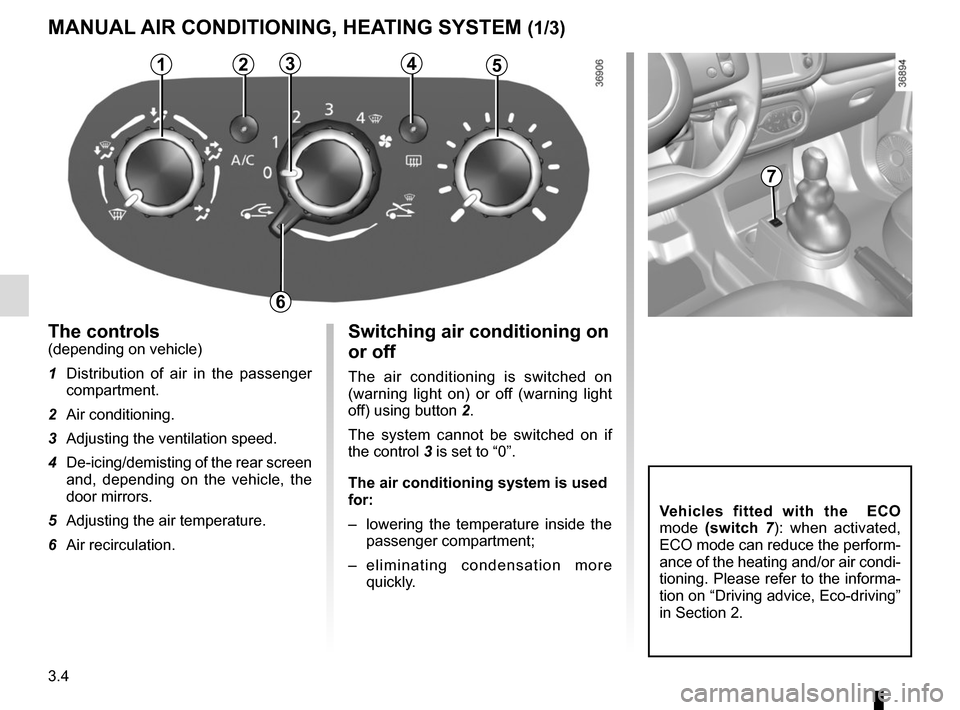
Switching air conditioning on
or off
The air conditioning is switched on
(warning light on) or off (warning light
off) using button 2.
The system cannot be switched on if
the control 3 is set to “0”.
The air conditioning system is used
for:
– lowering the temperature inside the
passenger compartment;
– eliminating condensation more quickly.
The controls(depending on vehicle)
1 Distribution of air in the passenger compartment.
2 Air conditioning.
3 Adjusting the ventilation speed.
4 De-icing/demisting of the rear screen and, depending on the vehicle, the
door mirrors.
5 Adjusting the air temperature.
6 Air recirculation.
MANUAL AIR CONDITIONING, HEATING SYSTEM (1/3)
53142
6
7
Vehicles fitted with the ECO
mode (switch 7): when activated,
ECO mode can reduce the perform-
ance of the heating and/or air condi-
tioning. Please refer to the informa-
tion on “Driving advice, Eco-driving”
in Section 2.
Page 117 of 216
3.5
Air recirculation is for:
– isolating the vehicle from the exter-
nal atmosphere (driving in polluted
areas, etc.).
– to bring the passenger compartment
to the desired temperature as quickly
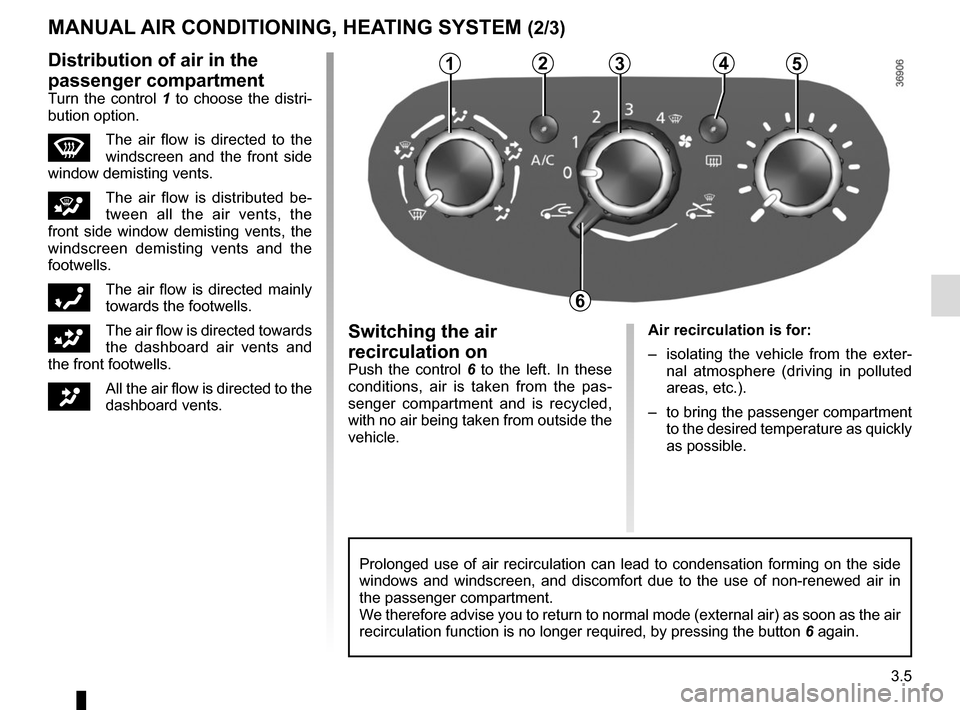
as possible.Switching the air
recirculation on
Push the control 6 to the left. In these
conditions, air is taken from the pas-
senger compartment and is recycled,
with no air being taken from outside the
vehicle.
MANUAL AIR CONDITIONING, HEATING SYSTEM (2/3)
Prolonged use of air recirculation can lead to condensation forming on t\
he side
windows and windscreen, and discomfort due to the use of non-renewed air\
in
the passenger compartment.
We therefore advise you to return to normal mode (external air) as soon\
as the air
recirculation function is no longer required, by pressing the button 6 again.
53124Distribution of air in the
passenger compartment
Turn the control 1 to choose the distri-
bution option.
WThe air flow is directed to the
windscreen and the front side
window demisting vents.
iThe air flow is distributed be-
tween all the air vents, the
front side window demisting vents, the
windscreen demisting vents and the
footwells.
óThe air flow is directed mainly
towards the footwells.
GThe air flow is directed towards
the dashboard air vents and
the front footwells.
JAll the air flow is directed to the
dashboard vents.
6
Page 118 of 216
3.6
Note: the air conditioning is not opera-
tional below 2°C.
If you want to shut off the flow of air, set
the control 3 to “0”. The system is de-
activated: the ventilation speed is zero
(vehicle stationary). You can, however,
still feel a slight flow of air when the ve-
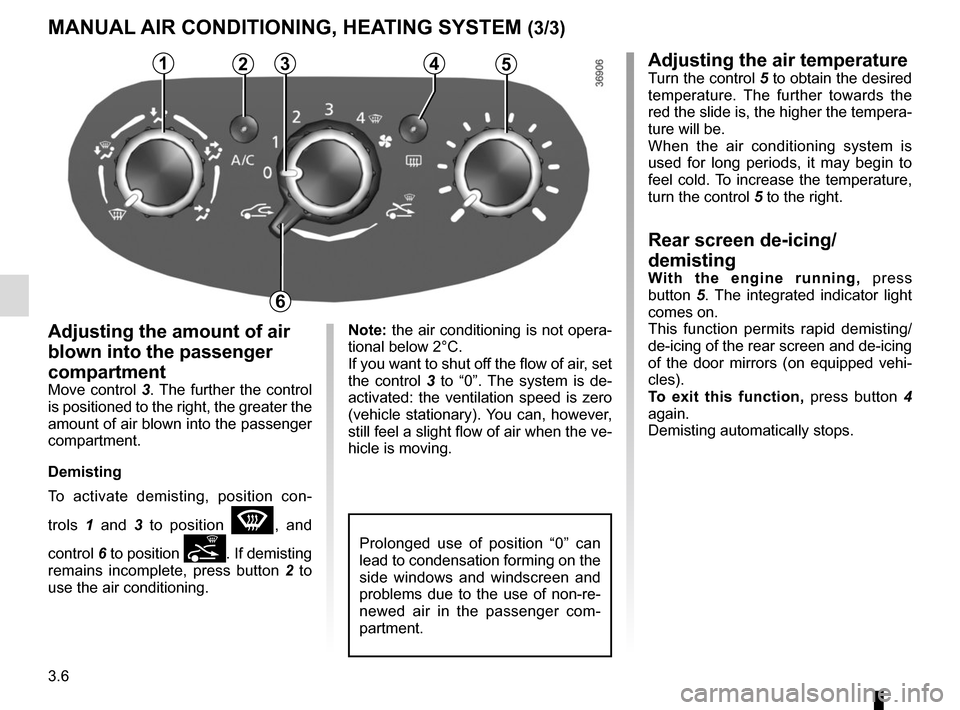
hicle is moving.Adjusting the amount of air
blown into the passenger
compartment
Move control 3. The further the control is positioned to the right, the greater the
amount of air blown into the passenger
compartment.
Demisting
To activate demisting, position con-
trols 1 and 3 to position
W, and
control 6 to position
. If demisting
remains incomplete, press button 2 to
use the air conditioning.
4
5
MANUAL AIR CONDITIONING, HEATING SYSTEM (3/3)
5314Adjusting the air temperatureTurn the control 5 to obtain the desired
temperature. The further towards the
red the slide is, the higher the tempera-
ture will be.
When the air conditioning system is
used for long periods, it may begin to
feel cold. To increase the temperature,
turn the control 5 to the right.
Rear screen de-icing/
demisting
With the engine running, press
button 5. The integrated indicator light
comes on.
This function permits rapid demisting/
de-icing of the rear screen and de-icing
of the door mirrors (on equipped vehi-
cles).
To exit this function, press button 4
again.
Demisting automatically stops.
2
6
Prolonged use of position “0” can
lead to condensation forming on the
side windows and windscreen and
problems due to the use of non-re-
newed air in the passenger com-
partment.
Page 119 of 216
3.7
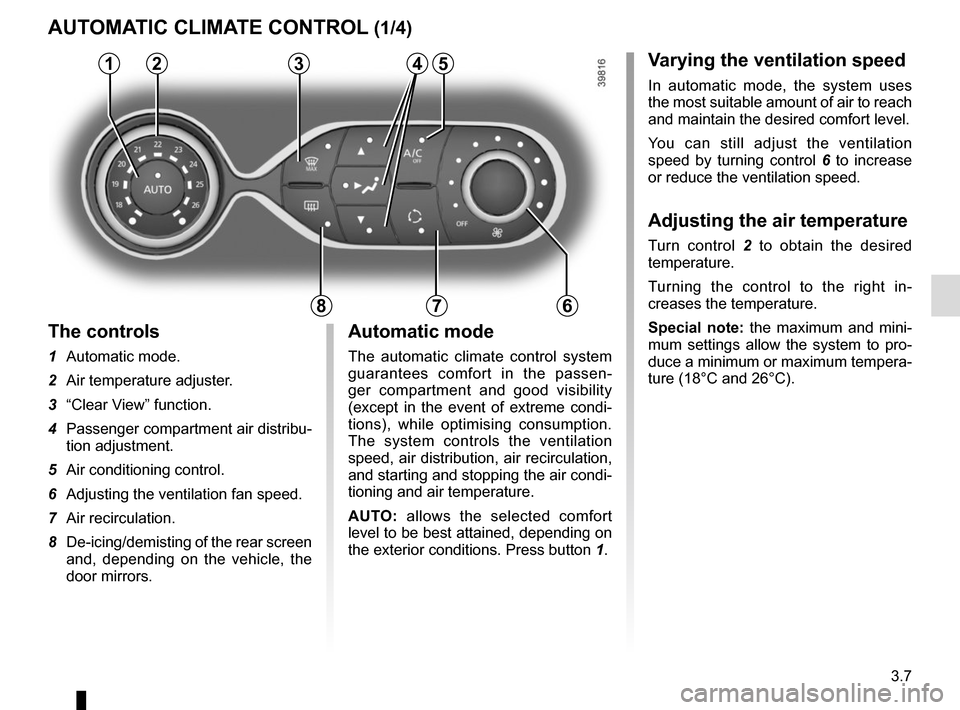
Varying the ventilation speed
In automatic mode, the system uses
the most suitable amount of air to reach
and maintain the desired comfort level.
You can still adjust the ventilation
speed by turning control 6 to increase
or reduce the ventilation speed.
Adjusting the air temperature
Turn control 2 to obtain the desired
temperature.
Turning the control to the right in-
creases the temperature.
Special note: the maximum and mini-
mum settings allow the system to pro-
duce a minimum or maximum tempera-
ture (18°C and 26°C).
The controls
1 Automatic mode.
2 Air temperature adjuster.
3 “Clear View” function.
4 Passenger compartment air distribu-
tion adjustment.
5 Air conditioning control.
6 Adjusting the ventilation fan speed.
7 Air recirculation.
8 De-icing/demisting of the rear screen
and, depending on the vehicle, the
door mirrors.
AUTOMATIC CLIMATE CONTROL (1/4)
235
786
Automatic mode
The automatic climate control system
guarantees comfort in the passen-
ger compartment and good visibility
(except in the event of extreme condi-
tions), while optimising consumption.
The system controls the ventilation
speed, air distribution, air recirculation,
and starting and stopping the air condi-
tioning and air temperature.
AUTO: allows the selected comfort
level to be best attained, depending on
the exterior conditions. Press button 1.
14
Page 120 of 216
3.8
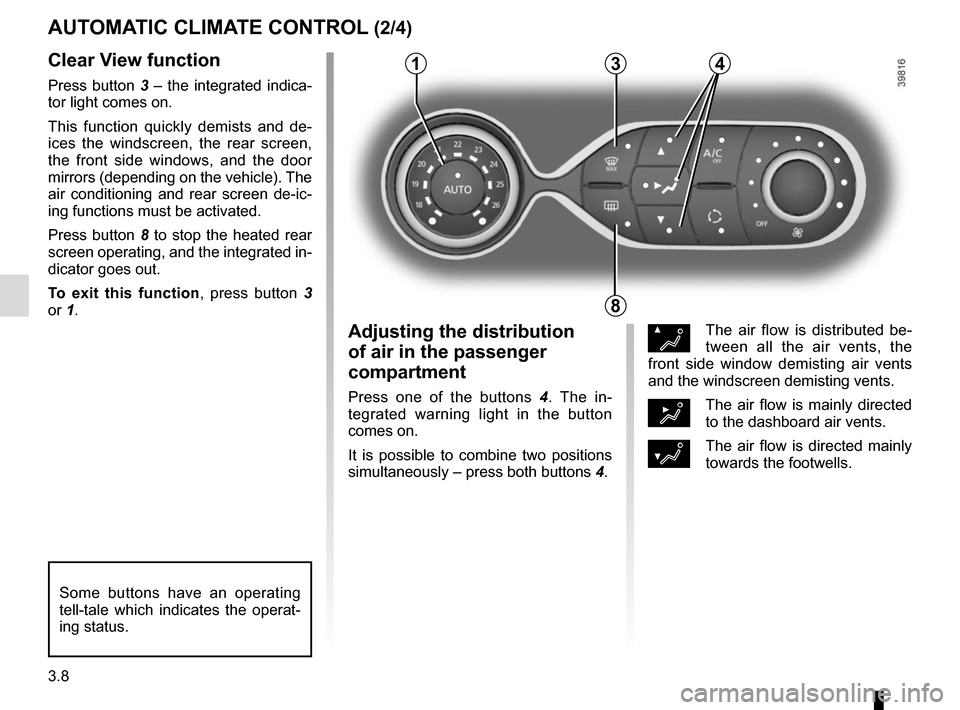
Clear View function
Press button 3 – the integrated indica-
tor light comes on.
This function quickly demists and de-
ices the windscreen, the rear screen,
the front side windows, and the door
mirrors (depending on the vehicle). The
air conditioning and rear screen de-ic-
ing functions must be activated.
Press button 8 to stop the heated rear
screen operating, and the integrated in-
dicator goes out.
To exit this function, press button 3
or 1.
AUTOMATIC CLIMATE CONTROL (2/4)
ØThe air flow is distributed be-
tween all the air vents, the
front side window demisting air vents
and the windscreen demisting vents.
½The air flow is mainly directed
to the dashboard air vents.
¿The air flow is directed mainly
towards the footwells.
Adjusting the distribution
of air in the passenger
compartment
Press one of the buttons 4 . The in-
tegrated warning light in the button
comes on.
It is possible to combine two positions
simultaneously – press both buttons 4.
8
3
Some buttons have an operating
tell-tale which indicates the operat-
ing status.
14
Page 123 of 216
3.11
Operating faults
As a general rule, contact your ap-
proved dealer in the event of an oper-
ating fault.
– Reduction in de-icing, demisting or air conditioning performance.
This may be caused by the passen-
ger compartment filter cartridge be-
coming clogged.
– No cold air is being produced .
Check that the controls are set cor-
rectly and that the fuses are sound.
Otherwise, switch off the system.
Presence of water under the
vehicle
After prolonged use of the air condi-
tioning system, it is normal for water
to be present under the vehicle. This is
caused by condensation.
AIR CONDITIONING: information and advice on use
Do not open the refriger-
ant fluid circuit. The fluid
may damage eyes or skin.
Fuel consumption
You will normally notice an increase in
fuel consumption (especially in town)
when the air conditioning is operating.
For vehicles fitted with air conditioning
with no automatic mode, switch off the
system when it is not required.
Advice for reducing consumption
and helping to preserve the environ-
ment
Drive with the air vents open and the
windows closed.
If the vehicle has been parked in the
sun, open the doors for a few moments
to let the hot air escape before starting
the engine.
Advice on use
In some situations, (air conditioning
off, air recirculation activated, ventila-
tion speed at zero or low, etc.) you may
notice that condensation starts to form
on the windows and windscreen.
If there is condensation, use the “Clear
View” function to remove it, then use
the air conditioning in automatic mode
to stop it forming again.
Maintenance
Refer to the Maintenance Document
for your vehicle for the inspection fre-
quency.
Do not add anything to the
vehicle’s ventilation circuit
(for example, to remove
bad odours).
There is a risk of damage or of
fire.
Page 128 of 216
3.16
Nothing should be placed
on the floor area in front of
the driver as such objects
may slide under the pedal
during braking manoeuvres, thus
obstructing its use.
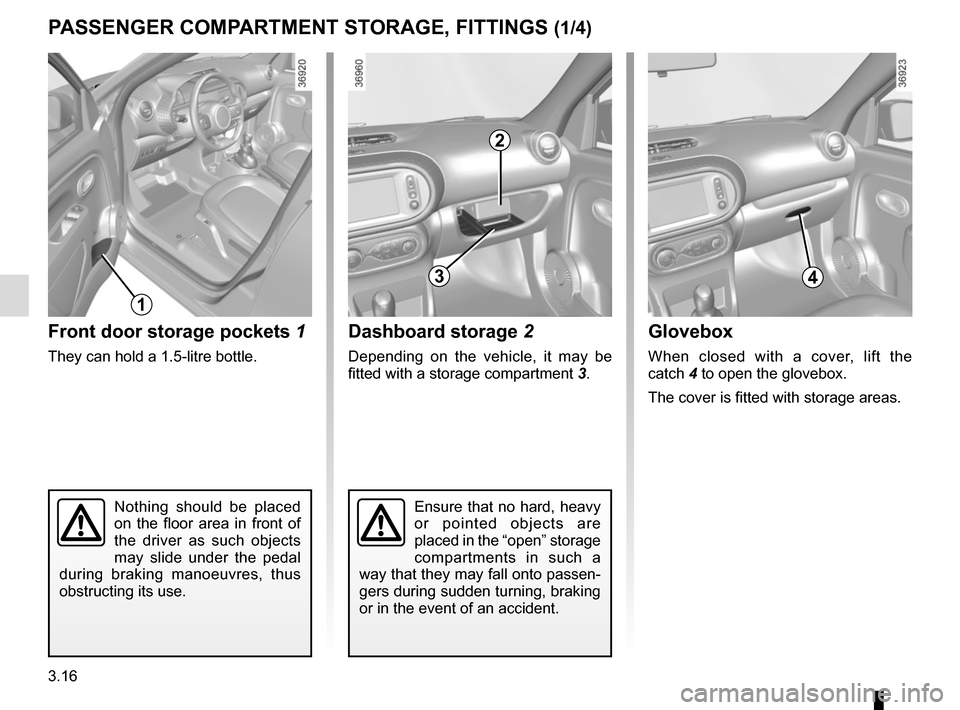
Front door storage pockets 1
They can hold a 1.5-litre bottle.
PASSENGER COMPARTMENT STORAGE, FITTINGS (1/4)
1
Ensure that no hard, heavy
or pointed objects are
placed in the “open” storage
compartments in such a
way that they may fall onto passen-
gers during sudden turning, braking
or in the event of an accident.
3
Dashboard storage 2
Depending on the vehicle, it may be
fitted with a storage compartment 3.
2
Glovebox
When closed with a cover, lift the
catch 4 to open the glovebox.
The cover is fitted with storage areas.
4
Page 130 of 216
3.18
PASSENGER COMPARTMENT STORAGE, FITTINGS (3/4)
9
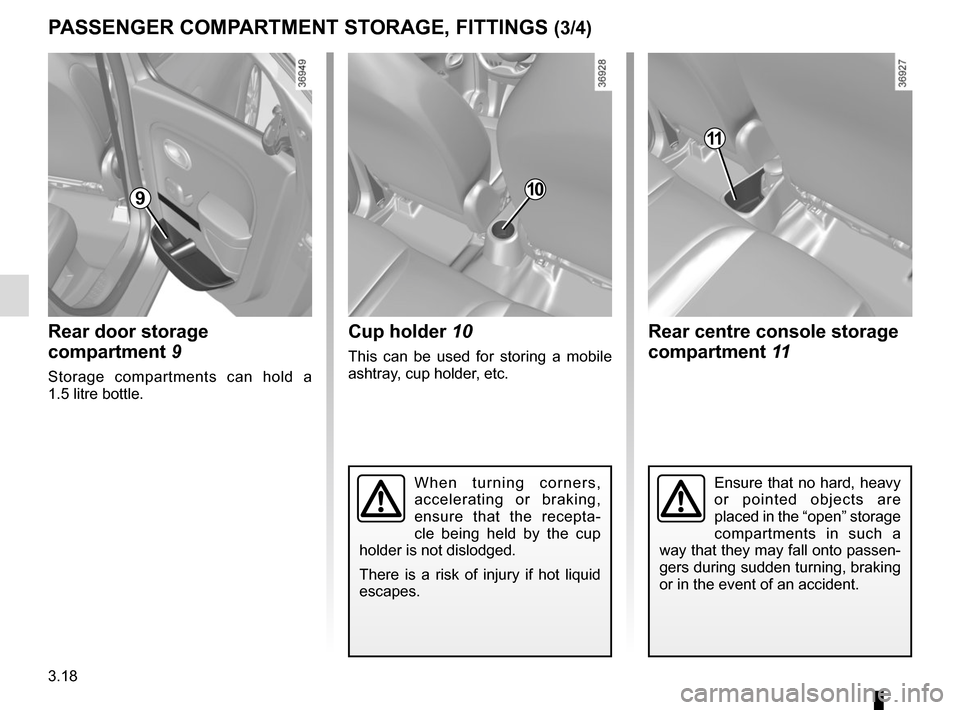
Rear door storage
compartment 9
Storage compartments can hold a
1.5 litre bottle.
10
Cup holder 10
This can be used for storing a mobile
ashtray, cup holder, etc.
When turning corners,
accelerating or braking,
ensure that the recepta-
cle being held by the cup
holder is not dislodged.
There is a risk of injury if hot liquid
escapes.
11
Rear centre console storage
compartment 11
Ensure that no hard, heavy
or pointed objects are
placed in the “open” storage
compartments in such a
way that they may fall onto passen-
gers during sudden turning, braking
or in the event of an accident.
Page 134 of 216
3.22
REAR BENCH SEAT
B
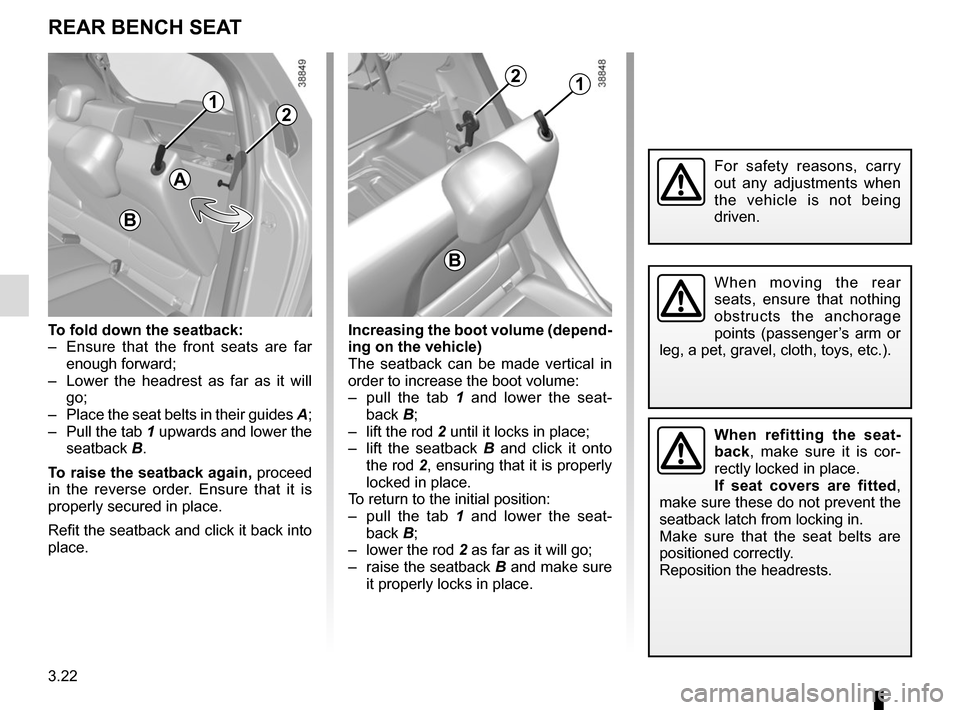
To fold down the seatback:
– Ensure that the front seats are far enough forward;
– Lower the headrest as far as it will go;
– Place the seat belts in their guides A;
– Pull the tab 1 upwards and lower the seatback B.
To raise the seatback again, proceed
in the reverse order. Ensure that it is
properly secured in place.
Refit the seatback and click it back into
place. Increasing the boot volume (depend-
ing on the vehicle)
The seatback can be made vertical in
order to increase the boot volume:
– pull the tab 1 and lower the seat-
back B;
– lift the rod 2 until it locks in place;
– lift the seatback B and click it onto
the rod 2, ensuring that it is properly
locked in place.
To return to the initial position:
– pull the tab 1 and lower the seat-
back B;
– lower the rod 2 as far as it will go;
– raise the seatback B and make sure it properly locks in place.
For safety reasons, carry
out any adjustments when
the vehicle is not being
driven.
When moving the rear
seats, ensure that nothing
obstructs the anchorage
points (passenger’s arm or
leg, a pet, gravel, cloth, toys, etc.).
When refitting the seat-
back, make sure it is cor-
rectly locked in place.
If seat covers are fitted ,
make sure these do not prevent the
seatback latch from locking in.
Make sure that the seat belts are
positioned correctly.
Reposition the headrests.
1
A
2
12
B
Page 143 of 216
4.3
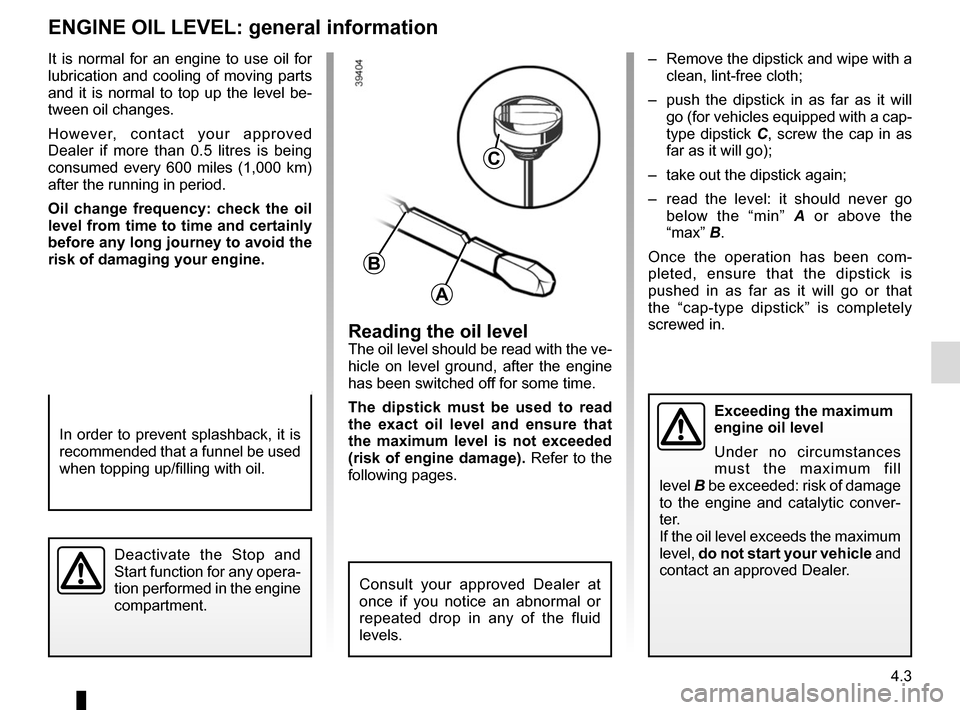
Reading the oil levelThe oil level should be read with the ve-
hicle on level ground, after the engine
has been switched off for some time.
The dipstick must be used to read
the exact oil level and ensure that
the maximum level is not exceeded
(risk of engine damage). Refer to the
following pages.
It is normal for an engine to use oil for
lubrication and cooling of moving parts
and it is normal to top up the level be-
tween oil changes.
However, contact your approved
Dealer if more than 0.5 litres is being
consumed every 600 miles (1,000 km)
after the running in period.
Oil change frequency: check the oil
level from time to time and certainly
before any long journey to avoid the
risk of damaging your engine.
ENGINE OIL LEVEL: general information
A
B
C
In order to prevent splashback, it is
recommended that a funnel be used
when topping up/filling with oil.
– Remove the dipstick and wipe with a
clean, lint-free cloth;
– push the dipstick in as far as it will go (for vehicles equipped with a cap-
type dipstick C, screw the cap in as
far as it will go);
– take out the dipstick again;
– read the level: it should never go below the “min” A or above the
“max” B.
Once the operation has been com-
pleted, ensure that the dipstick is
pushed in as far as it will go or that
the “cap-type dipstick” is completely
screwed in.
Deactivate the Stop and
Start function for any opera-
tion performed in the engine
compartment.
Consult your approved Dealer at
once if you notice an abnormal or
repeated drop in any of the fluid
levels.
Exceeding the maximum
engine oil level
Under no circumstances
must the maximum fill
level B be exceeded: risk of damage
to the engine and catalytic conver-
ter.
If the oil level exceeds the maximum
level, do not start your vehicle and
contact an approved Dealer.