engine RENAULT ZOE 2014 1.G Owner's Manual
[x] Cancel search | Manufacturer: RENAULT, Model Year: 2014, Model line: ZOE, Model: RENAULT ZOE 2014 1.GPages: 214, PDF Size: 4.13 MB
Page 83 of 214
1.77
PEDESTRIAN HORN
Electric vehicles are particularly quiet.
This system enables you to warn
people of your presence – especially
pedestrians and cyclists.
The system is activated automatically
when the engine is started. The sound
triggers when the vehicle speed is be-
tween 1 and 20 mph.
Deactivating the system
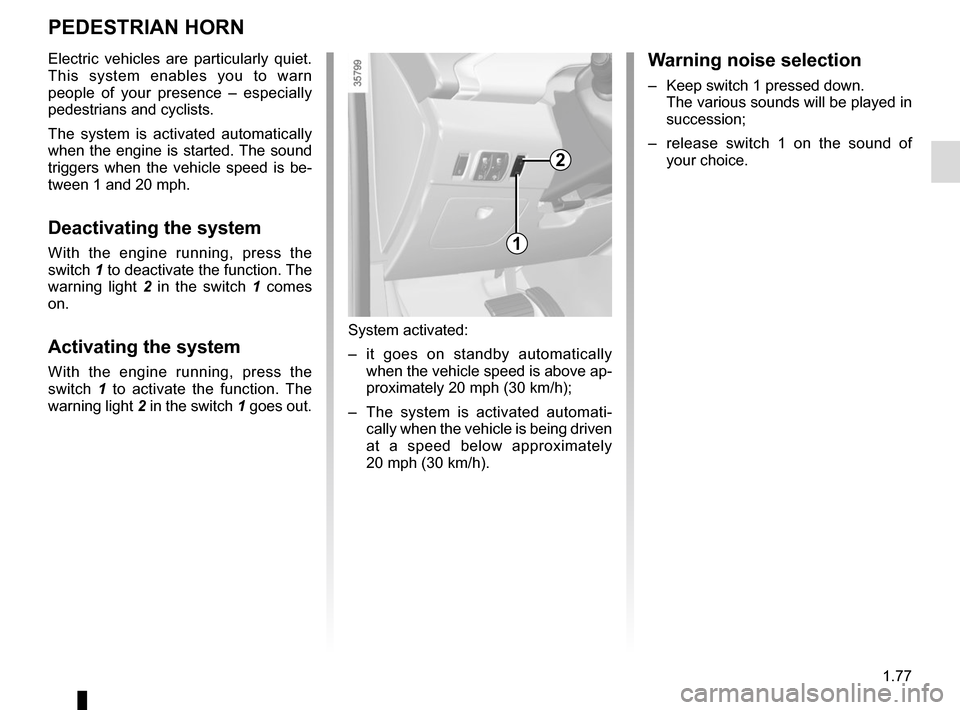
With the engine running, press the
switch 1 to deactivate the function. The
warning light 2 in the switch 1 comes
on.
Activating the system
With the engine running, press the
switch 1 to activate the function. The
warning light 2 in the switch 1 goes out.
System activated:
– it goes on standby automatically
when the vehicle speed is above ap-
proximately 20 mph (30 km/h);
– The system is activated automati- cally when the vehicle is being driven
at a speed below approximately
20 mph (30 km/h).
2
Warning noise selection
– Keep switch 1 pressed down. The various sounds will be played in
succession;
– release switch 1 on the sound of your choice.
1
Page 84 of 214

Before driving at night, check that the electrical equipment is operatin\
g
correctly and adjust the headlight beams (if your vehicle is not carryi\
ng
its n")
1.78
EXTERIOR LIGHTING AND SIGNALS (1/3)
Before driving at night, check that the electrical equipment is operatin\
g
correctly and adjust the headlight beams (if your vehicle is not carryi\
ng
its normal load). As a general precaution, check that the lights are not ob-
scured (by dirt, mud, snow or objects being transported).
31
kDipped beam
headlights
Manual operation
Turn the ring 2 until the symbol is oppo-
site mark 3. This indicator light on the
instrument panel comes on.
Automatic operation
(depending on vehicle)
Turn ring 2 until the AUTO symbol is op-
posite mark 3: with the engine running,
the dipped beam headlights switch on
or off automatically depending on the
brightness of the light outside, without
any action on stalk 1.2
If driving on the left in a left-hand
drive vehicle (or vice versa), drivers
must have the lights adjusted by an
authorised dealer for the duration of
the trip.
1
uSide lights
Turn the ring 2 until the symbol
is opposite mark 3. This indicator light
on the instrument panel comes on.
Daytime running lights
The daytime running lights come on au-
tomatically when the engine is started.
Page 85 of 214
1.79
EXTERIOR LIGHTING AND SIGNALS (2/3)
Switching off the lights
There are two possibilities:
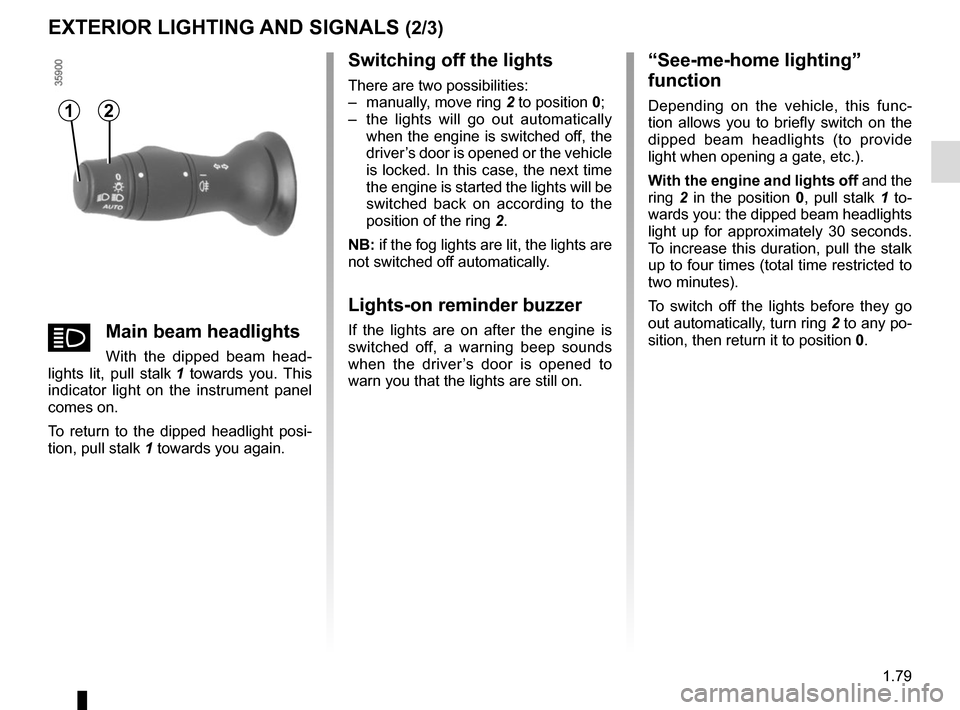
– manually, move ring 2 to position 0;
– the lights will go out automatically when the engine is switched off, the
driver’s door is opened or the vehicle
is locked. In this case, the next time
the engine is started the lights will be
switched back on according to the
position of the ring 2.
NB: if the fog lights are lit, the lights are
not switched off automatically.
Lights-on reminder buzzer
If the lights are on after the engine is
switched off, a warning beep sounds
when the driver’s door is opened to
warn you that the lights are still on.
“See-me-home lighting”
function
Depending on the vehicle, this func-
tion allows you to briefly switch on the
dipped beam headlights (to provide
light when opening a gate, etc.).
With the engine and lights off and the
ring 2 in the position 0, pull stalk 1 to-
wards you: the dipped beam headlights
light up for approximately 30 seconds.
To increase this duration, pull the stalk
up to four times (total time restricted to
two minutes).
To switch off the lights before they go
out automatically, turn ring 2 to any po-
sition, then return it to position 0.12
áMain beam headlights
With the dipped beam head-
lights lit, pull stalk 1 towards you. This
indicator light on the instrument panel
comes on.
To return to the dipped headlight posi-
tion, pull stalk 1 towards you again.
Page 88 of 214

1.82
Vehicles with automatic wiper
function
A park
B automatic wiper function.
When this position is selected, the
system detects water on the wind-
screen and triggers the wipers at a
suitable wiping speed. It is possi-
ble to change the triggering thresh-
old and the time sweeps by turning
ring 2:
– E : minimum sensitivity
– F : maximum sensitivity
NB: in foggy weather or during
snowfalls, the wiping is not automati-
cally triggered and remains under
the driver’s control.
C normal wiping speed
D fast wiping speed
Special note
When driving the vehicle, the wiping
speed slows down whenever the ve-
hicle stops. For example, fast wiping
speed will slow to normal wiping speed.
As soon as the vehicle moves off,
wiping will return to the speed originally
selected.
If stalk
1 is operated, it overrides and
cancels the automatic function.
Vehicle fitted with intermittent
windscreen wipers
A park
B intermittent wiping
The wipers will pause for several
seconds between sweeps. It is
possible to change the time be-
tween sweeps by turning ring 2.
C normal wiping speed
D fast wiping speed
WINDSCREEN WASH/WIPE (1/2)
1
A
B
C
D
For all vehicles, position C can be
accessed with the ignition on and
positions B and D can only be ac-
cessed with the engine running.
1
E
F
2
Page 89 of 214
1.83
Windscreen washer
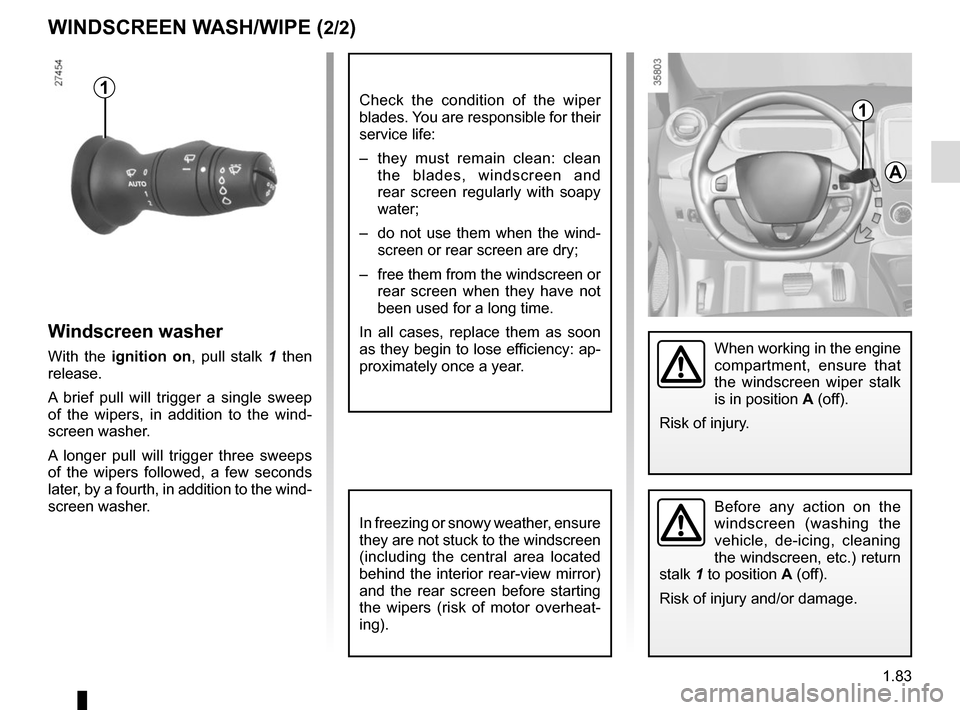
With the ignition on, pull stalk 1 then
release.
A brief pull will trigger a single sweep
of the wipers, in addition to the wind-
screen washer.
A longer pull will trigger three sweeps
of the wipers followed, a few seconds
later, by a fourth, in addition to the wind-
screen washer.
WINDSCREEN WASH/WIPE (2/2)
In freezing or snowy weather, ensure
they are not stuck to the windscreen
(including the central area located
behind the interior rear-view mirror)
and the rear screen before starting
the wipers (risk of motor overheat-
ing).
1
A
When working in the engine
compartment, ensure that
the windscreen wiper stalk
is in position A (off).
Risk of injury.
Before any action on the
windscreen (washing the
vehicle, de-icing, cleaning
the windscreen, etc.) return
stalk 1 to position A (off).
Risk of injury and/or damage.
1Check the condition of the wiper
blades. You are responsible for their
service life:
– they must remain clean: clean the blades, windscreen and
rear screen regularly with soapy
water;
– do not use them when the wind- screen or rear screen are dry;
– free them from the windscreen or rear screen when they have not
been used for a long time.
In all cases, replace them as soon
as they begin to lose efficiency: ap-
proximately once a year.
Page 91 of 214

Starting, stopping the engine . . . . . . . . . . . . . . . . . . . . . . . . . . . . . . . . . . . . \
. . . . . .")
2.1
Section 2: Driving
(Advice on use relating to fuel economy and the environment)
Starting, stopping the engine . . . . . . . . . . . . . . . . . . . . . . . . . . . . . . . . . . . . \
. . . . . . . . . . . . . . . . . . . 2.2
Gear control . . . . . . . . . . . . . . . . . . . . . . . . . . . . . . . . . . . . \
. . . . . . . . . . . . . . . . . . . . . . . . . . . . . . . . 2.4
Handbrake . . . . . . . . . . . . . . . . . . . . . . . . . . . . . . . . . . . . \
. . . . . . . . . . . . . . . . . . . . . . . . . . . . . . . . . 2.5
Driving advice, Eco-driving . . . . . . . . . . . . . . . . . . . . . . . . . . . . . . . . . . . .\
. . . . . . . . . . . . . . . . . . . . 2.6
Vehicle range: advice . . . . . . . . . . . . . . . . . . . . . . . . . . . . . . . . . . . .\
. . . . . . . . . . . . . . . . . . . . . . . . 2.9
Environment . . . . . . . . . . . . . . . . . . . . . . . . . . . . . . . . . . . .\
. . . . . . . . . . . . . . . . . . . . . . . . . . . . . . . 2.11
Tyre pressure loss warning . . . . . . . . . . . . . . . . . . . . . . . \
. . . . . . . . . . . . . . . . . . . . . . . . . . . . . . . . . 2.12
Driving correction devices . . . . . . . . . . . . . . . . . . . . . . . . . . . . . . . . . . . . \
. . . . . . . . . . . . . . . . . . . . . 2.15
Speed limiter . . . . . . . . . . . . . . . . . . . . . . . . . . . . . \
. . . . . . . . . . . . . . . . . . . . . . . . . . . . . . . . . . . . . . 2.19
Cruise control . . . . . . . . . . . . . . . . . . . . . . . . . . . . . . . . . . . .\
. . . . . . . . . . . . . . . . . . . . . . . . . . . . . . 2.22
Parking distance control . . . . . . . . . . . . . . . . . . . . . . . . . . . . . . . . . . . .\
. . . . . . . . . . . . . . . . . . . . . . 2.26
Reversing camera . . . . . . . . . . . . . . . . . . . . . . . . . . . . . . . . . . . . \
. . . . . . . . . . . . . . . . . . . . . . . . . . . 2.28
Page 92 of 214
2.2
STARTING, STOPPING THE ENGINE (1/2)
Driver’s responsibility
Never leave your vehi-
cle with the key inside and
never leave a child (or a
pet) unsupervised, even for a short
while.
There is a risk that they could start
the engine or operate electrical
equipment (electric windows etc.)
and trap part of their body (neck,
arms, hands, etc.).
Risk of serious injury.
Never switch off the ignition before
the vehicle has come to a complete
stop. Switching off the engine di-
sables the assistance equipment:
brakes, power-assisted steering,
etc., and the passive safety devices
such as airbagsand pretensioners.
The vehicle can only be started if
the charging cord is unplugged from
the vehicle.
The vehicle can only be started if the
selection lever is at P. Please see
the information on “Gear control” in
Section 2.
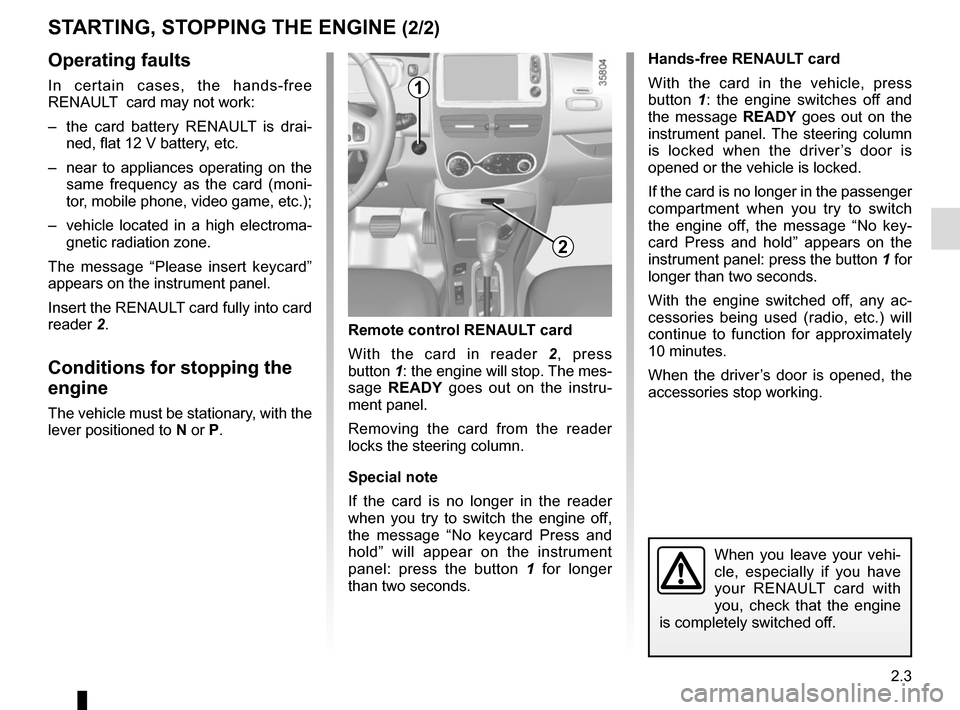
Remote control RENAULT
card
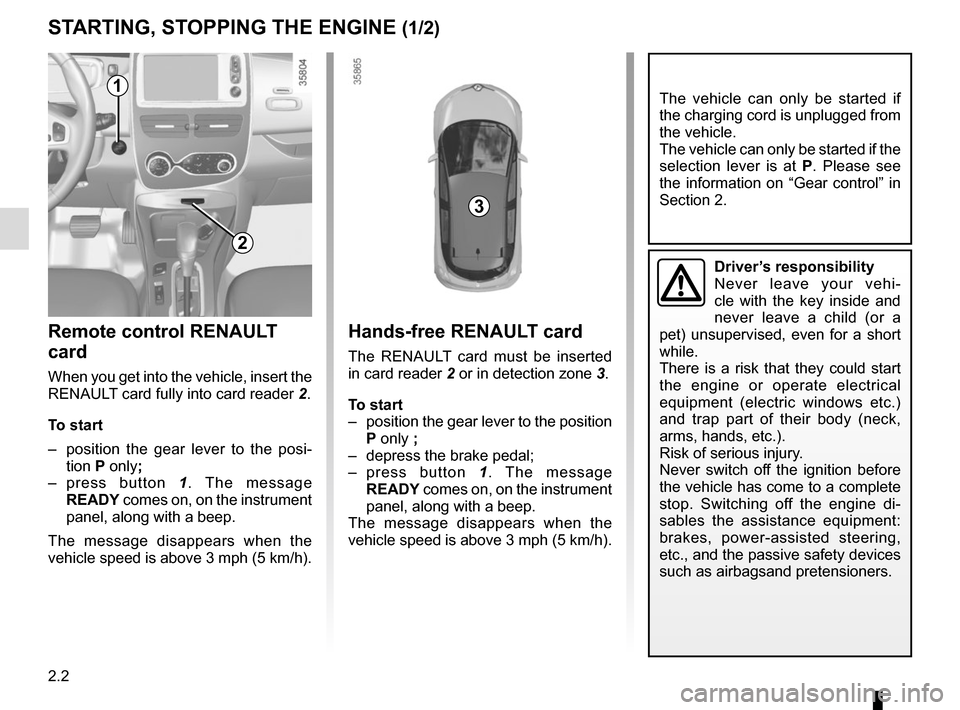
When you get into the vehicle, insert the
RENAULT card fully into card reader 2.
To start
– position the gear lever to the posi- tion P only;
– press button 1. The message
READY comes on, on the instrument
panel, along with a beep.
The message disappears when the
vehicle speed is above 3 mph (5 km/h).
Hands-free RENAULT card
The RENAULT card must be inserted
in card reader 2 or in detection zone 3.
To start
– position the gear lever to the position P only ;
– depress the brake pedal;
– press button 1. The message
READY comes on, on the instrument
panel, along with a beep.
The message disappears when the
vehicle speed is above 3 mph (5 km/h).
3
1
2
Page 93 of 214
2.3
Operating faults
In certain cases, the hands-free
RENAULT card may not work:
– the card battery RENAULT is drai-ned, flat 12 V battery, etc.
– near to appliances operating on the same frequency as the card (moni-
tor, mobile phone, video game, etc.);
– vehicle located in a high electroma- gnetic radiation zone.
The message “Please insert keycard”
appears on the instrument panel.
Insert the RENAULT card fully into card
reader 2.
Conditions for stopping the
engine
The vehicle must be stationary, with the
lever positioned to N or P.
STARTING, STOPPING THE ENGINE (2/2)
Hands-free RENAULT card
With the card in the vehicle, press
button 1: the engine switches off and
the message READY goes out on the
instrument panel. The steering column
is locked when the driver’s door is
opened or the vehicle is locked.
If the card is no longer in the passenger
compartment when you try to switch
the engine off, the message “No key-
card Press and hold” appears on the
instrument panel: press the button 1 for
longer than two seconds.
With the engine switched off, any ac-
cessories being used (radio, etc.) will
continue to function for approximately
10 minutes.
When the driver’s door is opened, the
accessories stop working.
Remote control RENAULT card
With the card in reader 2 , press
button 1: the engine will stop. The mes-
sage READY goes out on the instru-
ment panel.
Removing the card from the reader
locks the steering column.
Special note
If the card is no longer in the reader
when you try to switch the engine off,
the message “No keycard Press and
hold” will appear on the instrument
panel: press the button 1 for longer
than two seconds.
1
When you leave your vehi-
cle, especially if you have
your RENAULT card with
you, check that the engine
is completely switched off.
2
Page 94 of 214

2.4
Only engage D or R when the vehi-
cle is stopped, with your foot on the
brake and the accelerator pedal re-
leased.
Driving
While driving, press the accelerator
pedal to achieve the desired speed.
The reversing lights will come on as
soon as reverse gear is selected (with
the ignition on).
GEAR CONTROL (1/2)
2
1
Operates similar to an automatic gear-
box.
Selector lever 1The display 3 on the instrument panel
indicates the gear lever position.
P: park
R: reverse
N: neutral
D: forward drive
OperationTo start the engine, please refer to the
information on “Starting/Stopping the
engine” in Section 2.
To move out of position P, you must de-
press the brake pedal before pressing
unlocking button 2.
With the foot on the brake pedal (warn-
ing light
c on the display 3 goes out),
move the lever out of position P.
The vehicle can only start of the
gear selector is in position P.
The vehicle can only be started if
the charging cord is unplugged from
the vehicle.
Obstructions to the driver
On the driver’s side, only
use mats suitable for the
vehicle, attached with the
pre-fitted components, and check
the fitting regularly. Do not lay one
mat on top of another. There is a
risk of wedging the pedals
Put the lever 1 to position D or R.
The vehicle moves forward once
you release the brake pedal (without
pressing on the accelerator pedal).
3
Page 97 of 214

2.7
Journey log (Driving ECO²
Score)
When the engine is switched off,
“Journey record” shows on the multi-
media display 2, for equipped vehicles,
letting you see information about your
last journey.
This indicates:
– average energy consumption;
– number of miles/kilometres travelled.
Driving style indicator
Lets you know about the driving style
adopted (speed and anticipation). You
are notified by the colour in the zone 1
on the instrument panel.
– Green: measured, economical dri- ving;
– Blue: for less flexible driving;
– Purple: driving too fast.
DRIVING ADVICE, ECO-DRIVING (2/3)
The instrument panel or multimedia dis-
play 2 shows:
– an overall grade taking into account acceleration, braking anticipation
and your skill in managing speed;
– recommendations to enable you to improve your rating (please see the
equipment instructions).
Navigation systemUsing the information available on your
navigation system (traffic information,
nearest charging station, etc.) makes it
easy to manage your journey.
2
1