Traction RENAULT ZOE 2017 1.G User Guide
[x] Cancel search | Manufacturer: RENAULT, Model Year: 2017, Model line: ZOE, Model: RENAULT ZOE 2017 1.GPages: 220, PDF Size: 4.07 MB
Page 70 of 220
1.64
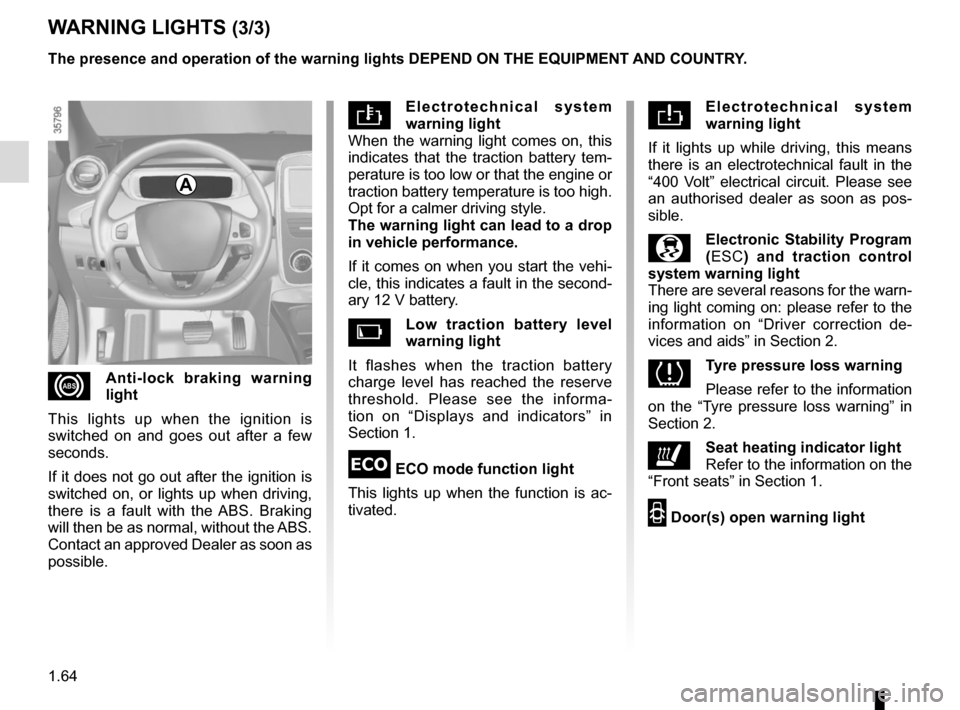
Electrotechnical system
warning light
When the warning light comes on, this
indicates that the traction battery tem-
perature is too low or that the engine or
traction battery temperature is too high.
Opt for a calmer driving style.
The warning light can lead to a drop
in vehicle performance.
If it comes on when you start the vehi-
cle, this indicates a fault in the second-
ary 12 V battery.
Low traction battery level
warning light
It flashes when the traction battery
charge level has reached the reserve
threshold. Please see the informa-
tion on “Displays and indicators” in
Section 1.
ECO mode function light
This lights up when the function is ac-
tivated.
WARNING LIGHTS (3/3)
Electrotechnical system
warning light
If it lights up while driving, this means
there is an electrotechnical fault in the
“400 Volt” electrical circuit. Please see
an authorised dealer as soon as pos-
sible.
\bElectronic Stability Program
( ESC) and traction control
system warning light
There are several reasons for the warn-
ing light coming on: please refer to the
information on “Driver correction de-
vices and aids” in Section 2.
Tyre pressure loss warning
Please refer to the information
on the “Tyre pressure loss warning” in
Section 2.
ðSeat heating indicator light
Refer to the information on the
“Front seats” in Section 1.
2 Door(s) open warning light
xAnti-lock braking warning
light
This lights up when the ignition is
switched on and goes out after a few
seconds.
If it does not go out after the ignition is
switched on, or lights up when driving,
there is a fault with the ABS. Braking
will then be as normal, without the ABS.
Contact an approved Dealer as soon as
possible. The presence and operation of the warning lights DEPEND ON THE EQUIPMENT\
AND COUNTRY.
A
Page 72 of 220

The presence and operation of the display and indicators DEPENDS ON THE \
LEVEL OF EQUIPMENT AND THE COUNTRY.
9
11
Estimated range 7
Remaining charge time 8
from abo")
1.66
DISPLAYS AND INDICATORS (2/2)
The presence and operation of the display and indicators DEPENDS ON THE \
LEVEL OF EQUIPMENT AND THE COUNTRY.
9
11
Estimated range 7
Remaining charge time 8
from about 95% charge, the remaining
charge time is no longer displayed.
Opening element warning
light 9
Shows when a door or the tailgate is
open or not closed properly.
7Charge level 12
The gauge indicates the level of energy
remaining.
Reserve level 13
This indicates that the traction battery
is at approximately 12% charge. The
warning light 14
Ṏ comes on, along
with a beep. The charge level 12 and
range 7 turn orange.
To optimise your range, please see the
information on “Recommendations:
saving energy” in Section 2.
Immobilisation threshold imminent
When the battery reaches less than 6%
charge, a beep comes on and the warn-
ing light 14
Ṏ flashes on and off.
When the charge level reaches 5%, the
range value is no longer displayed.
Motor performance gradually de-
creases until the vehicle comes to a
stop.
Refer to the information on “Towing” in
Section 5.
Traction battery charge
load 10
Charging cable “Plugged In”
warning light 11
This comes on when the charging cord
is plugged into the vehicle.
131214
Time remaining : 02:30
8
10
Page 74 of 220
1.68
TRIP COMPUTER: general information (2/2)
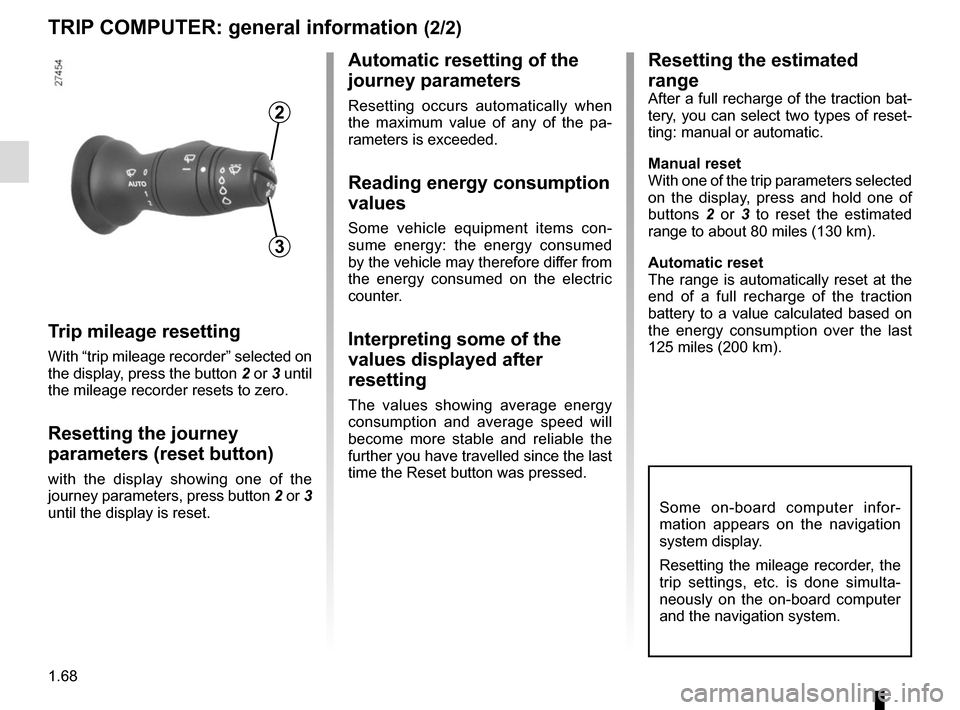
Trip mileage resetting
With “trip mileage recorder” selected on
the display, press the button 2 or 3 until
the mileage recorder resets to zero.
Resetting the journey
parameters (reset button)
with the display showing one of the
journey parameters, press button 2 or 3
until the display is reset.
Automatic resetting of the
journey parameters
Resetting occurs automatically when
the maximum value of any of the pa-
rameters is exceeded.
Reading energy consumption
values
Some vehicle equipment items con-
sume energy: the energy consumed
by the vehicle may therefore differ from
the energy consumed on the electric
counter.
Interpreting some of the
values displayed after
resetting
The values showing average energy
consumption and average speed will
become more stable and reliable the
further you have travelled since the last
time the Reset button was pressed.
3
2
Some on-board computer infor-
mation appears on the navigation
system display.
Resetting the mileage recorder, the
trip settings, etc. is done simulta-
neously on the on-board computer
and the navigation system.
Resetting the estimated
range
After a full recharge of the traction bat-
tery, you can select two types of reset-
ting: manual or automatic.
Manual reset
With one of the trip parameters selected
on the display, press and hold one of
buttons 2 or 3 to reset the estimated
range to about 80 miles (130 km).
Automatic reset
The range is automatically reset at the
end of a full recharge of the traction
battery to a value calculated based on
the energy consumption over the last
125 miles (200 km).
Page 79 of 220

1.73
TRIP COMPUTER AND WARNING SYSTEM: operating fault messages
These appear with the © warning light and mean that you should drive very carefully to an author\
ised dealer as
soon as possible. If you fail to follow this recommendation, you risk da\
maging your vehicle.
They disappear when the display selection key is pressed or after severa\
l seconds and are stored in the computer log. The
©
warning light stays on. Examples of operating fault messages are given i\
n the following pages.
Examples of messages Interpreting the display selected
«Check airbag» Indicates a fault in the restraint system in addition to the seat belts.\
In the event of an
accident, it is possible that they may not be triggered.
«Elec. System to check» Indicates a fault on one of the pedal sensors or in the 12 V battery man\
agement
system.
«Check braking system» Indicates wear or the need to check the braking system.
«Vehicle plug to be checked» Indicates overheating at the vehicle-side charging socket. Wait for about 20 minutes
and try again. If this does not work, contact an authorised dealer.
«Elec. System to check» Indicates a fault in the traction system.
«Always charging» Indicates a fault on the traction battery recharge system.
Page 100 of 220
2.6
Parking the vehicle
When the vehicle is at a standstill,
place the lever in position P: the drive
wheels are mechanically locked by the
transmission.
Apply the handbrake.
GEAR CONTROL (2/2)/HANDBRAKE
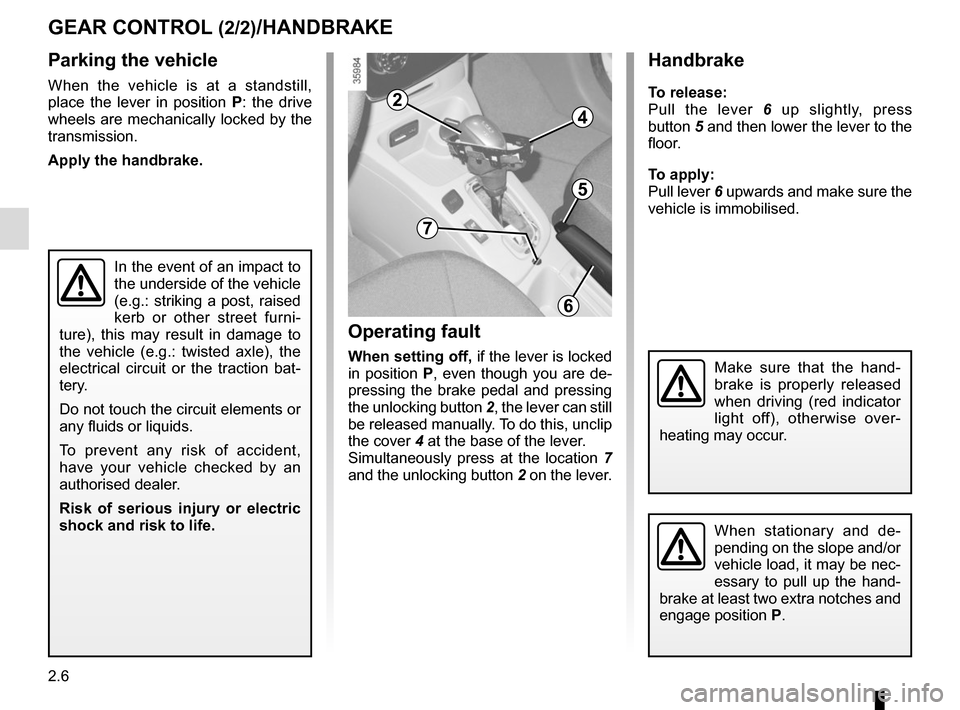
Operating fault
When setting off, if the lever is locked
in position P, even though you are de-
pressing the brake pedal and pressing
the unlocking button 2, the lever can still
be released manually. To do this, unclip
the cover 4 at the base of the lever.
Simultaneously press at the location 7
and the unlocking button 2 on the lever.
In the event of an impact to
the underside of the vehicle
(e.g.: striking a post, raised
kerb or other street furni-
ture), this may result in damage to
the vehicle (e.g.: twisted axle), the
electrical circuit or the traction bat-
tery.
Do not touch the circuit elements or
any fluids or liquids.
To prevent any risk of accident,
have your vehicle checked by an
authorised dealer.
Risk of serious injury or electric
shock and risk to life.
Handbrake
To release:
Pull the lever 6 up slightly, press
button 5 and then lower the lever to the
floor.
To apply:
Pull lever 6 upwards and make sure the
vehicle is immobilised.
When stationary and de-
pending on the slope and/or
vehicle load, it may be nec-
essary to pull up the hand-
brake at least two extra notches and
engage position P.
Make sure that the hand-
brake is properly released
when driving (red indicator
light off), otherwise over-
heating may occur.
6
7
5
4
2
Page 101 of 220
2.7
DRIVING ADVICE, ECO-DRIVING (1/3)
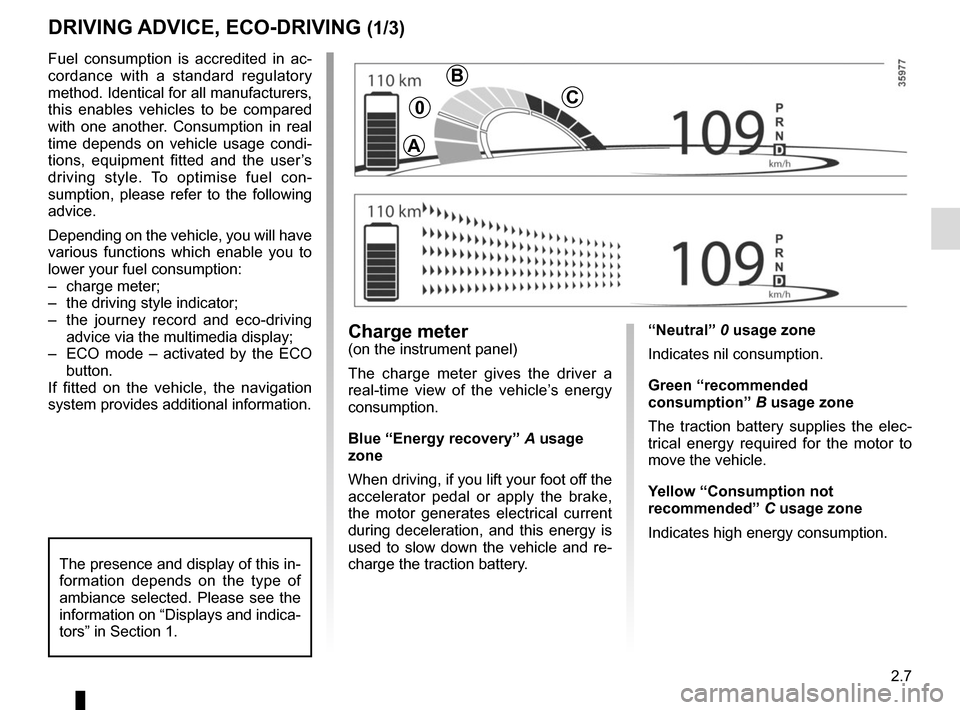
“Neutral” 0 usage zone
Indicates nil consumption.
Green “recommended
consumption” B usage zone
The traction battery supplies the elec-
trical energy required for the motor to
move the vehicle.
Yellow “Consumption not
recommended” C usage zone
Indicates high energy consumption.Charge meter(on the instrument panel)
The charge meter gives the driver a
real-time view of the vehicle’s energy
consumption.
Blue “Energy recovery” A usage
zone
When driving, if you lift your foot off the
accelerator pedal or apply the brake,
the motor generates electrical current
during deceleration, and this energy is
used to slow down the vehicle and re-
charge the traction battery.
Fuel consumption is accredited in ac-
cordance with a standard regulatory
method. Identical for all manufacturers,
this enables vehicles to be compared
with one another. Consumption in real
time depends on vehicle usage condi-
tions, equipment fitted and the user’s
driving style. To optimise fuel con-
sumption, please refer to the following
advice.
Depending on the vehicle, you will have
various functions which enable you to
lower your fuel consumption:
– charge meter;
– the driving style indicator;
– the journey record and eco-driving
advice via the multimedia display;
– ECO mode – activated by the ECO button.
If fitted on the vehicle, the navigation
system provides additional information.
The presence and display of this in-
formation depends on the type of
ambiance selected. Please see the
information on “Displays and indica-
tors” in Section 1.
A
B
C0
Page 110 of 220
2.16
ABS (anti-lock braking
system)
Under heavy braking, the ABS prevents
the wheels from locking, allowing the
stopping distance to be managed and
keeping control of the vehicle.
Under these circumstances, the vehi-
cle can be steered to avoid an obstacle
whilst braking. In addition, this system
can increase stopping distances, parti-
cularly on roads with low surface grip
(wet ground etc.).
You will feel a pulsation through the
brake pedal each time the system is
activated. The ABS does not in any way
improve the vehicle’s physical perfor-
mance relating to the road surface and
roadholding. It is still essential to follow
the rules of good driving practice (such
as driving at a safe distance from the
vehicle in front etc.).
These include:
– the ABS
(anti-lock braking
system);
– the electronic stability program
ESC with understeer control and
traction control;
– emergency braking assistance with (depending on the vehicle)
braking anticipation;
– regenerative braking system.
In an emergency, apply firm and
continuous pressure to the brake
pedal. There is no need to pump
it repeatedly. The ABS will modu-
late the force applied in the braking
system.
These functions are an ad-
ditional aid in the event of
critical driving conditions,
enabling the vehicle beha-
viour to be adapted to suit the dri-
ving conditions.
However, the functions do not take
the place of the driver. They do
not increase the vehicle’s limits
and should not encourage you
to drive more quickly. Therefore,
they can under no circumstances
replace the vigilance or responsibi-
lity of the driver when manoeuvring
the vehicle (the driver must always
be ready for sudden incidents which
may occur when driving).
Your braking systems
are partially operational.
However, it is dangerous
to brake suddenly and
it is essential to stop immediately,
as soon as traffic conditions allow.
Contact an approved dealer.
Operating faults
–
© and x lit up on the in-
strument panel, (depending on the
vehicle) alongside messages “Check
ABS”, “Check braking system” and
“Check ESC”: ABS, ESC and emer-
gency brake assist are deactivated.
Braking is always enabled;
–
x, D, © and û lit
up on the instrument panel alongside
the message “Braking system fault”:
this indicates a fault in the braking
system.
In both cases, please consult an
Authorised Dealer.
DRIVER CORRECTION DEVICES/AIDS (1/5)
Page 111 of 220
2.17
Electronic stability program
ESC with understeer control
and traction control
Electronic stability control ESC
This system helps you to keep control
of the vehicle in critical driving condi-
tions (avoiding an obstacle, loss of grip
on a bend, etc.).
Operating principle
A sensor in the steering wheel detects
the direction selected by the driver.
Other sensors throughout the vehicle
measure the actual direction.
The system compares driver input to
the actual trajectory of the vehicle and
corrects the trajectory if necessary by
controlling the braking of certain wheels
and/or engine power. In the event that
the system is engaged, indicator light
flashes on the instrument panel.Understeer control
This system optimises the action of the
ESC in the case of pronounced un-
dersteer (loss of front axle road hol-
ding).
Traction control
This system helps to limit wheelspin of
the drive wheels and to control the vehi-
cle when pulling away accelerating or
decelerating.
Operating principle
Using the wheel sensors, the system
measures and compares the speed of
the drive wheels at all times and slows
down their over-rotation. If a wheel is
starting to slip, the system brakes au-
tomatically until the drive supplied be-
comes compatible with the level of grip
under the wheel again.
Operating faults
When the system detects an operat-
ing fault the message “Check ESC” and
warning light
© appear on the in-
strument panel. In this case, the ESC
and traction control system are deacti-
vated.
Consult an approved dealer.
DRIVER CORRECTION DEVICES/AIDS (2/5)
Page 114 of 220
2.20
Regenerative braking system
When braking, the regenerative braking
system can convert the energy pro-
duced by the vehicle deceleration into
electric energy.
This will recharge the 400V traction bat-
tery and gain greater vehicle range.Operating faults
– © lights up on the instrument
panel, alongside the message
“Check braking system”: braking as-
sistance is available at all times.
Under these conditions, the feel of
applying the brake pedal may be dif-
ferent.
You are recommended to apply
strong continuous pressure to the
pedal.
Please see an authorised dealer.
–
û lights up on the instrument
panel, alongside the message
“Braking system fault”: this indi-
cates a fault in the braking system.
Please call an authorised dealer.
DRIVER CORRECTION DEVICES/AIDS (5/5)
The û warning light
requires you to stop imme-
diately, for your own safety,
as soon as traffic conditions allow.
Switch off the engine and do not res-
tart it. Contact an Authorised Dealer.
Page 123 of 220
2.29
PARKING DISTANCE CONTROL (2/2)
In the event of an impact to
the underside of the vehicle
(e.g.: striking a post, raised
kerb or other street furni-
ture), this may result in damage to
the vehicle (e.g.: twisted axle), the
electrical circuit or the traction bat-
tery.
To avoid any risk of accident, have
your vehicle checked by an ap-
proved dealer.
Operating faults
Depending on the vehicle, when the
system detects an operating fault, the
message “check parking distance con-
trol” appears on the instrument panel,
accompanied by the warning light
© and a beep lasting approxi-
mately 5 seconds. Please contact an
authorised dealer.
Special featuresMake sure that the ultrasonic sensors
are not obscured (by dirt, mud, snow
etc.).
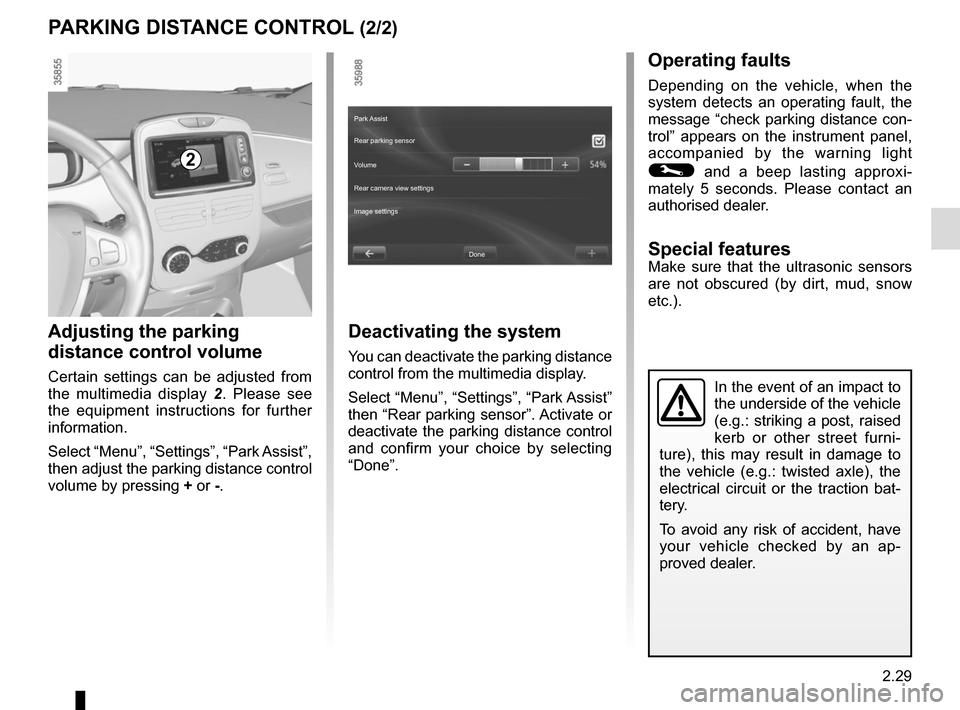
Adjusting the parking
distance control volume
Certain settings can be adjusted from
the multimedia display 2. Please see
the equipment instructions for further
information.
Select “Menu”, “Settings”, “Park Assist”,
then adjust the parking distance control
volume by pressing + or -.
2
Deactivating the system
You can deactivate the parking distance
control from the multimedia display.
Select “Menu”, “Settings”, “Park Assist”
then “Rear parking sensor”. Activate or
deactivate the parking distance control
and confirm your choice by selecting
“Done”.
Done
Park Assist
Rear parking sensor
Volume
Image settings Rear camera view settings