Starting RENAULT ZOE 2018 User Guide
[x] Cancel search | Manufacturer: RENAULT, Model Year: 2018, Model line: ZOE, Model: RENAULT ZOE 2018Pages: 226, PDF Size: 5.51 MB
Page 95 of 226

Starting, stopping the engine . . . . . . . . . . . . . . . . . . . . . . . . . . . . . . . . . . . . \
. . . . . .")
2.1
Section 2: Driving
(Advice on use relating to fuel economy and the environment)
Starting, stopping the engine . . . . . . . . . . . . . . . . . . . . . . . . . . . . . . . . . . . . \
. . . . . . . . . . . . . . . . . . . 2.2
Gear control . . . . . . . . . . . . . . . . . . . . . . . . . . . . . . . . . . . . \
. . . . . . . . . . . . . . . . . . . . . . . . . . . . . . . . 2.5
Handbrake . . . . . . . . . . . . . . . . . . . . . . . . . . . . . . . . . . . . \
. . . . . . . . . . . . . . . . . . . . . . . . . . . . . . . . . 2.6
Driving advice, Eco-driving . . . . . . . . . . . . . . . . . . . . . . . . . . . . . . . . . . . .\
. . . . . . . . . . . . . . . . . . . . 2.7
Vehicle range: advice . . . . . . . . . . . . . . . . . . . . . . . . . . . . . . . . . . . .\
. . . . . . . . . . . . . . . . . . . . . . . . 2.10
Environment . . . . . . . . . . . . . . . . . . . . . . . . . . . . . . . . . . . .\
. . . . . . . . . . . . . . . . . . . . . . . . . . . . . . . 2.12
Tyre pressure loss warning . . . . . . . . . . . . . . . . . . . . . . . . . . . . . . . . . . . .\
. . . . . . . . . . . . . . . . . . . . 2.13
Driving correction devices . . . . . . . . . . . . . . . . . . . . . . . . . . . . . . . . . . . . \
. . . . . . . . . . . . . . . . . . . . . 2.16
Speed limiter . . . . . . . . . . . . . . . . . . . . . . . . . . . . . . . . . . . .\
. . . . . . . . . . . . . . . . . . . . . . . . . . . . . . . 2.21
Cruise control . . . . . . . . . . . . . . . . . . . . . . . . . . . . . . . . . . . .\
. . . . . . . . . . . . . . . . . . . . . . . . . . . . . . 2.24
Parking distance control . . . . . . . . . . . . . . . . . . . . . . . . . . . . . . . . . . . .\
. . . . . . . . . . . . . . . . . . . . . . 2.28
Reversing camera . . . . . . . . . . . . . . . . . . . . . . . . . . . . . . . . . . . . \
. . . . . . . . . . . . . . . . . . . . . . . . . . . 2.30
Page 96 of 226
2.2
STARTING, STOPPING THE ENGINE (1/3)
The vehicle can only be started if
the charging cord is unplugged from
the vehicle.
The vehicle can only be started if the
selection lever is at P. Please see
the information on “Gear control” in
Section 2.
Remote control RENAULT
card
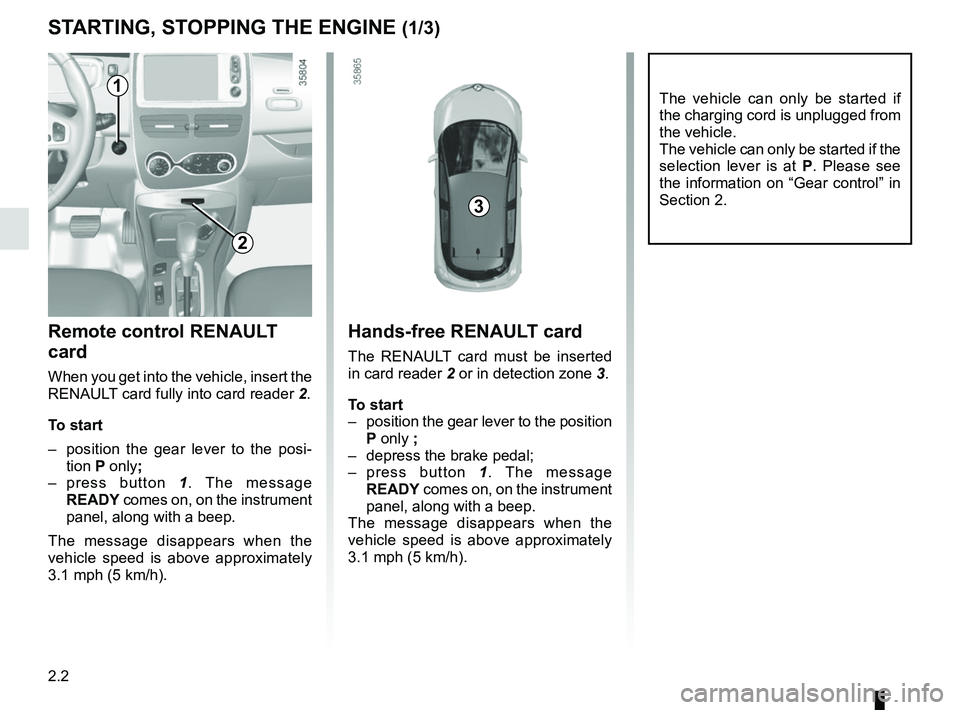
When you get into the vehicle, insert the
RENAULT card fully into card reader 2.
To start
– position the gear lever to the posi- tion P only;
– press button 1. The message
READY comes on, on the instrument
panel, along with a beep.
The message disappears when the
vehicle speed is above approximately
3.1 mph (5 km/h).
Hands-free RENAULT card
The RENAULT card must be inserted
in card reader 2 or in detection zone 3.
To start
– position the gear lever to the position P only ;
– depress the brake pedal;
– press button 1. The message
READY comes on, on the instrument
panel, along with a beep.
The message disappears when the
vehicle speed is above approximately
3.1 mph (5 km/h).
3
1
2
Page 97 of 226
2.3
Driver’s responsibility
when parking or stopping
the vehicle
Never leave an animal,
child or adult who is not self-suffi-
cient alone in your vehicle, even for
a short time.
They may pose a risk to themselves
or to others by starting the engine,
activating equipment such as the
electric windows or locking the
doors, for example.
Also, in hot and/or sunny weather,
please remember that the tempera-
ture inside the passenger compart-
ment increases very quickly.
RISK OF DEATH OR SERIOUS
INJURY.
Operating faults
In certain cases, the hands-free
RENAULT card may not work:
– the card battery RENAULT is drai- ned, flat 12 V battery, etc.
– near to appliances operating on the same frequency as the card (moni-
tor, mobile phone, video game, etc.);
– vehicle located in a high electroma- gnetic radiation zone.
The message “Please insert keycard”
appears on the instrument panel.
Insert the RENAULT card fully into card
reader 2.
STARTING, STOPPING THE ENGINE (2/3)
Page 98 of 226
2.4
Conditions for stopping the
engine
The vehicle must be stationary, with the
lever positioned to N or P.
STARTING, STOPPING THE ENGINE (3/3)
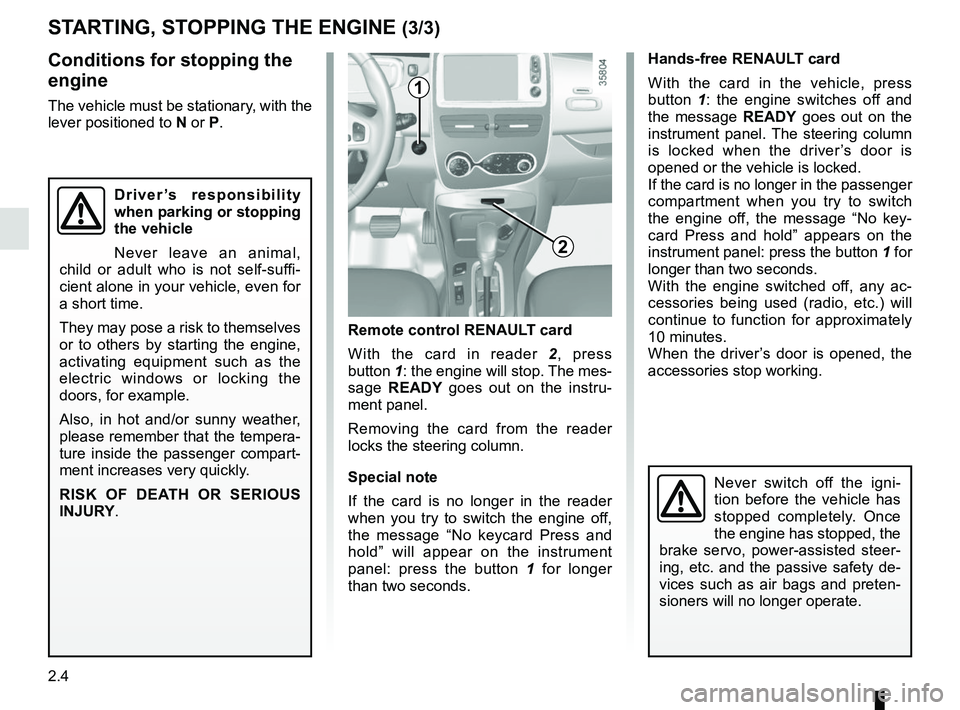
Hands-free RENAULT card
With the card in the vehicle, press
button 1: the engine switches off and
the message READY goes out on the
instrument panel. The steering column
is locked when the driver’s door is
opened or the vehicle is locked.
If the card is no longer in the passenger
compartment when you try to switch
the engine off, the message “No key-
card Press and hold” appears on the
instrument panel: press the button 1 for
longer than two seconds.
With the engine switched off, any ac-
cessories being used (radio, etc.) will
continue to function for approximately
10 minutes.
When the driver’s door is opened, the
accessories stop working.
Remote control RENAULT card
With the card in reader 2 , press
button 1: the engine will stop. The mes-
sage READY goes out on the instru-
ment panel.
Removing the card from the reader
locks the steering column.
Special note
If the card is no longer in the reader
when you try to switch the engine off,
the message “No keycard Press and
hold” will appear on the instrument
panel: press the button 1 for longer
than two seconds.
1
2
Never switch off the igni-
tion before the vehicle has
stopped completely. Once
the engine has stopped, the
brake servo, power-assisted steer-
ing, etc. and the passive safety de-
vices such as air bags and preten-
sioners will no longer operate.
Driver’s responsibility
when parking or stopping
the vehicle
Never leave an animal,
child or adult who is not self-suffi-
cient alone in your vehicle, even for
a short time.
They may pose a risk to themselves
or to others by starting the engine,
activating equipment such as the
electric windows or locking the
doors, for example.
Also, in hot and/or sunny weather,
please remember that the tempera-
ture inside the passenger compart-
ment increases very quickly.
RISK OF DEATH OR SERIOUS
INJURY.
Page 99 of 226
2.5
Only engage D or R when the vehi-
cle is stopped, with your foot on the
brake and the accelerator pedal re-
leased.
Driving
While driving, press the accelerator
pedal to achieve the desired speed.
The reversing lights will come on as
soon as reverse gear is selected (with
the ignition on).
GEAR CONTROL (1/2)
2
1
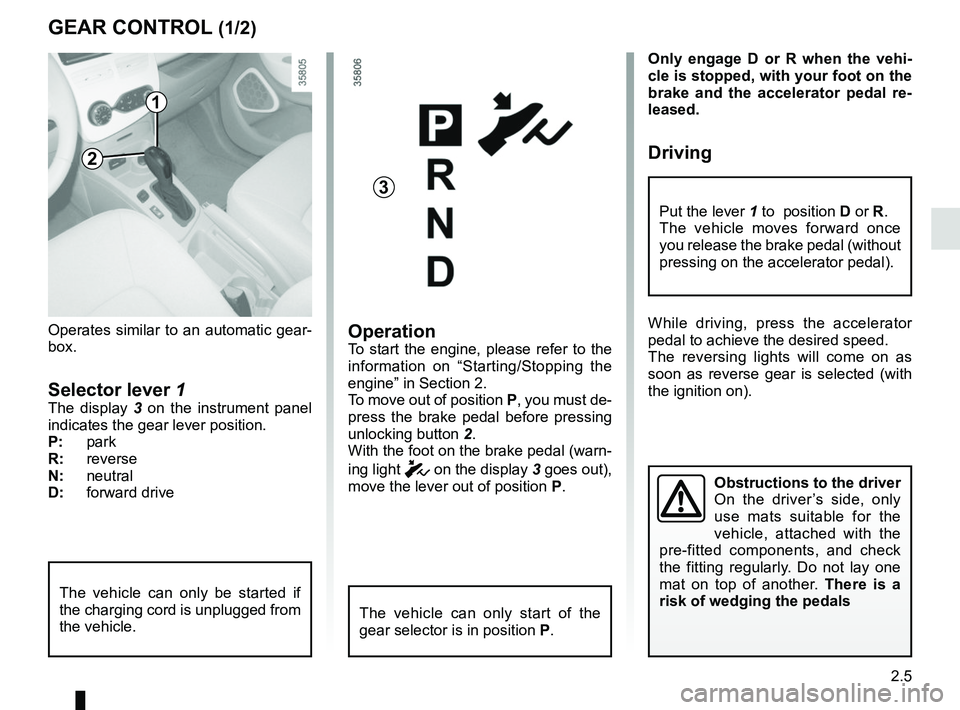
Operates similar to an automatic gear-
box.
Selector lever 1The display 3 on the instrument panel
indicates the gear lever position.
P: park
R: reverse
N: neutral
D: forward drive
OperationTo start the engine, please refer to the
information on “Starting/Stopping the
engine” in Section 2.
To move out of position P, you must de-
press the brake pedal before pressing
unlocking button 2.
With the foot on the brake pedal (warn-
ing light
c on the display 3 goes out),
move the lever out of position P.
The vehicle can only start of the
gear selector is in position P.
The vehicle can only be started if
the charging cord is unplugged from
the vehicle.
Obstructions to the driver
On the driver’s side, only
use mats suitable for the
vehicle, attached with the
pre-fitted components, and check
the fitting regularly. Do not lay one
mat on top of another. There is a
risk of wedging the pedals
Put the lever 1 to position D or R.
The vehicle moves forward once
you release the brake pedal (without
pressing on the accelerator pedal).
3
Page 111 of 226
2.17
Electronic stability program
ESC with understeer control
and traction control
Electronic stability control ESC
This system helps you to keep control
of the vehicle in critical driving condi-
tions (avoiding an obstacle, loss of grip
on a bend, etc.).
Operating principle
A sensor in the steering wheel detects
the direction selected by the driver.
Other sensors throughout the vehicle
measure the actual direction.
The system compares driver input to
the actual trajectory of the vehicle and
corrects the trajectory if necessary by
controlling the braking of certain wheels
and/or engine power. In the event that
the system is engaged, indicator light
flashes on the instrument panel.Understeer control
This system optimises the action of the
ESC in the case of pronounced under-
steer (loss of front axle road holding).
Traction control
This system helps to limit wheelspin of
the drive wheels and to control the ve-
hicle when pulling away accelerating or
decelerating.
Operating principle
Using the wheel sensors, the system
measures and compares the speed of
the drive wheels at all times and slows
down their over-rotation. If a wheel is
starting to slip, the system brakes au-
tomatically until the drive supplied be-
comes compatible with the level of grip
under the wheel again.
Operating faults
When the system detects an operat-
ing fault the message “Check ESC” and
warning light
© appear on the in-
strument panel. In this case, the ESC
and traction control system are deacti-
vated.
Consult an approved dealer.
DRIVER CORRECTION DEVICES, AIDS (2/5)
Page 113 of 226
2.19
The hill start assistance
system cannot completely
prevent the vehicle from
rolling backwards in all sit-
uations (extremely steep gradients,
etc.).
In all cases, the driver may depress
the brake pedal to prevent the vehi-
cle from rolling backwards.
The hill start assistance function
should not be used for prolonged
stops: use the brake pedal.
This function is not designed to im-
mobilise the vehicle permanently.
If necessary, use the brake pedal to
stop the vehicle.
The driver must remain particularly
vigilant when driving on slippery or
low-grip surfaces.
Risk of serious injury.
Hill start assistance
Depending on the gradient of the in-
cline, this system assists the driver
when starting on a hill. It prevents the
vehicle from rolling backwards by au-
tomatically applying the brakes when
the driver lifts his/her foot off the brake
pedal to depress the accelerator pedal.
System operation
It only operates when the gear lever is in
a position other than neutral (other than
N or P ) and the vehicle is completely
stationary (brake pedal depressed).
The system holds the vehicle for ap-
proximately 2 seconds. The brakes are
then gradually released (the vehicle will
move according to the slope).
DRIVER CORRECTION DEVICES, AIDS (4/5)
Page 133 of 226
3.7
AUTOMATIC AIR-CONDITIONING (1/4)
The system controls the fan speed, air
distribution, air recirculation,starting
and stopping the air conditioning, the
heating and air temperature.
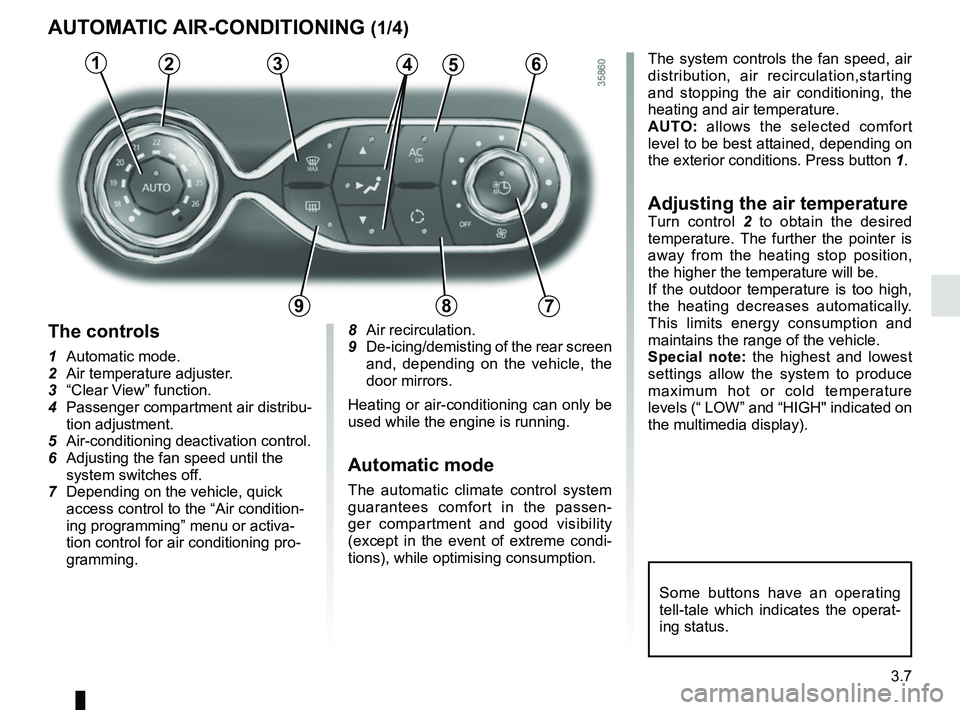
AUTO: allows the selected comfort
level to be best attained, depending on
the exterior conditions. Press button 1.
Adjusting the air temperatureTurn control 2 to obtain the desired
temperature. The further the pointer is
away from the heating stop position,
the higher the temperature will be.
If the outdoor temperature is too high,
the heating decreases automatically.
This limits energy consumption and
maintains the range of the vehicle.
Special note: the highest and lowest
settings allow the system to produce
maximum hot or cold temperature
levels (“ LOW” and “HIGH" indicated on
the multimedia display).
8 Air recirculation.
9
De-icing/demisting of the rear screen
and, depending on the vehicle, the
door mirrors.
Heating or air-conditioning can only be
used while the engine is running.
Automatic mode
The automatic climate control system
guarantees comfort in the passen-
ger compartment and good visibility
(except in the event of extreme condi-
tions), while optimising consumption.
The controls
1 Automatic mode.
2 Air temperature adjuster.
3 “Clear View” function.
4 Passenger compartment air distribu- tion adjustment.
5 Air-conditioning deactivation control.
6 Adjusting the fan speed until the
system switches off.
7 Depending on the vehicle, quick access control to the “Air condition-
ing programming” menu or activa-
tion control for air conditioning pro-
gramming.
3456
897
12
Some buttons have an operating
tell-tale which indicates the operat-
ing status.
Page 134 of 226
3.8
3
Deactivating the air-
conditioning
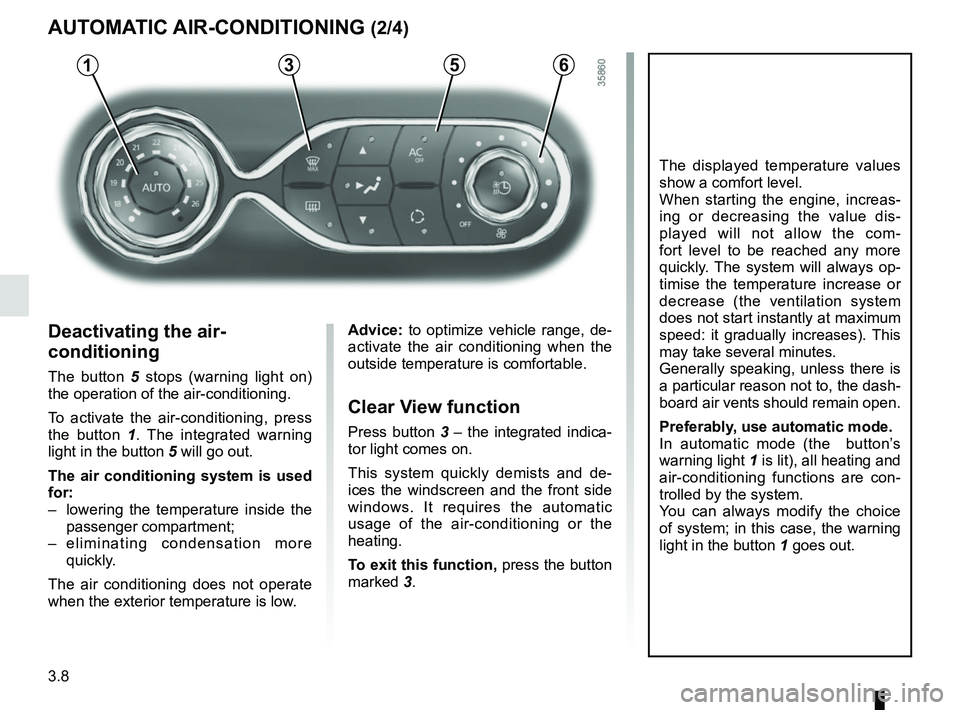
The button 5 stops (warning light on)
the operation of the air-conditioning.
To activate the air-conditioning, press
the button 1 . The integrated warning
light in the button 5 will go out.
The air conditioning system is used
for:
– lowering the temperature inside the passenger compartment;
– eliminating condensation more quickly.
The air conditioning does not operate
when the exterior temperature is low.
5
AUTOMATIC AIR-CONDITIONING (2/4)
The displayed temperature values
show a comfort level.
When starting the engine, increas-
ing or decreasing the value dis-
played will not allow the com-
fort level to be reached any more
quickly. The system will always op-
timise the temperature increase or
decrease (the ventilation system
does not start instantly at maximum
speed: it gradually increases). This
may take several minutes.
Generally speaking, unless there is
a particular reason not to, the dash-
board air vents should remain open.
Preferably, use automatic mode.
In automatic mode (the button’s
warning light 1 is lit), all heating and
air-conditioning functions are con-
trolled by the system.
You can always modify the choice
of system; in this case, the warning
light in the button 1 goes out.
Advice: to optimize vehicle range, de-
activate the air conditioning when the
outside temperature is comfortable.
Clear View function
Press button 3 – the integrated indica-
tor light comes on.
This system quickly demists and de-
ices the windscreen and the front side
windows. It requires the automatic
usage of the air-conditioning or the
heating.
To exit this function, press the button
marked 3.
61
Page 137 of 226
3.11
AIR CONDITIONING: remote activation
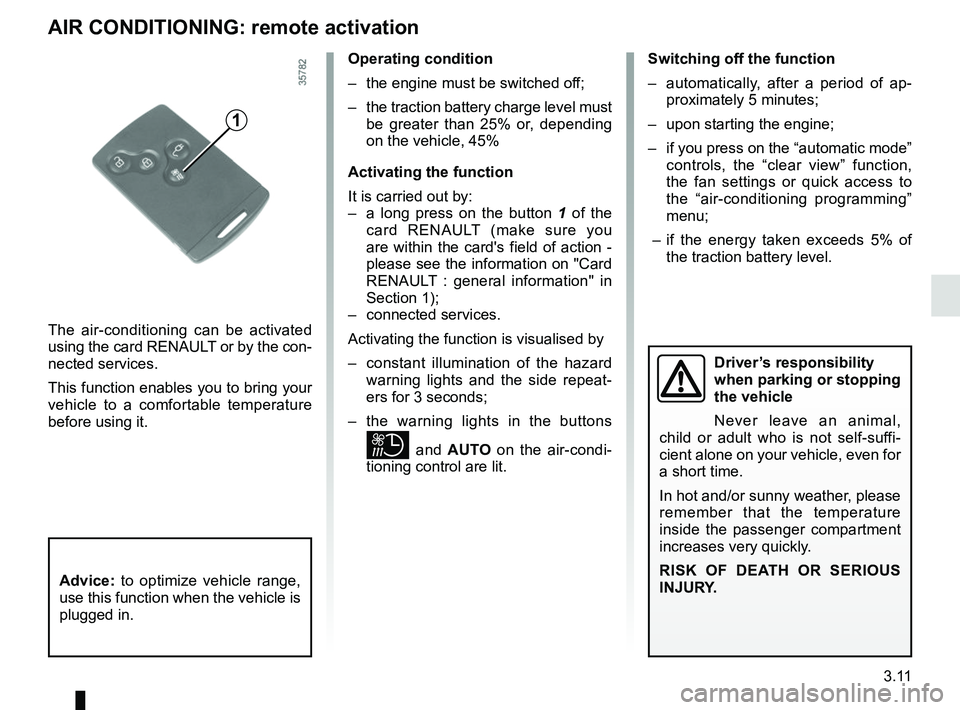
The air-conditioning can be activated
using the card RENAULT or by the con-
nected services.
This function enables you to bring your
vehicle to a comfortable temperature
before using it.
1
Operating condition
– the engine must be switched off;
– the traction battery charge level must be greater than 25% or, depending
on the vehicle, 45%
Activating the function
It is carried out by:
– a long press on the button 1 of the
card RENAULT (make sure you
are within the card's field of action -
please see the information on "Card
RENAULT : general information" in
Section 1);
– connected services.
Activating the function is visualised by
– constant illumination of the hazard warning lights and the side repeat-
ers for 3 seconds;
– the warning lights in the buttons
and AUTO on the air-condi-
tioning control are lit. Switching off the function
– automatically, after a period of ap-
proximately 5 minutes;
– upon starting the engine;
– if you press on the “automatic mode” controls, the “clear view” function,
the fan settings or quick access to
the “air-conditioning programming”
menu;
– if the energy taken exceeds 5% of the traction battery level.
Driver’s responsibility
when parking or stopping
the vehicle
Never leave an animal,
child or adult who is not self-suffi-
cient alone on your vehicle, even for
a short time.
In hot and/or sunny weather, please
remember that the temperature
inside the passenger compartment
increases very quickly.
RISK OF DEATH OR SERIOUS
INJURY.
Advice: to optimize vehicle range,
use this function when the vehicle is
plugged in.