door lock RENAULT ZOE 2018 User Guide
[x] Cancel search | Manufacturer: RENAULT, Model Year: 2018, Model line: ZOE, Model: RENAULT ZOE 2018Pages: 226, PDF Size: 5.51 MB
Page 33 of 226
1.27
OPENING AND CLOSING THE DOORS (1/2)
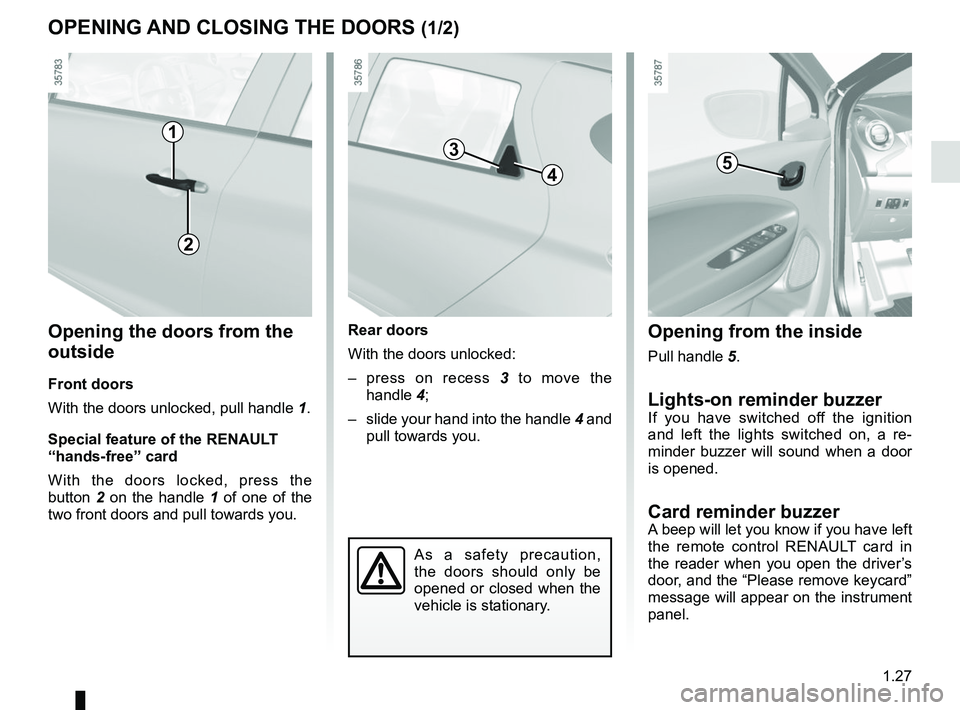
Opening the doors from the
outside
Front doors
With the doors unlocked, pull handle 1.
Special feature of the RENAULT
“hands-free” card
With the doors locked, press the
button 2 on the handle 1 of one of the
two front doors and pull towards you.
Opening from the inside
Pull handle 5.
Lights-on reminder buzzerIf you have switched off the ignition
and left the lights switched on, a re-
minder buzzer will sound when a door
is opened.
Card reminder buzzerA beep will let you know if you have left
the remote control RENAULT card in
the reader when you open the driver’s
door, and the “Please remove keycard”
message will appear on the instrument
panel.
1
As a safety precaution,
the doors should only be
opened or closed when the
vehicle is stationary.
2
Rear doors
With the doors unlocked:
– press on recess 3 to move the
handle 4;
– slide your hand into the handle 4 and
pull towards you.
4
35
Page 34 of 226
1.28
OPENING AND CLOSING THE DOORS (2/2)
Driver’s responsibility when parking or stopping the vehicle
Never leave an animal, child or adult who is not self-sufficient alone on
your vehicle, even for a short time.
They may pose a risk to themselves or to others by starting the engine, \
activating equipment such as the electric windows or by locking the door\
s.
Also, in hot and/or sunny weather, please remember that the temperature inside
the passenger compartment increases very quickly.
RISK OF DEATH OR SERIOUS INJURY.
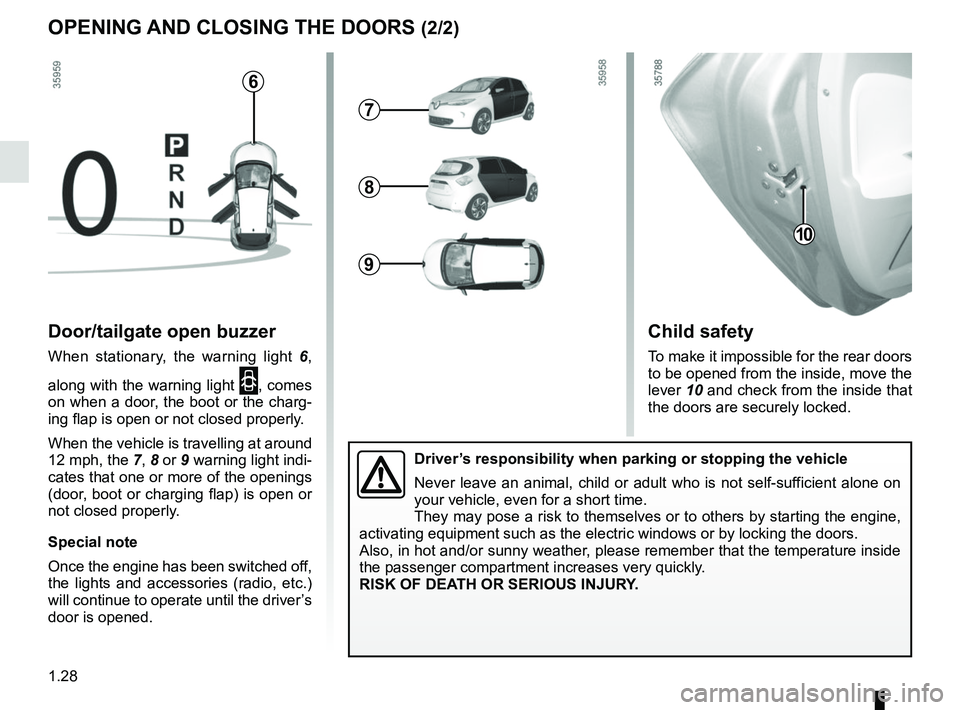
Child safety
To make it impossible for the rear doors
to be opened from the inside, move the
lever 10 and check from the inside that
the doors are securely locked.
10
Door/tailgate open buzzer
When stationary, the warning light 6,
along with the warning light
2, comes
on when a door, the boot or the charg-
ing flap is open or not closed properly.
When the vehicle is travelling at around
12 mph, the 7, 8 or 9 warning light indi-
cates that one or more of the openings
(door, boot or charging flap) is open or
not closed properly.
Special note
Once the engine has been switched off,
the lights and accessories (radio, etc.)
will continue to operate until the driver’s
door is opened.
6
7
8
9
Page 35 of 226
1.29
LOCKING, UNLOCKING THE DOORS (1/2)
Locking/Unlocking the doors
from the outside
This is done using the RENAULT Card;
see the “RENAULT Card” information in
Section 1.
In certain cases, the RENAULT card
may not work:
– the card battery RENAULT is drained, flat 12 V battery, etc.
– if equipment operating on the same frequency as the card (mobile
phones, etc.) is used;
– vehicle located in a high electromag- netic radiation zone.
It is then possible:
– to use the key integrated into the card to unlock the front left-hand
door;
– to lock each of the doors manually;
– to use the interior door locking/un- locking control (refer to the following
pages).
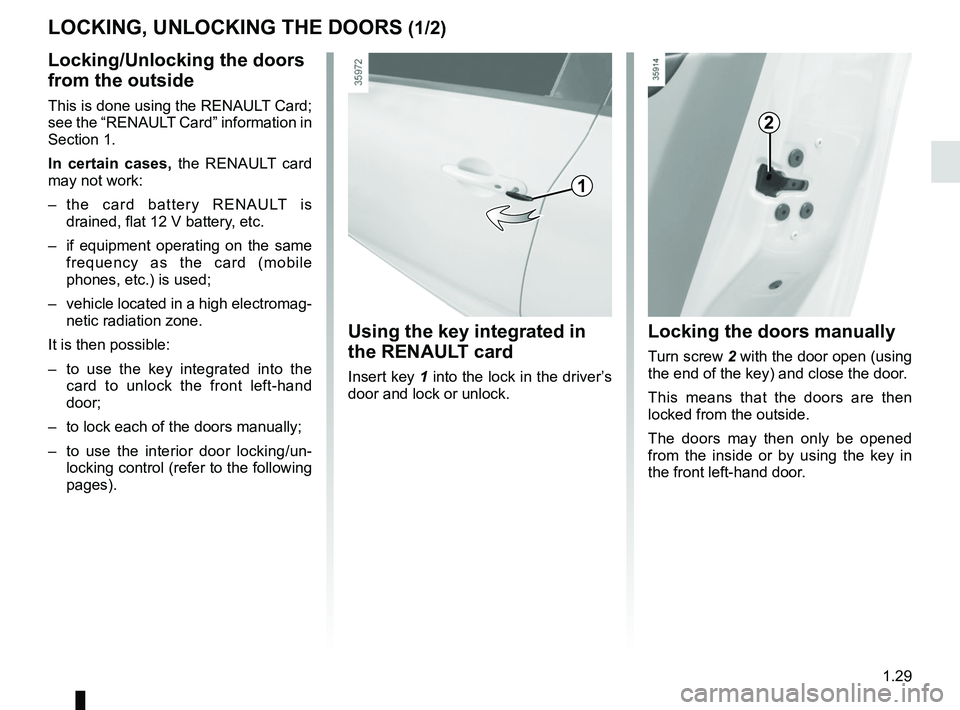
Using the key integrated in
the RENAULT card
Insert key 1 into the lock in the driver’s
door and lock or unlock.
Locking the doors manually
Turn screw 2 with the door open (using
the end of the key) and close the door.
This means that the doors are then
locked from the outside.
The doors may then only be opened
from the inside or by using the key in
the front left-hand door.
2
1
Page 36 of 226
1.30
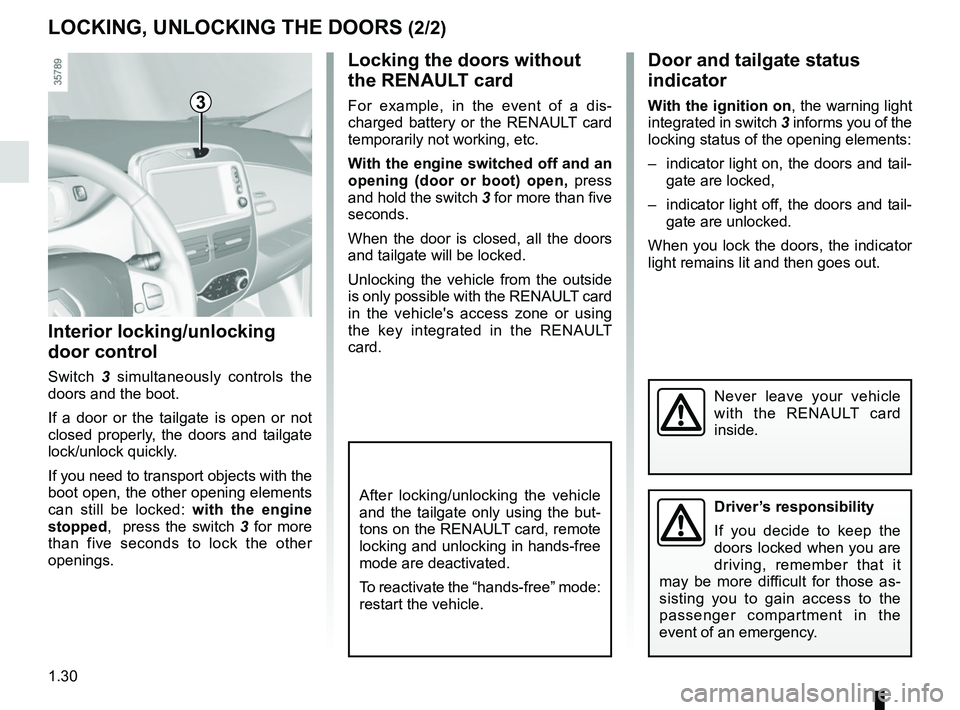
Locking the doors without
the RENAULT card
For example, in the event of a dis-
charged battery or the RENAULT card
temporarily not working, etc.
With the engine switched off and an
opening (door or boot) open, press
and hold the switch 3 for more than five
seconds.
When the door is closed, all the doors
and tailgate will be locked.
Unlocking the vehicle from the outside
is only possible with the RENAULT card
in the vehicle's access zone or using
the key integrated in the RENAULT
card.
LOCKING, UNLOCKING THE DOORS (2/2)
Interior locking/unlocking
door control
Switch 3 simultaneously controls the
doors and the boot.
If a door or the tailgate is open or not
closed properly, the doors and tailgate
lock/unlock quickly.
If you need to transport objects with the
boot open, the other opening elements
can still be locked: with the engine
stopped, press the switch 3 for more
than five seconds to lock the other
openings.
Door and tailgate status
indicator
With the ignition on , the warning light
integrated in switch 3 informs you of the
locking status of the opening elements:
– indicator light on, the doors and tail- gate are locked,
– indicator light off, the doors and tail- gate are unlocked.
When you lock the doors, the indicator
light remains lit and then goes out.
Never leave your vehicle
with the RENAULT card
inside.
After locking/unlocking the vehicle
and the tailgate only using the but-
tons on the RENAULT card, remote
locking and unlocking in hands-free
mode are deactivated.
To reactivate the “hands-free” mode:
restart the vehicle.
3
Driver’s responsibility
If you decide to keep the
doors locked when you are
driving, remember that it
may be more difficult for those as-
sisting you to gain access to the
passenger compartment in the
event of an emergency.
Page 37 of 226
1.31
AUTOMATIC LOCKING WHEN DRIVING
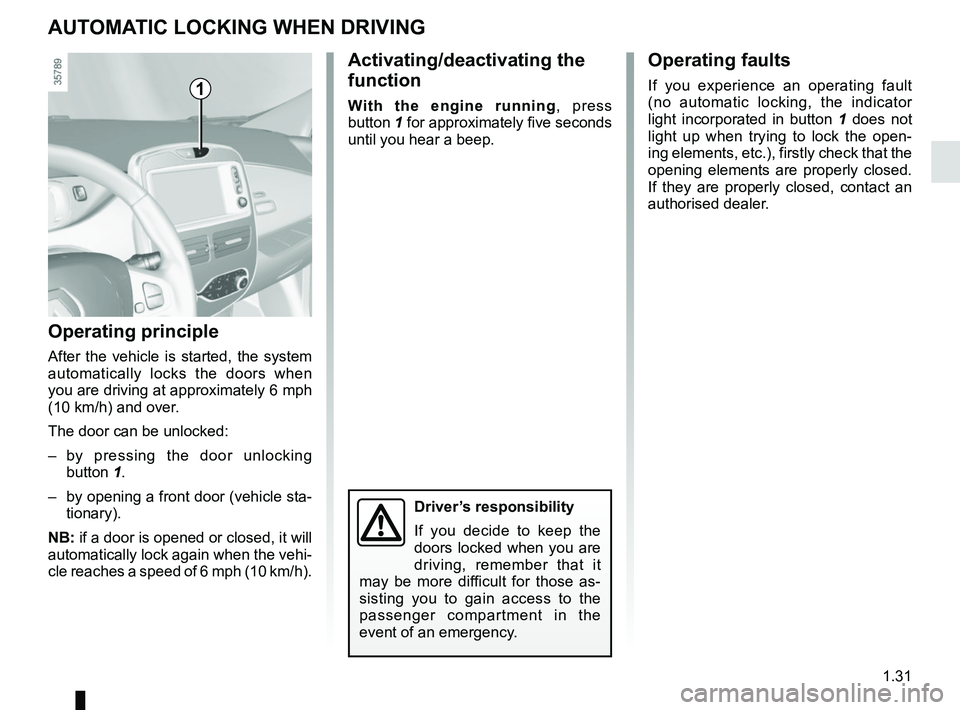
Activating/deactivating the
function
With the engine running, press
button 1 for approximately five seconds
until you hear a beep.
Operating principle
After the vehicle is started, the system
automatically locks the doors when
you are driving at approximately 6 mph
(10 km/h) and over.
The door can be unlocked:
– by pressing the door unlocking button 1.
– by opening a front door (vehicle sta- tionary).
NB: if a door is opened or closed, it will
automatically lock again when the vehi-
cle reaches a speed of 6 mph (10 km/h).
Operating faults
If you experience an operating fault
(no automatic locking, the indicator
light incorporated in button 1 does not
light up when trying to lock the open-
ing elements, etc.), firstly check that the
opening elements are properly closed.
If they are properly closed, contact an
authorised dealer.1
Driver’s responsibility
If you decide to keep the
doors locked when you are
driving, remember that it
may be more difficult for those as-
sisting you to gain access to the
passenger compartment in the
event of an emergency.
Page 50 of 226
1.44
CHILD SAFETY: General information (1/2)
Carrying children
Children, and adults, must be correctly
seated and strapped in for all journeys.
The children being carried in your vehi-
cle are your responsibility.
A child is not a miniature adult. Children
are at risk of specific injuries as their
muscles and bones have not yet fin-
ished growing. The seat belt alone
would not provide suitable protection.
Use an approved child seat and ensure
you use it correctly.
A collision at 30 mph
(50 km/h) is the same as fall-
ing a distance of 10 metres.
Transporting a child without
a restraint is the equivalent of allow-
ing him or her to play on a fourth-
floor balcony without railings.
Never travel with a child held in your
arms. In the event of an accident,
you will not be able to keep hold of
the child, even if you yourself are
wearing a seat belt.
If your vehicle has been involved in
a road accident, replace the child
seat and have the seat belts and
ISOFIX anchorage points checked.
To prevent the doors being
opened, use the “Child
safety” device (refer to the
information on “Opening
and closing the doors” in Section 1).
Driver’s responsibility
when parking or stopping
the vehicle
Never leave an animal,
child or adult who is not self-suffi-
cient alone on your vehicle, even for
a short time.
They may pose a risk to themselves
or to others by starting the engine,
activating equipment such as the
electric windows or by locking the
doors.
Also, in hot and/or sunny weather,
please remember that the tempera-
ture inside the passenger compart-
ment increases very quickly.
RISK OF DEATH OR SERIOUS
INJURY.
Page 56 of 226
1.50
In the rear side seat
A carrycot can be installed across the
vehicle and will take up at least two
seats. Position the child with his or her
feet nearest the door.
Move the front seat as far forward as
possible to install a rear-facing child
seat, then move back the seat in front
as far as it will go, although without al-
lowing it to come into contact with the
child seat.
For the safety of the child in the for-
ward-facing seat, do not move the seat
in front back past the middle of the
runner, do not tilt the seatback too far
(maximum of 25°) and raise the seat as
much as possible.
Always remove the headrest from the
rear seat used for the child seat (see
“Rear headrests” in Section 3). If nec-
essary, position the rear seat as far
back as possible. This must be done
before fitting the child seat. Check that
the child seat is resting against the
back of the rear seat.
Make sure that the child
seat or the child’s feet do
not prevent the front seat
from locking correctly. Refer
to the information on the “Front seat”
in Section 1.
A child seat with a floor sup-
port must never be installed
on the rear centre seat.
RISK OF DEATH OR
SERIOUS INJURY.
Rear centre seat
Check that the belt is suitable for se-
curing your child seat. Consult an ap-
proved dealer.
CHILD SAFETY: fitting a child seat (2/6)
When fitting a child seat
(Group 2 or 3 booster seat),
check that the seat belts op-
erate (wind) correctly: refer
to Section 1 “Rear seat belts”. If
necessary, adjust the position of the
vehicle seat.
Page 65 of 226
1.59
DRIVING POSITION: LEFT-HAND DRIVE (2/2)
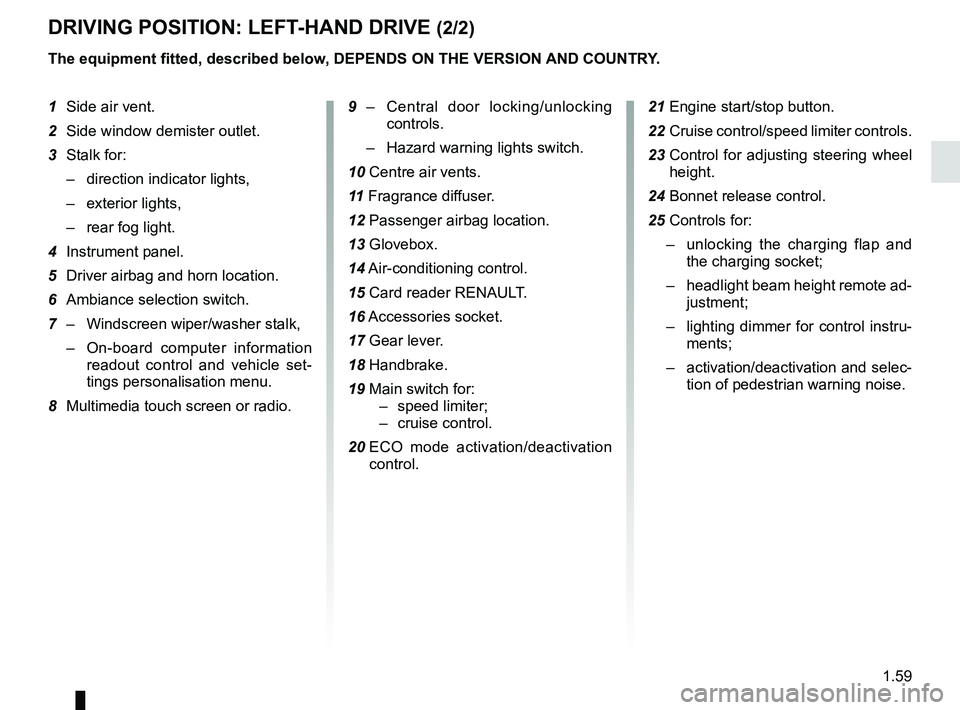
The equipment fitted, described below, DEPENDS ON THE VERSION AND COUNTRY.
1 Side air vent.
2 Side window demister outlet.
3 Stalk for:
– direction indicator lights,
– exterior lights,
– rear fog light.
4 Instrument panel.
5 Driver airbag and horn location.
6 Ambiance selection switch.
7 – Windscreen wiper/washer stalk,
– On-board computer information
readout control and vehicle set-
tings personalisation menu.
8 Multimedia touch screen or radio. 9 –
Central door locking/unlocking
controls.
– Hazard warning lights switch.
10 Centre air vents.
11 Fragrance diffuser.
12 Passenger airbag location.
13 Glovebox.
14 Air-conditioning control.
15 Card reader RENAULT.
16 Accessories socket.
17 Gear lever.
18 Handbrake.
19 Main switch for: – speed limiter;
– cruise control.
20 ECO mode activation/deactivation
control. 21 Engine start/stop button.
22 Cruise control/speed limiter controls.
23 Control for adjusting steering wheel
height.
24 Bonnet release control.
25 Controls for: – unlocking the charging flap and
the charging socket;
– headlight beam height remote ad-
justment;
– lighting dimmer for control instru-
ments;
– activation/deactivation and selec-
tion of pedestrian warning noise.
Page 67 of 226
1.61
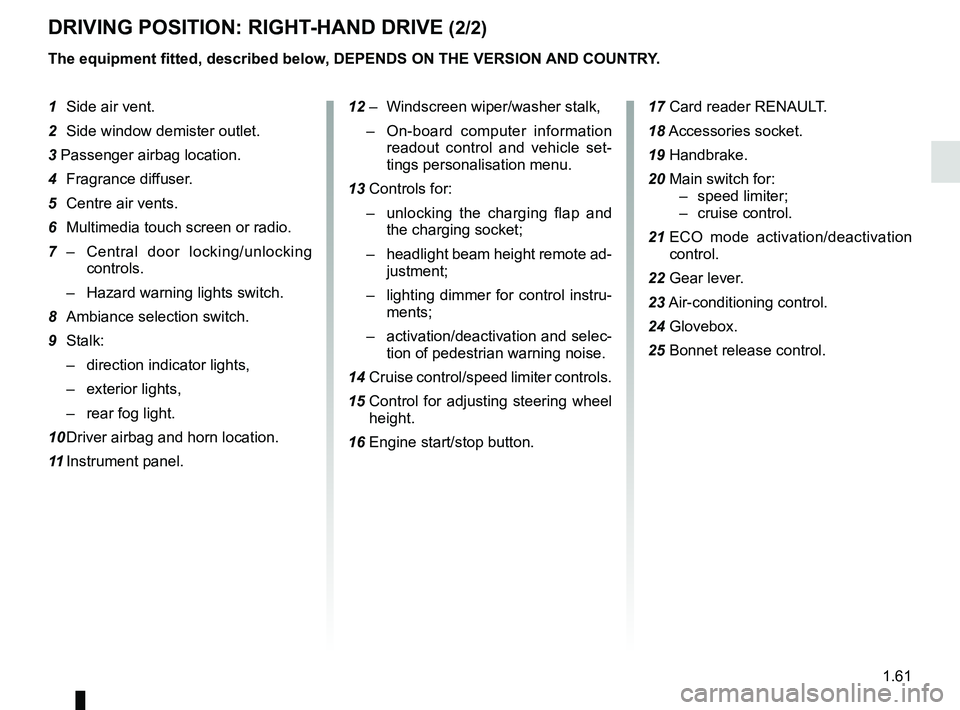
DRIVING POSITION: RIGHT-HAND DRIVE (2/2)
The equipment fitted, described below, DEPENDS ON THE VERSION AND COUNTRY.
1 Side air vent.
2 Side window demister outlet.
3 Passenger airbag location.
4 Fragrance diffuser.
5 Centre air vents.
6 Multimedia touch screen or radio.
7 – Central door locking/unlocking
controls.
– Hazard warning lights switch.
8 Ambiance selection switch.
9 Stalk: – direction indicator lights,
– exterior lights,
– rear fog light.
10 Driver airbag and horn location.
11 Instrument panel. 12 – Windscreen wiper/washer stalk,
– On-board computer information
readout control and vehicle set-
tings personalisation menu.
13 Controls for: – unlocking the charging flap and
the charging socket;
– headlight beam height remote ad-
justment;
– lighting dimmer for control instru-
ments;
– activation/deactivation and selec-
tion of pedestrian warning noise.
14 Cruise control/speed limiter controls.
15 Control for adjusting steering wheel
height.
16 Engine start/stop button. 17 Card reader RENAULT.
18
Accessories socket.
19 Handbrake.
20 Main switch for: – speed limiter;
– cruise control.
21 ECO mode activation/deactivation
control.
22 Gear lever.
23 Air-conditioning control.
24 Glovebox.
25 Bonnet release control.
Page 70 of 226
1.64
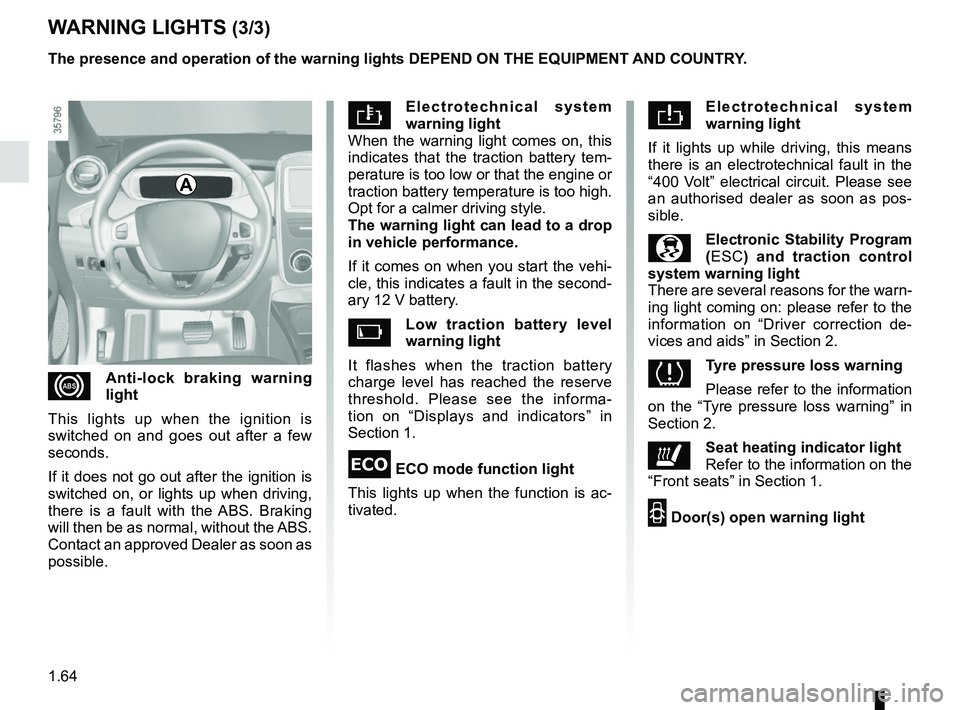
Electrotechnical system
warning light
When the warning light comes on, this
indicates that the traction battery tem-
perature is too low or that the engine or
traction battery temperature is too high.
Opt for a calmer driving style.
The warning light can lead to a drop
in vehicle performance.
If it comes on when you start the vehi-
cle, this indicates a fault in the second-
ary 12 V battery.
Low traction battery level
warning light
It flashes when the traction battery
charge level has reached the reserve
threshold. Please see the informa-
tion on “Displays and indicators” in
Section 1.
\b ECO mode function light
This lights up when the function is ac-
tivated.
WARNING LIGHTS (3/3)
Electrotechnical system
warning light
If it lights up while driving, this means
there is an electrotechnical fault in the
“400 Volt” electrical circuit. Please see
an authorised dealer as soon as pos-
sible.
Electronic Stability Program
( ESC) and traction control
system warning light
There are several reasons for the warn-
ing light coming on: please refer to the
information on “Driver correction de-
vices and aids” in Section 2.
Tyre pressure loss warning
Please refer to the information
on the “Tyre pressure loss warning” in
Section 2.
ðSeat heating indicator light
Refer to the information on the
“Front seats” in Section 1.
2 Door(s) open warning light
xAnti-lock braking warning
light
This lights up when the ignition is
switched on and goes out after a few
seconds.
If it does not go out after the ignition is
switched on, or lights up when driving,
there is a fault with the ABS. Braking
will then be as normal, without the ABS.
Contact an approved Dealer as soon as
possible. The presence and operation of the warning lights DEPEND ON THE EQUIPMENT\
AND COUNTRY.
A