door lock RENAULT ZOE 2018 Owner's Manual
[x] Cancel search | Manufacturer: RENAULT, Model Year: 2018, Model line: ZOE, Model: RENAULT ZOE 2018Pages: 226, PDF Size: 5.51 MB
Page 73 of 226
1.67
TRIP COMPUTER: general information (1/2)
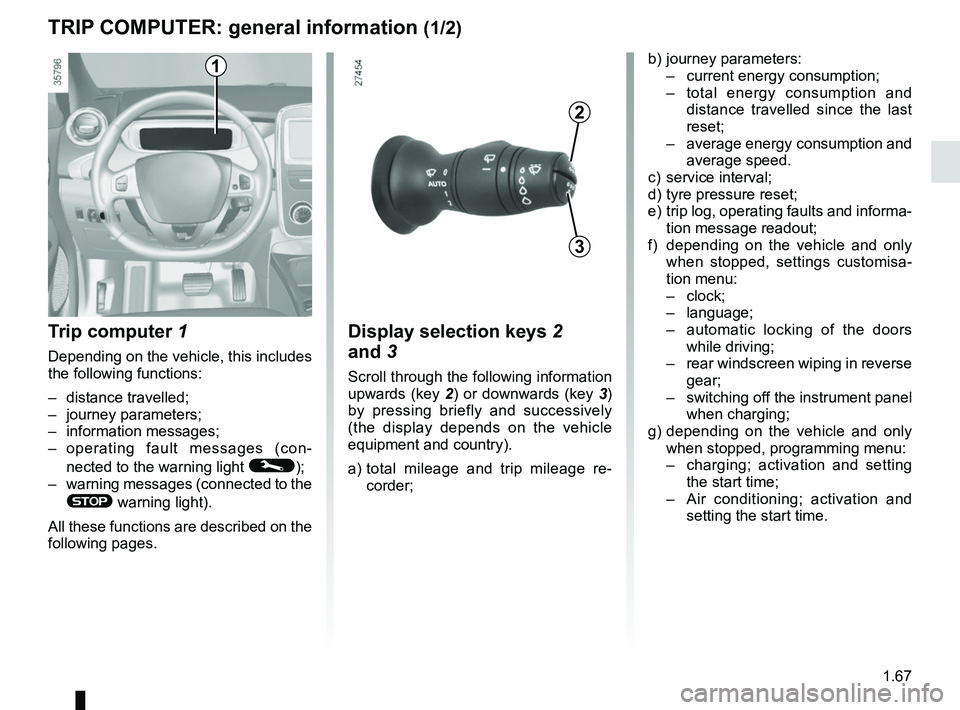
Trip computer 1
Depending on the vehicle, this includes
the following functions:
– distance travelled;
– journey parameters;
– information messages;
– operating fault messages (con-
nected to the warning light
©);
– warning messages (connected to the
® warning light).
All these functions are described on the
following pages.
Display selection keys 2
and 3
Scroll through the following information
upwards (key 2) or downwards (key 3)
by pressing briefly and successively
(the display depends on the vehicle
equipment and country).
a) total mileage and trip mileage re-
corder;
b) journey parameters:
– current energy consumption;
– total energy consumption and
distance travelled since the last
reset;
– average energy consumption and
average speed.
c) service interval;
d) tyre pressure reset;
e) trip log, operating faults and informa- tion message readout;
f) depending on the vehicle and only when stopped, settings customisa-
tion menu:
– clock;
– language;
– automatic locking of the doors
while driving;
– rear windscreen wiping in reverse
gear;
– switching off the instrument panel
when charging;
g) depending on the vehicle and only when stopped, programming menu:
– charging; activation and setting
the start time;
– Air conditioning; activation and
setting the start time.
3
2
1
Page 88 of 226
1.82
EXTERIOR LIGHTING AND SIGNALS (2/3)
Switching off the lights
There are two possibilities:
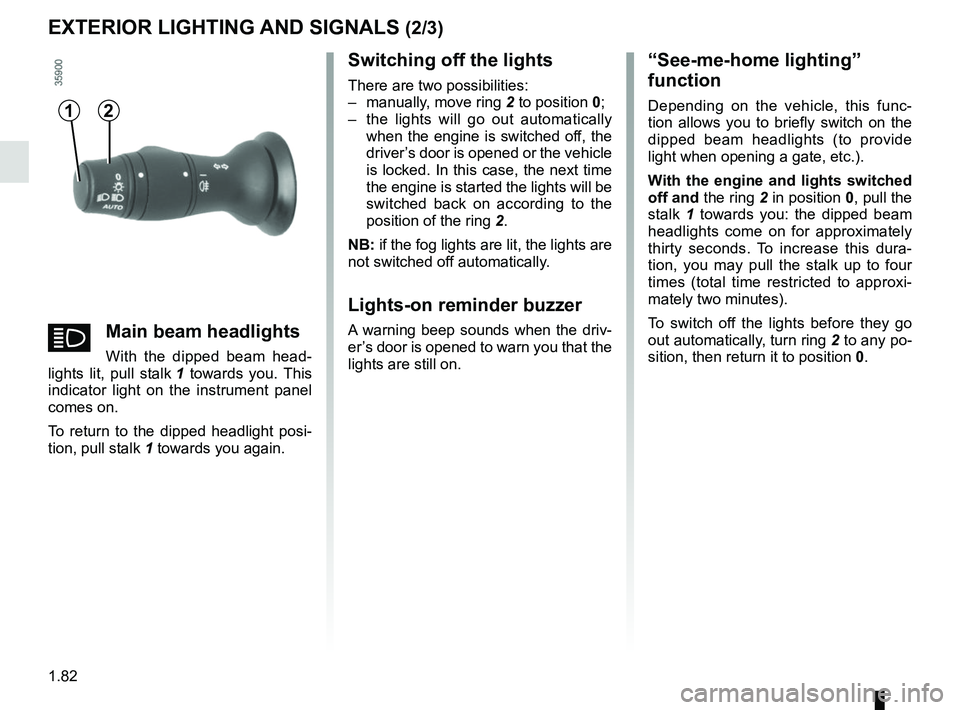
– manually, move ring 2 to position 0;
– the lights will go out automatically when the engine is switched off, the
driver’s door is opened or the vehicle
is locked. In this case, the next time
the engine is started the lights will be
switched back on according to the
position of the ring 2.
NB: if the fog lights are lit, the lights are
not switched off automatically.
Lights-on reminder buzzer
A warning beep sounds when the driv-
er’s door is opened to warn you that the
lights are still on.
“See-me-home lighting”
function
Depending on the vehicle, this func-
tion allows you to briefly switch on the
dipped beam headlights (to provide
light when opening a gate, etc.).
With the engine and lights switched
off and the ring 2 in position 0, pull the
stalk 1 towards you: the dipped beam
headlights come on for approximately
thirty seconds. To increase this dura-
tion, you may pull the stalk up to four
times (total time restricted to approxi-
mately two minutes).
To switch off the lights before they go
out automatically, turn ring 2 to any po-
sition, then return it to position 0.12
áMain beam headlights
With the dipped beam head-
lights lit, pull stalk 1 towards you. This
indicator light on the instrument panel
comes on.
To return to the dipped headlight posi-
tion, pull stalk 1 towards you again.
Page 97 of 226
2.3
Driver’s responsibility
when parking or stopping
the vehicle
Never leave an animal,
child or adult who is not self-suffi-
cient alone in your vehicle, even for
a short time.
They may pose a risk to themselves
or to others by starting the engine,
activating equipment such as the
electric windows or locking the
doors, for example.
Also, in hot and/or sunny weather,
please remember that the tempera-
ture inside the passenger compart-
ment increases very quickly.
RISK OF DEATH OR SERIOUS
INJURY.
Operating faults
In certain cases, the hands-free
RENAULT card may not work:
– the card battery RENAULT is drai- ned, flat 12 V battery, etc.
– near to appliances operating on the same frequency as the card (moni-
tor, mobile phone, video game, etc.);
– vehicle located in a high electroma- gnetic radiation zone.
The message “Please insert keycard”
appears on the instrument panel.
Insert the RENAULT card fully into card
reader 2.
STARTING, STOPPING THE ENGINE (2/3)
Page 98 of 226
2.4
Conditions for stopping the
engine
The vehicle must be stationary, with the
lever positioned to N or P.
STARTING, STOPPING THE ENGINE (3/3)
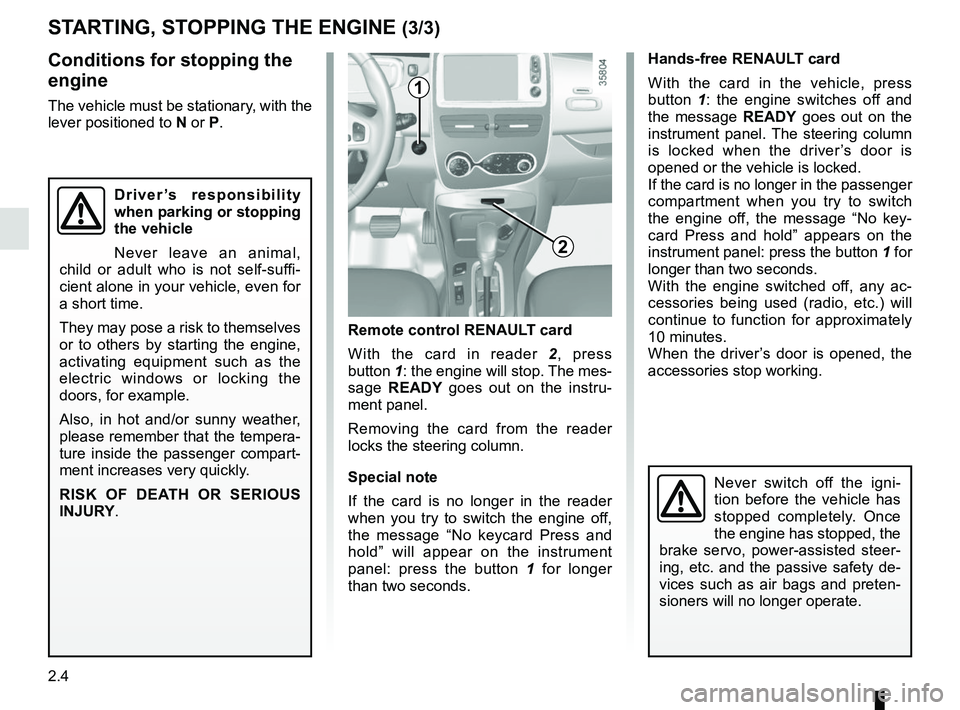
Hands-free RENAULT card
With the card in the vehicle, press
button 1: the engine switches off and
the message READY goes out on the
instrument panel. The steering column
is locked when the driver’s door is
opened or the vehicle is locked.
If the card is no longer in the passenger
compartment when you try to switch
the engine off, the message “No key-
card Press and hold” appears on the
instrument panel: press the button 1 for
longer than two seconds.
With the engine switched off, any ac-
cessories being used (radio, etc.) will
continue to function for approximately
10 minutes.
When the driver’s door is opened, the
accessories stop working.
Remote control RENAULT card
With the card in reader 2 , press
button 1: the engine will stop. The mes-
sage READY goes out on the instru-
ment panel.
Removing the card from the reader
locks the steering column.
Special note
If the card is no longer in the reader
when you try to switch the engine off,
the message “No keycard Press and
hold” will appear on the instrument
panel: press the button 1 for longer
than two seconds.
1
2
Never switch off the igni-
tion before the vehicle has
stopped completely. Once
the engine has stopped, the
brake servo, power-assisted steer-
ing, etc. and the passive safety de-
vices such as air bags and preten-
sioners will no longer operate.
Driver’s responsibility
when parking or stopping
the vehicle
Never leave an animal,
child or adult who is not self-suffi-
cient alone in your vehicle, even for
a short time.
They may pose a risk to themselves
or to others by starting the engine,
activating equipment such as the
electric windows or locking the
doors, for example.
Also, in hot and/or sunny weather,
please remember that the tempera-
ture inside the passenger compart-
ment increases very quickly.
RISK OF DEATH OR SERIOUS
INJURY.
Page 148 of 226
3.22
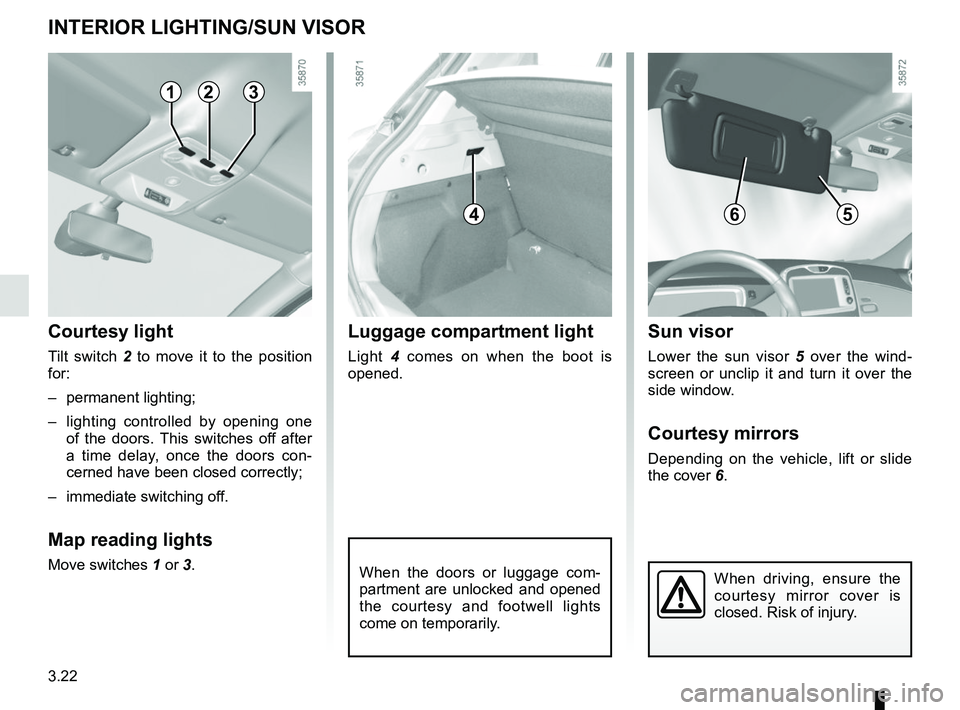
INTERIOR LIGHTING/SUN VISOR
When the doors or luggage com-
partment are unlocked and opened
the courtesy and footwell lights
come on temporarily.
123
Courtesy light
Tilt switch 2 to move it to the position
for:
– permanent lighting;
– lighting controlled by opening one of the doors. This switches off after
a time delay, once the doors con-
cerned have been closed correctly;
– immediate switching off.
Map reading lights
Move switches 1 or 3.
4
Luggage compartment light
Light 4 comes on when the boot is
opened.
6
Sun visor
Lower the sun visor 5 over the wind-
screen or unclip it and turn it over the
side window.
Courtesy mirrors
Depending on the vehicle, lift or slide
the cover 6.
5
When driving, ensure the
courtesy mirror cover is
closed. Risk of injury.
Page 172 of 226
4.12
Glass instrument panel(e.g. instrument panel, clock, exterior
temperature display, radio display, etc.)
Use a soft cloth (or cotton wool).
If this does not clean them properly,
use a soft cloth (or cotton wool) slightly
moistened with soapy water and then
wipe clean with another soft damp cloth
or cotton wool.
Finally, carefully dry off with a soft dry
cloth.
Do not use products containing alco-
hol and/or spray fluids on the area.
Seat belts
These must be kept clean.
Use products selected by our Technical
Department (Approved outlets) or
warm, soapy water and a sponge and
wipe with a dry cloth.
Detergents or dyes must not be used
under any circumstances.
INTERIOR TRIM MAINTENANCE (1/2)
Textiles (seats, door trim, etc)
Vacuum-clean the textiles regularly.
Liquid stain
Use soapy water.
Dab lightly (never rub) with a soft cloth,
rinse and remove the excess.
Solid or pasty stain
Carefully remove the excess solid or
pasty material immediately with a
spatula (working from the edges to the
centre to avoid spreading the stain).
Clean as for a liquid stain.
Special instructions for sweets or
chewing gum
Put an ice cube on the stain to solidify
it, then proceed as for a solid stain.
A well-maintained vehicle will last
longer. It is therefore recommended to
maintain the interior of the vehicle regu-
larly.
A stain should always be dealt with
swiftly.
Whatever type of stain is on the trim,
use
cold (or warm) soapy water with
natural soap.
Detergents (washing-up liquid, pow-
dered products, alcohol-based prod-
ucts) should not be used.
Use a soft cloth.
Rinse and soak up the excess.
For further recommendations for
maintaining the interior, and/or for
any unsatisfactory results, please
see an authorised dealer.
Page 188 of 226
5.14
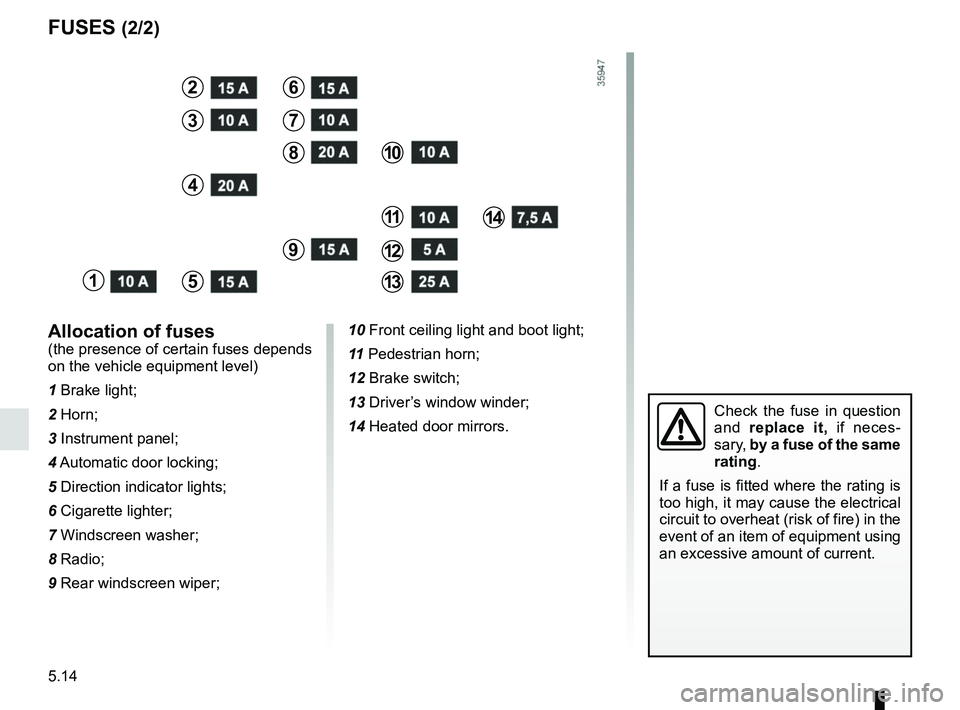
FUSES (2/2)
Allocation of fuses
(the presence of certain fuses depends
on the vehicle equipment level)
1 Brake light;
2 Horn;
3 Instrument panel;
4 Automatic door locking;
5 Direction indicator lights;
6 Cigarette lighter;
7 Windscreen washer;
8 Radio;
9 Rear windscreen wiper;
1
2
3
4
5
6
7
8
9
10
11
12
13
14
10 Front ceiling light and boot light;
11 Pedestrian horn;
12 Brake switch;
13 Driver’s window winder;
14 Heated door mirrors.
Check the fuse in question
and replace it, if neces-
sary, by a fuse of the same
rating.
If a fuse is fitted where the rating is
too high, it may cause the electrical
circuit to overheat (risk of fire) in the
event of an item of equipment using
an excessive amount of current.
Page 189 of 226
5.15
Operating faultsIf the battery is too weak to ensure cor-
rect operation, you can still start (insert
the RENAULT card in the card reader)
and lock/unlock the vehicle (refer to the
information on "Locking/unlocking the
doors" in Section 1).
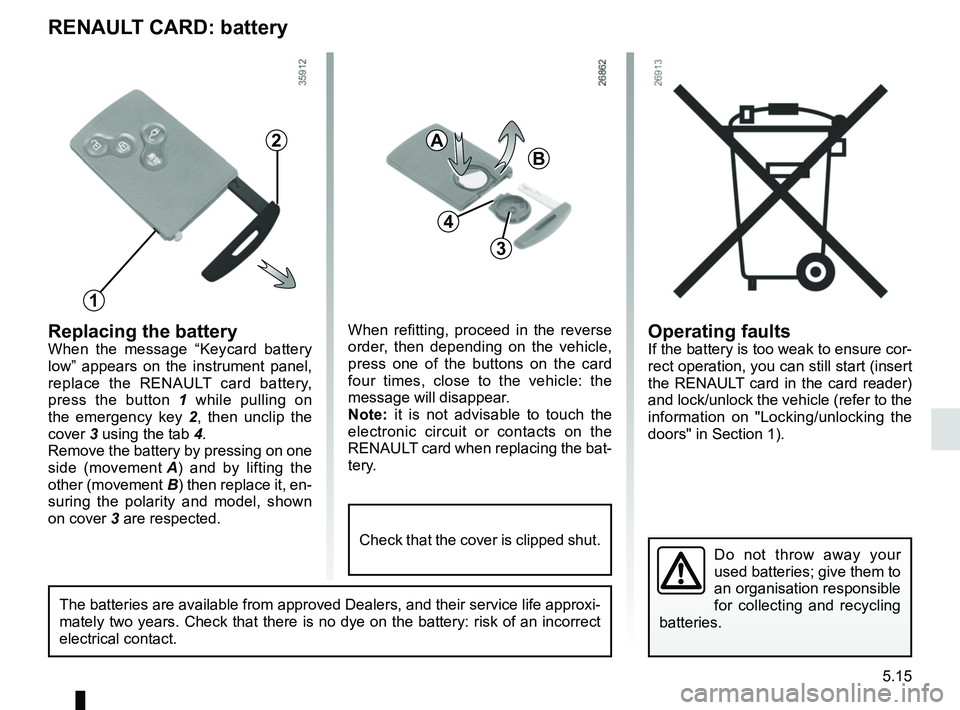
RENAULT CARD: battery
Replacing the batteryWhen the message “Keycard battery
low” appears on the instrument panel,
replace the RENAULT card battery,
press the button 1 while pulling on
the emergency key 2 , then unclip the
cover 3 using the tab 4.
Remove the battery by pressing on one
side (movement A) and by lifting the
other (movement B) then replace it, en-
suring the polarity and model, shown
on cover 3 are respected.
Do not throw away your
used batteries; give them to
an organisation responsible
for collecting and recycling
batteries.
1
2
When refitting, proceed in the reverse
order, then depending on the vehicle,
press one of the buttons on the card
four times, close to the vehicle: the
message will disappear.
Note: it is not advisable to touch the
electronic circuit or contacts on the
RENAULT card when replacing the bat-
tery.
A
B
3
The batteries are available from approved Dealers, and their service lif\
e approxi-
mately two years. Check that there is no dye on the battery: risk of an \
incorrect
electrical contact.
4
Check that the cover is clipped shut.
Page 193 of 226
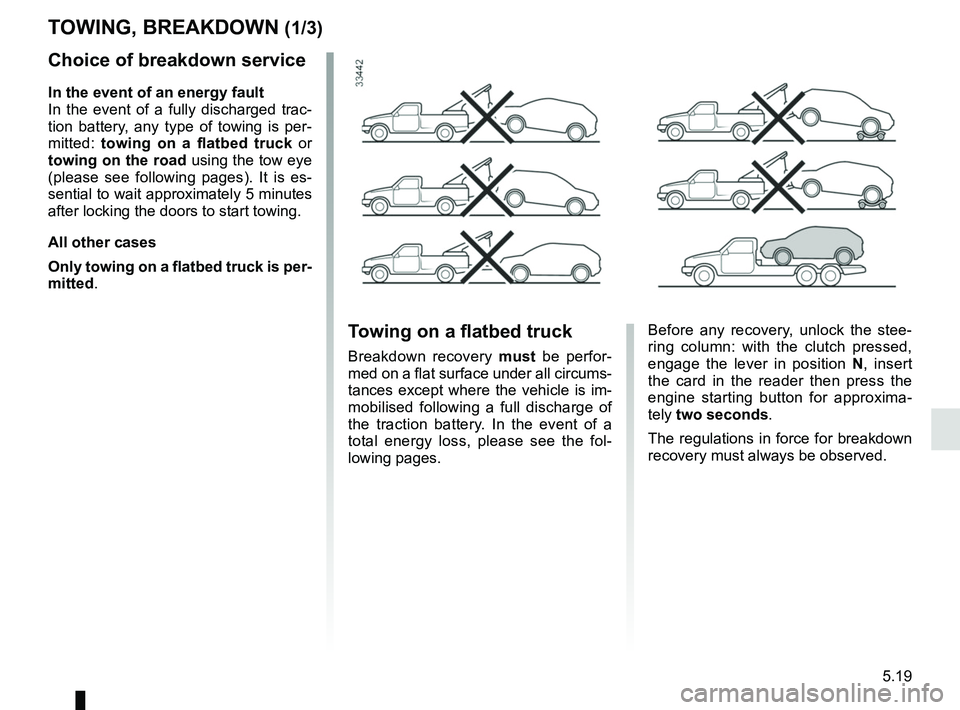
5.19
Choice of breakdown service
In the event of an energy fault
In the event of a fully discharged trac-
tion battery, any type of towing is per-
mitted: towing on a flatbed truck or
towing on the road using the tow eye
(please see following pages). It is es-
sential to wait approximately 5 minutes
after locking the doors to start towing.
All other cases
Only towing on a flatbed truck is per-
mitted.
TOWING, BREAKDOWN (1/3)
Before any recovery, unlock the stee-
ring column: with the clutch pressed,
engage the lever in position N, insert
the card in the reader then press the
engine starting button for approxima-
tely two seconds.
The regulations in force for breakdown
recovery must always be observed.Towing on a flatbed truck
Breakdown recovery must be perfor-
med on a flat surface under all circums-
tances except where the vehicle is im-
mobilised following a full discharge of
the traction battery. In the event of a
total energy loss, please see the fol-
lowing pages.
Page 196 of 226

The following advice will enable you to carry out quick, temporary repai\
rs. For safety reasons you should always contact
an approved dealer as soon as possible.
FAULTSPO")
5.22
OPERATING FAULTS (1/4)
The following advice will enable you to carry out quick, temporary repai\
rs. For safety reasons you should always contact
an approved dealer as soon as possible.
FAULTSPOSSIBLE CAUSESWHAT TO DO
Impossible to charge the traction bat-
tery.
The charging flap warning light flashes
red. The outdoor temperature is lower
than -26°C.
Recharge your vehicle in a more suitable
environment. If necessary, please refer to
the information on “Towing: breakdown re-
covery” in Section 5.
No electrical current in the wall
socket or poor connection of cable
to domestic socket. Check your installation (circuit breaker, pro-
grammer, etc.).
Check the connections (socket, etc.).
Please refer to the information on “Electric
vehicle: charging” in Section 1.
The cord is defective. Please see an authorised dealer to replace
it.
Impossible to charge the traction bat-
tery.
The charging flap warning light flashes
blue. The charging cord is not correctly
locked to the vehicle. Plug the charging cord correctly to the ve-
hicle. Refer to the information on “Electric
vehicle: charging” in Section 1.
The activation of the air conditioning
using the card RENAULT fails to work. The card RENAULT is outside its
area of action.Step closer to the vehicle.
One of the usage conditions is not
complied with. Please refer to the information on “Air-
conditioning: remote control activation” in
Section 3.