instrument panel RENAULT ZOE 2018 User Guide
[x] Cancel search | Manufacturer: RENAULT, Model Year: 2018, Model line: ZOE, Model: RENAULT ZOE 2018Pages: 226, PDF Size: 5.51 MB
Page 67 of 226
1.61
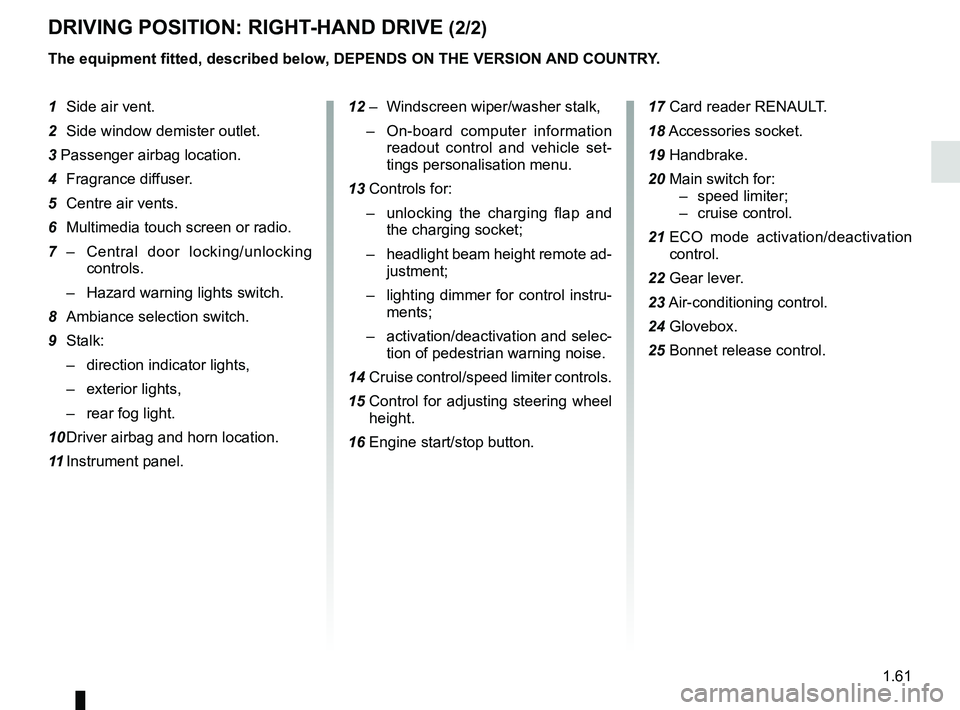
DRIVING POSITION: RIGHT-HAND DRIVE (2/2)
The equipment fitted, described below, DEPENDS ON THE VERSION AND COUNTRY.
1 Side air vent.
2 Side window demister outlet.
3 Passenger airbag location.
4 Fragrance diffuser.
5 Centre air vents.
6 Multimedia touch screen or radio.
7 – Central door locking/unlocking
controls.
– Hazard warning lights switch.
8 Ambiance selection switch.
9 Stalk: – direction indicator lights,
– exterior lights,
– rear fog light.
10 Driver airbag and horn location.
11 Instrument panel. 12 – Windscreen wiper/washer stalk,
– On-board computer information
readout control and vehicle set-
tings personalisation menu.
13 Controls for: – unlocking the charging flap and
the charging socket;
– headlight beam height remote ad-
justment;
– lighting dimmer for control instru-
ments;
– activation/deactivation and selec-
tion of pedestrian warning noise.
14 Cruise control/speed limiter controls.
15 Control for adjusting steering wheel
height.
16 Engine start/stop button. 17 Card reader RENAULT.
18
Accessories socket.
19 Handbrake.
20 Main switch for: – speed limiter;
– cruise control.
21 ECO mode activation/deactivation
control.
22 Gear lever.
23 Air-conditioning control.
24 Glovebox.
25 Bonnet release control.
Page 68 of 226
1.62
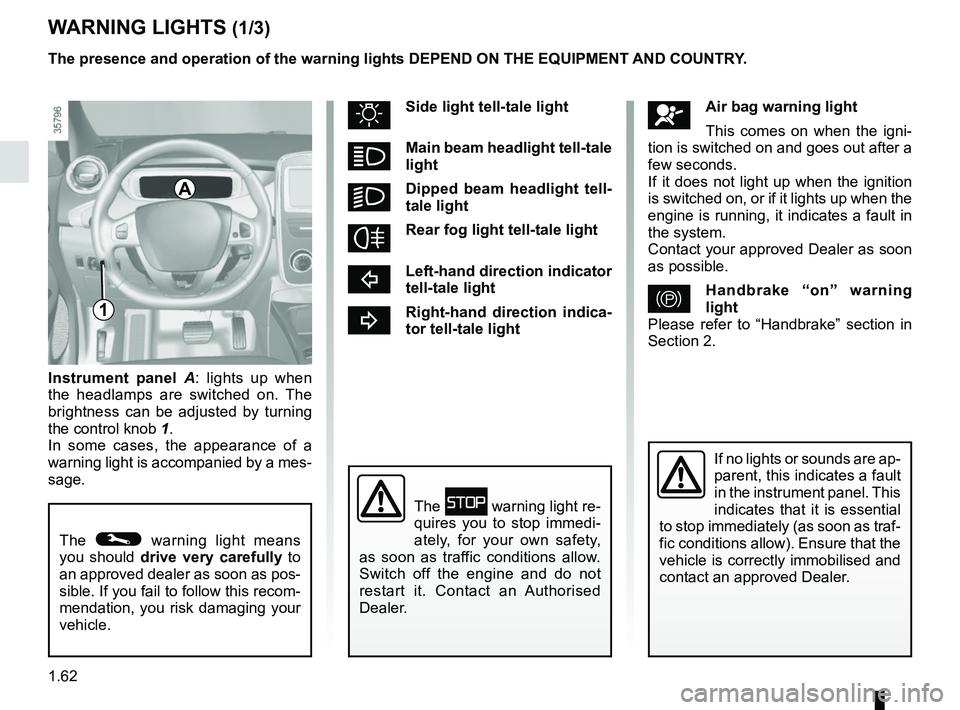
Instrument panel A : lights up when
the headlamps are switched on. The
brightness can be adjusted by turning
the control knob 1.
In some cases, the appearance of a
warning light is accompanied by a mes-
sage.
WARNING LIGHTS (1/3)
The © warning light means
you should drive very carefully to
an approved dealer as soon as pos-
sible. If you fail to follow this recom-
mendation, you risk damaging your
vehicle.
A
åAir bag warning light
This comes on when the igni-
tion is switched on and goes out after a
few seconds.
If it does not light up when the ignition
is switched on, or if it lights up when the
engine is running, it indicates a fault in
the system.
Contact your approved Dealer as soon
as possible.
}Handbrake “on” warning
light
Please refer to “Handbrake” section in
Section 2.
uSide light tell-tale light
áMain beam headlight tell-tale
light
kDipped beam headlight tell-
tale light
fRear fog light tell-tale light
cLeft-hand direction indicator
tell-tale light
bRight-hand direction indica-
tor tell-tale light
If no lights or sounds are ap-
parent, this indicates a fault
in the instrument panel. This
indicates that it is essential
to stop immediately (as soon as traf-
fic conditions allow). Ensure that the
vehicle is correctly immobilised and
contact an approved Dealer.
The û warning light re-
quires you to stop immedi-
ately, for your own safety,
as soon as traffic conditions allow.
Switch off the engine and do not
restart it. Contact an Authorised
Dealer.
1
The presence and operation of the warning lights DEPEND ON THE EQUIPMENT\
AND COUNTRY.
Page 69 of 226
1.63
WARNING LIGHTS (2/3)
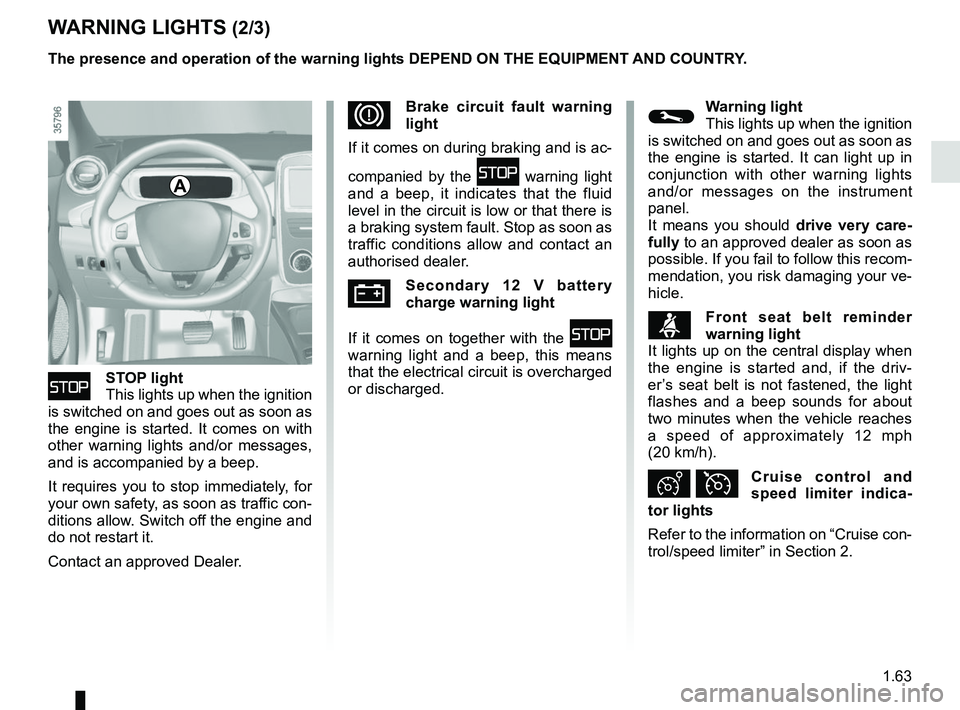
ûSTOP light
This lights up when the ignition
is switched on and goes out as soon as
the engine is started. It comes on with
other warning lights and/or messages,
and is accompanied by a beep.
It requires you to stop immediately, for
your own safety, as soon as traffic con-
ditions allow. Switch off the engine and
do not restart it.
Contact an approved Dealer.
DBrake circuit fault warning
light
If it comes on during braking and is ac-
companied by the
û warning light
and a beep, it indicates that the fluid
level in the circuit is low or that there is
a braking system fault. Stop as soon as
traffic conditions allow and contact an
authorised dealer.
ÚSecondary 12 V battery
charge warning light
If it comes on together with the
û
warning light and a beep, this means
that the electrical circuit is overcharged
or discharged.
The presence and operation of the warning lights DEPEND ON THE EQUIPMENT\
AND COUNTRY.
©Warning light
This lights up when the ignition
is switched on and goes out as soon as
the engine is started. It can light up in
conjunction with other warning lights
and/or messages on the instrument
panel.
It means you should drive very care-
fully to an approved dealer as soon as
possible. If you fail to follow this recom-
mendation, you risk damaging your ve-
hicle.
ßFront seat belt reminder
warning light
It lights up on the central display when
the engine is started and, if the driv-
er’s seat belt is not fastened, the light
flashes and a beep sounds for about
two minutes when the vehicle reaches
a speed of approximately 12 mph
(20 km/h).
Ð ÏCruise control and
speed limiter indica-
tor lights
Refer to the information on “Cruise con-
trol/speed limiter” in Section 2.
A
Page 71 of 226
1.65
DISPLAYS AND INDICATORS (1/2)
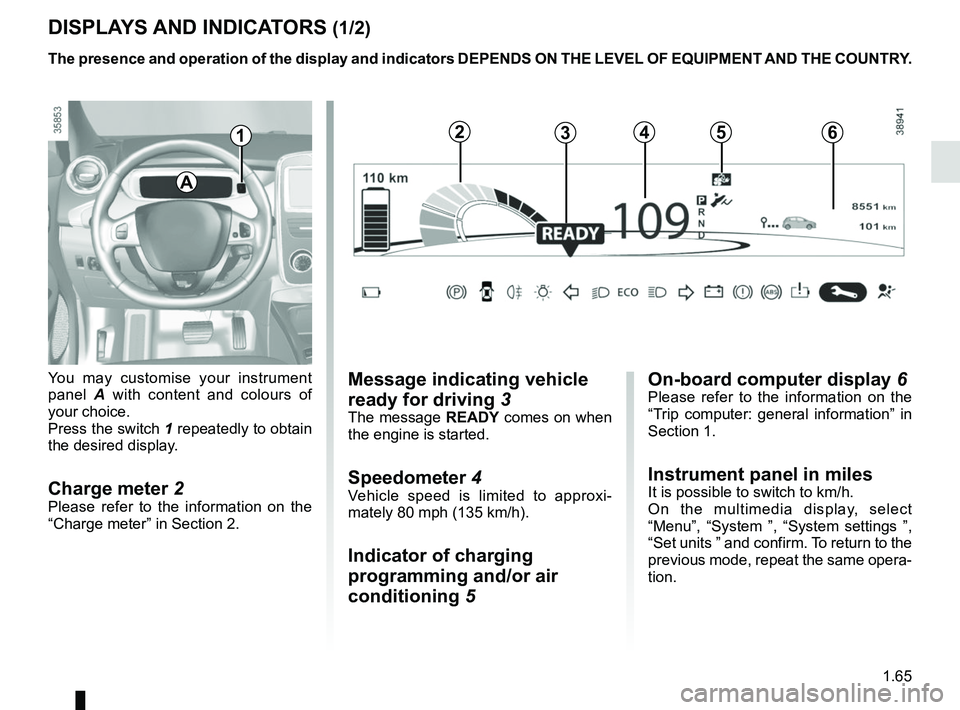
You may customise your instrument
panel A with content and colours of
your choice.
Press the switch 1 repeatedly to obtain
the desired display.
Charge meter 2Please refer to the information on the
“Charge meter” in Section 2.
The presence and operation of the display and indicators DEPENDS ON THE \
LEVEL OF EQUIPMENT AND THE COUNTRY.
Message indicating vehicle
ready for driving 3
The message READY comes on when
the engine is started.
Speedometer 4Vehicle speed is limited to approxi-
mately 80 mph (135 km/h).
Indicator of charging
programming and/or air
conditioning 5
A
124635
On-board computer display 6Please refer to the information on the
“Trip computer: general information” in
Section 1.
Instrument panel in milesIt is possible to switch to km/h.
On the multimedia display, select
“Menu”, “System ”, “System settings ”,
“Set units ” and confirm. To return to the
previous mode, repeat the same opera-
tion.
Page 73 of 226
1.67
TRIP COMPUTER: general information (1/2)
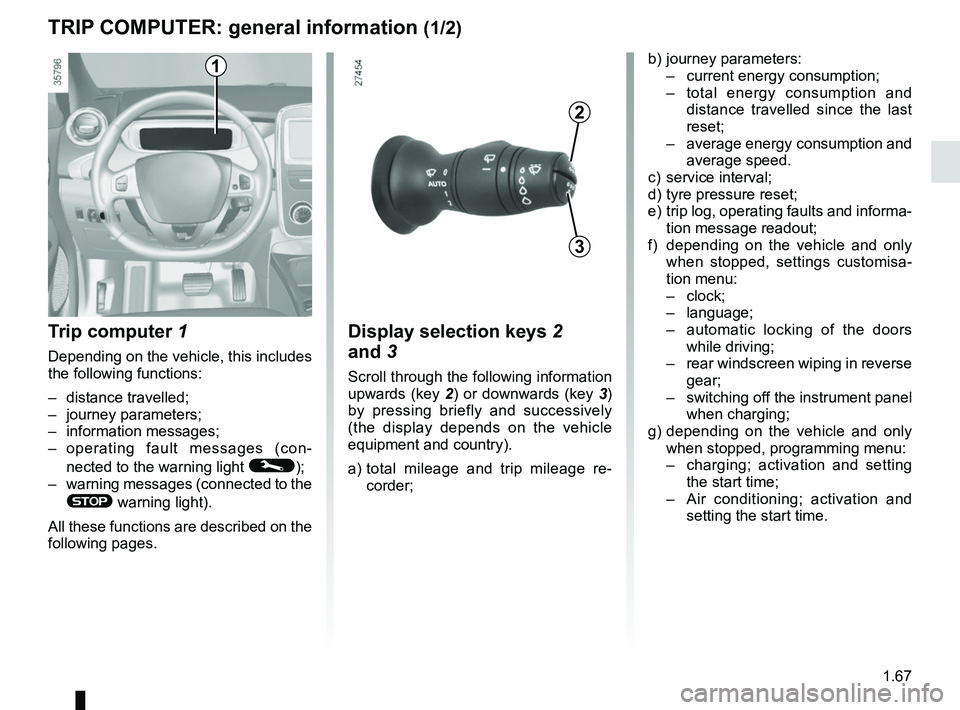
Trip computer 1
Depending on the vehicle, this includes
the following functions:
– distance travelled;
– journey parameters;
– information messages;
– operating fault messages (con-
nected to the warning light
©);
– warning messages (connected to the
® warning light).
All these functions are described on the
following pages.
Display selection keys 2
and 3
Scroll through the following information
upwards (key 2) or downwards (key 3)
by pressing briefly and successively
(the display depends on the vehicle
equipment and country).
a) total mileage and trip mileage re-
corder;
b) journey parameters:
– current energy consumption;
– total energy consumption and
distance travelled since the last
reset;
– average energy consumption and
average speed.
c) service interval;
d) tyre pressure reset;
e) trip log, operating faults and informa- tion message readout;
f) depending on the vehicle and only when stopped, settings customisa-
tion menu:
– clock;
– language;
– automatic locking of the doors
while driving;
– rear windscreen wiping in reverse
gear;
– switching off the instrument panel
when charging;
g) depending on the vehicle and only when stopped, programming menu:
– charging; activation and setting
the start time;
– Air conditioning; activation and
setting the start time.
3
2
1
Page 87 of 226

Before driving at night, check that the electrical equipment is operatin\
g
correctly and adjust the headlight beams (if your vehicle is not carryi\
ng
its n")
1.81
EXTERIOR LIGHTING AND SIGNALS (1/3)
Before driving at night, check that the electrical equipment is operatin\
g
correctly and adjust the headlight beams (if your vehicle is not carryi\
ng
its normal load). As a general precaution, check that the lights are not ob-
scured (by dirt, mud, snow or objects being transported).
31
kDipped beam
headlights
Manual operation
Turn the ring 2 until the symbol is oppo-
site mark 3. This indicator light on the
instrument panel comes on.
Automatic operation
(depending on vehicle)
Turn ring 2 until the AUTO symbol is op-
posite mark 3: with the engine running,
the dipped beam headlights switch on
or off automatically depending on the
brightness of the light outside, without
any action on stalk 1.2
If driving on the left in a left-hand
drive vehicle (or vice versa), drivers
must have the lights adjusted by an
authorised dealer for the duration of
the trip.
1
uSide lights
Turn the ring 2 until the symbol
is opposite mark 3. This indicator light
on the instrument panel comes on.
Daytime running lights
The daytime running lights come on
automatically with no action on stalk 1
when the engine is started, and they go
off once the engine is switched off.
Page 88 of 226
1.82
EXTERIOR LIGHTING AND SIGNALS (2/3)
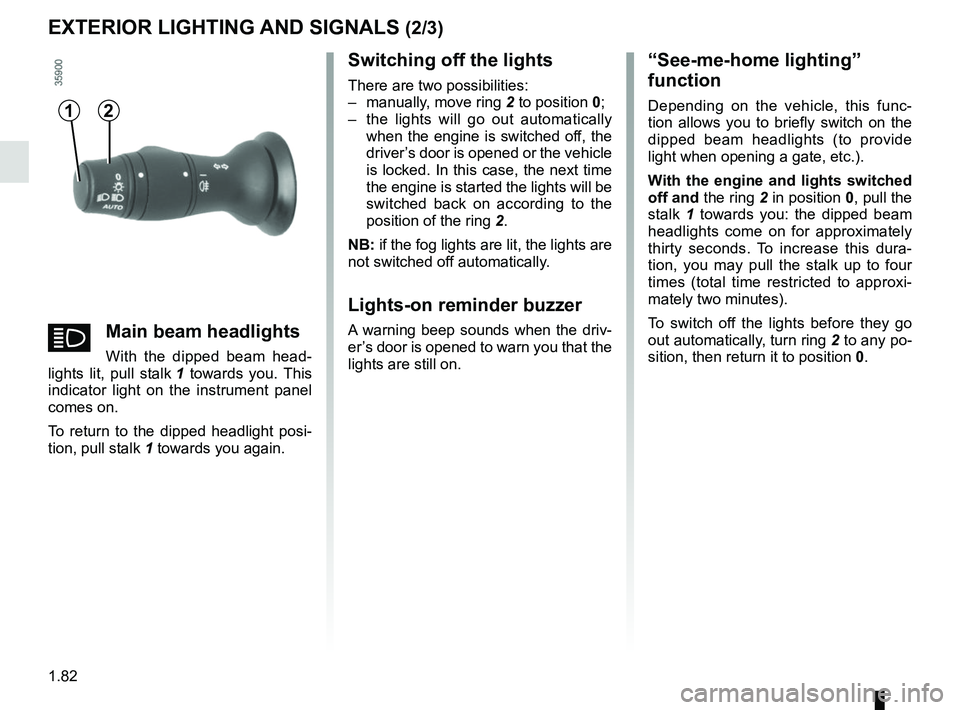
Switching off the lights
There are two possibilities:
– manually, move ring 2 to position 0;
– the lights will go out automatically when the engine is switched off, the
driver’s door is opened or the vehicle
is locked. In this case, the next time
the engine is started the lights will be
switched back on according to the
position of the ring 2.
NB: if the fog lights are lit, the lights are
not switched off automatically.
Lights-on reminder buzzer
A warning beep sounds when the driv-
er’s door is opened to warn you that the
lights are still on.
“See-me-home lighting”
function
Depending on the vehicle, this func-
tion allows you to briefly switch on the
dipped beam headlights (to provide
light when opening a gate, etc.).
With the engine and lights switched
off and the ring 2 in position 0, pull the
stalk 1 towards you: the dipped beam
headlights come on for approximately
thirty seconds. To increase this dura-
tion, you may pull the stalk up to four
times (total time restricted to approxi-
mately two minutes).
To switch off the lights before they go
out automatically, turn ring 2 to any po-
sition, then return it to position 0.12
áMain beam headlights
With the dipped beam head-
lights lit, pull stalk 1 towards you. This
indicator light on the instrument panel
comes on.
To return to the dipped headlight posi-
tion, pull stalk 1 towards you again.
Page 89 of 226
1.83
EXTERIOR LIGHTING AND SIGNALS (3/3)
When driving in fog or snow, or
when transporting objects which are
higher than the roof, the headlights
do not come on automatically.
The driver remains in full control of
switching on the fog lights: the indi-
cator lights on the instrument panel
inform you whether the fog lights
are lit (indicator light on) or not (indi-
cator light off).
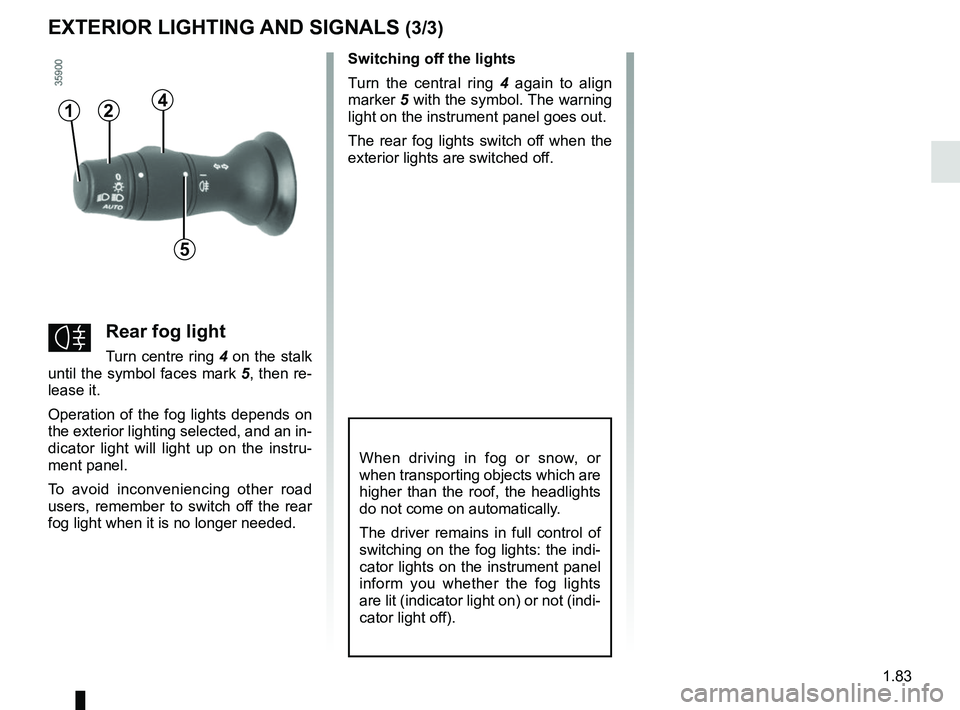
\fRear fog light
Turn centre ring 4 on the stalk
until the symbol faces mark 5, then re-
lease it.
Operation of the fog lights depends on
the exterior lighting selected, and an in-
dicator light will light up on the instru-
ment panel.
To avoid inconveniencing other road
users, remember to switch off the rear
fog light when it is no longer needed. Switching off the lights
Turn the central ring
4 again to align
marker 5 with the symbol. The warning
light on the instrument panel goes out.
The rear fog lights switch off when the
exterior lights are switched off.
412
5
Page 96 of 226
2.2
STARTING, STOPPING THE ENGINE (1/3)
The vehicle can only be started if
the charging cord is unplugged from
the vehicle.
The vehicle can only be started if the
selection lever is at P. Please see
the information on “Gear control” in
Section 2.
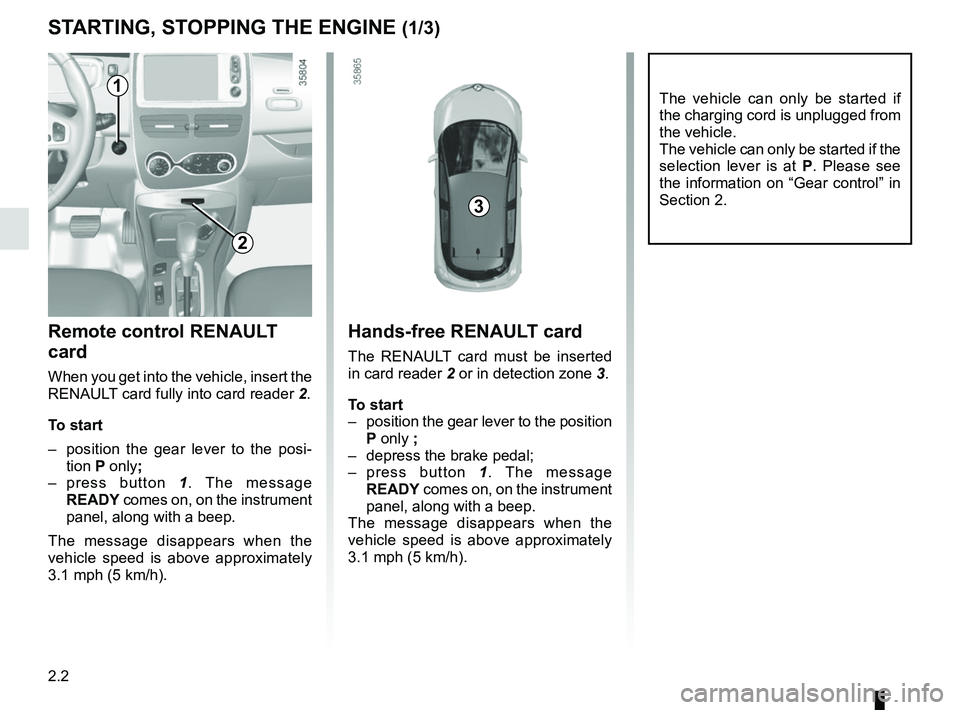
Remote control RENAULT
card
When you get into the vehicle, insert the
RENAULT card fully into card reader 2.
To start
– position the gear lever to the posi- tion P only;
– press button 1. The message
READY comes on, on the instrument
panel, along with a beep.
The message disappears when the
vehicle speed is above approximately
3.1 mph (5 km/h).
Hands-free RENAULT card
The RENAULT card must be inserted
in card reader 2 or in detection zone 3.
To start
– position the gear lever to the position P only ;
– depress the brake pedal;
– press button 1. The message
READY comes on, on the instrument
panel, along with a beep.
The message disappears when the
vehicle speed is above approximately
3.1 mph (5 km/h).
3
1
2
Page 97 of 226
2.3
Driver’s responsibility
when parking or stopping
the vehicle
Never leave an animal,
child or adult who is not self-suffi-
cient alone in your vehicle, even for
a short time.
They may pose a risk to themselves
or to others by starting the engine,
activating equipment such as the
electric windows or locking the
doors, for example.
Also, in hot and/or sunny weather,
please remember that the tempera-
ture inside the passenger compart-
ment increases very quickly.
RISK OF DEATH OR SERIOUS
INJURY.
Operating faults
In certain cases, the hands-free
RENAULT card may not work:
– the card battery RENAULT is drai- ned, flat 12 V battery, etc.
– near to appliances operating on the same frequency as the card (moni-
tor, mobile phone, video game, etc.);
– vehicle located in a high electroma- gnetic radiation zone.
The message “Please insert keycard”
appears on the instrument panel.
Insert the RENAULT card fully into card
reader 2.
STARTING, STOPPING THE ENGINE (2/3)