ECO mode SAAB 9-3 2000 User Guide
[x] Cancel search | Manufacturer: SAAB, Model Year: 2000, Model line: 9-3, Model: SAAB 9-3 2000Pages: 236, PDF Size: 10.85 MB
Page 69 of 236

69 Instruments and controls
Night panelTo improve night-driving conditions inside
the car, the Night Panel mode can be
selected. In this mode, the amount of infor-
mation displayed is reduced, and only the
most important instruments and displays
will be illuminated.
When the Night Panel button is pressed,
only the speedometer will be illuminated (up
to the 87-mph or 140-km/h graduation), all
the other instruments illumination will be
extinguished and their needles moved to
zero. Both the SID and the ACC displays will
be extinguished and the backlighting for
switches and other controls will be dimmed.
Note: All indicator and warning lights,
together with the display of CHECK mes-
sages, will operate as normal. The following conditions will wake up the
respective displays in the Night-Panel
mode:
Setting of the Audio System, SID or ACC
(display comes on for ten seconds).
CHECK message generated in the SID.
High engine revs cause the rev counter to
be illuminated until the engine speed has
fallen again.
If the quantity of fuel remaining falls below
4 gallons (15 liters), the fuel gauge will be
illuminated.
If the engine temperature rises above nor-
mal, the temperature gauge will be illumi-
nated.
If the speed of the car exceeds 84 mph
(135 km/h), the entire speedometer will
be illuminated.
In cars with automatic transmission, if the
selector lever is moved from D to position
3, 2 or 1, the selector indication on the
main instrument panel will be illuminated.
To restore the displays and lighting to the
normal mode, press the Night-Panel button.
Units and language versions The SID has four sets of units:
CHECK messages can be displayed in six
language options: English, Swedish,
German, French, Italian and Spanish. METRIC IMP. 1 IMP. 2 US
km miles miles miles
km/h mph mph mph
litres gallons gallons US
gallons
°C °F °C °F
24 hours 12 hours 12 hours 12 hours
ProCarManuals.com
Page 87 of 236
87 Instruments and controls
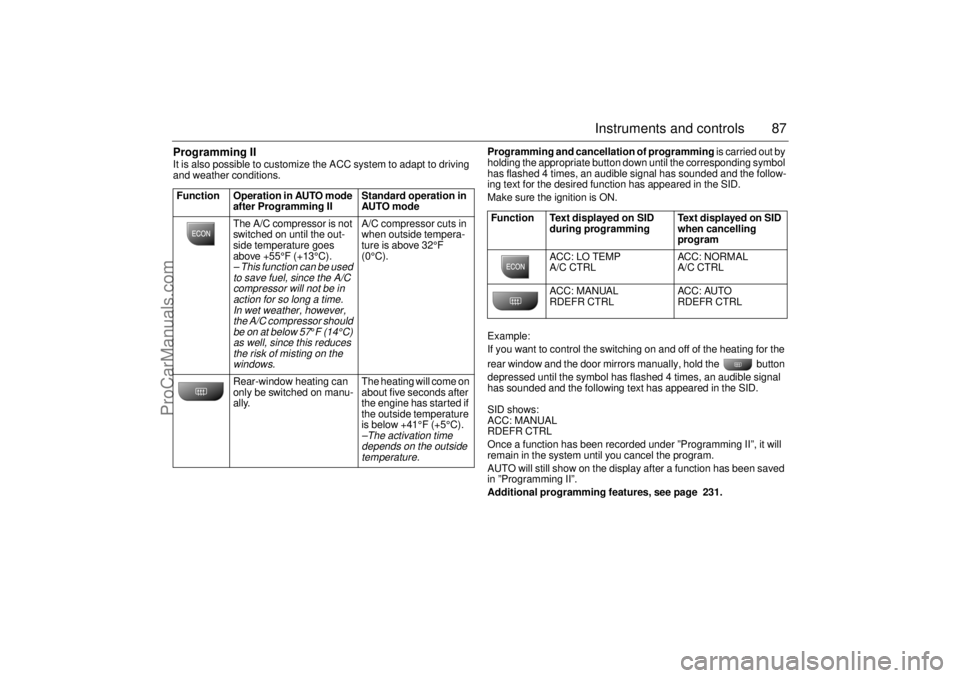
Programming II It is also possible to customize the ACC system to adapt to driving
and weather conditions. Programming and cancellation of programming is carried out by
holding the appropriate button down until the corresponding symbol
has flashed 4 times, an audible signal has sounded and the follow-
ing text for the desired function has appeared in the SID.
Make sure the ignition is ON.
Example:
If you want to control the switching on and off of the heating for the
rear window and the door mirrors manually, hold the button
depressed until the symbol has flashed 4 times, an audible signal
has sounded and the following text has appeared in the SID.
SID shows:
ACC: MANUAL
RDEFR CTRL
Once a function has been recorded under ”Programming II”, it will
remain in the system until you cancel the program.
AUTO will still show on the display after a function has been saved
in ”Programming II”.
Additional programming features, see page 231. Function Operation in AUTO mode
after Programming II Standard operation in
AUTO mode
The A/C compressor is not
switched on until the out-
side temperature goes
above +55°F (+13°C).
– This function can be used
to save fuel, since the A/C
compressor will not be in
action for so long a time.
In wet weather, however,
the A/C compressor should
be on at below 57
°F (14°C)
as well, since this reduces
the risk of misting on the
windows.
A/C compressor cuts in
when outside tempera-
ture is above 32°F
(0°C).
Rear-window heating can
only be switched on manu-
ally. The heating will come on
about five seconds after
the engine has started if
the outside temperature
is below +41°F (+5°C).–The activation time
depends on the outside
temperature.
Function Text displayed on SID
during programming Text displayed on SID
when cancelling
program
ACC: LO TEMP
A/C CTRL ACC: NORMAL
A/C CTRL
ACC: MANUAL
RDEFR CTRL ACC: AUTO
RDEFR CTRL
ProCarManuals.com
Page 88 of 236
88 Instruments and controlsUseful tips: If the ACC system is not functioning
satisfactorily the following should be tried
before you take the car to an authorized
Saab dealer.
If the indication AUTO does not light up
after starting (the ignition must have been
switched off for at least 10 minutes): See
Cancelling programming of ACC.
If you think that the ACC system is not
functioning satisfactorily you should:
1. Check that the cigarette lighter plug is
in its socket (since if the socket is empty
heated air can flow out and affect the
cabin sensor).
2. Recalibrate: See the section headed
Calibration.
If the battery has been disconnected or
has died, the ACC system should be reca-
librated: See Calibration.
Programmed settings are not deleted if the
battery has been disconnected. Extinguishing the lighting in ACC See section Night Panel, page 63.
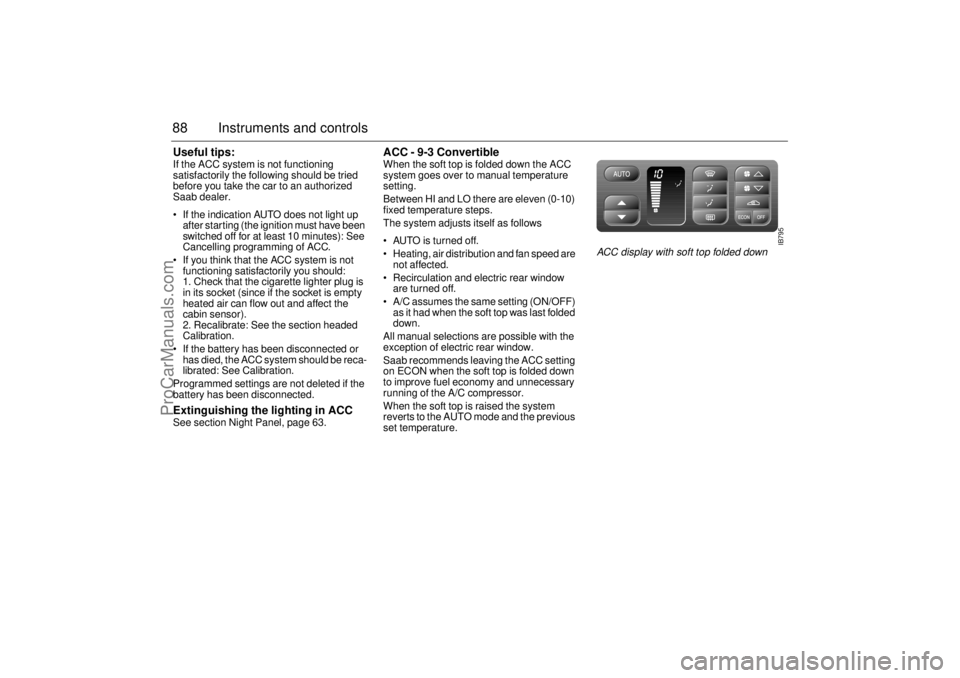
ACC - 9-3 Convertible When the soft top is folded down the ACC
system goes over to manual temperature
setting.
Between HI and LO there are eleven (0-10)
fixed temperature steps.
The system adjusts itself as follows
AUTO is turned off.
Heating, air distribution and fan speed are
not affected.
Recirculation and electric rear window
are turned off.
A/C assumes the same setting (ON/OFF)
as it had when the soft top was last folded
down.
All manual selections are possible with the
exception of electric rear window.
Saab recommends leaving the ACC setting
on ECON when the soft top is folded down
to improve fuel economy and unnecessary
running of the A/C compressor.
When the soft top is raised the system
reverts to the AUTO mode and the previous
set temperature.
IB795
ACC display with soft top folded down
ProCarManuals.com
Page 94 of 236
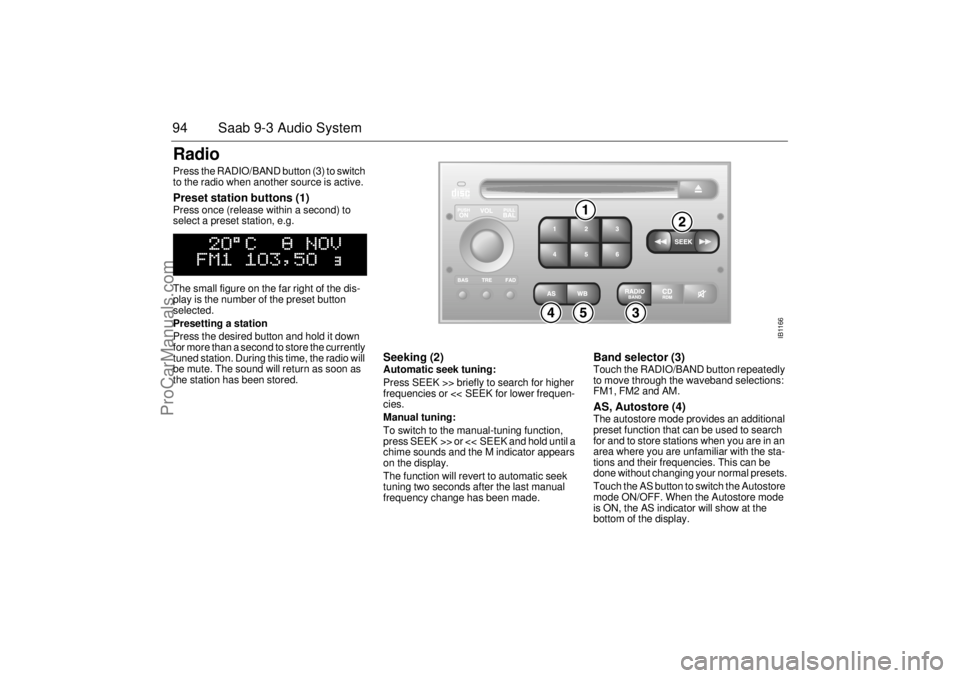
94 Saab 9-3 Audio SystemRadio Press the RADIO/BAND button (3) to switch
to the radio when another source is active. Preset station buttons (1) Press once (release within a second) to
select a preset station, e.g.
The small figure on the far right of the dis-
play is the number of the preset button
selected.
Presetting a station
Press the desired button and hold it down
for more than a second to store the currently
tuned station. During this time, the radio will
be mute. The sound will return as soon as
the station has been stored.
Seeking (2) Automatic seek tuning:
Press SEEK >> briefly to search for higher
frequencies or << SEEK for lower frequen-
cies.
Manual tuning:
To switch to the manual-tuning function,
press SEEK >> or << SEEK and hold until a
chime sounds and the M indicator appears
on the display.
The function will revert to automatic seek
tuning two seconds after the last manual
frequency change has been made.
Band selector (3) Touch the RADIO/BAND button repeatedly
to move through the waveband selections:
FM1, FM2 and AM. AS, Autostore (4) The autostore mode provides an additional
preset function that can be used to search
for and to store stations when you are in an
area where you are unfamiliar with the sta-
tions and their frequencies. This can be
done without changing your normal presets.
Touch the AS button to switch the Autostore
mode ON/OFF. When the Autostore mode
is ON, the AS indicator will show at the
bottom of the display.
IB1166
ProCarManuals.com
Page 95 of 236
95 Saab 9-3 Audio System
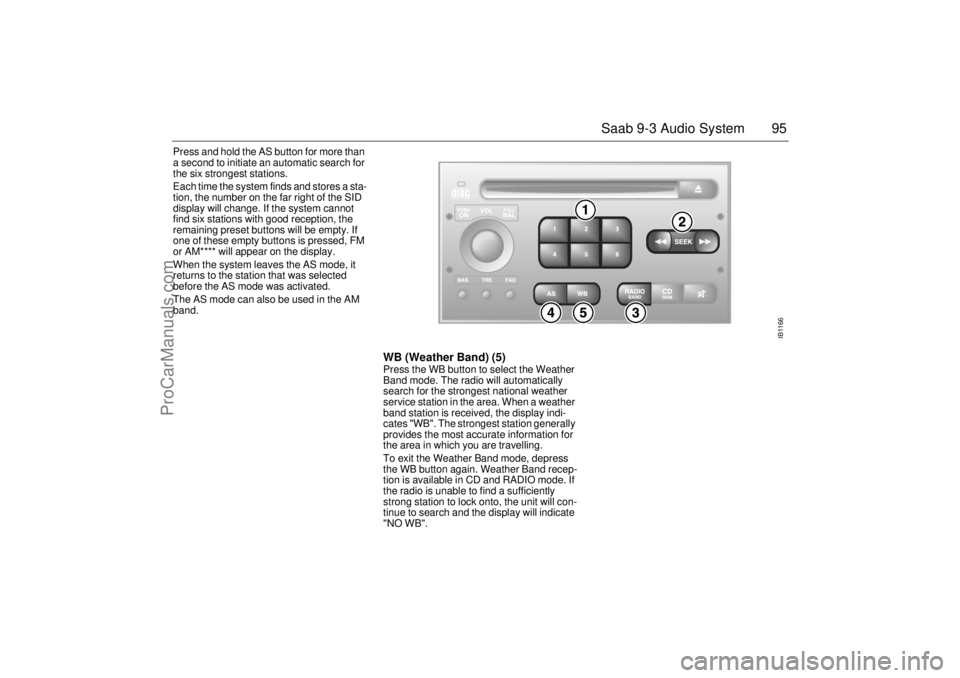
Press and hold the AS button for more than
a second to initiate an automatic search for
the six strongest stations.
Each time the system finds and stores a sta-
tion, the number on the far right of the SID
display will change. If the system cannot
find six stations with good reception, the
remaining preset buttons will be empty. If
one of these empty buttons is pressed, FM
or AM**** will appear on the display.
When the system leaves the AS mode, it
returns to the station that was selected
before the AS mode was activated.
The AS mode can also be used in the AM
band.
WB (Weather Band) (5)Press the WB button to select the Weather
Band mode. The radio will automatically
search for the strongest national weather
service station in the area. When a weather
band station is received, the display indi-
cates "WB". The strongest station generally
provides the most accurate information for
the area in which you are travelling.
To exit the Weather Band mode, depress
the WB button again. Weather Band recep-
tion is available in CD and RADIO mode. If
the radio is unable to find a sufficiently
strong station to lock onto, the unit will con-
tinue to search and the display will indicate
"NO WB".
IB1166
ProCarManuals.com
Page 99 of 236
99 Saab 9-3 Audio System
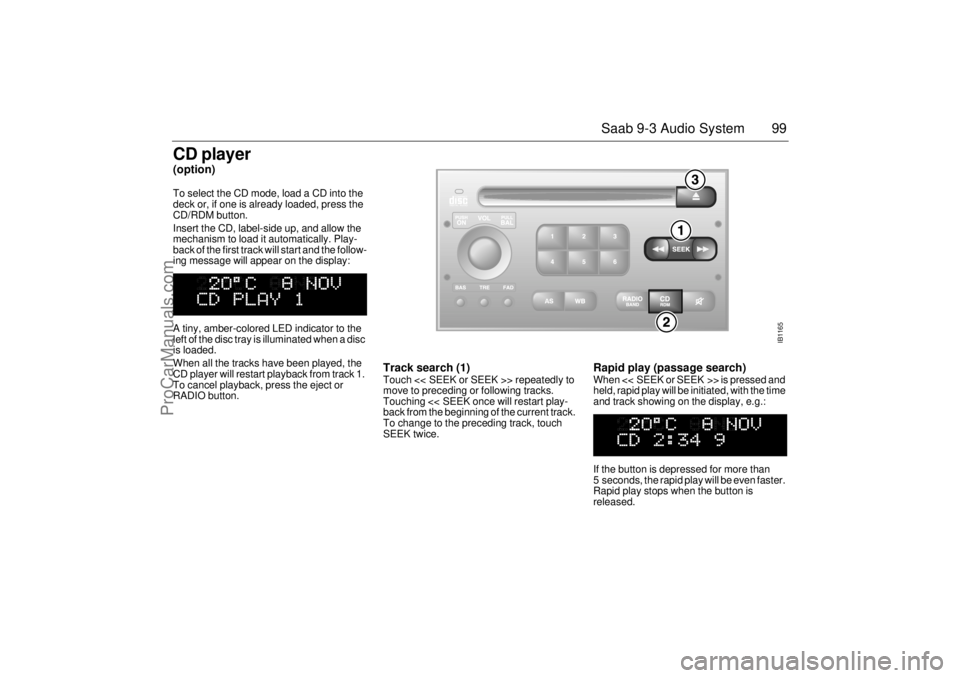
CD player(option)To select the CD mode, load a CD into the
deck or, if one is already loaded, press the
CD/RDM button.
Insert the CD, label-side up, and allow the
mechanism to load it automatically. Play-
back of the first track will start and the follow-
ing message will appear on the display:
A tiny, amber-colored LED indicator to the
left of the disc tray is illuminated when a disc
is loaded.
When all the tracks have been played, the
CD player will restart playback from track 1.
To cancel playback, press the eject or
RADIO button.
Track search (1) Touch << SEEK or SEEK >> repeatedly to
move to preceding or following tracks.
Touching << SEEK once will restart play-
back from the beginning of the current track.
To change to the preceding track, touch
SEEK twice.
Rapid play (passage search) When << SEEK or SEEK >> is pressed and
held, rapid play will be initiated, with the time
and track showing on the display, e.g.:
If the button is depressed for more than
5 seconds, the rapid play will be even faster.
Rapid play stops when the button is
released.
IB1165
ProCarManuals.com
Page 100 of 236
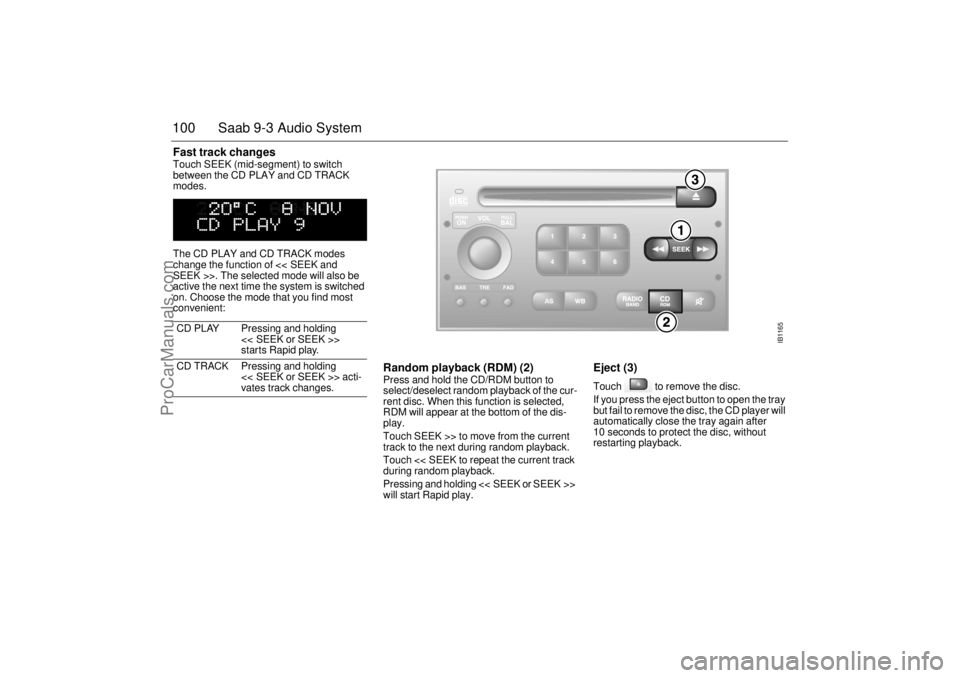
100 Saab 9-3 Audio SystemFast track changes Touch SEEK (mid-segment) to switch
between the CD PLAY and CD TRACK
modes.
The CD PLAY and CD TRACK modes
change the function of << SEEK and
SEEK >>. The selected mode will also be
active the next time the system is switched
on. Choose the mode that you find most
convenient:
Random playback (RDM) (2) Press and hold the CD/RDM button to
select/deselect random playback of the cur-
rent disc. When this function is selected,
RDM will appear at the bottom of the dis-
play.
Touch SEEK >> to move from the current
track to the next during random playback.
Touch << SEEK to repeat the current track
during random playback.
Pressing and holding << SEEK or SEEK >>
will start Rapid play.
Eject (3) Touch to remove the disc.
If you press the eject button to open the tray
but fail to remove the disc, the CD player will
automatically close the tray again after
10 seconds to protect the disc, without
restarting playback. CD PLAY Pressing and holding
<< SEEK or SEEK >>
starts Rapid play.
CD TRACK Pressing and holding
<< SEEK or SEEK >> acti-
vates track changes.
IB1165
ProCarManuals.com
Page 103 of 236
103 Saab 9-3 Audio System
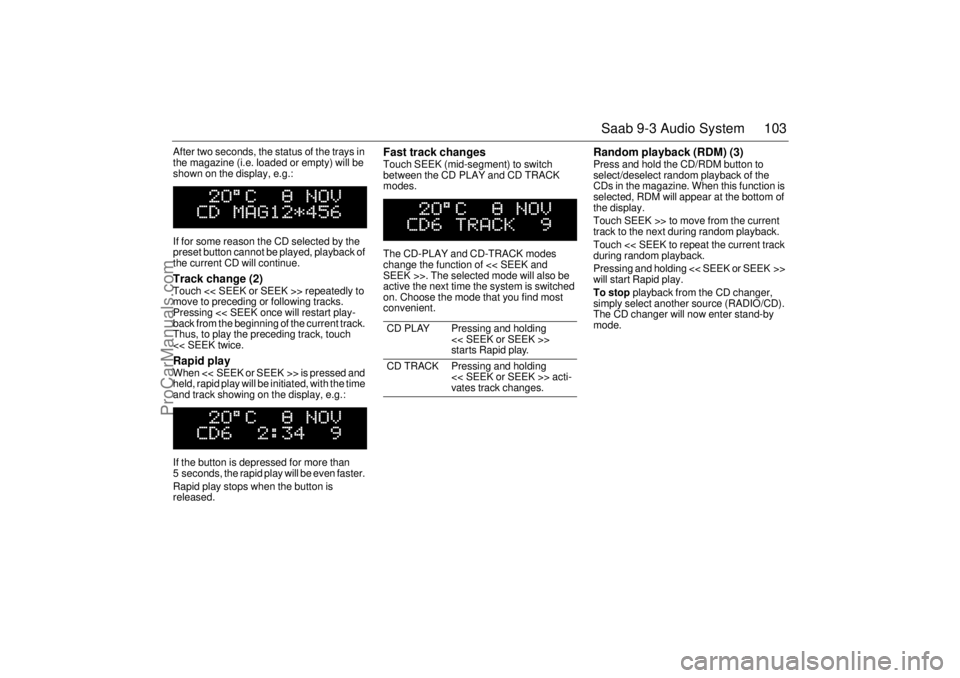
After two seconds, the status of the trays in
the magazine (i.e. loaded or empty) will be
shown on the display, e.g.:
If for some reason the CD selected by the
preset button cannot be played, playback of
the current CD will continue. Track change (2) Touch << SEEK or SEEK >> repeatedly to
move to preceding or following tracks.
Pressing << SEEK once will restart play-
back from the beginning of the current track.
Thus, to play the preceding track, touch
<< SEEK twice. Rapid play When << SEEK or SEEK >> is pressed and
held, rapid play will be initiated, with the time
and track showing on the display, e.g.:
If the button is depressed for more than
5 seconds, the rapid play will be even faster.
Rapid play stops when the button is
released.
Fast track changes Touch SEEK (mid-segment) to switch
between the CD PLAY and CD TRACK
modes.
The CD-PLAY and CD-TRACK modes
change the function of << SEEK and
SEEK >>. The selected mode will also be
active the next time the system is switched
on. Choose the mode that you find most
convenient.
Random playback (RDM) (3) Press and hold the CD/RDM button to
select/deselect random playback of the
CDs in the magazine. When this function is
selected, RDM will appear at the bottom of
the display.
Touch SEEK >> to move from the current
track to the next during random playback.
Touch << SEEK to repeat the current track
during random playback.
Pressing and holding << SEEK or SEEK >>
will start Rapid play.
To stop playback from the CD changer,
simply select another source (RADIO/CD).
The CD changer will now enter stand-by
mode.
CD PLAY Pressing and holding
<< SEEK or SEEK >>
starts Rapid play.
CD TRACK Pressing and holding
<< SEEK or SEEK >> acti-
vates track changes.
ProCarManuals.com
Page 104 of 236
104 Saab 9-3 Audio SystemGeneral functionsVolume-preset modeTo select the volume-preset mode, press
and hold the WB button at the same time as
you switch the Audio System on.
Use the << SEEK >> button to select the
required function.
The following volume settings can be prese-
lected:
STARTVOL - maximum volume level
when the Audio System is switched on.
TEL VOL - preset volume level when an
in-car phone is activated.
SP D VOL - speed-dependent volume.
The Audio System will automatically
adjust the volume level to suit the back-
ground noise, such as road noise, occur-
ring while the car is in motion.
LOUDNESS ON/OFF - boosting of the
highest and lowest frequency ranges to
enhance the sound image when the
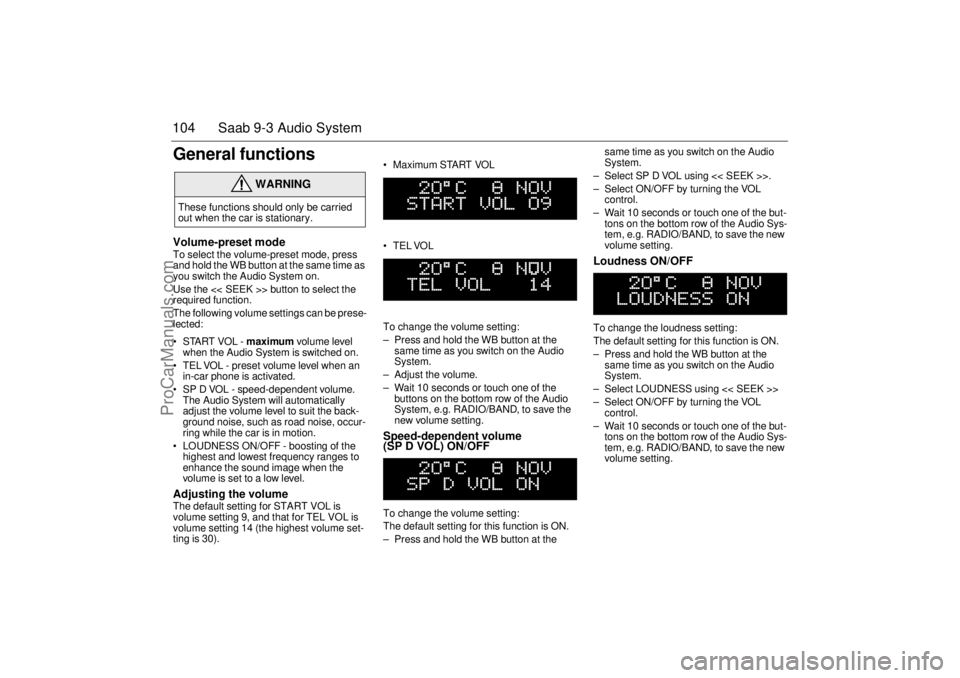
volume is set to a low level. Adjusting the volume The default setting for START VOL is
volume setting 9, and that for TEL VOL is
volume setting 14 (the highest volume set-
ting is 30). Maximum START VOL
TELVOL
To change the volume setting:
– Press and hold the WB button at the
same time as you switch on the Audio
System.
– Adjust the volume.
– Wait 10 seconds or touch one of the
buttons on the bottom row of the Audio
System, e.g. RADIO/BAND, to save the
new volume setting.
Speed-dependent volume
(SP D VOL) ON/OFF To change the volume setting:
The default setting for this function is ON.
– Press and hold the WB button at the same time as you switch on the Audio
System.
– Select SP D VOL using << SEEK >>.
– Select ON/OFF by turning the VOL
control.
– Wait 10 seconds or touch one of the but-
tons on the bottom row of the Audio Sys-
tem, e.g. RADIO/BAND, to save the new
volume setting.
Loudness ON/OFF To change the loudness setting:
The default setting for this function is ON.
– Press and hold the WB button at the
same time as you switch on the Audio
System.
– Select LOUDNESS using << SEEK >>
– Select ON/OFF by turning the VOL
control.
– Wait 10 seconds or touch one of the but-
tons on the bottom row of the Audio Sys-
tem, e.g. RADIO/BAND, to save the new
volume setting.
WARNING
These functions should only be carried
out when the car is stationary.
ProCarManuals.com
Page 121 of 236
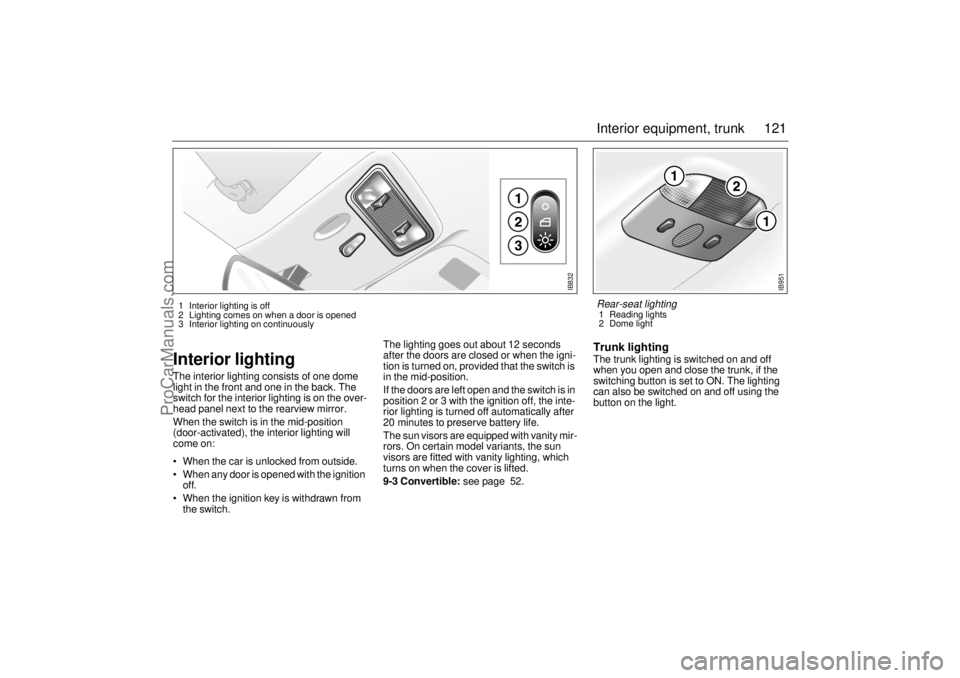
121 Interior equipment, trunk
Interior lightingThe interior lighting consists of one dome
light in the front and one in the back. The
switch for the interior lighting is on the over-
head panel next to the rearview mirror.
When the switch is in the mid-position
(door-activated), the interior lighting will
come on:
When the car is unlocked from outside.
When any door is opened with the ignition
off.
When the ignition key is withdrawn from
the switch.The lighting goes out about 12 seconds
after the doors are closed or when the igni-
tion is turned on, provided that the switch is
in the mid-position.
If the doors are left open and the switch is in
position 2 or 3 with the ignition off, the inte-
rior lighting is turned off automatically after
20 minutes to preserve battery life.
The sun visors are equipped with vanity mir-
rors. On certain model variants, the sun
visors are fitted with vanity lighting, which
turns on when the cover is lifted.
9-3 Convertible: see page 52.
Trunk lightingThe trunk lighting is switched on and off
when you open and close the trunk, if the
switching button is set to ON. The lighting
can also be switched on and off using the
button on the light.
IB832
1 Interior lighting is off
2 Lighting comes on when a door is opened
3 Interior lighting on continuously
IB951
Rear-seat lighting 1 Reading lights
2 Dome light
ProCarManuals.com