instrument panel SAAB 9-3 2000 User Guide
[x] Cancel search | Manufacturer: SAAB, Model Year: 2000, Model line: 9-3, Model: SAAB 9-3 2000Pages: 236, PDF Size: 10.85 MB
Page 69 of 236

69 Instruments and controls
Night panelTo improve night-driving conditions inside
the car, the Night Panel mode can be
selected. In this mode, the amount of infor-
mation displayed is reduced, and only the
most important instruments and displays
will be illuminated.
When the Night Panel button is pressed,
only the speedometer will be illuminated (up
to the 87-mph or 140-km/h graduation), all
the other instruments illumination will be
extinguished and their needles moved to
zero. Both the SID and the ACC displays will
be extinguished and the backlighting for
switches and other controls will be dimmed.
Note: All indicator and warning lights,
together with the display of CHECK mes-
sages, will operate as normal. The following conditions will wake up the
respective displays in the Night-Panel
mode:
Setting of the Audio System, SID or ACC
(display comes on for ten seconds).
CHECK message generated in the SID.
High engine revs cause the rev counter to
be illuminated until the engine speed has
fallen again.
If the quantity of fuel remaining falls below
4 gallons (15 liters), the fuel gauge will be
illuminated.
If the engine temperature rises above nor-
mal, the temperature gauge will be illumi-
nated.
If the speed of the car exceeds 84 mph
(135 km/h), the entire speedometer will
be illuminated.
In cars with automatic transmission, if the
selector lever is moved from D to position
3, 2 or 1, the selector indication on the
main instrument panel will be illuminated.
To restore the displays and lighting to the
normal mode, press the Night-Panel button.
Units and language versions The SID has four sets of units:
CHECK messages can be displayed in six
language options: English, Swedish,
German, French, Italian and Spanish. METRIC IMP. 1 IMP. 2 US
km miles miles miles
km/h mph mph mph
litres gallons gallons US
gallons
°C °F °C °F
24 hours 12 hours 12 hours 12 hours
ProCarManuals.com
Page 72 of 236
72 Instruments and controlsCourtesy Headlamp Feature A delay function allows the headlights to
remain on low beam for about 30 seconds
after the driver’s door has been closed.
To activate this function, switch off the igni-
tion, remove the key, open the driver’s door
and pull the high/low beam control stalk
towards the steering wheel like you are
flashing the high beam, see page 71. The
low beam headlights will now come on
immediately after the driver’s door has been
closed and will remain on for about
30 seconds.
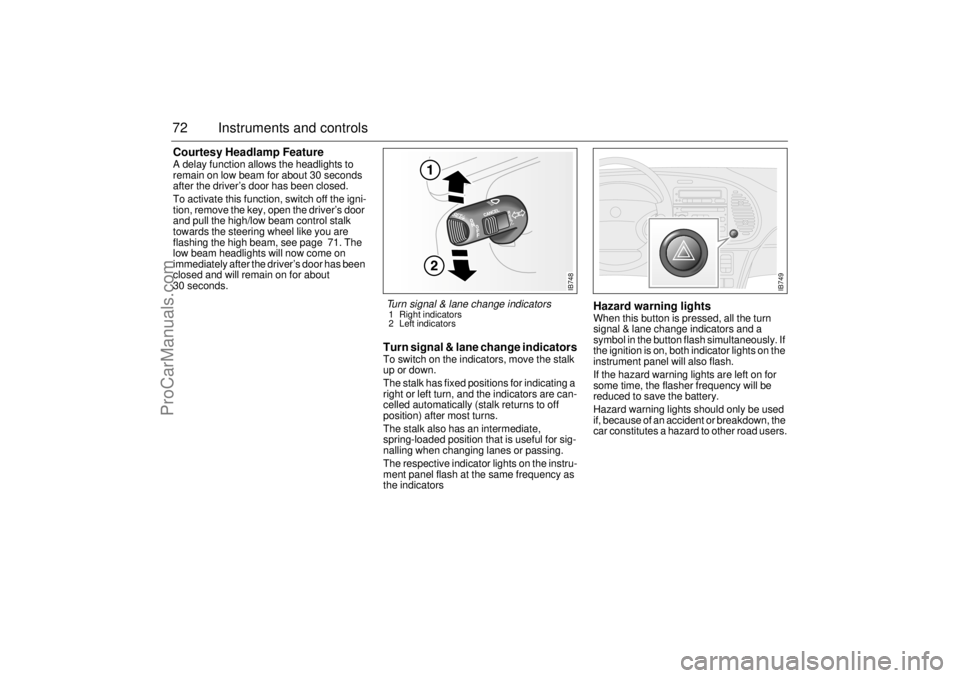
Turn signal & lane change indicatorsTo switch on the indicators, move the stalk
up or down.
The stalk has fixed positions for indicating a
right or left turn, and the indicators are can-
celled automatically (stalk returns to off
position) after most turns.
The stalk also has an intermediate,
spring-loaded position that is useful for sig-
nalling when changing lanes or passing.
The respective indicator lights on the instru-
ment panel flash at the same frequency as
the indicators
Hazard warning lightsWhen this button is pressed, all the turn
signal & lane change indicators and a
symbol in the button flash simultaneously. If
the ignition is on, both indicator lights on the
instrument panel will also flash.
If the hazard warning lights are left on for
some time, the flasher frequency will be
reduced to save the battery.
Hazard warning lights should only be used
if, because of an accident or breakdown, the
car constitutes a hazard to other road users.
IB748
Turn signal & lane change indicators 1 Right indicators
2 Left indicators
IB749
ProCarManuals.com
Page 74 of 236
74 Instruments and controlsInstrument lightingThe brightness of the instrument lighting
can be varied by means of the dimmer
switch adjacent to the headlight switch, the
ignition switch shall be in position ON. (See
also Night panel on page 69).
In daylight or other equally bright light, the
instrument and switch illumination is auto-
matically extinguished.
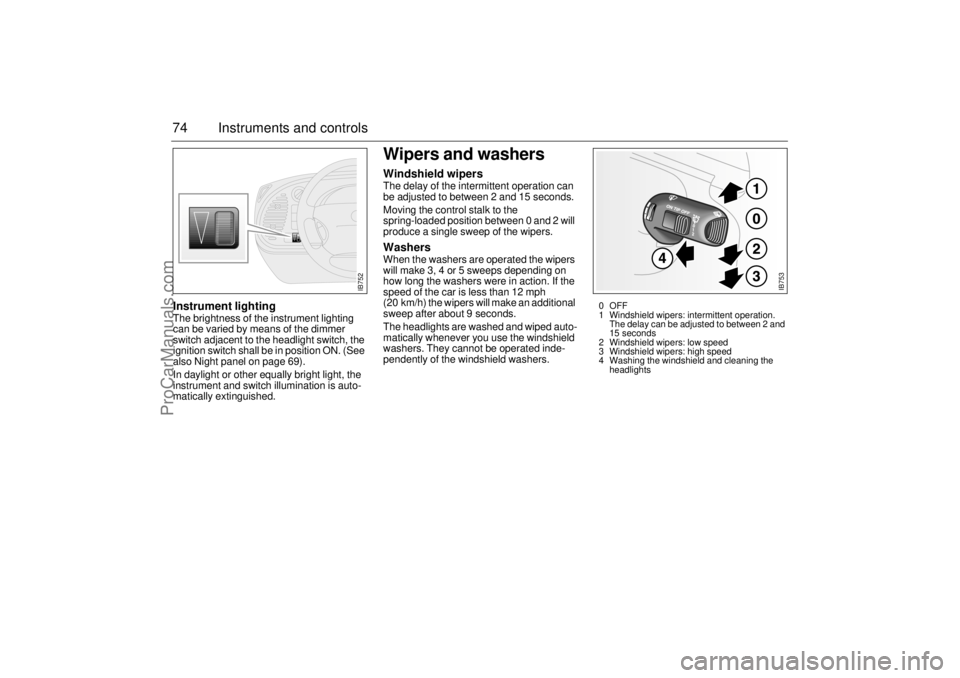
Wipers and washersWindshield wipersThe delay of the intermittent operation can
be adjusted to between 2 and 15 seconds.
Moving the control stalk to the
spring-loaded position between 0 and 2 will
produce a single sweep of the wipers. WashersWhen the washers are operated the wipers
will make 3, 4 or 5 sweeps depending on
how long the washers were in action. If the
speed of the car is less than 12 mph
(20 km/h) the wipers will make an additional
sweep after about 9 seconds.
The headlights are washed and wiped auto-
matically whenever you use the windshield
washers. They cannot be operated inde-
pendently of the windshield washers.
IB752
IB753
0OFF
1 Windshield wipers: intermittent operation.
The delay can be adjusted to between 2 and
15 seconds
2 Windshield wipers: low speed
3 Windshield wipers: high speed
4 Washing the windshield and cleaning the
headlights
ProCarManuals.com
Page 76 of 236
76 Instruments and controlsManual climate-control
systemThe air is drawn in through an intake at the
bottom edge of the windshield. It passes
through an efficient filter before being
routed through the climate-control system
and into the cabin. The cabin discharge vent
is located on the right behind the rear
bumper. The air discharge vents should be
kept free of snow and ice in the winter.
The rate of air flow inside the car is con-
trolled by means of the fan switch. Temperature control The temperature of the incoming air can
be steplessly varied using the temperature
control.
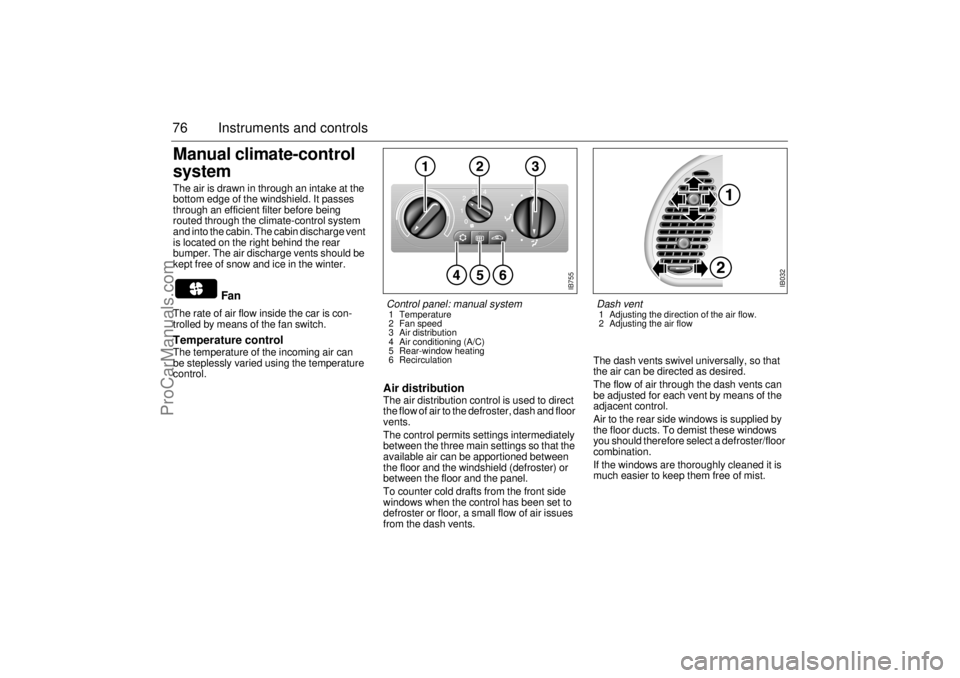
Air distribution The air distribution control is used to direct
the flow of air to the defroster, dash and floor
vents.
The control permits settings intermediately
between the three main settings so that the
available air can be apportioned between
the floor and the windshield (defroster) or
between the floor and the panel.
To counter cold drafts from the front side
windows when the control has been set to
defroster or floor, a small flow of air issues
from the dash vents. The dash vents swivel universally, so that
the air can be directed as desired.
The flow of air through the dash vents can
be adjusted for each vent by means of the
adjacent control.
Air to the rear side windows is supplied by
the floor ducts. To demist these windows
you should therefore select a defroster/floor
combination.
If the windows are thoroughly cleaned it is
much easier to keep them free of mist.
Fan
IB755
Control panel: manual system 1 Temperature
2 Fan speed
3 Air distribution
4 Air conditioning (A/C)
5 Rear-window heating
6 Recirculation
IB032
Dash vent 1 Adjusting the direction of the air flow.
2 Adjusting the air flow
ProCarManuals.com
Page 77 of 236
77 Instruments and controls
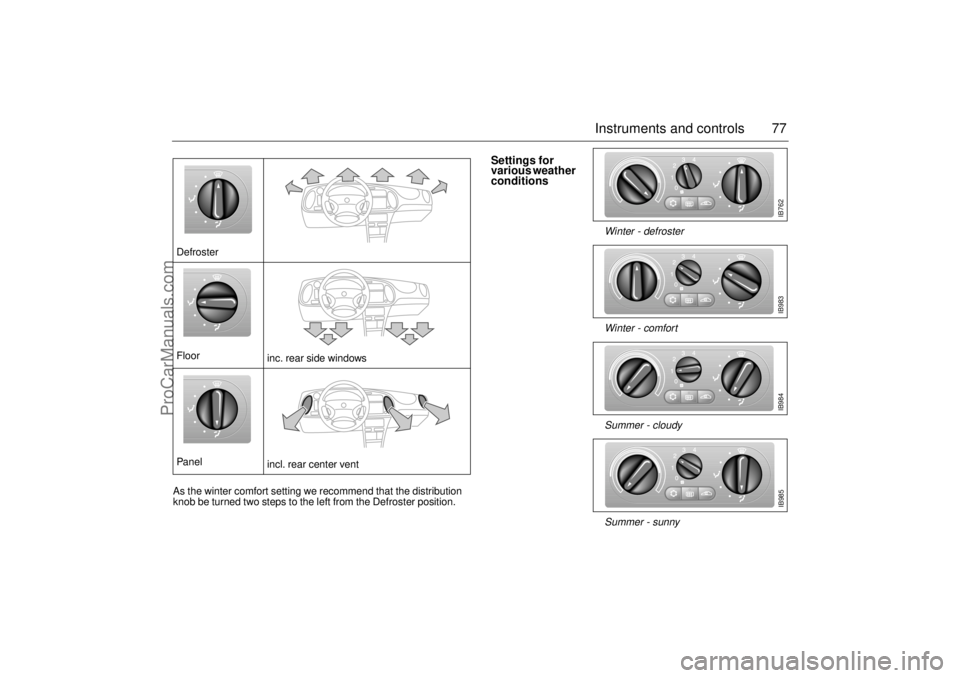
Defroster
Floor
inc. rear side windows
Panel
incl. rear center vent As the winter comfort setting we recommend that the distribution
knob be turned two steps to the left from the Defroster position.
IB762
Settings for
various weather
conditions
Summer - sunny Summer - cloudy Winter - comfort Winter - defroster
IB983IB984IB985
ProCarManuals.com
Page 79 of 236

79 Instruments and controls
The button is located on the climate-control
panel. An LED in the button is lit as long as
heating is on.
Switch off the heating as soon as the rear
window is clear. It will go off automatically
after about 10 minutes.
If the battery voltage is lower than 12 V the
heating will be switched off earlier so that
the battery can get the benefit of the alterna-
tor charge.
Avoid placing sharp objects on the rear
parcel shelf; the heater elements may suffer
damage if such objects touch the rear win-
dow. Do not switch the heating on until you
have started the engine.
Recommended settings in
severe cold On starting with a cold engine, set the fan
switch to position 2 and select defrost to
heat the cabin and defrost the windshield as
quickly as possible.
When the engine is warm enough for the
reading of the temperature gauge to start
rising, fan setting 3 may be chosen. Once
the windshield is clear, the air-distribution
control should be shifted two steps to the
left.
The warm-up time of the engine depends on
the kind of driving. Town driving in high gear
with a low RPM gives a longer warm-up time
than highway driving with a higher RPM.
Do not use position 4 on the fan switch, as
this is mainly intended to provide rapid cool-
ing in hot weather.
Electrically heated rear
window/external mirrors
ProCarManuals.com
Page 80 of 236
80 Instruments and controlsAutomatic climate
control (ACC)The air is drawn in through an intake at the
bottom edge of the windshield. It passes
through an efficient filter before being
routed through the climate-control system
and into the cabin. The cabin discharge vent
is located on the right behind the rear
bumper. The air discharge vents should be
kept free of snow and ice in the winter.
ACC (Automatic Climate Control) automati-
cally maintains the desired cabin tempera-
ture, regardless of the weather outside.
The system will achieve the desired temper-
ature in the quickest possible way.
Note that heating or cooling is not
speeded up by setting the temperature
higher or lower than you really want.
For the ACC system to be most effective, all
windows, and the sunroof if there is one,
must be closed, and the panel vents must
be open.
The incoming air is treated in three stages:
first it passes through a filter; it is then dehu-
midified and cooled and, finally, if required,
heated. The temperature interval within which you
can make adjustments is 58-82°F
(15-27°C). Outside it, there is the HI position
(max. heat and high fan speed) and the LO
position (max. cooling and max. fan speed).
The displayed temperature is not the actual
temperature but corresponds to the comfort
level normally experienced at that tempera-
ture after allowance has been made for the
air flow, relative humidity, solar radiation,
etc., currently prevailing inside the car.
The most usual temperature setting is
66-74°F (19-23°C), depending on per-
sonal preference and what clothing is
worn. It is recommended that changes in the
temperature setting be made in steps of
2°F (1°C).
Conversion between °C and °F is done in
the SID unit; see ”Units and language ver-
sions”, page 69.
During the cooling phase in warm
weather the panel vents must be open.
Do not manually select recirculation in
cold/wintery weather. The reduced air
flow can cause misting and ice on the
inside of the windows.
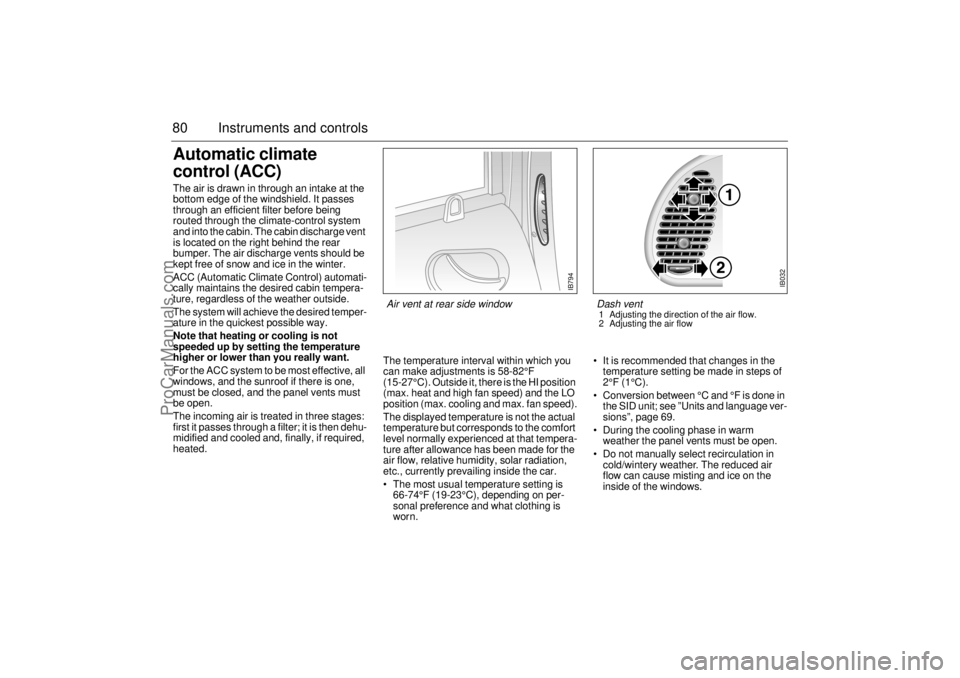
IB794
Air vent at rear side window
IB032
Dash vent 1 Adjusting the direction of the air flow.
2 Adjusting the air flow
ProCarManuals.com
Page 81 of 236
81 Instruments and controls
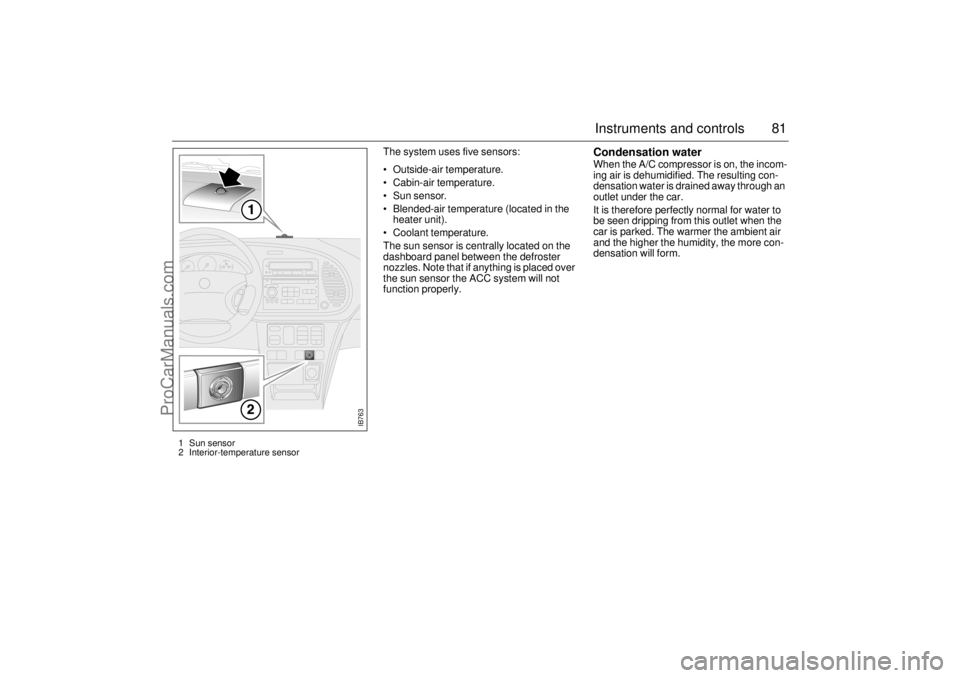
The system uses five sensors:
Outside-air temperature.
Cabin-air temperature.
Sun sensor.
Blended-air temperature (located in the
heater unit).
Coolant temperature.
The sun sensor is centrally located on the
dashboard panel between the defroster
nozzles. Note that if anything is placed over
the sun sensor the ACC system will not
function properly.
Condensation water When the A/C compressor is on, the incom-
ing air is dehumidified. The resulting con-
densation water is drained away through an
outlet under the car.
It is therefore perfectly normal for water to
be seen dripping from this outlet when the
car is parked. The warmer the ambient air
and the higher the humidity, the more con-
densation will form.
IB763
1 Sun sensor
2 Interior-temperature sensor
ProCarManuals.com
Page 83 of 236
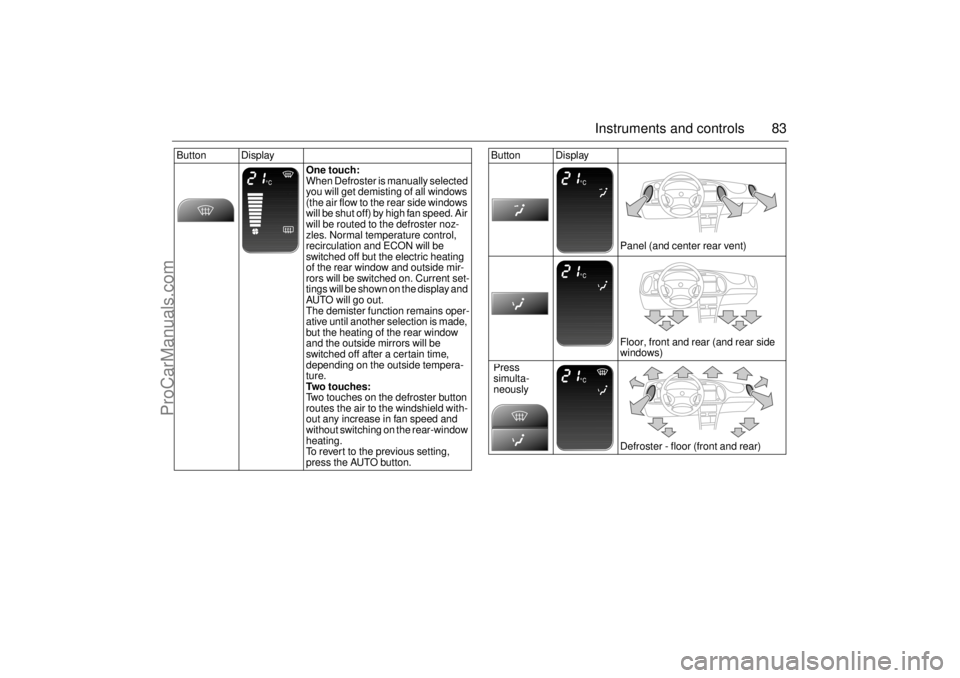
83 Instruments and controls
Button Display
One touch:
When Defroster is manually selected
you will get demisting of all windows
(the air flow to the rear side windows
will be shut off) by high fan speed. Air
will be routed to the defroster noz-
zles. Normal temperature control,
recirculation and ECON will be
switched off but the electric heating
of the rear window and outside mir-
rors will be switched on. Current set-
tings will be shown on the display and
AUTO will go out.
The demister function remains oper-
ative until another selection is made,
but the heating of the rear window
and the outside mirrors will be
switched off after a certain time,
depending on the outside tempera-
ture.
Two touches:
Two touches on the defroster button
routes the air to the windshield with-
out any increase in fan speed and
without switching on the rear-window
heating.
To revert to the previous setting,
press the AUTO button.
Button Display
Panel (and center rear vent)
Floor, front and rear (and rear side
windows)
Defroster - floor (front and rear) Press
simulta-
neously
ProCarManuals.com
Page 84 of 236
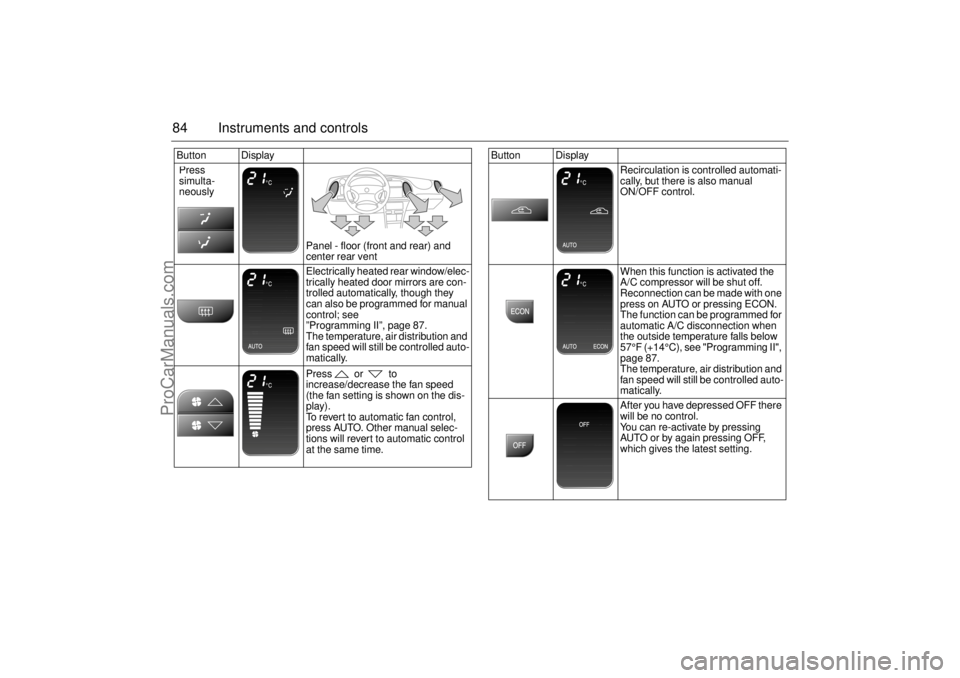
84 Instruments and controlsButton Display
Panel - floor (front and rear) and
center rear vent
Electrically heated rear window/elec-
trically heated door mirrors are con-
trolled automatically, though they
can also be programmed for manual
control; see
”Programming II”, page 87.
The temperature, air distribution and
fan speed will still be controlled auto-
matically.
Press or to
increase/decrease the fan speed
(the fan setting is shown on the dis-
play).
To revert to automatic fan control,
press AUTO. Other manual selec-
tions will revert to automatic control
at the same time. Press
simulta-
neously
Button Display
Recirculation is controlled automati-
cally, but there is also manual
ON/OFF control.
When this function is activated the
A/C compressor will be shut off.
Reconnection can be made with one
press on AUTO or pressing ECON.
The function can be programmed for
automatic A/C disconnection when
the outside temperature falls below
57°F (+14°C), see "Programming II",
page 87.
The temperature, air distribution and
fan speed will still be controlled auto-
matically.
After you have depressed OFF there
will be no control.
You can re-activate by pressing
AUTO or by again pressing OFF,
which gives the latest setting.
ProCarManuals.com