lights SAAB 9-3 2000 User Guide
[x] Cancel search | Manufacturer: SAAB, Model Year: 2000, Model line: 9-3, Model: SAAB 9-3 2000Pages: 236, PDF Size: 10.85 MB
Page 63 of 236

63 Instruments and controls
CHECK messages When the engine is started, CHECKING will
appear on the display for about four sec-
onds, while the SID checks are being per-
formed.
When a CHECK message is generated
while the car is being driven, a chime will
sound, INFO DISPL will illuminate on the
main instrument panel, and the message
will appear on the SID. The number of mes-
sages that can be displayed by the SID
varies with the specification of the car.
If more than one CHECK message has
been generated, the
+ symbol will appear to
the left of the text on the display. The mes-
sages appear in order of priority.
If a new fault occurs while another message
is being displayed, the message relating to
the new one will appear for 10 seconds,
after which the display will return to the ear-
lier one.
Press CLEAR once to acknowledge a mes-
sage, whereupon it will be cleared from the
display. It will not be displayed again before
the ignition has been switched off and then
on again. The following CHECK messages may be
displayed:
1 This message cannot be removed by pressing
CLEAR. Press the brake pedal to clear.
2 This message will be displayed approxi-
mately 600 miles (1,000 km) before the next
scheduled service is due, or when 365 days
have elapsed since the last service. The
message should be cleared at the time of that
service (see the Saab Warranties & Service
Record Booklet).
If you have carried out the service yourself,
you can clear the message by pressing
CLEAR once. Reset by pressing CLEAR for
at least eight seconds, until ”SERVICE”
appears on the display and a chime sounds.
Night Panel To improve night-driving conditions inside
the car, the Night Panel mode can be
selected. In this mode, the amount of infor-
mation displayed is reduced, and only the
most important instruments and displays
will be illuminated.
When the Night Panel button is pressed,
only the speedometer will be illuminated (up
to the 87 mph or 140-km/h graduation), all
the other instruments illumination will be
extinguished and their needles moved to
zero. Both the SID and the ACC displays will
be extinguished and the backlighting for
switches and other controls will be dimmed.
Note: All indicator and warning lights,
together with the display of CHECK mes-
sages, will operate as normal.
The following conditions will wake up the
respective displays in the Night-Panel
mode:
Adjusting of the Audio System, SID or
ACC (display comes on for ten seconds).
CHECK message generated in the SID.
High engine revs cause the rev counter to
be illuminated until the engine speed has
fallen again.
If the quantity of fuel remaining falls below
4 gallons (15 liters), the fuel gauge will be
illuminated.
If the engine temperature rises above nor-
mal, the temperature gauge will be illumi-
nated. Display shows: See
page
TEST BRAKE LIGHTS
1)
183
BRAKE LIGHT FAILURE 183
FRONT LIGHT FAILURE 181
REAR LIGHT FAILURE 183
FOG LIGHT FAILURE 183
WASHER FLUID LEVEL LOW 180
FILL COOLANT FLUID 174
TIGHTEN FUEL FILLER CAP 138
KEY NOT ACCEPTED 39
REPLACE KEY BATTERY 39
SERVICE THEFT ALARM 39
TRANSMISSION OVERHEAT-
ING 144
TIME FOR SERVICE
2)
212
ProCarManuals.com
Page 68 of 236

68 Instruments and controlsResetting values
To reset the values, press CLR for at least
four seconds.
The following functions will be reset
simultaneously:
Estimated range on remaining fuel
(function based on a fuel consumption of
28 mpg)
Average fuel consumption
Average speed
Arrival time (function based on current
speed)
Programmed values for DIST, ALARM and
SPD W will not be reset (see the respective
function).
CHECK messages When the engine is started, CHECKING will
appear on the display for about four sec-
onds, while the SID checks are being per-
formed.
When a CHECK message is generated
while the car is being driven, a chime will
sound, INFO DISPL will illuminate on the
main instrument panel, and the message
will appear on the SID. The number of mes-
sages that can be displayed by the SID
varies with the specification of the car.
If more than one CHECK message has
been generated, the
+ symbol will appear to
the left of the text on the display. The mes-
sages appear in order of priority.
If a new fault occurs while another message
is being displayed, the message relating to
the new one will appear for 10 seconds,
after which the display will return to the ear-
lier one.
Press CLR once to acknowledge a mes-
sage, whereupon it will be cleared from the
display. It will not be displayed again before
the ignition has been switched off and then
on again. The following CHECK messages may be
displayed:
1 This message cannot be removed by pressing
CLR. Press the brake pedal to clear.
2 This message will be displayed approximately
600 miles (1,000 km) before the next sched-
uled service is due, or when 365 days have
elapsed since the last service. The message
should be cleared at the time of that service
(see the Saab Warranties & Service Record
Booklet).
If you have carried out the service yourself, you
can clear the message by pressing CLR once.
Reset by pressing CLR for at least eight sec-
onds, until ”SERVICE” appears on the display
and a chime sounds. Display shows: See
page
TEST BRAKE LIGHTS
1)
183
BRAKE LIGHT FAILURE 183
FRONT LIGHT FAILURE 181
REAR LIGHT FAILURE 183
FOG LIGHT FAILURE 184
WASHER FLUID LEVEL LOW 180
TIGHTEN FUEL FILLER CAP 138
FILL COOLANT FLUID 174
KEY NOT ACCEPTED 39
REPLACE KEY BATTERY 39
SERVICE THEFT ALARM 39
TRANSMISSION OVERHEAT-
ING 144
TIME FOR SERVICE
2)
212
ProCarManuals.com
Page 69 of 236

69 Instruments and controls
Night panelTo improve night-driving conditions inside
the car, the Night Panel mode can be
selected. In this mode, the amount of infor-
mation displayed is reduced, and only the
most important instruments and displays
will be illuminated.
When the Night Panel button is pressed,
only the speedometer will be illuminated (up
to the 87-mph or 140-km/h graduation), all
the other instruments illumination will be
extinguished and their needles moved to
zero. Both the SID and the ACC displays will
be extinguished and the backlighting for
switches and other controls will be dimmed.
Note: All indicator and warning lights,
together with the display of CHECK mes-
sages, will operate as normal. The following conditions will wake up the
respective displays in the Night-Panel
mode:
Setting of the Audio System, SID or ACC
(display comes on for ten seconds).
CHECK message generated in the SID.
High engine revs cause the rev counter to
be illuminated until the engine speed has
fallen again.
If the quantity of fuel remaining falls below
4 gallons (15 liters), the fuel gauge will be
illuminated.
If the engine temperature rises above nor-
mal, the temperature gauge will be illumi-
nated.
If the speed of the car exceeds 84 mph
(135 km/h), the entire speedometer will
be illuminated.
In cars with automatic transmission, if the
selector lever is moved from D to position
3, 2 or 1, the selector indication on the
main instrument panel will be illuminated.
To restore the displays and lighting to the
normal mode, press the Night-Panel button.
Units and language versions The SID has four sets of units:
CHECK messages can be displayed in six
language options: English, Swedish,
German, French, Italian and Spanish. METRIC IMP. 1 IMP. 2 US
km miles miles miles
km/h mph mph mph
litres gallons gallons US
gallons
°C °F °C °F
24 hours 12 hours 12 hours 12 hours
ProCarManuals.com
Page 71 of 236
71 Instruments and controls
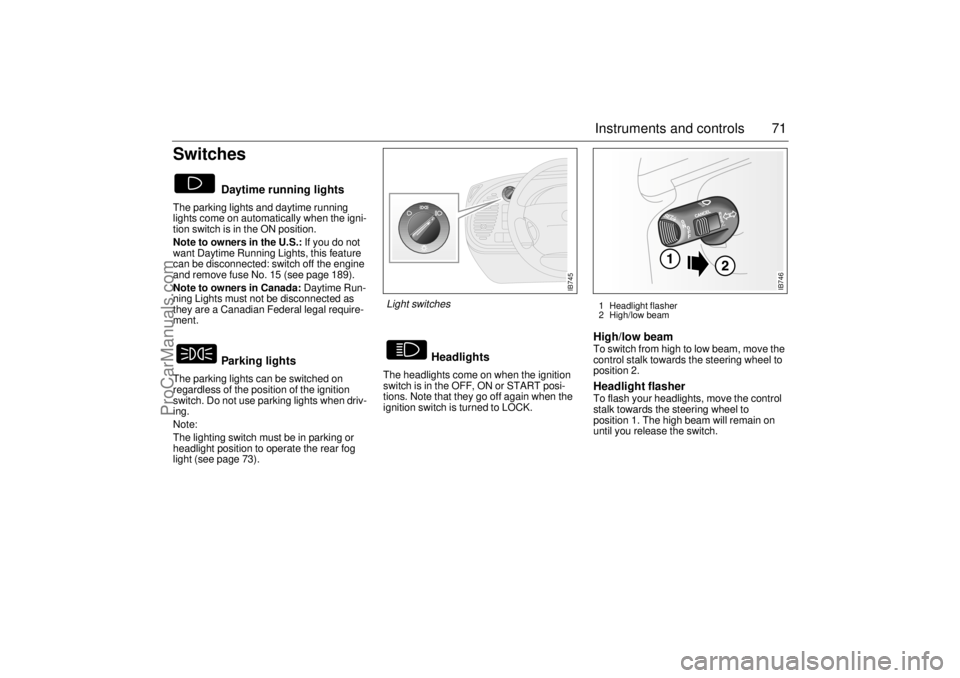
SwitchesThe parking lights and daytime running
lights come on automatically when the igni-
tion switch is in the ON position.
Note to owners in the U.S.: If you do not
want Daytime Running Lights, this feature
can be disconnected: switch off the engine
and remove fuse No. 15 (see page 189).
Note to owners in Canada: Daytime Run-
ning Lights must not be disconnected as
they are a Canadian Federal legal require-
ment.
The parking lights can be switched on
regardless of the position of the ignition
switch. Do not use parking lights when driv-
ing.
Note:
The lighting switch must be in parking or
headlight position to operate the rear fog
light (see page 73).The headlights come on when the ignition
switch is in the OFF, ON or START posi-
tions. Note that they go off again when the
ignition switch is turned to LOCK.
High/low beam To switch from high to low beam, move the
control stalk towards the steering wheel to
position 2. Headlight flasher To flash your headlights, move the control
stalk towards the steering wheel to
position 1. The high beam will remain on
until you release the switch.
Daytime running lights
Parking lights
Headlights
IB745
Light switches
1 Headlight flasher
2 High/low beam
IB746
ProCarManuals.com
Page 72 of 236
72 Instruments and controlsCourtesy Headlamp Feature A delay function allows the headlights to
remain on low beam for about 30 seconds
after the driver’s door has been closed.
To activate this function, switch off the igni-
tion, remove the key, open the driver’s door
and pull the high/low beam control stalk
towards the steering wheel like you are
flashing the high beam, see page 71. The
low beam headlights will now come on
immediately after the driver’s door has been
closed and will remain on for about
30 seconds.
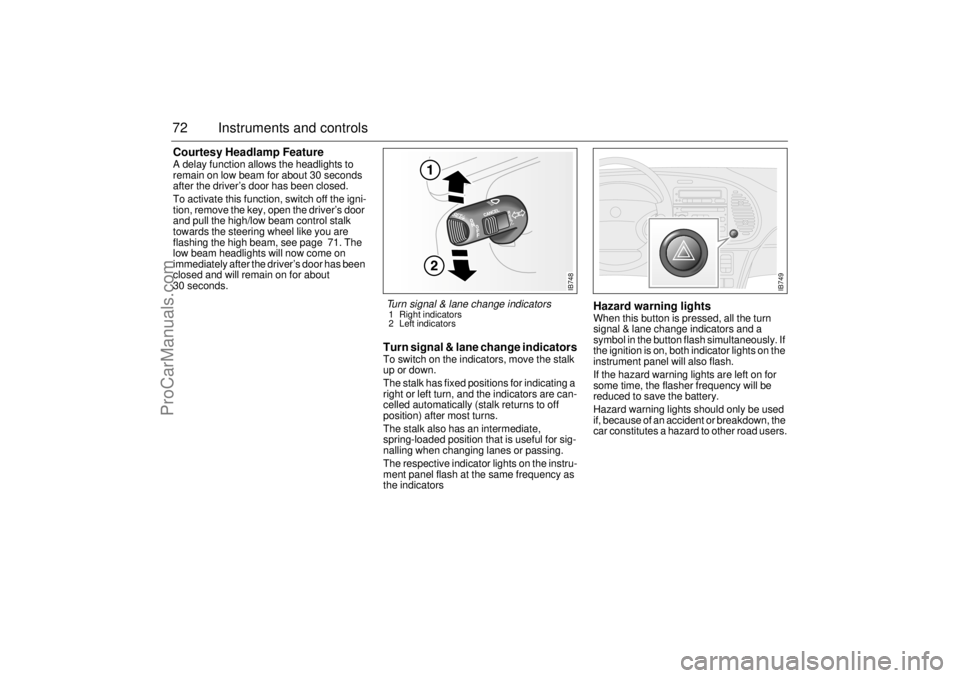
Turn signal & lane change indicatorsTo switch on the indicators, move the stalk
up or down.
The stalk has fixed positions for indicating a
right or left turn, and the indicators are can-
celled automatically (stalk returns to off
position) after most turns.
The stalk also has an intermediate,
spring-loaded position that is useful for sig-
nalling when changing lanes or passing.
The respective indicator lights on the instru-
ment panel flash at the same frequency as
the indicators
Hazard warning lightsWhen this button is pressed, all the turn
signal & lane change indicators and a
symbol in the button flash simultaneously. If
the ignition is on, both indicator lights on the
instrument panel will also flash.
If the hazard warning lights are left on for
some time, the flasher frequency will be
reduced to save the battery.
Hazard warning lights should only be used
if, because of an accident or breakdown, the
car constitutes a hazard to other road users.
IB748
Turn signal & lane change indicators 1 Right indicators
2 Left indicators
IB749
ProCarManuals.com
Page 73 of 236
73 Instruments and controls
Back-UpThe back-up lights come on automatically
when reverse gear is engaged or selected
with the ignition switched on.
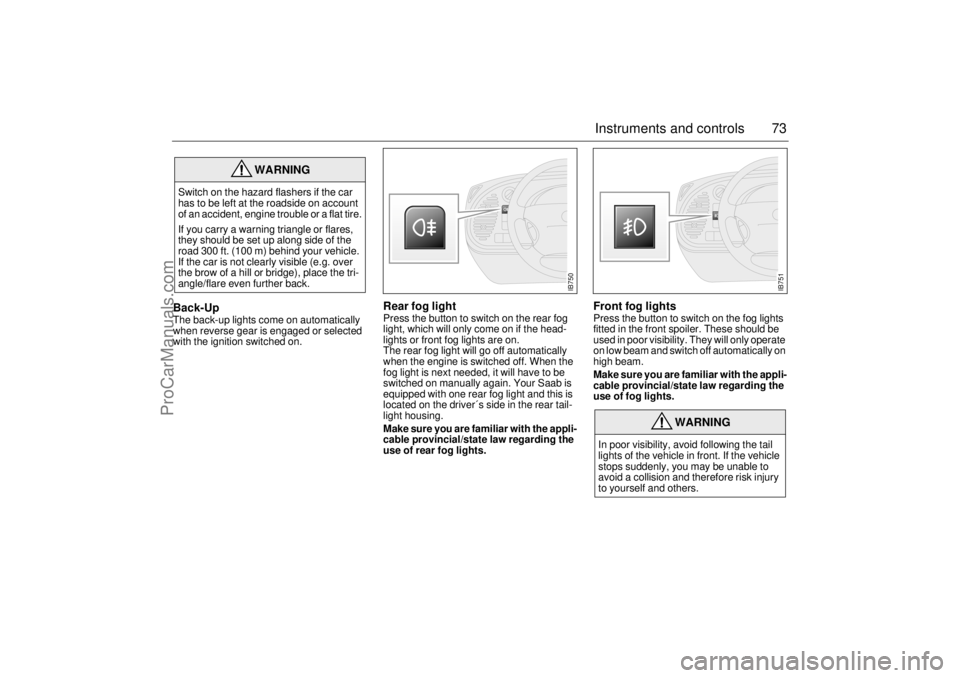
Rear fog lightPress the button to switch on the rear fog
light, which will only come on if the head-
lights or front fog lights are on.
The rear fog light will go off automatically
when the engine is switched off. When the
fog light is next needed, it will have to be
switched on manually again. Your Saab is
equipped with one rear fog light and this is
located on the driver´s side in the rear tail-
light housing.
Make sure you are familiar with the appli-
cable provincial/state law regarding the
use of rear fog lights.
Front fog lights Press the button to switch on the fog lights
fitted in the front spoiler. These should be
used in poor visibility. They will only operate
on low beam and switch off automatically on
high beam.
Make sure you are familiar with the appli-
cable provincial/state law regarding the
use of fog lights.
WARNING
Switch on the hazard flashers if the car
has to be left at the roadside on account
of an accident, engine trouble or a flat tire.
If you carry a warning triangle or flares,
they should be set up along side of the
road 300 ft. (100 m) behind your vehicle.
If the car is not clearly visible (e.g. over
the brow of a hill or bridge), place the tri-
angle/flare even further back.
WARNING
In poor visibility, avoid following the tail
lights of the vehicle in front. If the vehicle
stops suddenly, you may be unable to
avoid a collision and therefore risk injury
to yourself and others.
IB750
IB751
ProCarManuals.com
Page 74 of 236
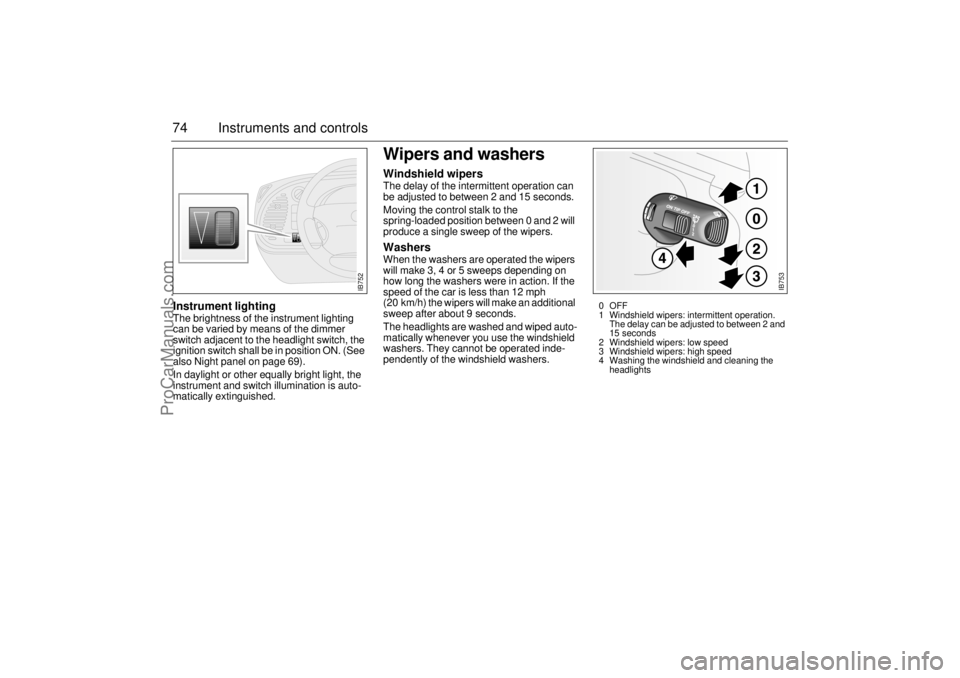
74 Instruments and controlsInstrument lightingThe brightness of the instrument lighting
can be varied by means of the dimmer
switch adjacent to the headlight switch, the
ignition switch shall be in position ON. (See
also Night panel on page 69).
In daylight or other equally bright light, the
instrument and switch illumination is auto-
matically extinguished.
Wipers and washersWindshield wipersThe delay of the intermittent operation can
be adjusted to between 2 and 15 seconds.
Moving the control stalk to the
spring-loaded position between 0 and 2 will
produce a single sweep of the wipers. WashersWhen the washers are operated the wipers
will make 3, 4 or 5 sweeps depending on
how long the washers were in action. If the
speed of the car is less than 12 mph
(20 km/h) the wipers will make an additional
sweep after about 9 seconds.
The headlights are washed and wiped auto-
matically whenever you use the windshield
washers. They cannot be operated inde-
pendently of the windshield washers.
IB752
IB753
0OFF
1 Windshield wipers: intermittent operation.
The delay can be adjusted to between 2 and
15 seconds
2 Windshield wipers: low speed
3 Windshield wipers: high speed
4 Washing the windshield and cleaning the
headlights
ProCarManuals.com
Page 75 of 236
75 Instruments and controls
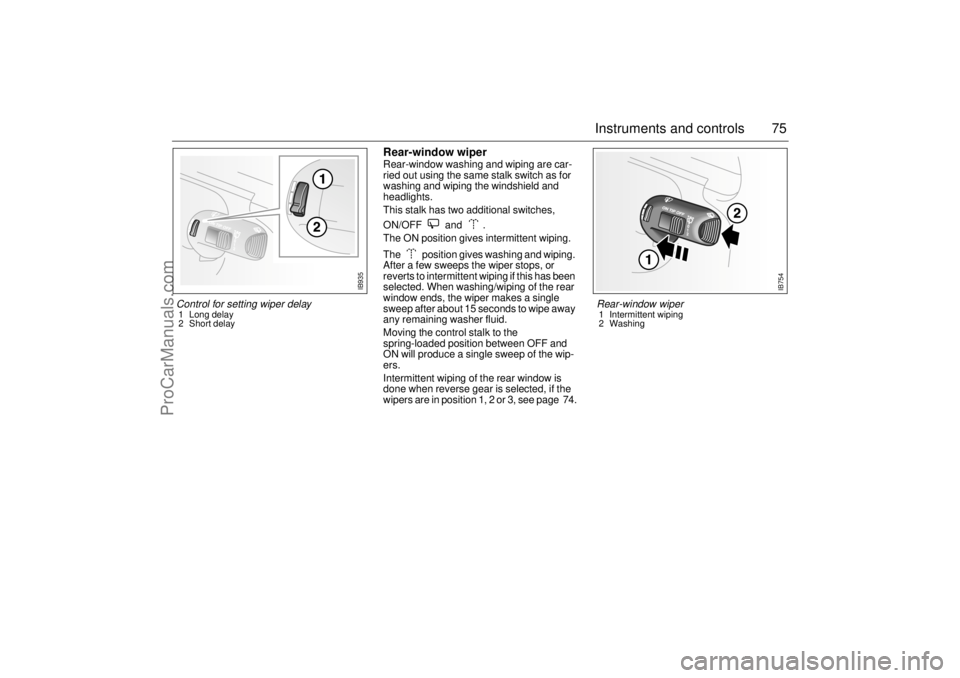
Rear-window wiperRear-window washing and wiping are car-
ried out using the same stalk switch as for
washing and wiping the windshield and
headlights.
This stalk has two additional switches,
ON/OFF and .
The ON position gives intermittent wiping.
The position gives washing and wiping.
After a few sweeps the wiper stops, or
reverts to intermittent wiping if this has been
selected. When washing/wiping of the rear
window ends, the wiper makes a single
sweep after about 15 seconds to wipe away
any remaining washer fluid.
Moving the control stalk to the
spring-loaded position between OFF and
ON will produce a single sweep of the wip-
ers.
Intermittent wiping of the rear window is
done when reverse gear is selected, if the
wipers are in position 1, 2 or 3, see page 74.
IB754
Rear-window wiper 1 Intermittent wiping
2 Washing
Control for setting wiper delay 1 Long delay
2 Short delay
IB935
ProCarManuals.com
Page 121 of 236
121 Interior equipment, trunk
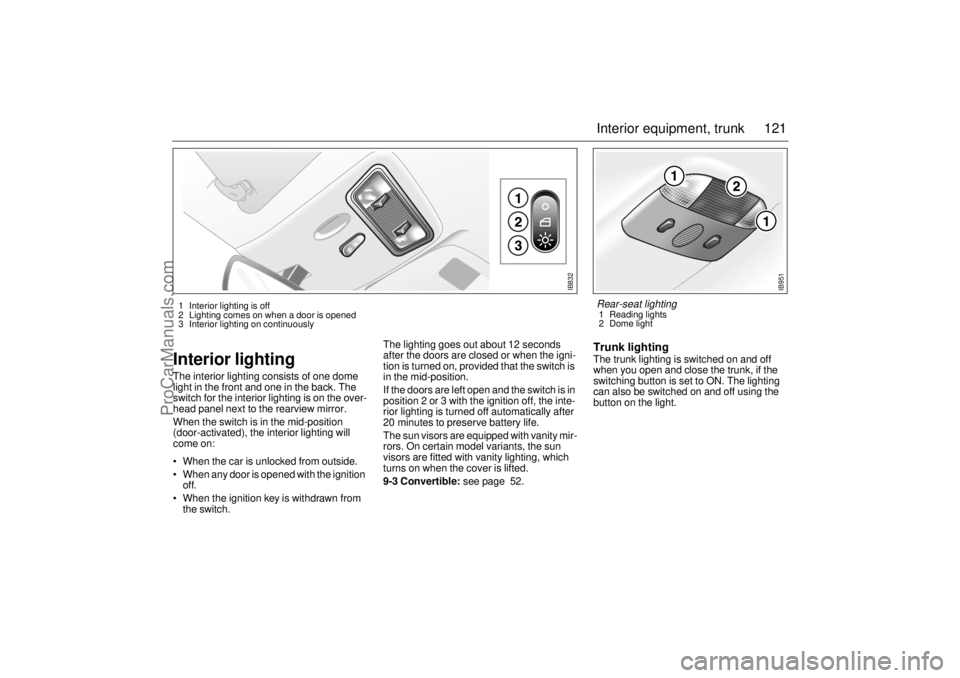
Interior lightingThe interior lighting consists of one dome
light in the front and one in the back. The
switch for the interior lighting is on the over-
head panel next to the rearview mirror.
When the switch is in the mid-position
(door-activated), the interior lighting will
come on:
When the car is unlocked from outside.
When any door is opened with the ignition
off.
When the ignition key is withdrawn from
the switch.The lighting goes out about 12 seconds
after the doors are closed or when the igni-
tion is turned on, provided that the switch is
in the mid-position.
If the doors are left open and the switch is in
position 2 or 3 with the ignition off, the inte-
rior lighting is turned off automatically after
20 minutes to preserve battery life.
The sun visors are equipped with vanity mir-
rors. On certain model variants, the sun
visors are fitted with vanity lighting, which
turns on when the cover is lifted.
9-3 Convertible: see page 52.
Trunk lightingThe trunk lighting is switched on and off
when you open and close the trunk, if the
switching button is set to ON. The lighting
can also be switched on and off using the
button on the light.
IB832
1 Interior lighting is off
2 Lighting comes on when a door is opened
3 Interior lighting on continuously
IB951
Rear-seat lighting 1 Reading lights
2 Dome light
ProCarManuals.com
Page 125 of 236
125 Interior equipment, trunk
Trunk, Coupé and 5-doorTrunk lid lockUnlock the trunk lid by pressing the lower button on the remote trans-
mitter, by pressing the remote release button on the driver’s door or
by using the key. The alarm horn sounds three times and the lights
flash when the trunk is released with the remote control.
Programming features, see page 231.
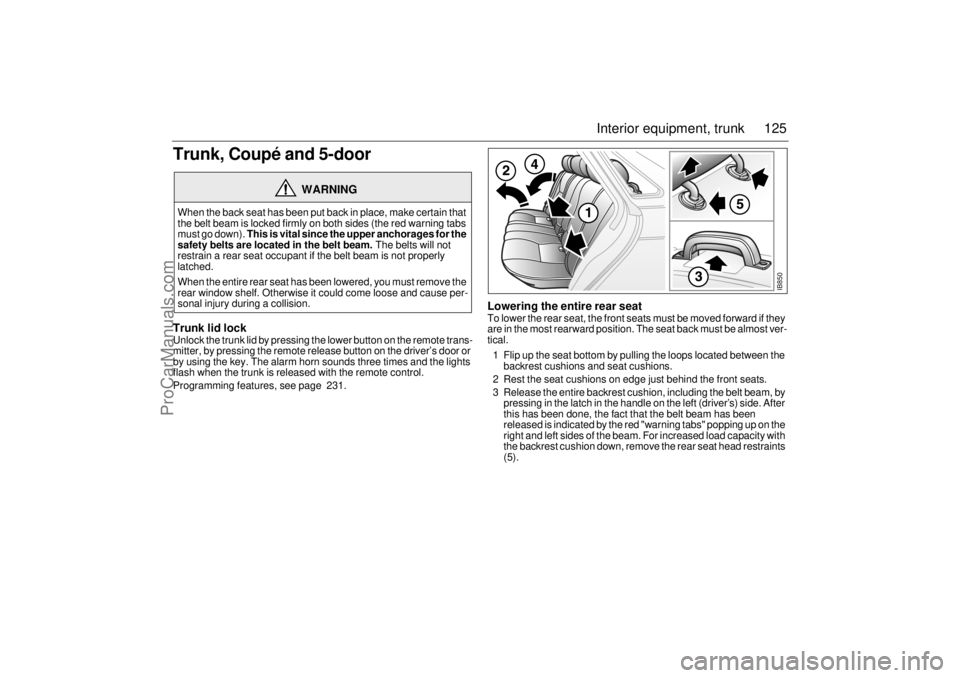
Lowering the entire rear seatTo lower the rear seat, the front seats must be moved forward if they
are in the most rearward position. The seat back must be almost ver-
tical.
1 Flip up the seat bottom by pulling the loops located between the
backrest cushions and seat cushions.
2 Rest the seat cushions on edge just behind the front seats.
3 Release the entire backrest cushion, including the belt beam, by
pressing in the latch in the handle on the left (driver’s) side. After
this has been done, the fact that the belt beam has been
released is indicated by the red "warning tabs" popping up on the
right and left sides of the beam. For increased load capacity with
the backrest cushion down, remove the rear seat head restraints
(5).
WARNING
When the back seat has been put back in place, make certain that
the belt beam is locked firmly on both sides (the red warning tabs
must go down). This is vital since the upper anchorages for the
safety belts are located in the belt beam. The belts will not
restrain a rear seat occupant if the belt beam is not properly
latched.
When the entire rear seat has been lowered, you must remove the
rear window shelf. Otherwise it could come loose and cause per-
sonal injury during a collision.
IB850
ProCarManuals.com