ECO mode SAAB 9-3 2002 User Guide
[x] Cancel search | Manufacturer: SAAB, Model Year: 2002, Model line: 9-3, Model: SAAB 9-3 2002Pages: 256, PDF Size: 11.55 MB
Page 91 of 256
91 Instruments and controls
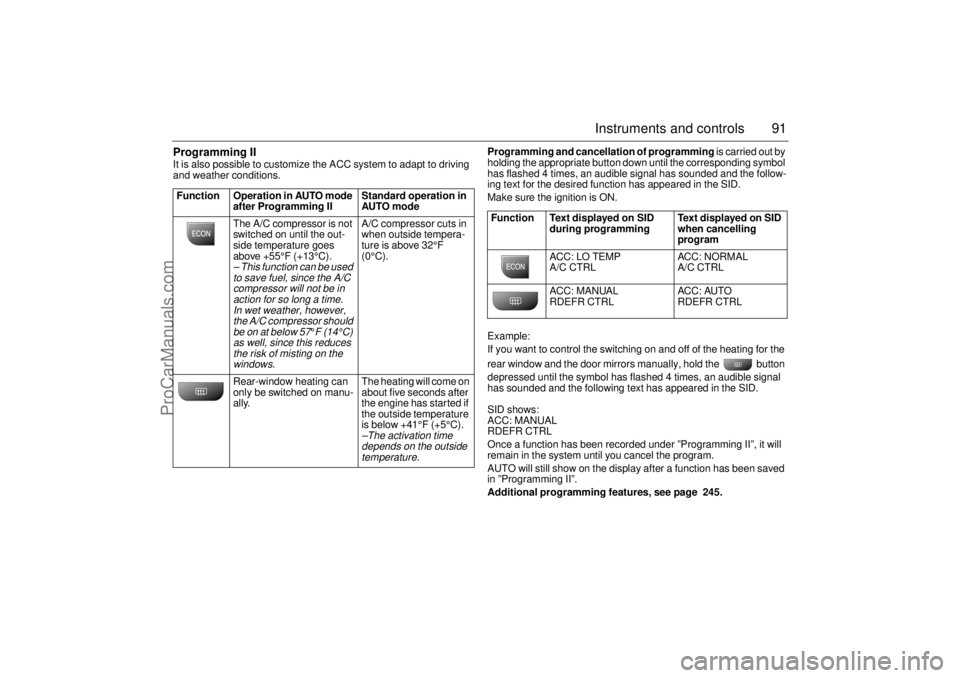
Programming II It is also possible to customize the ACC system to adapt to driving
and weather conditions. Programming and cancellation of programming is carried out by
holding the appropriate button down until the corresponding symbol
has flashed 4 times, an audible signal has sounded and the follow-
ing text for the desired function has appeared in the SID.
Make sure the ignition is ON.
Example:
If you want to control the switching on and off of the heating for the
rear window and the door mirrors manually, hold the button
depressed until the symbol has flashed 4 times, an audible signal
has sounded and the following text has appeared in the SID.
SID shows:
ACC: MANUAL
RDEFR CTRL
Once a function has been recorded under ”Programming II”, it will
remain in the system until you cancel the program.
AUTO will still show on the display after a function has been saved
in ”Programming II”.
Additional programming features, see page 245. Function Operation in AUTO mode
after Programming II Standard operation in
AUTO mode
The A/C compressor is not
switched on until the out-
side temperature goes
above +55°F (+13°C).
– This function can be used
to save fuel, since the A/C
compressor will not be in
action for so long a time.
In wet weather, however,
the A/C compressor should
be on at below 57
°F (14°C)
as well, since this reduces
the risk of misting on the
windows.
A/C compressor cuts in
when outside tempera-
ture is above 32°F
(0°C).
Rear-window heating can
only be switched on manu-
ally. The heating will come on
about five seconds after
the engine has started if
the outside temperature
is below +41°F (+5°C).–The activation time
depends on the outside
temperature.
Function Text displayed on SID
during programming Text displayed on SID
when cancelling
program
ACC: LO TEMP
A/C CTRL ACC: NORMAL
A/C CTRL
ACC: MANUAL
RDEFR CTRL ACC: AUTO
RDEFR CTRL
ProCarManuals.com
Page 92 of 256
92 Instruments and controlsUseful tips: If the ACC system is not functioning
satisfactorily the following should be tried
before you take the car to an authorized
Saab dealer.
If the indication AUTO does not light up
after starting (the ignition must have been
switched off for at least 10 minutes): See
“Cancelling program I”, page 90.
If you think that the ACC system is not
functioning satisfactorily you should:
1 Check that the cigarette lighter plug is in
its socket (since if the socket is empty
heated air can flow out and affect the
cabin sensor).
2 Recalibrate: See the section headed
Calibration, page 90.
If the battery has been disconnected or
has died, the ACC system should be reca-
librated: See Calibration, pag 90.
Programmed settings are not deleted if the
battery has been disconnected. Extinguishing the lighting in ACC See section Night panel, page 73.
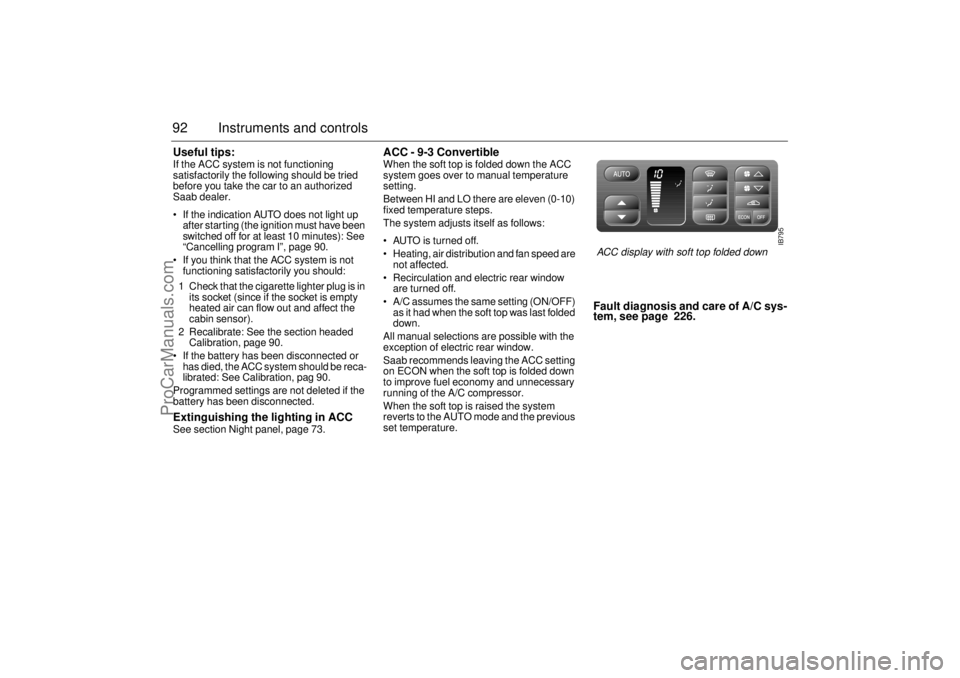
ACC - 9-3 Convertible When the soft top is folded down the ACC
system goes over to manual temperature
setting.
Between HI and LO there are eleven (0-10)
fixed temperature steps.
The system adjusts itself as follows:
AUTO is turned off.
Heating, air distribution and fan speed are
not affected.
Recirculation and electric rear window
are turned off.
A/C assumes the same setting (ON/OFF)
as it had when the soft top was last folded
down.
All manual selections are possible with the
exception of electric rear window.
Saab recommends leaving the ACC setting
on ECON when the soft top is folded down
to improve fuel economy and unnecessary
running of the A/C compressor.
When the soft top is raised the system
reverts to the AUTO mode and the previous
set temperature.
Fault diagnosis and care of A/C sys-
tem, see page 226.
IB795
ACC display with soft top folded down
ProCarManuals.com
Page 98 of 256
98 Saab 9-3 Audio SystemRadio Press the RADIO button to switch to the
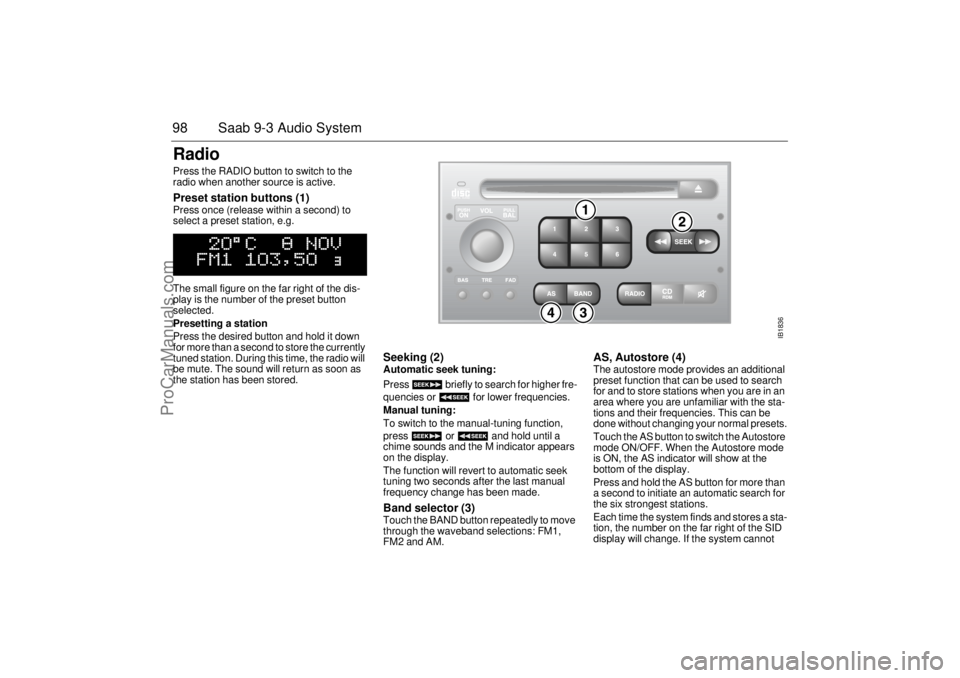
radio when another source is active. Preset station buttons (1) Press once (release within a second) to
select a preset station, e.g.
The small figure on the far right of the dis-
play is the number of the preset button
selected.
Presetting a station
Press the desired button and hold it down
for more than a second to store the currently
tuned station. During this time, the radio will
be mute. The sound will return as soon as
the station has been stored.
Seeking (2) Automatic seek tuning:
Press briefly to search for higher fre-
quencies or for lower frequencies.
Manual tuning:
To switch to the manual-tuning function,
press or and hold until a
chime sounds and the M indicator appears
on the display.
The function will revert to automatic seek
tuning two seconds after the last manual
frequency change has been made. Band selector (3) Touch the BAND button repeatedly to move
through the waveband selections: FM1,
FM2 and AM.
AS, Autostore (4) The autostore mode provides an additional
preset function that can be used to search
for and to store stations when you are in an
area where you are unfamiliar with the sta-
tions and their frequencies. This can be
done without changing your normal presets.
Touch the AS button to switch the Autostore
mode ON/OFF. When the Autostore mode
is ON, the AS indicator will show at the
bottom of the display.
Press and hold the AS button for more than
a second to initiate an automatic search for
the six strongest stations.
Each time the system finds and stores a sta-
tion, the number on the far right of the SID
display will change. If the system cannot
IB1836
ProCarManuals.com
Page 100 of 256

100 Saab 9-3 Audio SystemCD playerTo select the CD mode, load a CD into the
deck or, if one is already loaded, press the
CD/RDM button.
Insert the CD, label-side up, and allow the
mechanism to load it automatically. Play-
back of the first track will start and the follow-
ing message will appear on the display:
A tiny, amber-colored LED indicator to the
left of the disc tray is illuminated when a disc
is loaded.
When all the tracks have been played, the
CD player will restart playback from track 1.
To cancel playback, press the eject or
RADIO button.
Track search (1) Touch or repeatedly to move
to preceding or following tracks. Touching
once will restart playback from the
beginning of the current track. To change to
the preceding track, touch twice.
Rapid play (passage search) When or is pressed and
held, rapid play will be initiated, with the time
and track showing on the display, e.g.:
If the button is depressed for more than
5 seconds, the rapid play will be even faster.
Rapid play stops when the button is
released.
NOTEDo not use writable CDs in your audio
system, as in certain cases these types of
CD are only suitable for home use and
can therefore cause operational prob-
lems (overheating).
IB1837
ProCarManuals.com
Page 101 of 256
101 Saab 9-3 Audio System
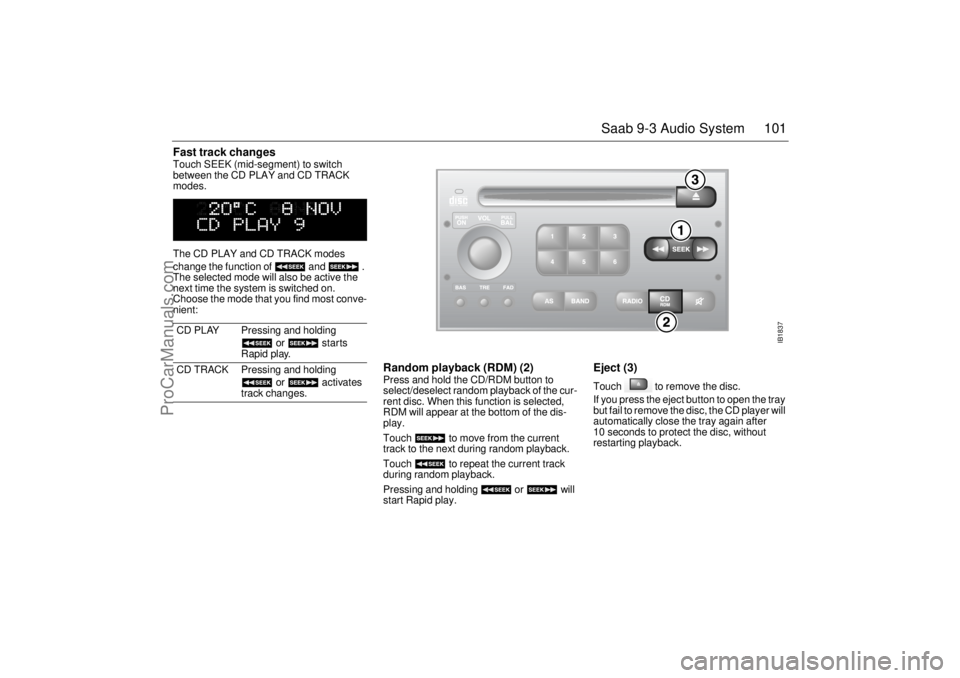
Fast track changes Touch SEEK (mid-segment) to switch
between the CD PLAY and CD TRACK
modes.
The CD PLAY and CD TRACK modes
change the function of and .
The selected mode will also be active the
next time the system is switched on.
Choose the mode that you find most conve-
nient:
Random playback (RDM) (2) Press and hold the CD/RDM button to
select/deselect random playback of the cur-
rent disc. When this function is selected,
RDM will appear at the bottom of the dis-
play.
Touch to move from the current
track to the next during random playback.
Touch to repeat the current track
during random playback.
Pressing and holding or will
start Rapid play.
Eject (3) Touch to remove the disc.
If you press the eject button to open the tray
but fail to remove the disc, the CD player will
automatically close the tray again after
10 seconds to protect the disc, without
restarting playback. CD PLAY Pressing and holding
or starts
Rapid play.
CD TRACK Pressing and holding
or activates
track changes.
IB1837
ProCarManuals.com
Page 104 of 256

104 Saab 9-3 Audio SystemAfter two seconds, the status of the trays in
the magazine (i.e. loaded or empty) will be
shown on the display, e.g.:
If for some reason the CD selected by the
preset button cannot be played, playback of
the current CD will continue. Track change (2) Touch or repeatedly to move
to preceding or following tracks. Pressing
once will restart playback from the
beginning of the current track. Thus, to play
the preceding track, touch twice. Rapid play When or is pressed and
held, rapid play will be initiated, with the time
and track showing on the display, e.g.:
If the button is depressed for more than
5 seconds, the rapid play will be even faster.
Rapid play stops when the button is
released.
Fast track changes Touch SEEK (mid-segment) to switch
between the CD PLAY and CD TRACK
modes.
The CD-PLAY and CD-TRACK modes
change the function of and .
The selected mode will also be active the
next time the system is switched on.
Choose the mode that you find most conve-
nient.
Random playback (RDM) (3) Press and hold the CD/RDM button to
select/deselect random playback of the
CDs in the magazine. When this function is
selected, RDM will appear at the bottom of
the display.
Touch to move from the current
track to the next during random playback.
Touch to repeat the current track
during random playback.
Pressing and holding or will
start Rapid play.
To stop playback from the CD changer,
simply select another source (RADIO/CD).
The CD changer will now enter stand-by
mode.
CD PLAY Pressing and holding
or starts
Rapid play.
CD TRACK Pressing and holding
or activates
track changes.
ProCarManuals.com
Page 105 of 256
105 Saab 9-3 Audio System
General functionsVolume-preset modeTo select the volume-preset mode, press
and hold the BAND button at the same time
as you switch the Audio System on.
Use the button to select the
required function.
The following volume settings can be prese-
lected:
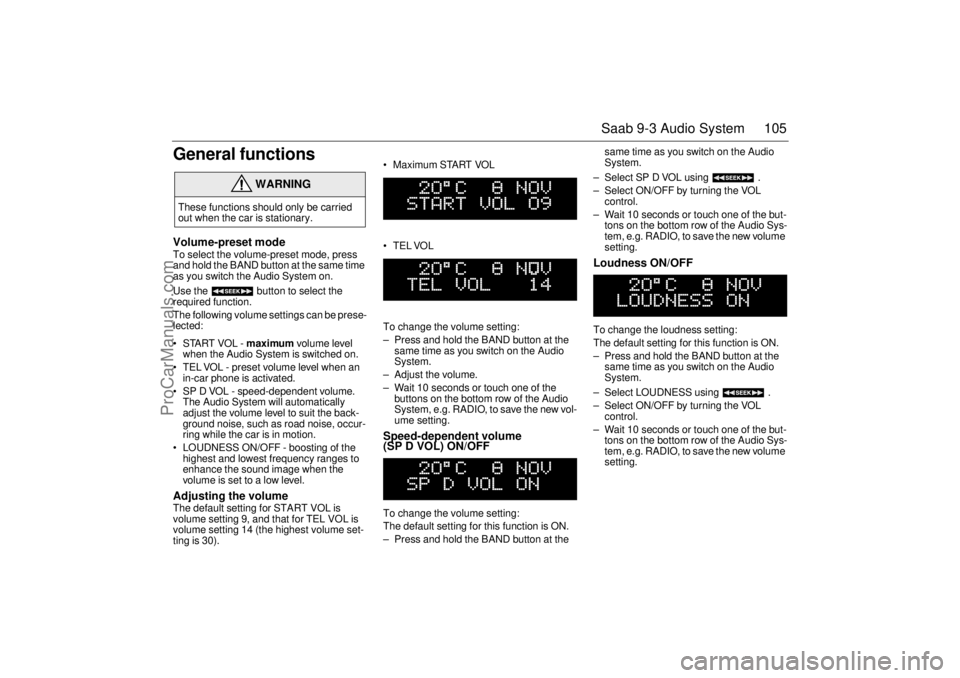
STARTVOL - maximum volume level
when the Audio System is switched on.
TEL VOL - preset volume level when an
in-car phone is activated.
SP D VOL - speed-dependent volume.
The Audio System will automatically
adjust the volume level to suit the back-
ground noise, such as road noise, occur-
ring while the car is in motion.
LOUDNESS ON/OFF - boosting of the
highest and lowest frequency ranges to
enhance the sound image when the
volume is set to a low level. Adjusting the volume The default setting for START VOL is
volume setting 9, and that for TEL VOL is
volume setting 14 (the highest volume set-
ting is 30). Maximum START VOL
TELVOL
To change the volume setting:
– Press and hold the BAND button at the
same time as you switch on the Audio
System.
– Adjust the volume.
– Wait 10 seconds or touch one of the
buttons on the bottom row of the Audio
System, e.g. RADIO, to save the new vol-
ume setting.
Speed-dependent volume
(SP D VOL) ON/OFF To change the volume setting:
The default setting for this function is ON.
– Press and hold the BAND button at the same time as you switch on the Audio
System.
– Select SP D VOL using .
– Select ON/OFF by turning the VOL
control.
– Wait 10 seconds or touch one of the but-
tons on the bottom row of the Audio Sys-
tem, e.g. RADIO, to save the new volume
setting.
Loudness ON/OFF To change the loudness setting:
The default setting for this function is ON.
– Press and hold the BAND button at the
same time as you switch on the Audio
System.
– Select LOUDNESS using .
– Select ON/OFF by turning the VOL
control.
– Wait 10 seconds or touch one of the but-
tons on the bottom row of the Audio Sys-
tem, e.g. RADIO, to save the new volume
setting.
WARNING
These functions should only be carried
out when the car is stationary.
ProCarManuals.com
Page 112 of 256

112 OnStar - TelematicsYour new vehicle comes equipped with
advanced telematics hardware and one full
year of Onstar Premium Service. Saab
Telematics is a sophisticated in-vehicle
system allowing convergence of wireless
communications, GPS (Global Positioning
System) satellites and advanced vehicle
electronics.
You must activate immediately to ensure
you receive your full year of service, as your
prepaid subscription begins at the time of
delivery.
Here’s how to activate your OnStar ser-
vice:
1 Push the blue OnStar button located in
your Saab. After a prerecorded mes-
sage explaining the benefits of onStar,
you will be greeted by a live OnStar advi-
sor. The advisor will activate your
OnStar service.
2 Provide the information requested by
the advisor to activate your account and
set up your personal profile. This will
take approximately 10-15 minutes.
Using OnStarWelcome to OnStar. This section gives you
all the information you need to get started
using OnStar, including descriptions of all
OnStar services. It also introduces the
added services of Personal Calling, Virtual
advisor, and the Onstar Subscriber website.
For a complete explanation of these addi-
tional services, please see pages 116, 120
and 121.
NOTE: In order for OnStar to operate, the
car audio system must be switched on.OnStar is EasyIt’s easy to start using your OnStar system.
In fact, pressing the OnStar button is usually
all you need to do. Once you are connected,
an OnStar advisor will help you with the ser-
vices in your plan.
Inoperative if battery is discharge or dis-
connected.
OnStar is powered by your vehicle´s battery
and will not operate if the battery is dis-
charged or disconnected.
Potentially inoperative if vehicle is in a
crash
If your vehicle is in a crash, some compo-
nents could be damaged or disconnected,
potentially rendering OnStar inoperative.Your onboard OnStar System consists of
three buttons:
OnStar Services Button
Press this button, and you are
connected to an OnStar advi-
sor. You will hear a chime, fol-
lowed by the words
”Connecting to OnStar.” Allow
20-30 seconds for initial con-
nection to the OnStar Call Cen-
ter. An advisor will then help
you with any of the services
included in your OnStar plan.
If cellular service is unavail-
able, OnStar will generate a
fast busy tone. The OnStar sys-
tem will retry calls a number of
times before returning to the
ready mode. To cancel the
automatic dialing, press the
White dot button.
ProCarManuals.com
Page 133 of 256
133 Interior equipment, trunk
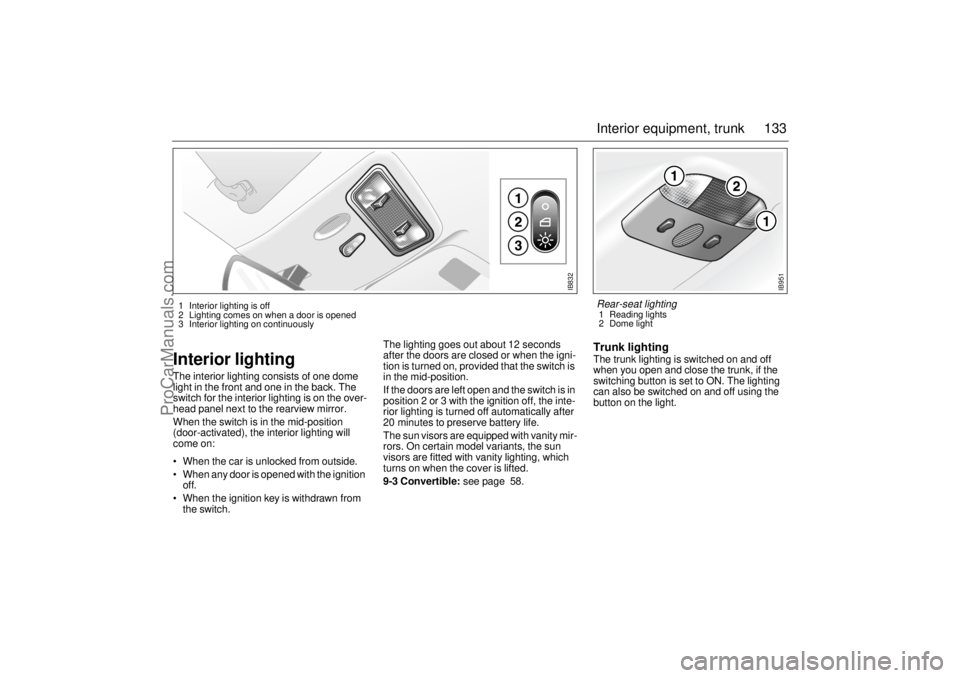
Interior lightingThe interior lighting consists of one dome
light in the front and one in the back. The
switch for the interior lighting is on the over-
head panel next to the rearview mirror.
When the switch is in the mid-position
(door-activated), the interior lighting will
come on:
When the car is unlocked from outside.
When any door is opened with the ignition
off.
When the ignition key is withdrawn from
the switch.The lighting goes out about 12 seconds
after the doors are closed or when the igni-
tion is turned on, provided that the switch is
in the mid-position.
If the doors are left open and the switch is in
position 2 or 3 with the ignition off, the inte-
rior lighting is turned off automatically after
20 minutes to preserve battery life.
The sun visors are equipped with vanity mir-
rors. On certain model variants, the sun
visors are fitted with vanity lighting, which
turns on when the cover is lifted.
9-3 Convertible: see page 58.
Trunk lightingThe trunk lighting is switched on and off
when you open and close the trunk, if the
switching button is set to ON. The lighting
can also be switched on and off using the
button on the light.
IB832
1 Interior lighting is off
2 Lighting comes on when a door is opened
3 Interior lighting on continuously
IB951
Rear-seat lighting 1 Reading lights
2 Dome light
ProCarManuals.com
Page 155 of 256
155 Starting and driving
Engine Break-in PeriodPistons, cylinder bores and bearings need
time to obtain uniform, wear-resistant sur-
faces.
If a new engine is driven too hard, this grad-
ual process of bedding-in will not be possi-
ble and the life of the engine will be short-
ened.
During the first 1,200 miles (2,000 km), do
not exceed 5,000 rpm.
In addition, refrain from driving the car at full
throttle, other than for brief instances,
during the first 1,800 miles (3,000 km).Wearing in new brake padsNew brake pads take time to bed in, about
90 miles (150 km) if the car is driven largely
under stop-and-go conditions or about
300 miles (500 km) of highway driving.
To extend the useful life of the pads, avoid
hard braking as much as possible.
Manual transmissionTo start the engine the clutch pedal must
be fully depressed.
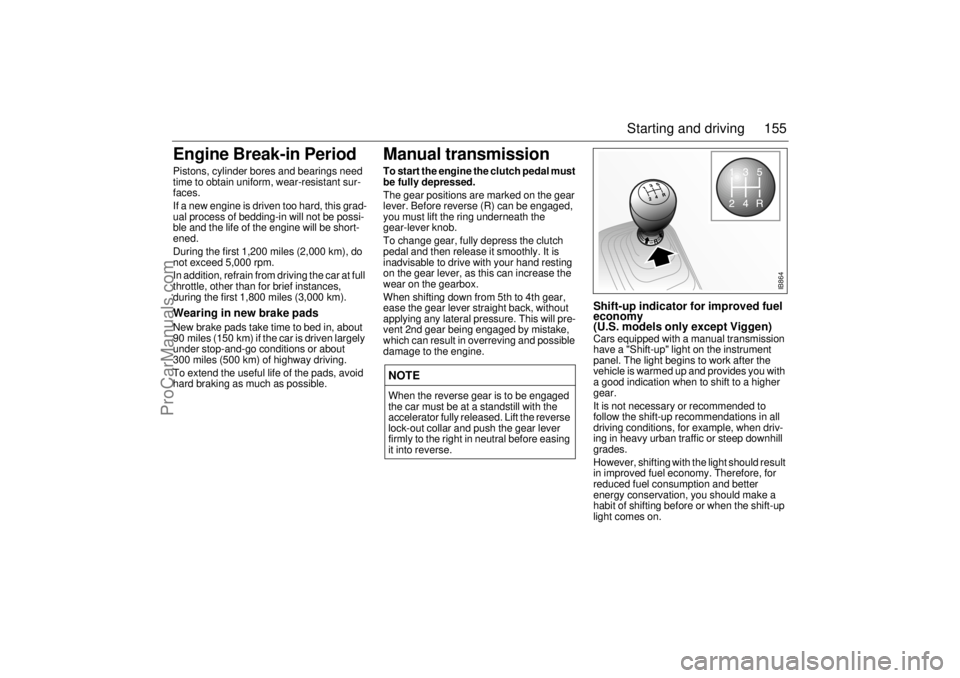
The gear positions are marked on the gear
lever. Before reverse (R) can be engaged,
you must lift the ring underneath the
gear-lever knob.
To change gear, fully depress the clutch
pedal and then release it smoothly. It is
inadvisable to drive with your hand resting
on the gear lever, as this can increase the
wear on the gearbox.
When shifting down from 5th to 4th gear,
ease the gear lever straight back, without
applying any lateral pressure. This will pre-
vent 2nd gear being engaged by mistake,
which can result in overreving and possible
damage to the engine.
Shift-up indicator for improved fuel
economy
(U.S. models only except Viggen)Cars equipped with a manual transmission
have a "Shift-up" light on the instrument
panel. The light begins to work after the
vehicle is warmed up and provides you with
a good indication when to shift to a higher
gear.
It is not necessary or recommended to
follow the shift-up recommendations in all
driving conditions, for example, when driv-
ing in heavy urban traffic or steep downhill
grades.
However, shifting with the light should result
in improved fuel economy. Therefore, for
reduced fuel consumption and better
energy conservation, you should make a
habit of shifting before or when the shift-up
light comes on.
NOTEWhen the reverse gear is to be engaged
the car must be at a standstill with the
accelerator fully released. Lift the reverse
lock-out collar and push the gear lever
firmly to the right in neutral before easing
it into reverse.
IB864
ProCarManuals.com