alarm SAAB 9-3 2003 User Guide
[x] Cancel search | Manufacturer: SAAB, Model Year: 2003, Model line: 9-3, Model: SAAB 9-3 2003Pages: 256, PDF Size: 21.66 MB
Page 51 of 256

51 Security
Quick guide, LED and Saab Information Display (SID)
messagesActivity LED signal
Arming (delay period) Shines for 11 s.
Alarm armed Flashes once every 3 s.
Disarming Off.
Alarm not armed Off.
A door, the hood or the tailgate is
open or opened during the delay
period.Flashes for 11 s then flashes
once every 3 s.
Car immobilized but not locked. Off.
Change of status of immobilizer
system, valid remote control
inserted or removed from ignition
switch.Double-flashes for 3 s.
SID message Reason/action
Key not accepted.
Contact Saab dealer.Error when remote control
inserted into ignition switch.
Remote control battery low.
Replace battery.Battery needs replacing.
See page 44.
X: standard key
Y: va l e t key
Key No: ZCheck of the number of remote
controls programmed for your
car. See page 43.
Alarm has been triggered
since being armed.The alarm has been tripped
since the car was last locked.
Immobilizer failure.
Try starting again.
Contact Saab dealer.Error when immobilizer code
checked.
ProCarManuals.com
Page 64 of 256

64 Instruments and controlsSaab Information
Display (SID)Various types of information are shown on
the SID: warnings, indications, trip com-
puter information and information from the
car’s Infotainment System.
The warnings and indications that can be
shown on the SID are listed on page 249.
When the engine is switched off, the current
warnings and indications are displayed.
If there is more than one message on the
SID, a plus sign will be displayed to the left
of the first message. Each message will be
displayed for 10 seconds.
Press the CLEAR button to acknowledge
a SID message. If you acknowledge a mes-
sage but do nothing about it, the message
will be displayed again the next time you
start the car.
You can adjust the settings of several of the
car’s systems, such as the clock, alarm and
climate control system. These are known as
Profiler.
ProfilerAdjustments can be made with the control
unit situated between the main instrument
panel and the audio system. This is called
Profiler.
1 Activate Profiler by pressing the
CUSTOMIZE button.
2 Turn the INFO dial until the appropriate
system is selected.
3 Confirm selection by pressing the
INFO dial.
Select Exit once you have made the desired
settings.The number of systems that are displayed
on the SID depends on the car’s equipment
level. The list shown below includes the
systems that can be found in your car.
Theft Alarm, page 46.
Full theft alarmDoor alarm only
Park Assistance, page 152.
SPA onSPA off
Clock / Alarm, page 69.
Set ClockSet Alarm
Rain Sensor, page 77.
HighMediumLow
SID, control unit and display
ProCarManuals.com
Page 66 of 256

66 Instruments and controlsSetting values
1 Select one of the functions using the
INFO dial.
Speed W (preset to 55 mph (90 km/h)
Dist (preset to 100 miles (100 km) if not
previously set)
Speed Ø
Arriv
Date
2 Press and hold the INFO dial until given
audible confirmation.
3 Turn the INFO dial to change the value.
(Press CLEAR to reset the value.)
4 Press the INFO dial to finish setup.
Using DIST as a trip meter
1 Select Dist using the INFO dial.
2 Press and hold the CLEAR button for
approx. 1 second.
An arrow will now appear on the right-hand
side of the display, indicating that the trip
meter is running.Resetting a single function
1 Select the function you wish to reset with
the INFO dial.
Fuel Ø
Speed Ø
Tr i p (Dist used as trip meter)
2 Press and hold the CLEAR button for
approx. 1 second.
The selected function will now be reset.
Resetting the trip computer
1 Select one of the functions using the
INFO dial.
Fuel Ø
Speed Ø
D.T.E.
Arriv
Tr i p (Dist used as trip meter)
2 Press and hold the CLEAR button
(approx. 3 seconds) until audible confir-
mation is given.Speed warning
This value is preset to 55 mph (90 km/h).
The value can be set to between 0 and
150 mph (0 and 250 km/h).
1 Select Speed W using the INFO dial.
2 Press and hold the INFO dial until given
audible confirmation.
3 Adjust the speed using the INFO dial.
4 Confirm the setting by pressing the
INFO dial.
A star on the right-hand side of the display
indicates when the speed warning function
is active.
An audible alarm will sound if the set speed
is exceeded.
Disengage the function with the CLEAR
button. Re-engage the function using
the INFO dial.
ProCarManuals.com
Page 69 of 256

69 Instruments and controls
Under Profiler you can choose whether the
entire speedometer scale (0–160 mph) or
only part of the scale (0–90 mph) should be
illuminated in Night Panel mode.
1 Press the CUSTOMIZE button to go to
Profiler.
2 Select System Settings using the INFO
dial.
3 Press in the INFO dial.
4 Select Speed Scale Illum.
Select 0–160 mph or 0–90 mph.
ClockSettings can be made from Profiler.
1 Press the CUSTOMIZE button to go to
Profiler.
2 Select Clock / Alarm using the INFO dial.
3 Press in the INFO dial.
4 Select Set Clock.
5 Select Manual.Explanation of setting the clock.
System Settings
Speed Scale Illum.
0–160 mph0–90 mph
Clock / Alarm
Set Clock
Manual
Clock
Set Clock
Manual:
Use the INFO dial to set
manually.
ProCarManuals.com
Page 70 of 256

70 Instruments and controlsAlarmSettings can be made from Profiler.
1 Press the CUSTOMIZE button to go to
Profiler.
2 Select Clock / Alarm using the INFO dial.
3 Press in the INFO dial.
4 Select Set Alarm.
If the alarm is not activated: set using the
INFO dial.
If the alarm is activated (Set Alarm on):
select Alarm on or Alarm off.Explanation of setting the alarm time.
System SettingsUnder this heading you can make system
settings, such as change the display lan-
guage, units and service information.
1 Press the CUSTOMIZE button to go to
Profiler.
2 Select System Settings using the
INFO dial.
3 Press in the INFO dial.
4 Select the desired heading using the
INFO dial.
5 Press in the INFO dial.
Clock / Alarm
Set Alarm
Alarm
00:00
Set Alarm on
Alarm onAlarm off
Set Alarm
Set Alarm:
A new alarm time can be set.
Use the INFO dial.
Set Alarm on:
A preset alarm time exists.
Select Alarm on or Alarm off.
ProCarManuals.com
Page 123 of 256
123 Starting and driving
Steering wheel lockThe steering wheel lock is electronic. The
lock engages when the remote control is
removed from the ignition and unlocks when
the remote control is inserted. A click can be
heard when the steering wheel lock locks
and unlocks.
If the car is parked with one front wheel
touching the curb, for example, you may
need to turn the steering wheel slightly
when you insert the remote control to allow
the steering wheel lock to unlock. If you do
not succeed on first attempt you must
remove the remote control before trying
again. Turn the steering wheel and insert
the remote control into the ignition switch.
If the steering wheel lock does not disen-
gage it will not be possible to turn the remote
control in the ignition switch.
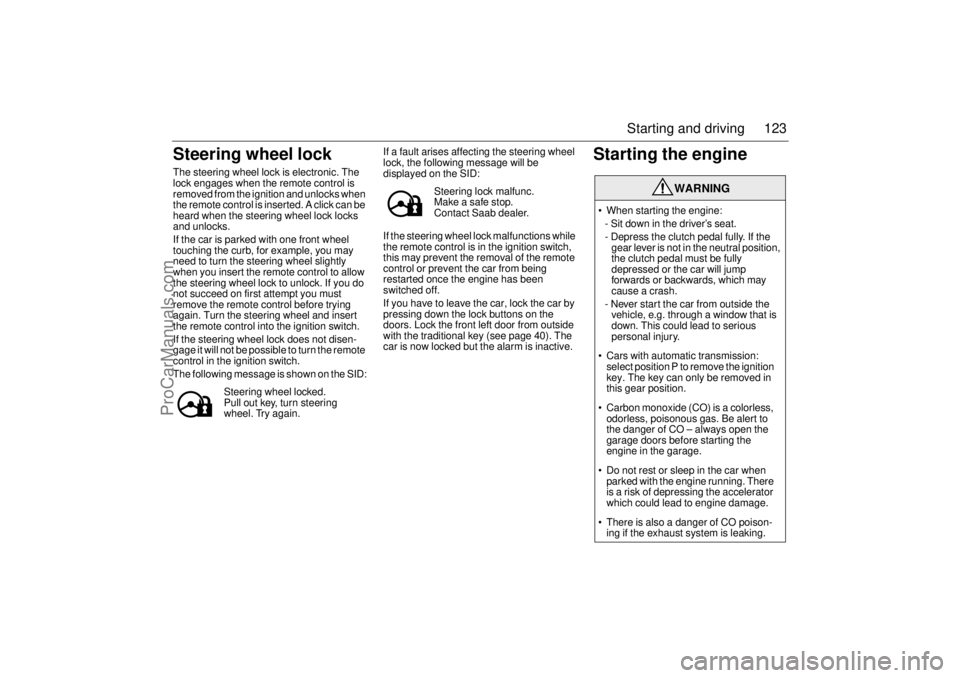
The following message is shown on the SID:If a fault arises affecting the steering wheel
lock, the following message will be
displayed on the SID:
If the steering wheel lock malfunctions while
the remote control is in the ignition switch,
this may prevent the removal of the remote
control or prevent the car from being
restarted once the engine has been
switched off.
If you have to leave the car, lock the car by
pressing down the lock buttons on the
doors. Lock the front left door from outside
with the traditional key (see page 40). The
car is now locked but the alarm is inactive.
Starting the engine
Steering wheel locked.
Pull out key, turn steering
wheel. Try again.
Steering lock malfunc.
Make a safe stop.
Contact Saab dealer.
WARNING
When starting the engine:
- Sit down in the driver’s seat.
- Depress the clutch pedal fully. If the
gear lever is not in the neutral position,
the clutch pedal must be fully
depressed or the car will jump
forwards or backwards, which may
cause a crash.
- Never start the car from outside the
vehicle, e.g. through a window that is
down. This could lead to serious
personal injury.
Cars with automatic transmission:
select position P to remove the ignition
key. The key can only be removed in
this gear position.
Carbon monoxide (CO) is a colorless,
odorless, poisonous gas. Be alert to
the danger of CO – always open the
garage doors before starting the
engine in the garage.
Do not rest or sleep in the car when
parked with the engine running. There
is a risk of depressing the accelerator
which could lead to engine damage.
There is also a danger of CO poison-
ing if the exhaust system is leaking.
ProCarManuals.com
Page 208 of 256
208 Car careThe receiver is located in the trunk. Tire
pressure information is sent wirelessly to
the receiver.
The system checks the tire pressure when
the car is travelling over 18 mph (30 km/h).
The system is "self-learning", which means
that the position of the wheels can be
changed without requiring adjustments to
the monitoring system. The spare wheel
does not have a sensor.
The sensor batteries have an average life of
10 years. The batteries cannot be changed
but require the sensor units to be replaced.
The system does not warn if a tire is overin-
flated.
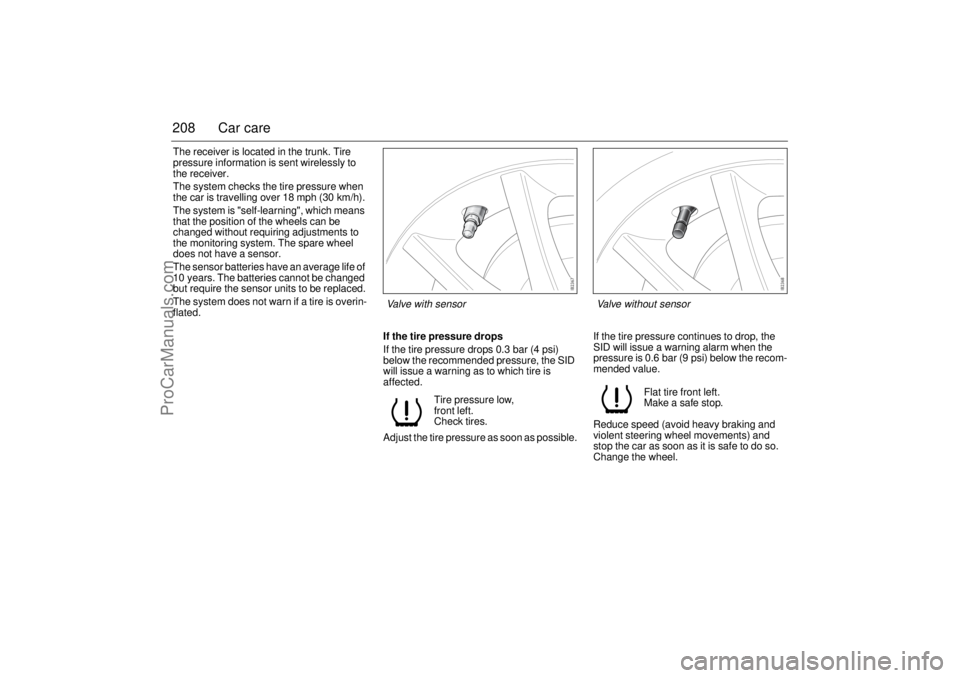
If the tire pressure drops
If the tire pressure drops 0.3 bar (4 psi)
below the recommended pressure, the SID
will issue a warning as to which tire is
affected.
Adjust the tire pressure as soon as possible.If the tire pressure continues to drop, the
SID will issue a warning alarm when the
pressure is 0.6 bar (9 psi) below the recom-
mended value.
Reduce speed (avoid heavy braking and
violent steering wheel movements) and
stop the car as soon as it is safe to do so.
Change the wheel. Tire pressure low,
front left.
Check tires.
Flat tire front left.
Make a safe stop.
Valve with sensor Valve without sensor
ProCarManuals.com
Page 248 of 256

248 Technical dataSeveral of the systems in your Saab
can be customized to better suit
your individual needs. Contact your
Saab dealerCentral locking system
Some functions are governed by legal
requirements and cannot therefore be
reprogrammed.
Consult a Saab dealer for further informa-
tion.
Listed below are a number of examples of
programmable functions.
Audible confirmation of arming/disarming
the car alarm.
Automatic unlocking when car stopped
and remote control removed from the igni-
tion switch.
Trunk lid locked when car driven off or
30 s after being shut.
Length of audible and visual acknowl-
edgements.
Possibility to have the trunk lid unlocked
when doors unlocked, yes/no.
Central locking relocks the car automati-
cally if a door or the trunk lid is not opened,
yes/no. If the car has an alarm, this is
rearmed.Car alarm
Listed below are a number of examples of
programmable functions.
Cabin lighting switched on when the car
alarm is tripped.
Sensitivity of the movement sensor.
Audible signal produced by horn or car
alarm siren.
ProCarManuals.com
Page 249 of 256
249 Technical data
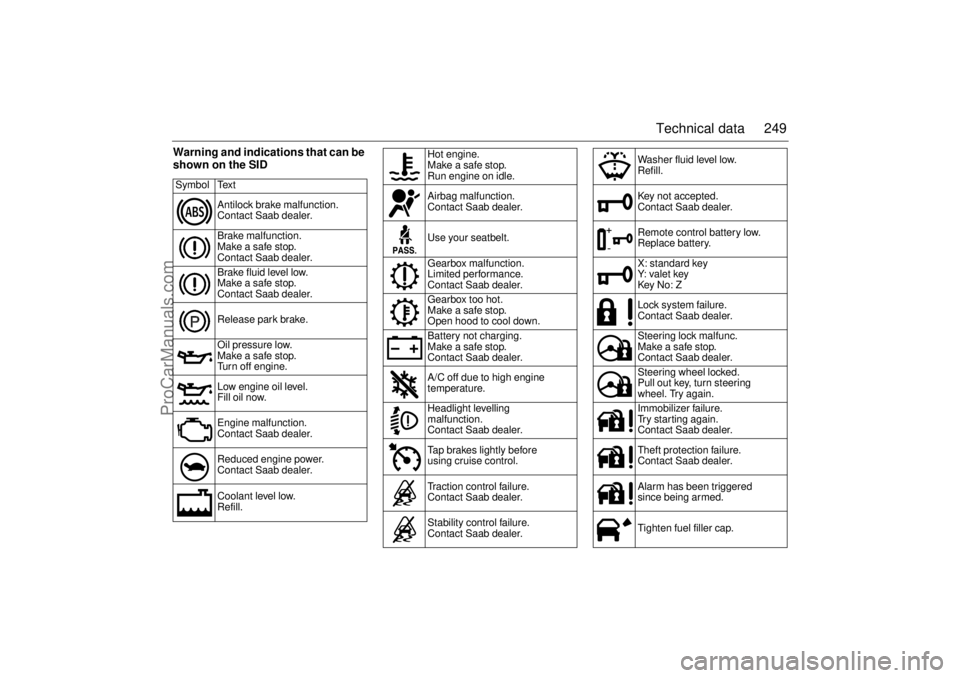
Warning and indications that can be
shown on the SIDSymbol Text
Antilock brake malfunction.
Contact Saab dealer.
Brake malfunction.
Make a safe stop.
Contact Saab dealer.
Brake fluid level low.
Make a safe stop.
Contact Saab dealer.
Release park brake.
Oil pressure low.
Make a safe stop.
Turn off engine.
Low engine oil level.
Fill oil now.
Engine malfunction.
Contact Saab dealer.
Reduced engine power.
Contact Saab dealer.
Coolant level low.
Refill.
Hot engine.
Make a safe stop.
Run engine on idle.
Airbag malfunction.
Contact Saab dealer.
Use your seatbelt.
Gearbox malfunction.
Limited performance.
Contact Saab dealer.
Gearbox too hot.
Make a safe stop.
Open hood to cool down.
Battery not charging.
Make a safe stop.
Contact Saab dealer.
A/C off due to high engine
temperature.
Headlight levelling
malfunction.
Contact Saab dealer.
Tap brakes lightly before
using cruise control.
Traction control failure.
Contact Saab dealer.
Stability control failure.
Contact Saab dealer.
Washer fluid level low.
Refill.
Key not accepted.
Contact Saab dealer.
Remote control battery low.
Replace battery.
X: standard key
Y: va l e t key
Key No: Z
Lock system failure.
Contact Saab dealer.
Steering lock malfunc.
Make a safe stop.
Contact Saab dealer.
Steering wheel locked.
Pull out key, turn steering
wheel. Try again.
Immobilizer failure.
Try starting again.
Contact Saab dealer.
Theft protection failure.
Contact Saab dealer.
Alarm has been triggered
since being armed.
Tighten fuel filler cap.
ProCarManuals.com
Page 251 of 256

251 Index
Index
AA/C
__________________________ 82
ABS brakes
___________________ 142
ACC
_________________________ 84
Adjustment, steering wheel
________ 98
Air conditioning
_________________ 82
Air filter
______________________ 178
Air pressure, tyres
______________ 207
Airbag
________________________ 26
Anchorage eyes
_______________ 118
Anti-corrosion treatment
_________ 220
Antilock braking system _________ 142
Anti-spin
_____________________ 144
Ashtrays _____________________ 108
Autochecking of lights, warning and
indicator lights
_________________ 58
Autodimming
______________ 111
, 112
Automatic climate control (ACC)
____ 84
Automatic transmission
__________ 134
Automatic tyre pressure monitoring
207
BBattery
______________________ 182
Bedding-in of new brake pads
____ 132
Before towing a trailer
___________ 160
Bonnet
______________________ 172Bootlid, driving when open
_______ 163
Bootlid, opening
________________ 41
Brake fluid, grade ______________ 242
Brakes
_______________________ 141
Braking ______________________ 141
Bulb changing
_________________ 188
Bulb table
____________________ 198
CCabin lighting
_________________ 105
Car alarm
_____________________ 46
Car transport __________________ 166
Care of air conditioning
__________ 225
Change of address notification
____ 232
Changing bulbs
________________ 188
Changing engine oil
____________ 177
Changing the battery, remote control
44
Changing wheels
______________ 214
Changing wiper blades
__________ 186
Checking the number of
remote controls
________________ 43
Checks before towing a trailer
____ 160
Child safety
____________________ 21
Child safety locks, rear doors
______ 42
Child seats
____________________ 21
Cigarette lighter
________________ 108
Cleaning the engine bay
_________ 218
Cleaning upholstery
____________ 217
Climate control system, manual
____ 79
Compact spare
________________ 212Compass
_____________________ 115
Condensation water, A/C
_________ 82
Coolant
______________________ 179
Cruise control
_________________ 140
Cup holder
____________________ 107
DDate codes, tyres
______________ 212
Deep water, driving through
______ 163
Direction indicator stalk switch _____ 75
Direction indicators
______________ 75
Donor battery, boost starting
______ 168
Door handles
___________________ 38
Door mirrors __________________ 110
Drive belt
_____________________ 185
Drive belt, length
_______________ 240
Driver’s seat with memory
_________ 19
Driving at night
________________ 163
Driving in cold climates
__________ 155
Driving in deep water
____________ 163
Driving in hot climates ___________ 156
Driving techniques
______________ 153
Driving with a heavy load on
hilly roads
___________________ 136
Driving with a load
______________ 162
Driving with a roof load
__________ 161
Driving with the bootlid open
______ 163
Driving with the compact
spare wheel
__________________ 167
ProCarManuals.com